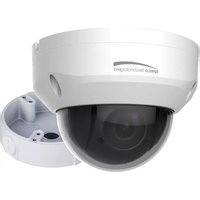
O4P4X - Surveillance Camera Speco Technologies - Free user manual and instructions
Find the device manual for free O4P4X Speco Technologies in PDF.


Pick your language and provide your email: we'll send you a specifically translated version.
| Product Type | IP Security Camera |
| Model | O4P4X |
| Brand | Speco Technologies |
| Image Sensor | 4MP 1/3" Progressive Scan CMOS |
| Resolution | 2688 x 1520 (4MP) at 15fps |
| Lens | 4mm fixed lens, F1.6 |
| Field of View | 88° horizontal, 47° vertical |
| IR Range | Up to 30m (Smart IR) |
| Minimum Illumination | 0.01 Lux (color), 0 Lux (IR) |
| Compression | H.265+, H.265, H.264+, H.264 |
| Network | RJ45 10/100Mbps, PoE (802.3af) |
| Power Supply | PoE or 12V DC (±10%), 5.5W max |
| Dimensions | 7.0 x 7.0 x 12.2 cm (LxWxH) |
| Weight | 0.38 kg (net) |
| Housing | Metal, IP67 weatherproof, IK10 vandal-resistant |
| Operating Temperature | -30°C to +60°C |
| Storage Temperature | -30°C to +60°C |
| Main Functions | Motion detection, tampering alarm, privacy mask, ROI, ONVIF compliant |
| Audio | Built-in microphone, 1 audio input, 1 audio output |
| Alarm I/O | 1 alarm input, 1 alarm output |
| Storage | Micro SD card slot (up to 256GB), NVR support |
| Software | Speco Technologies Viewer (iOS/Android), web browser |
| Cleaning | Gently clean with soft dry cloth; avoid solvents |
| Safety | Use only specified power supply; install by qualified personnel |
| Spare Parts & Repairability | Contact Speco Technologies support for replacement parts |
Frequently Asked Questions - O4P4X Speco Technologies
How do I connect the O4P4X camera to my network?
Connect the camera to your switch or PoE injector using a standard Ethernet cable. If using PoE, power and data are provided over the same cable. Alternatively, use a 12V DC power adapter and connect the cable to your router.
Does the camera support night vision?
Yes, the O4P4X features smart IR with a range up to 30 meters, providing clear black-and-white images in complete darkness.
What is the maximum resolution and frame rate?
The camera can record at 4MP (2688x1520) resolution at 15 frames per second. Lower resolutions support higher frame rates.
Is the camera compatible with ONVIF?
Yes, the O4P4X is ONVIF Profile S compliant, allowing integration with most third-party NVRs and software.
How do I reset the camera to factory settings?
Press and hold the reset button (located near the network port) for about 10 seconds until the status LED flashes. The camera will reboot with default settings.
Can I use a micro SD card for local storage?
Yes, the camera has a micro SD card slot supporting cards up to 256GB. Insert the card into the slot and configure recording in the camera settings.
Is the camera suitable for outdoor use?
Yes, it has an IP67 weatherproof rating and an IK10 vandal-resistant metal housing, making it ideal for outdoor installation.
How do I access the camera remotely?
Download the Speco Technologies Viewer app on your smartphone, or use a web browser to access the camera's IP address. Ensure you have set up port forwarding if accessing over the internet.
What power options are available?
The camera supports Power over Ethernet (PoE IEEE 802.3af) and 12V DC input. Both provide sufficient power for the camera's normal operation.
Does the camera have audio capabilities?
Yes, it includes a built-in microphone for sound pickup, plus one audio input and one audio output for external audio devices.
User questions about O4P4X Speco Technologies
0 question about this device. Answer the ones you know or ask your own.
Ask a new question about this device
No questions yet. Be the first to ask one.
Download the instructions for your Surveillance Camera in PDF format for free! Find your manual O4P4X - Speco Technologies and take your electronic device back in hand. On this page are published all the documents necessary for the use of your device. O4P4X by Speco Technologies.
USER MANUAL O4P4X Speco Technologies
Manual assistant
Powered by Anthropic
Waiting for your message
Product information
Brand : Speco Technologies
Model : O4P4X
Category : Surveillance Camera