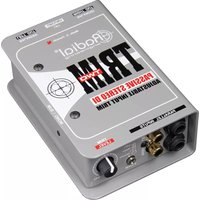
Trim-Two Stereo DI - Audio/video converter Radial Engineering - Free user manual and instructions
Find the device manual for free Trim-Two Stereo DI Radial Engineering in PDF.


| Product Type | Stereo Direct Box (DI) |
| Brand | Radial Engineering |
| Model | Trim-Two Stereo DI |
| Audio Connections | 2x 1/4" TRS inputs, 2x XLR outputs |
| Input Impedance | 200 kΩ (unbalanced), 100 kΩ (balanced) |
| Output Impedance | 600 Ω balanced |
| Frequency Response | 20 Hz - 20 kHz (±0.1 dB) |
| Dynamic Range | >110 dB |
| THD+N | <0.01% typical |
| Ground Lift | Yes, per channel |
| Pad Attenuation | -15 dB per channel |
| Power Supply | Passive (no battery or phantom power required) |
| Dimensions (W x D x H) | 120 x 95 x 48 mm (4.7 x 3.7 x 1.9 in) |
| Weight | 0.45 kg (1 lb) |
| Construction | Steel chassis with baked enamel finish |
| Main Features | Two independent channels, -15 dB pad, ground lift, high input impedance |
| Maintenance | Wipe with a dry cloth; no user-serviceable parts inside |
| Safety | Use only with balanced cables; do not expose to moisture |
| Spare Parts & Repairability | Contact Radial Engineering for authorized service |
| General Information | Designed for connecting unbalanced stereo sources to balanced audio systems |
Frequently Asked Questions - Trim-Two Stereo DI Radial Engineering
User questions about Trim-Two Stereo DI Radial Engineering
0 question about this device. Answer the ones you know or ask your own.
Ask a new question about this device
Download the instructions for your Audio/video converter in PDF format for free! Find your manual Trim-Two Stereo DI - Radial Engineering and take your electronic device back in hand. On this page are published all the documents necessary for the use of your device. Trim-Two Stereo DI by Radial Engineering.
USER MANUAL Trim-Two Stereo DI Radial Engineering
True to the Music
TRIM TWO
PASSIVE STEREO DI
ADJUSTABLE INPUT TRIM

TRIM-TWO USER GUIDE
PASSIVE STEREO DIRECT BOX
ADJUSTABLE INPUT TRIM
Radial Engineering Ltd.
1588 Kebet Way, Port Coquitlam BC V3C 5M5
Tel: 604-942-1001 • Fax: 604-942-1010 • Email: info@radialeng.com
TRIM-TWO™ STEREO DIRECT BOX USER GUIDE
Introduction....1
Features 2
Overview....3
Making Connections....4
Controls 5
Applications 6-7
Optional Mounting Accessories 8
Specifications 9
Block Diagram 10
Warranty .... Back Cover

Thank you for purchasing the Radial Trim-Two. This is without a doubt one of the most useful direct boxes that we have ever produced and is sure to give you years of enjoyment.
As with all new products, it is best that you take a few minutes to read through this short manual to review the many features that are built in. If you find yourself wondering about something, please take a moment to view the Trim-Two FAQ page on our web site. This is where we post the latest updates and questions from users. If afterwards you feel you are still in need of an answer, feel free to send us a note at info@radialeng.com and we will do our very best to reply in short order.
Now get ready to enjoy the advantages of having a volume control at your fingertips.
FEATURES
-
1/4 " INPUTS: Left and right inputs ideally suited for stereo keyboards or drum machines, wired in parallel with the RCA and mini 3.5 TRS connector.
-
RCA INPUTS: Left and right inputs provide an easy connection from a CD player or other -10dB consumer audio device.
-
3.5mm TRS INPUT: Standard mini TRS stereo input for connecting a laptop, tablet or iPhone to the Trim-Two.
-
LEVEL: Used to set the input level going into the Trim-2. Eliminates the need for a typical PAD switch.
-
MONO SUM: Side access set & forget switch sums stereo signals to mono at both XLR outputs.
-
BOOKEND DESIGN: Creates protective zone around the connectors and switches for added durability.
-
XLR OUT: Left and right balanced, low-Z mic-level output. Wired to AES standard pin-1 ground, pin-2 hot (+) and pin-3 cold (-).
-
GROUND LIFT: Lifts pin-1 at both XLR outputs to help eliminate hum and buzz caused by ground loops.
-
NO SLIP PAD: Provides electrical & mechanical isolation and keeps Trim-Two from sliding around.
-
14: GAUGE STEEL: I-Beam construction prevents circuit board from being torqued which could lead to part failure. Durable powder-coat fi nish keeps your Trim-Two looking great for years.


OVERVIEW
The Trim-Two is passive stereo direct box that has been designed from the ground up to be super easy to use. But unlike other DI boxes, the Trim-Two comes with a level control that lets you adjust the volume by simply reaching over and twisting a knob. The reason that the Trim-Two can be used this way is that it is intended to be used with buffered or active sources. Examples include keyboards, sound modules, DJ mixers, laptop computers or tablets. It is not designed for use with an old Fender bass as the transformers inside that do the balancing are not optimized for passive instruments.
It is important to note that the Trim-Two is a unity gain device. What this means is that when the volume control is set to maximum, it will produce about the same output level as the source instrument coming in - minus a slight bit due to the passive nature of transformers. So if you have a loud source such as a line level output from a DJ mixer, you would connect the output from the Trim-Two to the line level input on your mixer.
Since the Trim-Two is passive, it does not require any power to work. You simply connect your source to the Trim-Two and the outputs to the PA system, and you are set to go.
Typical connection using laptop as sound source
![graph TD A["USB"] --> B["PC Sound Source"] B --> C["INPUTS LEVEL"] C --> D["PA System"] D --> E["Balanced Out"] E --> F["PA System"] style A fill:#f9f,stroke:#333 style B fill:#ccf,stroke:#333 style C fill:#cfc,stroke:#333 style D fill:#fcc,stroke:#333 style E fill:#cff,stroke:#333 style F fill:#ffc…](/content/2026/07/1409282/images/7a8a0810cdadb57c07bcdfb01fef0100ffe25fa62fe1444ee556f54d39d162a1.jpg)
MAKING CONNECTIONS
Before making connections, it is good practice to always ensure your equipment is either turned off or volume levels set to zero. This will reduce the possibility of turn-on or connection transients from damaging more sensitive components such as tweeters.
Connect the source instrument or audio device to the Trim-Two using the 1/4 " RCA or 3.5mm stereo inputs. All of these are wired in parallel which enables you to use these as 'THRU' outputs for your personal monitoring system. This could necessitate using a pair of RCA to 1/4 " cables to connect to powered monitors. Try to keep hi-Z unbalanced cables under 8 meters (25') in length as they are much more susceptible to noise versus low-Z balanced cables. Connect the XLR outputs to the mixing console. These balanced low-Z outputs can be connected to a mic or line input, depending on the source (as explained above). Once balanced, you can easily drive cables to 100 meters (300'). You are now set to test the audio.
![graph TD A["Powered Monitors"] --> B["PC Sound Source"] B --> C["Input"] C --> D["PA System"] D --> E["Balanced Out"] E --> F["Output"] style A fill:#f9f,stroke:#333 style B fill:#ccf,stroke:#333 style C fill:#cfc,stroke:#333 style D fill:#fcc,stroke:#333 style E fill:#cff,stroke:#333 style F fill:#…](/content/2026/07/1409282/images/34f1bbfb6c3ba189b2f773cac1e2abb2ddb45676d9718c3a37225ac278df47fa.jpg)
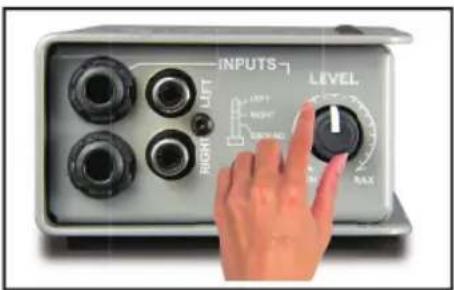
ADJUSTING THE VOLUME
Direct boxes are normally connected to the mic input on a mixing desk. This enables the DI signals and mics to live side-by-side inside a snake without cross-talk. Set the volume control to 2 o'clock. Although this will reduce the output, it is a good place to start as it will likely approximate the level produced by a typical direct box. This of course is dependent of the source. If you hear distortion in the PA system or need more gain, simply adjust the level on the Trim-Two to suit.

LIFTING THE GROUND
As the Trim-Two is completely passive, it is perfect for eliminating hum and buzz caused by so called ground loops. The transformers inside will block stray DC voltages that could introduce noise into the audio system. To further suppress noise, a ground lift switch can be engaged that disconnects pin-1 on the two XLR outputs. This lifts the audio ground, providing 100% isolation. If you hear noise, simply push in to solve the problem.
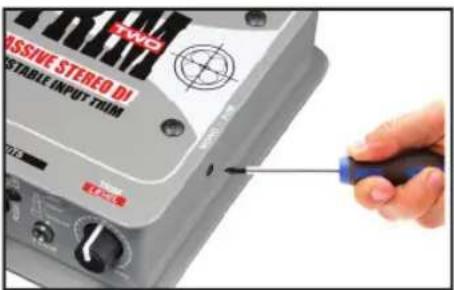
USING THE MONO SWITCH
Sometimes, it is beneficial to mix the stereo source to mono reducing the channel count going to the PA. The MONO switch is a recessed so that it can be set & forgotten. This also avoids it being switched by mistake. Simply depress if needed.
APPLICATIONS
The following are some common setups that you can enjoy using the Trim-Two:
Music playback with a laptop computer or tablet - Simply connect the output from your laptop using a 3.5mm stereo cable to the Trim-Two. Connect the XLRs to the PA system. Set the volume on the Trim-Two to 2 o'clock and adjust the output level from your laptop to suit.
![graph LR A["Laptop"] --> B["Audio Input"] B --> C["Level Audio"] C --> D["Left Audio"] C --> E["Right Audio"] D --> F["Speaker"] E --> G["Speaker"]](/content/2026/07/1409282/images/89d372a1abfc73fb300f6125aa22b1bf1ec0bb5a07b4a5dd104d6d269f255cbc.jpg)
CD player in restaurant - Connect the CD player's RCA output to the Trim-Two using standard RCA cables. Activate the mono sum to use the Trim-Two as a distribution point for two amplifiers. Send the output to ceiling speakers and outdoor speakers that are powered separately. Note that CD players typically do not have a volume control, so they play at full output all of the time. If you hear distortion, reduce the Trim-Two level control and adjust the power amp to compensate.
![graph LR A["Stereo RCA"] --> B["XLR"] B --> C["Mono"] B --> D["Mono"] C --> E["Ceiling Mounted Speakers"] D --> F["Outdoor Patio Speakers"]](/content/2026/07/1409282/images/607f91301523fd25a76621b236b8426d9057fe2142ae4d9162c923d217005f07.jpg)
![graph LR A["TRS Input"] --> B["1/4" TRS Input"] B --> C["RCA Thru"] C --> D["Powered Monitor"] C --> E["XLR"] E --> F["PA"]](/content/2026/07/1409282/images/71efeb68d99d9d25e07d719aa12f35e2f9251af6428d4cf547a8f0fa6782ff67.jpg)
![graph TD A["USB"] --> B["3.5mm Input"] B --> C["XLR"] C --> D["PA"] D --> E["Powered Monitor"] C --> F["1/4" TRS Thru"] F --> C](/content/2026/07/1409282/images/f4a46a2a4a2d165d0311f1ff1761c091bf5c166d665a863084887d57a24815a8.jpg)
![graph TD A["Input"] --> B["RCA Input"] B --> C["TRS"] C --> D["Powered Monitor"] D --> E["XLR"] E --> F["PA"] F --> G["Output"] style A fill:#f9f,stroke:#333 style B fill:#ccf,stroke:#333 style C fill:#cfc,stroke:#333 style D fill:#fcc,stroke:#333 style E fill:#cff,stroke:#333 style F fill:#ffc,stro…](/content/2026/07/1409282/images/789bb89d0d6100105e41fa3916e53a4114e3d7aa6fd98bf53de4653f9fc9605e.jpg)
Stereo keyboard with monitors - Connect to the Trim-Two using standard 1/4 " coaxial cables and XLRs for the PA system. If you are adding personal monitors, use a set of RCA to 1/4 " cables to feed the powered monitors. This essentially uses the RCA connectors as a typical THRU. Note that the THRU outputs will not be affected by the Trim-Two Level control. In other words, your keyboard volume control will determine the sound going to your monitors. Start by setting this up so that it is comfortable for you and then set the level control for the PA.
Controller keyboard with laptop - More and more keyboard players are using a laptop to generate audio fi les and 'play' the computer using a controller keyboard with a USB port. Connect the output from the laptop to the Trim-Two using the 3.5mm connector. Use the XLR outs to feed the PA and the 1/4 " outputs to feed the monitors on stage.
Using the Trim-Two for a DJ setup - DJ mixers can be notoriously problematic due to the DJ being too loud. This can cause distortion or even harm the PA system. Connecting the DJ mixer to the Trim-Two enables you to set a maximum level and is quick to adjust should need be. Connect a device to the Trim-Two using the RCA or 1/4 " inputs.
OPTIONAL RACK MOUNTING KITS
The J-Rak 8 and J-Rak 4 are an innovative rack mount chassis. The J-Rak 8 has eight vertical slots for Radial Trim-Two Stereo direct boxes or the other Radial J-Class products. The J-Rak 4 has four horizontal slots. Note you cannot access the mono switch on the Trim-Two when mounted in a J-Rak product, set before installing.

J-RAK 8 J-RAK 4

Each direct box can be front or rear mounted allowing the system designer to have the XLR's on the front of the rack or rear, depending on the application.
![graph LR A["USB Cable"] --> B["J-RAK Module"] B --> C["Laptop"]](/content/2026/07/1409282/images/051dc2d058cabe727caf77fe1bda6411f8a8a10b8cc57805272913b1e3964dd7.jpg)
LAPTOP AND MULTIMEDIA The 3.5mm inputs face front allowing easy connection for electronics devices.
![graph TD A["SYNTH 1"] --> B["J-RAK"] C["SYNTH 2"] --> B D["..."] --> B E["..."] --> B F["..."] --> B B --> G["Output Arrow"]](/content/2026/07/1409282/images/796ad73cb3b64df132f7bf3cd7a704a8c5dc1ce8b415554a3a564b70515e8298.jpg)
KEYBOARD RACKS The 1/4" inputs face toward the rear for connection to rackmounted modules.
J-CLAMP
The J-Clamp is a mounting adapter that allows any of the Radial J-Class products to be permanently mounted in locations such as in podiums, under board room tables and inside amplifier and effect racks. Features a heavy-duty steel shell with built in mounting flange and user-writable tabs.

SPECIFICATIONS
Audio circuit type: .... Passive transformer isolated
Frequency response: 20Hz to 20kHz (-1/+3db)
Total Harmonic Distortion: (THD+N)....0.009% (1kHz with 100k load)
Dynamic range: ....>126dB (difference between noise floor and maximum output)
Input impedance:.....Approx 10k with 100k load (depends on load impedance; about 6k with mono mode)
Maximum input: ....> +20dBu
Gain: -1dB (10k load; level control at maximum)
Clip Level - Output: > +11dBu
Output impedance: 2800Ω (level control at maximum; higher at lower settings)
Noise floor: .... < -115dBu
Intermodulation distortion: .... extension (-10dBu input)
Phase Deviation: ....<10° (20Hz to 20kHz with 100k load)
THD+N: 0.006% (-5dBu input)
Input pad: Variable trim control
XLR configuration: Pin-1 ground; pin-2 hot (+); pin-3 cold (-)
Other connectors: 1/4" TRS, RCA and Mini Phone In
Power: None, passive
Construction: Steel Enclosure
Size: (LxWxD)....5" x 3.3" x 1.8" (127mm x 84.1mm x 45.5mm)
Weight: 1.55 lbs (703 grams)
Shipping size: 6.5" x 4" x 3" (165mm x 102mm x 76mm)
Shipping weight: 1.92 lbs (870.9 grams)
Warranty: Radial 3-year, transferable
Block Diagram
![graph LR A["PHONO INPUT"] --> B["MONO BLEND"] C["TOP LEFT"] --> B D["1/4" PHONE INPUTS BOTTOMRIGHT"] --> B E["1/8" MINI-PHONE INPUT"] --> B B --> F["DUAL LEVEL CONTROL"] F --> G["OUTPUT"] G --> H["LEFT"] H --> I["GROUND LIFT"] I --> J["CHASSIS GROUND"] F --> K["RIGHT"] K --> I](/content/2026/07/1409282/images/07a7f55bc2a148e42aa5e9d0fa9f5782e1a04ca22f2dcc98776411ac7a4dd371.jpg)
RADIAL ENGINEERING 3 YEAR TRANSFERABLE WARRANTY
RADIAL ENGINEERING LTD. ("Radial") warrants this product to be free from defects in material and workmanship and will remedy any such defects free of charge according to the terms of this warranty. Radial will repair or replace (at its option) any defective component(s) of this product (excluding finish and wear and tear on components under normal use) for a period of three (3) years from the original date of purchase. In the event that a particular product is no longer available, Radial reserves the right to replace the product with a similar product of equal or greater value. In the unlikely event that a defect is uncovered, please call 604-942-1001 or email service@radialeng.com to obtain a RA number (Return Authorization number) before the 3 year warranty period expires. The product must be returned prepaid in the original shipping container (or equivalent) to Radial or to an authorized Radial repair center and you must assume the risk of loss or damage. A copy of the original invoice showing date of purchase and the dealer name must accompany any request for work to be performed under this limited and transferable warranty. This warranty shall not apply if the product has been damaged due to abuse, misuse, misapplication, accident or as a result of service or modification by any other than an authorized Radial repair center.
THERE ARE NO EXPRESSED WARRANTIES OTHER THAN THOSE ON THE FACE HEREOF AND DESCRIBED ABOVE. NO WARRANTIES WHETHER EXPRESSED OR IMPLIED, INCLUDING BUT NOT LIMITED TO, ANY IMPLIED WARRANTIES OF MERCHANTABILITY OR FITNESS FOR A PARTICULAR PURPOSE SHALL EXTEND BEYOND THE RESPECTIVE WARRANTY PERIOD DESCRIBED ABOVE OF THREE YEARS. RADIAL SHALL NOT BE RESPONSIBLE OR LIABLE FOR ANY SPECIAL, INCIDENTAL OR CONSEQUENTIAL DAMAGES OR LOSS ARISING FROM THE USE OF THIS PRODUCT. THIS WARRANTY GIVES YOU SPECIFIC LEGAL RIGHTS, AND YOU MAY ALSO HAVE OTHER RIGHTS, WHICH MAY VARY DEPENDING ON WHERE YOU LIVE AND WHERE THE PRODUCT WAS PURCHASED.
To meet the requirements of California Proposition 65, it is our responsibility to inform you of the following: WARNING: This product contains chemicals known to the State of California to cause cancer, birth defects or other reproductive harm. Please take proper care when handling and consult local government regulations before discarding.

www.radialeng.com
Radial Engineering Ltd.
1588 Kebet Way, Port Coquitlam BC V3C 5M5
Tel: 604-942-1001 • Fax: 604-942-1010 • Email: info@radialeng.com


Radial Trim-Two™ User Guide - Part #: R870 1213 00 Copyright © 2015, all rights reserved.
Appearance and specifications subject to change without notice.
Made in Canada


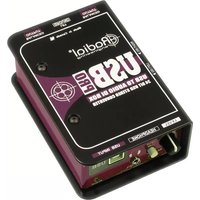

Brand : Radial Engineering
Model : Trim-Two Stereo DI
Category : Audio/video converter