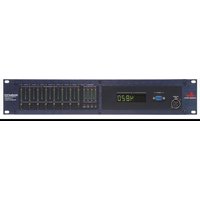
DriveRack 4820 - Audio Equalizer DBX - Free user manual and instructions
Find the device manual for free DriveRack 4820 DBX in PDF.


Pick your language and provide your email: we'll send you a specifically translated version.
| Product Type | Digital Loudspeaker Management System |
| Inputs / Outputs | 4 inputs, 8 outputs (balanced XLR) |
| Frequency Response | 20 Hz - 20 kHz (±0.5 dB) |
| Dynamic Range | > 110 dB (A-weighted) |
| Processing | 24-bit, 48 kHz sampling |
| Functions | Parametric EQ, crossover, limiter, delay, polarity, subharmonic synthesizer |
| Presets | 50 user-programmable, 25 factory presets |
| Rack Size | 1U, 19-inch rackmount |
| Dimensions (HxWxD) | 1.75 x 19 x 8.5 inches (44 x 483 x 216 mm) |
| Weight | 5.5 lbs (2.5 kg) |
| Power Requirement | 100-240 VAC, 50/60 Hz, 25 W |
| Display | 2-line alphanumeric LCD with backlight |
| Control | Front panel buttons and rotary encoder, RS-232 for remote control |
| Safety | Use grounded AC outlet; do not expose to rain or moisture |
| Cleaning & Maintenance | Clean with a dry, lint-free cloth; avoid solvents and abrasives |
| Spare Parts & Repairability | Contact DBX customer service or authorized service centers |
| General Information | Professional audio processor for sound reinforcement and installation |
Frequently Asked Questions - DriveRack 4820 DBX
How do I reset the DriveRack 4820 to factory defaults?
Press and hold the UTILITY button while powering on the unit. Navigate to 'Factory Reset' and confirm. All user presets will be lost.
What is the maximum input level?
The maximum input level is +20 dBu (balanced) before clipping. Ensure input signals do not exceed this to avoid distortion.
Can I use the DriveRack 4820 with powered speakers?
Yes, the DriveRack 4820 can be used with powered speakers. Set the output level appropriately to match the sensitivity of your speakers.
How do I set up a 2-way crossover?
From the main menu, select CROSSOVER. Choose the output pair, set the crossover frequency, and select the filter type (Butterworth, Linkwitz-Riley, etc.). Adjust slopes as needed.
What does the 'Subharmonic Synthesizer' do?
The subharmonic synthesizer generates low-frequency content one octave below the input signal, enhancing bass response for subwoofers.
How do I save a user preset?
After making adjustments, press the STORE button. Use the rotary encoder to select a preset location (1-50) and press ENTER to save.
The display shows 'ERROR' - what should I do?
An 'ERROR' message typically indicates a hardware or firmware fault. Cycle power; if the error persists, contact DBX support for assistance.
Can I control the unit via computer?
Yes, the DriveRack 4820 has an RS-232 port. Use DBX software (e.g., DriveRack PA) or third-party controllers to adjust parameters remotely.
How do I engage the limiter?
Go to the LIMITER menu, select the output channel, set the threshold (dBu), ratio, attack, and release times. Enable the limiter per channel.
What is the default crossover point for the DriveRack 4820?
Factory presets vary; the default for a typical subwoofer/satellite system is often 80 Hz with a 24 dB/octave Linkwitz-Riley filter. Check the preset list in the manual.
User questions about DriveRack 4820 DBX
0 question about this device. Answer the ones you know or ask your own.
Ask a new question about this device
No questions yet. Be the first to ask one.
Download the instructions for your Audio Equalizer in PDF format for free! Find your manual DriveRack 4820 - DBX and take your electronic device back in hand. On this page are published all the documents necessary for the use of your device. DriveRack 4820 by DBX.
USER MANUAL DriveRack 4820 DBX


Manual assistant
Powered by Anthropic
Waiting for your message
Product information
Brand : DBX
Model : DriveRack 4820
Category : Audio Equalizer