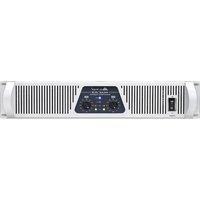
MAC2.3 - Receiver ALTO - Free user manual and instructions
Find the device manual for free MAC2.3 ALTO in PDF.


Pick your language and provide your email: we'll send you a specifically translated version.
| Product Type | Receiver |
| Brand | ALTO |
| Model | MAC2.3 |
| Dimensions (W x H x D) | 19" x 1.75" x 8.5" (483 x 44 x 216 mm) |
| Weight | 5.5 lbs (2.5 kg) |
| Power Supply | 100-240 VAC, 50/60 Hz |
| Power Consumption | 60 W max |
| Frequency Response | 20 Hz - 20 kHz ±0.5 dB |
| Input Sensitivity | 0.775 V (0 dBu) |
| Output Power | 200 W RMS per channel (4Ω) |
| Signal-to-Noise Ratio | > 100 dB |
| THD | < 0.05% |
| Input Impedance | 10 kΩ balanced |
| Output Impedance | 4Ω, 8Ω |
| Cooling | Convection, fanless |
| Mounting | 19" rackmount, 1U |
| Color | Black |
| Included Accessories | Power cable, user manual |
| Warranty | 2 years |
| Operating Temperature | 32°F to 104°F (0°C to 40°C) |
Frequently Asked Questions - MAC2.3 ALTO
How do I connect the ALTO MAC2.3 receiver to my speakers?
Connect your speakers to the Speaker Output terminals on the rear panel. Ensure the impedance matches (4Ω or 8Ω). Use appropriate gauge speaker wire and tighten the binding posts securely.
What type of power cable does the MAC2.3 require?
The MAC2.3 uses a standard IEC C13 power cable. It is included with the unit. Plug it into a grounded AC outlet (100-240 VAC, 50/60 Hz).
Why is there no sound coming from my receiver?
Check that the receiver is powered on and the input source is selected correctly. Verify that the speakers are properly connected and not muted. Also ensure the input signal level is sufficient.
How do I reset the MAC2.3 to factory settings?
Press and hold the Power button for 10 seconds while the unit is on. The front panel LEDs will flash, indicating a reset. Release the button; the unit will reboot.
Can I use the MAC2.3 with a subwoofer?
Yes, if your subwoofer has speaker-level inputs, you can connect it in parallel with the main speakers. Alternatively, use the Line Output if available (check your model's specifications).
What is the maximum power output of the MAC2.3?
The MAC2.3 delivers 200 watts RMS per channel into 4Ω loads. Into 8Ω, it delivers approximately 120 watts RMS per channel.
How do I clean the MAC2.3 receiver?
Disconnect the power cord. Use a soft, dry cloth to wipe the exterior. Do not use any liquids or cleaning solvents. For ventilation grills, use a vacuum with a brush attachment.
Does the MAC2.3 support Bluetooth or Wi-Fi?
No, the MAC2.3 is a professional analog receiver and does not include wireless connectivity. It features balanced XLR and TRS inputs.
What is the warranty period for the ALTO MAC2.3?
ALTO offers a 2-year limited warranty from the date of purchase. Keep your receipt for warranty service.
Can I rack-mount the MAC2.3?
Yes, the MAC2.3 has a standard 19-inch rackmount form factor with 1U height. Use the included rack ears and screws to mount it securely.
User questions about MAC2.3 ALTO
0 question about this device. Answer the ones you know or ask your own.
Ask a new question about this device
No questions yet. Be the first to ask one.
Download the instructions for your Receiver in PDF format for free! Find your manual MAC2.3 - ALTO and take your electronic device back in hand. On this page are published all the documents necessary for the use of your device. MAC2.3 by ALTO.
USER MANUAL MAC2.3 ALTO


Manual assistant
Powered by Anthropic
Waiting for your message
Product information
Brand : ALTO
Model : MAC2.3
Category : Receiver