Learning Thermostat 4th Gen - Thermostat NEST - Free user manual and instructions
Find the device manual for free Learning Thermostat 4th Gen NEST in PDF.


| Product Type | Smart Wi-Fi Thermostat |
| Dimensions | 3.3 x 3.3 x 1.1 inches (84 x 84 x 28 mm) |
| Weight | 5.6 oz (160 g) |
| Power Supply | 24V AC, 1A max from HVAC system (optional C wire) |
| Display | 2.8 inch color LCD, 480x480 pixels |
| Connectivity | Wi-Fi 802.11 b/g/n, Bluetooth LE, Thread, Matter |
| Sensors | Temperature, humidity, occupancy, ambient light |
| Compatibility | Most 24V heating and cooling systems, including gas, oil, electric, heat pumps, and radiant systems |
| Key Features | Auto-Schedule, Remote Control via App, Energy History, Home/Away Assist, Nest Renew, True Radiant |
| Languages | English, French, Spanish, German, Dutch, Italian, Swedish, Danish, Norwegian, Finnish |
| Warranty | 2 years limited warranty |
| Cleaning | Wipe with a soft dry cloth; do not use water or cleaning agents |
| Safety | UL certified, overheat protection |
| Spare Parts & Repairability | Not user-serviceable; contact Nest Support for repairs |
| General Information | Compatible with Google Home, Amazon Alexa, Apple HomeKit (via Matter) |
Frequently Asked Questions - Learning Thermostat 4th Gen NEST
User questions about Learning Thermostat 4th Gen NEST
0 question about this device. Answer the ones you know or ask your own.
Ask a new question about this device
Download the instructions for your Thermostat in PDF format for free! Find your manual Learning Thermostat 4th Gen - NEST and take your electronic device back in hand. On this page are published all the documents necessary for the use of your device. Learning Thermostat 4th Gen by NEST.
USER MANUAL Learning Thermostat 4th Gen NEST
Follow setup in the Google Home app
Step-by-step instructions on how to safely install your thermostat are only in the Google Home app


Click here to set up
Visit g.co/home/app to download the app
For disability support, visit g.co/assist
Table of Contents
3 Meet the Nest Learning Thermostat (4th gen)
7 Smart Schedule
14 Eco and energy savings
18 More helpful, intelligent features
Meet the Nest Learning Thermostat (4th gen)
Meet the Nest Learning Thermostat (4th gen)

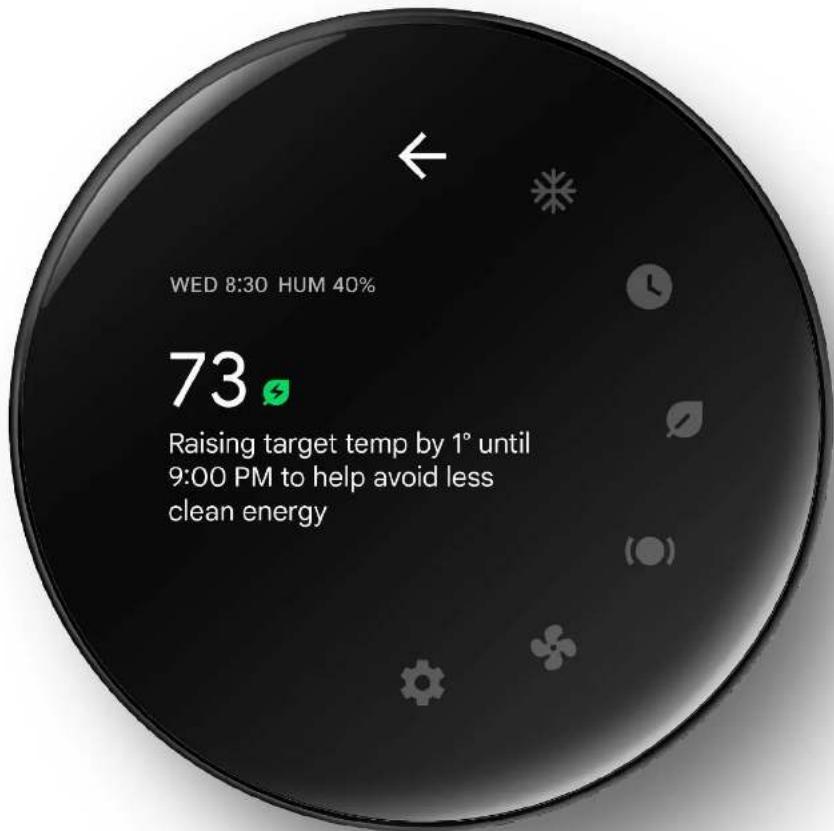
Press the thermostat to see more information

Understand what your thermostat is doing
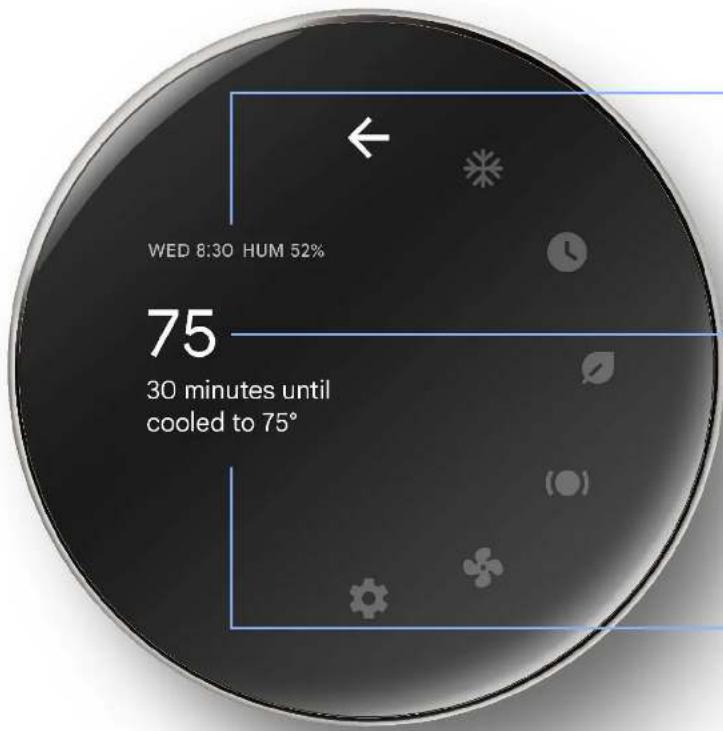
Time and Humidity
Quickly check the time and indoor humidity level
Target Temp
Temperature that your thermostat is actively heating or cooling to reach
Activity Description
Easy-to-understand description of what your thermostat is doing
Smart Schedule
Smart Schedule adapts to you
During setup, you'll be able to customize a starter schedule. Then in the coming days, the thermostat will learn more about your preferences and adjust that schedule based on how you tweak the temperature. 1

Your schedule has a few different types of temperature settings

Comfort
Comfortable temperatures for when you're at home and awake

Sleep
Cozy temperatures that balance comfort and savings while you're asleep

Eco
Energy-saving temperatures for when no one's home

Custom
Create your own preset temperatures
Ongoing learning for savings and comfort
Smart Schedule continues to learn and adapt over time. Like if you're waking up earlier each morning, it can start your Comfort temp earlier so you stay cozy while getting out of bed. Or it might uncover that a tiny adjustment to your Sleep temp could save you more without affecting comfort. 1

Control or automation, it's your choice
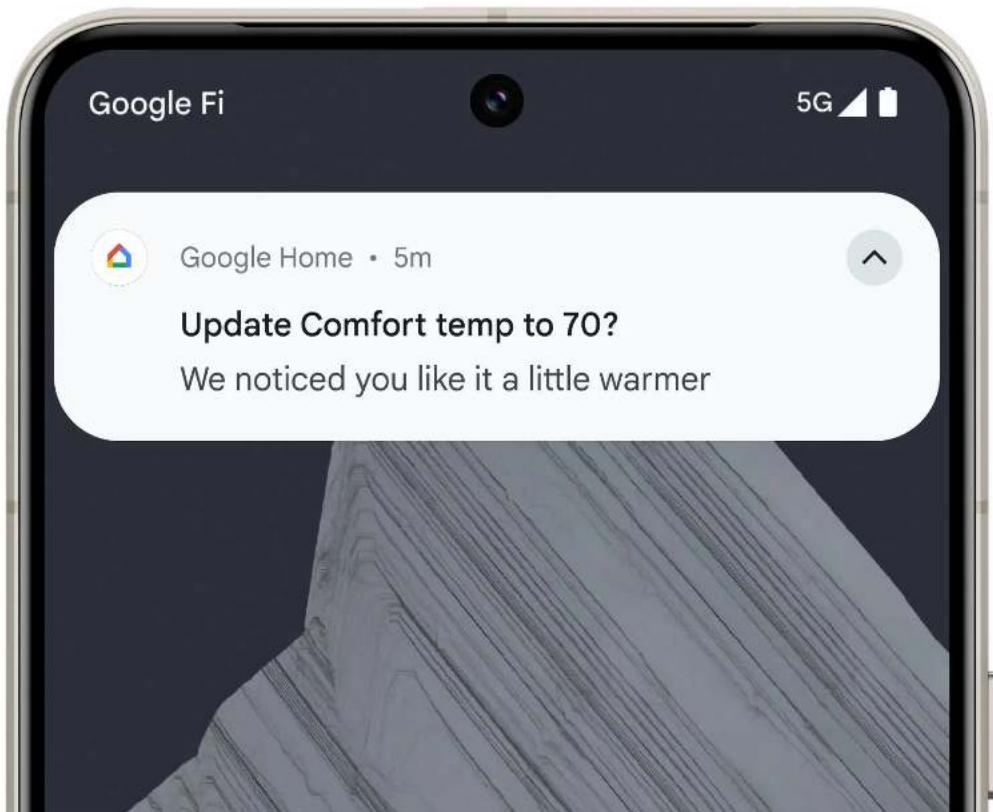
When Smart Schedule finds a recommended adjustment, it can give you a heads-up and ask for permission, or you can choose to have everything happen automatically.
If you choose “Suggestions” in Settings, you’ll get a notification on your phone and open the Google Home app to see more info on any suggested change. Then you can choose to accept or reject it.
If you don't have notifications turned on, you can still review changes in the Google Home app's Activity tab.
Manage hot and cold spots in your home
In the app, you can choose which sensor should be used to inform heating and cooling – your thermostat's built-in sensor, or a Nest Temperature Sensor.
Your schedule can use different sensors at different times, like the thermostat during the day, and a Nest Temperature Sensor in the bedroom at night.
You can also select multiple sensors for the thermostat to target, and the thermostat will create a comfortable average across those rooms. 2
Save when you're away
One of the best ways to save is to use a more efficient temp when nobody's home. Your thermostat has a set of Eco Temperature features that make it simple. 1
Eco & Energy Savings
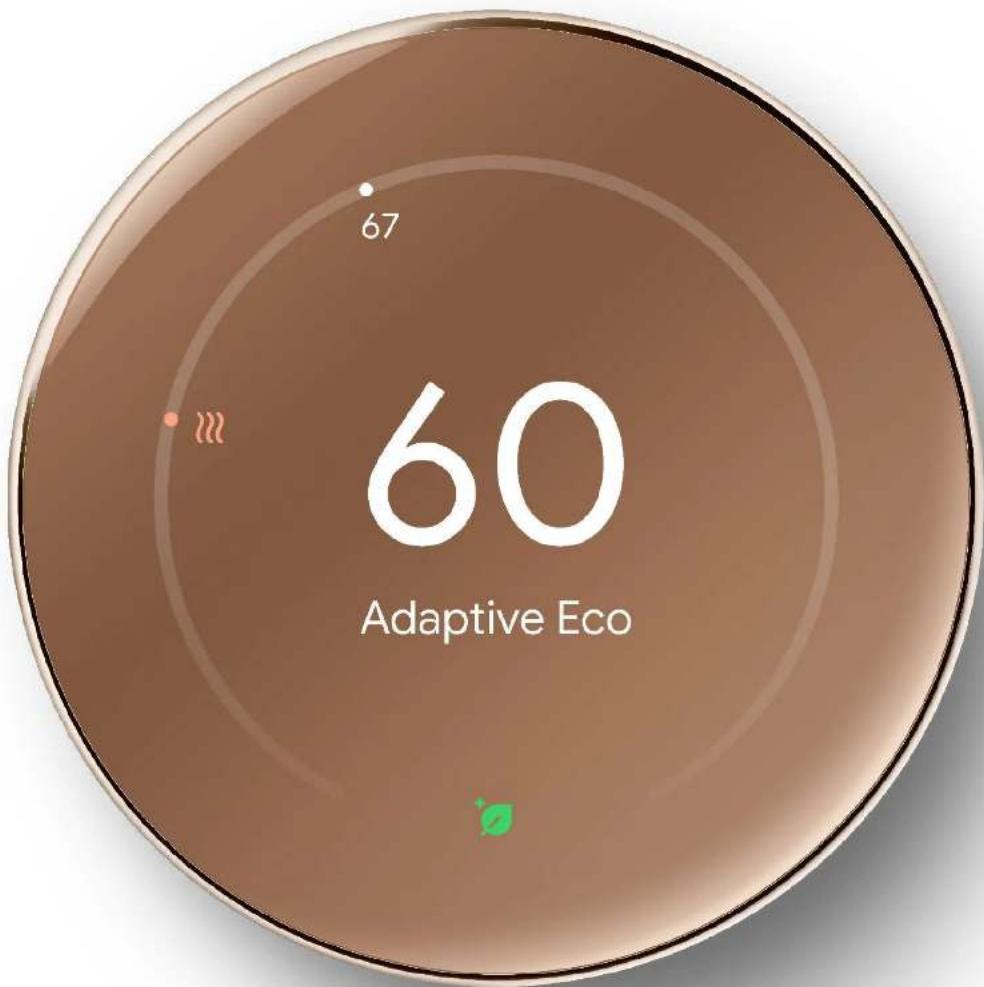
If you see the Leaf, you're saving energy

Eco
During setup, select your preferred Eco Temperature for both heating and cooling modes. Enable presence sensing to let the thermostat use your Eco Temperature automatically when nobody's home.

Adaptive Eco
If you enable Adaptive Eco, your thermostat dynamically selects an Eco Temperature based on the current outdoor temperature and how your home reacts in various conditions. For example, if your home is slow to heat when it's extremely cold, it might set back only a few degrees on a very cold day, but more than that when it's mild. So, you can save when away, but know you'll get back to your Comfort temp within an hour of getting home. 1
Help your thermostat maximize Eco savings

Enable presence sensing
Turn on Home/Away routines to enable presence sensing. Your phone location and sensors in supported Google Home devices, including your thermostat, can help determine if the home is empty and automatically switch to an Eco Temperature.

Turn on geofencing
Presence sensing works most efficiently if you enable geofencing. While it doesn't track your precise location, geofencing gives Google Home a basic signal when your phone is located outside of the vicinity of your home. You (and others with Google Home app access to your home) can turn on geofencing in the app.

Add more devices to your Google Home presence sensing list
Your thermostat has a built-in sensor that can detect motion. With your permission, it will use that sensor to help contribute to presence sensing. You can use the app to include other Google Home devices like displays and speakers that have built-in sensors to help make your home's understanding of when it's occupied more accurate.
Take advantage of cleaner energy with Nest Renew

The cleanliness and price of your electricity can change throughout the day. Renew's Energy Shift feature can shift energy use to cleaner or cheaper times. 3
To make sure you're getting the benefits of Renew, you can join at nestrenew.google.com.
More helpful, intelligent features
More energy-smart features

Humidity Helper
Monitors the humidity levels in your home and maintains a comfortable average, helping ensure your home's air doesn't get too dry or too humid. 4

Natural heating and cooling
Uses information about the outdoor temperature to naturally heat or cool your home when possible so you don't waste energy running your HVAC system. 1

Smart ventilation
Takes into account outdoor air quality and weather to optimize bringing in fresh air. 5

Adaptive Comfort
Provides the right amount of heating or cooling based on how your environment actually feels. 1

System Health Monitor
Keeps an eye on your heating and cooling system and helps detect hard-to-spot issues. If it finds something wrong, it sends an alert through the app. It also sends helpful reminders for air filter replacements and seasonal maintenance. 6
Customizing your thermostat's home screen

Dynamic Farsight puts helpful information at your fingertips. 1 You can personalize what your thermostat displays when you're across the room and when you're within arm's length. See time, weather, humidity, outdoor air quality, and more – customize it in Farsight settings.


1 Google Home app required.
2 Google Home app required. See g.co/nest/tempsensorapp for details.
3 Energy Shift makes small adjustments to your Nest Learning Thermostat set points which can shift electricity usage from your heating and cooling system. Learn more. Only available in areas served by major continental US grids (see here). Prioritize less expensive energy only available for customers on certain electric utility time-of-use rates (check availability).
4 Requires Google Home app, and an air conditioner, heat pump, or central humidifier or dehumidifier.
5 Requires Google Home app, and compatible HVAC ventilation system.
6 Alerts can notify you of a potential issue with an eligible HVAC system. They're meant to provide helpful information, not an endorsement, representation, or warranty of any kind about the health of your HVAC system. Alerts aren't intended to replace a diagnosis by a qualified HVAC professional.
Google Nest Learning Thermostat
+ Nest Temperature Sensor
First, install your thermostat*

1
Get the Google Home app
2
Add your thermostat in the app and follow on-screen steps
Next, install your sensor
3
Add your sensor in the app and follow on-screen steps
*Turn off the power before exposing wires
What's included


Thermostat

Base plate

Wall screws

Trim plate

Metal plate

Long screws Short screws

Sensor

Sensor wall screw
Nest Pro installation

Connect with an independent installer who's trained to install Google Nest products at g.co/nest/install
Get to know your new thermostat

Scan the QR code for a guide to help you and your household learn more, or visit g.co/nest/nltwelcome

We're here to help

Help
g.co/nest/nlt4
Disability support
g.co/assist
| Y1 | Y1 |
| Y2 | Y2 |
| G | G |
| OB | OB |
| Rc | Rc |
| W1 | W1 |
| W2AUX | W2AUX |
| C | C |
| RH | RH |
| *E | *E |
| *W3 | *W3 |
| *G3 | *G3 |
| *HUM | *HUM |
| *DEHUM | *DEHUM |
| AQ+ | AQ+ |
| AQ- | AQ- |
| *E | *E |
| *W3 | *W3 |
| *G3 | *G3 |
| *HUM | *HUM |
| *DEHUM | *DEHUM |
| AQ+ | AQ+ |
| AQ- | AQ- |
Google Nest Learning Thermostat
Safety, Warranty & Regulatory Guide for Google Nest Learning Thermostat and Nest Temperature Sensor(s)
DEVICE ARBITRATION AGREEMENT INCLUDED (US Only)
This booklet provides important safety, regulatory, and warranty information that you should read before using your Nest Learning Thermostat and Nest Temperature Sensor(s). You can find an online version of this document at g.co/nest/support
Basic Safety

WARNING: HEALTH AND SAFETY INFORMATION, READ BEFORE USE.
To avoid damaging your device, accessories, or any connected devices and to reduce the risk of personal injury, discomfort, property damage or other potential hazards, follow the precautions below and those found in the Nest Learning Thermostat and Nest Temperature Sensor(s) Safety Information at g.co/nest/support:
- Handle your Nest Learning Thermostat and Nest Temperature Sensor(s) with care. You may damage these devices or the battery if you disassemble, drop, bend, burn, crush or puncture your devices. Do not use a device with a cracked screen or damaged enclosure. Using a damaged device may cause overheating, fire, electric shock, injury or damage to your devices or other property. Do not expose your devices to liquids, which can cause a short circuit and overheating. Your devices are designed to operate in a dry, indoor environment and is not built for outdoor use. Your device works best in ambient temperatures between 32° and 104° F (0° and 40° C) and should be stored between ambient temperatures of -4° and 140° F (-20° and 60° C). Do not expose the devices to temperatures above 140° F (60° C) as this may damage the devices, overheat the battery, or pose a risk of fire.
- Your Nest Temperature Sensor(s) are designed so that they can be wall-mounted. See g.co/nest/nts2 for additional instructions on how to safely wall-mount your device.
PRODUCT INFORMATION
Nest Learning Thermostat
- Purpose of control: Thermostat, Timer
• Protection against electric shock: Independently Mounted Class III
• Surge immunity category: Installation Class 2 or Residential
• Pollution degree: 2 - Type of action: 1
• Rated impulse voltage: 0.33kV
• Temperature for the ball pressure test: 100°C
• ELV limits: 24 V\~
Nest Temperature Sensor(s)
- Purpose of control: Electronic Temperature Sensor (Operating Control – Non-safety related)
• Pollution Degree 2 - Type of action: 1
• Rated Impulse: 71Vpk
BATTERY
Nest Learning Thermostat
- This Nest Learning Thermostat contains a lithium-ion battery, which is a sensitive component that can cause injury if damaged. Do not attempt to remove the battery. Contact Google or a Google authorized service provider to replace the battery. For contact information, visit g.co/nest/contact. Replacement by non-qualified professionals can damage your Nest Learning Thermostat. Use of an non-qualified battery and improper disposal may present a risk of fire, explosion, leakage, and/or other hazards. Do not open, crush, heat above 140° F (60° C) or incinerate.
Nest Temperature Sensor(s)
- WARNING: This device(s) contains Lithium/Manganese Dioxide CR2 batteries which are sensitive components that can cause injury if damaged or ingested. Keep away from children. If ingested or placed inside any part of the body, seek medical attention immediately. Swallowing or insertion may lead to serious injury in as little as 2 hours or death, due to chemical burns and potential perforations of the esophagus. If you suspect your child has swallowed or inserted a battery, seek medical attention immediately. Examine the device(s) and make sure the battery compartment is correctly secured. If the battery compartment does not close securely, stop using the product and keep it away from children. Dispose of used batteries immediately and safely. Use of an unqualified and/or damaged battery or improper disposal may present a risk of fire, explosion, leakage and/or other hazards. Do not open, disassemble, crush, puncture, heat, or incinerate batteries. Do not attempt to recharge a Lithium/Manganese Dioxide CR2 battery.
DISPOSAL & RECYCLING
Dispose of and transport your device, batteries, and accessories according to local environmental and transportation regulations. Do not dispose of them in normal household waste. For more information on recycling your device, batteries, and accessories, visit g.co/HWRecyclingProgram
Proper Handling and Usage
NOT WATER OR DUST RESISTANT
Your Nest Learning Thermostat and Nest Temperature Sensor(s), and other accessories provided with your devices are not dust or water resistant. Liquid damage voids the Limited Warranty (see below). Do not expose your devices or other accessories to liquids or to dust, which can cause a short circuit and/or overheating.
Service & Support
For online help and support, visit g.co/nest/help. If you send your Nest Learning Thermostat for service, you might receive a replacement in place of your original Nest Learning Thermostat. Where permitted by law, goods presented for repair may be replaced by refurbished goods of the same type rather than being repaired. Refurbished parts may be used to repair the goods. If the goods are capable of retaining user-generated data, then the repair or replacement may result in loss of the data.
Regulatory Information
Regulatory information, certification, and compliance marks specific to Nest Learning Thermostat can be found on the wiring back plate of your device. Additional regulatory and environmental information can be found at g.co/nest/support
Manufacturer address: Google LLC, 1600 Amphitheatre Parkway, Mountain View, CA 94043.
EMC COMPLIANCE STATEMENT
Important: This device, power adapter and other in-box accessories have demonstrated Electromagnetic Compatibility (EMC) compliance under conditions that included the use of compliant peripheral devices and shielded cables between system components. It is important that you use compliant peripheral devices and shielded cables between system components to reduce the possibility of causing interference to radios, televisions and other electronic devices.
Maintain a distance of 20 cm (8 in) from your body to be consistent with how the device is tested for compliance with RF exposure requirements.
FCC & ISED CANADA REGULATORY COMPLIANCE
This device complies with Part 15 of the FCC Rules and ISED license-exempt RSS standard(s). Operation is subject to the following 2 conditions:
1 This device may not cause harmful interference.
2 This device must accept any interference received, including interference that may cause undesired operation.
Model number: GJQ8U
Product name: Google Nest Learning Thermostat
Model number: G5AJK
Product name: Google Nest Temperature Sensor(s)
FCC ID:2AQ68-G5AJK
IC:24374-G5AJK
These FCC and IC IDs are also located inside the battery compartment.
US Responsible Party: Google LLC, 1600 Amphitheatre Parkway, Mountain View, CA 94043
Contact: g.co/nest/contact
© 2024 Google LLC. All rights reserved.
Google Nest Learning Thermostat, G logo, Google, and related marks and logos are trademarks of Google LLC. ENERGY STAR and the ENERGY STAR mark are registered trademarks owned by the U.S. Environmental Protection Agency.
Google Consumer Hardware Limited Warranty | USA/CANADA
If there are any differences between this Limited Warranty included in the box with your product and the online Limited Warranty available at g.co/devicewarranty, then the online Limited Warranty will supersede the terms of this in-the-box warranty.
This Limited Warranty applies only if you are a consumer and purchased your Google-branded product ("Google Product") in the United States or Canada.
What does this warranty cover and how long does it last? Google warrants that a new Google Product (including any ancillary parts that may be packaged with it) will be free from defects in materials and workmanship under normal use in accordance with Google's published user documentation for one year from the date of original retail purchase in its original packaging by you. If a Google Product has been refurbished by Google or a third party authorized by Google ("Refurbished"), Google warrants that the Refurbished Google Product (including any ancillary parts that may be packaged with it) will be free from defects in materials and workmanship under normal use in accordance with Google's published user documentation for ninety days from the original date of retail purchase by you (these warranties are collectively referred to as our "Limited Warranty").
What will Google do? (THIS IS YOUR EXCLUSIVE REMEDY) If a defect covered by this Limited Warranty arises and you return your Google Product as directed by Google during the Limited Warranty period (which is one year for new Google Products and ninety days for Refurbished Google Products), Google will elect in its sole discretion and to the extent permitted by law to repair your Google Product using new or refurbished parts, replace your Google Product with a new or refurbished Google Product functionally at least equivalent to yours, or accept the return of your Google Product in exchange for a refund of the purchase price you paid for your Google Product. If Google repairs or replaces your Google Product, the repaired or replaced Google Product will continue to be warranted for the remaining time of the original warranty period. All returned parts for which you have received a replacement will become the property of Google. Repair or replacement may result in loss of data. Nothing in this Limited Warranty will reduce or otherwise affect your statutory rights in relation to your Google Product.
THE LIMITED WARRANTY WRITTEN ABOVE IS THE ONLY EXPRESS WARRANTY GOOGLE PROVIDES FOR YOUR GOOGLE PRODUCT, AND THE ABOVE REMEDY IS YOUR SOLE REMEDY. TO THE MAXIMUM EXTENT PERMITTED BY APPLICABLE LAW, GOOGLE EXPRESSLY DISCLAIMS ALL OTHER WARRANTIES AND CONDITIONS OF ANY KIND, WHETHER STATUTORY OR IMPLIED, ARISING FROM COURSE OF CONDUCT OR OTHERWISE, REGARDING YOUR GOOGLE PRODUCT, EXCEPT THAT ANY IMPLIED WARRANTIES OF MERCHANTABILITY, FITNESS FOR A PARTICULAR PURPOSE, AND NON-INFRINGEMENT THAT CANNOT BE DISCLAIMED ARE LIMITED IN DURATION TO THE PERIOD OF THE EXPRESS WARRANTY ABOVE (EITHER ONE YEAR OR NINETY DAYS, DEPENDING ON WHETHER YOUR GOOGLE PRODUCT IS NEW OR REFURBISHED).
Some states, provinces or territories do not allow limitations on how long an implied warranty lasts, so the above limitation may not apply to you.
What does this warranty not cover? This Limited Warranty is only valid and enforceable in locations where the Google Product is sold and will apply only if you purchased your Google Product from Google or its authorized resellers. This Limited Warranty only applies to hardware components (and not any software elements) of Google Product. This Limited Warranty also does not apply to any consumable parts, such as batteries or protective coatings, that due to their nature diminish over time, unless failure has occurred due to a defect in materials or workmanship, nor to any cosmetic damage unless failure has occurred due to a defect in materials or workmanship. This Limited Warranty does not apply to damage caused by: (1) normal wear and tear; (2) accidents; (3) misuse (including failure to follow product documentation); (4) neglect; (5) disassembly; (6) alterations; (7) servicing other than by Google-authorized technicians; and (8) external causes such as, but not limited to: liquid damage, exposure to sharp objects, exposure to excessive force, anomalies in the electrical current supplied to the Google product, and extreme thermal or environmental conditions. Liquid damage voids this Limited Warranty. This Limited Warranty does not guarantee that use of the Google Product will be uninterrupted or error-free. The ninety-day Limited Warranty Google provides for Refurbished Google Products is not applicable to Google Products refurbished by third parties not authorized to do so by Google, even if sold by a Google authorized reseller.
YOU EXPRESSLY UNDERSTAND AND AGREE THAT, TO THE MAXIMUM EXTENT PERMITTED BY APPLICABLE LAW, GOOGLE AND ITS SUBSIDIARIES AND AFFILIATES (COLLECTIVELY, "GOOGLE PARTIES") SHALL NOT BE LIABLE TO YOU UNDER ANY THEORY OF LIABILITY (WHETHER CONTRACT, TORT (INCLUDING NEGLIGENCE), BREACH OR FAILURE OF ANY WARRANTY OR OTHERWISE) FOR ANY INDIRECT, INCIDENTAL, SPECIAL, CONSEQUENTIAL OR EXEMPLARY DAMAGES THAT MAY BE INCURRED BY YOU IN CONNECTION WITH YOUR GOOGLE PRODUCT OR THESE TERMS, INCLUDING ANY LOSS OF DATA, WHETHER OR NOT A GOOGLE PARTY OR ITS REPRESENTATIVES HAVE BEEN ADVISED OF OR SHOULD HAVE BEEN AWARE OF THE POSSIBILITY OF ANY SUCH LOSSES ARISING. YOU EXPRESSLY UNDERSTAND AND AGREE THAT, TO THE MAXIMUM EXTENT PERMITTED BY APPLICABLE LAW, THE GOOGLE PARTIES' TOTAL LIABILITY IN CONNECTION WITH YOUR GOOGLE PRODUCT OR THIS LIMITED WARRANTY WILL NOT EXCEED THE AMOUNT YOU ACTUALLY PAID AT RETAIL FOR YOUR GOOGLE PRODUCT.
Some states, provinces or territories do not allow the exclusion or limitation of incidental or consequential damages, so the above limitation or exclusion may not apply to you.
What if my Google Product also has damage which is not covered by this Limited Warranty? Tlf, in addition to a defect covered by this Limited Warranty, your Google Product also has damage which is not covered (for example, damage caused by normal wear and tear or misuse by you) then Google is only responsible for addressing the defect covered by this Limited Warranty. In certain circumstances, Google may be prevented or restricted in carrying out the repair work until the damage which is not covered has also been fixed. For example, if your Google Product has a cracked screen then this may prevent Google from carrying out the repair work unless the screen is also fixed. If this happens, where permitted by law, Google may notify you and may give you the option of: (1) Google repairing the damage not covered by this Limited Warranty at your cost (and Google will tell you the amount in advance); or (2) Google returning your Google Product to you without carrying out any repair work.
What if my Google Product is damaged by liquid? If your Google Product has sustained liquid damage this Limited Warranty no longer applies and Google will not carry out any repair work. Google will give you the option of: (1) replacing your Google Product at your cost (and Google will tell you the amount in advance); or (2) Google returning your Google Product to you.
How do you make a claim? To make a claim under the Limited Warranty, please contact Google Product Support at g.co/warrantyclaim. You must provide your name, contact information, and the serial number of your Google Product to receive support. Before receiving warranty service, Google may require that you provide proof of purchase details, respond to questions designed to assist with diagnosing potential issues and follow Google's procedures for obtaining warranty service.
Other limitations: No vendor, seller, authorized reseller, employee, or representative of Google or its affiliates or any third party is authorized to make any modification, extension, or addition to this Limited Warranty. If any term of this Limited Warranty is held to be illegal or unenforceable, the remaining terms of this Limited Warranty will remain in full force and effect.
How state, province, territory, and other laws apply to you: This warranty gives you specific legal rights, and you may also have other rights that vary from jurisdiction to jurisdiction.
This Limited Warranty is given by Google LLC, organized in the state of Delaware, whose principal place of business is at 1600 Amphitheatre Parkway, Mountain View, CA, 94043, United States.
G953-00932-01 REV F
Notice of Arbitration (US only)
In accordance with the Google Arbitration Agreement - Devices, Related Accessories, and Related Subscription Services ("Arbitration Terms") set forth at g.co/devicearbitration, you acknowledge and agree that disputes relating to your Google device, related accessories, and related subscription services for your Google device ("Google Device") will be resolved through BINDING ARBITRATION on an individual, non-class basis, unless you have opted out or another exception applies as described in the Arbitration Terms. For disputes subject to arbitration, you agree to first send a written notice of the dispute by certified U.S. Mail or by Federal Express (or international equivalent) to Google's address for notice, Google LLC, Legal Department – Hardware Arbitration, c/o Corporation Service Company, 2710 Gateway Oaks Drive, Suite 150N, Sacramento, CA 95833. The notice has to include, if available: (a) the name of the person making the claim, (b) the type of Google Device, as applicable, (c) the serial number of the Google Device, (d) the email address used to activate the Google Device, as applicable, (e) a description of the nature and basis of the claim, (f) the result that is desired (e.g., an amount of money), and (g) the case number(s) assigned by Google to track previous attempts to resolve the dispute, if there is one. We each agree to try to resolve the claim, but if we can't do that within 60 days after the notice is received, you or Google may initiate an arbitration proceeding by following the American Arbitration Association ("AAA") Rules. Unless the parties agree otherwise, your demand for arbitration must be sent to Google's address for notice and entitled "Demand for Arbitration." Google will send demands for arbitration to you at the e-mail address provided in the notice of the dispute.
FRANÇAIS


- FOLLOW SETUP IN THE GOOGLE HOME APP
- TABLE OF CONTENTS
- MEET THE NEST LEARNING THERMOSTAT (4TH GEN)
- PRESS THE THERMOSTAT TO SEE MORE INFORMATION
- UNDERSTAND WHAT YOUR THERMOSTAT IS DOING
- TIME AND HUMIDITY
- TARGET TEMP
- ACTIVITY DESCRIPTION
- SMART SCHEDULE
- SMART SCHEDULE ADAPTS TO YOU
- YOUR SCHEDULE HAS A FEW DIFFERENT TYPES OF TEMPERATURE SETTINGS
- COMFORT
- SLEEP
- ECO
- CUSTOM
- ONGOING LEARNING FOR SAVINGS AND COMFORT
- CONTROL OR AUTOMATION, IT'S YOUR CHOICE
- MANAGE HOT AND COLD SPOTS IN YOUR HOME
- SAVE WHEN YOU'RE AWAY
- ECO & ENERGY SAVINGS
- IF YOU SEE THE LEAF, YOU'RE SAVING ENERGY
- ADAPTIVE ECO
- HELP YOUR THERMOSTAT MAXIMIZE ECO SAVINGS
- ENABLE PRESENCE SENSING
- TURN ON GEOFENCING
- ADD MORE DEVICES TO YOUR GOOGLE HOME PRESENCE SENSING LIST
- TAKE ADVANTAGE OF CLEANER ENERGY WITH NEST RENEW
- MORE HELPFUL, INTELLIGENT FEATURES
- MORE ENERGY-SMART FEATURES
- HUMIDITY HELPER
- NATURAL HEATING AND COOLING
- SMART VENTILATION
- ADAPTIVE COMFORT
- SYSTEM HEALTH MONITOR
- CUSTOMIZING YOUR THERMOSTAT'S HOME SCREEN
- GOOGLE NEST LEARNING THERMOSTAT
- FIRST, INSTALL YOUR THERMOSTAT
- 1
- 2
- NEXT, INSTALL YOUR SENSOR
- 3
- WHAT'S INCLUDED
- NEST PRO INSTALLATION
- GET TO KNOW YOUR NEW THERMOSTAT
- WE'RE HERE TO HELP
- SAFETY, WARRANTY & REGULATORY GUIDE FOR GOOGLE NEST LEARNING THERMOSTAT AND NEST TEMPERATURE SENSOR(S)
- DEVICE ARBITRATION AGREEMENT INCLUDED (US ONLY)
- BASIC SAFETY
- WARNING: HEALTH AND SAFETY INFORMATION, READ BEFORE USE
- PRODUCT INFORMATION
- BATTERY
- DISPOSAL & RECYCLING
- PROPER HANDLING AND USAGE
- NOT WATER OR DUST RESISTANT
- SERVICE & SUPPORT
- REGULATORY INFORMATION
- EMC COMPLIANCE STATEMENT
- FCC & ISED CANADA REGULATORY COMPLIANCE
- GOOGLE CONSUMER HARDWARE LIMITED WARRANTY | USA/CANADA
- NOTICE OF ARBITRATION (US ONLY)
- FRANÇAIS
Brand : NEST
Model : Learning Thermostat 4th Gen
Category : Thermostat