PMX6BU - Hand blender Pyle - Free user manual and instructions
Find the device manual for free PMX6BU Pyle in PDF.


| Product Type | Hand Blender |
| Brand | Pyle |
| Model | PMX6BU |
| Color | Blue |
| Power Consumption | 500 Watts |
| Speed Settings | 2 Speeds + Turbo |
| Blade Material | Stainless Steel |
| Shaft Material | Stainless Steel |
| Housing Material | Plastic |
| Cord Length | 4.5 ft (1.37 m) |
| Weight | 1.2 lbs (0.54 kg) |
| Total Height | 14.2 inches (36 cm) |
| Shaft Length | 7.5 inches (19 cm) |
| Included Attachments | Blending shaft, Whisk, Measuring cup (20 oz) |
| Dishwasher Safe Parts | Blending shaft and whisk |
| Safety Lock | Yes |
| Rubber Grip Handle | Yes |
| Cord Storage | Not specified |
| Warranty | 1 Year Limited |
| Country of Origin | China |
Frequently Asked Questions - PMX6BU Pyle
User questions about PMX6BU Pyle
0 question about this device. Answer the ones you know or ask your own.
Ask a new question about this device
Download the instructions for your Hand blender in PDF format for free! Find your manual PMX6BU - Pyle and take your electronic device back in hand. On this page are published all the documents necessary for the use of your device. PMX6BU by Pyle.
USER MANUAL PMX6BU Pyle

natural_image
Five abstract star and arrow symbols in black, arranged horizontally (no text or labels)
natural_image
Row of black-and-white geometric symbols including stars, circles, triangles, and stars (no text or labels)Wireless BT Streaming Stage & Studio Mixer System with Karaoke Style Mic-Talkover, MP3/USB/SD Readers, FM Radio
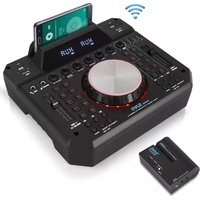
PMX6BU Wireless DJ Sound FX Audio Mixer
Wireless BT Streaming Stage & Studio Mixer System with Karaoke Style Mic-Talkover, MP3/USB/SD Readers, FM Radio
- System Pairing - Connection Setup:
- Be sure that the DJ Sound FX Audio Mixer POWER switch is set to OFF position.
- Turn each channel LEVEL and MASTER volume controls to "0" position.
- Next, turn ON the unit and receiver. Ensure both units are fully charged (if the battery LED indicator is red, then it requires charging).
- Use an Aux (3.5mm) audio cable to connect the wireless audio receiver's into a compatible speaker audio input jack -- and ensure if the 'Aux' mode on the connected speaker is activated.
- Pair your wireless receiver with the audio mixer.
\*See the included 'Quick Start Guide':
a. Press the 'POWER' button on the wireless receiver (the 'EMIT' indicator light will blink).
b. While the 'EMIT' indicator is blinking, press the '5.8G/BT' button (the 'RXD' indicator light will remain solid).
c. While the 'RXD' indicator light remains solid, press and hold the '5.8G/BT' button for \~ 5 seconds (or until the 'RXD' indicator blinks red).
d. While the 'RXD' indicator light blinks red, hit the switch and power ON the mixer unit.
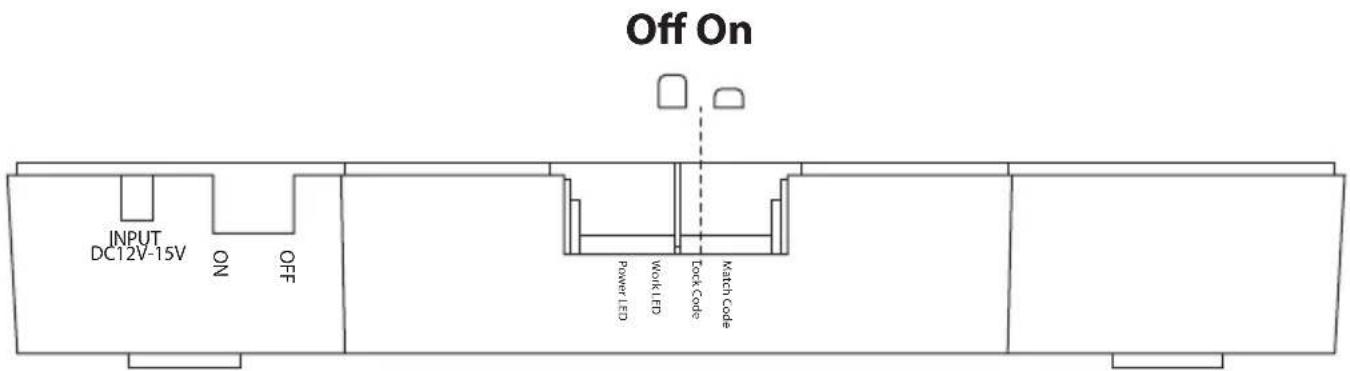
e. Press the 'Lock Code' button on the rear of the mixer unit. Then press and hold the 'Match Code' button for about \~5 seconds or until the 'Work LED' indicator blinks. The system is pairing while the 'RXD' indicator on the receiver blinks -- and the 'Work LED' indicator on the mixer blinks. Wait until the 'Work LED' indicator on the mixer remains solid to proceed to the next step.
f. While the 'Work LED' indicator light on the mixer remains solid, press the 'Lock Code' button to secure the wireless pairing connection (if a successful wireless pairing connection is made, the 'RXD' indicator on the receiver will stop blinking red).
g. Stream some sound! You can now connect the wireless receiver to a compatible speaker system via Aux-Input connection cable.
- Adjust and set the volume control levels accordingly. Begin playing audio through channel 1 while slowly adjusting the LEVEL control to the desired setting. Proceed to adjust the settings accordingly for each audio channel in use.
Limitless Speaker Connection

flowchart
graph TD
    A["Speaker 1"] -->|1| B["5.8GHz receiver"]
    C["Speaker 2"] -->|2| B
    D["Speaker 3"] -->|3| B
    E["Speaker 4"] -->|N+1| B
    F["Speaker N"] -->|N| B
    G["Speaker N+1"] -->|N+1| B
    H["SO CARD USB 1"] --> I["Microcontroller"]
    J["SO CARD USB 2"] --> K["Microcontroller"]
    I --> L["USB1/ADJ VOLUME"]
    K --> M["USB2 VOLUME"]
    L --> N["Motor: Repeats, Mic Priority, USB 1 KEY"]
    M --> O["Motor: Repeats, Mic Priority, USB 2 KEY"]
    style A fill:#f9f,stroke:#333
    style C fill:#f9f,stroke:#333
    style D fill:#f9f,stroke:#333
    style E fill:#f9f,stroke:#333
    style F fill:#f9f,stroke:#333
    style G fill:#f9f,stroke:#333
- Mixer Parts and their Function

1. Channel -1 USB/SD Input Jacks
USB/SD input jack: Supports WAV/MP3 format.
16G flash drive compatible
2. 6.35mm Microphone input jack
- DJ Set: Press this button to play music and the color will change from red to blue. Play using DJ performance effect and adjust USB1/DJ sound volume
- USB1/DJ volume: Control channel-1 with 10 DJ effect volume
- KEY CHANGE: Press this button will let your music modified tone
- Reverb: Make music reverberant
- Delay: Make music slowly down
-
Voice Chanc: Crop vocal music
-
Channel -1 USB/SD previous music for USB/SD mode and last channel for FM mode
- Channel -1 USB/SD choose input signal
- Repeat Channel -1 USB/SD song
- Phone/Pad stand
- 6.35mm Guitar Input jack
- Microphone Volume knob
- Guitar Volume knob
- Microphone Delay Effect knob
- Microphone Echo Effect knob
- Music bass Volume knob
- Music Treble Volume knob
- Master Volume Control
- Flange Effect
- Filter Effect
- WAH Voice Effect
- Scratch-1 Effect
- Scratch-2 Effect
- Channel -1 USB/SD: Play/Stop on Mp3 mode, scan FM CH on FM mode
- Channel -1 USB/SD Next Music for USB/SD mode, next channel for FM mode
- Microphone Priority: Mute the music and adjust microphone volume
- Channel -2 USB/SD
- 3.5MM AUX/PHONE out
- 3.5MM AUX input-1
- 3.5MM AUX input-2
- CLUB effect
- Drum Effect: Press for more than 4 sec. and the number 1 to 10 will change into blue color and use 10 types of drum effect
- Channel -2 USB/SD Last music for USB/SD mode, last CH for FM mode
- Channel -2 USB/SD Input Signal select
- Channel -2 USB/SD: Play/Stop on Mp3 mode:
Scan FM CH on FM mode -
Channel -2 USB/SD Next Music for USB/SD mode:
Next CH for FM mode -
Channel -2 USB/SD Record and Replay button
- Repeat Channel -2 USB/SD song
- Sound Effects selection
- USB2 volume control
- Power Switch and DC 13.5V 2A input: Use adapter for charging.
Important Note:
Use the 'Match Code' function button (located at the back of the mixer unit) upon your first time connecting / pairing any wireless audio receiver units.
The Match Code function will prevent the interference of any outside/external audio signals.
Multi-Receiver Connection:
If you have purchased additional PRTPMX6BURC receiver units, follow the below steps to connect additional speakers to your audio setup:
Connecting Additional Receivers / Speakers to the PMX6BU - DJ Sound FX Audio Mixer System...
- Designate one receiver to act as the 'MAIN RECEIVER' -- and place it to the side.
- Press the 'POWER' button on all additional receiver units you are attempting to connect (the 'EMIT' indicator lights will blink).
- While the 'EMIT' indicator is blinking, press the '5.8G/BT' button (the 'EMIT' indicator light will stop blinking and the 'RXD' indicator light will remain solid).
- While the 'RXD' indicator light remains solid, press and hold the '5.8G/BT' button for \~ 5 seconds (or until the 'EMIT' indicator blinks red).
-
While the 'EMIT' indicators blink red on all additional receiver units, press the 'POWER' button on the designated 'MAIN RECEIVER' (the 'EMIT' indicator will blink).
-
While the 'EMIT' indicator blinks on the 'MAIN RECEIVER', press and hold the '5.8G/BT' button for \~ 5 seconds (or until the 'EMIT' indicator blinks red).
-
Wait for the indicator lights on the additional receiver units to stop blinking -- this ensures they are successfully paired (however, the 'MAIN RECEIVER' indicator lights will continue to blink).
-
While only the indicator light on the 'MAIN RECEIVER' is blinking, it's time to connect via Bluetooth. Goto your device's Bluetooth network list and get connected (upon successful Bluetooth connection, the 'MAIN RECEIVER' indicator light will remain lit).
-
Stream some sound! The 'MAIN RECEIVER' will deliver the wireless audio to any paired additional receiver units. Ensure all receiver units are connected to a compatible speaker with the audio connection cables via the 'AUX OUTPUT'.
Notes:
* Pyle Model: PMX6BU - DJ Sound FX Audio Mixer, sold separately.
* When pairing the system, ensure both the mixer and wireless receiver(s) are within range to initiate a successful wireless pairing sequence.
* Ensure you are using a compatible speaker system with Aux audio line-in mode is activated on the connected speaker.
- Battery Charging:
When the battery is low, power indicator will flash on the receiver. Charge the DJ Sound FX Mixer or receiver immediately. For DJ Sound FX Mixer, use the 13.5V 2A adapter to charge the unit. Red LED indicator will be ON, when fully charged it will turn to green.
For the Mixer, use our adapter to charge the unit.
Red LED indicator will be ON, when fully charged it will turn to blue.
For the receiver, use our cable and your smartphone adapter for charging. Red LED will be ON, after fully charged it will turn to blue.

PRTPMX6BURC
Wireless Audio DJ Sound Receiver
PMX6BU
Rear Panel of Mixer Console
PMX6BU
Wireless DJ Sound FX Audio Mixer
Wireless BT Streaming Stage & Studio Mixer System
with Karaoke Style Mic-Talkover, MP3/USB/SD Readers, FM Radio
Features:
• DJ Mixer Audio Streaming System Kit
- Wirelessly Stream Your Sound to Connected Speakers
- Bluetooth Audio Ability & Included Wireless Receiver
• Multi-Channel Mixing: Mix, Scratch & Blend Your Beats
• Built-in Rechargeable Battery: Compact & Portable Style
- Simple Plug-and-Play Operation
• FM Radio with Digital LCD Display
- Start a Party with Karaoke Style Control
- Create Your Own Music with Recording Mode
- Mic Talkover Control: Microphone Priority Function
• (2) 1/4" Microphone / Guitar Inputs, 6.35mm
• MP3 Digital Audio File Playback
• Dual USB Flash Drive Readers
• Dual SD Memory Card Readers
• Headphone Jack, 3.5mm
• LED Backlit Illuminated Mixer Console
• Independent Channel Controls and Cross Fader
- Preset Button DJ Sound FX with Jog Wheel
• Sound Adjustment Configuration: Mic Volume, Delay, Echo, Bass, Treble
- Works with PA Speakers, Home Theater Systems, Bookshelf Speakers, etc.
Wireless Audio Receiver:
• Streams DJ Mixer Audio to External Speaker Systems
• USB Power / Charge Port
• Aux (3.5mm) Connectors
- Connection LED Indicator Lights
- Speaker Audio Transmission Distance: Up to 165'+ ft.
• *Connect Additional Speakers with Additional Receivers (Not Included)
• *Additional Wireless Audio Receivers Sold Separately,
Pyle Model: 'PRTPMX6BURC'
Bluetooth Connectivity:
- Bluetooth Music Streaming Ability
• Transfers Wireless Audio to Connected Receivers
• Simple & Hassle-Free Pairing - Works with All of Today's Latest Devices
• Smartphones, Tablets, Laptops, Computers - Bluetooth Version: 4.0
- WIFI solution: 5.8G
- Bluetooth Network Name: 'PyleUSA'
• Wireless Device Range: 30'+ ft.
What's in the Box:
- Bluetooth DJ Mixer
- Wireless Audio Receiver
- Receiver USB Charge Cable
- Aux (3.5mm) Audio Cable
- Power Adapter
Technical Specs:
• SS/N Ratio: 90dB
• Wireless Support Match: 1:1 /1:N
• Receiver Sensitivity: 86dBm
• Digital Audio File Support: MP3, WMA
• Maximum USB/SD Memory Support: 16GB
- Receiver Rechargeable Battery: 3.7V Li-iOn, 1800Mah
- Mixer Rechargeable Battery: 11.1V Li-iOn, 2000Mah
• Power Cord Length: 3.3' ft.
- Mixer Power Supply: 110/240V (13.5V Adapter)
- Dimensions (L x W x H): 11.7" x 10.3" x 3.5" -inches
PYLE
PyleUSA.com

natural_image
Illustration of a laptop with a red checkmark on screen (no text or symbols)VISIT US ONLINE:
Have a question?
Need service or repair?
Want to leave a comment?
PyleUSA.com/ContactUs
PYLE
- PMX6BU Wireless DJ Sound FX Audio Mixer
- - System Pairing - Connection Setup:
- \*See the included 'Quick Start Guide':
- Channel -1 USB/SD Input Jacks
- 6.35mm Microphone input jack
- Important Note:
- Multi-Receiver Connection:
- Notes:
- - Battery Charging:
- For the Mixer, use our adapter to charge the unit.
- PRTPMX6BURC
- PMX6BU
- Wireless DJ Sound FX Audio Mixer
- Features:
- Wireless Audio Receiver:
- Bluetooth Connectivity:
- What's in the Box:
- Technical Specs:
- PYLE
- PyleUSA.com
Brand : Pyle
Model : PMX6BU
Category : Hand blender