
Series 8 8371cc - Razor BRAUN - Free user manual and instructions
Find the device manual for free Series 8 8371cc BRAUN in PDF.


| Product Type | Electric Shaver |
| Model | Series 8 8371cc |
| Brand | Braun |
| Dimensions (W x H x D) | Approx. 6.5 x 18 x 4.5 cm |
| Weight | Approx. 200 g |
| Power Source | Rechargeable Li-Ion battery, cordless use |
| Charging Time | 1 hour for full charge |
| Shaving Time | Up to 50 minutes |
| Quick Charge | 5 minutes for one shave |
| Shaving Head | 4 shaving elements with SyncroSonic technology |
| Blades | OptiFoil and UltraActiveBlade |
| Trimmer | Precision wheel with side trimmer |
| Wet & Dry | Yes, can be used with foam, gel, or under shower |
| Display | LED display with battery status, cleaning indicator, travel lock |
| Cleaning System | Clean & Renew station with alcohol-based cleaning |
| Water Resistance | Fully washable under running water (IPX7) |
| Safety | Travel lock, automatic voltage adjustment |
| Spare Parts | Replacement foil and blade cassette (type 80S or similar) |
| Repairability | Spare parts available; modular design for replacement |
| Included Accessories | Shaver, Clean&Renew station, power cord, travel case, brush |
Frequently Asked Questions - Series 8 8371cc BRAUN
User questions about Series 8 8371cc BRAUN
0 question about this device. Answer the ones you know or ask your own.
Ask a new question about this device
Download the instructions for your Razor in PDF format for free! Find your manual Series 8 8371cc - BRAUN and take your electronic device back in hand. On this page are published all the documents necessary for the use of your device. Series 8 8371cc by BRAUN.
USER MANUAL Series 8 8371cc BRAUN
10 Power cord**
⑪ Shaver case
12 Alcohol cleaning system
**Design may differ.
Specifications
Tips for a good shave
Trimmer blade
Travel lock

Warning


Caution
How to remove the shaver
Replacing and disposing of the cleaning cartridge
Consumables
Contact your local dealer.
● Outer blade and inner blade cassette F/C83M
9:30~12:30/13:30~17:30
(Monday to Friday, excluding holidays)
F
English
Our products are designed to meet the highest standards of quality, functionality and design. We hope you enjoy your new Braun product.
Read these instructions completely, they contain safety information. Keep them for future reference.
Important
Your appliance is provided with a power supply, which has an integrated transformer (Safety Extra Low Voltage). Do not exchange or tamper with any part of it, otherwise there is risk of an electric shock. Only use the power supply provided with your appliance. If the appliance is marked -492, you can use it with any Braun power supply 492-XXXX.

This appliance is suitable for cleaning under running water and use in a bathtub or shower. For safety reasons, it can only be rated cordless. Detach the shaver from the power supply are using it with water.
Do not use if the appliance, the foil or the power supply are damaged.
Do not open the appliance! Only at the end of the product's useful life, disassemble the rechargeable battery for disposal reasons as shown in the battery removal section.
This appliance can be used by children aged from 8 years and above and persons with reduced physical, sensory or mental capabilities or lack of experience and knowledge if they have been given supervision or instruction concerning the safe use of the appliance and understand the hazards involved. Children shall not play with the appliance. Cleaning and user maintenance shall not be made by children unless they are older than 8 years and supervised.
Warning
Keep power supply, charging stand* and Clean & Charge Station* dry.
Clean&Charge Station*
To prevent the cleaning fluid from leaking, ensure that the Clean & Charge Station is placed on a flat surface. When a cleaning cartridge is installed, do not tip, move suddenly, or transport the station in any way, as cleaning fluid might spill out of the cartridge. Do not place the station inside a mirror cabinet, nor place it on a polished or lacquered surface.
The cleaning cartridge contains a highly flammable liquid, so keep it away from sources of ignition. Do not expose it to direct sunlight or cigarette smoke, nor store it over a radiator.
Do not refill the cartridge; use only original Braun refill cartridges.
*Not with all models
Shaver
1 Foil & Cutter cassette 2 Cassette release button 3 Multi Head Lock switch 4 On/off button 5 Shaver display** 5a Travel lock 5b Replacement indicator for Foil & Cutter cassette 5c Status segments 5d Minutes left display 5e Cleaning indicator* 5f Plug reminder 5g Battery icon* 6 Precision trimmer 7 Shaver-to-station contacts 8 Release button for precision trimmer 9 Shaver power socket 10 Power supply** 10a Charging stand*/** 11 Travel case * Not with all models (see display box) ** Design can differ
For electric specifications, see printing on the power supply.
Basic operating information
- A full charge takes 1 hour and provides up to 60 minutes of cordless shaving time. This may vary depending on your beard growth and ambient temperature.
- Recommended ambient temperature for charging is 5 °C to 35 °C, for storage and shaving it is 15 °C to 35 °C. The battery may not charge properly or at all under extremely low or high temperatures.
- Do not expose the appliance to temperatures higher than 50 °C for extended periods of time.
- When the shaver is connected to an electrical outlet, it may take some minutes until the display illuminates.
Charging
- Connect the shaver to an electrical outlet by snapping the power supply (10) into the power socket of the shaver (9) or the charging stand (10a). For cc models, plug into the station power socket (see chapter «Clean & Charge Station»).
- For first-time charge, charge continuously for at least 1 hour.
- The actual charge status is shown on the display.
Display
- The display information is dependent on the model.
- Some models only show icons during charging or operation. On other models, a series of icons is also shown after the shaver has been turned off.
- The table below shows the icons that can appear on the shaver display.
| Battery status | |
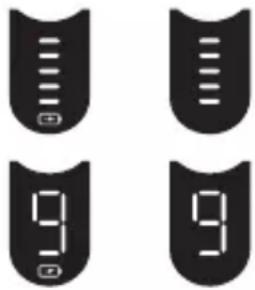 | Thebattery statusis shown with segments and additionally in digits (for some models also with a battery icon).The status segments appear / disappear gradually with the status of the battery power.The digital number shows the remaining shaving time in minutes. |
| Plug reminder(low charge / cordless operation only) | |
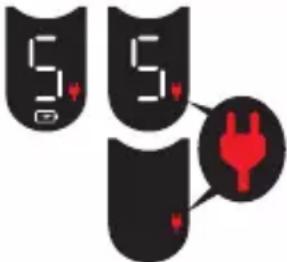 | 1.Flashing: Battery is inlow charge, i.e. 5 minutes shaving time are left.2.Fast flashing: This appliance can only beoperated cordless.Disconnect the shaver from the power supply before turning it on. |
| Travel lock | |
 | When the travel lock icon appears on the display, the shaver is locked. |
| Replacement indicator for Foil & Cutter cassette | |
 | Thereplacement indicatorshows the usage of the Foil & Cutter cassette. The status segments disappear gradually with the numbers of shaves*. |
| Cleaning indicator(with Clean & Charge station usage only) | |
 | Thecleaning indicatorlights up after each shave as a reminder that the shaver should be cleaned in the Clean & Charge Station. |
*not with all models
Usage
Make sure that the shaver is disconnected from the power supply. Press the on/off button (4) to operate the shaver.
Tips for a perfect shave
- Position the shaver at the right angle (90°) to your skin.
- Stretch your skin slightly with your hand.
- Shave against the direction of your beard growth.
Multi Head Lock switch (head lock)
The shaver head can be locked in five positions to shave hard-to-reach areas (e.g., under the nose).
- Slide the Multi Head Lock switch (3) down to lock the shaver head.
- Move the shaver head manually to your desired position.
- For automatic cleaning in the Clean & Charge Station, the head lock needs to be released.
Precision trimmer
The trimmer can be used to trim sideburns, moustache, or beard.
- Press the release button (8) and slide the trimmer (6) upwards.
Travel lock
The shaver can be locked to avoid unintended starting of the motor (e.g., for storing in a suitcase).
- Press the on/off button (4) for 5 seconds to lock/unlock the shaver. This is confirmed by a beep sound and the lock icon appearing/disappearing on the display.
Foil replacement
To maintain 100% shaving performance, replace the Foil & Cutter cassette (1) when the foil replacement indicator lights up (and no status segments are visible).
- To remove the Foil & Cutter cassette, press the release button (2).
- Press the on/off button for 10 seconds to reset the counter.
- Afterwards, you need to unlock the shaver (see chapter «Travel lock»).
- On some shaver models, the replacement indicator will reset automatically after 7 shaves.
Cleaning
Cleaning under running water
Especially important after foam or gel usage
- Switch on the shaver cordless and rinse the shaver head under hot running water until all residues have been removed. You may use liquid soap without abrasive substances. Rinse off all foam and let the shaver run for a few more seconds.
- Next, switch off the shaver, press the release button (2) to remove the Foil & Cutter cassette (1) and let it dry.
- If you regularly clean the shaver under water, apply a drop of light machine oil on top of the Foil & Cutter cassette once a week.
The shaver needs to be cleaned under running water after each foam or gel usage!
Cleaning with a brush
- Switch off the shaver. Remove the Foil & Cutter cassette (1) and tap it out on a flat surface. Using the brush, clean the inner area of the pivoting head. Do not clean the cassette with the brush as this may damage it!
Clean & Charge Station (C & C)*
The Clean & Charge Station has been developed for cleaning, charging, lubricating and storing your Braun shaver.
12 Station power socket 13 Lift button for cartridge exchange 14 Station-to-shaver contacts 15 Clean & Charge Station display 15a Level indicator 15b Status light 15c Cleaning program indicators* 16 Start button 17 Cleaning cartridge
* not with all models (see display box)
C & C Installation
- Remove the protection foil from the C & C display.
- Press the lift button (13) at the rear side of the C & C to lift the housing.
- Hold the cleaning cartridge (17) down on a flat, stable surface (e.g., a table).
- Carefully remove the lid from the cartridge.
- Slide the cartridge from the rear side into the base of the station until it snaps in.
- Slowly close the housing by pushing it down until it locks.
- Using the power supply (10), connect the station power socket (12) to an electrical outlet.
C & C Usage
Important: The shaver needs to be dry and free from any foam, gel, or soap residue!
- Insert the shaver in the C & C upside down, with the front showing and head lock (3) released.
- The contacts (7) on the back of the shaver need to align with the contacts (14) in the C & C. Push the shaver backwards in the correct position. A beep sound confirms that the shaver sits properly in the C & C.
- Only C & C with cleaning program selection: The C & C analyses the hygiene status. The status is shown by the cleaning program indicators (15c) in the C & C display (15).
Charging the shaver in the C & C
Charging will start automatically when the shaver has been inserted properly.
Cleaning the shaver in the C & C
When the cleaning indicator lights up on the shaver display, insert the shaver into the C & C, as described above.
Short / economical cleaning, normal level of cleaning, intensive cleaning
Each cleaning program consists of several cycles, where cleaning fluid is flushed through the shaver head.
Automatic cleaning
Start the cleaning process by pressing the start button (16). If the status light (15b) does not shine (C & C switches to stand-by after about 10 minutes), press the start button twice. Otherwise, cleaning will not start.
Depending on your model and/or program selected, the cleaning time takes up to 3 minutes. During this time, the status light (15b) blinks.
After cleaning and charging is completed, all indicators turn off.
Leave the shaver in the C & C for drying. It takes several hours until remaining moisture evaporates, depending on the climatic conditions.
Removing the shaver from the C & C
Hold the C & C with one hand and tilt the shaver slightly to the front to release it.
Cleaning cartridge / replacement
When the level indicator (15a) lights up permanently red, the remaining fluid in the cartridge is sufficient for about 3 more cycles. When the level indicator blinks red, the cartridge needs to be replaced – about every 4 weeks when used daily.
After having pressed the lift button (13) to open the housing, wait for a few seconds before removing the used cartridge to avoid any dripping. Before discarding the used cartridge, make sure to close the openings using the lid of the new cartridge, since the used cartridge will contain contaminated cleaning solution.
The hygienic cleaning cartridge contains ethanol or isopropanol (specification see cartridge), which once opened will naturally evaporate slowly. Therefore, each cartridge, if not used daily, should be replaced after approximately 8 weeks. The cleaning cartridge also contains lubricants for the shaving system, which may leave residual marks on the outer foil frame and the cleaning chamber of the C & C. These marks can be removed easily by wiping gently with a damp cloth and do not impact the shaver and its performance in any way.
Accessories
Braun recommends changing your shaver's Foil & Cutter cassette every 18 months to maintain your shaver's maximum performance.
Available at your dealer or Braun Service Centres:
- Foil & Cutter cassette: 83M
- Cleaning Cartridge: CCR
- Braun Shaver cleaner spray
Environmental notice
Product contains batteries and / or recyclable electric waste. For environment protection, do not dispose of in household waste, but for recycling take to electric waste collection points provided in your country.

The cleaning cartridge can be disposed of with regular household waste.
Subject to change without notice.
Trouble-Shooting
| Problem: Possible reason: Remedy: | ||
| Shaver | ||
| Shaver does not start when pressing the on / off button. | 1. The shaver can only be operated cordless.2. Travel lock is activated. | 1. Unplug the shaver.2. Press the on / off button for 5 seconds to unlock the shaver. |
| Charging does not start when connected to power socket or put in the Clean & Charge Station. | 1. Sometimes charging starts delayed (e.g. after long storage).2. Ambient temperature is out of valid range.3. Power supply is not plugged into the shaver properly.4. Shaver is not placed properly in the Clean & Charge Station. | 1. Wait a few minutes. Charging will start automatically.2. Recommended ambient temperature for charging is 5 °C to 35 °C.3. Power supply needs to snap in.4. Contacts of the shaver need to align with contacts in the Clean & Charge Station. |
| Shaver does not charge completely and keeps blinking. | Ambient temperature is out of valid range. | Recommended ambient temperature for charging is 5 °C to 35 °C. |
| Unpleasant smell from the shaver head. | 1. Shaver head is cleaned with water.2. Cleaning cartridge is in use for more than 8 weeks. | 1. When cleaning the shaver head with water only use hot water and from time to time some liquid soap (without abrasive substances). Remove Foil & Cutter cassette to let it dry.2. Change cleaning cartridge at least every 8 weeks. |
| Battery performance dropped significantly. | 1. Foil and cutter are worn which requires more power for each shave.2. Shaver head is regularly cleaned with water but not lubricated. | 1. Renew Foil & Cutter cassette.2. If the shaver is regularly cleaned with water, apply a drop of light machine oil on top of the foil once a week for lubrication. |
| Shaving performance dropped significantly. | 1. Foil and cutter are worn.2. Shaving system is clogged. | 1. Renew Foil & Cutter cassette.2. Soak the Foil & Cutter cassette into hot water with a drop of dish liquid. Afterwards rinse it properly and tap it out. Once dry apply a drop of light machine oil on the foil. |
| Shaver head is damp. | 1. Drying time after automatic cleaning was too short.2. Drain of the Clean & Charge station is clogged. | 1. Clean directly after shaving to allow enough time for drying.2. Clean the drain with a wooden toothpick. |
| Clean & Charge Station | ||
| Cleaning does not start when pressing the start button. | 1. Shaver is not placed properly in the Clean & Charge Station.2. Cleaning cartridge does not contain sufficient cleaning fluid (display blinks red).3. Appliance is in stand-by mode. | 1. Insert shaver into the Clean & Charge Station and push it to the rear side of the station (contacts of the shaver need to align with contacts in the station).2. Insert new cleaning cartridge. Press the start button again.3. Press the start button again. |
| Increased consumption of cleaning fluid. | Drain of the Clean & Charge station is clogged. | - Clean the drain with a wooden toothpick.- Regularly wipe the tub clean. |
Free repair regulations
Please note down the suggested replacement date (in 18 months from now) below replacement part reference number.
Braun Series 8 warranty certificate
Carry-in repair

- TIPS FOR A GOOD SHAVE
- TRIMMER BLADE
- TRAVEL LOCK
- WARNING
- CAUTION
- HOW TO REMOVE THE SHAVER
- REPLACING AND DISPOSING OF THE CLEANING CARTRIDGE
- CONSUMABLES
- ENGLISH
- IMPORTANT
- CLEAN&CHARGE STATION
- SHAVER
- BASIC OPERATING INFORMATION
- CHARGING
- DISPLAY
- USAGE
- TIPS FOR A PERFECT SHAVE
- MULTI HEAD LOCK SWITCH (HEAD LOCK)
- PRECISION TRIMMER
- FOIL REPLACEMENT
- CLEANING
- CLEANING UNDER RUNNING WATER
- CLEANING WITH A BRUSH
- CLEAN & CHARGE STATION (C & C)
- C & C INSTALLATION
- C & C USAGE
- IMPORTANT: THE SHAVER NEEDS TO BE DRY AND FREE FROM ANY FOAM, GEL, OR SOAP RESIDUE
- CHARGING THE SHAVER IN THE C & C
- CLEANING THE SHAVER IN THE C & C
- AUTOMATIC CLEANING
- REMOVING THE SHAVER FROM THE C & C
- CLEANING CARTRIDGE / REPLACEMENT
- ACCESSORIES
- ENVIRONMENTAL NOTICE
- FREE REPAIR REGULATIONS
- BRAUN SERIES 8 WARRANTY CERTIFICATE
Brand : BRAUN
Model : Series 8 8371cc
Category : Razor