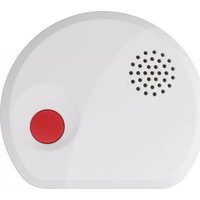
FWM 100 - Water detector KATHREIN - Free user manual and instructions
Find the device manual for free FWM 100 KATHREIN in PDF.


| Product Type | Wall Mount Bracket for Satellite Antenna |
| Brand | Kathrein |
| Model | FWM 100 |
| Material | Galvanized Steel with White Powder Coating |
| Dimensions (WxHxD) | 200 x 150 x 50 mm |
| Weight | 0.6 kg |
| Maximum Load Capacity | 25 kg |
| Mounting Type | Wall-mounted with adjustable tilt |
| Compatibility | Satellite dishes up to 80 cm diameter |
| Included Accessories | Screws, wall plugs, Allen key |
| Installation | Professional installation recommended |
| Certifications | CE, RoHS |
| Warranty | 2 years |
| Country of Origin | Germany |
| Storage Temperature | -20°C to +60°C |
| Operating Temperature | -10°C to +50°C |
| Color | White |
Frequently Asked Questions - FWM 100 KATHREIN
Tip: Use a spirit level for accuracy.
User questions about FWM 100 KATHREIN
0 question about this device. Answer the ones you know or ask your own.
Ask a new question about this device
Download the instructions for your Water detector in PDF format for free! Find your manual FWM 100 - KATHREIN and take your electronic device back in hand. On this page are published all the documents necessary for the use of your device. FWM 100 by KATHREIN.
USER MANUAL FWM 100 KATHREIN
natural_image
Simple diagram with a red circle and a dot pattern inside a rounded rectangle (no text or symbols)Introduction
Thank you for purchasing the KATHREIN Digital Systems GmbH water sensor. Please take the time to read the following safety and installation information carefully and attentively before using the water sensor. It is imperative to comply with these instructions in order to ensure the safe operation of the device. If you have any further questions, please contact your local retailer or KATHREIN Digital Systems GmbH directly. Your water sensor FWM 100 was developed and built with state-of-the-art technology and complies with European and German standards.
Please keep this manual safe to be able to answer possible questions in the future. The manual is an integral part of the product even in case it is resold to a third party.
Disclaimer
All technical details and descriptions in this manual were compiled with the greatest care. However, KATHREIN Digital Systems GmbH cannot entirely exclude mistakes in this manual. Therefore, we do not assume any legal responsibility or liability resulting from wrong information in this manual. Descriptions, technical illustrations and technical data are subject to change without notice according to technical progress. In addition, KATHREIN Digital Systems GmbH reserves the right to change the product and the manual without prior notice. We do not assume any guarantee with regard to the content of this document. We appreciate any comments on mistakes or inaccuracies which may help us to improve this product and this manual.

This symbol is intended to attract the user's attention to the potential risk of dangerous unprotected voltage inside the housing. This may lead to electric shock.

This symbol is intended to attract the user's attention to user and maintenance instructions in the manual and documents enclosed with the product.
WARNING:
TO MINIMISE THE RISK OF ELECTRIC SHOCK, YOU MUST NOT EXPOSE THIS PRODUCT TO WET AND MOIST CONDITIONS AT ANY TIME.
RoHS
All KATHREIN Digital Systems GmbH products are lead-free and meet the requirements stated under the European Directive on the Restriction of Hazardous Substances (RoHS). This guarantees that the entire production process and the product itself are free of lead and of all listed hazardous substances.
FC
This product was tested and complies with the regularities for a class of digital devices stated under FCC part 15. These limits were specified to provide reasonable protection against harmful exposure when operating the device in a commercial environment. This product generates, uses and may emit radio energy. It may in addition interfere with other radio communication systems if not installed or used according to this manual. Using the device in residential areas may cause disturbances to be possibly remedied at the user's expense.
CE
Hereby KATHREIN Digital Systems GmbH declares that the water sensor FWM 100 (order number 2220000013, EAN 4021121548901) is in conformity with the relevant provisions of Directive 1999/5/EG.
Conformity:
The declaration of conformity is available at http://www.kathrein-ds.com in the download section of the respective product. Alternatively, you can request the declaration of conformity directly from us:
KATHREIN Digital Systems GmbH
Anton-Kathrein-Str. 1–3
83022 Rosenheim, Germany

WARNING
The warranty claim will expire in case of damages resulting from the non-observance of this manual.
We do not assume any liability for consequential damages.
We do not assume any liability for damages to persons and/or material whatsoever, which result from improper handling or noncompliance with the safety instructions. The warranty claim will expire in such cases!
The water sensor FWM 100 is equipped with a high-quality housing. However, please observe the following safety instructions:
- Operate the water sensor only with the provided batteries.
- Handle the water sensor with care, heavy vibration or bumps may damage the device.
- Do not expose the water sensor to direct sunlight or strong heat, e.g. heaters.
- Do not install the water sensor close to strong electric power lines or magnetic fields, as this may impair the transmission quality significantly.
- Do not install the water sensor directly on iron or aluminium surfaces, as this may impair the wireless transmission significantly. Use a non-conducting material to insulate the device from the installation surface.
- Do not install the water sensor in moist, very cold or very hot environments. Please observe the maximum humidity and temperature.
- Persons (including children) with limited physical, sensory or mental abilities and/or lacking experience and/or knowledge must not use this product.
- Keep children away from the product and other connected electrical appliances at all times. The water sensor includes small parts they can swallow. Lay cables expertly so that they are neither bent nor otherwise damaged. Install the water sensor out of children's reach. Do not leave packaging materials unattended, as they may be dangerous for playing children.
- Use a damp cloth to clean the water sensor's surface, then dry it. Cleaning agents will damage the surface.
Malfunctions and Defects
If you notice any kind of defect, remove the batteries from the water sensor FWM 100 and contact your retailer or KATHREIN Digital Systems GmbH directly. Any further usage of the system may lead to fire or electric shock!
Intended Use
The KATHREIN Digital Systems GmbH water sensor FWM 100 is intended to protect against water damage. Install the water sensor indoors only. Any other use than that described in this manual is not permitted and will void any warranty or guarantee as well as liability claims. The same applies if the device is modified or retrofitted.
Disposal

Do not dispose of the device with domestic waste!
This product complies with the EU Directive on waste electrical and electronic equipment (WEEE) and therefore must not be disposed of with domestic waste. Dispose of the device via your local collection point for waste electronic equipment!
This product contains software programs subject to the GPL free software license.
This product contains software that was developed by third parties and/or software subject to the GNU General Public License (GPL) and/or the GNU Lesser General Public License (LGPL). We will send you the source code of these programs on request. The GPL and/or LGPL code used and offered in this product is EXCLUSIVE OF ANY GUARANTEE WHATSOEVER and is subject to the copyright of one or several authors. For further details, please refer to the GPL and/or LGPL code of this product and to the terms of use of GPL and LGPL.
You can read the complete license text at http://www.gnu.org/licenses/gpl-2.0.html. For an unofficial German translation, please go to
http://www.gnu.de/documents/gpl.de.html.
Product description:
The water sensor alerts you of water leaks and floods so that countermeasures can be taken as soon as possible. If the probe detects water for more than ten seconds, the water sensor sends an alarm signal to the alarm panel and both emit acoustic alarms.
Sensor data:
Dimensions (without mount): 9.5 × 3 × 8.3 cm (3.74 x 1.18 x 3.26 in)
Cable length: 29.5 cm (11.61 in)
Weight: 113 g (0.24 lbs)
Operating temperatures: -10 °C to +45 °C (14 °F to 113 °F)
Humidity: Maximum 95%
Detection method: Wheatstone bridge

-
Red LED (internal – shines through the housing)
-
Flashes twice: water detector was successfully added
- Flashes every twenty minutes: water detector has lost the connection
-
Flashes permanently: water detector is in standby mode
-
Learn/Test button
-
Pressing the test button once sends a supervisor signal to the alarm panel.
- Pressing the test button for more than ten seconds resets the water detector and deletes it from the sensor list.
- Pressing the test button while the water detector emits an alarm sets the water detector to standby mode.
- External water probe
- External water probe port
- Battery compartment
- The water sensor requires a CR123A 3 V lithium battery. The average battery life is 2.6 years, if one alarm per month is triggered.
- The water detector sends a status regularly to the alarm panel. The alarm panel is informed immediately when the battery runs low.
- Attachment notches for wall mounting
-
Water sensor on housing bottom
-
Remove the screw from the housing bottom.
- Insert the supplied battery.
- You can add the water sensor for XT2 Plus to the alarm panel only within the first three minutes after having connected it to its power supply!
- Open the menu "Sensors" → "Add," and press "Start" in the web interface of the alarm panel.
- Keep the Learn button (2) pressed for approx. ten seconds; the water sensor will beep briefly at the beginning and longer after approx. ten seconds. Release the Learn button. The water sensor transmits the connection request and the LED (1) flashes twice.
- The configuration menu of the alarm panel should indicate the water sensor.
- Add the water sensor.
- Configure the water sensor now by clicking "Change" or do it later in the "Sensor list".
Range test:
To test the signal strength at the desired installation location, perform a range test.
-
Open the alarm panel menu "Sensors" → "Range" and press "Start".
-
Press the Learn/Test button of the water sensor.
-
The sensor and the signal strength should be indicated. The higher the indicated number the better the reception (1 - 9).
-
Click "Stop" to end the test.
Installation:
You can install the water sensor either on the wall or on the floor.
Wall mounting:
- Remove the screw from the housing bottom.
- Use a slim screwdriver to loosen the screws of the external water probe port counterclockwise.
- Plug one side of the external water probe into the water probe port and fix it by tightening the screws clockwise.

natural_image
Interior view of an electronic device showing a circuit board, battery, and wiring (no visible text or symbols)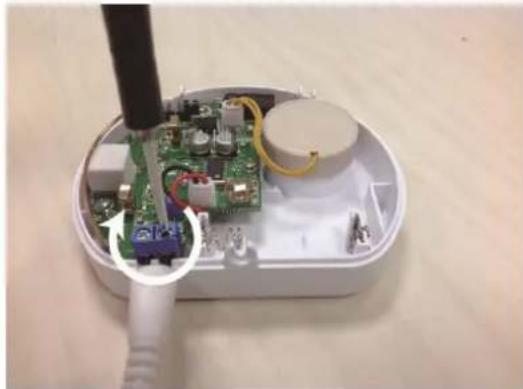
natural_image
Interior view of an electronic device showing a green circuit board with wiring and a black tool inserted, no visible text or symbols.- Break open the recesses intended for wall mounting.
- Use the provided screws to screw the water sensor tightly to the wall.
- Close the housing again.
- To prevent that the cable to hanging loosely from the wall, use the plastic clips to attach it. Remove the double-sided adhesive tape and place the cable of the water sensor into the clip.

natural_image
Close-up of a white electrical plug with two leads and a blue plastic clip attached (no text or symbols visible)Floor mounting:
- If the three sensors at the bottom of the water sensor's housing detect water, it triggers an alarm as well.
- For this purpose, place the water sensor with the golden sensors facing downwards on the floor.
- Since the water sensor is not entirely watertight, you should react promptly in case of an alarm. Otherwise, the device will possibly be destroyed/damaged by the rising water.
Notes:
- In case of longer contact with water, the water sensor sends an alarm signal to the alarm panel every ten minutes. If the water level drops again, the water sensor returns to normal operation.
- You can extend the external water probe e.g. by means of a luster terminal and another cable.
- The water sensor is not compatible with the wireless repeater and cannot be saved in the backup file.
Brand : KATHREIN
Model : FWM 100
Category : Water detector