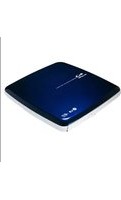
GH24NSD1 - Computer component LG - Free user manual and instructions
Find the device manual for free GH24NSD1 LG in PDF.


| Product Type | Internal DVD±RW/CD-RW Drive |
| Interface | SATA |
| Write Speed (DVD±R) | 24x |
| Write Speed (DVD±R DL) | 16x |
| Write Speed (DVD+RW) | 8x |
| Write Speed (DVD-RW) | 6x |
| Write Speed (CD-R) | 48x |
| Write Speed (CD-RW) | 24x |
| Read Speed (DVD-ROM) | 16x |
| Read Speed (CD-ROM) | 48x |
| Buffer Size | 2 MB |
| Load Mechanism | Tray |
| Form Factor | 5.25 inch internal |
| Dimensions (W x H x D) | 148 x 42 x 170 mm |
| Weight | 0.7 kg |
| Power Supply | 5V / 12V via SATA power connector |
| Supported Discs | CD-R, CD-RW, DVD±R, DVD±R DL, DVD±RW, DVD-RAM |
| Operating Systems | Windows, Linux, macOS |
| Laser Class | Class 1 (IEC 60825-1) |
| Maintenance | Use lens cleaning disc; avoid dust and liquids |
| Repairability | No user-serviceable parts; refer to qualified technician |
Frequently Asked Questions - GH24NSD1 LG
User questions about GH24NSD1 LG
0 question about this device. Answer the ones you know or ask your own.
Ask a new question about this device
Download the instructions for your Computer component in PDF format for free! Find your manual GH24NSD1 - LG and take your electronic device back in hand. On this page are published all the documents necessary for the use of your device. GH24NSD1 by LG.
USER MANUAL GH24NSD1 LG
Installing the Drive
Before installing the drive, turn off the system power.

Disconnect the power cord, and remove the cover.
- Remove a vacant 5.25" drive bay panel from the computer. Slide the drive into the drive bay.


Connecting the SATA Power Cable
- Connect the power cable so the projection of the cable connector side to come to the left side. Be careful not to connect upside down.
NOTE:
Improper connection may damage the drive and void the warranty. Generally, the power connector can only fit one way.

- Connect to the power connector of the PC.

Connecting the SATA Data Cable
- Connect the data cable. Be careful not to connect upside down.
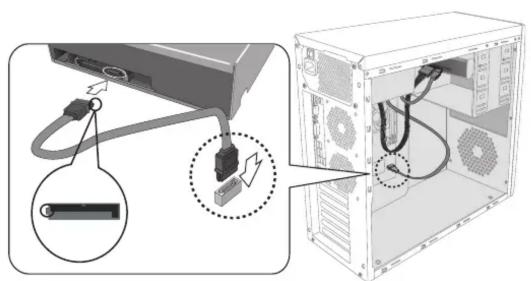
- Connect to the SATA connector on the PC's Motherboard.

Replace the cover, connect the power cord and restart your computer.
- Your computer configuration may different from the illustrations.

NOTE
Please pay attention to handling Electrostatic Sensitive Devices, you may use anti-static products such as wrist straps, heel straps, mats to protect your body from electrostatic.

LG
Life's Good
Quick Set-up Guide
To install of your product, please read this guide manual carefully and completely.
Features
- Serial ATA interface.
- Power tray loading and ejection of disc. (The disc can also be ejected manually.)
-
Combination CD-R/RW, DVD-R/RW, DVD-R DL, DVD+R/RW, DVD+R DL, M-DISC
(DVD+R SL), DVD-RAM Drive functions into one drive.
• Supports Region playback control Phase II
• Automatic buffer underrun error prevention technology. -
You may experience lower write quality in case if you use disc products by some disc makers which those are not registered with the product's firmware.
Therefore, it is recommended that you use only discs by recommended companies. And even if the write session is completed successfully, check the write quality before you put the disc in storage, especially in case of an important data backup.
(Manufacturer is not responsible for any loss resulting from data backup failure.)
Under Windows 8 operating system, a specific mainboard with nVidia GeForce 7025
Chipset may cause an abnormal operation.

MFL67902155
Super Multi DVD Writer
GH24
System Environment
Computer
This unit can be operated in the system environment explained here.
| System requirements | CPU: Motherboard that supports Serial ATA. (Recommended Pentium IV 3.2GHz or higher.) RAM:512MB or higher. |
| VGA Card Memory | 128MB or higher. |
| Hard disk | 20GB or more free space.(The free space needed for writing depends on the quantity of data.) |
| Interface | Serial ATA |
| Drive bay | 13.34 cm (5.25-inch) half-height bay required |
| Power | +5V/+12V power socket required |
| Software Required OS | Windows 10, 8.1, 8, 7, Vista(X86, X64), XP [Home Edition/ Professional/Media Center Edition] with SP3 or higher,Direct X 9.0 or Higher is required. |
| Recommended media manufacturer | CD-R : LG, Mitsubishi Kagaku Media, Verbatim, Taiyo Yuden or TDK discs are recommended.CD-RW : Ricoh, Mitsubishi Kagaku Media, Verbatim discs are recommended.DVD-R : Mitsubishi Kagaku Media, Verbatim are recommended.DVD-RW : Mitsubishi Kagaku Media, Verbatim are recommended.DVD+R : Mitsubishi Kagaku Media, Verbatim are recommended.DVD+RW : Mitsubishi Kagaku Media, Verbatim are recommended.DVD-RAM : Maxell, Panasonic are recommended.M-Disc (DVD+R SL) : MillenniataDVD+R DL : Mitsubishi Kagaku Media, Verbatim are recommended.DVD-R DL : Mitsubishi Kagaku Media, Verbatim are recommended. |
* Compatibility problem in write/read function may occur with media depending on the media
manufacturing quality
* Upon the media condition or some of user's environment the maximum speed sometimes could not be
guaranteed.
* Please visit http://www.m-disc.com to learn more about the M-DISC™.
Specifications
Items
General
Host Interface Serial ATA
Supported Discs DVD-ROM(Single/Dual), DVD-RW, DVD-R, DVD-R Dual layer, DVD+RW,
DVD+R, DVD+R Double layer, DVD- RAM, M-Disc (DVD+R SL),
CD-Digital Audio & CD-Extra, CD-Plus, CD-ROM, CD-ROM XA-Ready,
CD-I FMV, CD-TEXT, CD-Bridge, CD-R, CD-RW, Photo-CD
(Single & Multi-Session), Video CD, DVD-VIDEO
(8cm disc can be used only with drive placed horizontally.)
Mounting direction Horizontal/Vertical
Read/Write Speed
| Write : DVD-R : 2 x, 4 x, 8 x, 16 x, 24 x | DVD-RW : 2 x, 4 x, 6 x |
| DVD+R : 2.4 x, 4 x, 8 x, 16 x, 24 x | DVD+RW : 2.4 x, 4 x, 6 x, 8 x |
| DVD+R DL : 2.4 x, 4 x, 8 x | DVD-R DL: 4 x, 8 x |
| DVD-RAM: 2 x, 3 x, 5 x | M-Disc (DVD+R SL): 4 x |
| CD-R: 16 x, 32 x, 40 x, 48 x | CD-RW: 4 x, 10 x, 16 x, 24 x |
Read : DVD-ROM (Single/Dual) : 16 x/12 x max.
DVD-R : 16 x max. DVD-RW : 13 x max.
DVD+R: 16 x max. DVD+RW: 13 x max
DVD+R DL : 12 x max. DVD-R DL: 12 x max.
DVD-RAM (Ver. 2.x): 5 x max. M-Disc (DVD+R SL): 12 x max.
CD-R/ROM: 48 x max. CD-RW: 40 x max
CD-DA(DAE): 40 x max.
* The drive's appearance and specifications may change without prior notice.
Items
Burst transfer rate SATA Gen.1 1.5 Gbps
Average Access CD-ROM: 125 ms (Typical)
Time(Random) DVD-ROM : 145 ms (Typical)
DVD-RAM (Ver. 2.x) : 270 ms (Typical)
Buffer capacity 0.5 MB
MTBF 100000 Power On Hours (Duty Cycle 20 %)
Environmental Level
When operating Temperature: 5 °C to 40 °C
Humidity: 15 % to 85 % R.H. (non condensing)
When not operating Temperature: -30 °C to 60 °C
Humidity: 10 % to 90 % R.H. (non condensing)
Electrical
Power DC 5 V, DC 12 V
Software
Install the appropriate CD Recording Authoring Software before using this unit.
* Please uninstall any previous CD burning software you may have loaded on your PC in order to prevent possible compatibility issues.
Once you have installed the application software, you may (if you wish) begin to reinstall previous software, taking note for errors.
We recommend using the drive with the latest software as some problems encountered when using the drive can be solved by updating the software.
Worldwide corporate site : http://www.LG.com
Safety Instructions
The appliance is not intended for use by young children or infirm persons without supervision.
■ Microsoft ^® and Windows ^® are trademarks registered in the United States and other countries by the Microsoft Corporation.
■ The company names and product names written in this manual are trademarks or registered trademarks of the respective companies.
Caution!
The disc rotates at high speed in the drive unit. Use of worn, damaged, or non-standard discs can adversely affect the drive and cause the disc to shatter or crush while in use. Disc crush can only occur when you use a damaged disc in the drive. It is an extremely rare occurrence, but there are steps which can be taken to prevent it.
Always check your discs before inserting them into the drive.
- Take care not to use worn, cracked, damaged, warped or poor quality discs, as this may cause damage to your drive.
- Check the clear plastic on the center of the disc, cracks here are the main cause of disc crush.
- Do not play discs which are a non-standard (i.e. non-circular)shape, such as heart shaped discs, or discs in the shape of a business card.
How can you keep your discs from becoming damaged? - When not in use, remove discs from the drive.
- Keep discs in the packaging supplied with them and out of direct sunlight and away from heat sources.
Excessive vibration or a sudden jolt to the drive during operation may cause a malfunction. Avoid exposing the drive to sudden changes in temperature as it may cause condensation to collect inside the drive.
- Installing the Drive
- NOTE:
- Connecting the SATA Data Cable
- Replace the cover, connect the power cord and restart your computer.
- NOTE
- Quick Set-up Guide
- Features
- Super Multi DVD Writer
- System Environment
- Specifications
- Items
- General
- Read/Write Speed
- Environmental Level
- Electrical
- Software
- Safety Instructions
- Caution!
Brand : LG
Model : GH24NSD1
Category : Computer component