
PVDATN000 - Heat pump LG - Free user manual and instructions
Find the device manual for free PVDATN000 LG in PDF.
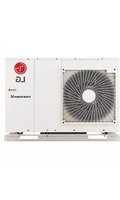


| Product Type | Air-to-Air Heat Pump (Split System) |
| Indoor Unit Dimensions (W x H x D) | Approx. 998 x 345 x 210 mm |
| Outdoor Unit Dimensions (W x H x D) | Approx. 840 x 670 x 360 mm |
| Indoor Unit Weight | 14.5 kg |
| Outdoor Unit Weight | 35.0 kg |
| Power Supply | 230 V, 50 Hz, Single Phase |
| Cooling Capacity | 2.6 kW (approx. 9000 BTU/h) |
| Heating Capacity | 3.1 kW (approx. 10500 BTU/h) |
| COP (Coefficient of Performance) | Up to 4.2 (Heating) |
| Refrigerant Type | R32 |
| Sound Level (Indoor) | 21 - 42 dB(A) |
| Sound Level (Outdoor) | 48 - 56 dB(A) |
| Filter Type | Washable Anti-Bacterial Filter |
| Operation Modes | Auto, Cool, Heat, Dry, Fan, Sleep |
| Defrost Function | Automatic Defrost System |
| Airflow Direction Control | 4-Way Auto Swing (Up/Down, Left/Right) |
| Auto Restart | Yes (After Power Failure) |
| Remote Control | Wireless Infrared Remote Included |
| Warranty | 2 Years (Parts and Labor) / 5 Years (Compressor) |
| Safety Features | Overheat Protection, Leak Detection, Auto Shut-off |
| Recommended Maintenance | Clean air filters every 2 weeks; Inspect outdoor unit annually |
| Spare Parts Availability | Filters, Remote Control, Fan Motor, Compressor (via LG Service) |
| Repairability Index | 7.5 / 10 (Modular design with accessible components) |
Frequently Asked Questions - PVDATN000 LG
User questions about PVDATN000 LG
0 question about this device. Answer the ones you know or ask your own.
Ask a new question about this device
Download the instructions for your Heat pump in PDF format for free! Find your manual PVDATN000 - LG and take your electronic device back in hand. On this page are published all the documents necessary for the use of your device. PVDATN000 by LG.
USER MANUAL PVDATN000 LG
INSTALLATION/OWNER'S MANUAL
AIR CONDITIONER
Please read this manual carefully before operating your set and retain it for future reference.
TYPE: Data Saving Module (Multi-V)
MODELS: PVDATN000
IMPORTANT SAFETY INSTRUCTIONS
READ ALL INSTRUCTIONS BEFORE USING THE APPLIANCE.
Always comply with the following precautions to avoid dangerous situations and ensure peak performance of your product.

WARNING
It can result in serious injury or death when the directions are ignored.

CAUTION
It can result in minor injury or product damage when the directions are ignored.

WARNING
- Installation or repairs made by unqualified persons can result in hazards to you and others.
- Installation work must be performed in accordance with the National Electric Code by qualified and authorized personnel only.
- The information contained in the manual is intended for use by a qualified service technician familiar with safety procedures and equipped with the proper tools and test instruments.
- Failure to carefully read and follow all instructions in this manual can result in equipment malfunction, property damage, personal injury and/or death.

WARNING
Installation
- Be sure to request installation from the service center or an installation specialty store. Otherwise, it may cause fire, electric shock, explosion, or injury.
- Request reinstallation of the installed product from the service center or an installation specialty store. Otherwise, it may cause fire, electric shock, explosion, or injury.
- Do not disassemble, repair, or modify the product randomly. It may cause fire or electric shock.
- Be sure to turn off the outdoor unit power before installation. Otherwise, it may cause electric shock.
In-use
- Do not place flammable materials close to the product. It may cause fire.
- Do not allow water to enter the product. It may cause electric shock or breakdown.
- Do not subject the product to shock. It may cause breakdown.
- Request service from the service center or an installation specialty store if the product becomes wet. It may cause fire or electric shock.
- Do not strike the product with sharp or pointed objects. It may cause breakdown by damaging parts.
- Do not touch the board while the power is connected. It may cause fire, electric shock, explosion, injury, or product malfunction.

CAUTION
In-use
- Do not clean using powerful detergents like solvents; use soft cloths. This can cause fire or product deformation.
- Do not press the screen with excessive force or press two buttons simultaneously. This can cause product breakdown or malfunction.
- Do not touch or pull the lead wire with wet hands. This can cause product breakdown or electric shock.
WARNING
This is a Class A product. In a domestic environment, this product may cause radio interference, in which case the user may be required to take adequate measures.
For your records
Staple your receipt to this page in case you need it to prove the date of purchase or for warranty purposes. Write the model number and the serial number here:
Model number:
Serial number:
You can find them on a label on the side of each unit.
Dealer's name:
Date of purchase:

ENGLISH Disposal of your old appliance
- When this crossed-out wheeled bin symbol is attached to a product it means the product is covered by the European Directive 2006/66/EC.
- All electrical and electronic products should be disposed of separately from the municipal waste stream via designated collection facilities appointed by the government or the local authorities.
- The correct disposal of your old appliance will help prevent potential negative consequences for the environment and human health.
- For more detailed information about disposal of your old appliance, please contact your city office, waste disposal service or the shop where you purchased the product.
TABLE OF CONTENTS
5 NAME OF EACH PART 6 COMPONENTS 7 SETTING AND USING METHOD 7 Date & Time setting 8 PC Connection for Date & Time Setting 15 Data Saving Module Operation 17 Installation Method 19 LED State 20 Data Converter
NAME OF EACH PART

Debugger Connector For bootloader program writing and debugging.
Start Switch On/Off switch for data save.
Dip Switch The switch for selecting Multi-V model
Communication Connector For Setting the Date and Time.
Outdoor Main PCB Connector For Connecting Main PCB and Data Saving Module.
State LEDs Display current state and error.
Battery Socket Keeping Date and Time.
Reset Switch For rebooting Data Saving Module.
SD Card Slot For installing the SD card.
COMPONENTS
Components

Data Saving Module (1EA)
Screw (1EA)

Manual (1EA)
Data Saving Module Exploded view
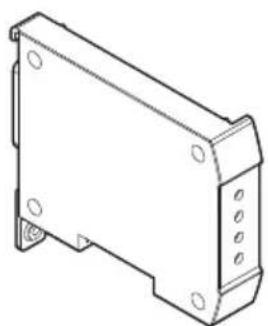


NOTE
SD Card and Battery are not provided by LG. You need to purchase Battery(CR2032) separately.
SETTING AND USING METHOD
Date & Time setting
Requirements
- Operating System : Windows 2000 Over
- PI232 Module - LG MV Module

- Data Saving Module and Cable
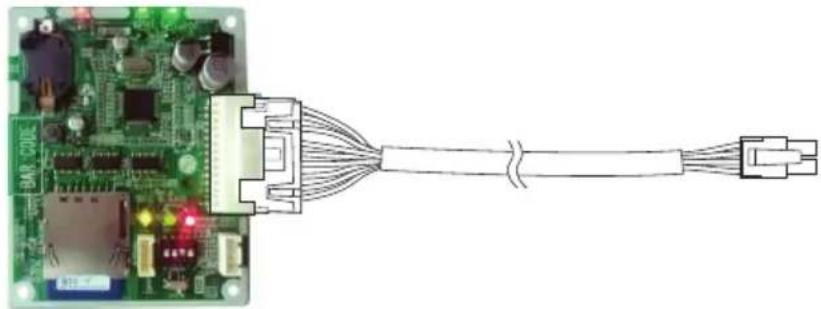
Data Saving Module Data Saving Cable
- LG MV Cable - Outdoor Main PCB

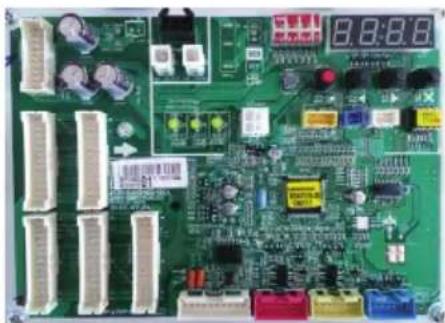
Outdoor Main PCB
NOTE
The product marked with '*' is not provided by LG.
PC Connection for Date & Time Setting
![graph TD A["PC/Notebook"] --> B["PI232 or LG MV (PRCTILO)"] B --> C["LGMV Cable"] C --> D["Data Saving Module"] D --> E["Outdoor Main PCB"] F["RS232"] --> B](/content/2026/06/1372783/images/c2de9277c08fddcd0f965a0cee723d032e396585e54029e79c9b1505596ad33b.jpg)

- How to connect
- Connect Data Saving Module and Multi-V Outdoor Main PCB with Data Saving Cable.
- Connect PC and PI232 or LG MV module with proper cable.
- Connect Upgrade port in Data Saving module and PI232 module with program writing cable.
- Turn on the power of main PCB.
- When using LG MV module (PRCTIL0), set the dip switch to program update mode. (SW 1,2,3,4,5 ON & 6 OFF)

NOTE
If there is no COM port on PC, use the USB-to-RS232 converter.
Setting
- Putty
- Download 32bit PGM
(https://www.chiark.greenend.org.uk/\~sgtatham/putty/latest.html)
Package files
You probably want one of these. They include versions of all the PuTTY utilities.
(Not sure whether you want the 32-bit or the 64-bit version? Read the FAQ entry.)
MSI ('Windows Installer')
| 32-bit: | putty-0.74-installer.msi | (or by FTP) | (signature) |
| 64-bit: | putty-64bit-0.74-installer.msi | (or by FTP) | (signature) |
| Unix source archive | |||
| .tar.gz: | putty-0.74.tar.gz | (or by FTP) | (signature) |
Installation method
- Click "Session" → Check the "Serial" → Enter serial line (ex.COM1) → Enter speed 2400 → Click "Open"

PuTTY Configuration

Category:
![graph TD A["Session"] --> B["Logging"] A --> C["Terminal"] C --> D["Keyboard"] C --> E["Bell"] C --> F["Features"] G["Window"] --> H["Appearance"] G --> I["Behaviour"] G --> J["Translation"] G --> K["Selection"] G --> L["Colours"] M["Connection"] --> N["Data"] M --> O["Proxy"] M --> P["Telnet"] M --…](/content/2026/06/1372783/images/8c6cab32fac97ff96afdf9a665c1101a080cfa5ae963ee4fc857859e7506e7ac.jpg)



- Push reset button on Data Saving Module. then Data Saving Module information will be shown.
![COM1 - PuTTY Data Saving Module : Version 4.0 Release Date : 09/30/2020 Time/Data Setting : Top 'Space Bar' Three Times Drive Size is 7948206080 Bytes (15523840 Sectors) [Total Byte] = 7929331712 Dip switch : Multi V 5 generation initialize Comm. / Store Enabled SD Card In SD Card Unlocked.](/content/2026/06/1372783/images/e4150989964944e1dab7e2c9b2b1516a18c05e58f95dfb90a34617b2d4b87edb.jpg)
Start Data Saving Module
- A Command mode can be available by clicking space bar three times. Then "----START COMMAND----" message will be displayed.
![Data Saving Module : Version 4.0 Release Date : 04/30/2020 Time/Data Setting : Tap 'Space Bar' Three Times Drive Size is 7948206080 Bytes (15523840 Sectors) [Total Byte] = 7929331712 Dip switch : Multi V 5 generation initialize Comm. / Store Enabled SD Card In SD Card Unlocked. --START COMMAND-- - T…](/content/2026/06/1372783/images/4f81163847420b31ed6fa61e27cc201677acd1354934eaa57ae02c130621e5aa.jpg)
Start Command
Type "HELP" in the terminal. Then, the program version and guides for commands will be displayed in the terminal.
![--START COMMAND-- - Type 'HELP' or '?' -HELP LG Data Saving Module [Firmware Version 4.0] 1. DATE [yyyy-mm-dd] (Display or set the date) ex) Display : Type 'DATE' only! ex) Setting : Type 'DATE 2013-07-18' 2. TIME [hh:mm:ss] (Display or set the time : 24H) ex) Display : Type 'TIME' only! ex) Setting…](/content/2026/06/1372783/images/e266cf2308085377359494ca99118b98f6372351e81e0f08dba24ba995bc28e7.jpg)
Enter HELP
How to set date
Type "DATE": Display currently configured date
![COM1 - PUTTY >HELP LG Data Saving Module [Firmware Version 4.0] 1. DATE [yyyy-mm-dd] (Display or set the date) ex) Display: Type 'DATE' only! ex) Setting: Type 'DATE 2013-07-18' 2. TIME [hh:mm:ss] (Display or set the time: 24H) ex) Display: Type 'TIME' only! ex) Setting: Type 'TIME 16:30:24' 3. HELP…](/content/2026/06/1372783/images/45532d2eb95f7278ce81e96599ceba213fd40cebd0e2e0cb566aeb7d8ef824a5.jpg)
Input date
- Change date: DATE [yyyy-mm-dd] e.g., DATE 2020-07-24
- Check modified date after typing new date.
![ex) Display: Type 'TIME' only! ex) Setting: Type 'TIME 16:30:24' 3. HELP or ? (Display help) 4. QUIT (Quit command-mode) 5. INTERVAL [2||5||10||20] (Display or set the Saving Time Interval) ex) Display: Type 'INTERVAL' only! ex) Setting: Type 'INTERVAL 5' →DATE Current date: 2020-01-01 →DATE 2020-07…](/content/2026/06/1372783/images/6e32c7afef520d06dea8fcb74982b29121f978216b1cc7dd34613d736d8895fc.jpg)
Check and change date
NOTE
In case of replacing a battery, the date or time is not correct. It needs to set date and time again.
How to set time
Type "TIME": Display currently configured time
![LG Data Saving Module [Firmware Version 1.0] 1. DATE [yyyy-mm-dd] (Display or set the date) ex) Display: Type 'DATE' only! ex) Setting: Type 'DATE 2013-07-15' 2. TIME [hh:mm:ss] (Display or set the time: 24H) ex) Display: Type 'TIME' only! ex) Setting: Type 'TIME 16:30:24' 3. HELP or ? (Display help…](/content/2026/06/1372783/images/f0a0dc84b47b6f5aff6138841e086e5f596fc58dea9deede21c0d0403c43a65b.jpg)
Input time
- Change time: TIME [hh:mm:ss] e.g., TIME 16:30:25
- Check modified time after typing new time.
![1. DATE [yyyy-mm-dd] (Display or set the date) ex) Display: Type 'DATE' only! ex) Setting: Type 'DATE 2013-07-15' 2. TIME [hh:mm:ss] (Display or set the time: 24H) ex) Display: Type 'TIME' only! ex) Setting: Type 'TIME 16:30:24' 3. HELP or ? (Display help) 4. QUIT (Quit command-mode) 5. INTERVAL [2|…](/content/2026/06/1372783/images/6d6683f727ccac38cd733e7ab387b49240ad6d7ef55a3e21971226201ade5ff7.jpg)
Check and Change Time
How to set interval
- Type "INTERVAL": Display current interval
- Change interval: INTERVAL [2 | 5 | 10 | 20]
- Check modified interval after typing new interval.
Example: INTERVAL 20
![ex) Display: Type 'DATE' only! ex) Setting: Type 'DATE 2013-07-15' 2. TIME [hh:mm:ss] (Display or set the time: 24H) ex) Display: Type 'TIME' only! ex) Setting: Type 'TIME 16:30:24' 3. HELP or ? (Display help) 4. QUIT (Quit command-mode) 5. INTERVAL [2||5||10||20] (Display or set the Saving Time Int…](/content/2026/06/1372783/images/b4f36c2bb789cfc52fd2fc6595ce6510807274b519f031338d6d1258fc65d756.jpg)
How to exit
Type "QUIT" and then press the "Enter" key. Then, the "----STOP COMMAND----" message will be displayed.
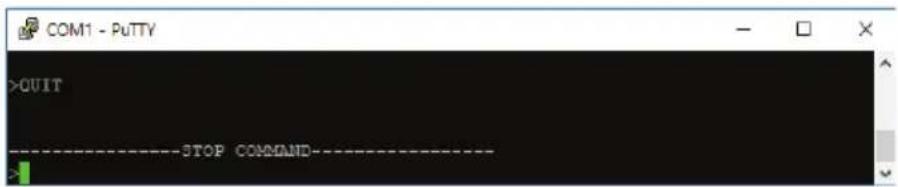
Stop Command Mode
Data Saving Module Operation
Requirements
- Data Saving Module
- SD Memory Card
- Battery (CR2032)
Outline of Data Saving Module
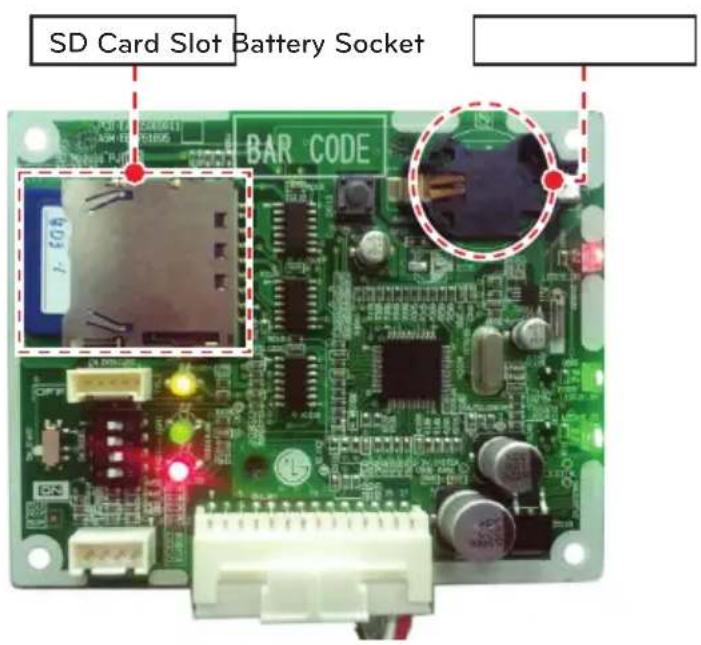
- SD Memory Card.
- Use 2GB ~ 32GB SD or SDHC
- FAT32 format should be preceded before in use.
- Output file format : S(model name)(year)(month)(day).csv ex) Multi-V IV, 2013(year) 7(month) 15(day) →S4130715.CSV
NOTE
- Remove the SD card after turning off the start switch.
- When Data Saving Module lost power, battery have to set on battery socket for Keeping Date and Time.
- When the SD card memory is filled, some of saved data is removed. It may different on SD card memory and recording interval.
Operation

Step 1. Turn off start switch in Data Saving Module. Step 2. Dip switch position depend on the model.
SW1 (ON) & SW2 (OFF) & SW3 (OFF) : Multi V 5 Generation
SW1 (OFF) & SW2 (ON) & SW3 (ON) : Multi V IV Generation
SW1 (OFF) & SW2 (ON) & SW3 (OFF) : Multi V III Generation
Step 3. Connect Data Saving Module to Outdoor Main PCB with Data Saving cable. Step 4. Check LED state.
: Green LED (Off), Yellow LED(Off), Red LED
(Blinking 8 Times – SD memory card is not inserted)
Step 5. Check LED state after SD memory card insertion.
: Green LED (several minutes On state →Off : Calculate SD memory card capacity)
Yellow LED (Off), Red LED (in Normal state – Blinking in 1 s interval)
Step 6. Check normal state. Then, turn start switch On
: Green LED (Blinking in xx seconds interval : Recording interval x 4) : Yellow LED (Always ON) : Red LED (in Normal state – Blinking in 1 s interval)
Installation Method
①Join the front case and the rear case.
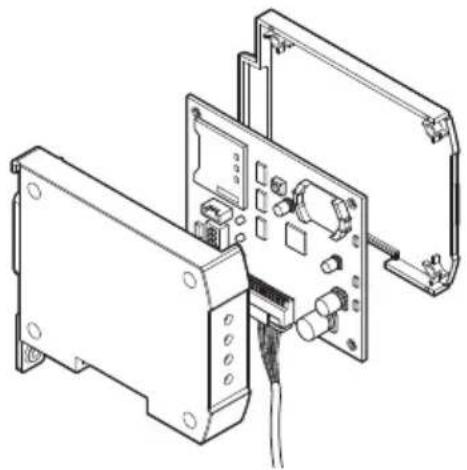
②Anchor the front case at holes using anchor screws

③Join the case in the Multi-V Control Box, anchor the case at holes using anchor screws.

④Connect connection wire to outdoor Main PCB.


CAUTION
• Install the product on flat surface and screw 4 places. Otherwise the Data Saving Module may not be anchored properly - Do not screw too tightly. It may cause deformation of the case. - Do not deform the case at random. It may cause malfunction of the Data Saving Module. - It is recommended that assembling the front case and fixing the product on designated location.
LED State
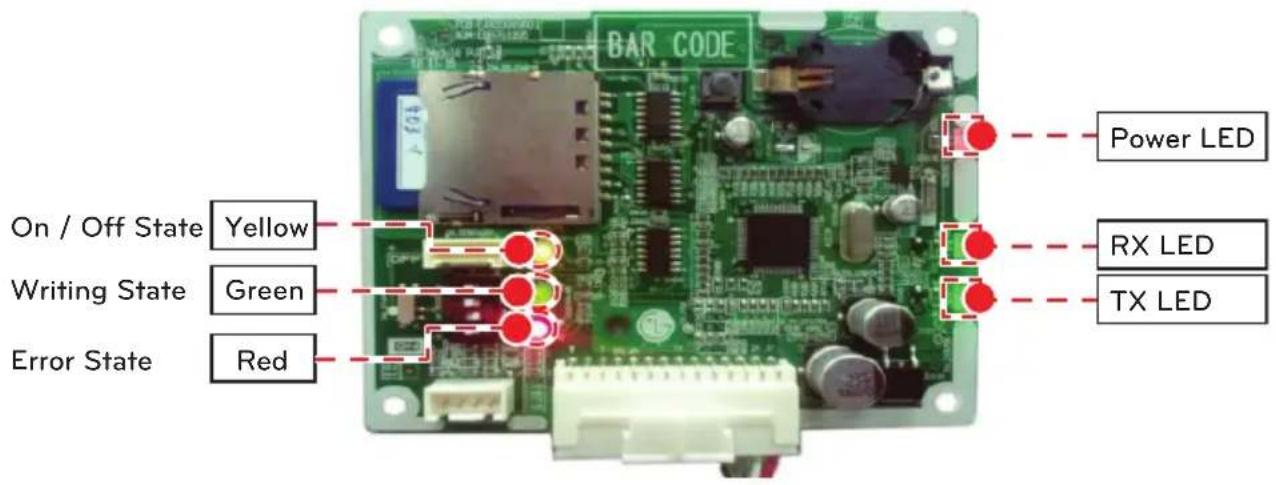
- Green LED
: Display current state
- On recording : Blinking in xx seconds interval : Recording interval x 4
- When SD memory card is initially inserted or memory capacity calculation is operated at every minutes: ON for several minutes(seconds) →OFF
- Yellow LED
: Display start of data recording
- Start SW On : always ON
- Start SW Off : always OFF
- Red LED
: Display normal or error state.
- Normal state : Blinking in 1 s interval.
- Error state : LED OFF for 2 seconds → Blinking current error as bellows.
7 times : Memory card Lock
8 times : No memory card
Data Converter
- Data Converter
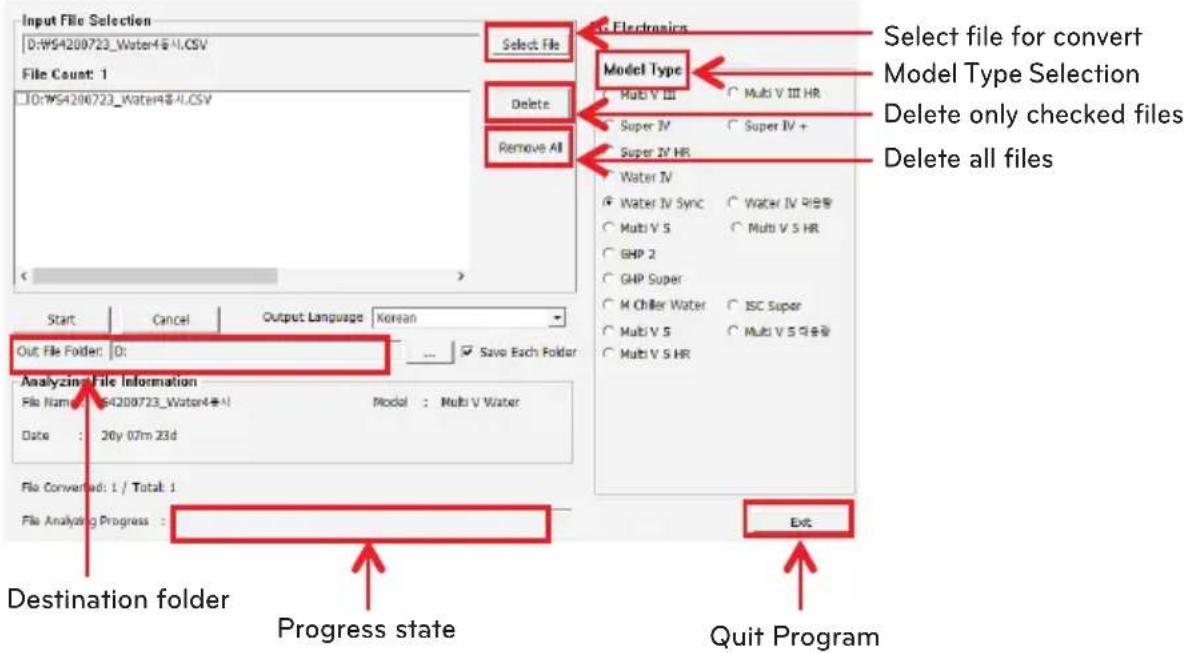
SD data converter is a Windows PC-based program that converts encoded files into an easy-to-read format for the user.
- When executing DataConverter, it displays as below.
- Select file(s) to convert (multiple selection is supported)
- Model Type Selection
- Click "Start"
LGE Open Source Software Notice
Product Type: Accessory
Model Number/Range: PVDATN000
These products identified by the Product Type and Model Range above from LG Electronics, Inc. ("LGE") contain the open source software detailed below. Please refer to the indicated open source licenses (as are included following this notice) for the terms and conditions of their use.
| Component(s) License | |
| Embedded Filesystems Library 0.2.8 GPL 2.0 | |
The source code for the above may be obtained free of charge from LGE at http://opensource.lge.com. LGE will also provide open source code to you on CD-ROM for a charge covering the cost of performing such distribution (such as the cost of media, shipping, and handling) upon email request to opensource@lge.com. This offer is valid for three (3) years from the date on which you purchased the product.
Please be informed that LG Electronics products may contain open source software listed in the tables below.
| Component(s) License | |
| Autobat master-20101201 MIT License | |
GPL 2.0
Version 2, June 1991
Copyright (C) 1989, 1991 Free Software Foundation, Inc.
51 Franklin Street, Fifth Floor, Boston, MA 02110-1301, USA
Everyone is permitted to copy and distribute verbatim copies of this license document, but changing it is not allowed.
Preamble
The licenses for most software are designed to take away your freedom to share and change it. By contrast, the GNU General Public License is intended to guarantee your freedom to share and change free software--to make sure the software is free for all its users. This General Public License applies to most of the Free Software Foundation's software and to any other program whose authors commit to using it. (Some other Free Software Foundation software is covered by the GNU Lesser General Public License instead.) You can apply it to your programs, too.
When we speak of free software, we are referring to freedom, not price. Our General Public Licenses are designed to make sure that you have the freedom to distribute copies of free software (and charge for this service if you wish), that you receive source code or can get it if you want it, that you can change the software or use pieces of it in new free programs; and that you know you can do these things.
To protect your rights, we need to make restrictions that forbid anyone to deny you these rights or to ask you to surrender the rights. These restrictions translate to certain responsibilities for you if you distribute copies of the software, or if you modify it.
For example, if you distribute copies of such a program, whether gratis or for a fee, you must give the recipients all the rights that you have. You must make sure that they, too, receive or can get the source code. And you must show them these terms so they know their rights.
We protect your rights with two steps: (1) copyright the software, and (2) offer you this license which gives you legal permission to copy, distribute and/or modify the software.
Also, for each author's protection and ours, we want to make certain that everyone understands that there is no warranty for this free software. If the software is modified by someone else and passed on, we want its recipients to know that what they have is not the original, so that any problems introduced by others will not reflect on the original authors' reputations.
Finally, any free program is threatened constantly by software patents. We wish to avoid the danger that redistributors of a free program will individually obtain patent licenses, in effect making the program proprietary. To prevent this, we have made it clear that any patent must be licensed for everyone's free use or not licensed at all.
The precise terms and conditions for copying, distribution and modification follow.
TERMS AND CONDITIONS FOR COPYING, DISTRIBUTION AND MODIFICATION
- This License applies to any program or other work which contains a notice placed by the copyright holder saying it may be distributed under the terms of this General Public License. The "Program", below, refers to any such program or work, and a "work based on the Program" means either the Program or any derivative work under copyright law: that is to say, a work containing the Program or a portion of it, either verbatim or with modifications and/or translated into another language. (Hereinafter, translation is included without limitation in the term "modification".) Each licensee is addressed as "you".
Activities other than copying, distribution and modification are not covered by this License; they are outside its scope. The act of running the Program is not restricted, and the output from the Program is covered only if its contents constitute a work based on the Program (independent of having been made by running the Program). Whether that is true depends on what the Program does.
- You may copy and distribute verbatim copies of the Program's source code as you receive it, in any medium, provided that you conspicuously and appropriately publish on each copy an appropriate copyright notice and disclaimer of warranty; keep intact all the notices that refer to this License and to the absence of any warranty; and give any other recipients of the Program a copy of this License along with the Program.
You may charge a fee for the physical act of transferring a copy, and you may at your option offer warranty protection in exchange for a fee.
- You may modify your copy or copies of the Program or any portion of it, thus forming a work based on the Program, and copy and distribute such modifications or work under the terms of Section 1 above, provided that you also meet all of these conditions:
a) You must cause the modified files to carry prominent notices stating that you changed the files and the date of any change.
b) You must cause any work that you distribute or publish, that in whole or in part contains or is derived from the Program or any part thereof, to be licensed as a whole at no charge to all third parties under the terms of this License.
c) If the modified program normally reads commands interactively when run, you must cause it, when started running for such interactive use in the most ordinary way, to print or display an announcement including an appropriate copyright notice and a notice that there is no warranty (or else, saying that you provide a warranty) and that users may redistribute the program under these conditions, and telling the user how to view a copy of this License. (Exception: if the Program itself is interactive but does not normally print such an announcement, your work based on the Program is not required to print an announcement.)
These requirements apply to the modified work as a whole. If identifiable sections of that work are not derived from the Program, and can be reasonably considered independent and separate works in themselves, then this License, and its terms, do not apply to those sections when you distribute them as separate works. But when you distribute the same sections as part of a whole which is a work based on the Program, the distribution of the whole must be on the terms of this License, whose permissions for other licensees extend to the entire whole, and thus to each and every part regardless of who wrote it.
Thus, it is not the intent of this section to claim rights or contest your rights to work written entirely by you; rather, the intent is to exercise the right to control the distribution of derivative or collective works based on the Program.
In addition, mere aggregation of another work not based on the Program with the Program (or with a work based on the Program) on a volume of a storage or distribution medium does not bring the other work under the scope of this License.
- You may copy and distribute the Program (or a work based on it, under Section 2) in object code or executable form under the terms of Sections 1 and 2 above provided that you also do one of the following: a) Accompany it with the complete corresponding machine-readable source code, which must be distributed under the terms of Sections 1 and 2 above on a medium customarily used for software interchange; or, b) Accompany it with a written offer, valid for at least three years, to give any third party, for a charge no more than your cost of physically performing source distribution, a complete machine-readable copy of the corresponding source code, to be distributed under the terms of Sections 1 and 2 above on a medium customarily used for software interchange; or, c) Accompany it with the information you received as to the offer to distribute corresponding source code. (This alternative is allowed only for noncommercial distribution and only if you received the program in object code or executable form with such an offer, in accord with Subsection b above.)
The source code for a work means the preferred form of the work for making modifications to it. For an executable work, complete source code means all the source code for all modules it contains, plus any associated interface definition files, plus the scripts used to control compilation and installation of the executable. However, as a special exception, the source code distributed need not include anything that is normally distributed (in either source or binary form) with the major components (compiler, kernel, and so on) of the operating system on which the executable runs, unless that component itself accompanies the executable.
If distribution of executable or object code is made by offering access to copy from a designated place, then offering equivalent access to copy the source code from the same place counts as distribution of the source code, even though third parties are not compelled to copy the source along with the object code.
- You may not copy, modify, sublicense, or distribute the Program except as expressly provided under this License. Any attempt otherwise to copy, modify, sublicense or distribute the Program is void, and will automatically terminate your rights under this License. However, parties who have received copies, or rights, from you under this License will not have their licenses terminated so long as such parties remain in full compliance.
- You are not required to accept this License, since you have not signed it. However, nothing else grants you permission to modify or distribute the Program or its derivative works. These actions are prohibited by law if you do not accept this License. Therefore, by modifying or distributing the Program (or any work based on the Program), you indicate your acceptance of this License to do so, and all its terms and conditions for copying, distributing or modifying the Program or works based on it.
- Each time you redistribute the Program (or any work based on the Program), the recipient automatically receives a license from the original licensor to copy, distribute or modify the Program subject to these terms and conditions. You may not impose any further restrictions on the recipients exercise of the rights granted herein. You are not responsible for enforcing compliance by third parties to this License.
- If, as a consequence of a court judgment or allegation of patent infringement or for any other reason (not limited to patent issues), conditions are imposed on you (whether by court order, agreement or otherwise) that contradict the conditions of this License, they do not excuse you from the conditions of this License. If you cannot distribute so as to satisfy simultaneously your obligations under this License and any other pertinent obligations, then as a consequence you may not distribute the Program at all. For example, if a patent license would not permit royalty-free redistribution of the Program by all those who receive copies directly or indirectly through you, then the only way you could satisfy both it and this License would be to refrain entirely from distribution of the Program.
If any portion of this section is held invalid or unenforceable under any particular circumstance, the balance of the section is intended to apply and the section as a whole is intended to apply in other circumstances.
It is not the purpose of this section to induce you to infringe any patents or other property right claims or to contest validity of any such claims; this section has the sole purpose of protecting the integrity of the free software distribution system, which is implemented by public license practices. Many people have made generous contributions to the wide range of software distributed through that system in reliance on consistent application of that system; it is up to the author/donor to decide if he or she is willing to distribute software through any other system and a licensee cannot impose that choice.
This section is intended to make thoroughly clear what is believed to be a consequence of the rest of this License.
- If the distribution and/or use of the Program is restricted in certain countries either by patents or by copyrighted interfaces, the original copyright holder who places the Program under this License may add an explicit geographical distribution limitation excluding those countries, so that distribution is permitted only in or among countries not thus excluded. In such case, this License incorporates the limitation as if written in the body of this License.
- The Free Software Foundation may publish revised and/or new versions of the General Public License from time to time. Such new versions will be similar in spirit to the present version, but may differ in detail to address new problems or concerns.
Each version is given a distinguishing version number. If the Program specifies a version number of this License which applies to it and "any later version", you have the option of following the terms and conditions either of that version or of any later version published by the Free Software
Foundation. If the Program does not specify a version number of this License, you may choose any version ever published by the Free Software Foundation.
- If you wish to incorporate parts of the Program into other free programs whose distribution conditions are different, write to the author to ask for permission. For software which is copyrighted by the Free Software Foundation, write to the Free Software Foundation; we sometimes make exceptions for this. Our decision will be guided by the two goals of preserving the free status of all derivatives of our free software and of promoting the sharing and reuse of software generally.
NO WARRANTY
- BECAUSE THE PROGRAM IS LICENSED FREE OF CHARGE, THERE IS NO WARRANTY FOR THE PROGRAM, TO THE EXTENT PERMITTED BY APPLICABLE LAW. EXCEPT WHEN OTHERWISE STATED IN WRITING THE COPYRIGHT HOLDERS AND/OR OTHER PARTIES PROVIDE THE PROGRAM "AS IS" WITHOUT WARRANTY OF ANY KIND, EITHER EXPRESSED OR IMPLIED, INCLUDING, BUT NOT LIMITED TO, THE IMPLIED WARRANTIES OF MERCHANTABILITY AND FITNESS FOR A PARTICULAR PURPOSE. THE ENTIRE RISK AS TO THE QUALITY AND PERFORMANCE OF THE PROGRAM IS WITH YOU. SHOULD THE PROGRAM PROVE DEFECTIVE, YOU ASSUME THE COST OF ALL NECESSARY SERVICING, REPAIR OR CORRECTION.
- IN NO EVENT UNLESS REQUIRED BY APPLICABLE LAW OR AGREED TO IN WRITING WILL ANY COPYRIGHT HOLDER, OR ANY OTHER PARTY WHO MAY MODIFY AND/OR REDISTRIBUTE THE PROGRAM AS PERMITTED ABOVE, BE LIABLE TO YOU FOR DAMAGES, INCLUDING ANY GENERAL, SPECIAL, INCIDENTAL OR CONSEQUENTIAL DAMAGES ARISING OUT OF THE USE OR INABILITY TO USE THE PROGRAM (INCLUDING BUT NOT LIMITED TO LOSS OF DATA OR DATA BEING RENDERED INACCURATE OR LOSSES SUSTAINED BY YOU OR THIRD PARTIES OR A FAILURE OF THE PROGRAM TO OPERATE WITH ANY OTHER PROGRAMS), EVEN IF SUCH HOLDER OR OTHER PARTY HAS BEEN ADVISED OF THE POSSIBILITY OF SUCH DAMAGES.
END OF TERMS AND CONDITIONS
How to Apply These Terms to Your New Programs
If you develop a new program, and you want it to be of the greatest possible use to the public, the best way to achieve this is to make it free software which everyone can redistribute and change under these terms.
To do so, attach the following notices to the program. It is safest to attach them to the start of each source file to most effectively convey the exclusion of warranty; and each file should have at least the "copyright" line and a pointer to where the full notice is found.
one line to give the program's name and an idea of what it does.
Copyright (C) yyyy name of author
This program is free software; you can redistribute it and/or modify it under the terms of the GNU General Public License as published by the Free Software Foundation; either version 2 of the License, or (at your option) any later version.
This program is distributed in the hope that it will be useful, but WITHOUT ANY WARRANTY; without even the implied warranty of MERCHANTABILITY or FITNESS FOR A PARTICULAR PURPOSE. See the GNU General Public License for more details.
You should have received a copy of the GNU General Public License along with this program; if not, write to the Free Software Foundation, Inc., 51 Franklin Street, Fifth Floor, Boston, MA 02110-1301, USA.
Also add information on how to contact you by electronic and paper mail.
If the program is interactive, make it output a short notice like this when it starts in an interactive mode:
Gnomovision version 69, Copyright (C) year name of author Gnomovision comes with ABSOLUTELY NO WARRANTY, for details type `show w'. This is free software, and you are welcome to redistribute it under certain conditions; type `show c' for details.
The hypothetical commands `show w' and `show c' should show the appropriate parts of the General Public License. Of course, the commands you use may be called something other than `show w' and `show c'; they could even be mouse-clicks or menu items--whatever suits your program.
You should also get your employer (if you work as a programmer) or your school, if any, to sign a "copyright disclaimer" for the program, if necessary. Here is a sample; alter the names:
Yoyodyne, Inc., hereby disclaims all copyright interest in the program `Gnomovision`
(which makes passes at compilers) written by James Hacker.
signature of Ty Coon, 1 April 1989
Ty Coon, President of Vice
MIT License
Autobat master-20101201
Copyright (c) 2009 UCSC Autonomous Systems Lab
Permission is hereby granted, free of charge, to any person obtaining a copy of this software and associated documentation files (the "Software"), to deal in the Software without restriction, including without limitation the rights to use, copy, modify, merge, publish, distribute, sublicense, and/or sell copies of the Software, and to permit persons to whom the Software is furnished to do so, subject to the following conditions:
The above copyright notice and this permission notice shall be included in all copies or substantial portions of the Software.
THE SOFTWARE IS PROVIDED "AS IS", WITHOUT WARRANTY OF ANY KIND, EXPRESS OR IMPLIED, INCLUDING BUT NOT LIMITED TO THE WARRANTIES OF MERCHANTABILITY, FITNESS FOR A PARTICULAR PURPOSE AND NONINFRINGEMENT. IN NO EVENT SHALL THE AUTHORS OR COPYRIGHT HOLDERS BE LIABLE FOR ANY CLAIM, DAMAGES OR OTHER LIABILITY, WHETHER IN AN ACTION OF CONTRACT, TORT OR OTHERWISE, ARISING FROM, OUT OF OR IN CONNECTION WITH THE SOFTWARE OR THE USE OR OTHER DEALINGS IN THE SOFTWARE.

- Manufacturer
: LG Electronics Inc. Changwon 2nd factory, 84, Wanam-ro, Seongsan-gu, Changwon-si, Gyeongsangnam-do, KOREA


- INSTALLATION/OWNER'S MANUAL
- AIR CONDITIONER
- IMPORTANT SAFETY INSTRUCTIONS
- READ ALL INSTRUCTIONS BEFORE USING THE APPLIANCE
- WARNING
- CAUTION
- INSTALLATION
- IN-USE
- FOR YOUR RECORDS
- ENGLISH DISPOSAL OF YOUR OLD APPLIANCE
- TABLE OF CONTENTS
- NAME OF EACH PART
- COMPONENTS
- DATA SAVING MODULE EXPLODED VIEW
- NOTE
- SETTING AND USING METHOD
- DATE & TIME SETTING
- REQUIREMENTS
- PC CONNECTION FOR DATE & TIME SETTING
- SETTING
- PUTTY
- PACKAGE FILES
- INSTALLATION METHOD
- PUTTY CONFIGURATION
- CATEGORY
- HOW TO SET DATE
- HOW TO SET TIME
- HOW TO SET INTERVAL
- HOW TO EXIT
- DATA SAVING MODULE OPERATION
- OPERATION
- LED STATE
- DATA CONVERTER
- WHEN EXECUTING DATACONVERTER, IT DISPLAYS AS BELOW
- LGE OPEN SOURCE SOFTWARE NOTICE
- GPL
- PREAMBLE
- TERMS AND CONDITIONS FOR COPYING, DISTRIBUTION AND MODIFICATION
- NO WARRANTY
- MIT LICENSE
- AUTOBAT MASTER
Brand : LG
Model : PVDATN000
Category : Heat pump