EE-6909 - Humidifier Crane - Free user manual and instructions
Find the device manual for free EE-6909 Crane in PDF.
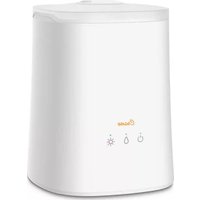


| Product Type | Cool Mist Humidifier |
| Brand | Crane |
| Model | EE-6909 |
| Dimensions (L x W x H) | 10 x 10 x 12 inches |
| Weight | 3.5 lbs |
| Power Supply | AC 120V, 60Hz |
| Power Consumption | 100 Watts |
| Water Tank Capacity | 1 gallon (3.8 liters) |
| Mist Output | Up to 2.5 gallons per day |
| Runtime per Fill | Up to 24 hours on low setting |
| Noise Level | Below 35 dB |
| Recommended Room Size | Up to 300 sq ft (28 m²) |
| Humidification Method | Ultrasonic |
| Mist Type | Cool mist |
| Adjustable Mist Control | Yes, variable output |
| Auto Shut-Off | Yes, when tank is empty |
| Filter Type | None (disc type) |
| Cleaning Frequency | Weekly recommended |
| Spare Parts Available | Replacement water tank, mist nozzle, ultrasonic disc |
| Warranty | 1 year limited |
Frequently Asked Questions - EE-6909 Crane
User questions about EE-6909 Crane
0 question about this device. Answer the ones you know or ask your own.
Ask a new question about this device
Download the instructions for your Humidifier in PDF format for free! Find your manual EE-6909 - Crane and take your electronic device back in hand. On this page are published all the documents necessary for the use of your device. EE-6909 by Crane.
USER MANUAL EE-6909 Crane
Please contact us first with any questions or problems you have about the operation of your Crane Humidifier.
1-888-599-0992
questions@crane-usa.com

MIST CHAMBER
Lock mist chamber into place and fill tank with clean water (If using essential oils, drop directly in humidifier)

PLACE
Place on a solid elevated surface, at least 2 ft. off the ground
DO NOT PLACE ON A WOOD SURFACE

HARD WATER
Use distilled water if you have hard water with high mineral levels

EMPTY + CLEAN
Empty tank when not in use. Use Crane Cleaner or WHITE vinegar and water. Wipe tank. Mist chamber, mist lid and cap are dishwasher safe

POWER
Plug in power cord, press power icon to turn on, mist icon for high/low output, light icon for color changing

STORE
in a cool dry place
Crane
TOP FILL
Ultrasonic Humidifier
EE-6909

If you have any questions about the operation of your humidifier, please contact Crane Customer Care.
Toll Free: 888-599-0992
Email: customer-service@crane-usa.com
Register Your Product Online
https://crane-usa.com/product-registration/

SAVE YOUR DATED PROOF OF PURCHASE
PLEASE READ AND SAVE ALL INSTRUCTIONS TO ENSURE THE SAFE AND EFFECTIVE USE OF THIS HUMIDIFIER.
[ You will need this in case of warranty ]
staple
tape
or paperclip
your
receipt
HERE
TABLE OF CONTENTS
| Table of Contents & Sustainability | P. 1 |
| Safety Instructions | P. 2-3 |
| List of Main Parts | P. 4 |
| Technical Specifications, Assembly & Use | P. 5-7 |
| Maintenance & Storing Your Humidifier | P. 8 |
| Customer Care & Trouble Shooting | P. 9 |
| FCC Warning | P. 10 |
| Warranty | P. 11 |
CRANE & SUSTAINABILITY

Crane USA is dedicated to your environment both inside and outside your home. We know if cleaned and maintained properly, our products last for years helping to reduce unnecessary use of resources and emissions making new products.
The Crane manual you are holding is made from recycled materials with no added finishes or
harmful dyes. If the humidifier should no longer operate, please be sure to dispose of the unit in an environmentally friendly way by taking it to a public collection point.
PLEASE DO NOT PLACE BROKEN HUMIDIFIERS WITH YOUR REGULAR HOUSEHOLD WASTE.

IMPORTANT SAFETY INSTRUCTIONS
WARNING! READ AND SAVE THESE INSTRUCTIONS. Failure to follow all of the instructions listed below may result in electric shock, fire and/or serious personal injury.
- It is advisable to carry humidifier with two hands.
- DO NOT operate outdoors. This humidifier is intended for indoor use only.
- Always have water in the Water Tank when operating the unit.
- Use only clean, cool tap water to fill the Humidifier body (filtered or distilled water is recommended to avoid white dust if tap water is too hard. DO NOT use hot water.
- Always have the Top Cover and Mist Lid in place while the unit is operating. Place the humidifier so the mist aims away from children, walls, furniture and electrical appliances.
- Use only a 110-120VAC outlet. * ALWAYS plug and unplug unit with dry hands to avoid electric shock.
- Never operate the unit with a damaged cord or plug.
- Always place the unit on a smooth, flat, lint-free, non-metallic, waterproof and level surface and position unit away from direct sunlight. Keep the cord away from heated surfaces and areas where it could be walked on or tripped over. Unplug the unit when not in use and whenever you clean or move the unit.
- Do not add medication of any type into this humidifier. Do not cover any openings on the unit or insert objects into any openings.
- The unit should not be left unattended in a closed room as the air could become saturated and leave condensation on walls or furniture. Leave room door partly open when humidifier is being operated.
- When cleaning the inside of the humidifier, keep water away from the Fan Vent. Turn off and unplug the humidifier to wipe the exterior (except the electrical controls) with a damp cloth. Humidifier requires regular cleaning. Please refer to the CLEANING INSTRUCTIONS in this manual.
- Do not tilt or tip the humidifier or attempt to empty or fill it while it is in operation. Do not remove the cover from the unit while it is on.
- Do not inhale the mist/vapor expelled from the humidifier or drink water from the tank.
- Do not use a detergent to clean any parts of the unit that contain water. Detergent film dissolved in the water supply can interfere with the output of the unit. Instead, always use white vinegar mixed with water to clean the humidifier.
SAVE THESE INSTRUCTIONS!

GENERAL SAFETY INSTRUCTIONS
WARNING! Read and understand all instructions. Failure to follow all instructions listed below may result in electric shock, fire or serious personal injury. The warnings, cautions, and instructions discussed in this instruction manual cannot cover all possible conditions and situations that may occur. It must be understood by the user that common sense and caution are a factor which cannot be built into this product, but must be supplied by the user.
THIS HUMIDIFIER IS NOT A TOY!
Do not let your child play with this humidifier. Serious injury and electrocution might be possible. This humidifier has to be operated by an adult only. Children should be supervised to ensure that they do not play with the humidifier.
SAVE ALL INSTRUCTIONS!
CAUTION: A short Power Supply Cord is provided to reduce the risk of personal injury resulting from becoming entangled in or tripping over a longer cord. Extension cords are available from local hardware stores and may be used if care is exercised in their use. If an extension cord is required, special care and caution is necessary. Also the extension cord must be (1) marked with an electrical rating of 125 V and at least 13 A., 1625 W., and (2) the cord must be arranged so that it will not drape over the countertop or tabletop where it can be pulled on by children or accidentally tripped over.
ELECTRIC POWER
If the electric circuit is overloaded by other appliances, your humidifier and/or appliances may not operate properly. The humidifier should be operated on a separate electrical circuit from other operating appliances.
POLARIZED PLUG
This humidifier has a polarized plug (one blade is wider than the other). As a safety feature to reduce the risk of electrical shock, this plug is intended to fit in a polarized outlet only one way. If the plug does not fit fully in the outlet, reverse the plug. If it still does not fit, contact a qualified electrician. Do not attempt to defeat this safety feature.


SAFETY WARNING
Although your humidifier is easy to operate, for your safety, the below warnings must be followed:
- Do not place the humidifier near a heat source.
- Never leave the humidifier unattended while connected to the electrical outlet.
- To avoid any accidents, never cover the Mist Lid when the humidifier is in operation.
- Use the humidifier on a smooth, flat, lint-free, non-metallic, waterproof, and level surface away from water.
- Do not unplug from the wall socket by pulling on the supply cord.
- The humidifier must be unplugged:
A. Before either filling or emptying the humidifier. B. Before any cleaning or maintenance is performed. C. After each use. D. If it appears to be faulty.
THIS PRODUCT IS INTENDED FOR HOUSEHOLD USE ONLY.
LIST OF MAIN PARTS
Fig. 1
- Water Level Sensor
- Nebulizer (Under mist chamber)
- Mist Chamber

Fig. 2
- Cover
- Mist Lid
- Control Buttons
- Fan Inlet (on back)

TECHNICAL SPECIFICATIONS
| Rating Voltage | 120V |
| Wattage | 37W |
| Frequency | 60Hz |
| Water Tank Capacity | Approx. 1.2 Gallon |
| Run Time Per Tank | Up to 24 hours |
| Humidifying Capacity | Up to 500 sq. ft. |
| Noise Level | < 37 decibels from 3 ft away |
BEFORE EACH USE:
CHECK HUMIDIFIER PLACEMENT:
Place the Humidifier on an elevated, non-metallic, lint-free, waterproof, level surface at least 2 feet above the floor.
- DO NOT PLACE ON CARPET OR TOWEL. The fan vent is located on the back of the humidifier base. The fan vent MUST NOT be obstructed.
- DO NOT PLACE ON WOOD SURFACE or near furniture that can be damaged by too much moisture.
A NOTE ABOUT HUMIDITY

- To reduce excessive humidity or condensation, especially in small rooms, leave the room door open and adjust mist intensity to the low output setting.
- Too much humidity in the room may allow moisture to accumulate on surfaces where bacteria and fungi can grow. Moisture that gathers may also damage furniture and walls, especially wallpaper.

CAUTION
- DO NOT attempt to operate the humidifier without water in the Water Tank.
- DO NOT plug or unplug the Power Cord with wet hands as electric shock could occur.
ASSEMBLY & USE
ALWAYS use fresh cool water when operating the humidifier.
- Remove the top cover from the main body.
- Attach the Mist Chamber into the humidifier by placing the chamber directly over the nebulizer and turn clockwise to secure the chamber in place. DO NOT OPERATE THE HUMIDIFIER WITHOUT THE MIST CHAMBER ATTACHED.
- Fill water into the main body. Do NOT exceed the MAX level mark. Filtered or distilled water is recommended to avoid white dust if tap water is too hard.
Note: Essential oils may be added to the water.
DO NOT fill water all the way to the rim.
DO NOT use hot water.
DO NOT add any medication or salt.

- Place top cover on humidifier base, making sure it fits together securely.
Note: Do not attempt to move the humidifier while full of water. Doing so may cause leakage of water.
- Plug the power cord into a wall socket and turn on the unit by using the control buttons.
- POWER: Touch the button to turn ON/OFF the humidifier.
1 touch – the unit is ON, the mist is HIGH, the indicator light is GREEN.
NOTE: The mist chamber must be attached before the unit is turned on.
2 touch – the unit is OFF, the light indicator is BLUE.
- MIST OUTPUT: Touch button to set the mist volume.
Green Light = High Mist Blue Light = Low Mist
- LIGHT: Touch the button to turn the LED light ON/OFF and select light mode.
1 Touch – the LED will change colors continually. 2 Touch – Keeps the current color on. 3 Touch – Turns OFF the LED light.
Note: Indicator will be Green when the light function is ON and Blue when the lights are OFF.
- SET THE CORRECT HUMIDITY OUTPUT: Adjust the mist output so the mist rises up to be absorbed by the room air. If mist drops quickly, turn down the mist output to the low setting.
- When the humidifier runs out of water, the Power Indicator will blink red 3 times and the unit will shut off. This is a safety feature to prevent the humidifier from possibly overheating and damaging the Nebulizer. Unplug the humidifier before removing the top and refilling the humidifier.
ASSEMBLY & USE
- AUTO DIM FUNCTION: The lights of the control panel will automatically dim within 10 seconds after the function button has been pressed for the last time. The center and right control light will switch off and the control light on the left (ON/OFF switch) will be dimmed to night mode to provide undisturbed sleep.
All lights will automatically reset to full brightness once any of the control buttons are touched again.
MAINTENANCE
Cleaning and disinfecting on a regular basis is important for maintaining the performance of your humidifier.
IMPORTANT: Water left in the tank or base when not in use may result in buildup of mineral deposits and bacteria which may inhibit the output efficiency as well as void the warranty. If water remains in the Water Tank for more than a day or two, bacterial growth is possible.
DAILY MAINTENANCE
- Turn off, unplug from outlet, remove top and empty water from base daily, when emptying the humidifier be sure to pour away from the fan outlet.
- Remove the mist chamber and rinse with water, then allow to air dry
- Allow top & base to air dry.
- Leave top off the base until ready for next use.
WEEKLY MAINTENANCE
- Turn off, unplug from outlet and empty water from tank.
- Wash the top, mist lid and mist chamber with a white vinegar and water solution by wiping each piece and rinsing. NOTE: The Top Cover, Mist Chamber and Mist Lid are TOP RACK dishwasher safe.
- Fill base half way with warm water, add 2 - 4 tablespoons of white vinegar and let sit for 20 min. Empty base & rinse with plain water. Make sure to pour water away from the fan outlet when emptying. Do NOT put the base in the dishwasher.
TIP: Clean the nebulizer with a damp cloth or cotton swab after soaking.
NEVER IMMERSE HUMIDIFIER BASE IN WATER.
END-OF-SEASON MAINTENANCE & STORING YOUR HUMIDIFIER
- Turn off, unplug from outlet, and empty water from top & base.
- Follow instructions for weekly maintenance above.
- Let all parts dry completely.
- Store humidifier in a cool, dry place.
CRANE CUSTOMER CARE
CALL US: 888-599-0992 (Mon-Fri 9:00am - 4:00pm CST)
EMAIL US: customer-service@crane-usa.com
LIVE CHAT: available at www.crane-usa.com
TROUBLESHOOTING
DO NOT attempt to repair the motor yourself.
If the humidifier continues to not operate, please contact Crane Customer Care.
| Problem | Solution |
| No mist being Produced | · Ensure the unit is plugged in.· The base might be overfilled: Remove the top, empty the base & refill.· Ensure the top is secure on the unit.· Clean the Water Level Sensor: Pull of the plastic cap from the peg. Remove the water level sensor float and clean with warm sudsy water. Replace parts by first putting the float onto the peg, then replacing the plastic cap on the peg. (Page 4 - Fig. 1) |
| Humidifier Does Not Have Any Power: | · Ensure unit is properly plugged into a power outlet / try another power outlet.· Check to make sure the unit is turned ON.· If Power On indicator light does not come on, contact Customer Care. |
| There is a Strange Odor: | · Clean the Water Tank with a water & white vinegar solution and rinse with clean water. (Page 7)· Leave the empty Water Tank open in a cool place for 12 hours without the Water Tank Cap attached. |
| Air blows, but no mist is being produced: | · Complete the weekly maintenance. (Page 7)· Humidifier should be placed on a hard, flat surface & fan vent should not be blocked.· The fan will run for 3 minutes after it is turned off to clear any mist from the humidifier. |
| White Dust Appears & Settles Outside the Humidifier: | · Area tap water may have too many minerals. Change to distilled water. |
| Humidifier is Leaking: | · From MIST LID: Turn mist level down· From BASE: Call Customer Care |
NOTE: Spare parts can also be purchased online at www.crane-usa.com
FCC WARNING
This equipment has been tested and found to comply with the limits for a Consumer ISM equipment, pursuant to Part 18 of the FCC Rules. These limits are designed to provide reasonable protection against harmful interference in a residential installation. This equipment generates, uses and can radiate radio frequency energy and, if not installed and used in accordance with the instructions, may cause harmful interference to radio communications. However, there is no guarantee that the interference will not occur in a particular installation.
Please note that changes or modifications of this product not expressly approved by the party responsible for compliance could void the user's authority to operate the equipment.
If this equipment does cause harmful interference to radio or television reception, which can be determined by turning the equipment off and on, the user is encouraged to try to correct the interference by one or more of the following measures:
--Reorient or relocate the receiving antenna. --Increase the separation between the equipment and receiver. --Connect the equipment into an outlet on a circuit different from that to which the receiver is connected. --Consult the dealer or an experienced radio/TV technician for help.
CRANE USA, INC.
1015 Hawthorn Dr., Itasca, IL 60143
Toll Free: 1-888-599-0992 (Monday-Friday 9:00am - 4:00pm CST)
Email: customer-service@crane-usa.com
Website: www.crane-usa.com
CRANE WARRANTY
For more information regarding the warranty policy, please visit our website: www.crane-usa.com/customer-service
LIMITED WARRANTY
Thank you for purchasing a Crane product which has been tested to meet our stringent quality standards. This product is warranted to be free from manufacturing defects under normal use and conditions for 1 year.
PLEASE CONTACT US BEFORE RETURNING THIS PRODUCT TO THE STORE. CALL CRANE CUSTOMER CARE FOR PROBLEMS AND QUESTIONS. WE CAN HELP.
WARRANTY REQUIRES A DATED PROOF OF PURCHASE.
This warranty is void if the defect is due to accidental damage, misuse, abuse, neglect, improper repair or alteration by unauthorized persons, or a failure to follow operating instructions provided with the product. This warranty does not apply to normal wear and tear or commercial use.
In no event shall liability exceed the purchase price paid by the purchaser of the product. Under no circumstances shall there be liability for any loss – direct, indirect or incidental – or consequential damage arising out of, or in connection with the use of this product.
This warranty is valid only in the 48 contiguous states plus the District of Columbia and excludes Puerto Rico and the Virgin Islands. This warranty is effective only if the product is purchased and operated in the United States of America.
Any instructions or warranty included in this manual may be subject to change without notice. For the most up-to-date instructions and warranty information, please contact us or visit our website.
TO RECEIVE WARRANTY INSTRUCTIONS AND RETURN AUTHORIZATION, PLEASE CALL OR EMAIL CRANE CUSTOMER CARE.
CRANE USA, INC.
1015 Hawthorn Dr., Itasca, IL 60143
Toll Free: 1-888-599-0992 (Monday - Friday 9:00am - 4:00pm CST)
Email: customer-service@crane-usa.com
Website: www.crane-usa.com
Crane
DESIGN FOR BETTER LIVING


- MIST CHAMBER
- PLACE
- HARD WATER
- EMPTY + CLEAN
- POWER
- STORE
- CRANE
- TOP FILL
- ULTRASONIC HUMIDIFIER
- SAVE YOUR DATED PROOF OF PURCHASE
- PLEASE READ AND SAVE ALL INSTRUCTIONS TO ENSURE THE SAFE AND EFFECTIVE USE OF THIS HUMIDIFIER
- CRANE & SUSTAINABILITY
- PLEASE DO NOT PLACE BROKEN HUMIDIFIERS WITH YOUR REGULAR HOUSEHOLD WASTE
- IMPORTANT SAFETY INSTRUCTIONS
- SAVE THESE INSTRUCTIONS
- GENERAL SAFETY INSTRUCTIONS
- THIS HUMIDIFIER IS NOT A TOY
- SAVE ALL INSTRUCTIONS
- ELECTRIC POWER
- POLARIZED PLUG
- SAFETY WARNING
- THIS PRODUCT IS INTENDED FOR HOUSEHOLD USE ONLY
- LIST OF MAIN PARTS
- FIG
- TECHNICAL SPECIFICATIONS
- BEFORE EACH USE
- CHECK HUMIDIFIER PLACEMENT
- A NOTE ABOUT HUMIDITY
- CAUTION
- ASSEMBLY & USE
- ALWAYS USE FRESH COOL WATER WHEN OPERATING THE HUMIDIFIER
- MAINTENANCE
- DAILY MAINTENANCE
- WEEKLY MAINTENANCE
- END-OF-SEASON MAINTENANCE & STORING YOUR HUMIDIFIER
- CRANE CUSTOMER CARE
- TROUBLESHOOTING
- DO NOT ATTEMPT TO REPAIR THE MOTOR YOURSELF
- FCC WARNING
- CRANE WARRANTY
- LIMITED WARRANTY
- PLEASE CONTACT US BEFORE RETURNING THIS PRODUCT TO THE STORE. CALL CRANE CUSTOMER CARE FOR PROBLEMS AND QUESTIONS. WE CAN HELP
- TO RECEIVE WARRANTY INSTRUCTIONS AND RETURN AUTHORIZATION, PLEASE CALL OR EMAIL CRANE CUSTOMER CARE
- DESIGN FOR BETTER LIVING
Brand : Crane
Model : EE-6909
Category : Humidifier