LocPro Advanced LPA-2.2 - Audio/video converter PAC - Free user manual and instructions
Find the device manual for free LocPro Advanced LPA-2.2 PAC in PDF.


| Product Type | Audio/Video Converter |
| Model | LocPro Advanced LPA-2.2 |
| Brand | PAC |
| Input Interfaces | HDMI, USB (for power) |
| Output Interfaces | Composite AV (RCA), 3.5mm audio |
| Supported Video Resolutions | 1080p input/output, 720p, 480p |
| Supported Audio Formats | PCM 2.0, stereo |
| Power Supply | USB 5V DC (1A) |
| Dimensions (W x D x H) | 150 x 80 x 30 mm |
| Weight | 200 g |
| Material | Plastic casing, metal connectors |
| Operating Temperature | 0°C to 40°C |
| Storage Temperature | -20°C to 60°C |
| Relative Humidity | 20% to 80% (non-condensing) |
| Main Functions | Convert HDMI signal to composite AV; support PAL/NTSC; plug-and-play |
| Controls | Power switch, output format selector (if applicable) |
| Indicators | Power LED (on/off) |
| Maintenance | Clean with dry soft cloth; do not use liquids or abrasives |
| Safety Precautions | Avoid exposure to moisture, extreme temperatures, and mechanical shock |
| Spare Parts & Repairability | No user-serviceable parts; contact PAC support for repairs |
| Compliance | CE, FCC, RoHS |
Frequently Asked Questions - LocPro Advanced LPA-2.2 PAC
User questions about LocPro Advanced LPA-2.2 PAC
0 question about this device. Answer the ones you know or ask your own.
Ask a new question about this device
Download the instructions for your Audio/video converter in PDF format for free! Find your manual LocPro Advanced LPA-2.2 - PAC and take your electronic device back in hand. On this page are published all the documents necessary for the use of your device. LocPro Advanced LPA-2.2 by PAC.
USER MANUAL LocPro Advanced LPA-2.2 PAC
Wiring Connection Chart (All Models)

MODELS:
• LPA-E4
• LPA2.4 / LPA2.2
• LPA1.4 / LPA1.2
Important Note: This harness is provided with a inline fuse installed. Please remove prior to install and reinsert once finished.
If your vehicle does not provide ACC source your harness will not have a "RED" wire to connect.
It will use DC Offset to turn on as well as trigger the "REM OUT" on the LPA. On LPA-E4 there will be a jumper that you can move based on your application.
This harness is designed to work on OEM NON-AMPLIFIED systems.
Connect the RED BUTT Connector to the aftermarket system turn on for your amplifiers.
| Wire Color | Function |
| Yellow | Constant 12V + |
| Black | Ground |
| Red | ACC / Rem Input |
| Blue/White | Amp Turn On + |
| White | Front Left + |
| White/Black | Front Left - |
| Gray | Front Right + |
| Gray/Black | Front Right - |
| Green | Rear Left + |
| Green/Black | Rear Left - |
| Purple | Rear Right + |
| Purple/Black | Rear Right - |
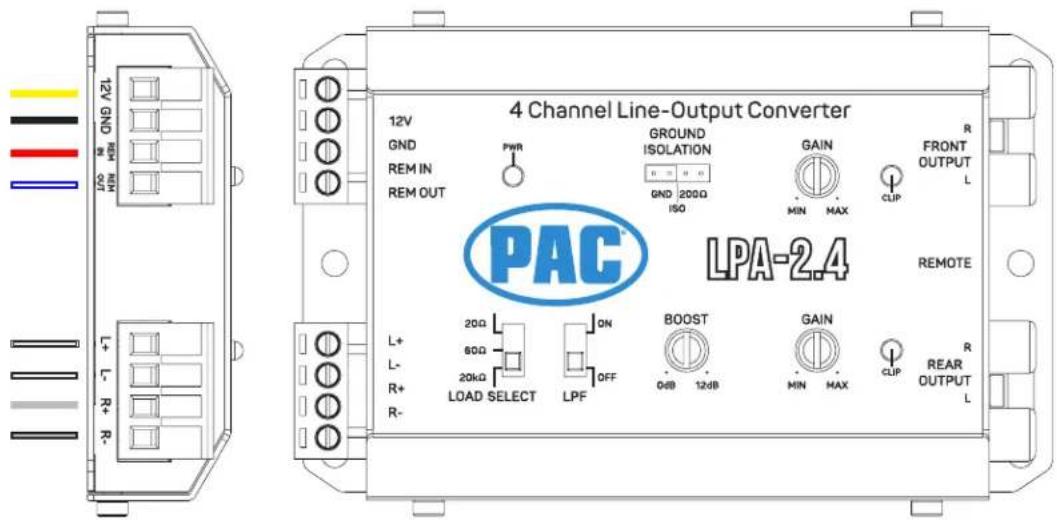
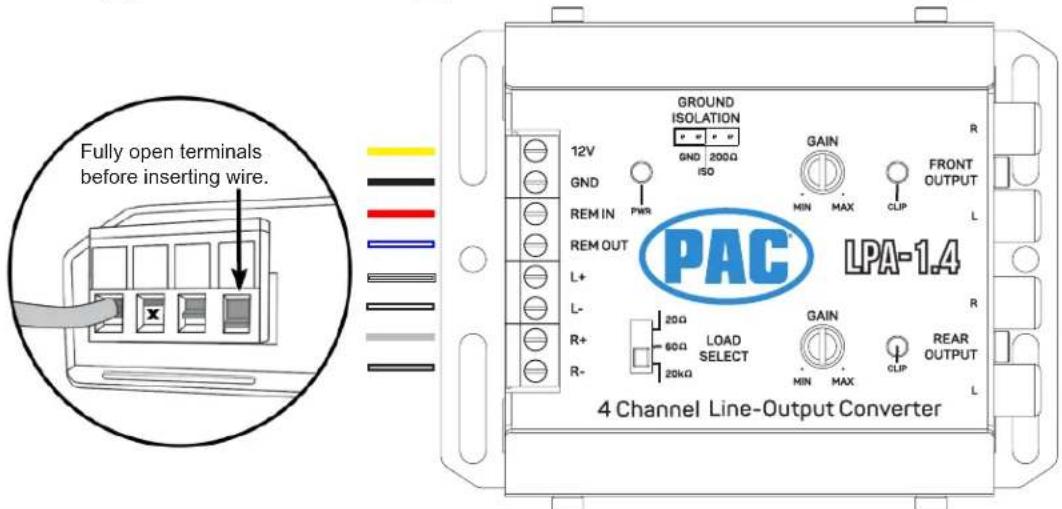
Example Installation - 4-Channel Amplifier - (HARNESS CUT REQUIRED)

flowchart
graph TD
    A["OEM RADIO"] -->|LPH TO RADIO CONNECTION| B["PAC"]
    B -->|LOOSE WIRE S TO LPA| C["Aftermarket Amplifier"]
    C -->|REM OUT FROM LPA\nRCA FROM LPA| B
    B -->|CUT HERE AND INSULATE" | D["OUT"]
    style A fill:#f9f,stroke:#333
    style B fill:#ccf,stroke:#333
    style C fill:#cfc,stroke:#333
    style D fill:#fcc,stroke:#333
Example Installation - Mono Amplifier - (HARNESS CUT NOT REQUIRED)

flowchart
graph TD
    A["OEM RADIO"] -->|DO NOT CUT!!| B["CUT HERE AND INSULATE"]
    B --> C["LPH TO RADIO CONNECTION"]
    C --> D["LOOSE WIRES TO LPA"]
    D --> E["2 Channel Line-Output Converter"]
    E --> F["RCA FROM LPA"]
    F --> G["AFTERMARKET AMPLIFIER"]
    G --> H["REMO OUT FROM LPA"]
    H --> I["SEM/SEM/SEM/SEM/SEM/SEM/SEM/SEM/SEM/SEM/SEM/SEM/SEM/SEM/SEM/SEM/SEM/SEM/SEM/SEM/SEM/SEM/SEM/SEM/SEM/SEM/SEM/SEM/SEM/SEM/SEM/SEM/SEM/SEM/SEM/SEM/SEM/SEM/SEM/SEM/SEM/SEM/SEM/SEM/SEM/SEM/SEM/SEM/SEM/SEM/SEM/HA"]
    style A fill:#f9f,stroke:#333
    style B fill:#ccf,stroke:#333
    style C fill:#cfc,stroke:#333
    style D fill:#fcc,stroke:#333
    style E fill:#cff,stroke:#333
    style F fill:#ffc,stroke:#333
    style G fill:#cfc,stroke:#333
    style H fill:#fcc,stroke:#333
    style I fill:#ffc,stroke:#333
ANC vs Amplifier


©2018 AAMP Global • All Rights Reserved.
- Amp is larger/Black
• ANC is small/Silver - Amp has 3 plugs
• ANC has 2 plugs
ANC / Amp Location 2019+ RAM 1500


ANC / Amp Location 2019+ RAM 2500/3500

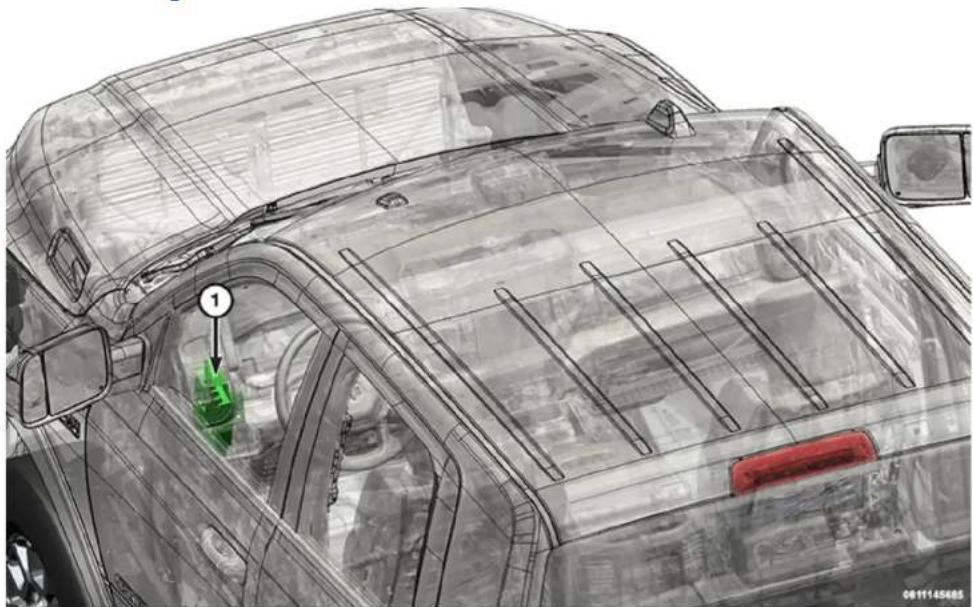
natural_image
Technical line drawing of a car's rear window and dashboard, showing structural components and a green component labeled '1' (no text or symbols beyond label)Under Driver Dash
ANC / Amp Location Jeep Cherokee


©2018 AAMP Global • All Pights Reserved.
ANC / Amp Location Chrysler Pacifica


ANC Location 2015-2016 Grand Cherokee

Behind Right Quarter Trim Panel


Brand : PAC
Model : LocPro Advanced LPA-2.2
Category : Audio/video converter