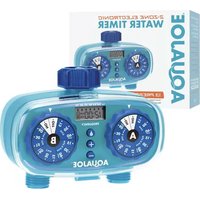
AJ-ET2Z-RM - Automatic irrigation timer Aqua Joe - Free user manual and instructions
Find the device manual for free AJ-ET2Z-RM Aqua Joe in PDF.


| Product Type | Electronic Water Timer |
| Brand | Aqua Joe |
| Model | AJ-ET2Z-RM |
| Dimensions (L x W x H) | 4.5 x 3.2 x 2.1 inches |
| Weight | 0.6 lb |
| Power Source | 2 x AA batteries (not included) |
| Number of Zones | 1 |
| Programming Options | Custom schedules, manual operation, rain delay |
| Max Water Pressure | 120 PSI |
| Water Connection | Standard garden hose thread (3/4 inch) |
| Maintenance | Clean filter periodically; store indoors during freezing |
| Safety Features | Automatic shut-off; low battery indicator |
| Spare Parts Availability | Replacement batteries, filter, and mounting bracket |
| Repairability | User replaceable batteries and filter; no serviceable internal components |
| General Information | Designed for outdoor watering automation; manual and programming guide included |
Frequently Asked Questions - AJ-ET2Z-RM Aqua Joe
User questions about AJ-ET2Z-RM Aqua Joe
0 question about this device. Answer the ones you know or ask your own.
Ask a new question about this device
Download the instructions for your Automatic irrigation timer in PDF format for free! Find your manual AJ-ET2Z-RM - Aqua Joe and take your electronic device back in hand. On this page are published all the documents necessary for the use of your device. AJ-ET2Z-RM by Aqua Joe.
USER MANUAL AJ-ET2Z-RM Aqua Joe
THANKS FOR YOUR PURCHASE OF A REMANUFACTURED PRODUCT.
To make sure you get the most out of your product, be sure to register online at
sunjoe.com
to enjoy full product support.
PASTE UPC LABEL HERE
If you have any questions or comments, please call the Snow Joe® + Sun Joe® customer service department at: 1-866-SNOWJOE (1-866-766-9563)

AQUAJOE®
2-ZONE ELECTRONIC WATER TIMER
Model AJ-ET2Z-RM

If you have any questions or comments, please call the Snow Joe ^® + Sun Joe ^® customer service department at:
1-866-SNOWJOE (1-866-766-9563)
Know Your Electronic Water Timer
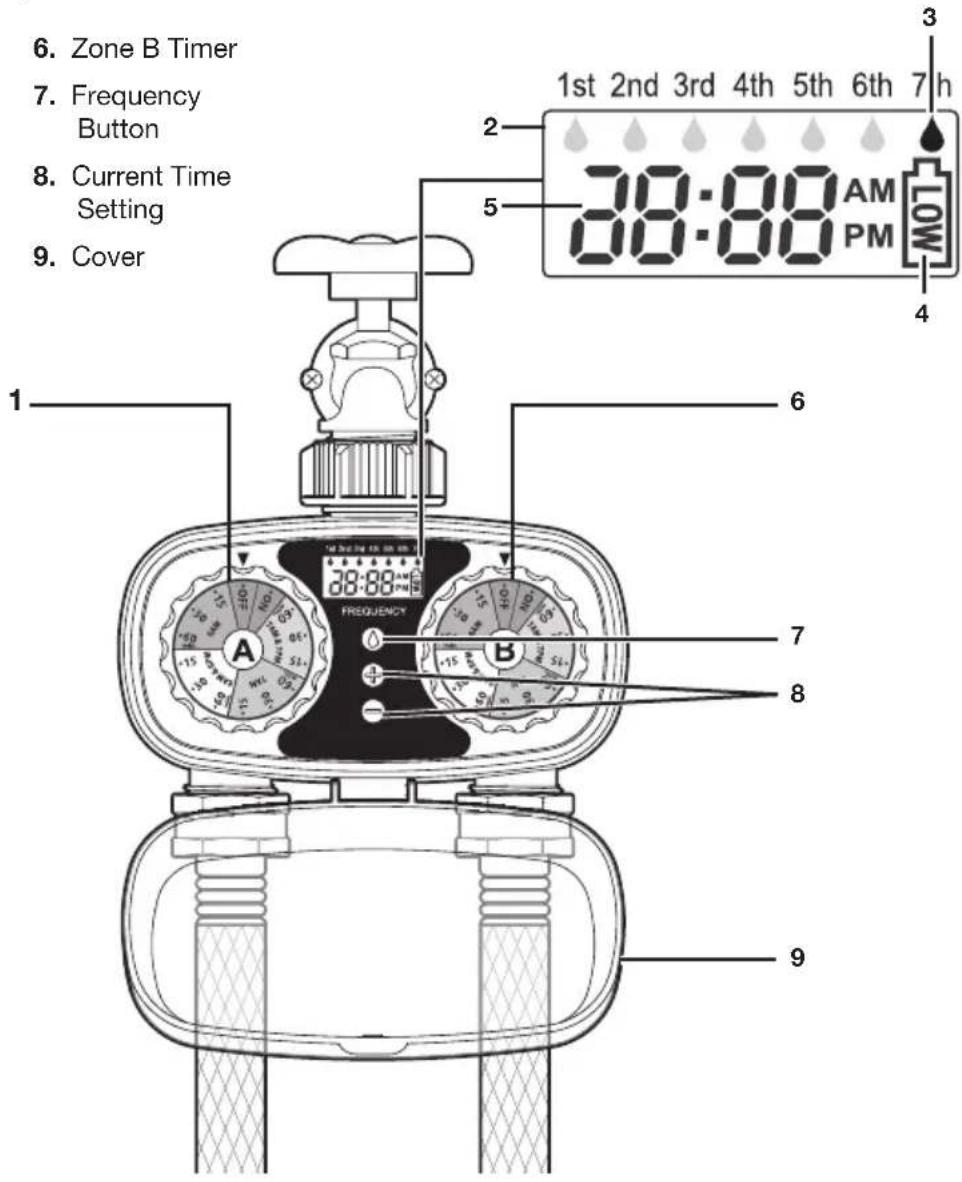
Read the owner's manual and safety rules carefully before operating your electronic water timer. Compare the illustration below to the actual unit in order to familiarize yourself with the location of the various controls and adjustments. Save this manual for future reference.
- Zone A Timer
- Digital Screen
- Watering Frequency
- Battery Capacity
-
Current Time
-
Zone B Timer
- Frequency Button
- Current Time Setting
- Cover
Technical Data
Power .... 2 AA Alkaline batteries (not included)
Operating Pressure 10 - 100 PSI
Max Pressure....120 PSI
Rated Flow 9.24 GPM
Water Outlet/Inlet Thread Size .....0.75 in. (1.9 cm)
Watering Cycles 1-13 cycles
Cycle Time Max 60 min each
Watering Frequency......12 hrs up to every 7 days
Valves/Number of Zones 2
Net Weight.... 0.7 lbs (0.3 kg)
Battery Installation
- Open the battery compartment on the lower back of the timer.
- Pull out the battery compartment and insert two AA batteries (not included). Secure the battery compartment back into the unit (Fig. 1).

Set Current Time
Refer to Fig. 2 for the following instructions.
- Use the "+" button to increase time displayed.
- Use the “-” button to decrease time displayed.
- Make sure that correct AM/PM is displayed.

TIP : Holding "+" or "-" button down allows you to scroll or more quickly through your time selection.
Programming the Timer
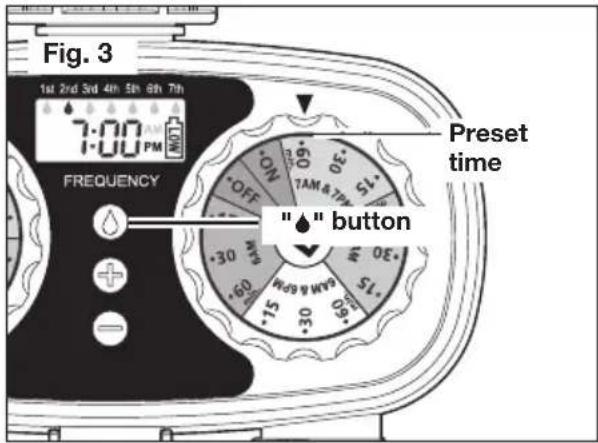
- To set watering frequency, press the "♠" button to cycle through options. Settings range from 1st to 7th. You may set up 1st (once a day), 2nd (once every two days), 3rd (once every three days), etc (Fig. 3).
- To select water cycle on dial, turn the dial to select one of the 13 settings you wish to run. For example, water at 6 AM for 15, 30 or 60 minutes; water at 6 AM and 6 PM for 15, 30 or 60 minutes; water at 7 AM for 15, 30 or 60 minutes; and water at 7 AM and 7 PM for 15, 30 or 60 minutes (Fig. 3).
Installing the Timer
Attach timer securely to the faucet and hose. Open the faucet and leave it open. Water will turn on and shut off at the selected time. Ensure cover is closed securely.
Manual Operation
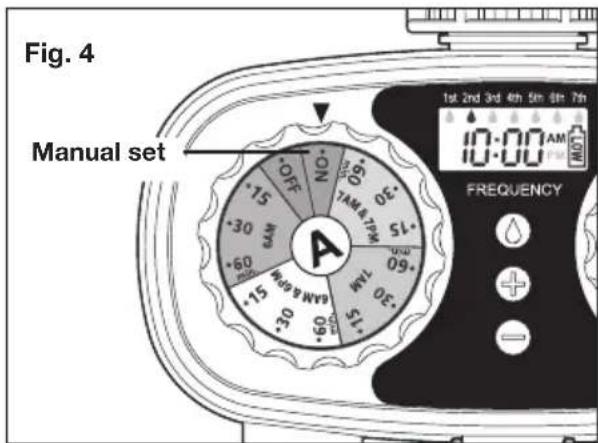
To water for non-timed application, with the water turned on at the faucet, turn the dial to ON. Turn the dial to OFF to stop manual watering (Fig. 4).
Maintenance + Care
Follow the steps below if the timer stops working or exhibits poor water quality due to debris or dirt build-up.
- Remove the inlet filter from the faucet connection and rinse under water to remove any dirt or debris (Fig. 5).

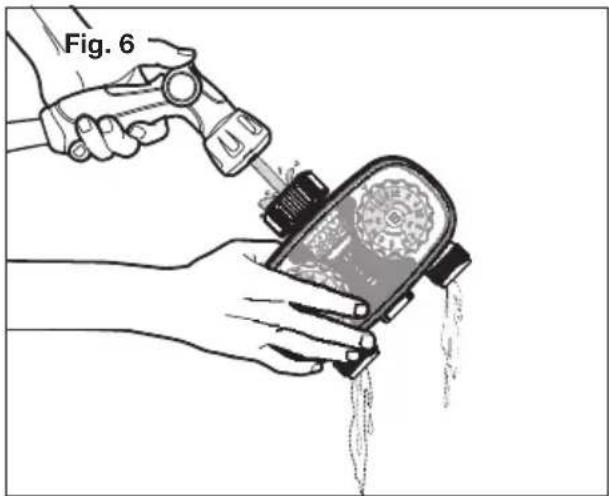
- With timer compartment cover closed securely, flush faucet connection with a stream of water, and repeat for both hose connections (Fig. 6).
natural_image
Illustration of a hand using a tool to lift a device into a container, with liquid dripping (no text or symbols)- Replace inlet filter before reattaching to water source. Tighten faucet connection securely.
WARNING!
Detach from faucet during freezing weather. This product is intended for outdoor watering use only. Do not use water exceeding 100^ F ( 38^ C) or with pressures exceeding 100 psi.
Service + Support
If your AQUA JOE® AJ-ET2Z-RM 2-Zone Electronic Water Timer requires service or maintenance, please call the Snow Joe® + Sun Joe® customer service center at 1-866-SNOWJOE (1-866-766-9563).

SNOW JOE® + SUN JOE® REFURBISHED GOODS WARRANTY
GENERAL CONDITIONS:
Snow Joe ^® + Sun Joe ^® operating under Snow Joe ^® , LLC warrants this refurbished product to the original purchaser for 90 days against defects in material or workmanship when used for normal residential purposes. If a replacement part or product is needed, it will be sent free of charge to the original purchaser except as noted below.
The duration of this warranty applies only if the product is put to personal use around the household. It is the owner's responsibility to correctly perform all maintenance and minor adjustments explained in the owner's manual.
HOW TO OBTAIN YOUR REPLACEMENT PART OR PRODUCT:
To obtain a replacement part or product, please visit snowjoe.com/help or email us at help@snowjoe.com for instructions. Please be sure to register your unit beforehand to speed up this process. Certain products may require a serial number, typically found on the decal affixed to the housing or guard of your product. All products require a valid proof of purchase.
EXCLUSIONS:
- Wearing parts like belts, augers, chains and tines are not covered under this warranty. Wearing parts can be purchased at snowjoe.com or by call 1-866-SNOWJOE (1-866-766-9563).
- Batteries are covered in full for 90-days from date of purchase.
Snow Joe ^® + Sun Joe ^® may from time to time change the design of its products. Nothing contained in this warranty shall be construed as obligating Snow Joe ^® + Sun Joe ^® to incorporate such design changes into previously manufactured products, nor shall such changes be construed as an admission that previous designs were defective.
This warranty is intended to cover product defects only. Snow Joe ^® , LLC is not liable for indirect, incidental or consequential damages in connection with the use or misuse of the Snow Joe ^® + Sun Joe ^® products covered by this warranty. This warranty does not cover any cost or expense incurred by the purchaser in providing substitute equipment or service during reasonable periods of malfunction or non-use of this product while waiting for a replacement part or unit under this warranty. Some states do not allow exclusions of incidental or consequential damages so the above exclusions may not apply in all states. This warranty may give you specific legal rights in your state.
HOW TO REACH US:
We're here to help Monday through Friday from 9AM to 7PM EST and Saturday and Sunday 9AM to 4PM. You can reach us at 1-866-SNOWJOE (1 866-766-9563), online at snowjoe.com, via email at help@snowjoe.com or tweet us @snowjoe.
in EXPORTS:
Customers who have purchased Snow Joe ^® + Sun Joe ^® products exported from the United States and Canada should contact their Snow Joe ^® + Sun Joe ^® distributor (dealer) to obtain information applicable to your country, province or state. If for any reason, you are not satisfied with the distributor's service, or if you have difficulty obtaining warranty information, contact your Snow Joe ^® + Sun Joe ^® seller. If in the event your efforts are unsatisfactory, please reach out to us directly.

- THANKS FOR YOUR PURCHASE OF A REMANUFACTURED PRODUCT.
- AQUAJOE®
- 2-ZONE ELECTRONIC WATER TIMER
- Know Your Electronic Water Timer
- Technical Data
- Battery Installation
- Set Current Time
- Programming the Timer
- Installing the Timer
- Manual Operation
- Maintenance + Care
- WARNING!
- Service + Support
- SNOW JOE® + SUN JOE® REFURBISHED GOODS WARRANTY
- GENERAL CONDITIONS:
- HOW TO OBTAIN YOUR REPLACEMENT PART OR PRODUCT:
- EXCLUSIONS:
- HOW TO REACH US:
- in EXPORTS:
Brand : Aqua Joe
Model : AJ-ET2Z-RM
Category : Automatic irrigation timer