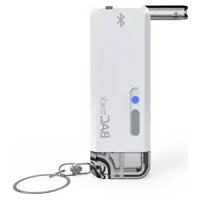
Vio BT-M2 - Breathalyzer BACTRACK - Free user manual and instructions
Find the device manual for free Vio BT-M2 BACTRACK in PDF.


| Product Type | Personal Breathalyzer |
| Brand | BACtrack |
| Model | Vio BT-M2 |
| Sensor Type | Fuel Cell Sensor |
| Measurement Range | 0.000–0.400% BAC |
| Accuracy | ±0.005% BAC at 0.020% BAC |
| Display | LED indicator lights (Green/Yellow/Red) |
| Power Source | 2 x AAA batteries (included) |
| Battery Life | Approximately 300 tests per set |
| Dimensions | 4.3 x 1.8 x 0.6 in (109 x 46 x 15 mm) |
| Weight | 2.4 oz (68 g) including batteries |
| Warm-Up Time | Less than 10 seconds |
| Testing Time | Approximately 5 seconds |
| Recovery Time | Approximately 30 seconds |
| Calibration | Recommended every 6–12 months or after 200 tests |
| Smartphone App | Compatible with BACtrack app (iOS/Android) for tracking and sharing |
| Mouthpieces | Disposable; box of 5 included |
| Operating Temperature | 32°F – 104°F (0°C – 40°C) |
| Storage Temperature | 14°F – 122°F (-10°C – 50°C) |
| Cleaning | Wipe exterior with a soft cloth; do not use liquids or solvents |
| Safety Certifications | FDA 510(k) cleared, CE marked |
| Spare Parts Availability | Mouthpieces and batteries widely available; calibration service through BACtrack |
| Repairability | No user-serviceable parts; calibration and repair by BACtrack authorized center |
| Warranty | 1-year limited warranty |
| Country of Origin | China |
Frequently Asked Questions - Vio BT-M2 BACTRACK
User questions about Vio BT-M2 BACTRACK
0 question about this device. Answer the ones you know or ask your own.
Ask a new question about this device
Download the instructions for your Breathalyzer in PDF format for free! Find your manual Vio BT-M2 - BACTRACK and take your electronic device back in hand. On this page are published all the documents necessary for the use of your device. Vio BT-M2 by BACTRACK.
USER MANUAL Vio BT-M2 BACTRACK
BACtrack® Vio™
Smartphone Breathalyzer
GETTING STARTED
BACtrack Vio is a revolutionary keychain-sized breathalyzer that wirelessly connects to your smartphone via Bluetooth® technology. Once connected to the free BACtrack app on iOS or Android, you are able to save and track your BAC over time, add photos and notes to your results, and learn interesting and valuable information about your drinking habits.
STEP 1: PAIR YOUR BREATHALYZER
- Download the free BACtrack app in the App Store or on Google Play*
- Ensure Bluetooth is turned on in the Settings of your smartphone
- Turn on your BACtrack Vio Breathalyzer by holding the power button until the light turns on
- Open the BACtrack app
- Register your email address to activate your warranty (if you haven't already), and click Done
- The app will automatically connect to the BACtrack via Bluetooth
STEP 2: TAKE A READING
Click the BACtrack image to begin your test. To ensure accurate results, it is important to wait at least 15 minutes after eating, drinking or smoking before testing.
* Links to the download pages can also be found at BACtrack.com/mobile

STEP 1. STEP 2.
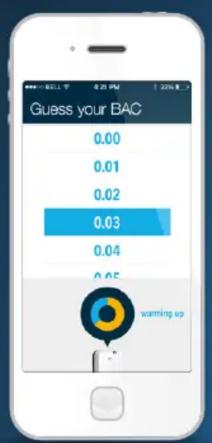
STEP 3: GUESS YOUR BAC
While the BACtrack sensor warms up, you are given the option to guess your BAC, which aims to help you better understand how alcohol affects your body. Your guess will not affect your reading.

STEP 4: BLOW INTO BREATHALYZER
When the screen reads “Blow Now,” take a deep breath and blow into your breathalyzer continuously until the circle is completely illuminated. You will be blowing for about five seconds.

STEP 5: VIEW RESULTS
Once your BACtrack has analyzed your breath sample, it will communicate the reading to your mobile device, and your Blood Alcohol Content (BAC) estimate will be displayed on screen.
BACtrack Vio Breathalyzer Features


TRACKING GRAPH: Track your BAC and drinking habits over time

line
| Time Point | Value | |---|---| | 1 | 0.05 | | 2 | 0.10 | | 3 | 0.15 | | 4 | 0.18 | | 5 | 0.16 | | 6 | 0.14 | | 7 | 0.12 | | 8 | 0.11 | | 9 | 0.13 | | 10 | 0.17 | | 11 | 0.19 | | 12 | 0.20 | | 13 | 0.22 | | 14 | 0.24 | | 15 | 0.26 | | 16 | 0.28 | | 17 | 0.30 | | 18 | 0.32 | | 19 | 0.34 | | 20 | 0.36 | | 21 | 0.38 | | 22 | 0.40 | | 23 | 0.42 | | 24 | 0.44 | | 25 | 0.46 | | 26 | 0.48 | | 27 | 0.50 | | 28 | 0.52 | | 29 | 0.54 | | 30 | 0.56 | | 31 | 0.58 | | 32 | 0.60 | | 33 | 0.62 | | 34 | 0.64 | | 35 | 0.66 | | 36 | 0.68 | | 37 | 0.70 | | 38 | 0.72 | | 39 | 0.74 | | 40 | 0.76 | | 41 | 0.78 | | 42 | 0.80 | | 43 | 0.82 | | 44 | 0.84 | | 45 | 0.86 | | 46 | 0.88 | | 47 | 0.90 | | 48 | 0.92 | | 49 | 0.94 | | 50 | 0.96 | | 51 | 0.98 | | 52 | 1.00 | | 53 | 1.02 | | 54 | 1.04 | | 55 | 1.06 | | 56 | 1.08 | | 57 | 1.10 | | 58 | 1.12 | | 59 | 1.14 | | 60 | 1.16 | | 61 | 1.18 | | 62 | 1.20 | | 63 | 1.22 | | 64 | 1.24 | | 65 | 1.26 | | 66 | 1.28 | | 67 | 1.30 | | 68 | 1.32 | | 69 | 1.34 | | 70 | 1.36 | | 71 | 1.38 | | 72 | 1.40 | | 73 | 1.42 | | 74 | 1.44 | | 75 | 1.46 | | 76 | 1.48 | | 77 | 1.50 | | 78 | 1.52 | | 79 | 1.54 | | 80 | 1.56 | | 81 | 1.58 | | 82 | 1.60 | | 83 | 1.62 | | 84 | 1.64 | | 85 | 1.66 | | 86 | 1.68 | | 87 | 1.70 | | 88 | 1.72 | | 89 | 1.74 | | 90 | 1.76 | | 91 | 1.78 | | 92 | 1.80 | | 93 | 1.82 | | 94 | 1.84 | | 95 | 1.86 | | 96 | 1.88 | | 97 | 1.90 | | 98 | 1.92 | | 99 | 1.94 | | Note: The 'yes' label in the chart is not present in the data table, so it is not included in the image.The first screen shows your history of predictions and results. Dots indicate a verified result, lines show how far away your guess was.
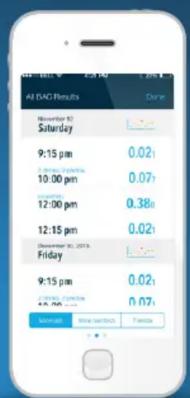
Swipe to view a list of All BAC Results. Toggle between "Mine (all)", "Mine (Verified*)" and "Friends" readings using the tabs at the bottom.

bar
| Category | Value | |---|---| | 6.20+ | 8.20 | | 9.18-9.28 | 9.18 | | 9.51-9.78 | 9.51 | | 9.84-10.18 | 9.84 | | 10.12-10.4 | 10.12 | | 10.43-10.78 | 10.43 | | 10.78-11.1 | 10.78 | | 11.22-11.5 | 11.22 | | 11.57-12.0 | 12.07 | | 12.02-12.4 | 12.34 |Swipe once more to view your results on a histogram.

BACTRACK WORLDVIEW: Explore real-time BAC results around the world from other BACtrack users

INFORMATION: Access the User Manual and more information about BACtrack

SETTINGS: Access options for sharing settings and account preferences
• Verified results are those taken after waiting 15 minutes to test after drinking, eating or smoking

EXPANDED RESULTS SCREEN:
With ZeroLine ^® , you can view an estimate of when your BAC will return to 0.00% based on your current result.
- Categorize your BAC result as “verified” by answering whether or not you waited 15 minutes before testing (which affects the accuracy of the reading). Your answer will affect how your BAC result is displayed on the Tracking Graph.
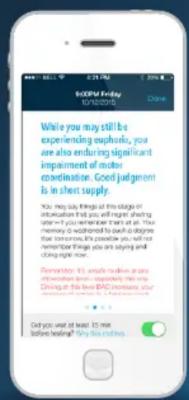
Swipe the screen to view safety information regarding your BAC level and an explanation of how your balance, coordination, and judgment may be affected.
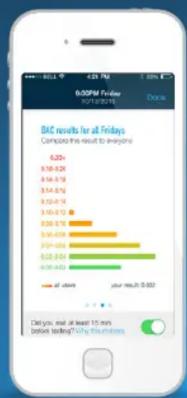
bar
DAC results for all Fridays Comparing this result to analysts | Category | Value ($) | | :--- | :--- | | 6-20+ | 10.428 | | 20-30 | 10.678 | | 30-40 | 10.478 | | 40-50 | 10.610 | | 50-60 | 10.678 | | 60-70 | 10.609 | | 70-80 | 10.783 | | 80-90 | 10.854 | | 90-100 | 10.843 | | all others | your result: $0.932Swipe again to view prior results.

Swipe once more to view a map of your location, where you can:
Categorize the results as yours or a friend's
Append photos, notes and drink logs to your BAC results*
Share your BAC results (and any associated photos or notes) via text message or social media
*Only viewed by you in the Tracking Graph, unless you choose to share them publicly.
BACtrack Vio Breathalyzer Features: Sharing and Privacy
Your BAC results can be as private or as public as you want them to be.
Simple privacy settings put you in control over what data is saved, if any at all.
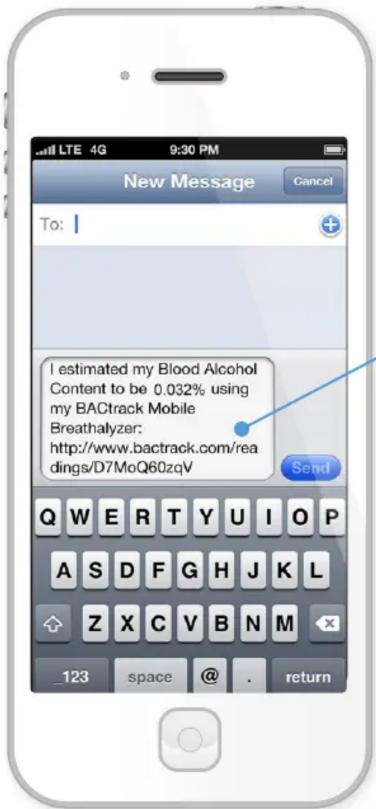

When a BACtrack Vio user chooses to share results privately via text message, their result appears on a unique BACtrack page with a randomly generated URL. It includes their result, date, time, and location, as well as drink data or photos if they were added to the result.
Results can also be shared publicly on Facebook and Twitter.


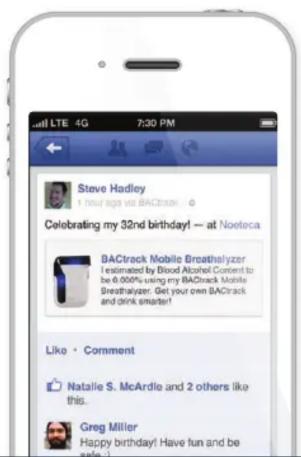
If a user is comfortable sharing their results (either publicly or anonymously), they can choose to contribute to the BACtrack WorldView - a live real-time map of BAC results shared by BACtrack Mobile and Vio users. Points on the map link to unique BACtrack results pages for each test taken.
Brand : BACTRACK
Model : Vio BT-M2
Category : Breathalyzer