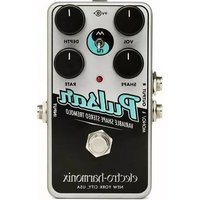
Nano Pulsar - Guitar effects pedal Electro Harmonix - Free user manual and instructions
Find the device manual for free Nano Pulsar Electro Harmonix in PDF.


| Product Type | Stereo Phaser / Pulsar Pedal |
| Model | Nano Pulsar |
| Brand | Electro Harmonix |
| Dimensions | 2.75 x 4.5 x 2 inches (70 x 114 x 51 mm) |
| Weight | 0.5 lbs (227 g) |
| Power Supply | 9V DC center negative (battery or adapter, optional) |
| Current Draw | Approximately 30 mA |
| Controls | Rate, Depth, Feedback, Blend, Shape (Waveform) switches |
| Modes | Phaser (Phase) and Pulsar (Tremolo) with selectable waveforms (Sine, Triangle, Square, Sawtooth) |
| Connectivity | 1/4" input, dual 1/4" outputs (stereo/mono) |
| Bypass | True bypass |
| LED Indicator | Yes, for effect on/off and rate sync |
| Housing | Compact metal chassis |
| Warranty | 1 year limited warranty |
| Included Accessories | User manual, stickers |
| Country of Origin | USA |
Frequently Asked Questions - Nano Pulsar Electro Harmonix
User questions about Nano Pulsar Electro Harmonix
0 question about this device. Answer the ones you know or ask your own.
Ask a new question about this device
Download the instructions for your Guitar effects pedal in PDF format for free! Find your manual Nano Pulsar - Electro Harmonix and take your electronic device back in hand. On this page are published all the documents necessary for the use of your device. Nano Pulsar by Electro Harmonix.
USER MANUAL Nano Pulsar Electro Harmonix
Congratulations on your purchase of the Nano Pulsar, a variable shape stereo tremolo and panner effects pedal. Connected in mono, the Nano Pulsar is a tremolo that allows significant control over the shape of the modulating waveform. Connect the Nano Pulsar in stereo (each output to a separate amp/mixer channel) and you have a panner pedal that will send your instrument back and forth between two amps with the same control over waveform shape. So, while one amp is fading up in volume, the other will be fading down in volume or even more dramatic: while one amp is on, the other is off. But that's not all! Higher settings of the DEPTH knob put the Nano Pulsar into warp mode where the signal's volume modulates asymmetrically producing rhythmic, out-of-phase tremolo effects.
Operating Instructions
Connect your guitar or other instrument to the INPUT jack on the Nano Pulsar and the MONO/L OUTPUT to your main amp. If running the Nano Pulsar in stereo, connect the Right OUTPUT jack to another amplifier. Apply power if needed; your Nano Pulsar might already have a 9V battery installed. Press the footswitch to ensure the STATUS LED is lit, now your Nano Pulsar is ready to go.
For a nice starter setting, turn all knobs to their 12 o'clock positions and set the toggle switch—centered within the knobs—to the Triangle position. This setting will yield a deep, smooth tremolo at a medium rate. Lower the DEPTH knob for a shallower tremolo effect; play with the RATE knob to hear the full range of modulation speed on tap; and of course, adjust the VOL knob for more or less volume at the output jacks.
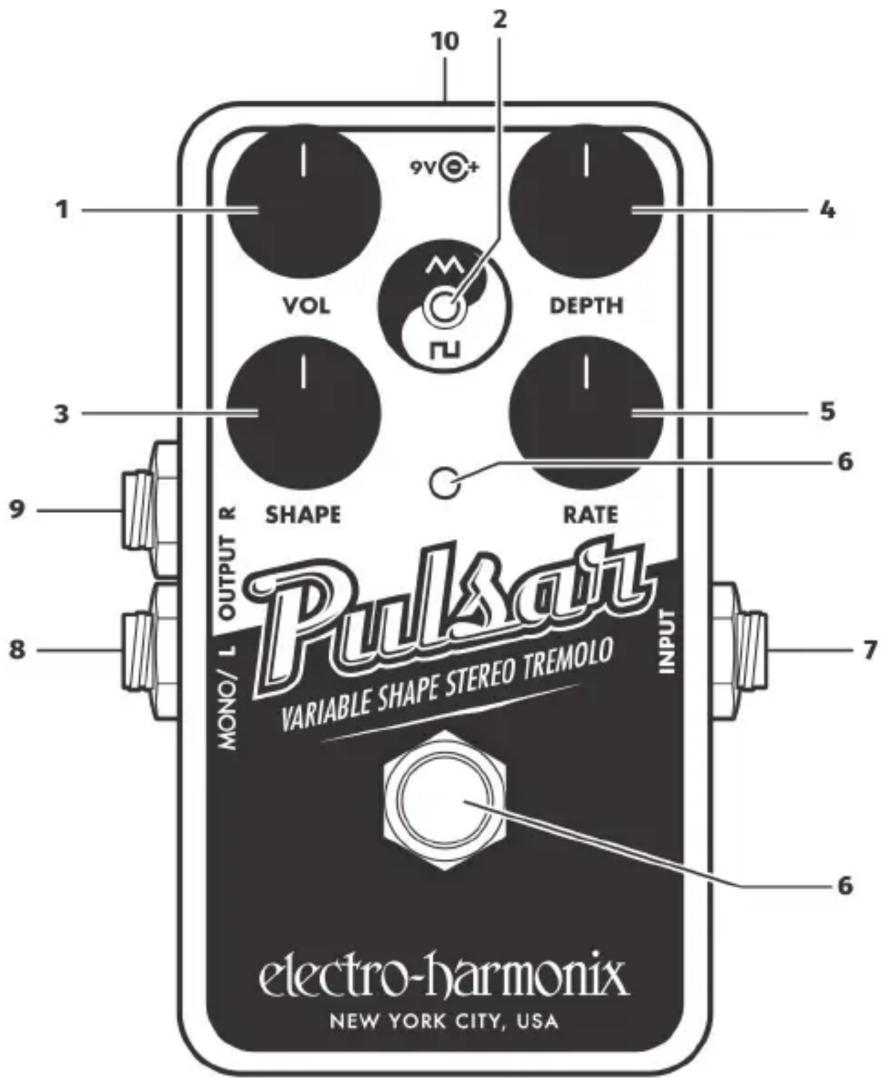
- VOL Knob Adjusts the overall output level of the effect. As VOL is turned clockwise, the output gets louder. The VOL knob offers up to 12dB of volume boost depending on the settings of the other controls. When VOL is turned fully counterclockwise the effect output is silenced.
- SHAPE Switch Selects between Triangle and Square Wave modes. See more on Shape in the SHAPE knob section.
- SHAPE Knob Further adjusts the tremolo's modulation waveform shape.
Triangle Wave Mode The modulation waveform is triangle wave based, resulting in smooth volume modulation. As the SHAPE knob is turned clockwise from the minimum position to the center, the waveform morphs from rising sawtooth to triangle. Turning SHAPE further clockwise from the center position to maximum, the waveform continues to morph from triangle to falling sawtooth. Please note: the triangle shapes are reversed out of the Right OUTPUT jack. For example, at the minimum SHAPE setting, the right output will be a falling sawtooth.
Square Wave Mode The modulation waveform is square wave based, resulting in sharp, on/off volume modulation. As the SHAPE knob is turned clockwise from minimum to maximum, the modulating waveform's pulse width increases from a narrow pulse to a wide pulse width. Near the knob's center position is square wave modulation where the tremolo volume is loud and quiet in equal amounts. Please note: the square shapes are reversed out of the Right OUTPUT jack. For example, at the minimum SHAPE setting, the right output will be a wide pulse width.
-
DEPTH Knob Adjusts the amount of tremolo that will be applied to your signal. As DEPTH is turned clockwise from minimum to maximum, the amount of the tremolo effect increases. Maximum tremolo—greatest dynamic range from loudest to quietest—occurs when the DEPTH knob is set to approximately 1 o'clock. As DEPTH is turned further clockwise past 1 o'clock, the tremolo begins to warp by modulating between positive and negative phase with an asymmetric or rhythmic feel. Set DEPTH to approximately 1 o'clock to obtain the widest stereo field when the Nano Pulsar is used as a stereo panner.
-
RATE Knob Adjusts the speed of the tremolo or pan effect. As RATE is turned clockwise the modulation rate increases. The range of modulation speed is approximately 20 seconds to 30 Hz.
-
FOOTSWITCH and STATUS LED – Press and release the footswitch to toggle between buffered bypass and effect mode. When in effect mode, the Status LED is lit and pulses at the same rate as the effect. The Status LED is off in buffered bypass mode. The Nano Pulsar powers up in bypass mode.
-
INPUT Jack Audio input to the Nano Pulsar.
-
MONO/LEFT OUTPUT Jack Connect this 1/4" mono jack to your amplifier's input. When using the Nano Pulsar as a mono device we recommend you use the MONO/L jack so that the SHAPE knob description on the previous page corresponds to what you hear.
-
RIGHT OUTPUT Jack Connect this 1/4" mono jack to your second amplifier's input. When using the Nano Pulsar as a stereo panner, use the R OUTPUT jack for your second channel. You can connect only to the RIGHT OUT jack if you like; the tremolo effect will be the same as from the LEFT OUT jack but the SHAPE waveforms are reversed. For example, when the SHAPE knob is set to maximum, tremolo modulation out of the Right Output will either be a rising sawtooth or narrow pulse width.
-
9V Power Jack – An optional 9VDC, center-negative power supply can be connected to the power jack to provide power without a battery. The Nano Pulsar requires 30mA at 9VDC on a center-negative plug. Do not exceed 12VDC at the power jack.
When using a 9V battery, plugging into the INPUT jack activates power. The input cable should be removed when the unit is not in use to avoid running down the battery.
To change the 9-volt battery, you must remove the 4 screws on the bottom of the Nano Pulsar. Once the screws are removed, you can take off the bottom plate and change the battery. Please do not touch the circuit board while the bottom plate is off or you risk damaging a component.
▶ Audio input impedance at INPUT jack: 2.2MΩ
▶ Audio output impedance at either OUTPUT jack: 600Ω
▶ Current draw: 30mA
▶ Maximum input signal level in bypass, before clipping: +5dBu
WARRANTY INFORMATION
Please register online at www.ehx.com/product-registration or complete and return the enclosed warranty card within 10 days of purchase. Electro-Harmonix will repair or replace, at its discretion, a product that fails to operate due to defects in materials or workmanship for a period of one year from date of purchase. This applies only to original purchasers who have bought their product from an authorized Electro-Harmonix retailer. Repaired or replaced units will then be warranted for the unexpired portion of the original warranty term.
If you should need to return your unit for service within the warranty period, please contact the appropriate office listed below. Customers outside the regions listed below, please contact EHX Customer Service for information on warranty repairs at info@ehx.com or +1-718-937-8300. USA and Canadian customers: please obtain a Return Authorization Number (RA#) from EHX Customer Service before returning your product. With your returned unit, include a written description of the problem as well as your name, address, telephone number, e-mail address, RA# and a copy of your receipt clearly showing the purchase date.
United States & Canada
EHX Customer Service
Electro-Harmonix
co New Sensor Corp.
47-50 33rd Street
Long Island City, NY 11101
Tel: 718-937-8300
Email: info@ehx.com
Europe
John Williams
Electro-Harmonix UK
13 Cwmdonkin Terrace
Swansea SA2 0RQ
United Kingdom
Tel: +44 179 247 3258
Email: electroharmonixuk@virginmedia.com
This warranty gives a purchaser specific legal rights. A purchaser may have even greater rights depending upon the laws of the jurisdiction within which the product was purchased.

The CE logo indicates that this product has been tested and shown to conform with all applicable European Conformity directives.

The WEEE or “trashcan” logo indicates that this product is made up of electronic components that should not be trashed alongside household waste but instead should be recycled by a proper electrical waste facility.

natural_image
Black and white circular illustration of a stylized face with curly hair and floral patterns (no text or symbols)electro-harmonix
WWW.EHX.COM



Brand : Electro Harmonix
Model : Nano Pulsar
Category : Guitar effects pedal