
SR-PC4 - Computer accessory SONY - Free user manual and instructions
Find the device manual for free SR-PC4 SONY in PDF.
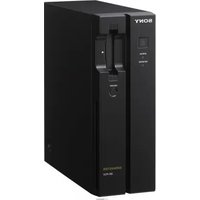


| Brand | Sony |
| Model | SR-PC4 |
| Product Type | Multimedia Projector |
| Dimensions (W x H x D) | 315 x 100 x 230 mm |
| Weight | 2.9 kg |
| Power Consumption | 260 W (max) |
| Lamp Life | 5000 hours (standard mode) |
| Resolution | 1920 x 1080 (Full HD) |
| Brightness | 3000 ANSI lumens |
| Contrast Ratio | 3000:1 |
| Connectivity | HDMI x 2, USB-A x 1, VGA x 1, Audio 3.5mm x 1 |
| Built-in Speaker | Mono, 5W |
| Noise Level | 29 dB (eco mode) |
| Operating Temperature | 0 °C to 40 °C |
| Storage Temperature | -20 °C to 60 °C |
| Included Accessories | Power cord, Remote control, Batteries, User manual |
| Warranty | 2 years limited |
| Cleaning Instructions | Wipe exterior with a soft dry cloth; clean lens with lens cleaning paper |
| Safety Warnings | Do not look into the lens while powered on; do not block ventilation |
| Spare Parts & Repairability | Replacement lamp and filters available; service by authorized technicians |
Frequently Asked Questions - SR-PC4 SONY
User questions about SR-PC4 SONY
0 question about this device. Answer the ones you know or ask your own.
Ask a new question about this device
Download the instructions for your Computer accessory in PDF format for free! Find your manual SR-PC4 - SONY and take your electronic device back in hand. On this page are published all the documents necessary for the use of your device. SR-PC4 by SONY.
USER MANUAL SR-PC4 SONY
MEMORY DATA TRANSFER UNIT
SRPC-5
SR-PC4
Before operating the unit, please read this manual thoroughly and retain it for future reference.
For SRPC-5
Important Safety Instructions
- Read these instructions.
- Keep these instructions.
- Heed all warnings.
- Follow all instructions.
- Do not use this apparatus near water.
- Clean only with dry cloth.
Do not block any ventilation openings. Install in accordance with the manufacturer's instructions.
Do not install near any heat sources such as radiators, heat registers, stoves, or other apparatus (including amplifiers) that produce heat.
Do not defeat the safety purpose of the polarized or grounding-type plug. A polarized plug has two blades with one wider than the other. A grounding-type plug has two blades and a third grounding prong. The wide blade or the third prong are provided for your safety. If the provided plug does not fit into your outlet, consult an electrician for replacement of the obsolete outlet.
- Protect the power cord from being walked on or pinched particularly at plugs, convenience receptacles, and the point where they exit from the apparatus.
- Only use attachments/accessories specified by the manufacturer.
- Use only with the cart, stand, tripod, bracket, or table specified by the manufacturer, or sold with the apparatus.

When a cart is used, use caution when moving the cart/apparatus combination to avoid injury from tip-over.
- Unplug this apparatus during lightning storms or when unused for long periods of time.
- Refer all servicing to qualified service personnel. Servicing is required when the apparatus has been damaged in any way, such as power-supply cord or plug is damaged, liquid has been spilled or objects have fallen into the apparatus, the apparatus has been exposed to rain or moisture, does not operate normally, or has been dropped.
WARNING
To reduce the risk of fire or electric shock, do not expose this apparatus to rain or moisture.
To avoid electrical shock, do not open the cabinet. Refer servicing to qualified personnel only.
THIS APPARATUS MUST BE EARTHED.
This apparatus is provided with a main switch on the rear panel.
Install this apparatus so that user can access the main switch easily.
To completely turn off the power, turn off the main power switch on the rear panel.
WARNING:
Using this unit at a voltage other than 120 V may require the use of a different line cord or attachment plug, or both. To reduce the risk of fire or electric shock, refer servicing to qualified service personnel.


This symbol is intended to alert the user to the presence of uninsulated "dangerous voltage" within the product's enclosure that may be of sufficient magnitude to constitute a risk of electric shock to persons.

This symbol is intended to alert the user to the presence of important operating and maintenance (servicing) instructions in the literature accompanying the appliance.
Attention - when the product is installed in a rack:
1. Prevention against overloading of branch circuit
When this product is installed in a rack and is supplied power from an outlet on the rack, please make sure that the rack does not overload the supply circuit.
2. Providing protective earth
When this product is installed in a rack and is supplied power from an outlet on the rack, please confirm that the outlet is provided with a suitable protective earth connection.
3. Internal air ambient temperature of the rack
When this product is installed in a rack, please make sure that the internal air ambient temperature of the rack is within the specified limit of this product.
- Prevention against achieving hazardous condition due to uneven mechanical loading
When this product is installed in a rack, please make sure that the rack does not achieve hazardous condition due to uneven mechanical loading.
- Install the equipment while taking the operating temperature of the equipment into consideration
For the operating temperature of the equipment, refer to the specifications of the Operation Manual.
- When performing the installation, keep the following space away from walls in order to obtain proper exhaust and radiation of heat.
Right, Left: 4 cm (1.6 inches) or more
Rear: 10 cm (4 inches) or more
When installing, the installation space must be secured in consideration of ventilation and service operation.
- Do not block the ventilation slots on the left and right side panels, and the vents of the fans.
- Leave a space around the unit for ventilation.
- Leave more than 40 cm of space in the rear of the unit to secure the operation area.
When the unit is installed on a desk or the like, leave at least 4 cm of space on the left and right sides.
Leaving 40 cm or more of space above the unit is recommended for service operation.
WARNING: THIS WARNING IS APPLICABLE FOR USA ONLY.
If used in the USA, use the UL LISTED power cord specified below.
DO NOT USE ANY OTHER POWER CORD.
Plug Cap: Parallel blade with ground pin (NEMA 5-15P Configuration)
Cord Type: SJT, three 16 or 18 AWG wires
Length: Minimum 1.5 m (4 ft 11 in.), less than 2.5 m (8 ft 3 in.)
Rating: Minimum 10A, 125V
Using this unit at a voltage other than 120V may require the use of a different line cord or attachment plug, or both. To reduce the risk of fire or electric shock, refer servicing to qualified service personnel.
WARNING: THIS WARNING IS APPLICABLE FOR OTHER COUNTRIES.
- Use the approved Power Cord (3-core mains lead) / Appliance Connector / Plug with earthing-contacts that conforms to the safety regulations of each country if applicable.
- Use the Power Cord (3-core mains lead) / Appliance Connector / Plug conforming to the proper ratings (Voltage, Ampere).
If you have questions on the use of the above Power Cord / Appliance Connector / Plug, please consult a qualified service personnel.
CAUTION
The apparatus shall not be exposed to dripping or splashing. No objects filled with liquids, such as vases, shall be placed on the apparatus.
Do not install the appliance in a confined space, such as book case or built-in cabinet.
CAUTION
The unit is not disconnected from the AC power source (mains) as long as it is connected to the wall outlet, even if the unit itself has been turned off.
For customers in Norway
This equipment may be connected to an IT power distribution system.
For customers in the U.S.A.
This equipment has been tested and found to comply with the limits for a Class A digital device, pursuant to Part 15 of the FCC Rules. These limits are designed to provide reasonable protection against harmful interference when the equipment is operated in a commercial environment.
This equipment generates, uses, and can radiate radio frequency energy and, if not installed and used in accordance with the instruction manual, may cause harmful interference to radio communications. Operation of this equipment in a residential area is likely to cause harmful interference in which case the user will be required to correct the interference at his own expense.
You are cautioned that any changes or modifications not expressly approved in this manual could void your authority to operate this equipment.
All interface cables used to connect peripherals must be shielded in order to comply with the limits for a digital device pursuant to Subpart B of Part 15 of FCC Rules.
This device complies with Part 15 of the FCC Rules.
Operation is subject to the following two conditions: (1) this device may not cause harmful interference, and (2) this device must accept any interference received, including interference that may cause undesired operation.
For the customers in Canada
This Class A digital apparatus complies with Canadian ICES-003.
For the customers in Europe
This product with the CE marking complies with the EMC Directive issued by the Commission of the European Community.
Compliance with this directive implies conformity to the following European standards:
• EN55103-1: Electromagnetic Interference (Emission) - EN55103-2: Electromagnetic Susceptibility (Immunity) This product is intended for use in the following Electromagnetic Environment: E4 (controlled EMC environment, ex. TV studio).
For the customers in Europe
The manufacturer of this product is Sony Corporation, 1-7-1 Konan, Minato-ku, Tokyo, Japan.
The Authorized Representative for EMC and product safety is Sony Deutschland GmbH, Hedelfinger Strasse 61, 70327 Stuttgart, Germany. For any service or guarantee matters please refer to the addresses given in separate service or guarantee documents.
This apparatus shall not be used in the residential area.
For the customers in Europe, Australia and New Zealand
WARNING
This is a Class A product. In a domestic environment, this product may cause radio interference, in which case the user may be required to take adequate measures.
For the customers in Taiwan only
Please recycle used batteries.
For SR-PC4
WARNING
To reduce the risk of fire or electric shock, do not expose this apparatus to rain or moisture.
To avoid electrical shock, do not open the cabinet. Refer servicing to qualified personnel only.
WARNING
This unit has no power switch.
When installing the unit, incorporate a readily accessible disconnect device in the fixed wiring, or connect the power plug to an easily accessible socket-outlet near the unit. If a fault should occur during operation of the unit, operate the disconnect device to switch the power supply off, or disconnect the power plug.
WARNING: THIS WARNING IS APPLICABLE FOR USA ONLY.
If used in USA, use the UL LISTED power cord specified below.
DO NOT USE ANY OTHER POWER CORD.
Plug Cap Parallel blade (NEMA 1-15P Configuration)
Cord Type NISPT-2 or SPT-2, two 16 or 18 AWG wires
Length: Minimum 1.5 m (4 ft 11 in.), Maximum 2.5 m (8 ft 3 in.)
Rating: Minimum 7 A, 125 V
Using this unit at a voltage other than 120V may require the use of a different line cord or attachment plug, or both. To reduce the risk of fire or electric shock, refer servicing to qualified service personnel.
WARNING: THIS WARNING IS APPLICABLE FOR OTHER COUNTRIES.
- Use the approved Power Cord (2-core mains lead) / Appliance Connector / Plug that conforms to the safety regulations of each country if applicable.
- Use the Power Cord (2-core mains lead) / Appliance Connector / Plug conforming to the proper ratings (Voltage, Ampere).
If you have questions on the use of the above Power Cord / Appliance Connector / Plug, please consult a qualified service personnel.
IMPORTANT
The nameplate is located on the bottom.
For the customers in the U.S.A.
This equipment has been tested and found to comply with the limits for a Class A digital device, pursuant to Part 15 of the FCC Rules. These limits are designed to provide reasonable protection against harmful interference when the equipment is operated in a commercial environment. This equipment generates, uses, and can radiate radio frequency energy and, if not installed and used in accordance with the instruction manual, may cause harmful interference to radio communications. Operation of this equipment in a residential area is likely to cause harmful interference in which case the user will be required to correct the interference at his own expense.
You are cautioned that any changes or modifications not expressly approved in this manual could void your authority to operate this equipment.
All interface cables used to connect peripherals must be shielded in order to comply with the limits for a digital device pursuant to Subpart B of Part 15 of FCC Rules.
This device complies with Part 15 of the FCC Rules. Operation is subject to the following two conditions: (1) this device may not cause harmful interference, and (2) this device must accept any interference received, including interference that may cause undesired operation.
For customers in Canada
This Class A digital apparatus complies with Canadian ICES-003.
For customers in Europe, Australia, and New Zealand
WARNING
This is a Class A product. In a domestic environment, this product may cause radio interference, in which case the user may be required to take adequate measures.
For customers in Europe
The manufacturer of this product is Sony Corporation, 1-7-1 Konan, Minato-ku, Tokyo, 108-0075 Japan. The Authorized Representative for EMC and product safety is Sony Deutschland GmbH, Hedelfinger Strasse 61, 70327 Stuttgart, Germany.
This apparatus shall not be used in residential areas.
For customers in Taiwan only

Table of Contents
Overview......8
Features 8
System Configuration Example 9
Names and Functions of Parts ....10
Front 10
Rear 11
Setup.... 12
Setup Flow 12
Preparation 12
Shared File Server Settings 12
Displaying the Web Application Screen 12
Network Settings.... 13
Mounting the File Server 14
Proxy Settings 14
Saving and Recalling GUI Configuration Data 16
Configuring the Monitor Output Signal.... 16
Lookup Table (LUT) Settings.... 17
Configuring the Monitor Output Adjustment Settings...... 17
Basic Operations 19
Web Application Screen 19
Viewing Video Data Recorded on SRMemory Cards ...... 20
Importing Files 20
VTR Video Data Operations.... 23
Connecting a VTR.... 23
Setting a VTR.... 23
Displaying Video Data.... 25
Transferring Video Data 26
Transferring SRMemory Data to a VTR.... 26
Other Operations 33
Editing and Viewing SRMemory Card Information...... 33
Viewing File Server Data.... 33
Displaying the Web Client IP Addresses 34
Managing Log Files 34
Using Export Log Files 35
Automatic Execution Using a Job File.... 35
Checking File Systems (FSCK) 36
Specifications 36
SRPC-5.... 36
SR-PC4.... 37
Appendix 38
Error/Warning Messages 38
Salvaging SRMemory Cards for which File Content was Lost 38
List of Keyboard Shortcuts.... 39
Supported Formats 39
LUT File Formats Applicable to This Board 40
MPEG-4 Visual Patent Portfolio License 41
Job File Samples 41
Connecting the SRPC-5/SR-PC4 to the Shared File Server and Transferring Files.... 43
Notes on File Transfer.... 46
Solving Problems related to eSATA HDD and SRPC-5/SR-PC4 Connections.... 46
Configuring FTP Server Settings 46
Overview
The SRPC-5 or SR-PC4 (herein referred to as the “unit”) is a data transfer unit used for displaying and transferring materials recorded on an SRMemory card. Using the unit, you can view materials recorded on an SRMemory card on a master monitor, or transfer recorded materials on an SRMemory card to a server or non-linear editing equipment.
You can also transfer materials recorded on a VTR to a server or write materials recorded on an SRMemory card to a VTR by connecting the SRPC-5 and the VTR (HDCAM-SR recorder on which an HKSR-5804 is installed).
Operations can be performed via a web browser on a PC or workstation. These operations include clip playback/pausing, clip list display, and metadata confirmation/editing.
Marks for model-specific functions
This manual uses the following markers to indicate functions that are specific to the SRPC-5 or SR-PC4.
PC5 : SRPC-5
PC4 : SR-PC4
Features
View video recorded on SRMemory cards
The unit is equipped with an HD-SDI connector that allows you to view video recorded on an SRMemory card on a master monitor.
PC5 The HD-SDI connector also supports 3G-SDI dual link, allowing display of a wide range of formats.
Transfer data recorded on SRMemory cards
Material recorded on an SRMemory card can be transferred to a server or non-linear editing equipment via Gigabit Ethernet.
Transfer data recorded on VTRs
PC5 Materials recorded on a VTR can be transferred to a server or non-linear editing equipment via Gigabit Ethernet by connecting the SRW-5800, on which an HKSR-5804 is installed, and the SRPC-5. VTR materials can be transferred after converting them to DPX or MXF format.
Write data recorded on SRMemory cards to a VTR
PC5 Materials recorded on SRMemory cards can be written to VTR tape by connecting the SRW-5800, on which an HKSR-5804 is installed, and the SRPC-5.
10 Gigabit Ethernet and eSATA support
By installing a commercially available 10GbE network interface card into the PCIe expansion slot on the rear of the unit, even faster data transfer is possible via 10 Gigabit Ethernet.
By installing a commercially available eSATA card into the PCIe expansion slot, you can transfer data to external HDDs, etc.
For details on recommended third-party products, contact your local Sony representative.
System Configuration Example
The following are examples of network system configurations in which data is transferred between a shared file server using the unit.
For the SRPC-5![graph TD A["Shared file server"] --> B["Switching hub"] C["Web client"] --> B B --> D["SRPC-5"] D --> E["AUX OUTPUT A/B"] E --> F["HD monitor"] D --> G["VTR 1)"]](/content/2026/06/1363595/images/3d15f91f374645c0925f292484f3870a656b4ecc785d72da9a12d125e40c7da4.jpg)
1) Connect the VTR if necessary. See "VTR Video Data Operations" on page 23 for details on connecting the SRPC-5 to a VTR and then setting up and operating the unit.
For the SR-PC4![graph TD A["Shared file server"] --> B["Switching hub"] C["Web client"] --> B B --> D["SR-PC4"] D --> E["MONITOR"] E --> F["HD monitor"]](/content/2026/06/1363595/images/310f0531482ce42ab8b23fa223e50add585b7e503bdf0cebc9c7446abee9399d.jpg)
Names and Functions of Parts
Front
SRPC-5
SR-PC4
① On/standby button
PC5 When the main power switch on the rear of the unit is turned on, this turns on the unit or sets it to standby mode.
PC4 Turns the unit on/off.
The button will light or blink based on the operating status of the unit.
Lit red: The unit is in standby mode.
Blinking green: The unit is starting up.
Lit green: The unit is turned on.
Blinking green: If the button blinks green after startup, the unit may be malfunctioning.
Blinking red: PC4 If the button is blinking red before the unit is turned on, the power supply voltage may be incorrect.
If the button blinks green after startup or blinks red, stop operation and contact your local Sony representative.
②STATUS indicator
Displays the status of the unit.
Lit green: Operating normally.
Blinking green: The unit is starting up.
Lit yellow: A warning has occurred.
Lit red: An error has occurred.
Blinking blue: The unit is starting up in default IP address mode (see page 13).
③ PC5 VTR indicator
Displays the connection status between the SRPC-5 and the VTR.
Off: The SRPC-5 is set to stand-alone mode or a VTR is not connected.
Lit green: The SRPC-5 is properly connected to the VTR and operating in VTR mode.
Lit yellow: A warning has occurred on the VTR.
Lit red: An error has occurred on the VTR.
Blinking red: The unit cannot connect to the VTR or communication with the VTR is disabled. Restart the unit and the VTR.
4 NETWORK indicator
Displays the communication status between the unit and the server.
Off: The server is not mounted.
Lit green: The server is mounted.
Blinking green: Data is being transferred.
5 PC5 Eject button
Press this to eject the SRMemory card.
⑥SRMemory indicator
Displays the status of the SRMemory card inserted in the slot.
Off: The SRMemory card is logically detached from the unit.
Lit blue: The SRMemory card is connected to the unit and available for use.
Lit green: Data is being read from the SRMemory card.
Blinking blue 1) : The SRMemory card is logically being attached to or detached from the unit.
Blinking green 1) : Data other than audio and video signals, such as file name changes, is being written.
Blinking purple 1) : Files are being deleted or formatting is being performed from the menu.
Blinking red 1) : Salvaging or formatting is being performed in response to an error.
Fast blinking red 1) : A problem was detected while processing the SRMemory card. Eject or salvage the card or perform the appropriate operation as instructed by the message that appears.
1) Blinking LED: Blinks at 1-second interval.
Fast blinking LED: Blinks at 1/4-second interval.
⑦SRMemory slot
Insert the SRMemory card here.
Note
[PC4] Be sure to insert the SRMemory card all the way into the slot. The card may not lock into place if it is not inserted completely.
8 PC4 UNLOCK button
Unlocks the SRMemory slot.
Press this button to unlock the slot before removing an SRMemory card.
Rear
SRPC-5

SR-PC4

①PCIe expansion slot
You can install a commercially available 10GbE card or eSATA card here.
②NETWORK connector
Connect a network cable here to enable file transfer to the file server and control of the unit from a web client.
CAUTION
- For safety, do not connect the connector for peripheral device wiring that might have excessive voltage to this port. Follow the instructions for this port.
- When you connect the NETWORK cable of the unit to peripheral device, use a shielded-type cable to prevent malfunction due to radiation noise.
③ PC5 VTR I/F OUTPUT connector
Connect this to the AUX INPUT connector on a VTR to output signals to the VTR.
4 PC5 VTR I/F INPUT connector
Connect this to the AUX OUTPUT connector on a VTR to input signals from the VTR.
5 PC5 AUX INPUT connector
Used for future expansion. This is not used in this version.
6 PC5 AUX OUTPUT connector
HD SDI signals are output from here for connection to an HD monitor.
7 PC5 AC IN connector
Connect the power cord here for connection to a power
⑥ outlet. ⑦ ⑧
8 PC5 Main power switch
Use this to turn the power supply on/off. During regular use of the unit, leave the main power switch in the on position, and use the on/standby button on the front of the unit to switch between operational mode and standby mode.
Note
Always make sure that the unit is in standby mode before setting the main power switch to the off position to turn off the power.
9 PC4 MONITOR connector
HD SDI signals are output from here for connection to an HD monitor.
10 PC4 DC IN connector
Connect the supplied AC adapter here and connect it to a power outlet.
Notes
- Do not use AC adapters other than the one supplied.
- Before disconnecting the AC adapter, always turn off the unit using the on/standby button on the front panel of the unit.
Setup
Setup Flow
The following is an overview of the setup procedure.
Connect the unit, shared file server, and web client within a LAN (see page 12).

Configure the shared file server (see page 12).

Configure the network settings from the web client (see page 13).

Mount the shared directory of the shared file server from the web client (see page 14).
Memo
For details on using the SRPC-5 after connecting it to a VTR, see “VTR Video Data Operations” on page 23. Configuration examples for when the SRPC-5 or SR-PC4 is connected to a shared file server are described in “Connecting the SRPC-5/SR-PC4 to the Shared File Server and Transferring Files” of the Appendix on page 43.
Preparation
Connect the unit, shared file server, and web client within the same segment of the LAN (Gigabit Ethernet).
![graph TD A["Shared file server"] --> B["Switching hub"] C["Web client"] --> B D["SRPC-5 or SR-PC4"] --> B](/content/2026/06/1363595/images/8ad48129e5269f3bc4827ce42dde8ece738a2432f27be0a2b8d12cd3b5f90e6d.jpg)
Shared file server
The shared file server consists of a shared disk and stores image data transferred from an SRMemory card and VTR. The file server must support NFS server and CIFS server functions. Any operating system is acceptable.
If an eSATA card is installed in the PCIe expansion slot, an HDD connected via eSATA can be used as a shared disk in place of a file server.
Web client
The web client is a PC or workstation used to operate the unit via the web application. It can also be used as a shared file server.
A web browser is required (Internet Explorer, Safari, Firefox, etc.). Any operating system is acceptable.
Note
Only one shared file server can be connected to the unit. Up to five web clients can be connected to the unit at one time.
Shared File Server Settings
Configure permission settings for the shared directory mounted by the unit. Grant read, write, and execute permissions to the unit (i.e., users).
You can configure the user ID and group ID in the NETWORK tab of the DIAGNOSIS menu.
For details on file server settings, consult your system administrator.
Displaying the Web Application Screen
Enter the IP address of the unit in the address bar of the web browser to display the web application screen of the unit on the web client.

Enter the IP address of the unit here.
Notes
- The factory default setting for the IP address is 192.168.0.1. When displaying the web application screen for the first time, enter “192.168.0.1” in the address bar of the web browser.
- Before accessing the unit, make sure Javascript and cookies are enabled in the web browser.
- When the web application of the unit is used, the [Return] and [Update] buttons in the browser menu do not operate. If the display of the browser cannot be updated or abnormality has occurred in the display contents, do not click the [Update] button. In this case, re-enter the IP address of the unit.
If you forget the IP address
If you forget the IP address of the unit, turn the unit off and perform the following to restart the unit.
1 Hold down the eject button (PC5) or UNLOCK button (PC4), and press the on/standby button. 2 Release the button when the STATUS indicator starts to blink blue.
The unit starts up in default IP address mode, and the IP address is reset to the factory default address, 192.168.0.1. Enter this address in the web application to connect to the unit, and verify or reconfigure the IP address as necessary.
Network Settings
Configure the unit's IP address and other settings.
Note
When opening the web application and configuring network settings for the first time, enter “192.168.0.1” in the address bar of your web browser to display the web application screen.
1 Click the DIAGNOSIS menu button in the web application screen, and click the NETWORK tab.
The NETWORK tab screen appears.
After entering values for each item in the following screen, press the Enter key and click the SET button to confirm the values.
The settings will be applied after you finish configuration and restart the unit.

2 Configure the following items under NETWORK.
IP ADDRESS: IP address of the unit.
SUBNET MASK: Subnet mask of the unit.
MTU: Maximum transfer volume for data in bytes.
Note
PC5 When connecting the SRPC-5 to the VTR, set an IP address that differs from the HKSR-5804's address.
3 If necessary, configure the following items under DOMAIN.
DOMAIN NAME: Network domain name.
DNS SERVER 1: IP address of DNS server 1.
DNS SERVER 2: IP address of DNS server 2.
DNS SERVER 3: IP address of DNS server 3.
DNS SERVER 4: IP address of DNS server 4.
4 Configure the following items under OTHERS.
DEFAULT GW: Default gateway of the unit.
HOST NAME: Host name of the unit.
UID: User ID of the unit.
GID: Group ID of the unit.
Note
Be sure to consult the file server administrator before entering the appropriate values for UID and GID.
If you are transferring data through means other than the NETWORK connector on the rear of the unit, configure
the IP address of the network adaptor that will be used for transfer as well.
When a commercially available 10GbE card or other option is installed in the PCIe expansion slot
Configure the IP address and other items under NETWORK (OPTION 1) and NETWORK (OPTION 2). Configure the settings so that the segments differ.
Mounting the File Server
Mount the shared disk of the file server as follows.
1 Click the DISK SETUP menu button in the web application screen, and click the DISK CONTROL tab.
The DISK CONTROL tab screen appears.

2 Configure the TYPE setting to select the shared disk protocol for the server to be mounted.
You can select from NFSv3, NFSv2, CIFS, or DEV. When mounting a hard drive connected to an eSATA card, select DEV.
Note
HFS+ is the recommended file system. Be sure to unmount an HDD connected via eSATA when removing it.
3 Configure the following settings based on the protocol selected in step 2.
For the NFSv3 or NFSv2 protocol
OPTION: Server mount option.
SERVER IP: IP address of the server.
SERVER DIR: Path to shared directory provided by the server.
For the CIFS protocol
OPTION: Server mount option.
SERVER IP: IP address of the server.
SERVER DIR: Path to shared directory provided by the server.
USER NAME: Name of user accessing the server.
DOMAIN: Domain to which the user belongs.
PASSWORD: Password used to access the server.
For the DEV protocol
OPTION: Mount option.
DEVICE: Select the device that will be mounted from the list of connected device types.
NODE: Select the node that will be mounted from the list of connected device node names.
Note
The OPTION setting should be left blank during normal use.
However, if you want to optimize transfer speeds by specifying the block size for files at the time of disk mounting, enter the data as shown in the following example.
Example) wsize=32768, rsize=32768
Consult your file server administrator if the OPTION setting requires configuration.
4 Click the MOUNT button to mount the file server or device.
After the server is mounted, the MOUNT button will change to the UNMOUNT button.
5 Configure the LIST TYPE setting to specify how image clips on the shared directory of the mounted file server are displayed.
Main: Display only the main image files.
Main+Proxy: Display main image files and proxies.
Others: Display non-image files.
To unmount the server
Click the UMOUNT button on the DISK CONTROL tab screen.

Note
Unmount the server before turning off the unit or before the unit restarts after changing the unit format settings.
Proxy Settings
1 Click the PROXY SETUP menu button in the web application screen, and click the PROXY SETUP tab.
The PROXY SETUP tab screen appears.
| PROXY SETUP | COOKIE | |
| GUI TYPE | Normal Proxy without JOG Dial | |
| CUI MODE | Tab | |
| FORMAT | JPG | |
| MODE | Normal | |
| WF TYPE | Dot | |
| WF OVERLAY | off | |
| WF ALPHA | Low | |
| AUTO GEN | enable(as Temporarily) | |
| PROXY DIR | Proxy Directory | |
2 Set the following items.
Underlined values in the table indicate default settings.
| Item Function/settings | |
| GUI TYPE Selects the size of the proxy and whether the jog dial appears or not in the GUI.Normal Proxy without JOG Dial:The proxy is displayed with a 320-pixel width. The jog dial does not appear in the MEM CONTROL display or the VTR/MEM CONTROL display.Normal Proxy with JOG Dial: The proxy is displayed with a 320-pixel width. The jog dial appears in the MEM CONTROL display or the VTR/MEM CONTROL display.Large Proxy without JOG Dial:The proxy is displayed with a 640-pixel width. The jog dial does not appear in the MEM CONTROL display or the VTR/MEM CONTROL display.PC5 This setting also determines the file size of the proxy that is generated automatically when transferring data to a VTR.NoteThe proxy that appears in the DISK SETUP menu is always displayed with a 320-pixel width, regardless of this setting. | |
| GUI MODE Selects how the items in the display are shown.Tab: Items are divided into multiple tab displays.Flat: Items are shown in one display. | |
| FORMAT Selects the file type of the proxy displayed on the GUI.BMP: BitmapJPG: JPEGPC5 This setting also determines the type of the proxy file that is generated automatically when transferring data to a VTR. |
| Item Function/settings | |
| MODE Selects the display mode of the proxies that appear in the GUI during tape playback.Normal: Displays the picture.Waveform(Parade): Displays the waveforms (red, green, and blue).Waveform(Red): Displays the waveform (red).Waveform(Green): Displays the waveform (green).Waveform(Blue): Displays the waveform (blue).Vector: Displays the vector scope.Vector(x2): Displays the vector scope at 2-fold magnification. | |
| WF TYPE Selects the drawing method of the waveform.Dot DotsLine: Lines | |
| WF OVERLAY Selects the display method of the waveform(s).off: Does not display the picture.Only the waveform(s) is (are) displayed.on: Waveform(s) is (are) displayed over the picture.on(Mix): Waveform(s) and the picture are mixed and displayed. | |
| WF ALPHA Specifies the waveform transparency when the waveform(s) and the picture are mixed.Low: Low transparencyMiddle: Medium transparencyHigh: High transparency | |
| PC5 AUTO GEN(VTR mode only) | Determines whether or not proxies are automatically generated.disable: Proxies are not generated automatically.enable: When previewing files in the clip list and when transferring files to VTR, proxies are automatically generated for picture files that do not have their own proxies.enable(as Temporarily) Proxies are generated for display on the GUI. However, the generated proxies are not stored on the disk.NotePC5 Due to system limitations, during the export of uncompressed data, proxies are not generated for main picture files that are greater than about 62 MB. |
| PC5 PROXY DIR(VTR mode only) | Determines the directory wherethe generated proxies are stored.Same as Main Files: Proxies arestored in the same directoryas the main picture files.Proxy Directory: “proxy/” directoryis automatically created rightunder the directory where themain picture files are stored.Proxies are stored in the“proxy/” directory.Resolution directory: When themain picture files are storedin directories labeledaccording to size (e.g., 1920×1080), a directory forstoring small-size picture files(e.g., 320 × 180) is created tostore proxies. When the mainpicture files are not stored indirectories according topicture file size, proxies arestored in the same directorywhere their main picture filesare stored.When importing files, adirectory for storing mainpicture files and a directoryfor storing their proxieslabeled according to size(e.g., 1920 × 1080, 320 ×180) are created directlyunder the specified directory.The main picture files andtheir proxies are stored inthese directories.When importinguncompressed files, note thatthe “Resolution directory”setting is not applied whenFILE DIR in the DISKCONTROL tag display of theIMPORT menu is set to “OrgStructure” and the originalpicture files are not stored inthe directory according tosize. When FILE DIR is set to“All Files into SelectedDirectory,” directoriesaccording to size are created. |
Saving and Recalling GUI Configuration Data
GUI configuration data is temporarily saved in your browser's cookies.
By naming this configuration data and saving it to the mounted file server, you can recall the data later to restore the previous configuration.
1. Click the PROXY SETUP menu button in the web application screen, and click the COOKIE tab.
The COOKIE tab screen appears.

2. Enter a name for the cookie in the NAME box of the SAVE area, and then click the SAVE button.
The entered file name is automatically appended with the date.
Then, the cookie is stored in the directory for cookies on the mounted server.
To recall GUI setup data
Click the NAME box of the LOAD/DELETE area, select the stored cookie, and then click the LOAD button. Selecting "Factory Preset" at this time resets the GUI settings to their default values.
To delete GUI setup data
Click the NAME box of the LOAD/DELETE area, select the stored cookie, and then click the DELETE button.
Configuring the Monitor Output Signal
You can select the type of SDI signal that is output from the AUX OUTPUT connector (PC5) or MONITOR connector (PC4) on the rear of the unit.
1. Click the DIAGNOSIS menu button in the web application screen, and click the SYSTEM FORMAT tab.
The SYSTEM FORMAT tab screen appears.

2 Select the video format in the matrix table.
Select the format from the “4096 × 2160 / F65RAW” option in the matrix table when playing F65RAW files.
Notes
- When playing F65RAW files, do not use it for any purpose other than monitor output.
- When selecting any one of 23p, 24p, 25p or 29p from “4096 × 2160 / F65RAW” in the matrix table, those options will convert to 23PsF, 24PsF, 25PsF, or 29PsF respectively and output to the monitor. Additionally, when 50p or 59p is selected, those options will convert to 25PsF or 29PsF and output to the monitor.

3 PC5 Select one of the following in the DUAL/3G setting.
DUAL: Dual link (1.5G HD SDI)
3G: 3G HD SDI output
Lookup Table (LUT) Settings
It is possible to load lookup table (LUT) files to the LUT banks of the unit using the web application.
The eight LUT banks provided in the unit are used to store LUTs that are used for importing, exporting data from the tape and monitor signal output from the port.
LUT files stored in the banks are maintained even after the unit and VTR are turned off.
The bit depth of LUT files can be applied 8, 10, 12, and 16-bit data. Note, however, that the lower four of 16 bits are ignored because of the hardware's 12-bit process.
On the contrary, when the bit depth of the input data is 8 or 10, the signal is linearly interpolated into 12-bit data.
For details on applicable LUT file formats, see "LUT File Formats Applicable to This Board" in "Appendix".
1 Click the SRPC SETUP menu button, and click the LUT tab.
The LUT tab screen appears.

2 Set the following items.
| Item Function/settings | |
| BANK Selects one of the eight banks (BANK 1 to BANK 8). | |
| WP check box Check this box when you do not want to overwrite the contents of the selected LUT bank. |
3 Click the [Browse...] button to open the local disk or external media of the web client, then select the LUT file. And then, click the LOAD button.
The selected LUT file is loaded to the LUT bank selected in step 2.
Clearing the contents of a LUT bank
Select the bank whose contents you want to delete, and then click the CLEAR button.
Checking the names of files loaded to the LUT bank from the VTR
Use the NETWORK2 SETUP menu from the OTHERS CHECK menu within the MAINTENANCE menu of the VTR.
For details on the MAINTENANCE menu of the VTR, refer to the Installation Manual supplied with the SRW-5800.
Configuring the Monitor Output Adjustment Settings
Color control function for the monitor output can be set using the web application or through control panel operation on the VTR.
1 Click the SRPC SETUP menu button, and click the MONITOR tab.
The MONITOR tab screen appears.

2 Set the following items.
Underlined values in the table indicate default settings.
| Item Function/settings | |
| PC5 MODE (when connected to VTR) | Selects the storage destination of the video data to be output to the monitor.SRMemory: SRMemory card video data is displayed in the monitor.VTR: VTR video is displayed in the monitor when VTR is connected. |
| PC5 SDI MODE Selects the SDI signal type.1.5G: 1.5G HD SDI output3G: 3G HD SDI output | |
| COLOR SPACE Specifies the monitor output signal type.RGB 4:4:4: RGB 4:4:4 signal YCbCr: YcbCr 4:2:2 signal | |
| LUT Selects one of the eight banks.off: No LUT is used.BANK1 to BANK8: The LUT in the specified bank is applied to the monitor output.S-log1/2 to REC709 (800): Converts files filmed by F65 in S-log to REC709. | |
| RANGE Specifies whether the monitor output signal is extended from Head to Full before the LUT and compressed from Full to Head after the LUT.Pre(H→F) checkbox: Check this box to extend the effective signal range of a monitor output signal with headroom to full range before the LUT.Post(F→H) checkbox: Check this box to compress a full range monitor output signal to the effective signal range of a monitor output signal with headroom after the LUT. | |
| Item Function/settings | |
| CROP POS (4K)(only enabled when the system format is F65RAW) | Sets the position to crop the 1920 sample from the resized 2048 wide sample. -128 +128 sample (in samples of 2): The set value will be held until the unit is turned off. |
| EI(only enabled when the system format is F65RAW) | Sets the sensitivity (EI value).Auto: The EI value is set automatically.XXX: The EI value is set manually. |
| 3D MODE Left:PC5 | Outputs the Link A signal from the AUX OUTPUT A connector, and the Link B signal from AUX OUTPUT B connector.PC4 Outputs the Link A signal from the MONITOR OUT connector.Right:PC5 Outputs the Link B signal from the AUX OUTPUT A connector, and the Link A signal from AUX OUTPUT B connector.PC4 Outputs the Link B signal from the MONITOR OUT connector.H Split(L/R): Splits the display horizontally with the Link A signal output on the left side, and the Link B signal output on the right.H Split(R/L): Splits the display horizontally with the Link B signal output on the left side, and the Link A signal output on the right.V Split(L/R): Splits the display vertically with the Link A signal output on the top, and the Link B signal output on the bottom.V Split(R/L): Splits the display vertically with the Link B signal output on the top, and the Link A signal output on the bottom. |
Basic Operations
Web Application Screen
Configuration and data transfer controls for the unit are performed in the web application screen from a web client.
Contents of the web application screen
The web application screen consists of the following contents.
| Menu button Description | ||
| Tab | ||
| HOME Initial screen of the web application. | ||
| MEMCONTROL[PC5] VTR/MEMCONTROL(when connected to VTR) | Displays video from VTR or the SRMemory card. | |
| DISKCONTROL | Allows you to verify files stored on the file server. | |
| REMOTE Displays the IP address of the client PC connected to the unit. | ||
| IMPORT Allows you to import files from the SRMemory card to the file server. | ||
| MEMCONTROL[PC5] VTR/MEMCONTROL(when connected to VTR) | Displays data stored on VTR and the SRMemory card, and allows you to select videos for import. | |
| DISKCONTROL | Allows you to configure the storage location, file names, and other settings for the imported files. | |
| FILE SETUP Allows you to configure the format and conversion methods for the imported files. | ||
| Menu button Description | ||
| Tab | ||
| PROXY SETUP Allows you to configure proxy and GUI settings. | ||
| PROXY SETUP Allows you to configure settings for the proxy display method and GUI display style. | ||
| COOKIE Allows you to save and recall GUI configuration data. | ||
| SRPC SETUP Allows you to configure settings for the unit. | ||
| LUT Allows you to configure lookup table (LUT) settings. | ||
| MONITOR Allows you to configure color settings for monitor output signals. | ||
| SRMEMORY Displays information and file lists for the SRMemory card. | ||
| OTHERS | Allows you to configure settings for operation mode. | |
| DISK SETUP Allows you to configure system settings. | ||
| DISK CONTROL | Allows you to mount/unmount the shared file server. | |
| LOG CONTROL | Allows you to manage log files. | |
| JOB CONTROL | Allows you to perform job file controls. | |
| DIAGNOSIS | Allows you to configure other detailed settings. | |
| INFORMATION | Displays version information and the serial No., etc. | |
| SYSTEM FORMAT | Allows you to select the format of the SDI signal that is output to the monitor. | |
| NETWORK | Allows you to configure network settings. | |
| VERSION UP | Allows you to perform version updates. | |
| OTHERS | Sets the time and date, initializes the unit's settings, and performs a file system check of the factory default settings and HDD connected by eSATA. | |
| PC5 EXPORT(VTR mode only) | Allows you to copy data from the file server to the VTR. | |
| VTR MEM CONTROL | Allows you to specify an IN point of the tape for copy. | |
| DISK CONTROL | Allows you to select files for copy. | |
| VTR SETUP | Allows you to configure conversion methods for the copy files. | |
| PC5 VTR SETUP(VTR mode only) | Allows you to configure VTR settings. | |
| DC SETUP | Allows you to configure down converter settings. | |
| CASSETTE | Displays Tele-File information stored on the cassette tape. | |
Viewing Video Data Recorded on SRMemory Cards
You can view video data stored on an SRMemory card via a web browser or HD monitor connected to the unit by accessing the MEM CONTROL tab screen from the HOME or IMPORT menu.
Using the control buttons in the MEM CONTROL tab screen, you can perform operations such as play, pause, fast forward, and rewind for the video data.
Note
To play back files stored on an SRMemory card, you must configure the frame frequency and color space in the SYSTEM FORMAT tab of the DIAGNOSIS menu beforehand.
For details, see "Configuring the Monitor Output Signal" on page 16.

Files in the file list are color coded as follows to show files' playback ability which depends on format status.
White: Playback or import is possible. (Yellow text indicates formats that differ from the system.)
Dark grey: Import is possible.
Light grey: Playback and import are not possible.
Notes
- The following restrictions apply when playing files off-speed.
- Off-speed playback is not possible between interlaced and progressive formats.
- Sound is muffled when files with a frame frequency below 29p are played in a system above 50p. (and vice versa)
- The sound will not play correctly when off-speed playback is performed at below 29p or above 50p.
- The timecode is output in its original system format when off-speed playback is performed.
You can display a jog dial and adjust the size of the proxy screen for the GUI of the MEM CONTROL tab screen. The GUI is configured with the GUI TYPE setting in the PROXY SETUP tab screen of the PROXY SETUP menu (see page 14).
Importing Files
You can import files stored on an SRMemory card inserted in the unit to the shared file server.
Memo
Refer to "VTR Video Data Operations" on page 23 for details about transferring video data recorded on a VTR to a shared file server.
1 Click the IMPORT menu button in the web application screen, and click the FILE SETUP tab.
The FILE SETUP tab screen appears.

2 Configure the following items.
Underlined values in the table indicate default settings.
| Item Function/settings | |
| AUDIO Specifies | the number of audio channels to be added to the imported files.0CH: No audio channel is added.2CH: Channel 1 to 24CH: Channel 1 to 46CH: Channel 1 to 68CH: Channel 1 to 810CH: Channel 1 to 1012CH: Channel 1 to 1214CH: Channel 1 to 1416CH: Channel 1 to 16Auto:Adds the channel numbers stored in the imported files. |
| METADATA Selects whether to add ANC metadata to the imported files.OFF: ANC metadata is not added.ON: ANC metadata is added. Set to ON when importing files in F65RAW format. | |
| TC Select the timecode to be included in the header of the MXF file.LTC: LTCVITC: VITCRecount: Includes a timecode that is generated using the timecode of the first frame as a starting point. | |
| REEL NAME (top field) | Select one of the following as information to be included in the header of the imported file.Manual: Includes the reel name entered in the bottom field in the header.SRMemory ID: Includes the ID assigned to the SRMemory card.SRMemory Label: Includes the label assigned to the SRMemory card.Filename(Full): Creates directory from the file nameFilename(8char): Creates directory from the first eight letters of the file nameFilename(4char): Creates directory from the first four letters of the file nameNoteThe three Filename(Full),Filename(8char) and Filename(4char) items are displayed when Reel Name is selected from REEL DIR in the DISK CONTROL tab. |
| REEL NAME (bottom field) | If [Manual] is selected in the top field, enter a reel name. |
| CHUNK When files for import are split, it sets the size of each file after splitting.Off: Splitting disabled2GB: Splits in chunks of 2GB4GB: Splits in chunks of 4GB8GB: Splits in chunks of 8GB16GB: Splits in chunks of 16GB32GB: Splits in chunks of 32GB | |
3 Click the DISK CONTROL tab.
The DISK CONTROL tab screen appears.

4 Select the directory in which to store the imported file in the DISK CONTROL tab screen.
The file server directories and stored files appear at the bottom of the screen. Open the directory in which to store the imported files in this area.
To create, delete, or rename directories, use the controls at the bottom of the screen.
To create a new directory
Enter a name for the new directory in the MKDIR field, and click the MKDIR button.
The new directory is created directly under the currently displayed directory.
When you enter the following character strings in the directory name, the corresponding information is retrieved from the system and automatically reflected in the directory name.
The character strings that can be entered and the information that is retrieved are as follows.
: SRMemory ID
: Date (year, month, day)
: Time (hour, minute, second)
The following is an example of the directory name when the SRMemory card ID is "0123456789" and "test<memid_ " is entered at 17:42:35 on November 16, 2011.
test0123456789_20111116174235/
To rename a directory
Click the top box of the RMDIR / RENAME field, and select the directory you want to rename. Enter a new directory name in the bottom box of the RMDIR / RENAME field, and click the RENAME button.
To delete a directory
Click the top box of the RMDIR / RENAME field, select the directory you want to delete, and click the RMDIR button.
5 Configure the following items in the DISK CONTROL screen.
Underlined values in the table indicate default settings.
| Item Function/settings | |
| NAME SRC Specify the method in which imported files are named.Original: Uses the original file names that are stored on the SRMemory card.Manual: Renames the files during import.When “Manual” is selected, the FILE NAME field appears under NAME SRC. A sample file name based on the settings you specify will appear in this field. | |
| BASE NAME When Manual is selected for NAMESRC, this specifies the portion of the name that will be common in all the file names.+SubID check box: Select this to add sub IDs (for identifying clips) to the file names. The sub ID is a serial number that increases sequentially by 1 with each file imported.NoteSelect the “+SubID” check box when importing multiple files of the same name to the same directory. | |
| REEL DIR Selects whether to create a directory named after the SRMemory card ID when storing the file.disable:A directory named after the SRMemory card ID is not created. The file will be saved directly under the specified directory.SRMemory ID: Creates a directory named after the SRMemory card ID.Reel Name: Creates a directory named after the reel name. Original Dir: Uses the original directory names that are stored on the SRMemory card. | |
| DELIMITER Specifies the delimiter to be used between the file name specified in BASE NAME and the serial number. You can select underbars (_), periods (.), or hyphens (-). The default setting is a period. |
| Item Function/settings | |
| IMPORT LOG S | Specifies the import log file setting.disable: An import log file is not created.enable(Log Dir): An import log file will be saved in the log directory.enable(Selected Dir): An import log file will be saved directly under the directory you specify.+FCP check box: Select this to generate Final Cut Pro 7 format XML files.To view the created import log file, click the Import LOG button at the bottom right of the DISK CONTROL tab.For details on import log files, see “Import log display” on page 23.For details on managing import log files, see “Managing Log Files” on page 34. |
| COMMENT Enter comments to be included in the import log file. | |
6 Click the MEM CONTROL tab.
The MEM CONTROL tab screen appears.
7 Select the check boxes for the files to be imported, and click the "Add" button.
The selected files are added to the CLIP LIST.
If you click the proxy screen, the file that appears in the screen will be added directly to the CLIP LIST.
When you click the check box, the first image of that file is displayed.
If you double-click a check box while pressing the Shift key, all the check boxes will be selected. If you double-click a check box while pressing the Ctrl key, all the check boxes will be cleared.
You can only set the IN/OUT points and DURATION for files playable in the format set in SYSTEM FORMAT. Files are added to the CLIP LIST when you double-click the GUI proxy after setup.
8 Click the START button in the IMPORT area.
File import starts.

During file import, the transfer status is indicated by a progress bar and percentage in the DISK field.
Action when errors occur
You can specify the action to be taken if an error occurs during import.
Underlined values in the table indicate default settings.
| Item Function/settings | |
| ERR ABORT Specify whether to abort import if an error occurs.enable: Import is aborted.disable: Import continues for as long as possible.NoteWhen [disable] is selected, import will continue for as long as possible, but proper operation is not guaranteed.Select [enable] during normal use. |
Import log display
Click the Import LOG button in the DISK CONTROL tab screen to open the import log display. You can view the log for each import (sequence).

To clear the contents of the import log display Each sequence in the import log display can be cleared. Click the DEL button at the beginning of the sequence indication whose contents you want to clear.
VTR Video Data Operations
You can transfer materials recorded on a VTR to a server or write (copy) materials recorded on an SRMemory card to a VTR by connecting the SRPC-5 and the VTR (HDCAM-SR recorder on which an HKSR-5804 is installed).
Connecting a VTR
Connect the SRPC-5 to the VTR (SR-5800 with an HKSR-5804 installed) as follows.

Setting a VTR
The following settings are needed to transfer data between the SRPC-5 and a VTR.
• Operation Mode Settings (see page 23) - Format Settings (see page 24) • VTR Remote Mode Settings (see page 24) • SRPC Mode Settings (see page 24) - Proxy and GUI Settings (see page 14) • Monitor Output Signal Settings (see page 16) - Downconverter Settings (see page 25) - Lookup Table (LUT) Settings (see page 17)
Operation Mode Settings
Be sure to first set the operation mode in the web application screen to enable data transfer between a VTR and the SRPC-5.
1 Click the SRPC SETUP menu button in the web application screen, and then click the OTHERS tab.
The OTHERS tab screen appears.

2 Select either "Auto" or "VTR" in the SRPC MODE field.
Memo
- Auto: VTR connection is detected automatically, and the unit operates in VTR mode when a VTR is connected and in stand-alone mode when a VTR is not connected. When a VTR is not connected, system startup may take longer as the unit searches for a connected VTR.
- The connection with a VTR is not enabled when Stand Alone is selected in the SRPC MODE field.
Notes
- Restart the power for both the SRPC-5 and VTR when changing the operation mode to connect to a VTR.
- The unit cannot be operated from the HKSR-5804 when connected to a VTR.
Format Settings
This sets the format when transferring VTR data to a server.
Perform this setting in the SYSTEM MENU in OTHERS CHECK within the MAINTENANCE menu of the VTR.
For details on the MAINTENANCE menu of the VTR, refer to the Installation Manual supplied with the SRW-5800.
1 From the VTR, open the SYSTEM MENU in the OTHERS CHECK menu.
![SYSTEM MODE 1080/23.98PsF 444SQ RGB [F1]SYSTEM MODE: 1080 [F2]SYSTEM SCAN MODE: PsF [F3]SYSTEM FRAME: 23.98Hz [F4]SYSTEM SIGNAL MODE:444SQ RGB [F5]3G-SDI: [F6]FRAME CONVERT: 422 1080/23.98P [F7]ACTIVE LINE(HDCAM):OFF [F8]CANCEL [F9]Exec of Reset VTR Sys (STOP & STNDBY OFF/EJECT) 3G/ DUAL FRAME CNVER…](/content/2026/06/1363595/images/35ca8f74db76db9b87cae4ced369db4ddfc776682dcf12a900d04140b0185db9.jpg)
2 Set the items in the menu according to the format that you want to use.
To downconvert 4K/2K files for recording in HD format, set the items to the values indicated in the columns below the “Compression (HDCAM-SR) format” header in the table below.
| Compression (HDCAM-SR) format | Uncompression (DATA) format | |
| SYSTEM MODE | 1920 × 10801280 × 720 | DATA |
| SYSTEM SCAN | PsF or InterlaceProgressive | PsF |
| SYSTEM FRAME | 23.98, 24, 25, 29.97, 30, 50, 59 | 25 or 29.97 |
| SYSTEM SIGNAL | 444SQ, 422 or 444HQ | — |
The formats described in the table above are the VTR formats supported by the SRPC-5.
Note
The AUX output from the SRPC-5 is not guaranteed when the SRW-5800 is set to a system format other than the ones described in the table above.
VTR Remote Mode Settings
Be sure to set VTR to remote mode to enable data transfer between the VTR (SRW-5800) and the SRPC-5 via a web application.
Press the NETWORK 2 button on the upper control panel of the SRW-5800 to light it.

SRPC Mode Settings
Be sure to set the VTR to SRPC mode when using the SRPC-5 with a connected VTR. Select NW CTRL → NW I/O MODE in the VTR's SETUP menu and set SDI MODE to SRPC.
For details on the MAINTENANCE menu of the VTR, refer to the Installation Manual supplied with the SRW-5800.
Automatic changes in the VTR SETUP menu settings that occur during VTR operations conducted through the web application
The settings of the following items in the VTR SETUP menu of the SRW-5800 will be changed automatically, as indicated below, when the respective VTR operations are conducted through the web application.
- Import or export of files
- Menu item “606: TCG MODE select” changes to “regene”.
- Menu item "607: TCG REGENE SOURCE select" changes to "int-LTC".
- First Rec (first recording operation)
Menu item “601: DF/NDF MODE select” changes to “drop frame” or “non-drop frame” according to the setting on the web application.
- Any VTR operation (including import and export)
- Menu item "005: SERVO AV REFERENCE select" changes to "input" 1).
- Menu item "602: TIMER MODE select" changes to "TC".
- Menu item "A10: 9-pin TC sense select" changes to "LINE".
1) It is recommended that you leave the "input" specification as is during use of the networking function of the SRPC-5.
VTR SETUP menu settings to prevent import or export failure
During import or export, the SRW-5800 repeats “run and stop” movement. If the SRW-5800 enters standby off mode while stopped (in STILL status) during import or export, the SRW-5800 may fail to servo-lock by the time it reaches the next IN point. This will cause the import or export operation to be canceled. To prevent this, it is recommended that menu item “501: STILL TIMER” in the VTR SETUP menu of the SRW-5800 be set to eight minutes (the default setting) or longer.
If the same problem occurs due to extremely slow network speed, etc., the menu item “501: STILL TIMER” setting should be even longer to prevent the SRW-5800 from entering tape protection mode while in stop (STILL) status.
Downconverter Settings
Configure downconverter settings for outputting downconverted VTR data to the monitor or for recording downconverted data when copying to the VTR.
Downconverter settings are configured in the DC SETUP tab screen of the DISK SETUP menu.
Refer to the operating instructions for the HKSR-5804 for more details.
Displaying Video Data
You can view video data stored on a SRMemory card or VTR via a web browser or HD monitor connected to the unit by accessing the VTR MEM CONTROL tab screen from the video data's HOME, IMPORT, or EXPORT menu.
Using the control buttons in the VTR MEM CONTROL tab screen, you can perform video data operations such as play, pause, fast forward, and rewind.

You can display a jog dial and adjust the size of the proxy screen for the GUI of the VTR MEM CONTROL tab screen. The GUI is configured with the GUI TYPE setting in the PROXY SETUP tab screen of the PROXY SETUP menu (see page 15).
In VTR mode, the VIEWER button appears on the right side of the web application screen. The VIEWER window appears when this is clicked.
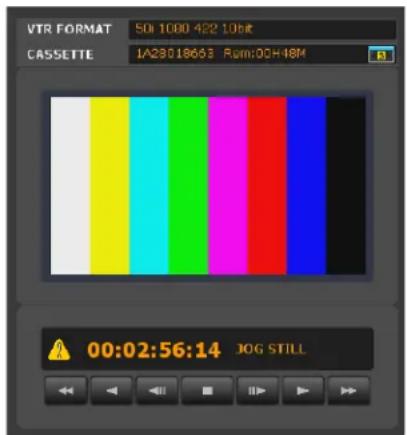
The video data controls available in the VTR MEM CONTROL screen are also available in the VIEWER window.
Differences in the VTR MEM CONTROL window during processing of compressed data and uncompressed data
When processing compressed data (HDCAM-SR format), the current position on the tape is displayed by the timecode. When processing uncompressed data (DATA format), the current position on the tape is displayed in picture IDs instead of the timecode. A picture ID consists
of six digits in the first part and two digits in the last part. The first six digits constitute the serial number of the image data, and the last two digits constitute the serial number that indicates the specific frame (portion) of the image data. (Portions are counted in single-frame units based on the frames in HD images compressed in the HDCAM-SR format.)
To display picture IDs on the control panel of the VTR (uncompressed data only)
Set VTR SETUP menu item "635: PICTURE ID DISPLAY" to "on".
To display file information on the VTR control panel (uncompressed data only)
Set VTR SETUP menu item "604: TC2 MODE SEL" to "off" to display the file information under the timecode indication on the control panel of the VTR.

For details on the VTR SETUP menu of the SRW-5800, refer to the Operation Manual supplied with the SRW-5800.
Transferring Video Data
You can transfer video data saved in the VTR to a shared file server via the SRPC-5.
For details on importing from a VTR, refer to "Importing Files" in the operating instructions for the HKSR-5804.
Transferring SRMemory Data to a VTR
You can write (copy) video data recorded on SRMemory to VTR tape. Write operations are performed via the VTR's control panel.
When copying is initiated, video data is recorded by the following methods.
- The timecode is recorded according to the timecode recorded in the SRMemory.
- A black screen is recorded for six seconds prior to the selected file. - When each file has been copied, the OUT point image is freezed and recorded for six seconds.
Memo
- 4:2:2 SR-Lite format files in the SRMemory are converted to 4:2:2 SR-SQ and recorded. - By setting the VTR system setting to double speed, you can record 4:2:2 SR-Lite and SR-SQ/4:4:4 SR-SQ files at double speed.
Note
Close the GUI of the PC during copy operations.
Opening the SRMemory
1 Press the CUE button and the ALT key. The ALT+CUE menu appears. 2 Press the F2 (SRMem) key. The SRMemory menu appears.

To switch between VTR mode and SRPC-5 mode
Press the RECORDER button to set to VTR mode and the PLAYER button to set to SRPC-5 mode.
(VTR mode screen)
(SRPC-5 mode screen)

Displaying the Edit Screen
Press the F1 (SRMem) key.
A variety of operations can be performed in the edit screen such as setting the IN point of the copy VTR; editing the IN/OUT point of the copy file; selecting copy files; and executing the copy operation.

Displaying File Lists
Press the F2 (FILE LIST) key.
Files saved in the SRMemory card are listed in the file list. File list operations include selecting copy files, displaying file details, and sorting lists.

Files in the file list are color coded as follows to show files' copy ability which depends on format status.
White background: Currently selected file (can be copied)
Yellow text: File can be copied
Grey text: File cannot be copied
Note
Grey text with a white background indicates a file that cannot be copied.
To arrange the file list display
Press any of the keys detailed below.
F6 (ITEM): Switches between file name/date/recorded time order.
F7 (ORDER) key: Switches between UP (ascending order) and DOWN (descending order).
To view detailed information about files in the file list
Press the ← or → key to switch between the following detailed information screens.
(File Name/Date/Duration)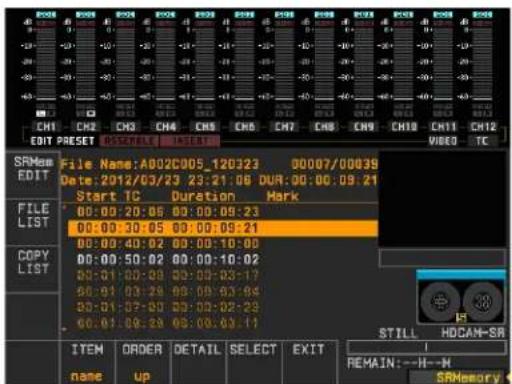
(Format)
(Start TC/Duration/Attr)

You can also display detailed information by pressing the F8 (DETAIL) key to display a pop-up window or by pressing the ↑ or ↓ key and turning the MULTI CONTROL knob.

Press the F8 (DETAIL) or F10 (EXIT) key to close the pop-up window and return to the file list.
Displaying Copy Lists
Press the F3 (COPY LIST) key.
Files to be copied from the SRMemory card to the VTR are listed in the copy list.

To view detailed information about files in the copy list
Press the left or right arrow key to switch between the following detailed information screens.
(File Name/IN/OUT)
(File Name/Date/Duration)

(Format)
(Start TC/Duration/Attr)

You can also display detailed information by displaying a pop-up window by pressing the F8 (DETAIL) key and pressing the up or down arrow key and turning the MULTI CONTROL knob.

Press the F8 (DETAIL) or F10 (EXIT) key to close the pop-up window and return to the file list.
Viewing Detailed SRMemory Card Information
1 Press the ALT button in the SRMemory menu to open the ALT+SRMem menu.

2 Press the F1 (SRMem INFO) key.
Detailed information about the SRMemory card inserted in the SRPC-5 appears.
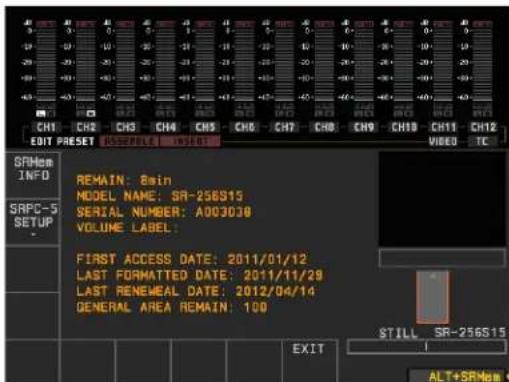
Press the F10 (EXIT) key to return to the original screen.
Changing settings for the SRPC-5
1 Press the ALT button in the SRMemory menu to display the ALT+SRMem menu.

2 Press the F2 (SRPC-5 SETUP) key to display the SRPC5 SETUP menu.

3 Press the ↑ or ↓ key or turn the MULTI CONTROL knob to highlight the setting you want to change.
To configure an item for which is displayed

Press the → key to display sub-window, and press the ↑ or ↓ key or turn the MULTI CONTROL knob to highlight the setting item you want to change.

To close the sub-window Press the ← key or F10 (EXIT) key.
4 Press the F8 (CHANGE DATA) key.
To configure the field value Press the center key.
To restore previous settings Press the F9 (CANCEL) key.
Executing copy
Note
Confirm the following before copying.
- Ensure that the REMOTE NETWORK 2 button in the VTR is lit.
- Ensure that "B01:NW I/O MODE" in the VTR SETUP menu is set to "SRPC".
1 Press the F2 (FILE LIST) key in the SRMemory menu to display the file menu.
2 Press the ↑ or ↓ key or turn the MULTI CONTROL knob to highlight the file you want to copy.
Memo
You can scroll through files in groups of 100 by holding down the SFT key while turning the MULTI CONTROL knob.

3 Press the F9 (SELECT) key.
“*” appears next to the selected clip.

4 Repeat steps 3 and 4 to select multiple clips.
To select all files displayed in the list
Press the F9 (SELECT) key while holding down the SFT key.
Note
Selecting all files is enabled after obtaining data (when the “retrieving data” sign disappears) on files in the SRMemory card.

To view a selected file list
Press the F2 (COPY LIST) key.

The File No. of the files being copied and the total selected files appear.
To delete individual files from the list
① Press the ↑ or ↓ key or turn the MULTI CONTROL knob to highlight the file you want to delete. ②Press the CLR key.
To delete all files from the list
Simultaneously press the SFT key and CLR key.
To edit the IN/OUT point in copy files
See "Editing the Copy File IN/OUT Point" on page 32.
5 Press the F1 (SRMem EDIT) key to open the edit screen.
6 Set the IN point of the copy VTR.
To set the IN point of the VTR using numeric keys
①Press the RECORDER button to set to RECORDER mode. ②Input the timecode in the scratchpad using numeric keys. ③Press the SET key. ④Press the VIDEO IN key.
To set the current timecode as an IN point of the VTR
①Press the RECORDER button to set to RECORDER mode. ②Simultaneously press the ENTRY key and VIDEO IN key.

7 Press the REC/EDIT button.
Copy starts.
To confirm the copy progress status
Press the F3 (COPY LIST) key. The copy list appears so the File No. of the files being copied can be confirmed.

When copying is complete, the file changes to a shaded display.
If an SRW-5800 channel condition error (VIDEO DATA ERROR or AUDIO DATA ERROR) occurs during copying, “!” appears to the left of the corresponding file.
2 Press the PLAYER button to set to SRPC-5 mode. The timecode and IN/OUT point of the SRMemory card's current file appears.
To confirm the copy execution log
The copy execution log is saved to the memory stick as a csv file.
Storage directory:
MSSONY/PRO/VTR/SRW5800/copylog
File name:
"LABEL_ID (label ID for Tele-File)"_"DATE (save date: YYMMDD)".csv
Saved information:
IN point, OUT point, recording format, file creation date and time, file name, device that created the file and its serial number
To stop the copying process
Press the STOP button.
8 When copying is complete, press the F10 (EXIT) key.
This returns the screen to the file list display.
Editing the Copy File IN/OUT Point
1 Press the F1 (SRMem EDIT) key in the SRMemory menu to open the edit screen.
To change the current file
①Press the F2 (FILE LIST) key to display the file list. ② Press the ↑ or ↓ key or turn the MULTI CONTROL knob to highlight the file you want to make the current file. ③Press the center key. The file selected as the current file is highlighted in white.
3 Change the IN (OUT) point.
To change the IN (OUT) point using numeric keys
①Input the timecode in the scratchpad using numeric keys. ②Press the SET key. ③Press the VIDEO IN (VIDEO OUT) key.
To make the current timecode the IN (OUT) point
①Turn the search dial in jog or shuttle mode to search for the edit point. ②Simultaneously press the ENTRY key and VIDEO IN (VIDEO OUT) key.
To change the IN (OUT) point in frames
Simultaneously press the VIDEO IN (VIDEO OUT) key and + or - key.
Every time you press the + or - key the edit point advances or returns by a single frame.
To return the changed IN (OUT) point to its original position
Simultaneously press the CLR key and VIDEO IN (VIDEO OUT) key.
4 Press the F9 (SELECT) key.
The file with the edited IN/OUT point is selected as the copy file.
To view a selected file list
Press the F2 (COPY LIST) key.
Other Operations
Editing and Viewing SRMemory Card Information
When you click the SRPC SETUP menu button in the web application screen and click the SRMEMORY tab, media information on the SRMemory card inserted in the unit's SRMemory slot is displayed, in addition to a list of files stored on the memory card.
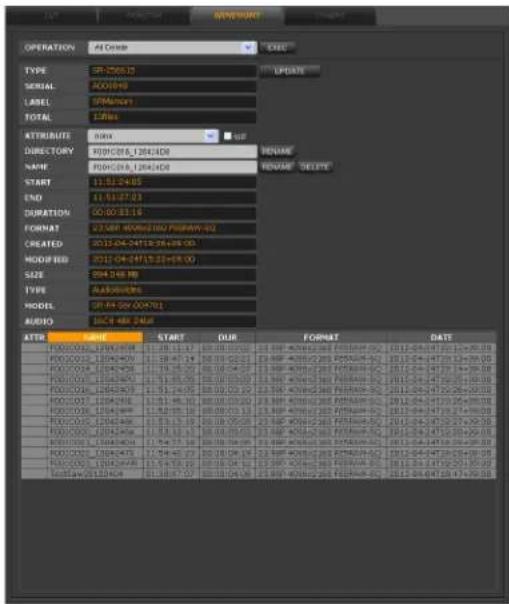
In addition to viewing SRMemory card information, you can also perform the following operations.
All Delete: Deletes all files in the SRMemory
FORMAT: Formats the SRMemory
ATTRIBUTE: Specifies OK / NG / KEEP attributes for each file
WP: Sets write protection for each file
NAME: Changes file names
DELETE: Deletes files
Viewing File Server Data
You can view the directories and files stored on the shared file server by accessing the DISK CONTROL tab from the HOME or IMPORT menu.

Displaying the Web Client IP Addresses
You can view the IP addresses of the web clients that are currently accessing the unit.
To do so, click the HOME menu button in the web application screen, and click the REMOTE button.
The IP addresses of all the web clients appear in the REMOTE tab screen.

Managing Log Files
You can manage the import log files.
To do so, click the DISK SETUP menu button in the web application screen, and click the LOG CONTROL tab to display the LOG CONTROL tab screen.

Managing import log files
To display an import log file
1 Select the import log file using one of the following methods.
- Specify the directory name of the log file in the DIR NAME field.
- Specify the date and time the log file was saved in the DATE/TIME field.
2 Click the SHOW button for the DIR NAME or DATE/TIME field.
The selected log file appears.
To delete an import log file
1 Select the import log file in the DIR NAME or DATE/TIME field. 2 Click the DELETE button for the DIR NAME or DATE/TIME field.
The selected log file is deleted.
Managing export log files
You can manage export log files stored in the log directory (Log Dir) of the mounted file server.
To display an export log file
Specify the cassette ID of the log file in the CASSETTE ID field, and click the SHOW button.
To copy an export log file to a web client
Specify the drive or removable media on the web client machine, specify the cassette ID of the log file in the CASSETTE ID field, and then click the SAVE button.
The selected export log file and a thumbnail directory are copied as a tar.gz file.
Note
The thumbnail directory is only created when the LOG PROXY setting is set to [Copy to Log Directory] in the DISK CONTROL tab screen of the EXPORT menu.
To save an export log file on a web client to the file server
1 Click the [Browse...] button of the LOG ARCHIVE field, and specify the export log file stored on a drive or removable media on the web client machine. 2 Click the LOAD button of the LOG ARCHIVE field.
The log file is saved to the log file directory (Log Dir) of the mounted file server.
Using Export Log Files
When a tape created via exporting at one facility includes an export log file and is handed over to another facility, the facility that receives the tape can open the export log file and view the clips that are recorded on the tape.
In addition, specific clips can be imported to the clip list by clicking the IMP button in the export log screen. By using this function, you can specify only the clips you need from the clips recorded on the tape during import.
For details, refer to the operating instructions for the HKSR-5804.
Automatic Execution Using a Job File
Operations such as importing can be automatically carried out by loading an XML-format job file that you create with an external editor.
Click the DISK SETUP menu select button on the web application, and then click the JOB CONTROL tab. You can load or delete a job file, check its contents, execute it, and check the results in the JOB CONTROL tab screen.

Loading a job file
Click the [Browse...] button to the right of the JOB FILE box in the JOB CONTROL tab screen, specify the job file stored on the web client disk or external media, and then click the LOAD button.
Job files that have been loaded can be selected in the QUEUE box.
Checking the contents of a job file
In the QUEUE box, select the job file that you want to check, and then click the SHOW button.
The contents of the selected job file are displayed.

Executing a job file
In the QUEUE box, select the job file that you want to execute, and then click the EXEC button.
The contents of the selected job file are automatically executed.
Checking the results of an automatic execution
Log files for job files that have been automatically executed are stored in the JOB LOG area, each indicated by the name of the job file appended by the date and time of execution. A log file of a successfully executed job file can be selected by clicking the SUCCEEDED box, while a log file of a job file that failed can be selected by clicking the FAILED box.
After selecting the log file whose contents you want to check, click the SHOW button to display the contents.
To delete a log file
Select the log file that you want to delete, and then click the DELETE button.
Deleting a job file
In the QUEUE box, select the job file that you want to delete, and then click the DELETE button.
About creating a job file
To create a job file using the settings configured in the web application, configure import settings and other settings in the IMPORT menu, and then click the START button while holding down the Shift key. A job file is created without import taking place.
The tasks that can be defined in a job file correspond with most of the items that can be specified in the menus of the web application.
For details, see "Job File Samples" on page 41 in "Appendix".
Checking File Systems (FSCK)
The file system of an HDD connected to the unit by eSATA can be checked and restored by following the steps below.
Note
The HFS+ file system is the only HDD format that can be checked and restored.
1 Click the DIAGNOSIS menu button in the web application screen, and then click the OTHERS tab.
The OTHERS tab screen appears.

2 Select the node to perform the file check from "NODE" in the FSCK (HFS) field, and then click the EXEC button.
When the file check is complete, a results screen like the one below appears.
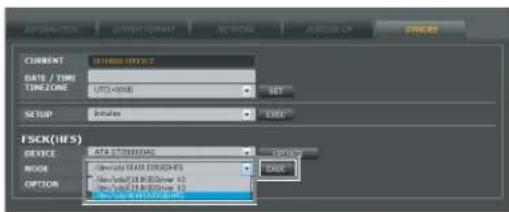
Specifications
Notes
- Always make a test recording, and verify that it was recorded successfully. SONY WILL NOT BE LIABLE FOR DAMAGES OF ANY KIND INCLUDING, BUT NOT LIMITED TO, COMPENSATION OR REIMBURSEMENT ON ACCOUNT OF FAILURE OF THIS UNIT OR ITS RECORDING MEDIA, EXTERNAL STORAGE SYSTEMS OR ANY OTHER MEDIA OR STORAGE SYSTEMS TO RECORD CONTENT OF ANY TYPE.
• Always verify that the unit is operating properly before use. SONY WILL NOT BE LIABLE FOR DAMAGES OF ANY KIND INCLUDING, BUT NOT LIMITED TO, COMPENSATION OR REIMBURSEMENT ON ACCOUNT OF THE LOSS OF PRESENT OR PROSPECTIVE PROFITS DUE TO FAILURE OF THIS UNIT, EITHER DURING THE WARRANTY PERIOD OR AFTER EXPIRATION OF THE WARRANTY, OR FOR ANY OTHER REASON WHATSOEVER.
SRPC-5
General
Power supply 100 to 240 V AC (50/60 Hz)
Power consumption 110 W (with all options installed)
Inrush current
(1) Maximum possible inrush current at initial switch-on (Voltage changes caused by manual switching): 28 A peak, 1.7 A r.m.s. (240 V AC)
(2) Inrush current after a mains interruption of five seconds (Voltage changes caused at zero-crossing): 5 A peak, 1.6 A r.m.s. (240 V AC)
Operating temperature 5 °C to 40 °C (41 °F to 104 °F)
Storage temperature -20 °C to +60 °C (-4 °F to +140 °F)
Mass 10 kg (22 lb.) Dimensions 427 × 43.6 × 546 mm (16 7/8 × 1 3/4 × 21 1/2 in.) (W×H×D)
Input connectors
AUX INPUT A/B: BNC (2) HD SDI (1.485 Gbps) (conforming to SMPTE-292M/372M, BTA-S004B) 3G SDI (2.97 Gbps) (SMPTE-424M)
Output connectors
AUX OUTPUT A/B: BNC (2) HD SDI (1.485 Gbps) (conforming to SMPTE-292M/372M, BTA-S004B) 3G SDI (2.97 Gbps) (SMPTE-424M)
I/O connectors
VTR I/F (IN, OUT) Local I/F INPUT A/B: BNC (2) Local I/F OUTPUT A/B: BNC (2)
NETWORK 1000Base-T modular jack (1) OPTION PCI Express Slot (1) (PCI Express x4 Gen1)
Supported formats
See "Supported Formats" on page 39.
On-board functions
1D LUT, downconverter, color space converter
Confirmed operational environment
Browser Firefox, Internet Explorer, Safari, Google Chrome NFS server Redhat Linux E5, Mac OS v10.6 CIFS server Windows XP, Windows 7
Supplied accessories
Rack mount angle (1 each for left and right) 1) Washers (4) Screws (4) Installation manual (1) Operation guide (1) Operation manual (1)
1) An optional RMM-10 Rack Mount Kit is necessary to mount the unit on a rack.
Design and specifications are subject to change without notice.
Dimensions 88 × 250 × 231 mm ( 31/ 2 × 97/ 8 × 91/8 in.) (W×H×D) (excluding protrusions)
Output connectors
MONITOR BNC (1) HD SDI (1.485 Gbps) (conforming to SMPTE-292M, BTA-S004B) 3G SDI (2.97 Gbps) (SMPTE-424M) NETWORK 1000Base-T modular jack (1) Option PCI Express Slot (1) (PCI Express x4 Gen1)
Supported formats
See "Supported Formats" on page 39.
On-board functions
1D LUT, downconverter, color space converter
Confirmed operational environment
Browser Firefox, Internet Explorer, Safari, Google Chrome NFS server Redhat Linux E5, Mac OS v10.6 CIFS server Windows XP, Windows 7
Supplied accessories
AC adapter (1) Rubber feet (4) Installation manual (1) Operation guide (1) Operation manual (CD-ROM) (1)
Design and specifications are subject to change without notice.
SR-PC4
General
Power supply 19.5 V
Current consumption 5 A (with all options installed)
Operating temperature
5 °C to 35 °C (41 °F to 95 °F)
Storage temperature
-20 °C to +60 °C (-4 °F to +140 °F)
Mass 3.9 kg (8 lb. 10 oz.)
Appendix
Error/Warning Messages
When an abnormality is detected on the unit or VTR, a yellow warning mark (A) flashes to the left of the timecode (or picture ID) in the MEM CONTROL window or VTR CONTROL window. Clicking the warning mark displays the message as follows.

Error messages
| Code | Message Description | |
| 03 FAN STOP A fan error was detected. | ||
| 04 POWER FAN STOP | PC5 An error was detected with the fan located in the power section. | |
| 81 EPR PLD1 INITIAL ERROR | PC5 A PLD1 initialization error was detected for the EPR-3 board.PC4 A PLD1 initialization error was detected for the EPR-4 board. | |
| 82 EPR PLD2 INITIAL ERROR | PC5 A PLD2 initialization error was detected for the EPR-3 board.PC4 A PLD2 initialization error was detected for the EPR-4 board. | |
| 83 CN PLD1 INITIAL ERROR | PC5 A PLD1 initialization error was detected for the CN-3367 board. | |
| 83 DC PLD1 INITIAL ERROR | PC4 A PLD1 initialization error was detected for the DC-161 board. | |
| 84 DM INTERFACE ERROR | A communication error was detected between the DM-145 and CPU. | |
| 88 NVRAM CHECKSUM ERROR | An NVRAM (IC310) checksum error was detected. IP address and other configuration data may be damaged.Restart the unit using the factory default settings (IP address: 192.168.0.1; subnet mask: 255.255.255.0; MTU: 1500). | |
Warning messages
| Code | Message Description | |
| 11 EPR | PLD1TEMPERATUREHIGH | PC5 A PLD1 temperature error was detected for the EPR-3 board.PC4 A PLD1 temperature error was detected for the EPR-4 board. |
| 12 DM | PLD1TEMPERATUREHIGH | A PLD1 temperature error was detected for the DM-145 board. |
Salvaging SRMemory Cards for which File Content was Lost
The unit incorporates a salvage function that is designed to minimize data loss for SRMemory cards for which file content was lost. The salvage function restores files based on factors such as the maker information recorded on the SRMemory card. The salvaging process can take as little as a few seconds or up to 60 minutes, depending on the conditions at the time recording was interrupted.
Notes
- The salvage function is intended to salvage as much recorded material as possible in the event of an unforeseen accident, but it does not guarantee 100% restoration of data.
- This function will not restore data recorded immediately preceding the recording interruption. The amount of data lost will be as follows. SR-Lite mode: Approx. 8 seconds of data SR-SQ mode: Approx. 4 seconds of data
- Whenever you insert an SRMemory card that requires salvaging or turn on the unit with such a card inserted, a message asking whether you want to perform salvaging will appear.
- Recording and playback are disabled for SRMemory cards that require salvaging.
- When you format an SRMemory card, the memory card will be ready for use immediately. However, any previously recorded data will be lost.
To restore files via salvaging
1 Insert the SRMemory card for which file content was lost into the SRMemory slot.
A warning message and a message asking whether you want to perform salvaging or formatting appear.
Note
After you start the salvaging process, the process cannot be stopped. Be sure that you have enough time to wait for the process to complete before starting.
2 Select and confirm "Salvage."
The salvaging process starts, and the "Please wait." message appears.
The message closes automatically when the process is complete.
If files are not restored after salvaging
If an SRMemory card cannot be restored even after salvaging, you can format the SRMemory card to make the card usable again.
1 Insert the SRMemory card that could not be salvaged.
A warning message and a message asking whether you want to perform salvaging or formatting appear.
2 Select and confirm "Format."
The formatting process starts, and the "Please wait." message appears.
The message closes automatically when the process is complete.
List of Keyboard Shortcuts
| Category Key | Function | |
| File control operations | Ja) | REV/REW |
| Ka) | PAUSE | |
| La) | PLAY/FFWD | |
| ←a) | STEP REV | |
| → | STEP FWD | |
| Space bara) | PAUSE/PLAY | |
| Menu/tab control operations | Ctrl+Shift+H Opens the HOME menu. | |
| Ctrl+Shift+I Opens the IMPORT menu. | ||
| Ctrl+Shift+V 5 Opens the VTR SETUP menu. | ||
| Ctrl+Shift+P Opens the PROXY SETUP menu. | ||
| Ctrl+Shift+D Opens the DISK SETUP menu. | ||
| Ctrl+T Moves to the next tab screen. | ||
| Ctrl+Shift+T Moves to the previous tab screen. | ||
| Category Key | Function | |
| Importing operations | Ctrl+\ Previews | the selected clip. |
| Ctrl+A Adds the | selected sequence to the import list. | |
| Ctrl+C | Starts importing. | |
| ESC | Cancels importing. | |
| Shift+ double-click | Selects all files. | |
| Ctrl+ double-click | Clears selection of all files. | |
| DISK SETUP operations | Ctrl+U | Updates the file list. |
| Ctrl+Shift+M | Mounts the NFS server. | |
| Ctrl+Shift+U | Unmounts the NFS server. |
a) Make sure that the cursor is not in the text field when you press the key.
Supported Formats
SRMemory
| Resolution | Playback mode | System frequency |
| 1080 4:2:2Lite (2D/3D),4:2:2SQ (2D/3D),4:4:4SQ (2D/3D),4:4:4HQ | 23.98PsF, 24PsF,25PsF, 29PsF, 50i,59.94i, 50p, 59p | |
| F65RAW | F65RAW SQ,F65RAW Lite | 23.98p, 24p, 25p,29p, 50p, 59p |
| F65RAW HFR 23p, 24p, 25p, 29p | ||
VTR
| Resolution | Record and playback modes | System frequency |
| 1080 422, 4:4:4SQ, 4:4:4HQ | 23.98PsF, 24PsF, 25PsF, 29PsF, 30PsF, 50i, 59.94i, 60i | |
| 720 | 4:2:2 | 50p, 59.94p |
Formats that can be copied from SRMemory to tape
| Resolution | Playback mode | System frequency |
| 1080 4:2:2Lite, 4:2:2SQ, 4:4:4SQ (2D) | 23PsF, 24PsF, 25PsF, 29PsF, 50i, 59i, 50p, 59p | |
File formats
| Type | Format |
| MXF | 4:2:2Lite, 4:2:2SQ, 4:4:4SQ (SRMemory format) |
LUT File Formats Applicable to This Board
Examples of the five lookup table (LUT) file formats applicable to this board are shown below.
Note
Line numbers ("Lx" in the tables below) do not appear in the actual LUT files.
LUT file type 1: R, G, and B have the same value (the same curve)
"LUT: 1 1024" in the header indicates one output data block (common to R, G, and B) corresponding with the 10-bit (1024) input data.
The bit depth of the output is determined by the maximum output value.
(This is an example of 10-bit input and 10-bit output.)
# Comment
LUT: 1 1024
# (Line No,) Output value
| L1 | 0 |
| L2 | 0 |
| L3 | 1 |
L1023 1023
L1024 1023
LUT file type 2: R, G, and B have individual values (individual curves) and are aligned vertically in the order of R, G, B
The header "LUT: 3 1024" indicates three separate output data blocks (for R, G, and B) corresponding with the 10-bit (1024) input data.
The bit depth of the output is determined by the maximum output value.
The output values on lines L1 to L1024 are R values, the values on lines L1025 to L2048 are G values, and the values on lines L2049 to L3072 are B values.
(This is an example of 10-bit input and 10-bit output.)
# Comment
LUT: 3 1024
# (Line No,) Output value
| L1 | 0 |
| L2 | 0 |
| L3 1 |
L1023 1023
L1024 1023
L1025 0
L1026 0
L1027 1
L2047 1023
L2048 1023
L2049 0
LUT file type 3: R, G, and B have individual values (individual curves) and are aligned horizontally
"LUT10" in the header indicates the bit depth of the output is 10 bits.
The bit depth of the input is determined by the maximum number of lines.
(This is an example of 10-bit input and 10-bit output.)
# Comment
LUT10
(Line No,) Input Output R Output G Output B value
L10222
L2 1 2 2 2
L3 2 2 2 2
| L1023 | 1022 | 1023 | 1023 | 1023 |
| L1024 | 1023 | 1023 | 1023 | 1023 |
LUT file type 4: R, G, and B have individual values (individual curves) and are aligned horizontally
The bit depth is not indicated in the header. It is automatically determined by the number of lines and their values.
(This is an example of 10-bit input and 10-bit output.)
# Comment
# (Line No,) Input Output R Output G Output B value
L10222
L2 1 2 2 2
L3 2 2 2 2
•
•
•
L1023 1022 1023 1023 1023
L1024 1023 1023 1023 1023
LUT file type 5: R, G, and B have individual values (individual curves) and are aligned horizontally
The bit depth is not indicated in the header. It is automatically determined by number of lines and their values.
There are no lines for input values.
(This is an example of 10-bit input and 10-bit output.)
# Comment
# (Line No,) Output R Output G Output B
L1 2 2 2
L2 2 2 2
L3 2 2 2
•
•
•
L1023 1023 1023 1023
L1024 1023 1023 1023
MPEG-4 Visual Patent Portfolio License
THIS PRODUCT IS LICENSED UNDER THE MPEG-4 VISUAL PATENT PORTFOLIO LICENSE FOR THE PERSONAL AND NON-COMMERCIAL USE OF A CONSUMER FOR
(i) ENCODING VIDEO IN COMPLIANCE WITH THE MPEG-4 VISUAL STANDARD (“MPEG-4 VIDEO”)
AND/OR
(ii) DECODING MPEG-4 VIDEO THAT WAS ENCODED BY A CONSUMER ENGAGED IN A PERSONAL AND NON-COMMERCIAL ACTIVITY AND/OR WAS OBTAINED FROM A VIDEO PROVIDER LICENSED BY MPEG LA TO PROVIDE MPEG-4 VIDEO.
NO LICENSE IS GRANTED OR SHALL BE IMPLIED FOR ANY OTHER USE. ADDITIONAL
INFORMATION INCLUDING THAT RELATING TO PROMOTIONAL, INTERNAL AND COMMERCIAL USES AND LICENSING MAY BE OBTAINED FROM MPEG LA, LLC. SEE HTTP://WWW.MPEGLA.COM
MPEG LA is offering licenses for (i) manufacturing/sales of any storage media storing MPEG-4 Visual video information (ii) distribution/broadcasting of MPEG-4 Visual video information in any manner (such as online video distribution service, internet broadcasting, TV broadcasting). Other usage of this product may be required to obtain license from MPEGLA.
Please contact MPEG LA for any further information. MPEG LA, L.L.C., 250 STEELE STREET, SUITE 300, DENVER, COLORADO 80206, http://www.mpegla.com
Job File Samples
Samples of job files used for automatic execution are shown below.
You can copy these samples and edit them as necessary on an external editor to create your own job files.
A comment ( ) is indicated below each element as an explanation of the element.
Example of a comment:
1
Errors in description in a job file may result in unforeseen operations during automatic execution.
For details on actual operations related to automatic executions, see "Automatic Execution Using a Job File" on page 35.
Sample: Importing from the SRMemory card
<?xml version="1.0" encoding="UTF-8"?>
<jobinfo>
    <general>
    <mode>11</mode>
    <!-- 1:Codcc Import/2:Codcc Export/3:UC Import/4:UC Export/11:Memory Import -->
    <log>
    <control></control>
    <!-- 0:disable/*1:enable(Log Dir)/2:enable(Selected Dir) -->
    <text></text>
    <!-- 30 characters -->
    <fcp></fcp>
    <!-- *0:disable/1:enable -->
    <handle></handle>
    <!-- Handle value for FCP xml -->
    </log>
    <proxy>
    <!-- Proxy Setting for GUI/AutoGen -->
    <type></type>
    <!-- 0:BMP/*1:JPG -->
    <size></size>
    <!-- 0:160/*2:320/3:640 -->
    <dirmode></dirmode>
    <!-- 0:Same as Main Files/*1:Proxy Directory/2:Resolution Directory -->
    <gen></gen>
    <!-- 0:disable/1:enable(n)/2:enable(l)/3:enable(c)/4:enable(a)*5:enable(as Temporarily) -->
    </proxy>
    <abort></abort>
    <!-- 0:disable/*1:enable -->
    </general>
    <sequence>
    <!-- You can add up to 1000 sequences. -->
    <memory>
    <filename></filename>
    <!-- File Name(used if File ID:-1) -->
    </memory>
    <main>
    <name>
    <original></original>
    <!-- 0:Manual input/*1:Use Original Name -->
    <dir></dir>
    <!-- 128 characters(depends on full pathname) -->
    <base></base>
    <!-- 32 characters -->
    <sid></sid>
    <!-- 0:No Sub ID/*1:Add Sub ID -->
    <reeldir></reeldir>
    <!-- *0:disable/1:Add SRMemory ID Dir/2:Add Reel Name Dir -->
    <delimiter></delimiter>
    <!-- 0:'_' (Under Bar)/*1:'.' (Period)/2:'-' (Minus) -->
    </name>
    </main>
    <audio>
    <ch></ch>
    <!-- 0/2/4/6/8/10/12/14/16/*255(auto) -->
    </audio>
    <header>
    <meta></meta>
    <!-- 0:Off/*1:All Data -->
    <recl>
    <mode></mode>
    <!-- 0:Manual/1:SRMemory ID/*2:SRMemory Label -->
    <name></name>
    <!-- 30 characters (memid:SRMemory ID/memlabel: SRMemory Label) -->
    </recl>
    <tc></tc>
    <!-- 0*:LTC/1:VITC/2:Recounted TC (for MXF only) -->
Connecting the SRPC-5/SR-PC4 to the Shared File Server and Transferring Files
To transfer files when the SRPC-5/SR-PC4 is connected to a computer (file server), settings must be configured on the file server. This section describes how to configure these settings.
For details on the procedure for Windows OS servers, see “Windows servers (Windows 7 Professional)” on page 43. For details on the procedure for Mac OS servers, see “Mac OS servers (Mac OS X)” on page 45.
Windows servers (Windows 7 Professional)
The system requirements for settings configuration are as follows.
OS: Windows 7 Professional
Connection method: Peer-to-peer between Windows 7 and the SR-PC4/SRPC-5
Network connection settings:
- IP address
• Windows 7: 192.168.0.7
• SR-PC4/SRPC-5: 192.168.0.5
MTU = 1500
Shared folder: C:\sr_files
User account:
- User name = srpc
- Password = sony1234
To create a new user account
1 Right-click [Computer] in the Start menu, and click [Manage].
The [Computer Management] dialog box appears.
2 Double-click the [Local Users and Groups] icon in the left pane, and click the [User] icon.
3 Right-click an empty space in the right pane, and click [New User].
The [New User] dialog box appears.
4 Enter the following for the [User Name], [Password], and [Confirm password] fields.
User Name: srpc
Password: sony1234
Confirm password: sony1234
5 Verify that the [User must change password at next logon] check box is not selected.
6 Select the [Password never expires] check box.
7 Click the [Create] button, and click the [Close] button after verifying the setting contents.
8 Verify that "srpc" has been created in the User folder in the [Computer Management] dialog box.
To create the shared folder
1 Click [Computer] in the Start menu. The [Computer] screen appears.
2 Double-click [Local Disk (C:)].
3 Click [New folder]. A new folder is created.
4 Click the new folder to highlight the file name, enter "sr_files," and then press the Enter key.
5 Right-click the "sr_files" folder, and click [Share with]. The [File Sharing] dialog box appears.
6 Click the drop-down button and select the previously created user name, "srpc."
When the [File Sharing] dialog box returns, verify that "srpc" has been added to the list and that the [Permission Level] is set to [Read].
7 Click [Read] in the "srpc" row, and select [Read/Write] from the drop-down list box.
8 Verify that the [Permission Level] is set to [Read/Write] in the "srpc" row, and click the [Share] button.
9 Verify that the "sr_files" folder is specified as the shared folder (\Computer name\sr_files) in the [File Sharing] dialog box, and click the [Done] button.
10 Right-click the "sr_files" folder on the C: drive in the [Computer] screen, and click [Properties] in the submenu.
The [sr_files Properties] screen appears.
11 Click the [Sharing] tab.
Verify that the “sr_files” folder is “Shared” and that “\Computer name\sr_files” appears for [Network Path].
To configure network settings for Windows 7 Professional
1 Click [Control Panel] in the Start menu. The Control Panel appears. 2 Click [Network and Internet]. 3 Click [Network and Sharing Center]. 4 Click [Change adapter settings]. 5 Right-click [Local Area Connection], and click [Properties] in the submenu. 6 Click [Internet Protocol Version 4 (TCP/IPv4)] to select it in the [Local Area Connection Properties] screen, and click the [Properties] button. 7 Click the [Use the following IP address] button to select it in the [Internet Protocol Version 4 (TCP/IPv4) Properties] screen, and enter the following for the IP address and subnet mask.
IP address: 192.168.0.7
Subnet mask: 255.255.255.0
8 Click [OK].
To verify the network connection between the SR-PC4/SRPC-5 and Windows 7
First, verify that the SR-PC4 or SRPC-5 is connected to the Windows workstation via an Ethernet cable (CAT-5E), and then verify the connection status between the SR-PC4/SRPC-5 and Windows 7 Professional using a ping command. Verify using the ping command as follows.
1 Enter "cmd" in the [Search programs and files] box of the Start menu, and press the Enter key. The DOS screen appears. 2 Enter "ping 192.168.0.5" and press the Enter key. If the connection is properly established, "Reply from 192.168.0.5" appears. If there is a problem with the connection, "Request time out" appears.
To change the initial settings of the SR-PC4/SRPC-5
1 Open a Web browser, enter "192.168.0.5" in the address bar, and press the Enter key.
The SR-PC4/SRPC-5 screen appears.
2 Click the [DIAGNOSIS] button. 3 Click the [NETWORK] tab, and enter the following for [IP ADDRESS], [SUBNET MASK], and [MTU].
IP ADDRESS: 192.168.0.5
SUBNET MASK: 255.255.255.0
MTU: 1500
4 Click [SET]. 5 When the confirmation message appears, click [OK]. 6 Turn off the SR-PC4/SRPC-5, and then turn it on again.
The settings are applied after the unit restarts.
To mount the shared folder
1 Open a Web browser, enter "192.168.0.1" (factory default value) in the address bar, and press the Enter key. 2 After connection is established, click the [DISK SETUP] button. 3 Select "CIFS" in the [DISK SETUP] screen, and enter the following for [SERVER IP], [SERVER DIR], [USER NAME], and [PASSWORD].
SERVER IP: 192.168.0.7
SERVER DIR: sr_files
USER NAME: srpc
PASSWORD: sony1234
4 Click the [MOUNT] button.
A confirmation screen appears.
5 To verify whether the shared folder is properly mounted, enter a directory name in the [MKDIR] box, and click the [MKDIR] button.
Verify that the entered directory name has been created and appears in the list.
Mac OS servers (Mac OS X)
The system requirements for settings configuration are as follows.
OS: Mac OS X 10.6.8
Connection method: Peer-to-peer between the Mac workstation and the SR-PC4/SRPC-5
Network connection settings:
IP address
• Mac OS X: 192.168.0.9
• SR-PC4/SRPC-5: 192.168.0.4
- MTU = 1500
Shared folder: /Users/sony/SR_Files
User account:
- User name = sony
- Password = srpc4
To verify the login user account privileges
1 Click the [System Preferences] icon.
2 Click the [Users & Groups] icon.
3 In the [Users & Groups] window, verify that the login user possesses "Administrator" privileges.
To create the shared folder on the NFS
Note
This section describes how to create the shared folder in the user's Home. In this procedure, "sony" is specified as the Home.
1. Click [Home] in the [Go] menu of the Finder.
2. When the content of the "sony" folder appears, click [New Folder] in the [File] menu.
3. Click the "SR_Files" folder to select it.
4. Click [Get Info] in the [File] menu, and change the [everyone] privilege from [Read only] to [Read & Write] in the [SR_Files Info] dialog box that appears.
To configure network settings
1. Click the [System Preferences] icon.
2. Click [Network].
3. Click [Ethernet] in the [Network] dialog box.
4. Enter the following for the network settings that appear on the right.
Configure IPv4: Manually
IP Address: 192.168.0.9
Subnet Mask: 255.255.255.0
5. Click [Apply].
To configure share settings on the NFS
1 Click [Utilities] in the [Go] menu of the Finder.
2 Click the [Terminal] icon.
3 Expand the [Terminal] window display, enter "ls -alg," and press the return key.
4 Verify the access level in the "SR_File" row, enter "cd SR_Files," and press the return key.
5 Enter "pwd," and press the Enter key.
6 Verify that "/Users/sony/SR_Files" appears, enter "sudo vi /etc/exports," and press the return key.
7 When [Password] appears, enter "srpc4" for the password.
Use the vi text editor to create a new file in /etc/ exports/.
8 Press the i key while holding down the esc key to switch vi to INSERT mode.
9 Enter "Users/sony/SR_Files -network 192.168.0.0 -mask 255.255.255.0."
10 Press the esc key, enter “:wq!,” and press the return key.
The file is saved.
11 Enter "more /etc/exports" after exiting the vi editor to check the file.
12 Verify that "Users/sony/SR_Files -network 192.168.0.0 -mask 255.255.255.0" appears.
13 Enter "sudo nfsd update," and press the return key to restart the NFS service.
14 When [Password] appears, enter "srpc4" for the password.
15 Enter "showmount -e," and press the return key.
16 Verify that "/Users/sony/SR_Files 192.168.0.0" appears.
To change the initial settings of the SR-PC4/SRPC-5
For details on these settings, see “To change the initial settings of the SR-PC4/SRPC-5” on page 44.
To mount the shared folder
1 Open a Web browser, enter "192.168.0.4" in the address bar, and press the return key. 2 After connection is established, click the [DISK SETUP] button. 3 Select [NFSv3] for [Type]. 4 In the [DISK SETUP] screen, enter the following for [SERVER IP] and [SERVER DIR].
SERVER IP: 192.168.0.9
SERVER DIR: /Users/sony/SR_Files
When the shared folder is mounted, the [MOUNT] button changes to the [UNMOUNT] button.
5 To verify file reading/writing access to the shared folder, enter "Test" in the [MKDIR] box, and click the [MKDIR] button.
Verify that the entered directory name has been created and appears in the list.
Notes on File Transfer
When SStP MXF files are transferred from the SRPC-5/SR-PC4 to Windows 7 Professional, file sharing may be damaged.
To prevent this, add the following registry values and restart the server beforehand.
Registry hive: HKEY_LOCAL_MACHINE
Registry key: System\CurrentControlSet\Services\LanmanServer\Parameters
Name: MaxNonpagedMemoryUsage
Type: REG_DWORD
Data value: 0xFFFFFFF
Solving Problems Related to eSATA HDD and SRPC-5/SR-PC4 Connections
If an eSATA HDD in HFS+ format is connected to the SRPC-5/SR-PC4, it may be mounted as "Read Only" and file transfer to the eSATA HDD may not be possible. Mount the drive as "Read & Write" to enable file transfer as follows.
1. Click the eSATA drive icon on the desktop, and select [Get Info] in the [File] menu or press the i key while holding down the command key.
2. When the properties appear, verify that the [everyone] privilege in [Sharing & Permissions] is set to [Read & Write]. If it is set to [Read Only], change the setting to [Read & Write]. 3. In the [DISK SETUP] tab of the SRPC-5/SR-PC4 Web application, change [OPTION] to [force], and click the [MOUNT] button.
The eSATA drive is mounted as "Read/Write," and file transfer will be possible.
Configuring FTP Server Settings
This section describes how to configure settings for the FTP server on your PC.
In addition, you can improve the importing speed by creating a file with the following content (ftp.conf file) on the server PC in the folder to which this unit will be mounted.
host=192.168.0.7: Enter the IP address of the server. user=user name: Enter the FTP user name. passwd=password: Enter the FTP password. path=path: Enter the path from the FTP home directory.
The content for entry differs depending on the operating system. For details, see step 11 in "For Windows 7 Professional" or step 4 in "For Mac OS X 10.7.4".
Note
If the FTP home directory and the shared folder are the same, the “path” entry is not required.
For Windows 7 Professional
1 Click [Control Panel] > [Programs and Features] in the Start menu. 2 When the [Programs and Features] dialog box appears, click [Turn Windows feature on and off]. 3 Select the [FTP Server] check box for [Internet Information Services] under [Turn Windows feature on and off], and click [OK]. 4 Click [Control Panel] > [Administrative Tools] in the Start menu. 5 Click [Internet Information Services (IIS) Manager] in the [Administrative Tools] window.
6 Right-click the computer name that appears in the left pane of the [Internet Information Services (IIS) Manager] window, and click [Add FTP Site]. 7 Enter a name for [FTP site name] in the [Add FTP Site] dialog box, specify the path of the folder with which the unit will be connected in [Physical path], and then click [Next]. 8 Click the [IP Address] drop-down button in the [Binding and SSL Settings] dialog box, specify the displayed IP address, select [SSL] in [No SSL], and then click [Next]. 9 Select [All Users] for [Authorization] in the [Authentication and Authorization Information] window, and select both the [Read] and [Write] check boxes for [Permission]. 10 Click the [Finish] button. 11 Enter the following for ftp.conf.
host=192.168.0.7
user=srpc
password=sony1234
This completes FTP server configuration for Windows 7 Professional.
For Mac OS X 10.7.4
1 Double-click [Applications] in the Finder, double-click the [Utilities] icon in the [Applications] window, and start [Terminal]. 2 Enter the following commands in Terminal.
a. sudo -s
b. launchctl load -w /System/Library/ LaunchDaemons/ftp.plist
3 If the FTP home directory is different from the NFS directory, configure the following in Terminal.
Create a symbolic link.
Example: FTP home: /Users/srpc NFS home: /Volumes/HDD2/export
# ln -s /Volumes/HDD2/export /Users/srpc/export
4 Enter the following for ftp.conf.
host=192.168.0.9
user=sony
passwd=srpc4
path=export
This completes FTP server configuration for Mac OS X 10.7.4.
The material contained in this manual consists of information that is the property of Sony Corporation and is intended solely for use by the purchasers of the equipment described in this manual.
Sony Corporation expressly prohibits the duplication of any portion of this manual or the use thereof for any purpose other than the operation or maintenance of the equipment described in this manual without the express written permission of Sony Corporation.
Trademarks
- Windows and Internet Explorer are registered trademarks of Microsoft Corporation in the United States and/or other countries. • Mac OS, Safari, and Final Cut Pro are trademarks of Apple Inc., registered in the U.S. and other countries.
- Firefox is a registered trademark of the Mozilla Foundation in the United States and/or other countries.
- Linux is a registered trademark of Linus Torvalds in the U.S. and other countries. • Chrome is a trademark of Google Inc.
- Other system names, product names, and company names appearing in this manual are trademarks or registered trademarks of their respective holders. In this manual, such names are not indicated by ® or TM marks.
- SRPC
- SR-PC
- FOR SRPC
- IMPORTANT SAFETY INSTRUCTIONS
- WARNING
- THIS APPARATUS MUST BE EARTHED
- ATTENTION - WHEN THE PRODUCT IS INSTALLED IN A RACK
- PREVENTION AGAINST OVERLOADING OF BRANCH CIRCUIT
- PROVIDING PROTECTIVE EARTH
- INTERNAL AIR AMBIENT TEMPERATURE OF THE RACK
- WARNING: THIS WARNING IS APPLICABLE FOR USA ONLY
- WARNING: THIS WARNING IS APPLICABLE FOR OTHER COUNTRIES
- CAUTION
- FOR CUSTOMERS IN NORWAY
- FOR CUSTOMERS IN THE U.S.A
- FOR THE CUSTOMERS IN CANADA
- FOR THE CUSTOMERS IN EUROPE
- FOR THE CUSTOMERS IN EUROPE, AUSTRALIA AND NEW ZEALAND
- FOR THE CUSTOMERS IN TAIWAN ONLY
- FOR SR-PC
- TO AVOID ELECTRICAL SHOCK, DO NOT OPEN THE CABINET. REFER SERVICING TO QUALIFIED PERSONNEL ONLY
- IMPORTANT
- FOR THE CUSTOMERS IN THE U.S.A
- FOR CUSTOMERS IN CANADA
- FOR CUSTOMERS IN EUROPE, AUSTRALIA, AND NEW ZEALAND
- FOR CUSTOMERS IN EUROPE
- FOR CUSTOMERS IN TAIWAN ONLY
- TABLE OF CONTENTS
- OVERVIEW
- NAMES AND FUNCTIONS OF PARTS
- SETUP
- BASIC OPERATIONS
- VTR VIDEO DATA OPERATIONS
- OTHER OPERATIONS
- SPECIFICATIONS
- APPENDIX
- MARKS FOR MODEL-SPECIFIC FUNCTIONS
- FEATURES
- VIEW VIDEO RECORDED ON SRMEMORY CARDS
- TRANSFER DATA RECORDED ON SRMEMORY CARDS
- TRANSFER DATA RECORDED ON VTRS
- WRITE DATA RECORDED ON SRMEMORY CARDS TO A VTR
- GIGABIT ETHERNET AND ESATA SUPPORT
- SYSTEM CONFIGURATION EXAMPLE
- FRONT
- ① ON/STANDBY BUTTON
- ②STATUS INDICATOR
- ③ PC5 VTR INDICATOR
- NETWORK INDICATOR
- PC5 EJECT BUTTON
- ⑥SRMEMORY INDICATOR
- ⑦SRMEMORY SLOT
- NOTE
- PC4 UNLOCK BUTTON
- REAR
- ①PCIE EXPANSION SLOT
- ②NETWORK CONNECTOR
- ③ PC5 VTR I/F OUTPUT CONNECTOR
- PC5 VTR I/F INPUT CONNECTOR
- PC5 AUX INPUT CONNECTOR
- PC5 AUX OUTPUT CONNECTOR
- PC5 AC IN CONNECTOR
- PC5 MAIN POWER SWITCH
- PC4 MONITOR CONNECTOR
- PC4 DC IN CONNECTOR
- NOTES
- SETUP FLOW
- MEMO
- PREPARATION
- SHARED FILE SERVER
- WEB CLIENT
- SHARED FILE SERVER SETTINGS
- DISPLAYING THE WEB APPLICATION SCREEN
- IF YOU FORGET THE IP ADDRESS
- NETWORK SETTINGS
- WHEN A COMMERCIALLY AVAILABLE 10GBE CARD OR OTHER OPTION IS INSTALLED IN THE PCIE EXPANSION SLOT
- MOUNTING THE FILE SERVER
- FOR THE NFSV3 OR NFSV2 PROTOCOL
- FOR THE CIFS PROTOCOL
- FOR THE DEV PROTOCOL
- TO UNMOUNT THE SERVER
- PROXY SETTINGS
- SET THE FOLLOWING ITEMS
- SAVING AND RECALLING GUI CONFIGURATION DATA
- TO RECALL GUI SETUP DATA
- TO DELETE GUI SETUP DATA
- CONFIGURING THE MONITOR OUTPUT SIGNAL
- LOOKUP TABLE (LUT) SETTINGS
- CLEARING THE CONTENTS OF A LUT BANK
- CHECKING THE NAMES OF FILES LOADED TO THE LUT BANK FROM THE VTR
- CONFIGURING THE MONITOR OUTPUT ADJUSTMENT SETTINGS
- WEB APPLICATION SCREEN
- VIEWING VIDEO DATA RECORDED ON SRMEMORY CARDS
- IMPORTING FILES
- CLICK THE DISK CONTROL TAB
- SELECT THE DIRECTORY IN WHICH TO STORE THE IMPORTED FILE IN THE DISK CONTROL TAB SCREEN
- TO CREATE A NEW DIRECTORY
- SRMEMORY ID
- TO RENAME A DIRECTORY
- TO DELETE A DIRECTORY
- CONFIGURE THE FOLLOWING ITEMS IN THE DISK CONTROL SCREEN
- CLICK THE MEM CONTROL TAB
- SELECT THE CHECK BOXES FOR THE FILES TO BE IMPORTED, AND CLICK THE "ADD" BUTTON
- CLICK THE START BUTTON IN THE IMPORT AREA
- ACTION WHEN ERRORS OCCUR
- IMPORT LOG DISPLAY
- CONNECTING A VTR
- SETTING A VTR
- OPERATION MODE SETTINGS
- FORMAT SETTINGS
- VTR REMOTE MODE SETTINGS
- SRPC MODE SETTINGS
- AUTOMATIC CHANGES IN THE VTR SETUP MENU SETTINGS THAT OCCUR DURING VTR OPERATIONS CONDUCTED THROUGH THE WEB APPLICATION
- VTR SETUP MENU SETTINGS TO PREVENT IMPORT OR EXPORT FAILURE
- DOWNCONVERTER SETTINGS
- DISPLAYING VIDEO DATA
- DIFFERENCES IN THE VTR MEM CONTROL WINDOW DURING PROCESSING OF COMPRESSED DATA AND UNCOMPRESSED DATA
- TO DISPLAY PICTURE IDS ON THE CONTROL PANEL OF THE VTR (UNCOMPRESSED DATA ONLY)
- TO DISPLAY FILE INFORMATION ON THE VTR CONTROL PANEL (UNCOMPRESSED DATA ONLY)
- TRANSFERRING VIDEO DATA
- TRANSFERRING SRMEMORY DATA TO A VTR
- OPENING THE SRMEMORY
- TO SWITCH BETWEEN VTR MODE AND SRPC-5 MODE
- DISPLAYING THE EDIT SCREEN
- DISPLAYING FILE LISTS
- TO ARRANGE THE FILE LIST DISPLAY
- TO VIEW DETAILED INFORMATION ABOUT FILES IN THE FILE LIST
- DISPLAYING COPY LISTS
- TO VIEW DETAILED INFORMATION ABOUT FILES IN THE COPY LIST
- VIEWING DETAILED SRMEMORY CARD INFORMATION
- CHANGING SETTINGS FOR THE SRPC
- EXECUTING COPY
- TO SELECT ALL FILES DISPLAYED IN THE LIST
- TO VIEW A SELECTED FILE LIST
- TO DELETE INDIVIDUAL FILES FROM THE LIST
- TO DELETE ALL FILES FROM THE LIST
- TO EDIT THE IN/OUT POINT IN COPY FILES
- TO SET THE IN POINT OF THE VTR USING NUMERIC KEYS
- TO SET THE CURRENT TIMECODE AS AN IN POINT OF THE VTR
- PRESS THE REC/EDIT BUTTON
- TO CONFIRM THE COPY PROGRESS STATUS
- TO CONFIRM THE COPY EXECUTION LOG
- TO STOP THE COPYING PROCESS
- EDITING THE COPY FILE IN/OUT POINT
- TO CHANGE THE CURRENT FILE
- TO MAKE THE CURRENT TIMECODE THE IN (OUT) POINT
- TO CHANGE THE IN (OUT) POINT IN FRAMES
- TO RETURN THE CHANGED IN (OUT) POINT TO ITS ORIGINAL POSITION
- EDITING AND VIEWING SRMEMORY CARD INFORMATION
- VIEWING FILE SERVER DATA
- DISPLAYING THE WEB CLIENT IP ADDRESSES
- MANAGING LOG FILES
- MANAGING IMPORT LOG FILES
- TO DISPLAY AN IMPORT LOG FILE
- TO DELETE AN IMPORT LOG FILE
- MANAGING EXPORT LOG FILES
- TO DISPLAY AN EXPORT LOG FILE
- TO COPY AN EXPORT LOG FILE TO A WEB CLIENT
- TO SAVE AN EXPORT LOG FILE ON A WEB CLIENT TO THE FILE SERVER
- USING EXPORT LOG FILES
- AUTOMATIC EXECUTION USING A JOB FILE
- LOADING A JOB FILE
- CHECKING THE CONTENTS OF A JOB FILE
- EXECUTING A JOB FILE
- CHECKING THE RESULTS OF AN AUTOMATIC EXECUTION
- TO DELETE A LOG FILE
- DELETING A JOB FILE
- ABOUT CREATING A JOB FILE
- CHECKING FILE SYSTEMS (FSCK)
- GENERAL
- INPUT CONNECTORS
- OUTPUT CONNECTORS
- I/O CONNECTORS
- SUPPORTED FORMATS
- ON-BOARD FUNCTIONS
- CONFIRMED OPERATIONAL ENVIRONMENT
- SUPPLIED ACCESSORIES
- ERROR/WARNING MESSAGES
- SALVAGING SRMEMORY CARDS FOR WHICH FILE CONTENT WAS LOST
- TO RESTORE FILES VIA SALVAGING
- SELECT AND CONFIRM "SALVAGE
- IF FILES ARE NOT RESTORED AFTER SALVAGING
- INSERT THE SRMEMORY CARD THAT COULD NOT BE SALVAGED
- SELECT AND CONFIRM "FORMAT
- LUT FILE FORMATS APPLICABLE TO THIS BOARD
- LUT FILE TYPE 1: R, G, AND B HAVE THE SAME VALUE (THE SAME CURVE)
- LUT FILE TYPE 2: R, G, AND B HAVE INDIVIDUAL VALUES (INDIVIDUAL CURVES) AND ARE ALIGNED VERTICALLY IN THE ORDER OF R, G, B
- LUT FILE TYPE 3: R, G, AND B HAVE INDIVIDUAL VALUES (INDIVIDUAL CURVES) AND ARE ALIGNED HORIZONTALLY
- (LINE NO,) INPUT OUTPUT R OUTPUT G OUTPUT B VALUE
- LUT FILE TYPE 4: R, G, AND B HAVE INDIVIDUAL VALUES (INDIVIDUAL CURVES) AND ARE ALIGNED HORIZONTALLY
- LUT FILE TYPE 5: R, G, AND B HAVE INDIVIDUAL VALUES (INDIVIDUAL CURVES) AND ARE ALIGNED HORIZONTALLY
- MPEG-4 VISUAL PATENT PORTFOLIO LICENSE
- JOB FILE SAMPLES
- EXAMPLE OF A COMMENT
- CONNECTING THE SRPC-5/SR-PC4 TO THE SHARED FILE SERVER AND TRANSFERRING FILES
- WINDOWS SERVERS (WINDOWS 7 PROFESSIONAL)
- NETWORK CONNECTION SETTINGS
- USER ACCOUNT
- TO CREATE A NEW USER ACCOUNT
- TO CREATE THE SHARED FOLDER
- TO CONFIGURE NETWORK SETTINGS FOR WINDOWS 7 PROFESSIONAL
- TO VERIFY THE NETWORK CONNECTION BETWEEN THE SR-PC4/SRPC-5 AND WINDOWS
- TO CHANGE THE INITIAL SETTINGS OF THE SR-PC4/SRPC
- TO MOUNT THE SHARED FOLDER
- MAC OS SERVERS (MAC OS X)
- TO VERIFY THE LOGIN USER ACCOUNT PRIVILEGES
- TO CREATE THE SHARED FOLDER ON THE NFS
- TO CONFIGURE NETWORK SETTINGS
- TO CONFIGURE SHARE SETTINGS ON THE NFS
- NOTES ON FILE TRANSFER
- SOLVING PROBLEMS RELATED TO ESATA HDD AND SRPC-5/SR-PC4 CONNECTIONS
- CONFIGURING FTP SERVER SETTINGS
- FOR WINDOWS 7 PROFESSIONAL
- FOR MAC OS X
- TRADEMARKS
Brand : SONY
Model : SR-PC4
Category : Computer accessory