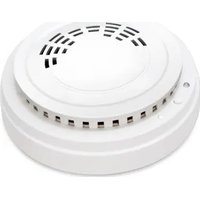
LS100-SMK - Connected sensor Planet - Free user manual and instructions
Find the device manual for free LS100-SMK Planet in PDF.


| Product Type | Managed 8-Port Gigabit Ethernet Switch |
| Dimensions (W x D x H) | 200 x 120 x 44 mm |
| Weight | 0.8 kg |
| Power Supply | External AC adapter 12V DC, 1A |
| Power Consumption | Maximum 10W |
| Ports | 8x 10/100/1000 Mbps RJ45 |
| LED Indicators | Power, Link/Activity per port |
| Switching Capacity | 16 Gbps |
| MAC Address Table | 8K entries |
| Management | Web-based GUI, SNMP v1/v2c |
| Operating Temperature | 0°C to 50°C |
| Storage Temperature | -10°C to 70°C |
| Humidity | 10% to 90% non-condensing |
| Mounting | Desktop or wall-mount |
| Cooling | Passive (fanless) |
| Safety Certifications | CE, FCC Class A |
| Package Contents | Switch, power adapter, quick install guide |
| Warranty | 3 years limited |
Frequently Asked Questions - LS100-SMK Planet
User questions about LS100-SMK Planet
0 question about this device. Answer the ones you know or ask your own.
Ask a new question about this device
Download the instructions for your Connected sensor in PDF format for free! Find your manual LS100-SMK - Planet and take your electronic device back in hand. On this page are published all the documents necessary for the use of your device. LS100-SMK by Planet.
USER MANUAL LS100-SMK Planet
2.2.1 Battery Installation.... 20
2.2.2 Magnetic Mounting or Wall Mounting.... 21
2.3.2 Precautions.... 24
3. Preparation 28
3.1 Requirements 28
3.2 LoRaWAN Gateway Setup 28
3.2.1 LoRa Frequency Setting 28
3.2.2 LoRaWAN Setting 29
3.2.3 Setting Up of LoRa Connection via ABP Decryption 30
4. Customer Support 32
Copyright
Copyright (C) 2023 PLANET Technology Corp. All rights reserved.
The products and programs described in this User's Manual are licensed products of PLANET Technology, This User's Manual contains proprietary information protected by copyright, and this User's Manual and all accompanying hardware, software, and documentation are copyrighted.
No part of this User's Manual may be copied, photocopied, reproduced, translated, or reduced to any electronic medium or machine-readable form by any means, electronic or mechanical including photocopying, recording, or information storage and retrieval systems, for any purpose other than the purchaser's personal use, and without the prior express written permission of PLANET Technology.
Disclaimer
PLANET Technology does not warrant that the hardware will work properly in all environments and applications, and makes no warranty and representation, either implied or expressed, with respect to the quality, performance, merchantability, or fitness for a particular purpose.
PLANET has made every effort to ensure that this User's Manual is PLANET disclaims liability for any inaccuracies or omissions that may have occurred. Information in this User's Manual is subject to change without notice and does not represent a commitment on the part of PLANET. PLANET assumes no responsibility for any inaccuracies that may be contained in this User's Manual. PLANET makes no commitment to update or keep current the information in this User's Manual, and reserves the right to make improvements and/or changes to this User's Manual at any time without notice.
If you find information in this manual that is incorrect, misleading, incomplete, we would appreciate your comments and suggestions.
FCC Compliance Statement
This Equipment has been tested and found to comply with the limits for a Class A digital device, pursuant to Part 15 of the FCC rules. These limits are designed to provide reasonable protection against harmful interference in a residential installation. This equipment can radiate radio frequency energy and, if not installed and used in accordance with the instructions, may cause harmful interference to radio communications.
However, there is no guarantee that interference will not occur in a particular installation. If this equipment does cause harmful interference to radio or television reception, which can be determined by turning the equipment and on, the user is encouraged to try to correct the interference by one or more of the following measures:
- Reorient or relocate the receiving antenna.
- Increase the separation between the equipment and receiver.
- Connect the equipment into an outlet on a circuit different from which the receiver is connected.
- Consult the dealer or an experienced radio/TV technician for help.
CE mark Warning
CE This equipment is compliant with Class A of CISPR 32. In a residential environment this equipment may cause radio interference.
WEEE

To avoid the potential effects on the environment and human as a result of the presence of hazardous substances in electrical and electronic equipment, end users of electrical and electronic equipment should understand the meaning of the crossed-out wheeled bin symbol. Do not dispose of WEEE as unsorted municipal waste and have to collect such WEEE separately.
Trademarks
The PLANET logo is a trademark of PLANET Technology. This documentation may refer to numerous hardware and software products by their trade names. In most, if not all cases, these designations are claimed as trademarks or registered trademarks by their respective companies.
Revision
User's Manual of PLANET LoRaWAN Sensors
Model: LS100 series (LS100-WL, LS100-PIR, and LS100-DW) and LS200 series (LS200-TH, LS200-PT, LS200-TC, LS200-RF, LS200-LG, and LS200-CM3)
Rev.: 1.0 (December 2023)
Part No. EM-LS100 Series_ LS200 Series v1.0
1. Product Introduction
Thank you for purchasing PLANET LoRaWAN Sensor, LS series. The descriptions of these models are as follows:
EU868
| LS100-WL-EU868 IP65 LoRaWAN Water Leak Sensor (EU868 Sub 1G) | |
| LS100-PIR-EU868 | IP30 LoRaWAN Indoor Occupancy Sensor (Occupancy/ Light/Temperature -20~55 degrees C, EU868 Sub 1G) |
| LS100-DW-EU868 | IP30 LoRaWAN Door and Window Sensor (EU868 Sub 1G) |
| LS200-TH-EU868 | IP65 LoRaWAN Indoor Temperature and Humidity Sensor (-20~55 degrees C, EU868 Sub 1G) |
| LS200-PT-EU868 | IP65 LoRaWAN Product Temperature Sensor (PT1000 Needle Probe -70~200 degrees C, EU868 Sub 1G) |
| LS200-TC-EU868 | IP65 LoRaWAN Machine Temperature Sensor (Thermocouple -40~125 degrees C, EU868 Sub 1G) |
| LS200-RF-EU868 | IP65 LoRaWAN Refrigerator Temperature and Humidity Sensor (-40~55 degrees C, EU868 Sub 1G) |
| LS200-LG-EU868 IP65 LoRaWAN Light Level Sensor (EU868 Sub 1G) | |
| LS200-CM3-EU868 | IP53 LoRaWAN 3-phase Current Meter (3 x 75A Clamp-On CT, EU868 Sub 1G) |
US915
| LS100-WL-US915 IP65 LoRaWAN Water Leak Sensor (US915 Sub 1G) | |
| LS100-PIR-US915 | IP30 LoRaWAN Indoor Occupancy Sensor (Occupancy/ Light/Temperature -20~55 degrees C, US915 Sub 1G) |
| LS100-DW-US915 | IP30 LoRaWAN Door and Window Sensor (US915 Sub 1G) |
| LS200-TH-US915 | IP65 LoRaWAN Indoor Temperature and Humidity Sensor (-20~55 degrees C, US915 Sub 1G) |
| LS200-PT-US915 | IP65 LoRaWAN Product Temperature Sensor (PT1000 Needle Probe -70~200 degrees C, US915 Sub 1G) |
| LS200-TC-US915 | IP65 LoRaWAN Machine Temperature Sensor (Thermocouple -40~125 degrees C, US915 Sub 1G) |
| LS200-RF-US915 | IP65 LoRaWAN Refrigerator Temperature and Humidity Sensor (-40~55 degrees C, US915 Sub 1G) |
| LS200-LG-US915 IP65 | LoRaWAN Light Level Sensor (US915 Sub 1G) |
| LS200-CM3-US915 | IP53 LoRaWAN 3-phase Current Meter (3 x 75A Clamp-On CT, US915 Sub 1G) |
"LoRaWAN Sensor" mentioned in the manual refers to the above models.
1.1 Package Contents
The package should contain the following:
| Model Package Contents |
| LS100-WL LoRaWAN Water Leak Sensor x 1 |
| LS100-PIR LoRaWAN Indoor Occupancy Sensor x 1 |
| LS100-DW LoRaWAN Door and Window Sensor x 1 |
| LS200-TH LoRaWAN Indoor Temperature and Humidity Sensor x 1 |
| LS200-PT LoRaWAN Product Temperature Sensor x 1 |
| LS200-TC LoRaWAN Machine Temperature Sensor x 1 |
| LS200-RF LoRaWAN Refrigerator Temperature and Humidity Sensor x 1 |
| LS200-LG LoRaWAN Light Level Sensor x 1 |
| LS200-CM3 LoRaWAN 3-phase Current Meter x 1 |

Note
If any of the above items are missing, please contact your dealer immediately.
1.2 Overview
Build a Smart IoT Environment with Fabulous LoRaWAN Sensors
PLANET LS100 and LS 200 LoRaWAN sensors are intended for environmental monitoring and data collection. Data such as temperature, humidity, illumination, and ingress/egress all impact the status of a facility or a device,
whether it is a motor, a refrigeration unit, or even the networking gear itself. Sensors in the LS series mostly have IP65 and IP67 ratings, allowing them to be deployed in outdoor and industrial indoor environments. The number of sensors deployed depends on network requirements. The sensor(s) cam monitor a wide variety of conditions, including humidity, leak detection, room temperature, machine temperature, product temperature, ingress and egress, lighting, occupancy and asset location. These battery-operated sensors with no wiring required are easy to install in any place.


LoRa and LoRaWAN Wireless Technology
LoRa is a low-power, wide area network (LPWAN) RF modulation technology. It standardizes LPWANs and enables extremely long-range data links. With a range of up to three miles (five kilometers) in urban areas and miles (15 kilometers) in rural areas (line of sight), LoRa is ideal for creating networks that require long-range or deep in-building communication. A key feature is its ultra-low power requirements, enabling the deployment of battery-operated devices that can last up to several years. Using the open LoRaWAN protocol in a star topology, it's suitable for applications with numerous low-power devices collecting small amounts of data. The LS series is ideal for LoRa-enabled devices in the IoT system.
LoRaWAN-based Controller with Rich Industrial Interfaces
PLANET LoRaWAN Sensor is fully compatible with standard LoRaWAN gateways like PLANET LCG-300 series, supporting the LoRaWAN class A. It is ideal for large-scale IoT applications, including building automation, smart metering, HVAC systems, agriculture, and more. The sensor facilitates the seamless integration of multiple sensors, making it a perfect choice for retrofitting legacy assets into IoT-enabled systems.
LS100-WL
IP65 LoRaWAN Water Leak Sensor
LS100-PIR
IP30 LoRaWAN Indoor Occupancy Sensor
LS100-DW
IP30 LoRaWAN Door and Window Sensor
LS200-TH
IP65 LoRaWAN Indoor Temperature and Humidity Sensor
LS200-PT
IP65 LoRaWAN Product Temperature Sensor
LS200-TC
IP65 LoRaWAN Machine Temperature Sensor
LS200-RF
IP65 LoRaWAN Refrigerator Temperature and Humidity Sensor
LS200-LG
IP65 LoRaWAN Light Level Sensor
LS200-CM3
IP53 LoRaWAN 3-phase Current Meter
1.3 Features
Key Features
LS100-WL
Water Leak Sensor
IP65 rating
➢ LoRaWAN™ Class A compatible
LS100-PIR
➢ Indoor Occupancy Sensor (Occupancy/Light/Temperature)
IP30 rating
➢ LoRaWAN™ Class A compatible
LS100-DW
▶ Door and Window contact Sensor
IP30 rating
LoRaWAN™ Class A compatible
LS200-TH
➢ Indoor Temperature and Humidity Sensor (-20\~55 degrees C)
IP65 rating
LoRaWAN™ Class A compatible
LS200-PT
Product Temperature Sensor with PT1000 Needle Probe (-70\~200 degrees C)
IP65 rating
LoRaWAN™ Class A compatible
LS200-TC
Machine Temperature Sensor with Thermocouple (-40\~125 degrees C)
IP65 rating
LoRaWAN™ Class A compatible
LS200-RF
➢ Refrigerator Temperature and Humidity Sensor (-40\~55 degrees C)
IP65 rating
LoRaWAN™ Class A compatible
LS200-LG
Light Level Sensor
IP65 rating
LoRaWAN™ Class A compatible
LS200-CM3
3-phase Current Meter with Clamp-On CT
➢ Measure 75A current maximum
IP53 rating
LoRaWAN™ Class A compatible
1.4 Product Specifications
■ LS100 series
| Product LS100-WL LS100-PIR LS100-DW | |||
| Wireless Transmission | |||
| Technology LoRaWAN | |||
| Frequency | EU868: 863–870 MHzUS915: 902–928 MHz | ||
| TX Power | US915 20dbm EU868 16dbmAS923 16dbm (optional) KR920 14dbm (optional)AU915 20dbm (optional) IN865 20dbm (optional) | ||
| Rx Sensitivity | -136dBm(LoRa, Spreading Factor = 12, Bitrate = 293bps)-121dBm(FSK, Frequency Deviation = 5kHz, Bitrate = 1.2kbps) | ||
| Work Mode OTAA/ABP Class A | |||
| Data Interfaces | |||
| Power Supply | 2 x 3.6V ER14505 AA battery in parallel(Battery not included) | 2 x 3.0V CR2450 button battery(Battery not included) | |
| Operating Voltage | DC 3.1V~3.65V DC | 3.1V~3.65V DC | 2.4V~3V |
| Battery Life Time | 5 years(25°C, 15-minute reports,TxPower=20dBm, SF10) | 3 years(25°C, 15-minute reports,TxPower=20dBm,SF10) | |
| Standby Current 22uA 110uA 12uA | |||
| Wake-up Current(Typical value) | 7.12mA 9.78mA 120mA/11mA | ||
| Low Battery Threshold | 3.2V 3.2V 2.4V | ||
| Physical Characteristics | |||
| Dimensions(L x W x H) | 112 x 88.2 x 32 mm | 78 x 78.8 x 82.2 mm | 57 x 38.05 x 15.2 mm42.5 x 13 x 12 mm(Magnet) |
| Weight 141g 125.8g 43.8g | |||
| Sensor Dimensions(L x W x H) | 38.5 x 11.89 x 13.7 mm | - | - |
| Ingress Protection | IP65 IP30 IP30 | ||
| Operating Temperature | -20°C to 55°C | ||
| Relative Humidity | <90% RH (non condensing) | ||
| Storage Temperature | -40°C~85°C | ||
| Standards Conformance | |||
| Regulatory Compliance | CE RED,FCC PART 15B | FCC Part 15B FCC | Part 15B |
■ LS200 series (1/2)
| Product LS200-TH LS200-PT LS200-TC | |||
| Wireless Transmission | |||
| Technology LoRaWAN | |||
| Frequency | EU868: 863-870 MHzUS915: 902-928 MHz | ||
| TX Power | US915 20dbm EU868 16dbmAS923 16dbm (optional) KR920 14dbm (optional)AU915 20dbm (optional) IN865 20dbm (optional) | ||
| Rx Sensitivity | -136dBm(LoRa, Spreading Factor = 12, Bitrate = 293bps)-121dBm(FSK, Frequency Deviation = 5kHz, Bitrate = 1.2kbps) | ||
| Work Mode OTAA/ABP Class A | |||
| Data Interfaces | |||
| Power Supply | 2 x 3.6V ER14505 AA battery in parallel(Battery not included) | ||
| Operating Voltage | DC 3.1V~3.65V DC 3.1V~3.65V DC 3.1V~3.65V | ||
| Battery Life Time | 5 years(25°C, 15-minute reports,TxPower=20dBm, SF10) | 4.8 Years(25°C, 15-minute reports,TxPower=20dBm,SF10) | |
| Standby Current 24uA 25uA 34uA | |||
| Wake-up Current(Typical value) | 6.99mA 9.94mA 7.33mA | ||
| Low Battery Threshold | 3.2V 3.2V 3.2V | ||
| Physical Characteristics | |||
| Dimensions(L x W x H) | 112 x 65 x 28mm | 112 x 88.19 x 32mm | 112 x 88.19 x 32mm |
| Weight 141g 141g | 186g | ||
| SensorDimensions | D: ∅16mm*L: 27mm, | - | - |
| Probe Info - | PT1000 Platinum Thermal | Thermocouple Characteristic | |
| Probe Temperature Detecting Range | -20°C~55°C -70°C to 200°C -40°C to 125°C | ||
| Probe Wire Length | - 2m 1m | ||
| Probe Dimensions - | 5mm in diameter * 150mm in length, needle probe | - | |
| Ingress Protection | IP65 IP65 IP65 | ||
| Operating Temperature | -20°C to 55°C | ||
| Relative Humidity | <90% RH (non condensing) | ||
| Storage Temperature | -40°C~85°C | ||
| Standards Conformance | |||
| Regulatory Compliance | CE RED,FCC PART 15B | TELEC,CB C TUV US | CE RED,FCC PART 15B |
■ LS200 series (2/2)
| Product LS200-RF LS200-LG LS200-CM3 | |||
| Wireless Transmission | |||
| Technology LoRaWAN | |||
| Frequency | EU868: 863-870 MHzUS915: 902-928 MHz | ||
| TX Power | US915 20dbm | EU868 | 16dbm |
| AS923 16dbm (optional) | KR920 | 14dbm (optional) | |
| AU915 20dbm (optional) | IN865 | 20dbm (optional) | |
| Rx Sensitivity | -136dBm(LoRa, Spreading Factor = 12, Bitrate = 293bps)-121dBm(FSK, Frequency Deviation = 5kHz, Bitrate = 1.2kbps) | ||
| Work Mode OTAA/ABP Class A | |||
| Data Interfaces | |||
| Power Supply | 2 x 3.6V ER14505 AA battery in parallel(Battery not included) | ||
| Operating Voltage | DC 3.1V~3.65V DC | 3.1V~3.65V DC | 3.1V~3.65V |
| Battery Life Time | 5 years(25°C, 15-minute reports, TxPower=20dBm, SF10) | ||
| Standby Current 20uA 17uA 25uA | |||
| Wake-up Current(Typical value) | 7.11mA 7.5mA 127mA | ||
| Low Battery Threshold | 3.2V 3.2V 3.2V | ||
| Physical Characteristics | |||
| Dimensions(L x W x H) | 112 x 65 x 32mm | 112 x 65 x 32mm | 112 x 88.19 x 32mm |
| Weight 141g 150g | 141g | ||
| Sensor Dimensions(L x W x H) | - | - | 27.5 x 25 x 42.5mm |
| Sensor Weight - - | 49.6 x 3g | ||
| Sensor Measurement Info | Temperature Detecting Range:-40°C~55°C | Illuminance Range:0.01 LUX to 157K LUX | Current Measurement Range:100mA to 75A Operating Temperature:-40°C to 85°C |
| Ingress Protection | IP65 IP65 IP53 | ||
| Operating Temperature | -40°C~55°C -20°C to 55°C | ||
| Relative Humidity | <90% RH (non condensing) | ||
| Storage Temperature | -40°C~85°C | ||
| Standards Conformance | |||
| Regulatory Compliance | CE RED,FCC PART 15B | CE RED,FCC PART 15B | CE RED,FCC PART 15B |
2. Hardware Introduction
2.1 Physical Descriptions
| LS100-PIR | |
| Appearance | 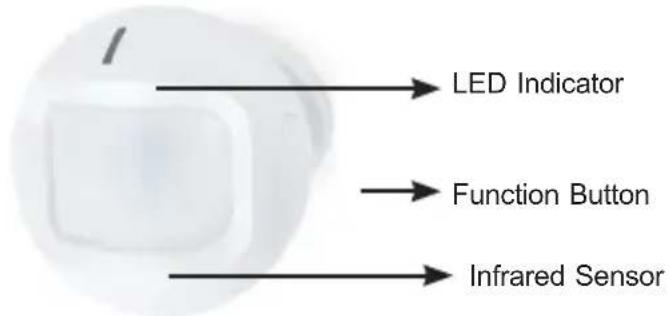 |
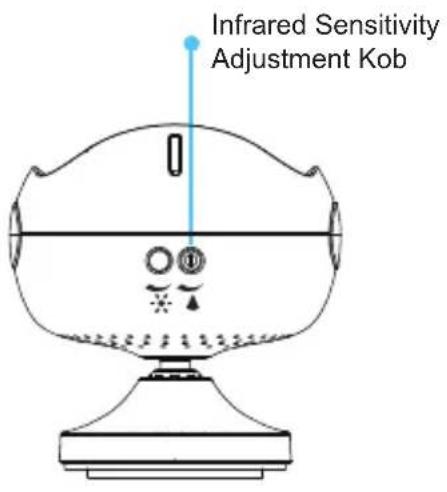 | |
 | |
| LS100-WL | |
| Appearance |  |
| LS100-DW | |
| Appearance |  |
| LS200-TH | |
| Appearance |  |
| LS200-PT | |
| Appearance |  |
| LS200-TC | |
| Appearance | 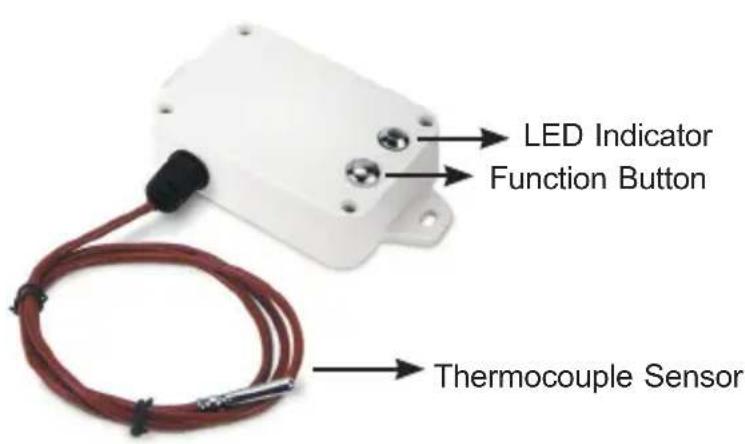 |
| LS200-RF | |
| Appearance |  |
| LS200-LG | |
| Appearance | Light Sensor |
| LS200-CM3 | |
| Appearance | 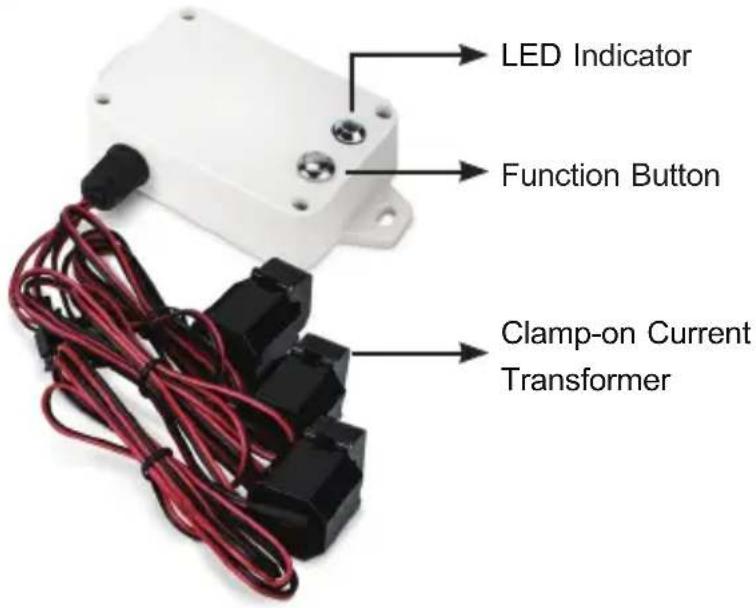 |
LED Definition:
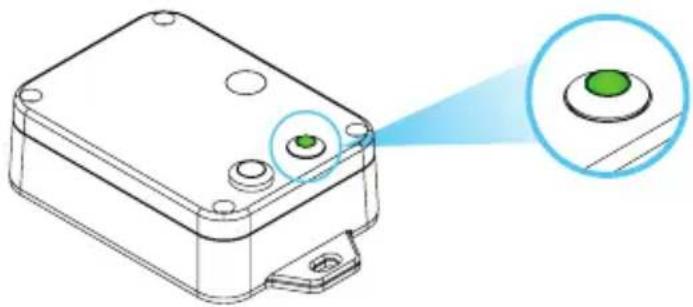
natural_image
Technical line drawing of a mechanical component with two green circular features and a blue laser beam pointing to it (no text or symbols)| Color Function | |||
| LED Green | |||
2.2 Hardware Installation
Refer to the illustration and follow the simple steps below to quickly install your LoRaWAN Sensor.
2.2.1 Battery Installation
Product uses two CR2450 batteries:
Module: LS100-DW
Unscrew the four screws on the device's cover to remove the front cover. Insert the battery and put back the device's cover and tighten the screws.
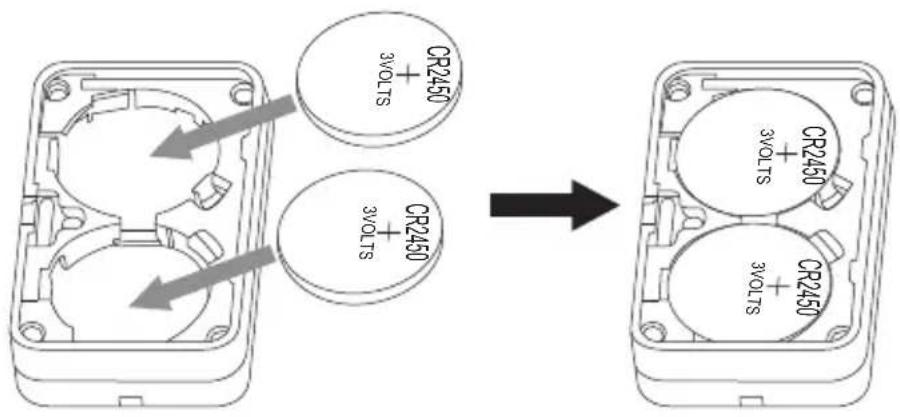
Product uses two ER14505 batteries:
Modules: LS100-PIR, LS100-WL, LS200-TH, LS200-PT, LS200-TC, LS200-RF, LS200-LG, and LS200-CM
Unscrew the four screws on the device's cover to remove the front cover. Insert the battery and put back the device's cover and tighten the screws.

natural_image
Technical line drawing of a mechanical housing with mounting holes and bolted components (no text or symbols)2.2.2 Magnetic Mounting or Wall Mounting
Magnetic mounting
Models: LS100-WL, LS200-TH, LS200-PT, LS200-TC, LS200-RF, LS200-LG, and LS200-CM
The LoRaWAN Sensor features magnetic mounting for easy attachment to the surface with iron material.

Wall mounting by screws (optional)
Models: LS100-WL, LS200-TH, LS200-PT, LS200-TC, LS200-RF, LS200-LG, and LS200-CM
To make the installation more secure, please use screws (purchased separately) to fix the device on the wall or other objects.

natural_image
Technical line drawing of a rectangular electronic component with mounting holes and a bolted base (no text or symbols)Wall mounting by the double-sided stickers
Model: LS100-PIR
- Clean the surface of the objects before sticking with the sticker.
- Tear off the 3M300LSE side of the sticker, place it on the bottle product as shown in the picture, and press it.
- Tear off the other side of the sticker and put the sticker to a of the wall and press the sticker firmly for around 20 seconds.

Model: LS-100-DW
Tear off the magnetic body's 3M release paper, and then adhere th the window or door frame by sticking it in parallel with the magnetic body.


Note
Do not install the device in a metal shielded box or in an environment surrounded by other electrical equipment to avoid affecting the wireless transmission of the device.
2.3.2 Precautions
LS100-WL: IP65 LoRaWAN Water Leak Sensor
The sensor probe of LS100-WL has to attach to the smooth ground that may accumulate leakage.
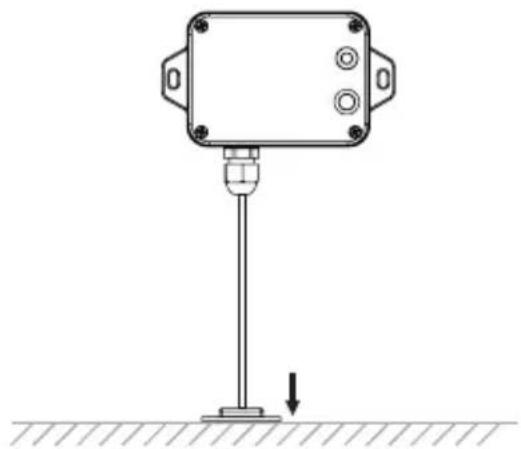
natural_image
Technical line drawing of a sensor or measurement device mounted on a pole, with no visible text or symbols.LS100-PIR: IP30 LoRaWAN Indoor Occupancy Sensor
The correct installation of LS100-PIR is shown below.

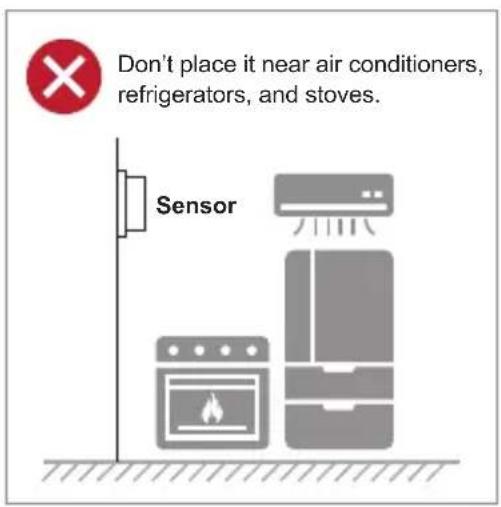

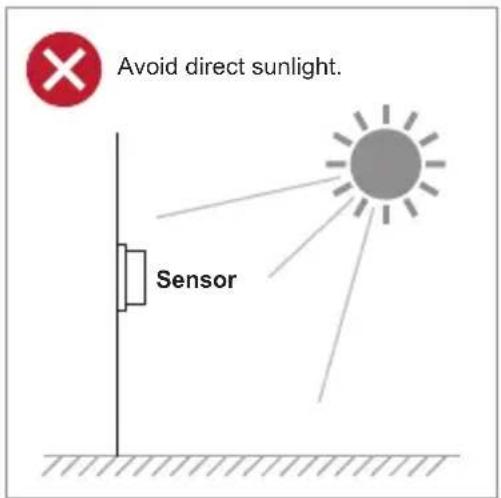
Detection Range

Coverage area A-Distance: 5 meters; sensing angle: 120°
Coverage area B-Distance: 8 meters; sensing angle: 60°
Coverage area C-Distance: 11 meters; sensing angle: 30°
LS100-DW: IP30 LoRaWAN Door and Window Sensor
The distance between the two objects has to be less than 2cm.
LS200-TH: IP65 LoRaWAN Indoor Temperature and Humidity Sensor (-20\~55 degrees C)
Installation height recommendation: 1-2 m.
LS200-PT: IP65 LoRaWAN Product Temperature Sensor (PT1000 Needle Probe, -70\~200 degrees C)
When LS200-TC is compared with the last reported values, the temperature change is expected to exceed 0.1^ C (by default). It will report values at the Min Time interval if it does not exceed 0.1^ C (by default). It will report values at the Max. Time interval.
LS200-TC: IP65 LoRaWAN Machine Temperature Sensor (Thermocouple -40\~125 degrees C)
When LS200-TC is compared with the last reported values, the temperature change is expected to exceed 10^ C (by default). It will report values at the Min. Time interval. If it does not exceed 10^ C (by default), it will report values at the Max. Time interval.
LS200-LG: IP65 LoRaWAN Refrigerator Temperature and Humidity Sensor (-40\~55 degrees C)
Compare the illumination value detected by the illumination sensor with the set illumination value. The detected value exceeds the set value (default 50 Lux), the currently detected illumination value is sent.
LS200-CM3
The 3-phase current meter (LS200-CM3) samples the current according to Min. Time. If the current value sampled this time relatively exceeds the set value (the default is 100mA) more than the current value reported last time, the device will immediately report the current value sampled this time. If the current variation does not exceed the default value, the data will be reported regularly according to Max. Time.
- When using it, the back of it can be adsorbed on the iron surface, or the two ends can be fixed to the wall with screws.
- When installing the LS200-CM3 current transformer, please separate the live and neutral wires of the wire to be detected, and only take the live wire through current transformer and start the measurement according to the wiring below:
If the live wire and the neutral wire are connected together at the same time, they will offset each other and the measurement is 0.
"L ← K" is marked on the bottom of the CT.
WARNING 1: Before using, user must check whether the appearance is deformed; otherwise, the test accuracy will be affected.
WARNING 2: The operating environment should be kept away from strong magnetic fields, so as not to affect the test accuracy. It is strictly use in humid and corrosive gas environments.
WARNING 3: Before installation, please confirm the current value of the load. If the current value of the load is higher than the measurement range, select a model with a higher measurement range.
WARNING 4: Children and the persons who do not have enough knowledge about electric measurements must not use this instrument.
WARNING 5: Do not measure the electricity naked or barefooted to protect yourself from electrical shock hazard.
WARNING 6: Be careful not to get hurt with the sharp test lead pins.
WARNING 7: Warning for High Power Line Measurements
High Power Line (High Energy Circuits) such as Distribution Transformers, Bus Bars and Large Motors are very dangerous. High Power Line sometimes includes High Surge Voltage that could cause explosive short in the instrument and could result in shock hazard. For voltage measurement of High Power Line, do not touch Clamp Meter, its Test Leads, and any part of the circuit.
WARNING 8: Warning for High Voltage Measurements
Even for Low Energy Circuits of electric/electronic appliances, such as heating elements, small motors, line cords and plugs, High Voltage Measurements are very dangerous. Do not touch Clamp Meter, Test Leads, and any part of the circuit. Generally, shock hazard could occur when the current between the circuit that involves more than 33V rms or 46.7V DC or peak and ground goes up to 0.5mA or more.
3. Preparation
Before accessing the LoRaWAN Sensor controllers, user has to install utility tool for operation.
3.1 Requirements
PLANET Industrial LoRaWAN Gateway, e.g., LCG-300 series
Workstations running Windows OS, MAC OS X or later, Linux, UNIX, or other platforms are compatible with TCP/IP protocols and installed with web browser.

It is recommended to use Chrome 98.0.xxx or above to access the LoRaWAN Gateway. If the Web interface of the LoRaWAN Gateway is not accessible, please turn off the anti-virus software or firewall and then try it again.
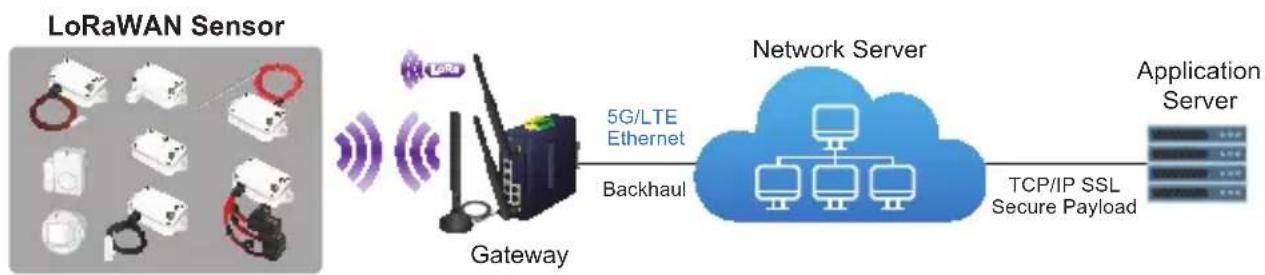
flowchart
graph LR
    A["LoRaWAN Sensor"] --> B["Gateway"]
    B --> C["5G/LTE Ethernet"]
    B --> D["Backhaul"]
    C --> E["Network Server"]
    D --> E
    E --> F["Application Server"]
    G["TCP/IP SSL Secure Payload"] --> E
3.2 LoRaWAN Gateway Setup
3.2.1 LoRa Frequency Setting
a. Open browser and login to the Web GUI of LCG-300 series.
b. Click LoRa label on main menu and LoRa label on function menu.

c. Select the Frequency Plan for your local area. Some Frequency Plan supports Frequency Sub Band. (In this test case, select "US915" for frequency plan and "US915, FSB2" for frequency sub band.)
LCG-300 series-US
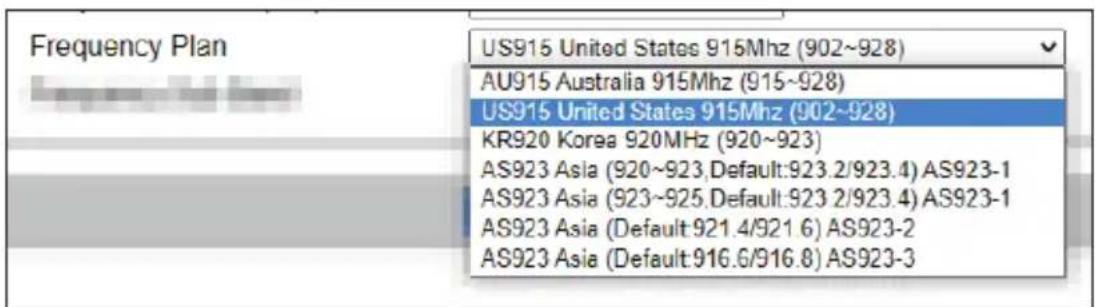

LCG-300 series-EU

3.2.2 LoRaWAN Setting
Click LoRaWAN label and input the related data.

| Object Description | |
| LoRaWAN Server Mode | The service of LoRaWAN |
| Email The registered email of LoRaWAN server | |
| Gateway ID | The unique identity of the base station, which the server can distinguish a different LoRaWAN base station |
| Server Provider The service provider of LoRaWAN server | |
| Server Address The IP address of LoRaWAN server | |
| Uplink Port | LoRaWAN data service center program uplink port. Value range is 0-65535 and the default value is 1700. |
| Downlink Port | LoRaWAN data service center program downlink port. Value range is 0-65535 and the default value is 1700. |
3.2.3 Setting Up of LoRa Connection via ABP Decryption

a. Click Enable.
b. Click Add ABP Key Button. Then input data which has to be the same as the settings of LoRa node/sensor.

| Object Description | |
| Device Address* | The DevAddr of device |
| Network Session Key* | The NWKSKEY of device |
| Application Session Key* | The APPSKEY of device |
| Decoder The decoder way | |
| Downlink Frame Counter | The action status of sensor or node |
*The data of the LoRa sensor has to be provided by provider; and user also can change the setting after connecting.
When sensor connects to LoRa Gateway, the RSSI and SNR would be shown on the UI of gateway as seen below.
| ABP Decryption | |||||||
| ABP Decryption | ● Enable ○ Disable | ||||||
| ABP Keys | |||||||
| No. | Device Address | Network Session Key | Application Session Key | Decoder | RSSI(dBm) | SNR(dB) | Action |
| 1 | 08042A7B | FEB4A5B8F950158441DCFE2506E3DSDE | C98FCB0C0TPO0BG3DHA0G5ATHGSL1E2DE | ASCII_String | 空曲 | ||
| 2 | 08042A7D | 2DB52FF308FD04AA209C4R084R09R088 | 090B00B0B0FCF4D812015121B07E894E | ASCII_String | -88 | 11 | 空曲 |
| 3 | 08042A83 | ACFO9UP6059C4R0C1578125796E83E823 | ED86F4D000A0A0B3E2134H9F E7D91E1F4 | ASCII_String | 空曲 | ||
| 4 | 08042A82 | 2521337C34EA0AD0F1D0E36R03DDE13 | BCB0B0E3C52A8F541B813DCDCDC5BB | ASCII_String | 空曲 | ||
| 5 | 08042A84 | FB7E9R0E67D02R251E51R53R62R8A187 | A60B0DF2C4B0E194E757EJCP0G5E8C8 | ASCII_String | 空曲 | ||
| 6 | 08042A7E | CC153C4AAA36L9E5R2E9D84C5FA776 | 87F8CS21B15A8A7S9R2G6NADC7ABL8CD8 | ASCII_String | 空曲 | ||
| 7 | 08042A7F | 639FCDC27F32BCE34R052A7RQ421C1F87 | 44662BCIAF6BIC662B8ECZ6B6U87E1 | ASCII_String | -75 | 12 | 空曲 |
| 8 | 08042A7C | 307B6CTF7E7F1NCBKDCFCF9B4E7F9B9EB | E29E542FBA2G12BHC4GSS573CB5B62A | ASCII_String | 空曲 | ||
| 9 | 08042A7A | 3B77B43F454DA2BBD5F9B5B429C7E155 | 6CF40GAPC5BC6E3CGZ6K6D9BC4E5FA | ASCII_String | 空曲 | ||
| 10 | 08042A89 | F187C7F0DRA145BCDCBOFT4R4B92389 | SC1E6VDF7D9C9F9BES4NVC6E3J7D974BA | ASCII_String | -94 | 8 | 空曲 |
4. Customer Support
Thank you for purchasing PLANET products. You can browse our online FAQ resource and User's Manual on PLANET Web site first to check if it your issue. If you need more support information, please contact PLANET switch support team.
PLANET online FAQs:
https://www.planet.com.tw/en/support/faq
Switch support team mail address:


- Preparation 28
- Customer Support 32
- Copyright
- Disclaimer
- FCC Compliance Statement
- CE mark Warning
- WEEE
- Trademarks
- Revision
- Product Introduction
- Package Contents
- Overview
- Build a Smart IoT Environment with Fabulous LoRaWAN Sensors
- LoRa and LoRaWAN Wireless Technology
- LoRaWAN-based Controller with Rich Industrial Interfaces
- Features
- Key Features
- Product Specifications
- ■ LS100 series
- Hardware Introduction
- Physical Descriptions
- Hardware Installation
- Battery Installation
- Product uses two ER14505 batteries:
- Magnetic Mounting or Wall Mounting
- Magnetic mounting
- Wall mounting by screws (optional)
- Wall mounting by the double-sided stickers
- Model: LS100-PIR
- Model: LS-100-DW
- Precautions
- LS100-WL: IP65 LoRaWAN Water Leak Sensor
- LS100-PIR: IP30 LoRaWAN Indoor Occupancy Sensor
- Detection Range
- LS100-DW: IP30 LoRaWAN Door and Window Sensor
- LS200-TH: IP65 LoRaWAN Indoor Temperature and Humidity Sensor (-20\~55 degrees C)
- LS200-PT: IP65 LoRaWAN Product Temperature Sensor (PT1000 Needle Probe, -70\~200 degrees C)
- LS200-TC: IP65 LoRaWAN Machine Temperature Sensor (Thermocouple -40\~125 degrees C)
- LS200-LG: IP65 LoRaWAN Refrigerator Temperature and Humidity Sensor (-40\~55 degrees C)
- LS200-CM3
- Preparation
- Requirements
- LoRaWAN Gateway Setup
- LoRa Frequency Setting
- LoRaWAN Setting
- Setting Up of LoRa Connection via ABP Decryption
- Customer Support
Brand : Planet
Model : LS100-SMK
Category : Connected sensor