PT4200 - Teleprompter Ikan - Free user manual and instructions
Find the device manual for free PT4200 Ikan in PDF.


| Product Type | Field Monitor |
| Brand | Ikan |
| Model | PT4200 |
| Display Size | 4.2-inch |
| Resolution | 1920 x 1080 (Full HD) |
| Brightness | 500 nits |
| Contrast Ratio | 1000:1 |
| Inputs | HDMI, SDI |
| Outputs | HDMI loop-through |
| Power Supply | DC 12V or NP-F battery |
| Battery Type | NP-F series (compatible) |
| Dimensions | 127 x 89 x 30 mm (5 x 3.5 x 1.2 in) |
| Weight | 1.6 kg (3.5 lbs) |
| Mount | 1/4"-20 tripod mount, shoe mount |
| Key Functions | Waveform, vectorscope, false color, peaking, zebra |
| Software | On-screen menu, firmware upgradable |
| Maintenance | Clean with soft, dry cloth |
| Safety | Avoid liquids, ensure ventilation |
| Spare Parts | Available through Ikan support |
| Repairability | Accesible via service centers |
| Documentation | User manual (8 pages, PDF) |
Frequently Asked Questions - PT4200 Ikan
User questions about PT4200 Ikan
0 question about this device. Answer the ones you know or ask your own.
Ask a new question about this device
Download the instructions for your Teleprompter in PDF format for free! Find your manual PT4200 - Ikan and take your electronic device back in hand. On this page are published all the documents necessary for the use of your device. PT4200 by Ikan.
USER MANUAL PT4200 Ikan
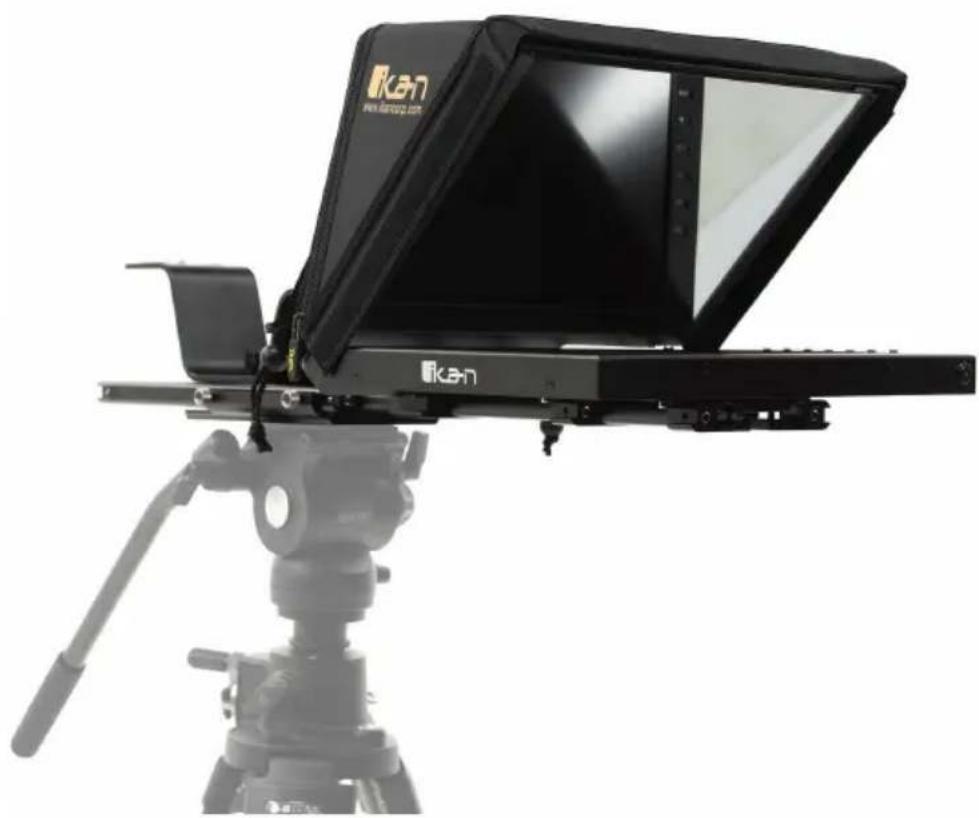
Professional 12" Beam Splitter Teleprompter with Reversing Monitor
natural_image
Exterior view of a Kan TV projector with tripod-mounted stand (no text or symbols visible)What's Included
□ 1 x Teleprompter Base
□ 1 x Bracket with Glass
□ 1 x Magnetic Teleprompter Hood with Boot
□ 1 x Monitor
□ 1 x Dual Sided Riser
□ 1 x AC Adapter with Cord
□ 1 x PrompterPro Software
□ 2 x 15mm Rod Monitor Adapters
□ 2 x Hex Keys
□ 4 x Screws
Setup
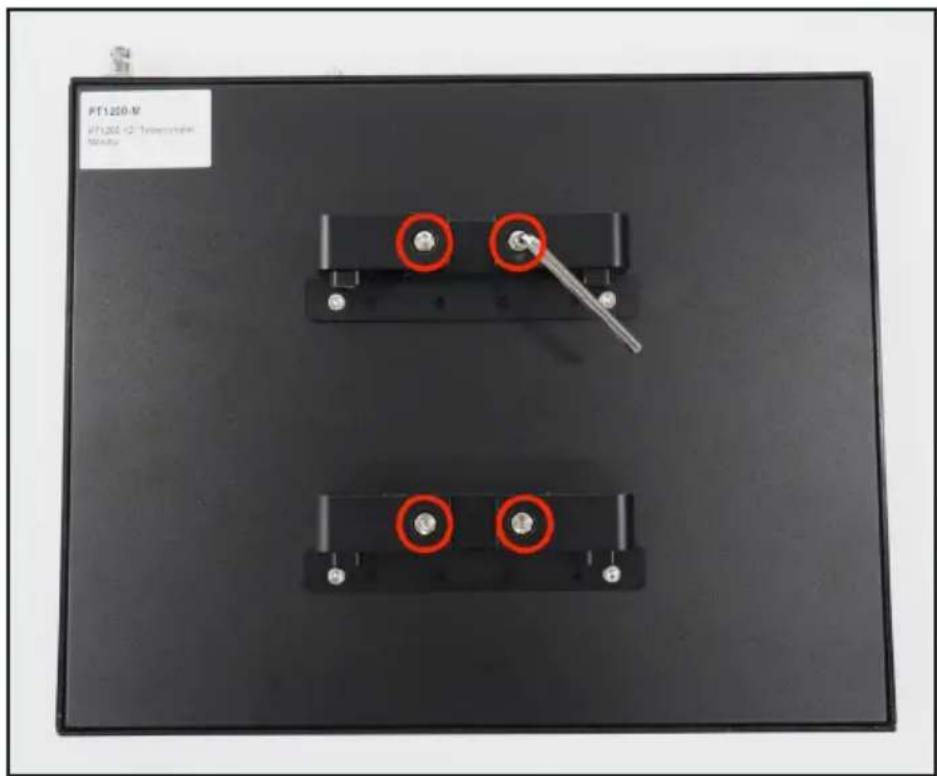
Step 1
Attach the two 15mm rod monitor adapters to back of the monitor's VESA mounts with the 4 screws using the smaller hex key.

Step 2
Using the larger hex key loosen the rod clamps.
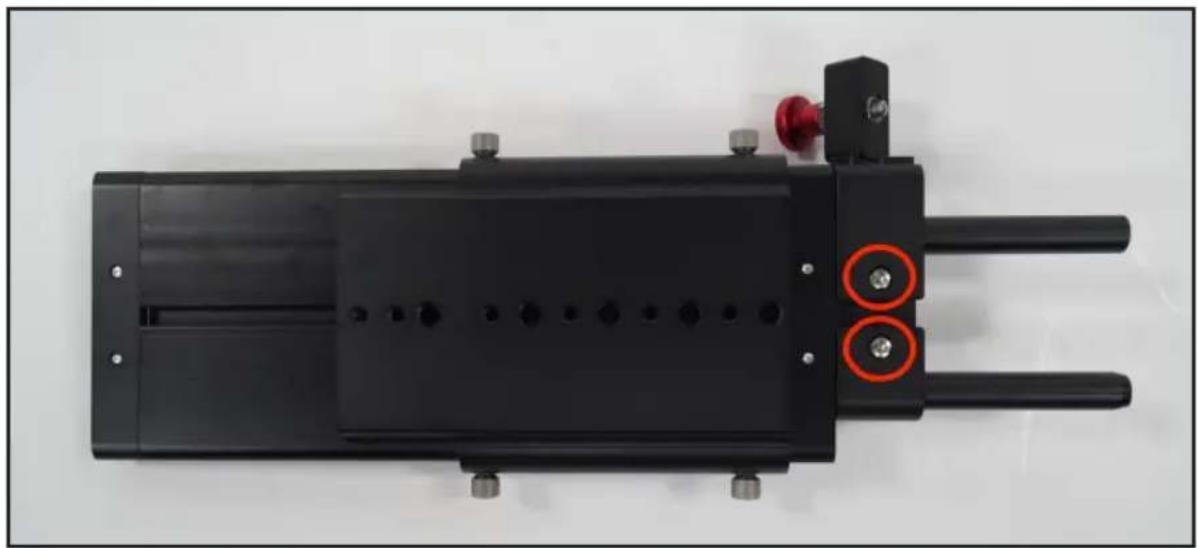
Step 3
On the teleprompter base loosen the top 4 screws holding the rods in place.

natural_image
Top-down view of a black electronic device with red circular annotations and a 'ikan' logo, no readable text or symbols beyond the label.Step 4
After loosening the following two screws on the base pull the rods out to accommodate the monitor. Tighten all 6 screws after rods are extended.
natural_image
Top-down view of a black mechanical device with two red circular annotations highlighting features (no text or symbols visible)Step 5
After tightening the rods, slide the monitor into the teleprompter base. Leave slight room for the teleprompter bracket and glass to slide in.

natural_image
Mechanical assembly with black components and a flat plate, no visible text or symbolsStep 6
Pull the red knob to insert the teleprompter bracket with glass into the teleprompter base.

natural_image
Close-up of a hand adjusting a black electronic device with a red knob and metal connectors (no visible text or symbols)Step 7
Tighten the silver knob to hold the teleprompter bracket in place.

natural_image
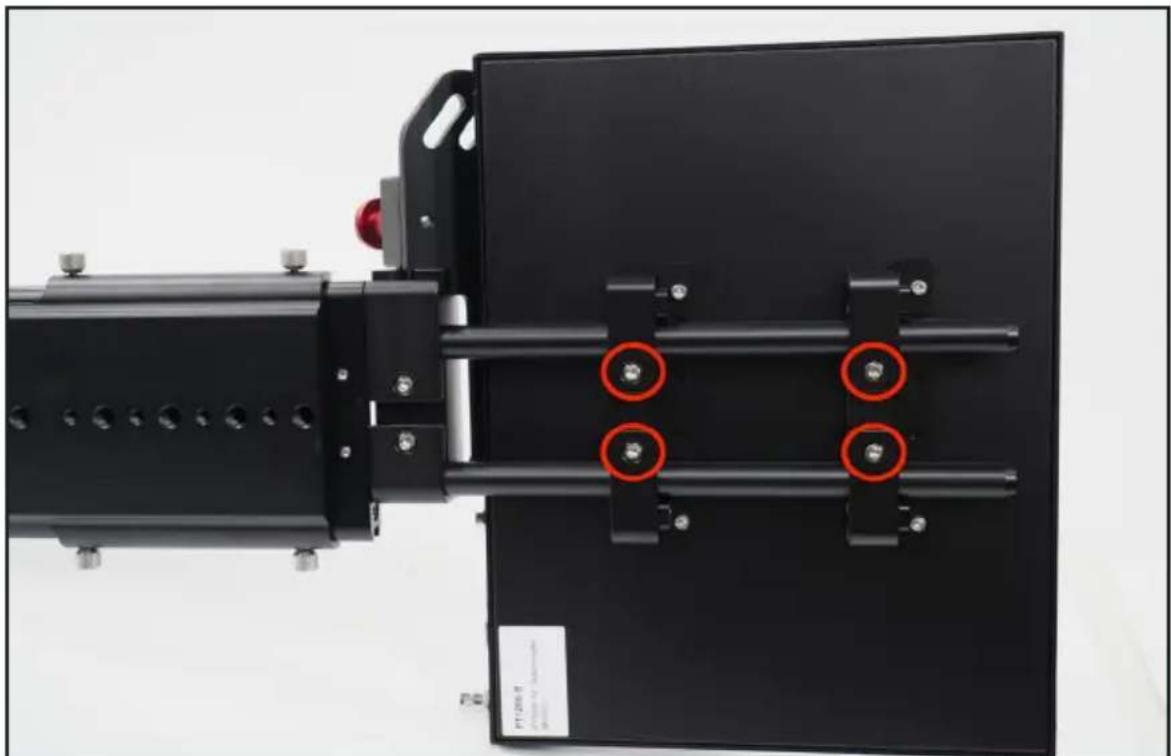
Close-up of a black electronic device component with a red circle highlighting a small metallic component, labeled 'ikan' (no readable text beyond branding)Step 8
Slide the monitor completely in and tighten the four screws to lock the monitor in place.
natural_image
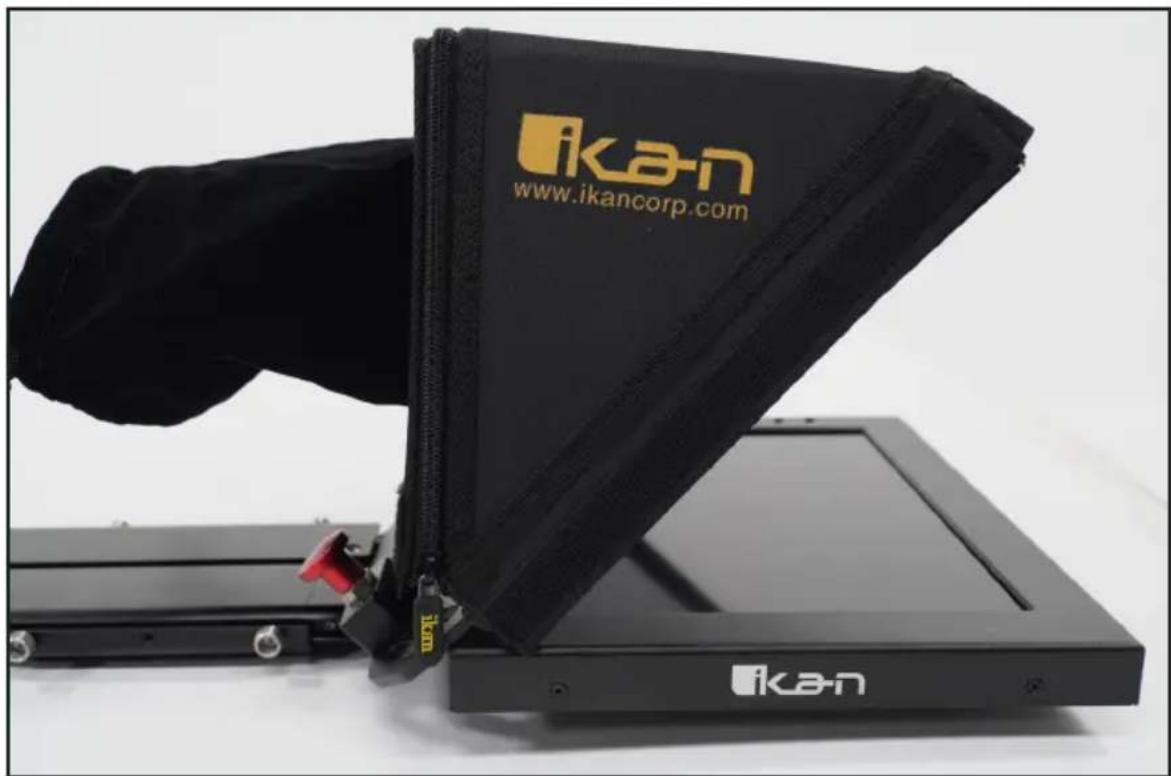
Mechanical assembly with black components and red circular annotations (no readable text or symbols)Step 9
Attach the magnetic teleprompter hood with boot.
natural_image
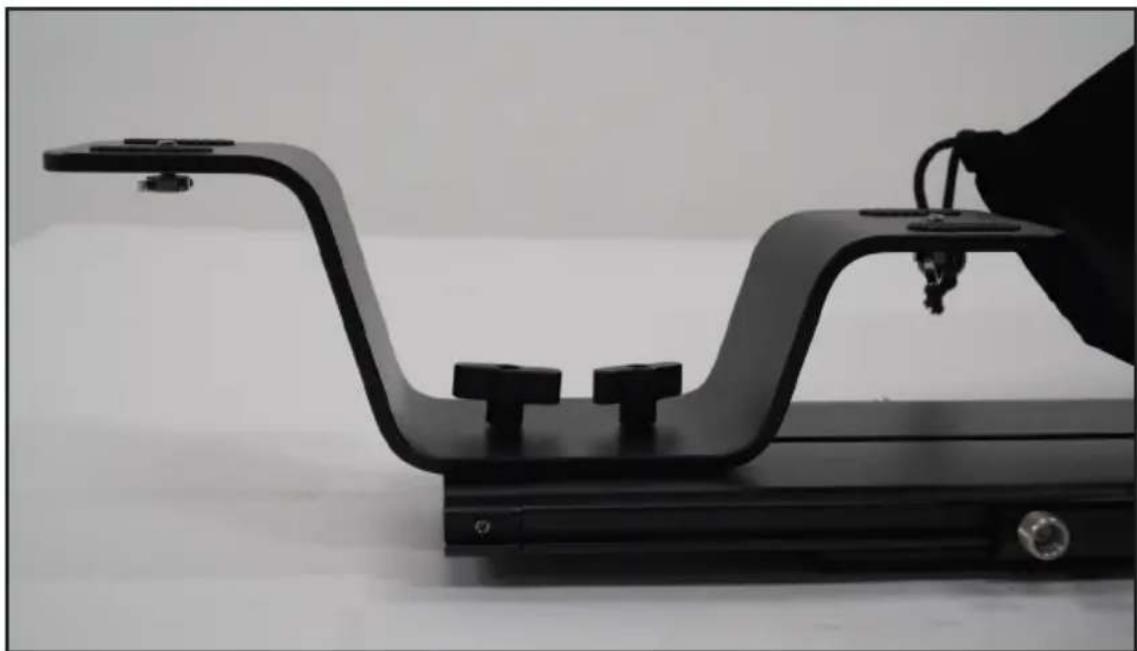
Black Ika-n device with a zipper and logo, displayed on a stand (no readable text beyond branding)Step 10
Slide the dual sided riser into the directional channel of the teleprompter base. Larger or taller cameras should insert the lower side facing glass, while smaller cameras should insert with higher side.
natural_image
Black-and-white photo of a hand adjusting a black metal frame with three small blocks, no visible text or symbols.Specifications
| Aspect Ratio 4:3 | |
| Brightness 350 cd/m2 | |
| Build Material Aluminum / Steel | |
| Contrast Ratio 500:1 | |
| Input Signal Composite BNC, VGA, HDMI | |
| Reading Range 13 ft. | |
| Resolution 1024 x 768 | |
| Screen Size 12 in. | |
| Viewing Angle 160 degrees (horizontal/vertical) | |
Features
- Includes 12" monitor that supports image flip (vertical and horizontal)
- High-quality American made 70/30 beam splitter glass
- Screen readable from up to 13'
- Works with many different sized camera
- Easy balancing with adjustable base
- Perfect size for portability and view-ability
- Ships in Reusable Foam for Easy Transport
- Includes MAC and PC Software
- HDMI, VGA, and Composite BNC
Learn More
More dynamic information at official website: www.ikancorp.com
Support
Contact email: support@ikancorp.com
CONDITIONS OF WARRANTY SERVICE
- Free service for one year from the day of purchase if the problem is caused by manufacturing errors.
- The components and maintenance service fee will be charged if the warranty period is expired.
Free Service will not be Provided in the Following Situations:
(Even if the product is still within the warranty period.)
- Damage caused by abuse or misuse, dismantling, or changes to the product not made by the company.
- Damage caused by natural disaster, abnormal voltage, and environmental factors, etc.
©2020 Ikan International. All rights reserved.


Brand : Ikan
Model : PT4200
Category : Teleprompter