
KAD-2BT - Hi-Fi System Qtx - Free user manual and instructions
Find the device manual for free KAD-2BT Qtx in PDF.


| Product Type | Hi-Fi System |
| Brand | Qtx |
| Model | KAD-2BT |
| Dimensions (W x H x D) | 200 mm x 150 mm x 250 mm |
| Weight | 2.5 kg |
| Power Supply | AC 100-240 V, 50/60 Hz |
| Power Consumption | 15 W |
| Bluetooth Version | 5.0 |
| Supported Audio Sources | Bluetooth, CD, FM Radio, USB, AUX |
| Speaker Configuration | 2-way, 2 speakers |
| Output Power | 2 x 10 W RMS |
| Frequency Response | 60 Hz - 20 kHz |
| FM Tuner Range | 87.5 - 108 MHz |
| Remote Control | Included |
| Material | ABS plastic, wood effect panels |
| Maintenance | Wipe with a dry, soft cloth; do not use chemical solvents |
| Safety | Do not expose to rain or moisture; operate in well-ventilated area |
| Spare Parts & Reparability | Contact Qtx authorized service centers; some parts replaceable by user (e.g., fuses) |
| Included Accessories | Remote control, FM antenna, user manual |
Frequently Asked Questions - KAD-2BT Qtx
User questions about KAD-2BT Qtx
0 question about this device. Answer the ones you know or ask your own.
Ask a new question about this device
Download the instructions for your Hi-Fi System in PDF format for free! Find your manual KAD-2BT - Qtx and take your electronic device back in hand. On this page are published all the documents necessary for the use of your device. KAD-2BT by Qtx.
USER MANUAL KAD-2BT Qtx
DIGITAL STEREO AMPLIFIER with BLUETOOTH
Item ref: 103.122UK
User Manual
Specifications:
Power Supply 230Vac, 50Hz (IEC)
Output Impedance 4 - 8Ω
Output Power (8Ω) 2 x 25W rms / 2 x 40W max. (EIAJ Standard @ 1kHz 10% THD)
Output Power (4Ω) 2 x 35W rms / 2 x 55W max. (EIAJ Standard @ 1kHz 10% THD)
Input sensitivity: line 380mV
Input sensitivity: mic 15mV
Dimensions 200 x 200 x 65mm
Weight 1.6kg
Version 2.1
Introduction
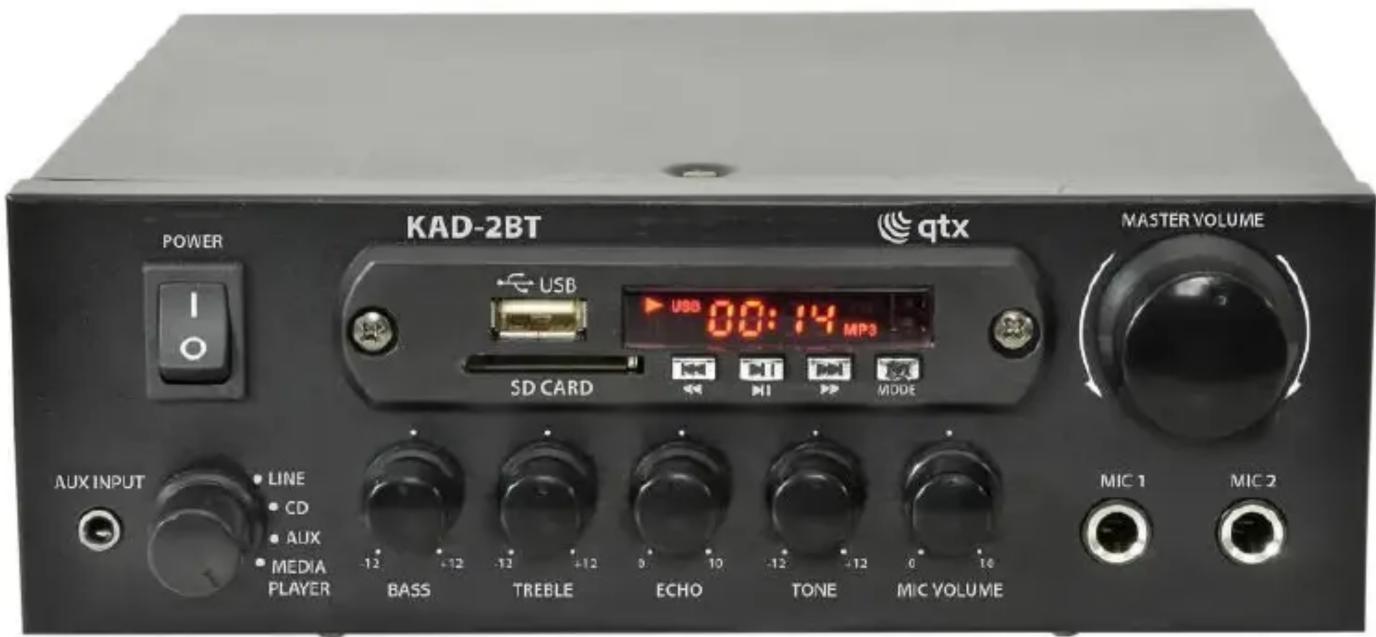
Thank you for choosing the QTX KAD-2BT stereo amplifier. This compact class D digital amplifier is capable of delivering a powerful 55W max output per channel. With 4 selectable inputs, 2 mic inputs and various controls, this is a great multipurpose amplifier for both domestic and commercial use.
Product layout:

- Power switch
MEDIA PLAYER:
- SD card slot
- USB memory stick slot
- Previous track/hold for Rewind
- Play/Pause
- Next track/hold for Fast-Forward
- Input selection
- Input display
MAIN UNIT:
-
Volume control
-
6.3mm jack microphone input
-
Aux input, 3.5mm jack socket
- Rotary input selector
- Input bass level control
- Input treble level control
- Microphone input echo effect
- Microphone input tone control
- Microphone input level control
- RCA stereo line inputs
- Spring clip for FM antenna
- Spring clip speaker output
- IEC mains input
Impedance Matching:
KAD-2BT is capable of 4-16Ω impedance output if more than one speaker is to be connected to the amplifier per channel. Please ensure the total impedance of the speakers are within the range. Speakers can be wired in two different ways, in parallel or in series. The total impedance can be worked out by the following formulas for the two different ways of wiring:
Parallel Connection - 1/R_total = 1/R_1 + 1/R_2 + 1/R_3 .....

Series Connection - R_total = R_1 + R_2 + R_3 .....

Installation:
Before installation, please ensure power is switched off and mains unplugged from the wall to avoid damage to equipment and installer.

Wire speakers to the amplifier as shown above, ensure the positive and negative terminals are wired correctly. Audio input on the back is through 3 pairs of RCA connectors, ensure left and right signals are correct for stereo output. Finally insert the IEC plug and connect the unit to the mains. Before switching on, always ensure the master volume is set at the lowest point to avoid power surge damage to the unit or speakers. Adjust the volume accordingly to an appropriate listening level.
Media Player:
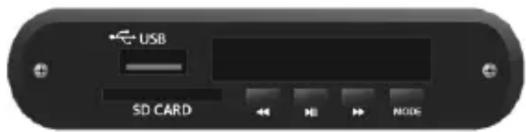
KAD-2BT has a built in media player which functions as an MP3 player, FM tuner and Bluetooth receiver. To use turn the input selector to media player.
MP3 Player – MP3 files can be played through an SD card or USB stick. Plug in the memory device and media will automatically start playing. Alternatively press Mode button until "USB" is displayed on the screen. To make a selection, press ◀ for previous or ▶ for next song respectively (press and hold ◀ for reverse or press and hold ▶ for fast-forward). For play and pause press the ▶ II button.
Bluetooth – for Bluetooth connection press MODE button until "BT" is displayed on the screen. From your Bluetooth search function (please refer to device manual for instructions) look for "KAD-2BT" to pair with, you should hear a tone once successfully connected. Step through tracks on the playback device using the ◀ or ▶ buttons. For play and pause press the ▶ II button.
FM radio – for FM radio press MODE button until "FM" is displayed on the screen. Press the play and pause ▶ II button to initiate search function through FM frequencies, all searched radio stations will be stored (up to 99 stations). After the search is complete, it will automatically select the station on the lowest frequency. Press the ◀ or ▶ buttons to step through the tuned stations.
Troubleshooting
| No Power | Check mains is switched on and power lead is in good condition and fully inserted into the wall socket. |
| Check IEC plug is fully inserted into the amplifier on the back. | |
| Check power switch is switched on on the amplifier. | |
| Check if the fuse is faulty. If the fuse blows too frequently, stop use of device immediately and refer to qualified personnel for repair. | |
| No Music output | Check the input connection lead is fully inserted on both amplifier and source. |
| Check the correct input is selected. | |
| Check the audio source is playing. | |
| Check volume is turn up on both amplifier and audio source | |
| Check speaker cable is not damaged and connected properly on both amplifier and speakers. | |
| Check for any loose strands on the speaker that might short together the positive and negative terminal, this will trigger the short circuit protection. | |
| No Mic output | Check Mic is switched on. |
| Check Mic volume is turned up on the amplifier. | |
| Check if Mic requires phantom power. | |
| Check if Mic is working properly on another device. | |
| Low output | Check speaker polarity is connected correctly. |
| Check audio source/media player volume is turned up. | |
| Check impedance of the speaker/s is within the range. | |
| Distorted output | Check output volume is not too high on both audio source and amplifier. |
| Check for damage on speaker cable and connection leads. | |
| Check amplifier, audio device, speaker and connection cables are not near any mains power cable or large inductive appliances such as a fridge. | |
| Check location of the Bluetooth device is within the reception range of the amplifier. Range may be significantly reduced in areas where a large number of electronic / wireless devices are present. | |
| Unable to connect to Bluetooth | Check Bluetooth device function is switched on. |
| Restart both amplifier and Bluetooth device. | |
| Unable to play USB/SD | Ensure all files are saved on the root level and not hidden in folders. |
| Ensure audio files are saved in MP3 format. | |
| FM radio not working | Ensure amplifier is not located close to any electronic devices e.g. large transformers, fridges or microwaves. |
| Ensure volume on amplifier and media player are turned up. | |
| Check the condition of the FM antenna. |


Brand : Qtx
Model : KAD-2BT
Category : Hi-Fi System