 ManualGo.com
URC-6410 - Universal remote ONEFORALL - Free user manual and instructions
Find the device manual for free URC-6410 ONEFORALL in PDF.



Download the instructions for your Universal remote in PDF format for free! Find your manual URC-6410 - ONEFORALL and take your electronic device back in hand. On this page are published all the documents necessary for the use of your device. URC-6410 by ONEFORALL.
USER MANUAL URC-6410 ONEFORALL
Select your region All oTHER couNTRIES Great Britain / Ireland
WWW.ONEFORALL.COM
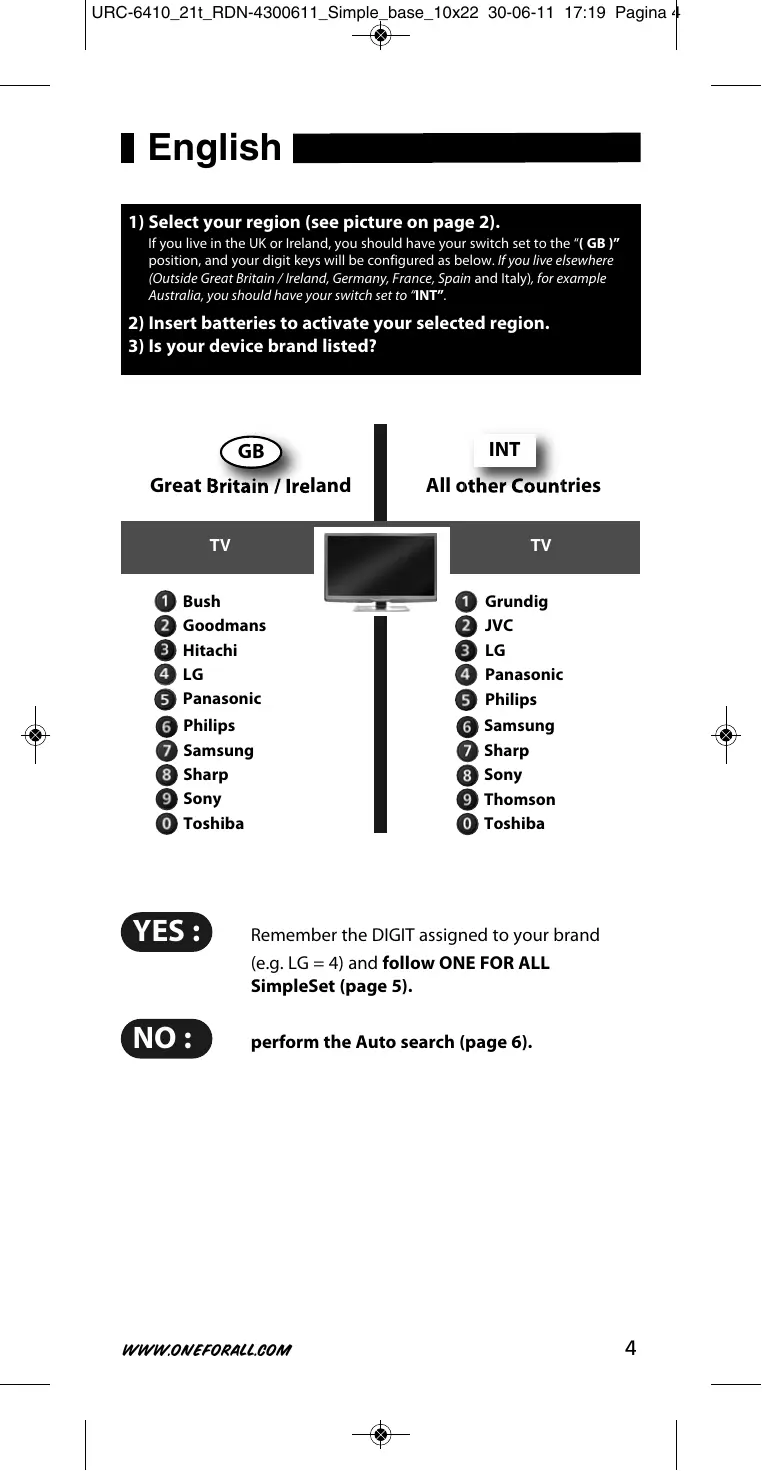
Is your device brand listed? (see page 4). Deutsch English
1) Select your region (see picture on page 2).
If you live in the UK or Ireland, you should have your switch set to the “( GB )” position, and your digit keys will be configured as below. If you live elsewhere (Outside Great Britain / Ireland, Germany, France, Spain and Italy), for example Australia, you should have your switch set to “INT”.
2) Insert batteries to activate your selected region.
3) Is your device brand listed?
Great Britain / Ireland
INT All other countries
Remember the DIGIT assigned to your brand (e.g. LG = 4) and follow oNE FoR All SimpleSet (page 5). No : perform the Auto search (page 6).
WWW.ONEFORALL.COM
oNE FoR All SimpleSet Allows you to set up most popular device brands within a few minutes. Simply find the DIGIT KEY assigned to your brand (page 4) and follow steps A-B.
LED will blink twice! Press and hold green & yellow 3 seconds!
Make sure your device is switched ON (not on standby). oFF
Acer Acer pointing at your device! Acer Press and hold the “DIGIT kEY assigned to your brand” e.g. lG = (see page 4) until your device switches oFF! (This may take up to 40 seconds) Release the “DIGIT key” as soon as your device switches oFF. READY ! Your particular device does NoT switch oFF? Follow the Auto search procedure on page 6. Your particular device does NoT switch back oN? Switch your device back ON manually (or using the original remote) and repeat SimpleSet making sure to release the “DIGIT KEY assigned to your brand” as soon as your device switches OFF. Your oNE FoR All is not working properly? There may be a better configuration for your device brand. Please repeat SimpleSet. If still not successful please follow the Auto search procedure.
WWW.ONEFORALL.COM
Auto search Is the way to set up all brands not covered by SimpleSet
LED will blink twice! Press and hold green & yellow 3 seconds!
LED will blink twice! Press and release ok !
Make sure your device is switched ON (not on standby). oFF Acer
Acer pointing at your device! Acer Acer NOW, Press and release ok as soon as your device switches oFF (within 3 seconds)! the remote will send a different POWER signal (AUTOMATICALLY EvERY 3 sECONDs) going through all the brands stored in the memory! READY ! Your device switched OFF but it does not switch back ON? You may have pressed the OK key (to save your settings) too late.
1) Switch your device back ON manually (or using the original remote).
Press and hold “green & yellow” for 3 seconds. LED will blink twice (Main TV Control = press and hold red & blue for 3 sec.).
Point the ONE FOR ALL at your device and press cH(repeatedly) until your device switches OFF.
Press and release ok as soon as your device switches OFF. If this is not successful you may want to repeat Auto Search and make sure to press OK as soon as your device switches OFF to save your settings! Your ONE FOR ALL is not working properly? There may be a better configuration for your device brand. Please repeat the Auto Search procedure! Auto search not successful? Perform the COPY feature.
WWW.ONEFORALL.COM
The learning feature allows you to learn (copy) one or more functions from your (working) original TV and/or Digital TV Receiver remote control onto your oNE FoR All remote. Example: How to learn (copy) the “I/II (mono/stereo)“ function from your original remote onto the “red key” on your ONE FOR ALL remote control.
2 - 5 cm
Align both remotes also in height Place both remote controls on a flat surface. Make sure that the ends you normally point at your device are facing each other.
LED will blink twice! Press and hold COPY 3 seconds!
WWW.ONEFORALL.COM
First; Press the ”red” key.
2 - 5 cm
Acer Both LED’s will flash rapidly! then; Press & briefly hold the “I/II (mono/streo)” key. Both LED’s will light up twice to confirm successful COPYING.
- If you want to copy other functions, simply repeat step C for each key you want to copy.
- If you get a long blink, please repeat step C.
- You can COPY onto every key except the COPY key.
LED will blink twice! Press and hold COPY 3 seconds to exit the COPY feature ! READY ! Delete a coPIED function:
1) Press and hold COPY for 3 seconds until both LED’s blink twice.
2) Press the corresponding key (e.g. red key) you wish to delete for 3 seconds
until both LED’s blink twice.
3) Press and hold COPY for 3 seconds. Both LED’s will blink twice.
WWW.ONEFORALL.COM
Deutschland Digital TV Receiver INT Align both remotes also in height Blue Sky Panasonic Philips Pioneer INT Portugal
Lampen blinker to ganger. lampen blinker to ganger. lampen blinker to ganger. Lampen blinker to ganger. New Zealand FAX: 06 878 2760 South Africa 011 417 3074 / FAX: 011 417 3275 / support@oneforall.co.za Slovenská/Slovakia +420 571 114 299 oneforall@solidczech.cz Ykpaïha/ukraine www.oneforall.com Ελληνική/Hellas/ Greece FAX: 2410 579092 info@oneforall.gr www.digitech.gr India
- Toll Free number (Airtel/BSNL/Tata Indicom/BPL subscribers only): 1800-102-3299
- Other subscribers: 080-40351700 support@oneforall.co.in Although all customer service information is updated before printing it may happen that during the time of use changes have occurred. Please check our website (www.oneforall.com) for our latest customer service information.
WWW.ONEFORALL.COM
India UEI Electronics Private Ltd offers you, the customer, oNE YEAR WARRANTY for your Remote. The Remote is warranted against manufacturing defects arising from faulty design, poor workmanship and materials for a period of one year (“the period”) from the date of its original purchase by you, on the following terms and conditions. To obtain warranty service, please call us at the numbers applicable to your local area mentioned on the Customer Service Page of the User Manual or available on www.oneforall.co.in This warranty will be valid only when the original invoice/ purchase receipt (indicating date of purchase, product description, dealer’s name etc.) is presented with the defective Remote. Universal reserves the right to refuse free-of-charge warranty replacement if the above document cannot be presented or if the information contained in it is incomplete, illegible or incorrect. This Warranty does not apply if the type, serial number on the Remote has been altered, deleted, removed or otherwise made illegible. Universal’s liability, under this warranty, shall be strictly limited to the first/original sale by the dealer/retailer to you (the first user), and will not apply or extend to any secondary or subsequent sale/transfer of the Remote by you. You shall be liable for all expenses incurred in delivering the defective Remote to us at the applicable addresses, however, we shall bear the cost of delivery to you for the replacement Remote. While Universal shall make all efforts to replace the defective Remote at the earliest, it is made expressly clear that Universal is under no obligation to do so in a specified period of time. Universal reserves the right to retain the defective Remote, at its own discretion. Please note that the replacement of the Remote, shall not extend the warranty period beyond one year from the original purchase. No fresh warranty shall apply to the replacement Remote. This Warranty covers only manufacturing defects in the Remote which occur under conditions of normal operation of the Remote and in consonance with their proper and prescribed use. This Warranty does not cover the damage resulting from adaptations, adjustments, modifications made to the Remote or normal wear and tear, misuse, reckless use, damages caused due to natural disasters, Acts of God. This Warranty does not extend to accessories or products used with the Remote, batteries, broken or marred cabinets, cartons, carrying cases or any other item used in connection with the Remote. This Warranty does not apply if the Remote has been tampered with, altered, serviced by any agency, person not authorized by Universal. It is your responsibility to check and verify from Universal, the authenticity of the authorization, which any servicing agency may represent to you. This Warranty is in lieu of all implied conditions and warranties under applicable law and is confined to replacement of the defective Remote and does not cover any special, consequential, incidental or resulting liability, damage, loss arising from such defects. This warranty, in no event, shall extend to the payment of any monetary consideration or compensation whatsoever. This Warranty does not affect your statutory rights under applicable Indian laws. This Warranty is valid only within the territory of India. In the event of a dispute arising in relation to or connected with this Warranty, the decision of Universal shall be final and binding. For more information, write to: uEI Electronics Private ltd 5th Floor, East Wing khanija Bhavan # 49 Race course Road Bangalore 560 001 Universal Electronics BV Europe & International P.O. Box 3332 7500 DH, Enschede The Netherlands URC-6410 RDN-4300611