
MW3 206N - Microwave FAGOR - Free user manual and instructions
Find the device manual for free MW3 206N FAGOR in PDF.
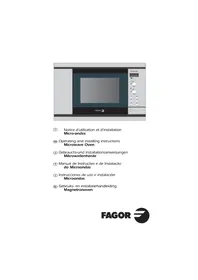


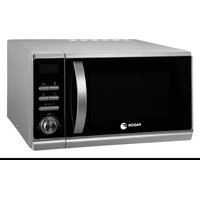
| Product Type | Microwave Oven |
| Model | MW3 206N |
| Brand | Fagor |
| Capacity | 20 L |
| Power Output | 800 W |
| Dimensions (H x W x D) | 25.8 x 45.2 x 36.0 cm |
| Net Weight | 10.5 kg |
| Power Supply | 230 V / 50 Hz |
| Power Consumption | 1200 W |
| Functions | Microwave, Defrost, Timer, Turntable |
| Control Type | Rotary knobs |
| Turntable Diameter | 25 cm |
| Interior Light | Yes |
| Safety Lock | Child safety lock |
| Cleaning | Wipe interior with damp cloth; avoid abrasive cleaners |
| Spare Parts | Turntable, glass tray, fuse |
| Reparability | Repairable by authorized service center |
| General Information | Read user manual before installation and use |
Frequently Asked Questions - MW3 206N FAGOR
User questions about MW3 206N FAGOR
0 question about this device. Answer the ones you know or ask your own.
Ask a new question about this device
Download the instructions for your Microwave in PDF format for free! Find your manual MW3 206N - FAGOR and take your electronic device back in hand. On this page are published all the documents necessary for the use of your device. MW3 206N by FAGOR.
USER MANUAL MW3 206N FAGOR
⑤ Operating and installation instructions Microwave Oven GB Operating and installing instructions Microwave Oven ⑭ Gebrauchs- und Installationsanweisungen Mikrowellenherde P Manual de Instruções e de Instalação do Microondas E Instrucciones de uso e instalación Microondas NL Gebruiks- en installatiehandleiding Magnetronoven
FAGOR

GB CONTENTS
Important safety instructions. Read carefully and keep for future reference.
Installation 14
Warning 15
General Description....16
Control panel 17
Setting the clock / Microwave power settings .....18
Setting A microwave Programme / Express programme .....19
Memory keys 20
Pointers....21
Child lock 21
Care & Cleaning 22
INSTALLATION
Before connection
- Make sure that your oven has not suffered any damage during transport (deformed door or door seal, etc.). If you see any signs of damage, contact your dealer before use.
- Check the power voltage. If there is a PERMANENT undervoltage (200-210 volts), consult your electrical installer.
Location
- The appliance should be installed at a distance of 85 cm above the floor.
- Place the oven on a flat and horizontal surface, away from any source of heat or steam. Make sure that air may circulate freely around the oven.
- Check all the characteristics and building in conditions in the user's manual supplied with the appliance.
- Make sure that nothing obstructs the ventilation louvers at the back of the appliance.
- Make sure the electrical plug will be accessible after installation.
- Do not use your appliance immediately (wait approx. 1-2 hours) after transfer from a cold place to a warm place as condensation may cause a malfunction.
Electrical connection
- Your installation must be protected by a 10 Amp thermal fuse.
- It is mandatory to use a power point with a ground terminal, connected in accordance with current safety regulations.
- In your electrical installation, provide a device that is accessible to the installer, capable of separating the appliance from the mains power and whose contact opening is at least 3 mm at all of the poles.
- If the supply cord is damaged, it must be replaced by the manufacturer, its service agent or similarly qualified persons in order to avoid a hazard.
WARNING
- Your appliance is designed exclusively for the domestic purposes of defrosting, heating, or cooking foods. The manufacturer bears no responsibility in the case of improper usage.
- Only use utensils that are suitable for use in microwave ovens.
- To avoid deterioration of your microwave oven, never operate it empty or without the turntable.
- Never tamper with the lock mechanism of your microwave oven; you could cause damage requiring repair by an authorized technician.
- When heating food in plastic or paper containers, keep an eye on the oven due to the possibility of ignition.
- It is not advisable to use metal recipients, forks, spoons, knives, metal ties, or staples for deep-freeze bags.
- The contents of feeding bottles and baby food jars shall be stirred or shaken and the temperature checked before consumption in order to avoid burns.
- Only allow children to use the oven without supervision when adequate instructions have been given so that the child is able to use the oven in a safe way and understands the hazards of improper use.
- Liquids and other foods must not be heated in sealed containers; they are liable to explode.
- Eggs in their shell and whole hard-boiled eggs should not be heated in microwave ovens since they may explode, even after microwave heating has ended.
- Microwave heating of beverages can result in delayed eruptive boiling, therefore care must be taken when handling the container.
- For small amounts (one sausage, a single croissant, etc.), place a glass of water alongside the food item.
- Time settings that are too long may dry out and burn the food. To avoid such incidents, never use the same cooking times as those recommended for traditional ovens.
- If smoke is observed, switch off or unplug the appliance and keep the door closed in order to stifle any flames.
- In order to evacuate moisture, your appliance is fitted with a delayed ventilation function. Depending on the applied cooking mode (solo / grill / combination), the oven ventilation will continue to operate after the cooking end.
GENERAL DESCRIPTION

Identification label
Turntable Wheel support
■ THE TURNTABLE :
ensures equal cooking of food throughout with no need to intervene.
- It may be used as a cooking dish.
- Rotation is controlled by the drive shaft and the wheel support.
- The turntable rotates in both directions.
- If it does not turn, verify that all components are properly positioned.
■ TURNTABLE OFF :
stops the turntable from revolving in order to use platters which require the entire oven space. When stopped, remember to stir the contents or turn the dish midway through the programme.
■ THE WHEEL SUPPORT :
Do not try to rotate the roller ring manually, as you could damage the drive system. If it does not turn smoothly, make sure that there is nothing in the well beneath the turntable.
CONTROL PANEL
A Display window:
to simplify programming, the display indicates: the time of day, the programme length, and the functions programmed.
B The clock setting key

to allow the clock setting.
C Microwave power selector knob:
to set the microwave power level.
D Time selector knob

to set the clock, the programme length.
E MEMORY keys M1 / M2 / M3:
for rapid access to 3 preprogrammed operations.
F Start key:
to start all programmes.
G CLEAR/STOP key Stop:
to interrupt (press once) or cancel a programme (press twice).
H STOP-TURNTABLE key:
to stop the turntable from revolving.
I Door open button :
to open the door or stop the oven.

GB

SETTING THE CLOCK
After plugging in the appliance or a power cut, the flashing
00:00 invites you to set the clock.
To set the clock :
- Push the clock setting key
- Set the clock with the time selector knob (ex. 12:00).
- Validate with a single push on the clock setting key Ⓜ.
The clock is set.

MICROWAVE POWER SETTINGS
| POWER SETTING APPLICATION | ||
 | DEFROST 150 | To defrost meat, fish, fruit, bread or delicate dishes. |
 | VERY LOW COOK 250 | To top off cooking of delicate dishes or to cook very slowly. |
 | LOW COOK 350 | To finish programmes begun with the HIGH COOK power setting which might otherwise over cook on the outside, for instance veal or pork roast. |
 | SIMMER 500 | To cook fish and poultry. To finish programmes begun with the HIGH COOK power setting such as beans, lentils or milk-based dishes. |
 | REHEAT 700 | To reheat all fresh or frozen pre-cooked dishes and frozen vegetables. |
 | HIGH COOK 750 | To cook fresh vegetables and soup. To heat up all liquids. |
| MICROWAVE OUTPUT POWER : 750W | ||
SETTING A MICROWAVE PROGRAMME
Your microwave oven is now plugged in and the clock is set.
Open the door, set the dish inside, close the door. If the door is not properly shut, the appliance will not operate.
If the dish is too large to turn freely inside the oven, press the STOP TURNTABLE key before or during the programme.
6 microwave power levels are available:
(150 - 250 - 350 - 500 - 700 - 750 W).
Example: Set a microwave programme at the HIGH COOK power level (750 W).
Turn the microwave power selector knob to 750W

is displayed.
Set the programme time with the time selector knob, ex. 5 minutes:

is displayed.
Press Start.
The programme begins: the turntable revolves, the oven light comes on. 3 beeps announce the end of a programme. The beeps are repeated every minute for 10 minutes until you open the door.
If there is an error in the programming, press the Stop key twice.

EXPRESS PROGRAMME
Set the programme time with the selector knob, ex. three minutes:

is displayed.
②Press Start.
The HIGH COOK programme begins automatically: the turntable revolves, the oven light comes on.
MEMORY KEYS M1 / M2 / M3
The Memory keys allow you to store 3 frequently used programmes which you can then access simply by pressing M1 / M2 / M3. You may memorize any programme you wish.
Example: Use the Memory key to preprogramme heating up a plate of food.
Proceed as if setting the programme for immediate use:
①Turn the microwave power selector knob to HIGH COOK (750 W):

is displayed.
② Set the programme time with the time selector knob, ex. 2 minutes:

is displayed.
③Instead of Start, press the MEMORY key M1; after several seconds you will hear a tone confirming that the personalized programme has been memorized.

is displayed.

You may memorize two more programmes by pressing Memory keys M2 / M3.
To call up a programme, press the corresponding Memory key; the preprogrammed information is displayed.
Press Start, the memorized programme begins.
CHILD LOCK
You may programme "Child lock" to prevent unsupervised operation of your oven.
To set:
Press the Stop button for 5 seconds with the door open, "LOC" will appear.
To release:
Proceed as above / press the Stop button for 5 seconds with the door open.
GB
POINTERS
- You may stop or start the turntable revolving during a programme by pressing the TURNTABLE STOP key.
- To change a programme, press the Stop key twice and programme again.
- If you open the door before the end of the programme, shut the door and press the Start key to continue the programme.
- When using the defrost function (150W) turn the food midway through the programme to obtain the best results. Close the door and press the Start key to continue the second half of the programme.
- If you remove a dish before the end of the programme, press the Stop key twice to erase the programme.
Troubleshooting guide
Problem
The microwave oven is noisy when operating. The turntable does not revolve correctly.
The food is not heated up.
The appliance produces sparks.
Suggestion
Clean the wheels and the well area beneath the turntable.
Make sure that you use only containers which are adapted to microwave cooking.
Wipe the water off with the help of a cloth in order to avoid any corrosion.
CARE & CLEANING
- WARNING: It is recommended to clean the oven regularly and to remove any food deposits inside and outside the appliance. Use a soapy and wet cloth. If the appliance is not kept clean, its surface could deteriorate and adversely affect its life and possibly result in a hazardous situation. If the door or door seals are damaged, the oven must not be operated until it has been repaired by a competent person.
- A steam cleaner is not to be used.
- Do not use abrasives, alcohol or solvents as they are liable to damage the oven.
- In the event of bad odors or caked-on dirt, boil water containing lemon juice or vinegar in a cup for 2 minutes and clean the walls with a little dishwashing liquid.
- The turntable can be removed for cleaning. For easy removal, press on one edge to tilt. If you remove the drive, do not allow water to enter the motor shaft hole. Be sure to put the turntable and wheel support back in their proper place. ■ If the equipment has sustained any damage:
- Check that the door is not deformed.
- If the oven does not operate, before calling the repairman:
- Check the electrical supply.
- Check that the door is properly closed.
- Check your programming.
CAUTION: never attempt to repair your oven yourself.


WARNING: it is dangerous for anyone other than qualified personnel to make any repairs requiring removal of the cover providing protection from exposure to microwave energy.
Only a specially trained technician is qualified to repair your microwave oven.

- GB CONTENTS
- IMPORTANT SAFETY INSTRUCTIONS. READ CAREFULLY AND KEEP FOR FUTURE REFERENCE
- INSTALLATION
- BEFORE CONNECTION
- LOCATION
- ELECTRICAL CONNECTION
- WARNING
- GENERAL DESCRIPTION
- THE TURNTABLE
- TURNTABLE OFF
- THE WHEEL SUPPORT
- CONTROL PANEL
- SETTING THE CLOCK
- TO SET THE CLOCK
- SETTING A MICROWAVE PROGRAMME
- EXPRESS PROGRAMME
- MEMORY KEYS M1 / M2 / M
- CHILD LOCK
- POINTERS
- TROUBLESHOOTING GUIDE
- PROBLEM
- SUGGESTION
- CARE & CLEANING
Brand : FAGOR
Model : MW3 206N
Category : Microwave