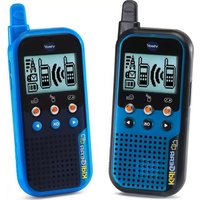
KidiGear Walkie Talkies - Toy VTECH - Free user manual and instructions
Find the device manual for free KidiGear Walkie Talkies VTECH in PDF.


| Product Type | Walkie Talkie Toy |
| Brand | VTech |
| Model | KidiGear Walkie Talkies |
| Recommended Age | 4-8 years |
| Dimensions (each unit) | Approx. 15 x 5 x 3 cm |
| Weight (per unit) | Approx. 100 g (with batteries) |
| Power Supply | 3 x AAA batteries per unit (not included) |
| Battery Life | Up to 10 hours of intermittent use |
| Range | Up to 100 meters (open area) |
| Channels | 2 channels (with separate talk buttons) |
| Main Functions | Two-way communication with push-to-talk button; adjustable volume; LED indicator for transmission |
| Audio Features | Clear sound with built-in speaker and microphone |
| Durability | Designed for children with shock-resistant casing |
| Care and Cleaning | Wipe with a dry cloth; do not immerse in water |
| Safety Features | CE marking; no sharp edges; low battery indicator |
| Spare Parts Availability | Batteries (standard AAA); replacement units available via VTech customer service |
| Repairability | Battery compartment accessible; other repairs by VTech support only |
| Certifications | CE, RoHS |
| Package Contents | 2 x KidiGear Walkie Talkies, user manual |
| Color Options | Blue/Green (typical) |
| Language Support | English (manual available in multiple languages online) |
Frequently Asked Questions - KidiGear Walkie Talkies VTECH
User questions about KidiGear Walkie Talkies VTECH
0 question about this device. Answer the ones you know or ask your own.
Ask a new question about this device
Download the instructions for your Toy in PDF format for free! Find your manual KidiGear Walkie Talkies - VTECH and take your electronic device back in hand. On this page are published all the documents necessary for the use of your device. KidiGear Walkie Talkies by VTECH.
USER MANUAL KidiGear Walkie Talkies VTECH
VTech understands that a child's needs and abilities change as they grow and with that in mind we develop our toys to teach and entertain at just the right level...
Electronic Learning Computers
Cool, aspirational and inspiring computers for curriculum related learning
vtech Baby
Toys that will stimulate their interest in different textures, sounds and colours
I am...
...responding to colours, sounds and textures
...understanding cause and effect
...learning to touch, reach, grasp, sit-up, crawl and toddle
Pre-School
Interactive toys to develop their imagination and encourage language development
I want...
...to get ready for school by starting to learn the alphabet and counting
...my learning to be as fun, easy and exciting as can be
...to show my creativity with drawing and music so my whole brain develops
I need...
...challenging activities that can keep pace with my growing mind
...intelligent technology that adapts to my level of learning
...National Curriculum based content to support what I'm learning at school

To learn more about this and other VTech® products, visit www.vtech.co.uk
INTRODUCTION
Add excitement to any adventure with the KidiGear™ Walkie Talkies by VTech®. These safe and secure two-way walkie talkies feature preset animated messages and games for fun inside and outside!

INCLUDED IN THIS PACKAGE
• Two KidiGear™ Walkie Talkies
• One Parent's Guide
WARNING:
All packing materials such as tape, plastic sheets, packaging locks, removable tags, cable ties and packaging screws are not part of this toy and should be discarded for your child's safety.
NOTE:
Please keep this Parent's Guide as it contains important information.
GETTING STARTED
BATTERY INSTALLATION
- Make sure the unit is turned OFF.
- Locate the battery cover on the back of the unit, turn the battery lock anticlockwise and slide the cover off.
- Install 3 new AAA (LR03/AM-4) batteries into both Walkie Talkies following the diagram inside the battery compartment. (The use of new alkaline batteries is recommended for maximum performance).
- Replace the battery cover and turn the battery lock clockwise.

natural_image
Technical line drawing of an open mobile phone case with internal components and a dial indicator (no text or symbols)BATTERY NOTICE
- Use new alkaline batteries or fully charged NI-MH (Nickel Metal-hydride)
- Use only batteries of the same or equivalent type as recommended.
- Do not mix different types of batteries: alkaline, standard (carbon-zinc) or rechargeable, or new and used batteries.
- Do not use damaged batteries.
- Insert batteries with the correct polarity.
- Do not short-circuit the battery terminals.
- Remove exhausted batteries from the toy.
- Remove batteries during long periods of non-use.
- Do not dispose of batteries in fire.
- Do not charge non-rechargeable batteries.
- Remove rechargeable batteries from the toy before charging (if removable).
- Rechargeable batteries are only to be charged under adult supervision.
Disposal of batteries and product

The crossed-out wheelie bin symbols on products and batteries, or on their respective packaging, indicates they must not be disposed of in domestic waste as they contain substances that can be damaging to the environment and human health.

The chemical symbols Hg, Cd or Pb, where marked, indicate that the battery contains more than the specified value of mercury (Hg), cadmium (Cd) or lead (Pb) set out in Battery Directive (2006/66/EC).
The solid bar indicates that the product was placed on the market after 13th August, 2005.
Help protect the environment by disposing of your product or batteries responsibly.
For more information, please visit:
PRODUCT FEATURES
Note: If the Walkie Talkies lose connection, first remove the batteries from both Walkie Talkies. Then, wait one minute and reinstall all batteries. Finally, turn both Walkie Talkies on at the same time. For best performance, make sure the Walkie Talkies are at least 6 feet apart when you turn them on.
1. Power Button
Press the Power Button to power on the Walkie Talkie. Press the button again to power off the Walkie Talkie.
2. Game Button
Press the Game Button to enter the game menu and choose a game to play.
3. Walkie Talkie Button
Press the Walkie Talkie Button to enter Walkie Talkie mode.
4. Message Button
Press the Message Button to choose an animated message to send to the other Walkie Talkie.
5. Left, Right and OK Buttons
Press the Left, Right and OK Buttons to choose options or to play games.
6. Talk Button
Press and hold the Talk Button in Walkie Talkie mode to transmit your voice to the other Walkie Talkie.

7. Volume Buttons
Press the Volume Buttons to adjust the volume.
8. Automatic Shut Off

natural_image
Close-up of a finger pressing a button on a black surface, no text or symbols visibleTo preserve battery life, the KidiGear™ Walkie Talkies will automatically turn off after 30 minutes without input. Turn the Walkie Talkies on again by pressing the Power Button.
Note: When battery levels are low, the Walkie Talkies will enter a power-saving state and the LCD backlight will turn off. Please follow the instructions in the Battery Installation section to replace the batteries.
9. Wrist Strap Slot
Insert a strap here (not included) to secure the KidiGear™ Walkie Talkies to your wrist.

natural_image
Close-up of a device's front panel with a dotted circular annotation highlighting a small component (no visible text or symbols)ACTIVITIES
1. Walkie Talkie Mode

To talk, press and hold the Talk Button. Release the Talk Button when you are not speaking. Press the Left and Right Buttons to choose a voice changing effect. Speak closely to the microphone for the best performance.
2. Message Mode

In this mode, you can send an animated message to the other Walkie Talkie. Press the Left and Right Buttons to select a message. Then, press the OK Button to send.
Note: If you send multiple messages in quick succession, only the last message will be received.
3. Game Mode

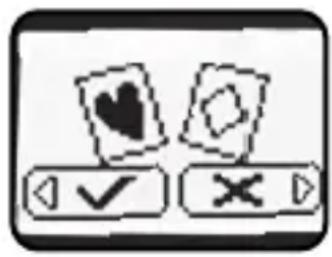
In this mode, you can choose between four two-player games to play with both Walkie Talkies. Press the Left and Right Buttons to choose a game. Press the OK Button to confirm and send an invitation to the other Walkie Talkie.
Card Matching Game
Players take turns turning over cards looking for matching pairs. When a player reveals a pair correctly, they continue to turn over cards until they miss a match. The player with the most pairs when all the cards are gone wins.
Guessing Game
The player who initiates the game hides an object in one of the three containers and then the other player guesses which container the object is in.
Racing Game
Press the Left and Right Buttons to avoid obstacles. The player who reaches the finish line first or passes the most checkpoints wins.
Treasure Hunt Game
Players take turns opening treasure chests to look for prizes and avoid traps. Finding the treasure is worth one point, whilst a trap is minus one point. The first player to get five points, or whoever has the most points when the time runs out is the winner.
4. Incoming Messages or Game Invitation
You can receive an incoming message, Walkie Talkie conversation invitation, or game invitation anytime the Walkie Talkies are on. To read a message or accept an invitation, press the Left or OK Buttons. To reject, press the Right Button.
CARE & MAINTENANCE
- Keep the units clean by wiping them with a slightly damp cloth.
- Keep the units out of direct sunlight and away from any direct heat sources.
- Remove the batteries when the units are not in use for an extended period of time.
- Do not drop the units on a hard surface and do not expose the units to excess moisture.
TROUBLESHOOTING
If for some reason the Walkie Talkies stop working or lose connection, please follow these steps:
- Turn the units OFF.
- Interrupt the power supply by removing the batteries.
- Let the units stand for a few minutes, then replace the batteries in both units.
- Move both units at least 6 feet apart, and turn them back on again simultaneously. The units will now be ready to play with again.
- If the units still do not work, repeat steps 1-4 with a brand new set of batteries installed.
DECLARATION OF CONFORMITY
Hereby, VTech Electronics Europe BV declares that the radio equipment type 5185 is in compliance with Directive 2014/53/EU. The full text of the EU declaration of conformity is available at the following internet address: www.vtech.com/re-directive Manufacturer Name: VTech Electronics Europe BV Manufacturer address: PO Box 10042, 6000 GA Weert, The Netherlands Radio Frequency Band : 2408MHz – 2474MHz Maximum RF power : 107.23dBuV/m
* Your KidiTalkie will achieve the maximum operating range when communicating in flat open areas with no trees or buildings to obstruct the signal. Under these ideal conditions, you may achieve range up to 200m/650' range.
The following conditions tend to reduce the range:
• One or both walkie-talkies are being used indoors.
- There are large obstructions such as buildings, trees, vehicles, hills, etc. between radios.
• The batteries are running low.

CE
CONSUMER SERVICES
Creating and developing VTech ^® products is accompanied by a responsibility that we at VTech ^® take very seriously. We make every effort to ensure the accuracy of the information, which forms the value of our products. However, errors sometimes can occur. It is important for you to know that we stand behind our products and encourage you to call our Consumer Services Department with any problems and/or suggestions that you might have. A service representative will be happy to help you.
UK Customers:
Phone: 0330 678 0149 (from UK) or +44 330 678 0149 (outside UK)
Website: www.vtech.co.uk/support
Australian Customers:
Phone: 1800 862 155
Website: support.vtech.com.au
NZ Customers:
Phone: 0800 400 785
Website: support.vtech.com.au
PRODUCT WARRANTY/ CONSUMER GUARANTEES
UK Customers:
Read our complete warranty policy online at vtech.co.uk/warranty.
Australian Customers:
VTECH ELECTRONICS (AUSTRALIA) PTY LIMITED – CONSUMER GUARANTEES
Under the Australian Consumer Law, a number of consumer guarantees apply to goods and services supplied by VTech Electronics (Australia) Pty Limited. Please refer to vtech.com.au/consumerguarantees for further information.
Visit our website for more information about our products, downloads, resources and more.
www.vtech.co.uk www.vtech.com.au

TM & © 2019 VTech Holdings Limited.
All rights reserved.
Printed in China.
91-003663-006UK
- Electronic Learning Computers
- vtech Baby
- I am...
- Pre-School
- I want...
- I need...
- INTRODUCTION
- INCLUDED IN THIS PACKAGE
- WARNING:
- NOTE:
- GETTING STARTED
- BATTERY INSTALLATION
- BATTERY NOTICE
- Disposal of batteries and product
- PRODUCT FEATURES
- Power Button
- Game Button
- Walkie Talkie Button
- Message Button
- Left, Right and OK Buttons
- Talk Button
- Volume Buttons
- Automatic Shut Off
- Wrist Strap Slot
- ACTIVITIES
- Walkie Talkie Mode
- Message Mode
- Game Mode
- Card Matching Game
- Guessing Game
- Racing Game
- Treasure Hunt Game
- Incoming Messages or Game Invitation
- CARE & MAINTENANCE
- TROUBLESHOOTING
- DECLARATION OF CONFORMITY
- CONSUMER SERVICES
- UK Customers:
- Australian Customers:
- NZ Customers:
- PRODUCT WARRANTY/ CONSUMER GUARANTEES
- Visit our website for more information about our products, downloads, resources and more.
Brand : VTECH
Model : KidiGear Walkie Talkies
Category : Toy