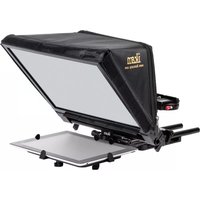
PT-Elite-V2 - Teleprompter Ikan - Free user manual and instructions
Find the device manual for free PT-Elite-V2 Ikan in PDF.


| Product Type | Professional Video Monitor |
| Model | PT-Elite-V2 |
| Brand | Ikan |
| Screen Size | 7.5 inches (diagonal) |
| Resolution | 1920 x 1080 Full HD |
| Brightness | 1000 cd/m² |
| Contrast Ratio | 1000:1 |
| Viewing Angle | 178° horizontal / 178° vertical |
| Input Signals | HDMI, SDI, Composite |
| Output Signals | HDMI loop-through, SDI loop-through |
| Power Supply | DC 12V (2.1mm barrel connector) or Sony L-series battery |
| Power Consumption | 15W typical |
| Dimensions (W x H x D) | 7.5 x 5.0 x 1.5 inches (190 x 127 x 38 mm) |
| Weight | 1.1 lbs (0.5 kg) |
| Mounting | 1/4-20 thread at bottom and rear |
| Functions | Peaking, False Color, Zebra, Waveform, Vectorscope, Histogram, Focus Assist, Anamorphic Desqueeze |
| Cleaning | Use a soft, dry microfiber cloth. Avoid abrasive cleaners. |
| Safety | Do not expose to moisture or extreme temperatures. Use only recommended power sources. |
| Spare Parts & Repairability | Contact Ikan or authorized service centers for replacement parts and repairs. |
| General Information | Designed for on-set video monitoring with professional color accuracy. |
Frequently Asked Questions - PT-Elite-V2 Ikan
User questions about PT-Elite-V2 Ikan
0 question about this device. Answer the ones you know or ask your own.
Ask a new question about this device
Download the instructions for your Teleprompter in PDF format for free! Find your manual PT-Elite-V2 - Ikan and take your electronic device back in hand. On this page are published all the documents necessary for the use of your device. PT-Elite-V2 by Ikan.
USER MANUAL PT-Elite-V2 Ikan
natural_image
Black IKAN photography studio projector with open screen and flat base (no visible text or symbols on device body)What's Included
□ 1 x Glass Assembly
□ 1 x Magnetic Hood
□ 2 x 12-Inch Rods
□ 1 x Baseplate Assembly
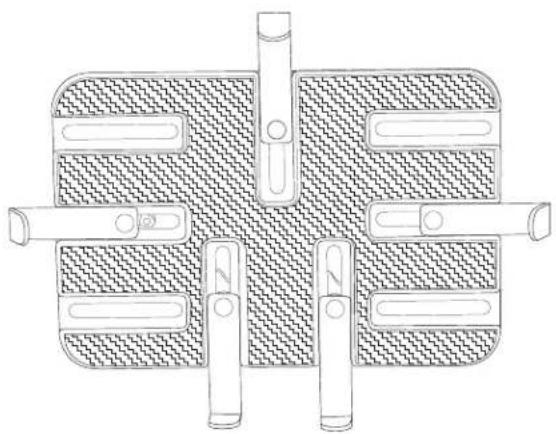
□ 1 x Tablet Holder
ikan
www.ikancorp.com
713.272.8822
PT-ELITE-V2
What's Included

natural_image
Technical line drawing of a mechanical clamp or lever assembly (no text or symbols)□ Glass Frame Assembly

natural_image
Line drawing of a mechanical component with a folded sheet and attached fabric (no text or symbols)□ Magnetic Sunhood

natural_image
Two parallel horizontal lines with rounded ends, no text or symbols present□ 2 x 12-Inch Rods

natural_image
Technical line drawing of a mechanical clamp or bracket assembly (no text or symbols)□ Baseplate Assembly
natural_image
Technical line drawing of a mechanical component with multiple cylindrical pins and hatched fill (no text or symbols)□ Tablet Holder
PT-ELITE-V2
How to Assemble
- Attach tablet mount to glass frame assembly. Figures 1a, 1b, 1c.

PT-ELITE-V2
- Insert rods into rail mount on glass frame assembly.
- Slide baseplate onto rods.
- Adjust spacing for your camera.
- Tighten & loosen thumb screws to adjust glass frame. Ideal angle is 45 degrees.

- Attach magnetic hood to glass frame.
- Remove quick release plate & attach your camera. Reattach.
DO NOT THROW AWAY FOAM INSERT.
- The PT-ELITE-v2 comes packaged in high quality custom-cut foam. It is sized perfectly to fit inside an SKB-i Series 1914-8 waterproof case.
Software Options
Windows: Choose from PrompterPro from Ikan, or from multiple third party options in the Windows Store or on the Web.
iOS: Choose from multiple 3rd party options on Apple Store
Android: Choose from multiple 3rd party options on Google Play Store
Visit www.ikancorp.com for a list of recommended apps.
Learn More
More dynamic information at official website: www.ikancorp.com
Support
Contact email: support@ikancorp.com
Conditions of warranty service
Free service for one year from the day of purchase if the problem is caused by manufacturing errors.
- The components and maintenance service fee will be charged if the warranty period is expired.
Free Service will not be Provided in the Following Situations:(*Even if the product is still within the warranty period.) - Damage caused by abuse or misuse, dismantling, or changes to the product not made by the company.
- Damage caused by natural disaster, abnormal voltage, and environmental factors, etc.


Brand : Ikan
Model : PT-Elite-V2
Category : Teleprompter