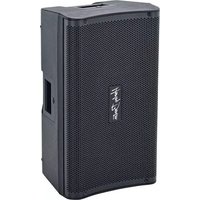
FRFR-112A - Guitar amplifier Harley Benton - Free user manual and instructions
Find the device manual for free FRFR-112A Harley Benton in PDF.


| Product Type | Active FRFR Guitar Amplifier / Powered Speaker |
| Speaker Size | 12 inches |
| Total Power Output | 200 Watts (Class D) |
| Frequency Response | 50 Hz - 20 kHz |
| Inputs | 1x XLR, 1x 1/4" TS, 1x RCA (Stereo) |
| Outputs | 1x XLR (Thru/Link), 1x 1/4" (Headphones) |
| Controls | Volume, EQ: Bass, Mid, Treble, Presence, Master Volume |
| Enclosure Type | Bass-reflex (ported) |
| Dimensions (W x H x D) | 40.6 x 40.6 x 35.6 cm (16 x 16 x 14 in) |
| Weight | 13.6 kg (30 lbs) |
| Power Supply | AC 100-240V, 50/60 Hz, internal switching |
| Power Consumption | 250 VA |
| Impedance (Input) | 1 MΩ (1/4"), 10 kΩ (XLR) |
| Maximum SPL | 125 dB peak |
| Coverage Angle | 90° x 60° (rotatable horn) |
| Cooling | Passive (convection) |
| Construction | Plywood with black carpet covering |
| Application | Guitar modelers, multifx, bass, keyboard, PA monitor |
Frequently Asked Questions - FRFR-112A Harley Benton
User questions about FRFR-112A Harley Benton
0 question about this device. Answer the ones you know or ask your own.
Ask a new question about this device
Download the instructions for your Guitar amplifier in PDF format for free! Find your manual FRFR-112A - Harley Benton and take your electronic device back in hand. On this page are published all the documents necessary for the use of your device. FRFR-112A by Harley Benton.
USER MANUAL FRFR-112A Harley Benton
natural_image
Black portable electronic device with textured surface and 'Audio Player' logo on front (no visible text beyond label)Harley Benton
FRFR-112A Guitar DSP
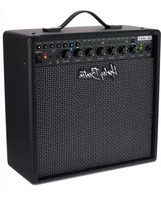
guitar combo
Musikhaus Thomann
Thomann GmbH
1 General information.... 4
1.1 Further information.... 5
1.2 Notational conventions.... 6
1.3 Symbols and signal words.... 6
2 Safety instructions.... 8
3 Features.... 12
4 Starting up.... 13
5 Connections and controls.... 15
6 DSP functions.... 18
7 Technical specifications.... 23
8 Plug and connection assignment.... 25
9 Cleaning.... 28
10 Protecting the environment.... 29
FRFR-112A Guitar DSP
th·mann MUSIC IS OUR PASSION
1 General information
This user manual contains important information on the safe operation of the device. Read and follow all safety notes and all instructions. Save this manual for future reference. Make sure that it is available to all persons using this device. If you sell the device to another user, be sure that they also receive this manual.
Our products and user manuals are subject to a process of continuous development. We therefore reserve the right to make changes without notice. Please refer to the latest version of the user manual which is ready for download under www.thomann.de.
1.1 Further information
On our website (www.thomann.de) you will find lots of further information and details on the following points:
| Download This manual is also available as PDF file for you to download. | |
| Keyword search | Use the search function in the electronic version to find the topics of interest for you quickly. |
| Online guides | Our online guides provide detailed information on technical basics and terms. |
| Personal consultation For personal consultation please contact our technical hotline. | |
| Service | If you have any problems with the device the customer service will gladly assist you. |
FRFR-112A Guitar DSP

1.2 Notational conventions
This manual uses the following notational conventions:
Letterings
The letterings for connectors and controls are marked by square brackets and italics.
Examples: [VOLUME] control, [Mono] button.
Displays
Texts and values displayed on the device are marked by quotation marks and italics.
Examples: '24ch', 'OFF'.
1.3 Symbols and signal words
In this section you will find an overview of the meaning of symbols and signal words that are used in this manual.
| Signal word Meaning | ||
| DANGER! This combination of symbol and signal word indicates an immediate dangerous situation that will result in death or serious injury if it is not avoided. | ||
| CAUTION! This combination of symbol and signal word indicates a possible dangerous situation that can result in minor injury if it is not avoided. | ||
| NOTICE! This combination of symbol and signal word indicates a possible dangerous situation that can result in material and environmental damage if it is not avoided. | ||
| Warning signs Type of danger | ||
 | Warning – high-voltage. | |
 | Warning – danger zone. | |
FRFR-112A Guitar DSP
th·mann MUSIC IS OUR PASSION
2 Safety instructions
Intended use
This device is intended to be used for amplification and playback of signals from musical instruments with electromagnetic pickups. Any other use or use under other operating conditions is considered to be improper and may result in personal injury or property damage. No liability will be assumed for damages resulting from improper use.
This device may be used only by persons with sufficient physical, sensorial, and intellectual abilities and having corresponding knowledge and experience. Other persons may use this device only if they are supervised or instructed by a person who is responsible for their safety.

DANGER!
Danger for children
Ensure that plastic bags, packaging, etc. are disposed of properly and are not within reach of babies and young children. Choking hazard!
Ensure that children do not detach any small parts (e.g. knobs or the like) from the unit. They could swallow the pieces and choke!
Never let children unattended use electrical devices.
DANGER!
Electric shock caused by high voltages inside
Within the device there are areas where high voltages may be present. Never remove any covers.
There are no user-serviceable parts inside.
Do not use the device if covers, protectors or optical components are missing or damaged.

DANGER!
Electric shock caused by short-circuit
Always use proper ready-made insulated mains cabling (power cord) with a protective contact plug. Do not modify the mains cable or the plug. Failure to do so could result in electric shock/death or fire. If in doubt, seek advice from a registered electrician.
FRFR-112A Guitar DSP
th·mann MUSIC IS OUR PASSION

CAUTION!
Possible hearing damage
The device can produce volume levels that may cause temporary or permanent hearing impairment. Over an extended period of time, even levels that seem to be uncritical can cause hearing damage.
Decrease the volume level immediately if you experience ringing in your ears or hearing impairment. If this is not possible, keep a greater distance or use sufficient ear protectors.

NOTICE!
Risk of fire
Do not block areas of ventilation. Do not install the device near any direct heat source. Keep the device away from naked flames.

NOTICE!
Power supply
Before connecting the device, ensure that the input voltage (AC outlet) matches the voltage rating of the device and that the AC outlet is protected by a residual current circuit breaker. Failure to do so could result in damage to the device and possibly injure the user.
Unplug the device before electrical storms occur and when it is unused for long periods of time to reduce the risk of electric shock or fire.

NOTICE!
Possible damage due to installation of a wrong fuse
The use of different types of fuses can cause serious damage to the unit. Fire hazard!
Only fuses of the same type may be used.
FRFR-112A Guitar DSP
th·mann MUSIC IS OUR PASSION
3 Features
The device is characterized by the following features:
Full range flat-response speaker box for a modern digital guitar setup (amp modelling and multi-effects processor)
4 DSP sound programmes
various DSP equalizer modes, each with ±12 dB level control per band
■ 1200 watt power amp, class D
■ 12-inch woofer and 1-inch tweeter
- suitable for use as floor monitor or on a tripod
2 × XLR / 1/4" phone jack combo socket for adjustable MIC / Line input
1 × 3.5 mm phone jack socket as AUX input for connecting line devices
1 × XLR output
■ suitable dust cover optional (item no. 410589)
4 Starting up
Unpack and check carefully there is no transportation damage before using the unit. Keep the equipment packaging. To fully protect the product against vibration, dust and moisture during transportation or storage use the original packaging or your own packaging material suitable for transport or storage, respectively.
Create all connections while the device is off. Use the shortest possible high-quality cables for all connections. Take care when running the cables to prevent tripping hazards.

NOTICE!
Possible property damage by magnetic fields
Loudspeakers produce a static magnetic field. Therefore, maintain an appropriate distance to devices that can be adversely affected or damaged by an external magnetic field.
FRFR-112A Guitar DSP


NOTICE!
Use of stands
When mounting the device onto a stand, ensure that the stand is in a safe and stable position and that the weight of the device does not exceed the maximum permissible load capacity of the stand.
The unit can be mounted on a tripod or set up on the floor or a sufficiently sized and stable surface.
5 Connections and controls


FRFR-112A Guitar DSP

| Front panel | |
| 1 [DSP] | backlit display for DSP functions |
| 2 [MASTER / PUSH FOR DSP] | Rotary control for the overall volume, push button for activating the DSP functions |
| 3 [INPUT 1 LINE] | Rotary gain control for input 1. Turning clockwise increases the input gain for connecting microphones. Turning counterclockwise decreases the input gain for connecting instruments or devices with line level outputs. |
| 4 [INPUT 2 LINE] | Rotary gain control for input 2. Turning clockwise increases the input gain for connecting microphones. Turning counterclockwise decreases the input gain for connecting instruments or devices with line level outputs. |
| 5 Mic / Line input, designed as XLR / 1/4" phone jack combo socket, balanced | |
| 6 Mic / Line input, designed as XLR / 1/4" phone jack combo socket, balanced | |
| 7 [OUTPUT] | Line output, designed as XLR chassis plug. The combined signal of both inputs is present here, unaffected by DSP. |
| 8 [AUX IN] | 3.5 mm phone socket for connecting line level devices such as MP3 or CD players. Stereo signals are combined. |
| Rear panel | |
| 9 IEC chassis | plug with fuse holder for the power supply |
| 10 [ON OFF Auto Stand-by]Turns the automatic shutdown function on and off. When pressed, the function is deactivated, when not pressed, it is activated. The device will turn off after approx. 60 minutes without input signal. When the input signal recurs, the device returns automatically. | |
| 11 This LED lights up when the automatic shutdown function is active. | |
| 12 [POWER ON / OFF]Mains switch. Turns the device on and off. | |
FRFR-112A Guitar DSP

6 DSP functions
Function selection
- Press [MASTER | PUSH FOR DSP] to call up the main menu.
- Turn [MASTER | PUSH FOR DSP] to switch between menu items or values.
- Press [MASTER | PUSH FOR DSP] to activate the menu shown in the display or to confirm a value.
- To exit a menu item without changes, select 'EXIT' and press [MASTER | PUSH FOR DSP] to confirm.
Setting the sound programme
- Press [MASTER | PUSH FOR DSP] to call up the main menu.
- Turn [MASTER | PUSH FOR DSP] until the display shows 'MODE' and press [MASTER | PUSH FOR DSP] to confirm.
- Turn [MASTER | PUSH FOR DSP] until the display shows 'Sim1', 'Sim2', 'Sim3' or 'OFF' and press [MASTER | PUSH FOR DSP] to confirm.
⇒ The selected sound program is set.

guitar combo
EQ setting
- Press [MASTER | PUSH FOR DSP] to call up the main menu.
- Turn [MASTER | PUSH FOR DSP] until the display shows 'EQ SET' and press [MASTER | PUSH FOR DSP] to confirm.
- Turn [MASTER | PUSH FOR DSP] until the display shows 'EQ TYPE' and press [MASTER | PUSH FOR DSP] to confirm.
- Turn [MASTER | PUSH FOR DSP] until the display shows 'PA', 'GUITAR1' or 'GUITAR2' and press [MASTER | PUSH FOR DSP] to confirm.
⇒ The selected EQ setting is set.
Setting the level of a frequency band
- Press [MASTER | PUSH FOR DSP] to call up the main menu.
- Turn [MASTER | PUSH FOR DSP] until the display shows 'EQ SET' and press [MASTER | PUSH FOR DSP] to confirm.
- Turn [MASTER | PUSH FOR DSP] until the display shows 'EQ LOW' (bass control), 'EQ MID' (mids control) or 'EQ HIGH' (treble control) and press [MASTER | PUSH FOR DSP] to confirm.
FRFR-112A Guitar DSP
th·mann MUSIC IS OUR PASSION
- Turn [MASTER | PUSH FOR DSP] to raise or lower the level of the selected frequency band and press [MASTER | PUSH FOR DSP] to confirm.
Setting the LED mode
- Press [MASTER | PUSH FOR DSP] to call up the main menu.
- Turn [MASTER | PUSH FOR DSP] until the display shows 'LED MODE' and press [MASTER | PUSH FOR DSP] to confirm.
- Turn [MASTER | PUSH FOR DSP] until the display shows 'OFF' (LED not active), 'ON' (LED active) or 'LIMITER' (LED flashes when limiter is activated) and press [MASTER | PUSH FOR DSP] to confirm.
Dimming the display
- Press [MASTER | PUSH FOR DSP] to call up the main menu.
- Turn [MASTER | PUSH FOR DSP] until the display shows 'LCD DIM' and press [MASTER | PUSH FOR DSP] to confirm.
- Turn [MASTER | PUSH FOR DSP] until the display shows 'OFF' or 'ON' and press [MASTER | PUSH FOR DSP] to confirm.
Setting the display brightness
- Press [MASTER | PUSH FOR DSP] to call up the main menu.
- Turn [MASTER | PUSH FOR DSP] until the display shows 'BRIGHT' and press [MASTER | PUSH FOR DSP] to confirm.
- Turn [MASTER | PUSH FOR DSP] to set a value between '1' (low) and '10' (high) and press [MASTER | PUSH FOR DSP] to confirm.
Setting the display contrast
- Press [MASTER | PUSH FOR DSP] to call up the main menu.
- Turn [MASTER | PUSH FOR DSP] until the display shows 'CONTRAST' and press [MASTER | PUSH FOR DSP] to confirm.
- Turn [MASTER | PUSH FOR DSP] to set a value between '1' (low) and '10' (high) and press [MASTER | PUSH FOR DSP] to confirm.
FRFR-112A Guitar DSP

Reset
- Press [MASTER | PUSH FOR DSP] to call up the main menu.
- Turn [MASTER | PUSH FOR DSP] until the display shows 'RESET' and press [MASTER | PUSH FOR DSP] to confirm.
- Turn [MASTER | PUSH FOR DSP] until the display shows 'Confirm Reset: YES' and press [MASTER | PUSH FOR DSP] to confirm.
⇒ The device is reset to factory default settings.
- To keep the existing settings, choose 'Confirm Reset: NO' and press [MASTER | PUSH FOR DSP] to confirm.
System information
- Press [MASTER | PUSH FOR DSP] to call up the main menu.
- Turn [MASTER | PUSH FOR DSP] until the display shows 'INFO' and press [MASTER | PUSH FOR DSP] to confirm.
⇒ The current firmware version of the DSP function is displayed.
7 Technical specifications
| Speaker 12-inch woofer | 1" tweeter | |
| Amp class Class-D power amp | ||
| Input connections Mic / Line 2 × XLR / jack | kock combo socket, balanced | |
| Line level player 1 × 3.5 mm jack socket | ||
| Voltage supply IEC chassis plug C14 | ||
| Output connections Line level mix from both inputs 1 × XLR, 3-pin | ||
| Output power RMS: 300 W | Peak: 1200 W | |
| Frequency range 48 Hz ... 19 kHz, -3 dB | ||
| Sound pressure level (SPL), max. 134 dB | ||
| Power consumption 461 W | ||
FRFR-112A Guitar DSP

| Operating supply voltage | 230 V ~50 Hz | |
| Fuse 5 mm × 20 mm, 3 A, 250 V, slow-blow | ||
| Dimensions (W × H × D) 348 mm × 607 mm × 355 mm | ||
| Weight 14.6 kg | ||
| Ambient conditions Temperature range | 0 °C...40 °C | |
| Relative humidity 50 %, non-condensing | ||
Further information
Dust cover optional Yes (item no. 410589)
8 Plug and connection assignment
Introduction
This chapter will help you select the right cables and plugs to connect your valuable equipment in such a way that a perfect sound experience is ensured.
Please note these advices, because especially in 'Sound & Light' caution is indicated: Even if a plug fits into the socket, an incorrect connection may result in a destroyed power amp, a short circuit or 'just' in poor transmission quality!
Balanced and unbalanced transmission
Unbalanced transmission is mainly used in semi-professional environment and in hifi use. Instrument cables with two conductors (one core plus shielding) are typical representatives of the unbalanced transmission. One conductor is ground and shielding while the signal is transmitted through the core.
Unbalanced transmission is susceptible to electromagnetic interference, especially at low levels, such as microphone signals and when using long cables.
In a professional environment, therefore, the balanced transmission is preferred, because this enables an undisturbed transmission of signals over long distances. In addition to the conductors 'Ground' and 'Signal', in a balanced transmission a second core is added. This also transfers the signal, but phase-shifted by 180°.
FRFR-112A Guitar DSP

Since the interference affects both cores equally, by subtracting the phase-shifted signals, the interfering signal is completely neutralized. The result is a pure signal without any noise interference.
1/4" TS phone plug (mono, unbalanced)
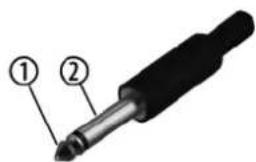
1 Signal
2 Ground, shielding
1/4" TRS phone plug (mono, balanced)

1 Signal (in phase, +)
2 Signal (out of phase, -)
3 Ground
th·mann MUSIC IS OUR PASSION
guitar combo
XLR plug (balanced)

1 Ground, shielding
2 Signal (in phase, +)
3 Signal (out of phase, -)
4 Shielding on plug housing (option)
XLR plug (unbalanced)

1 Ground, shielding
2 Signal
3 Bridged to pin 1
FRFR-112A Guitar DSP

9 Cleaning
Device components
Clean the device components that are accessible from the outside regularly. The cleaning frequency depends on the operating environment: damp, smoky or particularly dirty environments can cause greater accumulation of dirt on the device components.
■ Clean with a dry soft cloth.
■ Stubborn dirt can be removed with a slightly dampened cloth.
■ Never use solvents or alcohol for cleaning.
10 Protecting the environment
Disposal of the packaging material

For the transport and protective packaging, environmentally friendly materials have been chosen that can be supplied to normal recycling.
Ensure that plastic bags, packaging, etc. are properly disposed of.
Do not just dispose of these materials with your normal household waste, but make sure that they are collected for recycling. Please follow the notes and markings on the packaging.
Disposal of your old device

This product is subject to the European Waste Electrical and Electronic Equipment Directive (WEEE) in its currently valid version. Do not dispose with your normal household waste.
Dispose of this device through an approved waste disposal firm or through your local waste facility. When discarding the device, comply with the rules and regulations that apply in your country. If in doubt, consult your local waste disposal facility.
FRFR-112A Guitar DSP

Notes
th·mann MUSIC IS OUR PASSION
guitar combo

natural_image
Solid olive green background with no visible text, symbols, or patterns

- General information
- Further information
- Notational conventions
- Letterings
- Displays
- Symbols and signal words
- Safety instructions
- Intended use
- DANGER!
- Danger for children
- Electric shock caused by high voltages inside
- Electric shock caused by short-circuit
- CAUTION!
- Possible hearing damage
- NOTICE!
- Risk of fire
- Power supply
- Possible damage due to installation of a wrong fuse
- Features
- Starting up
- Possible property damage by magnetic fields
- Use of stands
- DSP functions
- Function selection
- Setting the sound programme
- EQ setting
- Setting the level of a frequency band
- Setting the LED mode
- Dimming the display
- Setting the display brightness
- Setting the display contrast
- Reset
- System information
- Further information
- Plug and connection assignment
- Introduction
- Balanced and unbalanced transmission
- Cleaning
- Device components
- Protecting the environment
Brand : Harley Benton
Model : FRFR-112A
Category : Guitar amplifier