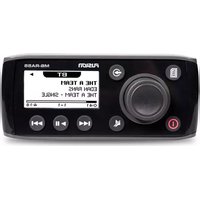
MS-RA55 - Radio Fusion - Free user manual and instructions
Find the device manual for free MS-RA55 Fusion in PDF.


Pick your language and provide your email: we'll send you a specifically translated version.
| Product Type | Marine Digital Media Receiver |
| Dimensions (W x H x D) | 7.0 x 2.0 x 5.0 inches (178 x 51 x 127 mm) |
| Weight | 2.2 lbs (1.0 kg) |
| Power Supply | 12V DC (negative ground) |
| Rated Power Output | 4 x 50W max (CEA-2006 compliant) |
| AM/FM Tuner | Yes, with RDS (Radio Data System) |
| Bluetooth | Built-in for music streaming and hands-free calling |
| SiriusXM Ready | Yes (requires optional SXV300 tuner) |
| NMEA 2000 | Compatible for marine network integration |
| Water Resistance | IPX7 (protected against temporary immersion) |
| Audio Inputs | 1 x AUX (3.5mm), 1 x USB (for MP3/WMA) |
| Audio Outputs | 4 x Speaker (pre-wired), 2 x RCA preamp |
| Display | 2.4-inch color LCD with day/night modes |
| Removable Faceplate | Yes, for theft deterrence |
| Steering Wheel Control Compatible | Yes (via optional adapter) |
| Maintenance & Cleaning | Wipe with soft, damp cloth; use mild detergent if needed; avoid solvents |
| Safety | Disconnect power before cleaning; avoid exposure to extreme temperatures |
| Spare Parts & Repairability | Contact Fusion customer service; use only authorized parts for repair |
| General Information | Designed for marine use; fusionlink app compatible (iOS/Android) |
Frequently Asked Questions - MS-RA55 Fusion
How do I pair my phone via Bluetooth?
Enable Bluetooth on your phone. Press the BT button on the MS-RA55 until 'Pairing' appears. Select 'Fusion MS-RA55' from your phone's list. Confirm pairing code if prompted.
Can I listen to SiriusXM?
Yes, the MS-RA55 is SiriusXM ready. You need the optional Fusion SXV300 tuner module and an active subscription. Connect the module via the rear port.
What is the maximum power output?
The MS-RA55 delivers up to 50 watts RMS per channel (4 channels) at 14.4V, 4 ohms, 1% THD. Peak power may be higher.
How do I reset the unit?
Press and hold the DISP and MENU buttons simultaneously for 5 seconds. The unit will reboot and restore factory defaults.
Is the faceplate removable?
Yes, the front faceplate detaches for theft prevention. Press the RELEASE button on the bottom edge and pull the faceplate off.
Can I control it from my NMEA network?
Yes, the MS-RA55 supports NMEA 2000 connectivity. You can control audio functions from compatible chartplotters or multifunction displays.
What audio formats are supported via USB?
The USB port supports MP3 and WMA files. Maximum file system is FAT32. Folders are navigated via the menu.
How do I set the clock?
Press and hold the MENU button. Navigate to 'Clock Settings' using the rotary knob. Adjust hours and minutes, then press enter to save.
What is the warranty period?
Fusion offers a 2-year limited warranty for the MS-RA55. Register your product online to activate. Warranty covers defects in materials and workmanship.
Can I use the radio in a car?
Technically yes, but it is designed for marine environments with corrosion-resistant components and IPX7 water resistance. In a car, ensure proper ventilation and power supply.
User questions about MS-RA55 Fusion
0 question about this device. Answer the ones you know or ask your own.
Ask a new question about this device
No questions yet. Be the first to ask one.
Download the instructions for your Radio in PDF format for free! Find your manual MS-RA55 - Fusion and take your electronic device back in hand. On this page are published all the documents necessary for the use of your device. MS-RA55 by Fusion.
USER MANUAL MS-RA55 Fusion


Manual assistant
Powered by Anthropic
Waiting for your message
Product information
Brand : Fusion
Model : MS-RA55
Category : Radio