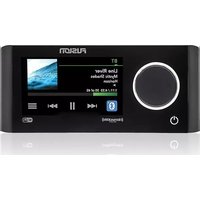
MS-RA770 - Radio Fusion - Free user manual and instructions
Find the device manual for free MS-RA770 Fusion in PDF.


Pick your language and provide your email: we'll send you a specifically translated version.
| Product Type | Marine Digital Media Receiver |
| Brand | Fusion |
| Model | MS-RA770 |
| Dimensions (W x H x D) | 4.0 x 2.0 x 4.0 inches (DIN size) |
| Weight | 0.9 lbs (approx.) |
| Power Supply | 12V DC (negative ground) |
| Radio Bands | AM/FM with RDS |
| Bluetooth Version | 4.2 (A2DP, AVRCP, HFP) |
| USB Input | USB-A (supports MP3, WMA, FLAC) |
| AUX Input | 3.5 mm stereo auxiliary input |
| Water Resistance Rating | IPX5 (protected against water jets) |
| Maximum Power Output | 4 x 50W (peak) |
| Display | Backlit LCD with customizable colors |
| Control Options | Front panel buttons and rotary encoder |
| Maintenance | Clean with soft, dry cloth; avoid solvents |
| Safety | Disconnect battery before installation or service |
| Spare Parts & Repairability | Contact Fusion authorized service centers |
| General Information | Designed for marine environments; includes mounting hardware |
Frequently Asked Questions - MS-RA770 Fusion
How do I pair my phone via Bluetooth?
Press the Bluetooth button on the front panel. Enable Bluetooth on your phone and search for 'Fusion MS-RA770'. Select to pair. If prompted, enter PIN 0000.
Why is there no sound from the speakers?
Check that the volume is not muted and that the source is selected correctly. Ensure speaker wires are properly connected and not shorted. Verify the amplifier (if external) is powered on.
How do I reset the unit?
Press and hold the Power button for 5 seconds until the display turns off, then release. Alternatively, use a paperclip to press the reset button on the front panel.
Can I use this radio in a car?
Yes, the MS-RA770 operates on 12V DC and fits standard DIN slots. However, it is designed for marine use with water resistance.
How do I tune radio stations?
Press Source to select Tuner. Use the Seek buttons to scan for stations. Press and hold a preset button (1-6) to save a station.
What audio formats are supported via USB?
The unit supports MP3, WMA, and FLAC files. Ensure the USB drive is formatted as FAT32.
How do I clean the front panel?
Use a soft, damp cloth with mild soap if needed. Avoid abrasive cleaners or solvents. Do not spray liquid directly onto the unit.
Is the radio waterproof?
The MS-RA770 has an IPX5 rating, meaning it is protected against water jets but should not be submerged.
Can I connect an external amplifier?
Yes, the unit has preamp outputs (RCA) for front, rear, and subwoofer. Use shielded cables to connect to an external amplifier.
How do I change the display color?
From the main menu, select Settings > Display > Color. Choose from preset colors or custom RGB options.
User questions about MS-RA770 Fusion
0 question about this device. Answer the ones you know or ask your own.
Ask a new question about this device
No questions yet. Be the first to ask one.
Download the instructions for your Radio in PDF format for free! Find your manual MS-RA770 - Fusion and take your electronic device back in hand. On this page are published all the documents necessary for the use of your device. MS-RA770 by Fusion.
USER MANUAL MS-RA770 Fusion


Manual assistant
Powered by Anthropic
Waiting for your message
Product information
Brand : Fusion
Model : MS-RA770
Category : Radio