Monkey Light M133s - Bike light Monkeylectric - Free user manual and instructions
Find the device manual for free Monkey Light M133s Monkeylectric in PDF.


| Product Type | Bike Light |
| Brand | Monkeylectric |
| Model | Monkey Light M133s |
| Dimensions | Approx. 100 x 50 x 30 mm |
| Weight | Approx. 150 g |
| Power Source | Rechargeable Lithium-Ion battery |
| Battery Capacity | 2000 mAh |
| Charging Time | 2-3 hours via USB |
| Runtime | Up to 8 hours on steady mode |
| Light Source | LED (multiple colors) |
| Brightness | 50 lumens |
| Modes | Steady, Flashing, Animation patterns |
| Mounting | Handlebar mount (included) |
| Water Resistance | IPX4 (splash proof) |
| Material | Aluminum and polycarbonate |
| Compatibility | Most bicycle handlebars (22-32 mm diameter) |
| Animation Customization | Via smartphone app (iOS/Android) |
| Safety | CE and RoHS compliant |
| Maintenance | Clean with damp cloth; avoid solvents |
| Repair | Non-user serviceable; contact manufacturer |
Frequently Asked Questions - Monkey Light M133s Monkeylectric
User questions about Monkey Light M133s Monkeylectric
0 question about this device. Answer the ones you know or ask your own.
Ask a new question about this device
Download the instructions for your Bike light in PDF format for free! Find your manual Monkey Light M133s - Monkeylectric and take your electronic device back in hand. On this page are published all the documents necessary for the use of your device. Monkey Light M133s by Monkeylectric.
USER MANUAL Monkey Light M133s Monkeylectric
The MonkeyLectric m133s Monkey Light is a revolutionary new bike light that keeps you visible - and in style.
The Monkey Light provides outstanding visibility at any speed and creates spectacular full color patterns at 10+ mph (15+ km/h).
It features cutting edge digital light effects custom designed by electronic artists. The effects are instantly customizable – you can choose the colors, patterns and mood to fit any situation.
FEATURES
- Unique and powerful graphics synthesizer system:
○ Amazing digital light effects by 3 different artists
o Generates thousands of constantly changing patterns and colors
o Instantly customizable colors, patterns and activity to fit any situation
• 32 Full color, wide angle, ultra-bright LEDs provide nearly 360-degree visibility - 7 mounting positions fit nearly any Road, Mountain, Cruiser, City, Hybrid or BMX bike wheel
• Rugged construction designed for daily use and wet weather - Clear hardcoat over all LEDs keep the lights fully waterproof for the deepest puddles
• Vibration-proof 3-point mounting system installs in minutes
• High strength fiber composite construction withstands rough riding - Hook & loop battery strap keeps batteries secure and easy to replace
• Environment friendly construction: Lead-free & RoHS compliant.
• Only 65 grams without batteries - Lasts up to 30 hours on 3 × AA batteries, rechargeables provide best performance
WHAT'S INCLUDED
• MonkeyLectric m133s bike wheel light system
- Rubber battery cover
• 4 x rubber shock mounts
- 6 x black zip-ties for mounting
- Instructions sheet
SAFETY
Bike Safe! We want your biking experience to be as safe and fun as possible. Please note the following:
- The m133s does not replace the need for standard front and rear bike lighting.
- As with any device attached to a bike, the m133s may affect the handling of your bike. Familiarize yourself with the handling of your bike after installing the m133s.
- The m133s is not designed for use above 30mph (50km/h) – the batteries or unit itself may become dangerous projectiles if they break free at high speeds.
- The m133s is not designed structurally for use on a motorized vehicle.
- The m133s may be distracting to you or others while in use. Every riding location and situation is different, only you can judge your own safety.
• Some areas may regulate lights used on public roads, please be aware of your local laws. - Do not use on racing bike wheels with flat spokes, the flat spokes can cut the zip-tie.
NOTES
- Weather use: the device is designed for all-weather use and will operate in heavy rain. The lights and electronics are fully waterproof. The batteries and battery holder may corrode if stored in wet environments for a long time.
- Cleaning: use soap and/or spray water as needed, then dry.
- Vibration: If you hear vibration when riding, check that the rubber spacers are between the m133s and the spokes, and that no other spokes are touching the m133s. Check that all 3 zip-ties are tight. The 4th rubber spacer can be used to double the mount height at one of the 3 mount locations by stacking it.
- Hardware Hacking & DIY: it will void your warranty, but we'll help. We're putting the m133s electrical schematic on our website so you know where to get started.
LOW BATTERY SAFETY WARNING: A simple flashing double-arc (“XX”) will be displayed in yellow or red when the wheel is spinning.
ABOUT OUR ARTISTS:
DAN GOLDWATER – Dan is the founder of MonkeyLectric, and he’s also one of our artists! Dan built the first MonkeyLectric prototype as an artwork long before there was any thought of selling it. Dan is an engineer by day, but at night he conspires in a variety of artistic media. His Rope & Sound interactive technology sculpture was featured at the Smithsonian and he has published several DIY art projects on Instructables.com. Dan was previously a founder of Squid Labs and Instructables.com, and a scientist at the MIT Media Lab.
XANDER HUDSON – After several years working in engineering and networking, Xander is now pursuing full time his mission of “making cool stuff”. Xander embodies the hacker artist and we’re glad he’s making cool stuff with us. His other works have been seen in Make and Instructables.com.
NOAH VAWTER – Noah creates sonic spaces, using his skills in electronic music instrument design. Noah explores, conceptually and aesthetically, the landscape between acoustic order and disorder. Noah’s work has been featured in the New York Times, the Sundance Film Festival, Wired magazine, IEEE Spectrum, and Discovery TV, and shown in Rio de Janeiro, New York City, and Los Angeles. He teaches workshops on music synthesizer design and audio art around the world. Noah is a Doctoral student at the MIT Media Lab.
SPECIFICATIONS
• Size: 160mm x 110mm x 22mm (6.3" x 4.3" x 0.85")
• Lighted length: 150mm (6.0")
• Visibility: night, dusk, cloudy, indoors.
• Weight: 65g without batteries
• Power: 3 x AA batteries (any type), NiMH rechargeable provide best performance
- Battery life: 4-6 hours in high-brightness mode, 15-30 hours in high-efficiency mode
• Output power: 2.5 Watt peak
• Recommended riding speed: 10 to 30 mph (15 to 50 km/h)
- Fit: any spoked bicycle wheel size 20" or larger, with between 16 and 40 spokes. Many other wheels can be fit as well.
• Structure: 100% high strength fiber composite with clear hardcoat over LEDs
- Mounting: vibration-proof 3-point mount system with 4mm thick solid rubber dampers, mounts with standard 5mm nylon zip-ties.
- Environment:
o Rugged construction designed for daily use and wet-weather
- Tip is fully submersible for deep puddles
o Rubber battery cover protects batteries from rain (wet storage not recommended)
- Lead-free RoHS compliant construction
- LEDs
o 32 tri-color (full color) ultra-bright LEDs - 16 on each side
o Super-wide-angle 150-degree half-brightness, near 360-degree overall visibility
• Graphics synthesizer system
- 12mhz microcontroller with 16Kb flash memory, 1Kb SRAM
- 9 parameterized display functions, with thousands of unique output patterns
- 16 user-selectable colors, 64 total colors
o EEPROM for permanent storage of user settings
WARRANTY
• 1 year against manufacturing defects. Cosmetic variation in the clear protective coating is normal
CONTACT & SUPPORT
Contact us through our website, www.MonkeyLectric.com
We have online support with forums and email, plus photo galleries and more.
Design and Development by:
MONKEYLECTRIC LLC
CALIFORNIA USA
COPYRIGHT 2008
MADE IN MEXICO

Controlling the effects
Using the 4 on-board buttons you can easily change the colors, patterns and activity of the display anytime. From the factory, the m133s is pre-configured to use all colors and all patterns. You can use the buttons to select only the colors or patterns you like, or to change the “speed” or “mood”. Keep your m133s handy, the instructions will be most clear if you try them.
- POWER Button:
o PRESS to cycle through the modes: Off, High efficiency mode, High brightness mode
β High efficiency: 15-30 hours runtime
β High brightness: 4-6 hours runtime
- Menu Basics: COLOR, PATTERN and SPEED Buttons:
o PRESS the button once to SHOW the corresponding menu
β The row of lights is turned into a menu: each light is an option you can select
β Selected items are blinking, and the cursor blinks extra brightly
o PRESS the button again to MOVE the cursor
o HOLD the button to SAVE your choice
o WAIT 5 seconds to EXIT the menu
• COLOR button details:
- You can choose what colors you want to see – 1 to 4 individual colors, or all 16.
- The menu: Each light shows a color you can select
○ After saving a color, the cursor moves and you can save a 2nd , 3rd and 4th color.
o To DELETE a saved color: Move the cursor over it and HOLD. After deleting, the cursor
moves and the deleted color stops blinking. - To get ALL colors: move cursor past the end – all colors blink – HOLD to save.
• PATTERN button details:
o You can choose your favorite patterns: 1 to 4 individual patterns, or all 9.
o The menu: Each white light is a pattern you can select:
(1) Zigzag (artist: Dan Goldwater)
β (2) Hypno (artist: Dan Goldwater)
β (3) Teleport (artist: Dan Goldwater)
β (4) Grind (artist: Dan Goldwater)
β (5) Brain Wave (artist: Dan Goldwater)
β (6) Spread Spectrum (artist: Xander Hudson)
β (7) Fire Storm (artist: Noah Vawter)
β (8) Fracture (artist: Xander Hudson)
β (9) Amoeba (artist: Noah Vawter)
β The MonkeyLectric.com website has photos of all patterns
o After saving a pattern, the cursor moves and you can save a 2nd , 3rd and 4th pattern.
To DELETE a saved pattern: Move the cursor over it and HOLD. After deleting, the cursor moves and the deleted pattern stops blinking.
To get ALL patterns: move cursor past the end – all patterns blink – HOLD to save.
• SPEED button details:
- You can choose the “mood” or “activity” of the display effects.
- There are 3 speed menus to let you control the “mood” in different ways:
β RED menu: simple/mellow patterns or complex/extreme patterns
β GREEN menu: slow color changes or fast color changes
β BLUE menu: slow pattern changing or fast pattern changing
Slowest: 1 minute between pattern changes, fastest: 1 second.
The RED menu is shown first. 5 lights and a cursor show the menu, while the other 8 lights show a moving display to help you make your choice.
○ After saving your setting, the GREEN speed menu is shown, and the cursor shows the current setting for the GREEN menu. After saving again, the BLUE menu is shown.
RESET TO FACTORY DEFAULTS: HOLD the COLOR, PATTERN and SPEED buttons all at the same time for 3 seconds. This will set the unit to use all colors, all patterns, and medium-high speed settings.
- Put Inside Spokes

natural_image
Diagram of a bicycle wheel with a cable and suspension mechanism, no text or symbols presentMONKEYLECTRIC M133S INSTALL INSTRUCTIONS
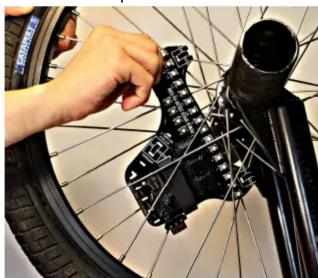
If spokes are close together: Slide the m133s between spokes sideways (as shown below), then rotate into position
natural_image
Close-up of a hand adjusting a bicycle wheel component with black plastic components (no visible text or symbols)If it just won't fit inside, or you have a special type of wheel – see our website for other ways to mount.
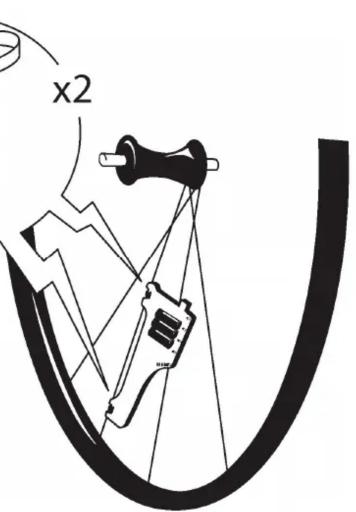
- Attach in 2 places
Line up 2 mount slots with a spoke
Battery holder facing in
Rubber spacer between unit and spoke
Feed zip-tie through slots, around spoke, and back through slots
- Line up a 3rd mounting slot
Use the slot that fits your spoke
- Attach 3rd mounting slot

natural_image
Diagram of a bicycle tire with pulley and wheel, showing rope routing and tire alignment (no text or symbols)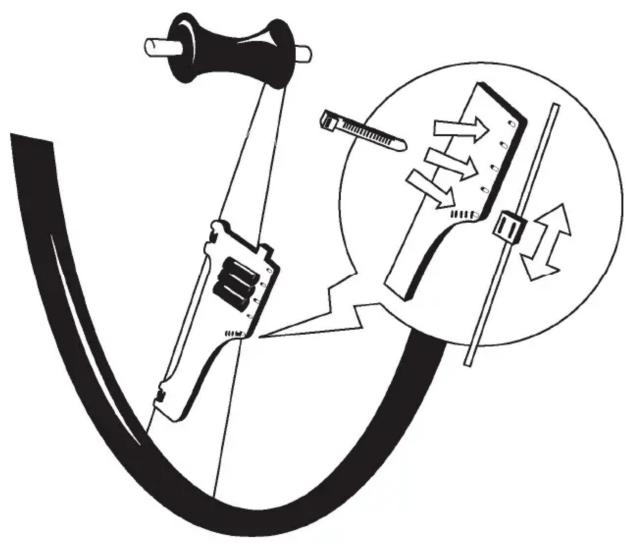
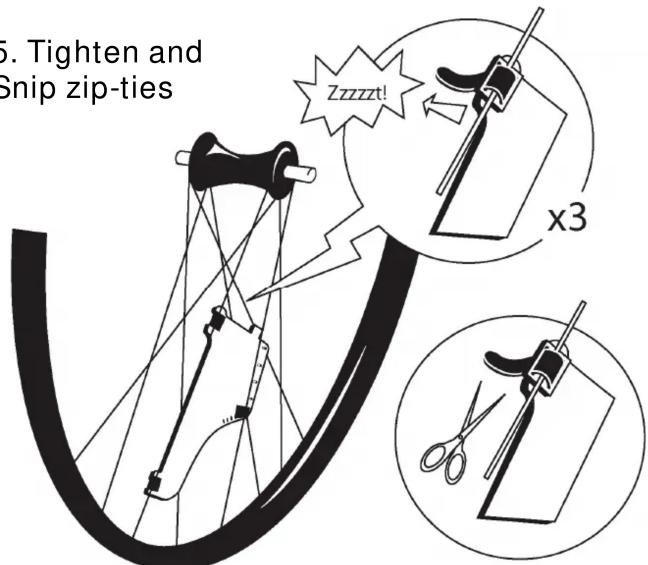
- Tips
Insert 3 x AA batteries
Press POWER button
' Spin wheel to see patterns!
HIGH SPEED RIDING
(20mph+ or 30km/h+): Put one zip-tie around crossing spokes:

natural_image
Close-up of a black electronic component with four white circular components and a central black square, being adjusted by tweezers (no visible text or symbols)Stack 2 rubber pieces if spoke blocks battery strap:

natural_image
Close-up of a damaged electronic circuit board with visible traces and components (no readable text or symbols)- DONE!

natural_image
Close-up of a bicycle wheel with visible internal components and wiring (no text or symbols)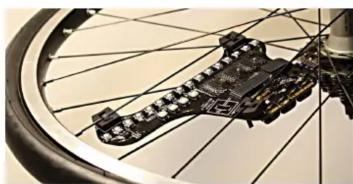
natural_image
Close-up of a bicycle wheel rim with visible structural components (no text or symbols)
natural_image
Close-up of a bicycle wheel rim with visible structural components (no text or symbols)More install photos and help are on our website
Web Support:
http://www.MonkeyLectric.com/support.htm


natural_image
Close-up of a black electronic circuit board with multiple LED indicators and a coiled wire (no visible text or symbols)ANTI-THEFT STRAP
Use a steel wire instead of one of the plastic straps for improved protection against theft.
Complete anti-theft strap instructions are at our website:
www.MonkeyLectric.com/support.htm
Brand : Monkeylectric
Model : Monkey Light M133s
Category : Bike light