
Tekken 6 (Playstation 3) - Video game SONY - Free user manual and instructions
Find the device manual for free Tekken 6 (Playstation 3) SONY in PDF.
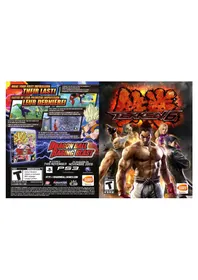


| Product Type | Video Game |
| Platform | PlayStation 3 |
| Genre | Fighting |
| Release Year | 2009 |
| Developer | Bandai Namco Entertainment |
| Publisher | Sony Computer Entertainment |
| Number of Players | 1-2 (offline), up to 8 (online) |
| Game Disc Format | Blu-ray Disc |
| Case Dimensions | 13.5 cm x 17.2 cm x 1.5 cm |
| Weight | Approx. 100 g |
| Power Source | PlayStation 3 console (no separate power) |
| Languages | English, French, Spanish, German, Italian |
| Main Function | Fighting game with story mode, arcade mode, and online multiplayer |
| Number of Characters | Over 40 |
| Game Modes | Story, Arcade, Versus, Team Battle, Survival, Practice, Online, Scenario Campaign |
| Online Features | Ranked and player matches, leaderboards, ghost battles |
| Controller Support | DualShock 3, arcade sticks |
| Cleaning Instructions | Wipe disc with soft cloth from center to edge; avoid solvents |
| Safety Warnings | Risk of seizures for photosensitive epilepsy; take breaks |
| Spare Parts | Replacement disc can be purchased; case and manual not sold separately |
| Repairability | Not repairable; replace disc if damaged |
| Warranty | Standard Sony warranty for manufacturing defects |
| Manual Format | PDF (18 pages) |
Frequently Asked Questions - Tekken 6 (Playstation 3) SONY
User questions about Tekken 6 (Playstation 3) SONY
0 question about this device. Answer the ones you know or ask your own.
Ask a new question about this device
Download the instructions for your Video game in PDF format for free! Find your manual Tekken 6 (Playstation 3) - SONY and take your electronic device back in hand. On this page are published all the documents necessary for the use of your device. Tekken 6 (Playstation 3) by SONY.
USER MANUAL Tekken 6 (Playstation 3) SONY

WARNING: PHOTOSENSITIVITY/EPILEPSY/SEIZURES
A very small percentage of individuals may experience epileptic seizures or blackouts when exposed to certain light patterns or flashing lights. Exposure to certain patterns or backgrounds on a television screen or when playing video games may trigger epileptic seizures or blackouts in these individuals. These conditions may trigger previously undetected epileptic symptoms or seizures in persons who have no history of prior seizures or epilepsy. If you, or anyone in your family, has an epileptic condition or has had seizures of any kind, consult your physician before playing. IMMEDIATELY DISCONTINUE use and consult your physician before resuming gameplay if you or your child experience any of the following health problems or symptoms:
- dizziness - eye or muscle twitches - disorientation - any involuntary movement
- altered vision - loss of awareness - seizures or convulsion.
RESUME GAMEPLAY ONLY ON APPROVAL OF YOUR PHYSICIAN.
Use and handling of video games to reduce the likelihood of a seizure
- Use in a well-lit area and keep as far away as possible from the television screen.
- Avoid large screen televisions. Use the smallest television screen available.
- Avoid prolonged use of the PLAYSTATION 3 system. Take a 15-minute break during each hour of play.
- Avoid playing when you are tired or need sleep.
Stop using the system immediately if you experience any of the following symptoms: lightheadedness, nausea, or a sensation similar to motion sickness; discomfort or pain in the eyes, ears, hands, arms, or any other part of the body. If the condition persists, consult a doctor.
NOTICE:
Use caution when using the DUALSHOCK 3 wireless controller motion sensor function. When using the DUALSHOCK 3 wireless controller motion sensor function, be cautious of the following points. If the controller hits a person or object, this may cause accidental injury or damage. Before using, check that there is plenty of space around you. When using the controller, grip it firmly to make sure it cannot slip out of your hand. If using a controller that is connected to the PS3 system with a USB cable, make sure there is enough space for the cable so that the cable will not hit a person or object. Also, take care to avoid pulling the cable out of the PS3 system while using the controller.
WARNING TO OWNERS OF PROJECTION TELEVISIONS:
Do not connect your PLAYSTATION 3 system to a projection TV without first consulting the user manual for your projection TV, unless it is of the LCD type. Otherwise, it may permanently damage your TV screen.
HANDLING YOUR PLAYSTATION 3 FORMAT DISC:
- Do not bend it, crush it or submerge it in liquids. - Do not leave it in direct sunlight or near a radiator or other source of heat. - Be sure to take an occasional rest break during extended play. - Keep this disc clean. Always hold the disc by the edges and keep it in its protective case when not in use. Clean the disc with a lint-free, soft, dry cloth, wiping in straight lines from center to outer edge. Never use solvents or abrasive cleaners.

GETTING STARTED
GAME CONTROLS
PLAYSTATION*3 system
STARTING A GAME: Before use, carefully read the instructions supplied with the PLAYSTATION®3 computer entertainment system. The documentation contains information on setting up and using your system as well as important safety information.
Check that the MAIN POWER switch (located on the system rear) is turned on. Insert the TEKKEN®6 disc with the label facing up into the disc slot. Select the icon for the software title under [Game] in the PLAYSTATION®3 system's home menu, and then press the ✗button. Refer to this manual for information on using the software.
QUITTING A GAME: During gameplay, press and hold down the PS button on the wireless controller for at least 2 seconds. Then select "Quit Game" from the screen that is displayed.
HINT: To remove a disc, touch the eject button after quitting the game.
SAVED DATA FOR PLAYSTATION®3 FORMAT SOFTWARE:
Saved data for PLAYSTATION®3 format software is saved on the system's hard disk. The data is displayed under "Saved Game Utility" in the Game menu.
GAME CONTROLS
Directional buttons, left stick .....Character movement, item select
button....Left punch
▲button......Right punch
× button....Left kick, confirm
◎ button....Right kick, cancel
START button ......Display Pause Menu
NOTE: To use the controller, you must first register or "pair" the controller with the PLAYSTATION®3 system and assign a number to the controller. For details, refer to the instructions supplied with the system.
STORY
STARTING THE GAME
Shrouded in mystery, the King of Iron Fist Tournament 5 came to an end with the defeat of Jinpachi Mishima at the hands of Jin Kazama.
Jin took control of the Mishima Zaibatsu and began using the special Tekken Force unit to carry out covert disinformation and paramilitary operations. As a result of its efforts, the general public became paranoid and minor incidents around the globe soon evolved into major conflicts. Governments around the world grew increasingly impotent as chaos spread. At the peak of the carnage and confusion, the Mishima Zaibatsu arose from the darkness, flexing the full potential of its military might and declaring its dominion over all governmental rule.
The Mishima Zaibatsu took control of the world with overwhelming force. In response, G Corporation materialized in opposition to the Zaibatsu, setting out to subdue the Mishima forces globally. Hailed as civilization's savior, The G Corporation offered a generous bounty to anyone who captures Mishima Zaibatsu's leader, Jin Kazama.
In an effort to lead the next steps in the deadly dance between organizations, the Mishima Zaibatsu set the stage for battle with its announcement of The King of Iron Fist Tournament 6.
Some seek fame. Some seek the bounty on Jin's head. Some seek solely to banish their own inner demons. Each fighter has a unique agenda. Welcome to The King of Iron Fist Tournament 6.
PLAYER INFO
PLAYER NAME: PlayStation®Network user name and player icon are displayed.
PLAYER DATA: Player fight record and win percentage is displayed.
MAIN CHARACTER: Main character as set in PROFILE. This character and corresponding rank is displayed in the background of Main Menu.
FIGHT MONEY: Current fight money balance.
STATUS: Player promotion and other info and updates displayed.
MAIN MENU
★SCENARIO CAMPAIGN: Select a character and defeat an onslaught of enemies as you progress through this story-based 3D action mode.
★ONLINE MODE: Fight against other players online or view online leaderboards. ★ OFFLINE MODE: Fight against the CPU or other players offline. ★GALLERY: View in-game movies or replay data. ★ PROFILE: Edit player info/settings or equip items to customize your character. ★ OPTIONS: Change various in-game, BGM, and SE settings.


NETWORK PLAY
SCENARIO CAMPAIGN
Play against other players around the world in Online Mode
You can also browse through rankings and upload or download Replay and Ghost data.
Note: A PlayStation®Network ID is required for Network Play.
ABOUT PLAYER INFORMATION PRIVACY
Please be aware that your
PlayStation®Network account name, used as your Player Name in Online VS mode, as well as certain "Options" settings, will be viewable by other players. Your player name will also be used in part of the file names for replay and ghost data, as well as in the ranking data. Also, player ghost data, RANKED MATCH replays, and some Offline Mode records are automatically uploaded.

SYNOPSIS
In the Scenario Campaign mode, the world is being controlled from the shadows by the Mishima Zaibatsu and their vast military power.
The leader of the rebel army Lars Alexandersson partners with several allies to battle the sinister organization.
Players control Lars and try to complete the objectives given in each area to advance to the next stage.
Turn back the waves of enemies and defeat the boss to move on to the next area.
HOW TO PLAY
In the Scenario Campaign mode, the story progresses in intervals by area. You can check each area's objectives and hints from the area map. Pressing the ✗Button will select an area to play, and you will be taken into the action. During the action, players will control their character to attack the enemies and progress through the game.

B

7
SCENARIO CAMPAIGN CONTINUED
PLAYER'S HEALTH: If this drops to zero, the game will end and you will be taken back to the area map.
PARTNER'S HEALTH: If this drops to zero, your partner will retreat from the battle area.
ENEMY HEALTH: A red marker will be displayed over the health gauge of the targeted enemy.
TARGET: The health gauge of the enemy the player is attacking will be highlighted in red.
When the area objectives [such as defeating all enemies and bosses] are met, the area is cleared, and your progress will be saved before returning to the area map. Clearing areas will unlock more areas for you to tackle, so clear as many as you can to reach the head of the Mishima Zaibatsu, Jin Kazama.

HINTS:
- When you first play, there will be a tutorial that will allow you to practice the controls. (A second player will not be able to join in during the tutorial)
- Move commands available in other modes will also be available in Scenario Campaign mode. So you may want to first try controlling Lars in Practice or Arcade mode.
- If you find yourself surrounded by enemies, wide area attacks such as the Chevron Slash [←, ⊙] are quite effective.
- Money bags and treasure chests containing customization items will appear when you defeat enemies in action. Additionally, fight money and other items may be hidden in the level, so try finding them.
- As you progress through the story, you will be able to select other characters in addition to Lars and Alisa.
- If you have the item "Emergency Kit" when a partner character is knocked out, crouching down near the downed character will allow them to recover part of their health. If they are not healed, a knocked out character will eventually disappear.
SCENARIO CAMPAIGN CONTINUED
ONLINE MODE
SCENARIO CAMPAIGN PAUSE MENU
★RETURN TO GAME PLAY
Resume your game.
★COMMAND LIST
Display the move command list.
★CONTROLLER SETUP
Change control settings.

★SKIP CINEMATIC
Choose to skip previously viewed demo scenes.
★RETURN TO WORLD MAP
Exit the current stage and return to the World Map.
★RETURN TO MAIN MENU
Quit game and return to the Main Menu.

In ONLINE MODE, you will be able to play against other players, view rankings, and more via the internet.
ABOUT ONLINE MODE
Read about internet connectivity in the PlayStation®3 user's guide. When playing the game online, please bear in mind the following points.
- When playing online, please follow the PlayStation®Network usage agreement.
•Online play manners
- Please do not forcefully disconnect during play.
- Please give yourself plenty of time to play online.
- Please do not perform actions or say anything to aggravate your opponents.
This software requires an internet connection for online play.
Therefore, please keep in mind that there may be times when network connectivity or communication errors may cause an unsatisfactory game play experience, or prevent you from playing at all.
To play Tekken 6 online, you must pass all items on the PlayStation®3 "Internet Connectivity Test", and it is recommended that the NAT Type be either 1 or 2.
To learn more about the "Internet Connectivity Test" or how to change connection settings, please refer to your PlayStation®3 online manual or your network hardware user's guide or manual.
Also, if your PlayStation®3 is connected wirelessly, having a PC or other game devices connected to your network may affect connectivity.

ONLINE MODE CONTINUED
In Player Match within the ONLINE MODE, up to a maximum of 4 people will be able to join a session.
The players within the room will take turns challenging the champion, and players not currently playing will be able to view the fight.

ONLINE MODE MENU
★RANKED MATCH
RANKED MATCH results will affect online rankings. Ranks and ranking points within the ONLINE MODE will be affected depending on the match outcome.
★PLAYER MATCH
Customize various match settings in this mode. Match results in this mode will not affect online rankings.
★INVITE PLAYER
When an invite is received from a friend, select this to proceed to the session.
★DATA UPLOAD
Upload your replay and ghost data.
★DOWNLOAD DATA
Download other players' replay and ghost data.
★LEADERBOARD
View rankings based on Battle Points or online battle records.
WARNING ABOUT ONLINE PLAY
Data is automatically saved before and after a match.
If you turn your system's
power off during a
match, and an
online match is
unable to be com-
pleted properly, you
will be penalized, so
please take care not to
do so. Disconnecting or
lost connections during bat-
tles will also incur a loss, even if
they were due to a technical difficulty.
Online Mode will be playable after applying the free online update that will automatically download after connecting to the PlayStation®Network.


OFFLINE MODE
ARCADE BATTLE
Recreate the arcade experience and battle the CPU (All 9 Stages).
CHARACTER SELECT SCREEN EXPLANATION
Selecting Arcade Battle will take you to the Character Select Screen. Select a character with the directional buttons and press the punch (☐ or △button) or kick button (☒ or ○button). Pressing a punch button will select a 1P color while a kick button will select a 2P color.

Additionally, you can set round time, number of rounds, starting player health and other items within the OPTIONS settings. If you have two controllers, the 2P can join in and play in a 2 Player versus match.
GHOST BATTLE
Fight a succession of ghosts in this mode. After the end of the match, select your next opponent or select EXIT to return to the OFFLINE MODE menu. Friends' ghost characters may also appear if they have been downloaded.
ABOUT 'GHOSTS'
Ghosts are CPU-controlled opponents that have individual names. They appear in Arcade Battle and Ghost Battle. The difficulty level, and the way they fight, differ depending on the Ghost.
VS BATTLE
Play against another player offline. Select a character, handicap setting, and a stage to begin the match.
TIME ATTACK
Race to see how quickly you can finish the game by defeating all opponents.
TEAM BATTLE
Pick a team of up to 8 characters and face off against the CPU or another player. Defeat an opponent and your character's health will be replenished slightly in the next round.
SURVIVAL
Defeat as many CPU-controlled opponents as you can. Your health will be slightly replenished after defeating an opponent. The game will end when your health is reduced to zero.
ABOUT OFFLINE MODE RANKS
Each character will have a rank associated with them. All will be at 'Beginner' when you start the game, but winning matches in OFFLINE MODE or ONLINE MODE will garner experience points. When you have earned enough, you will be promoted to '9th Kyu'. Once you reach '1st Kyu', the next rank will be '1st Dan'. Ranks higher than '1st Dan' can only be gained in ranked matches in ONLINE MODE.
PRACTICE
Practice various techniques and combinations for each character.


OFFLINE MODE CONTINUED
GALLERY
Watch the cut scenes and movies that appear in Tekken 6. The number of viewable items will increase as you progress throughout the game.
PROFILE
Change player information, view records, and use fight money accumulated in the game to customize your character.
PLAYER SETTINGS
★MAIN CHARACTER SELECT
Set your main character. The character set as your main character will be displayed in the Main Menu and other screens.
★MAIN STAGE SELECT
When you set a main stage, it will be displayed as the background in screens such as the Main Menu.
CUSTOMIZE
Purchase items with fight money and equip them or customize your character with items unlocked in Scenario Campaign mode.
RECORDS
View your compiled fight record, the records for each mode and character, as well as your online match record.
RANKING
View rankings for TIME ATTACK, SURVIVAL, and other modes.
GHOST LIST
View or delete Ghost data. Select a Ghost from the list to view its details.
OPTIONS
Change game settings, control settings, or make display and sound adjustments.

BASIC TECHNIQUES
Basic controls such as moving, attacking and defending will be introduced. All the following controls are explained as if your character is facing right.
BASIC CONTROLS
★NORMAL MOVEMENT
Walk Forward →
Walk Backward ←
→ to move the character forward, ← to move the character backward.
★CROUCH
Crouch ↙ or ↓ Crouch while moving forward to crouch while moving forward. You are unable to crouch and move backward.
★JUMP
Jump ↕ or ↑ or ↗ Small Jump to jump forward, to jump backward.
★SIDESTEP
Into the Foreground

Into the Background

After inputting your command, hold down a directional button to continue sidestepping.


★DASH
Dash Forward
Dash Backward
Quickly move forward and backward to control the distance between you and your opponent.
★RUN
Run → or → →
Quickly close the distance between you and your opponent.


GETTING UP
If you perform these actions when you are knocked down, you will be able to swiftly recover and be ready for your next move. Note that there are some attacks you can not recover from.
★UKEMI
or (into the foreground) /

( into the background )
Input this command when you hit the ground to recover and stand up.
★UKEMI (WITH DIRECTIONAL BUTTONS)
←roll backward /
→spring forward
Input this command when you hit the ground to roll back on your feet or quickly stand up where you are.


BASIC TECHNIQUES CONTINUED
MASTERING GUARD AND UKEMI
USING THE TWO TYPES OF GUARDS EFFECTIVELY
- Most characters will throw High and Mid attacks, so standing guard is most effective. However, you should not just guard standing up. Read your opponent's tactics and habits to effectively mix between standing and crouching when you guard.
- Be aware of the distance between you and your opponent.
- Use Ukemi when your opponent knocks you down. If you stay down, your opponent may be able to continue their attack.
- Additionally, there are many different types of Ukemi that affect the way you stand up.
- Anticipate your opponent's next action to move in a safe direction.
If you do not use Ukemi when you are knocked down, there are several options for you to take to stand back up.
GETTING UP WHEN YOU ARE DOWN
★STAND UP ON THE SPOT
You will stand up where you are. It is the quickest and most direct method of waking up.

★FORWARD AND BACKWARD
SOMERSAULT
Roll forward or backward onto your feet. It is effective when you want to control the distance to your opponent.
★SIDE ROLL
☐(into the background) /
☐+ ↓(into the foreground)
You will roll on the ground. You can connect this with a somersault or even a wake-up kick.


Additionally, you can attack at the same time as you stand up. Use it well to fend off your opponent and connect it to your next attack.
★WAKE-UP LOW (MID) KICK
⊗(Low) / Ⓞ(Mid)
Execute a Low or Mid kick while you stand up.

★WAKE-UP TOE KICK
Press ↓ + ⊙ or ↓ + ✘ when you are knocked down and facing up.
When you are knocked down and facing up, with your legs toward your opponent, you can perform this kick. It is effective against opponents closing in on you for a pursuit attack.


BASIC TECHNIQUES CONTINUED
★SPRING KICK
Roll backward, then ✗ + Ⓞ
Just as with the toe kick, if you are knocked down and facing up with your feet towards your opponent, you can perform this attack.
★RISING CROSS CHOP
Somersault backward (or forward) ☐ + △
You can perform this when you are knocked down and facing up with your feet towards your opponent. You will spring up towards your opponent and execute a chop.
PARRY AND REVERSALS
Time these commands with your opponent's attacks to push aside attacks and create large openings, or evade attacks and counter.
★LOW PARRY

All characters can use this move. If timed correctly, when your opponent performs a low attack, you will push the attack aside and create a large opening.
★HIGH AND MID PARRIES

Only certain characters can perform this move, which pushes aside the opponent's High and Mid attacks.


★REVERSALS
← + △ + ⊙ / ← + □ + ✕
Only certain characters can perform this move, which reverses the opponent's incoming attack, and it requires exact timing. Most characters can only reverse High and Mid attacks.

DASH ATTACKS
When you have created some distance between you and your opponent, try a dash attack.
★TACKLE
Run into your opponent from at least 3 steps away
Knock down your opponent and then straddle them. You can even punch them from this position.

Run into your opponent from at least 4 steps away
Run towards your opponent to tackle them. You have no need to worry about being blocked, and you cannot be countered.
You will trample over your opponent if they are on the ground.


BASIC TECHNIQUES CONTINUED
★RUN CHOP
Run into your opponent from at least
3 steps away □+ △
Jump towards your opponent with this Mid cross chop. If successful, there is a chance that your opponent will be knocked down.
★DASH SLIDING
Run into your opponent from at least 3 steps away Ⓞ
Perform a sliding low attack. King and Yoshimitsu will perform a different move with this command.


UNBLOCKABLE ATTACKS
When you perform certain commands, you will be able to execute unblockable attacks.
ITEM TECHNIQUES
Some customizable items allow a character to perform a special technique when equipped.
HOMING ATTACK
Some techniques have properties that make them effective against sidestepping opponents. Each character has them, so learn to use them effectively.
RAGE
When your health is depleted to a certain amount, attack power will increase. Use Rage effectively to regain the advantage.
COUNTER HIT
Hit your opponent in the middle of an attack to deal extra damage. A successful counter hit may also knock an opponent down or cause them to stagger, making it easier to follow up with another attack.
CLEAN HIT
Landing a blow from close range is considered a clean hit, and will deal more damage than normal. However, some attacks will not register as clean hits.
ABOUT WALLS
Some stages are surrounded by walls. If knocked into a wall with great force, your character will stagger and will be vulnerable to successive attacks.
DESTRUCTIBLE WALLS & FLOORS
In some stages, an opponent can be knocked through walls or floors, altering the size of the arena.
CHAINING ATTACKS
Certain moves, when successfully landed, can sometimes allow you to execute consecutive attacks. These sequenced attacks are known as combos, and may give you the upper-hand when used effectively. Be sure to practice them in the PRACTICE mode.

ADVICE
CREDITS
AERIAL JUGGLES
Some attacks lift opponents into the air, leaving them open to successive attacks. Vary your aerial juggle depending on your opponent's position relative to walls or destructible floors.
BOUND
Certain techniques will bounce airborne enemies off of the ground, allowing you to extend your combo. Performing Bound techniques over destructible portions of the ground will break it and drop your opponent to the stage below.
MASTERING
THE 10 HIT
COMBO
Each character has a special, 10-hit combo string. Hit your opponent with every attack to deal a large amount of damage.

Produced by
NAMCO BANDAI GAMES INC.
Published by
NAMCO BANDAI GAMES
AMERICA INC.
Developed by
TEKKEN PROJECT
PRODUCTION
DIRECTOR, JAPAN PRODUCTION
Takahiro Sasanoi
SENIOR MANAGER.
JAPAN PRODUCTION
Takashi Akiyama
MANAGER, JAPAN PRODUCTION
Ryota Toyama
ASSOCIATE PUBLIC RELATIONS
MANAGER
Tim Ng
PUBLIC RELATIONS COORDINATOR
Rob Ely
SALES


Ever get stuck and just need that extra edge to beat the level? Having problems getting your game to work properly? Now you can get one-on-one help from NAMCO BANDAI Games America Inc. using your web browser! Simply go to livehelp.namco.com for more details. Live Counselors available from 9am-5pm Monday-Friday Pacific Time.
NAMCO BANDAI Games America Inc.
ATTN: Customer Service
4555 Great America Parkway, Suite 201
Santa Clara, CA 95054
Before returning any defective materials to us, please contact us for a Return Merchandise Authorization (RMA) number. You can reach us at the address above, via e-mail at support@namcobandaigames.com or contact us at (408) 235-2222. Please note that any materials sent to us without an RMA number will be refused and returned. We highly recommend that you use a traceable and / or insured method of shipping the materials to us.
NAMCO BANDAI Games America Inc. Online: www.namcobandaigames.com Visit our Website to get information about our new titles.
LIMITED WARRANTY: NAMCO BANDAI Games America Inc. warrants to the original purchaser that this NAMCO BANDAI Games America Inc. game pack shall be free from defects in material and workmanship for a period of ninety (90) days from the date of purchase. If a defect covered by this limited warranty occurs during this 90-day limited warranty period, NAMCO BANDAI Games America Inc. will repair or replace the defective game pack or component part, at its option, free of charge. This limited warranty does not apply if the defects have been caused by negligence, accident, unreasonable use, modification, tampering, or any other cause not related to defective material or workmanship.
LIMITATIONS ON WARRANTY: Any applicable implied warranties of merchantability and fitness for a particular purpose, are hereby limited to ninety (90) days from the date of purchase and are subject to the conditions set forth herein. In no event shall NAMCO BANDAI Games America Inc. be liable for consequential or incidental damages resulting from the possession or use of this product. The provisions of the limited warranty are valid in the United States only. Some states do not allow limitations on how long an implied warranty lasts, or exclusion of consequential or incidental damages, so the above limitation or exclusion may not apply to you. This limited warranty provides you with specific legal rights. You may have other rights which vary from state to state.
"PLAYSTATION" and "DUALSHOCK" are registered trademarks and "FS3" is a trademark of Sony Computer Entertainment Inc. The ratings icon is a trademark of the Entertainment Software Association. SIXAXIS is a trademark of Sony Computer Entertainment Inc. © 2009 Sony Computer Entertainment Inc.
To register product online go to WWW.NAMCOREG.COM


- WARNING: PHOTOSENSITIVITY/EPILEPSY/SEIZURES
- USE AND HANDLING OF VIDEO GAMES TO REDUCE THE LIKELIHOOD OF A SEIZURE
- NOTICE
- WARNING TO OWNERS OF PROJECTION TELEVISIONS
- HANDLING YOUR PLAYSTATION 3 FORMAT DISC
- GETTING STARTED
- GAME CONTROLS
- PLAYSTATION*3 SYSTEM
- SAVED DATA FOR PLAYSTATION®3 FORMAT SOFTWARE
- STORY
- STARTING THE GAME
- PLAYER INFO
- MAIN MENU
- NETWORK PLAY
- SCENARIO CAMPAIGN
- ABOUT PLAYER INFORMATION PRIVACY
- SYNOPSIS
- HOW TO PLAY
- SCENARIO CAMPAIGN CONTINUED
- HINTS
- ONLINE MODE
- SCENARIO CAMPAIGN PAUSE MENU
- ABOUT ONLINE MODE
- ONLINE MODE CONTINUED
- ONLINE MODE MENU
- ★RANKED MATCH
- ★PLAYER MATCH
- ★INVITE PLAYER
- ★DATA UPLOAD
- ★DOWNLOAD DATA
- ★LEADERBOARD
- WARNING ABOUT ONLINE PLAY
- OFFLINE MODE
- ARCADE BATTLE
- CHARACTER SELECT SCREEN EXPLANATION
- GHOST BATTLE
- ABOUT 'GHOSTS
- VS BATTLE
- TIME ATTACK
- TEAM BATTLE
- SURVIVAL
- ABOUT OFFLINE MODE RANKS
- PRACTICE
- OFFLINE MODE CONTINUED
- GALLERY
- PROFILE
- PLAYER SETTINGS
- ★MAIN CHARACTER SELECT
- ★MAIN STAGE SELECT
- CUSTOMIZE
- RECORDS
- RANKING
- GHOST LIST
- OPTIONS
- BASIC TECHNIQUES
- BASIC CONTROLS
- ★NORMAL MOVEMENT
- ★CROUCH
- ★JUMP
- ★SIDESTEP
- ★DASH
- ★RUN
- GETTING UP
- ★UKEMI
- ★UKEMI (WITH DIRECTIONAL BUTTONS)
- BASIC TECHNIQUES CONTINUED
- MASTERING GUARD AND UKEMI
- USING THE TWO TYPES OF GUARDS EFFECTIVELY
- GETTING UP WHEN YOU ARE DOWN
- ★STAND UP ON THE SPOT
- ★FORWARD AND BACKWARD
- ★SIDE ROLL
- ★WAKE-UP LOW (MID) KICK
- ★WAKE-UP TOE KICK
- ★SPRING KICK
- ★RISING CROSS CHOP
- PARRY AND REVERSALS
- ★LOW PARRY
- ★HIGH AND MID PARRIES
- ★REVERSALS
- DASH ATTACKS
- ★TACKLE
- ★RUN CHOP
- ★DASH SLIDING
- UNBLOCKABLE ATTACKS
- ITEM TECHNIQUES
- HOMING ATTACK
- RAGE
- COUNTER HIT
- CLEAN HIT
- ABOUT WALLS
- DESTRUCTIBLE WALLS & FLOORS
- CHAINING ATTACKS
- ADVICE
- CREDITS
- AERIAL JUGGLES
- BOUND
- MASTERING
- THE 10 HIT
- COMBO
- ASSOCIATE PUBLIC RELATIONS
Brand : SONY
Model : Tekken 6 (Playstation 3)
Category : Video game