
Katamari Forever (PS3) - Video game SONY - Free user manual and instructions
Find the device manual for free Katamari Forever (PS3) SONY in PDF.
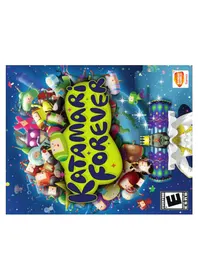


| Product Type | Video Game for PlayStation 3 |
| Platform | PlayStation 3 |
| Genre | Action, Puzzle, Party |
| Number of Players | 1-2 (Offline), Online multiplayer (up to 4) |
| Disc Format | Blu-ray Disc |
| Language Support | English, French, Spanish, German, Italian |
| Dimensions (Case) | Approx. 13.5 x 1.5 x 17.2 cm |
| Weight (Case) | Approx. 100 g |
| Power Consumption | N/A (Powered by console) |
| Storage Requirement | Minimum 5.5 GB free hard drive space |
| Controller Support | DualShock 3, SIXAXIS motion controller |
| Online Features | Leaderboards, ghost data sharing, downloadable content |
| Save File Size | Approx. 500 KB |
| Parental Control | ESRB: Everyone; PEGI: 3+ |
| Release Year | 2009 |
| Developer | Namco Bandai Games |
| Publisher | Namco Bandai Games America |
| Manual Languages | English, French, Spanish, Portuguese, Dutch |
| Cleaning and Maintenance | Keep disc clean and free of scratches. Store in original case when not in use. Use a soft, dry cloth for cleaning. |
| Safety Precautions | Take breaks every hour. Avoid prolonged exposure to motion controls. Keep out of reach of young children. |
| Repairability | If disc is damaged, it may not be repairable. Contact retailer for replacement. |
Frequently Asked Questions - Katamari Forever (PS3) SONY
User questions about Katamari Forever (PS3) SONY
0 question about this device. Answer the ones you know or ask your own.
Ask a new question about this device
Download the instructions for your Video game in PDF format for free! Find your manual Katamari Forever (PS3) - SONY and take your electronic device back in hand. On this page are published all the documents necessary for the use of your device. Katamari Forever (PS3) by SONY.
USER MANUAL Katamari Forever (PS3) SONY
A very small percentage of individuals may experience epileptic seizures or blackouts when exposed to certain light patterns or flashing lights. Exposure to certain patterns or backgrounds on a television screen or when playing video games may trigger epileptic seizures or blackouts in these individuals. These conditions may trigger previously undetected epileptic symptoms or seizures in persons who have no history of prior seizures or epilepsy. If you, or anyone in your family, has an epileptic condition or has had seizures of any kind, consult your physician before playing. IMMEDIATELY DISCONTINUE use and consult your physician before resuming gameplay if you or your child experience any of the following health problems or symptoms:
- dizziness - altered vision - eye or muscle twitches - loss of awareness - disorientation - seizures - any involuntary movement or convulsion.
RESUME GAMEPLAY ONLY ON APPROVAL OF YOUR PHYSICIAN.
Use and handling of video games to reduce the likelihood of a seizure
- Use in a well-lit area and keep as far away as possible from the television screen. - Avoid large screen televisions. Use the smallest television screen available. - Avoid prolonged use of the PLAYSTATION®3 system. Take a 15-minute break during - Avoid playing when you are tired or need sleep.
Stop using the system immediately if you experience any of the following symptoms: lightheadedness, nausea, or a sensation similar to motion sickness; discomfort or pain in the eyes, ears, hands, arms, or any other part of the body. If the condition persists, consult a doctor.
NOTICE:
Use caution when using the DUALSHOCK®3 wireless controller motion sensor function. When using the DUALSHOCK®3 wireless controller motion sensor function, be cautious of the following points. If the controller hits a person or object, this may cause accidental injury or damage. Before using, check that there is plenty of space around you. When using the controller, grip it firmly to make sure it cannot slip out of your hand. If using a controller that is connected to the PS3™ system with a USB cable, make sure there is enough space for the cable so that the cable will not hit a person or object. Also, take care to avoid pulling the cable out of the PS3™ system while using the controller.
WARNING TO OWNERS OF PROJECTION TELEVISIONS:
Do not connect your PLAYSTATION ® 3 system to a projection TV without first consulting the user manual for your projection TV, unless it is of the LCD type. Otherwise, it may permanently damage your TV screen.
HANDLING YOUR PLAYSTATION ©3 FORMAT DISC:
- Do not bend it, crush it or submerge it in liquids. • Do not leave it in direct sunlight or near a radiator or other source of heat. • Be sure to take an occasional rest break during extended play. • Keep this disc clean. Always hold the disc by the edges and keep it in its protective case when not in use. Clean the disc with a lint-free, soft, dry cloth, wiping in straight lines from center to outer edge. Never use solvents or abrasive cleaners.
Getting Started 2
Story and Characters ....4
Starting the Game....6
Controls ....10
Viewing the Screen/Rules....14
RoboKing's Cosmos / The King's Cosmos....18
VS Battle & Co-op ....22
Sound & Vibration....24
Cousins & Presents....25
Katamari Collection ....26
Network Rankings....30
Credits .... 32
Warranty.... 37

Getting Started
PLAYSTATION®3 system
Starting a game: Before use, carefully read the instructions supplied with the PLAYSTATION®3 computer entertainment system. The documentation contains information on setting up and using your system as well as important safety information. Check that the MAIN POWER switch (located on the system rear) is turned on. Insert the Katamari Forever™ disc with the label facing up into the disc slot. Select the icon for the software title under [Game] in the PLAYSTATION®3 system's home menu, and then press th button. Refer to this manual for information on using the software.
Quitting a game: During gameplay, press and hold down the PS button on the wireless controller for at least 2 seconds. Then sele "Quit Game" from the screen that is displayed.
HINT: To remove a disc, touch the eject button after quitting the game.
Saved data for PLAYSTATION®3 format software
Saved data for PLAYSTATION®3 format software is saved on the
system's hard disk. The data is displayed under "Saved Game Utility"
in the Game menu.


The handsome Prince who is always, without complaint, doing whatever crazy task his father, the King, asks of him.
The Prince
Will The Prince and his cousins truly be able to bring peace back to the Cosmos?
continued to
here to help
The King,
every single star in the Cosmos.
Roboking


Our beautiful and munificent King whom we all love,
Cosmos
The King of All
memory
The King's
directly into
and smashed
rumbling
A big, black star came
STORY AND CHARACTERS
into space.
and shot out
burst through the
as a flash, he
like you might


The Prince and his cousins worked feverishly to make his robot. Besides being shockingly arrogant, Robaking
Roboking
The Prince and his cousins worked feverishly to make
is also incredibly pessimistic. He supposedly sings a
"pretty handsome tune though."


Today, as usual,
guarding the harmony
and peace of the
"All Cosmos" Is yours, mine and
everyone's
favorite: The
King of All Cosmos.
The King was
watching as
The Prince was in the middle of
the middle of his upper training
•
Unable to hold
himself back,
The King execute
model jump
model jump.
model jump.

This is terrible!
This is terrible!
The King Won't
even open to even
[Non-Text]
[Non-Text]
The dropped Prince
consulted with
consulted with
his cousins
and decided to make a
"Robot King"
In The King's
place, but
Roboking
well on a hoge campaign
[Non-Text]


Starting the Game (cont.)
the square is the hub on our home.
The magazine storybook, you can do ever think
In this picture, we proposed of stages, once open to the
the two cosmetic products and adjust different game zone.
you've collected as tan, your character across the door.
use the left stick to move your
when you see an button to select it.
The Village Square


Charakter being controlled
Charakter being controlled

Robbling's Cosmos


2.1 中国银行
the and variation functions
∴ m = 3/11
View the photos, objects, and movies you have collected or listen to the games' sounds.
Katamani Collection
∴ m = 3/11
Return to Title Screen


Controls
DUALSHOCK®3 wireless controller (for PLAYSTATION®3)
R2 button
R1 button
button
@ button
× button
button
∴ · = 0
*A DUALSHOCK®3 wireless controller is needed to enjoy the vibration function. Press and hold the PS button and make sure the vibration function is set to "On" under Controller Settings. To turn the vibration On/Off
during the game, press the SELECT button during a stage.

L2 button
L1 button
SELECT button
directional buttons
START button
left stick L3 button (press the left stick)
*A DUALSHOCK®3 wireless controller is needed to enjoy the vibration function. Press and hold the PS button and make sure the vibration function is set to "On" under Controller Settings. To turn the vibration On/Off
during the game, press the SELECT button during a stage.

Menu and
The Village
Sauve
Square Controls
Change Character

If you press the button
another character in The Vill
In the Village Square or elsewhere in the Picture Book
The character you are playing.
"Cousins"
"Cousins" under "Cousins & Presents"


Controls (cont.)
The left stick and right stick are mainly used in
combination during stages
* The ↑ or ↓ indicate the direction to move the stick
When using the wireless controller's motion sensor functions, please note the following:

← → ← →
Opposite move direction Opposite move direction
↓ ↑ or ↑ ↓
↓ ↑ ↑ ↓
Keep left stick and right stick pushed in the direction of the wall or obstacle to climb over ↓↑ (rapidly back and forth) ↓↑ (rapidly back and forth)
∴ m = 3/11
Press L3 button and R3 button simultaneously
Quickly shake controller up/down or press R2 button
wpoint) L1 button
ok| L2 button/ B2 button
R1 button
L2 button/R2 b
Press ✕ button while in Prince Look or Katamari Look
button
button
al Look) Left stick
START button
Vibration ON/OFF
∴ m = 3/11
Photo Mode
Press the ✕ buttons during Prince Look or Royal
Look to enter Photo Mode.
Use the directional buttons to select a
Photo slot. You can store up to 3 photos.
Use the left stick to move the viewpoint, and press the
button to snap a photo. If there are air storage area, they will be overwritten.
* One of the Presents you can obtain and use is the camera.
* You can store your photos in the Kalamari Collection's "Photo Album."
In-Game Controls

Roll forward
Roll backwards
Turn left (right)
Roll left (right)
Brake
Turn right
Turn left
Roll up & over
Dash

Viewing the Screen/Rules (cont.)
Basic Rules (Playing Through Stages)

where may also be other conditions to fulfill.


As your katamari rolls up objects, it gets bigger. Make it bigger little by little. When it reaches a certain size, it will be able to roll up items that it had not yet been able to roll up and reach places that it had not yet been able to reach. Even when you reach the target size, you can continue to roll around until the time runs out. Get as big as you can and try to set new records.

The effect occurs while the Broken Heart is being rolled up.

The effect continues for a limited time.
Rolling up hearts...
If you roll up The King's Heart (RoboKing's Heart) or The King's Broken Heart
(RoboKing's Broken Heart) you can suck
up items around you for a set amount of time. The King's Heart and The King's
Broken Heart appear in stages within
The King's Cosmos, RoboKing's Heart and RoboKing's Broken Heart appear
stages within RoboKing's Cosmos.


RoboKing's Cosmos/ The King's Cosmos


The Cosmos
Select a Stage

Description of stage
Stage Stages with "New" displayed on them are new and?" indicates unfinished challenges.
"RoboKing's Cosmos" and "The King's Cosmos" are both modes in which you advance the story by clearing a handed down to you by the RoboKing or The King. You clear a stage, the katamari you made becomes the story advances and a new stage is added to on Cosmos. * The newly added request will be displayed [★] mark next to the Cosmos.
If you select either "RoboKing's Cosmos" or "The King's Cosmos" in The Village Square, you will advance to the stage selection screen. Use the directional buttons or the left stick to choose the stage you want to try, and press the button.
Information about the currently collected Cousins, Presents, and Shooting Stars
Icons will appear if you previously rolled up a Cousin or a Present in the stage, or if you caused a Shooting Star to appear on the Results Screen.
Setting requests
When you select a stage, a detailed explanation and information about previously made stars are displayed. Use the directional buttons or left stick to select the game mode, L1 button and R1 button for the Music and L2 button and R2 button for the graphic filter. When the setting is completed, press the button to begin the stage.* New Modes are unlocked and become available as you clear more stages, depending on your accumulated scores.
4 MODES OF PLAY Katamari Forever: Default rules and game play. Katamari Drive: Katamari rolls faster than norm Eternal: Play for as long as you like with no time Classic Katamari: During challenges, there is Hearts available.


Roboking's Cosmos/ The King's Cosmos (cont.)
Results Screen
When you clear a stage, the Results Screen will be displayed. Here, after viewing your katamari's size, target completion time, and composition, your katamari will become a star or a constellation. Also, in the case of stages you've already completed, you can choose to replace an existing star with a new star or turn your katamari into stardust. • Press the START button to skip past RoboKing's (The King's) messages. • When you clear a stage, a Shooting Star may appear. You can view Shooting Stars that appeared by moving them with the right stick on the "RoboKing's Cosmos" stage selection screen.
Punishment
If you fail to clear a stage, the Punishment mini-game will begin. Move your character and dodge the falling magma to gain points and extend the mini-game. After Punishment is over, if you press the START button, you can choose to try the stage again. Select either "Play again" to try again or "Quit" to return to The Village Square. The Punishment mini-game cannot be played multiple times.
Cousins and Royal Presents
Royal Present
wear these presents if you go into "Presents" under "Cousins & Presents."
under "Cousins & Presents."
wear these presents if you go into "Presents"
after Rolling up a Royal Present, you can wear these presents if you go into "Presents"
after rolling up a Royal Present, you can wear these presents if you go into "Presents"
control that Cousin. Also, if you clear a stage after selling up a Royal Present, you can
of your Cousins, you will then be able to control that Cousin. Also, if you clear a stage
When you clear a stage after rolling up one of your Cousins, you will then be able to
When you clear a stage after rolling up one
Cousins and Royal Presen
CONTINUING AND CONTROL DISEASE
VS Battle & Co-op


Conditions vary per stage, so get out there and roll your way to victory. The side that gets closest to filling the conditions before time runs out is the winner. Controls are basically the same as with a single-player game, but there are two additional VS-only actions. "Lock on" and "Charge'n Roll."

"VS Battle & Co-op" is a mode that two players can enjoy. To play in this mode, you must have 2 controllers. Choose "VS Battle & Co-op" at The Village Square and then select the character to be controlled by the 2P side (you cannot use the same character as player 1). Player 1 then selects a stage and the game will start.
- "VS Battle & Co-op" becomes playable only after you collect another Cousin. - The stages you can choose from increase as you clear more stages.

IN-BATTLE SPECIAL ACTIONS
Press the R1 button or the L1 button to face the direction of your partner.
Lock on
Charge'n Roll Rapidly move the left stick and right stick back and forth and then release them to zoom ahead and collide with your opponent to give them a real headache. * When one player's katamari gets much bigger than the other player's, it is possible for it to roll up its opponent. The player that was rolled up cannot move, but can shake themselves free by rapidly moving the left stick and right stick back and forth.

In Co-op mode, two players roll a single katamari and try to clear the stages. The controls are basically the same as with single-player, but players have to act together to make it roll well. The screen is the same as for a single-player game. If you clear the stage, you will go to the Results Screen (see page 20). If you fail, Punishment (see page 19) will begin.


What were played during
STAR: duration.
played during
th the directional
ass the button
the next page with
if you press the
being shown, you
on screen
(1) 2017年1月1日
You can listen to private https
played during the week, with a basic mind was
the spring with the gun. Choose
or the left stick and 100% of the directional buttons
the building and press the
www.com.cn
can relation
•
[Unreadable]
图 1-3
①
[Non-Text]
B
①
©
∴ m = 3/11
[Unreadable]
∴ m = 3/11
∴ m = 3/11
∴ m = 3/11
∴ m = 3/11
∴ m = 3/11
[Non-Text]
[Non-Text]


If you choose "Kafomari" Collection at The Village Square, you will advance to the Kafomari Collection Screen. You can solve
photos that you have
doming
to the camp
the work under
SOHANJAN
MOSIC, P.10
collected
play some news
Games, of look under
objects that you have
up in Collection:
[Non-Text]
The Ground Truth image displays a single, solid horizontal line. According to Rule 2 (UNDERSCORE & LINE RULES), this is a stylistic or background line, not a placeholder underscore. Therefore, the OCR result must ignore it and output nothing or only meaningful text. The provided OCR content is "____", which consists of four underscores. This is an incorrect interpretation of the line as a placeholder, violating the rule that stylistic lines must be ignored. The OCR has hallucinated placeholder underscores where none exist in the GT. Hence, the OCR result is inconsistent with the Ground Truth.
The Ground Truth image displays a single, solid horizontal line. According to Rule 2 (UNDERSCORE & LINE RULES), this is a stylistic or background line, not a placeholder underscore. Therefore, the OCR result must ignore it and output nothing or only meaningful text. The provided OCR content is "____", which consists of four underscores. This is an incorrect interpretation of the line as a placeholder, violating the rule that stylistic lines must be ignored. The OCR has hallucinated underscores where none should exist based on the GT's visual context. Hence, the OCR result is inconsistent with the Ground Truth.
∴ m = 3/11
∴ m = 3/11
∴ m = 3/11
∴ m = 3/11
∴ m = 3/11
∴ m = 3/11
∴ m = 3/11
∴ m = 3/11
∴ m = 3/11
∴ m = 3/11
∴ m = 3/11
∴ m = 3/11
1 + u/1 - u/1 = ( 1 + u) u1 < u/1 = u
∴ m = 3/11
(1) 2017年1月1日
[Non-Text]
∴ m = 3/11
∴ m = 3/11
∴ m - 1 ≠ 0 ;
-
-
-
∴ m - 1 ≠ 0 ;
2014年
∴ m = 3/11
∴ m = 3/11
∴ m = 3/11
∴ m = 3/11
∴ m = 3/11
∴ m = 3/11
This image contains no text. The horizontal line is a stylistic or background element and must be ignored according to the rules.
[Non-Text]
[Non-Text]
[Non-Text]
[Non-Text]
[Non-Text]
[Non-Text]
[Non-Text]
[Non-Text]
[Non-Text]
[Non-Text]
[Non-Text]
[Non-Text]
[Non-Text]
[Non-Text]
[Non-Text]
[Non-Text]
[Non-Text]
[Non-Text]
[Non-Text]
[Non-Text]
[Non-Text]
[Non-Text]
[Non-Text]
[Non-Text]
[Non-Text]
[Non-Text]
[Non-Text]
[Non-Text]
[Non-Text]
[Non-Text]
[Non-Text]
[Non-Text]
[Non-Text]
[Non-Text]
[Non-Text]
[Non-Text]
[Non-Text]
[Non-Text]
[Non-Text]
[Non-Text]

You can save photos that you took during a stage and save them in JPEG format. * This feature becomes available when you have obtained the "camera present" by rolling it up in a stage.
Saving Photos
Savings When the saved photo with
Choose the directional buttons or the left show
and press the button to save the photo
to the PLAYSTATION®S system do this, the photo will th
folder. When you do tically be deleted from its storage
atomally, the photo in the Photo Album.
that are not saved will be
• Photos that was started when the game ends.
Choose the game with
of the left stick and
begin the game.
* This item
requests.
The image is too blurry to recognize any text content.
the stage. Flip through it
button and the button through the pages with the L1
category of object and process
confirm.
∴ m = 3/11


Network Rankings
Select the Ranking
You can connect to the village square, you can connect to the
if you choose "Network running" or "with work and view other players", records and thanking
PlayStation@Network.com, who is seeking you want to see with the directional buttons or keys
Choose the square spanning, you can change please
the 14 button or the 81 button.
the Playstation®Network, record data
• If necessary
Rankings and after the completion of Singapore


Credits
| NAMCO BANDAI GamesAmerica Inc. | PROJECT COORDINATORJesse Mejia | Jon SeckTom Usher Designs |
| DIRECTOR, JAPANPRODUCTIONTakahiro Sasanoi | QA LEADMatt Peterson | RECORDING STUDIOCup of Tea Productions, Inc.NSI Studios |
| QA TESTERS | ||
| SR. MANAGER, JAPANPRODUCTIONTaka Akiyama | Bernard DoriaBreanna ChaparroJake FairSean Edwards | VO ENGINEERDanielle HuntCASTING |
| MANAGER, JAPANPRODUCTIONRyota Toyama | Anthony EharaJoshua GloverMichael SobolevJesse Numa Auld | Cup of Tea Productions, Inc.VO DIRECTORWendee Lee |
| LOCALIZATION PRODUCERMinako Takahashi | Min SungCQC TEAM | VO EDITORDanielle Hunt |
| ASSOCIATE LOCALIZATIONPRODUCERStephanie M. Fernandez | Damon BernalGreg AndersonRyan DagleyDavid Moya | PROJECT MANAGERSLainie BusheyDanielle Hunt |
| LOCALIZATION SPECIALISTKatherine Schilling | Jhune De La CruzY Pham | |
| DIRECTOR, MARKETING ANDPUBLIC RELATIONSTodd Thorson | Stephen ChinMerwin Del RosarioGene DuenasSaiho KwanTaylor BensonDan Tran | This software uses fonts made byFontworks Japan, Inc. Fontworksand font names are trademarks orregistered trademarks of FontworksJapan, Inc.Kalamari ForeverTM & ©2003-2009 |
| ASSOCIATE BRAND MANAGERBrad Stradling | GAME TEXT TRANSLATIONAgness Shigeko Kaku8-4, Ltd. | |
| PUBLIC RELATIONSCOORDINATORNick O'Leary | ||
| SR. DIRECTOR, SALESChris Lee | SPECIAL THANKSGenichi ItoMakoto Iwai | |
| NATIONAL SALES MANAGERTerry Carlson | Shuji NakataMyrna DobronCharmaine Morena | |
| DIRECTOR, OPERATIONSDeborah Kirkham | Moto AidaLee HsiaoShin Young | |
| SR. OPERATIONS MANAGERJennifer Tersigni | Ryan GrissomIn Joon HwangMichiko Wang | |
| SR. QA MANAGERTad Hirabayashi | Corey TranJanna SmithPaul Caparotta | |
| QA SUPERVISORMike Peterson | Martin NguyenScott Hartz |

Ever get stuck and just need that extra edge to beat the level? Having problems getting your game to work properly?
Now you can get one-on-one help from NAMCO BANDAI Games America Inc. using your web browser! Simply go to livehelp.namco.com for more details. Live Counselors available from 9am-5pm Monday-Friday Pacific Time.
NAMCO BANDAI Games America Inc.
ATTN: Customer Service
4555 Great America Parkway, Suite 201
Santa Clara, CA 95054
Before returning any defective materials to us, please contact us for a Return Merchandise Authorization (RMA) number. You can reach us at the address above, via e-mail at support@namcobandaigames.com or contact us at (408) 235-2222.
Please note that any materials sent to us without an RMA number will be refused and returned. We highly recommend that you use a traceable and / or insured method of shipping the materials to us.
NAMCO BANDAI Games America Inc. Online: www.namcobandaigames.com Visit our Website to get information about our new titles.
LIMITED WARRANTY: NAMCO BANDAI Games America Inc. warrants to the original purchaser that this NAMCO BANDAI
Games America Inc. game pack shall be free from defects in material and workmanship for a period of ninety (90) days from the date of purchase. If a defect covered by this limited warranty occurs during this 90-day limited warranty period,
NAMCO BANDAI Games America Inc. will repair or replace the defective game pack or component part , at its option, freeof charge. This limited warranty does not apply if the defects have been caused by negligence, accident, unreasonable use.
modification, tampering, or any other cause not related to defective material or workmanship.
LIMITATIONS ON WARRANTY: Any applicable implied warranties of merchantability and fitness for a particular purpose, are hereby limited to ninety (90) days from the date of purchase and are subject to the conditions set forth herein. In no
event shall NAMCO BANDAI Games America Inc. be liable for consequential or incidental damages resulting from the possession or use of this product. The provisions of the limited warranty are valid in the United States only. Some states do
not allow limitations on how long an implied warranty lasts, or exclusion of consequential or incidental damages, so the above limitation or exclusion may not apply to you. This limited warranty provides you with specific legal rights. You may
have other rights which vary from state to state.
"PLAYSTATION" and "DUALSHOCK" are registered trademarks and "PS3" is a trademark of Sony Computer Entertainment Inc. The ratings icon is a trademark of the Entertainment Software Association. SIXAXIS is a trademark of Sony Computer Entertainment Inc. © 2009 Sony Computer Entertainment Inc.
To register product online go to
WWW.NAMCOREG.COM


- USE AND HANDLING OF VIDEO GAMES TO REDUCE THE LIKELIHOOD OF A SEIZURE
- NOTICE
- WARNING TO OWNERS OF PROJECTION TELEVISIONS
- HANDLING YOUR PLAYSTATION ©3 FORMAT DISC
- GETTING STARTED
- THE PRINCE
- COSMOS
- THE KING OF ALL
- STORY AND CHARACTERS
- ROBOKING
- STARTING THE GAME (CONT.)
- CONTROLS
- CONTROLS (CONT.)
- PHOTO MODE
- VIEWING THE SCREEN/RULES (CONT.)
- ROLLING UP HEARTS
- ROBOKING'S COSMOS/ THE KING'S COSMOS
- SETTING REQUESTS
- ROBOKING'S COSMOS/ THE KING'S COSMOS (CONT.)
- PUNISHMENT
- COUSINS AND ROYAL PRESENTS
- VS BATTLE & CO-OP
- IN-BATTLE SPECIAL ACTIONS
- SAVING PHOTOS
- NETWORK RANKINGS
- SELECT THE RANKING
- TO REGISTER PRODUCT ONLINE GO TO
- WWW.NAMCOREG.COM
Brand : SONY
Model : Katamari Forever (PS3)
Category : Video game