
S4 - Sports car AUDI - Free user manual and instructions
Find the device manual for free S4 AUDI in PDF.


User questions about S4 AUDI
0 question about this device. Answer the ones you know or ask your own.
Ask a new question about this device
Download the instructions for your Sports car in PDF format for free! Find your manual S4 - AUDI and take your electronic device back in hand. On this page are published all the documents necessary for the use of your device. S4 by AUDI.
USER MANUAL S4 AUDI
This quick reference guide gives you a brief introduction to the main features and controls of your vehicle.
However, it cannot replace the Owner's Manual which contains important information and safety warnings.
We wish you safe and enjoyable motoring with your Audi.
AUDI AG
Locking and unlocking the vehicle
The central locking system locks and unlocks all the doors, the boot lid and the tank flap. It can be operated with the remote control or by turning the key in the lock.
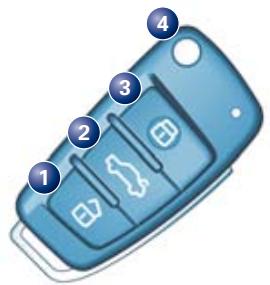
Remote control keys
Press the appropriate button for about 1 second.
1 Unlocking button: Open one of the doors within about 60 seconds, otherwise the vehicle will lock itself again automatically.
2 Unlocking button for boot lid:
Press the button for at least 1 second.
3 Locking button: The turn signals flash once to confirm that the doors and boot lid are properly closed and locked.
4 Folding out the master key:
Press the release button.
Folding in the master key:
Press the button and fold in the key.
Note: Press and hold the unlocking button on the remote control to open all the windows automatically.
Press and hold the locking button to close all the windows and the sun roof.
Anti-theft alarm
The alarm system is automatically set when you lock the car, and switched off when you unlock the car with the remote control. If you unlock the vehicle by inserting the key in the driver's door, the ignition must be switched on within 15 seconds, otherwise the alarm will be triggered.
WARNING!
The doors and windows cannot be opened from inside the vehicle if it has been locked from the outside.
Filling the tank
Opening the tank flap
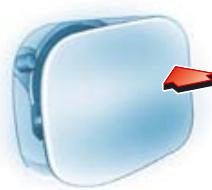
Open the tank flap by pressing it in the direction indicated by the arrow.
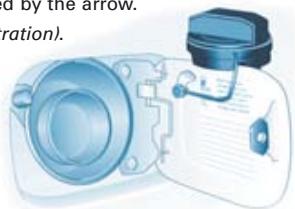
Unscrew the tank cap and hook it onto the flap (see illustration).
Fuel grade
The correct fuel grade for your vehicle is shown on the inside of the tank flap.
Note: The sticker listing the tyre pressures is located on the driver's door pillar.
Safety
Seat belts must be worn on every journey, even on short trips in town. This applies to the front and rear seats. To ensure that the seat belts, belt tensioners and airbags are fully effective, please note the following points:
Wear the seat belt correctly
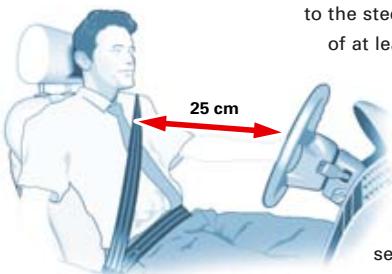
Make sure that the shoulder section of the belt is positioned over the centre of the shoulder and move the lap section as far down over the hips as possible. The belts should always be worn so that they fit tightly (see illustration).
Adjusting seat belt height
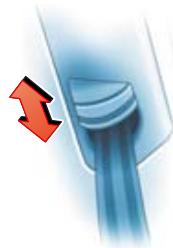
Take hold of the top guide fitting and slide it up or down so that the shoulder portion of the seat belt is positioned roughly midway over the shoulder. After adjusting, pull the shoulder belt sharply to check that the catch on the guide fitting has engaged securely.
Adjust seat and sit in correct position
The front seats should not be positioned too close to the steering wheel or dashboard. Maintain a distance of at least 25 cm and sit in a normal upright position.
The top of the head restraint should be at eye level or higher. Always keep your feet in the footwell.
Safety of children in the vehicle
Children under 12 should travel on the rear seat. They must be protected by a child restraint system which complies with the European standard ECE-R 44 and is suitable for the child's height and weight. est place for the child restraint system is behind the front passenger's seat.
WARNING!
Please follow the instructions in the Owner's Manual supplied with your Audi and read the instructions provided by the child seat manufacturer.
Adjusting front seats
Adjusting head restraints
Raising head restraint: Take hold of the sides of the head restraint with both hands and move it up as required.
Lowering head restraint: Press the button on the side of the head restraint and move the head restraint as required.
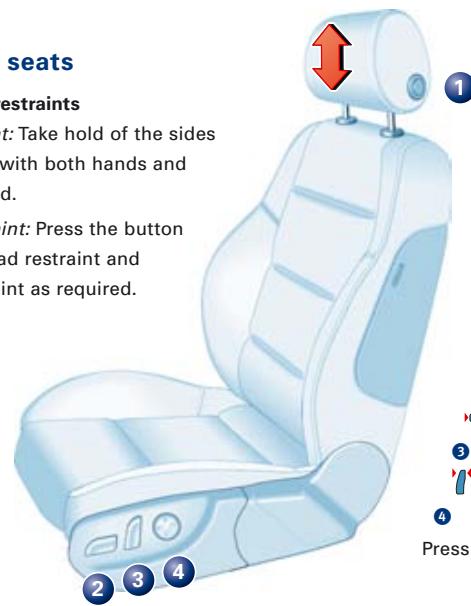
Adjusting seat height and moving seat backwards or forwards
Press the switch in the appropriate direction (as indicated by the arrows):

To raise/lower the seat at the front

To raise/lower the seat at the rear

To raise/lower the seat

To move the seat forwards/backwards

Adjusting the backrest

Backrest further upright/further reclined

adjusting lumbar support
Press appropriate part of the switch.
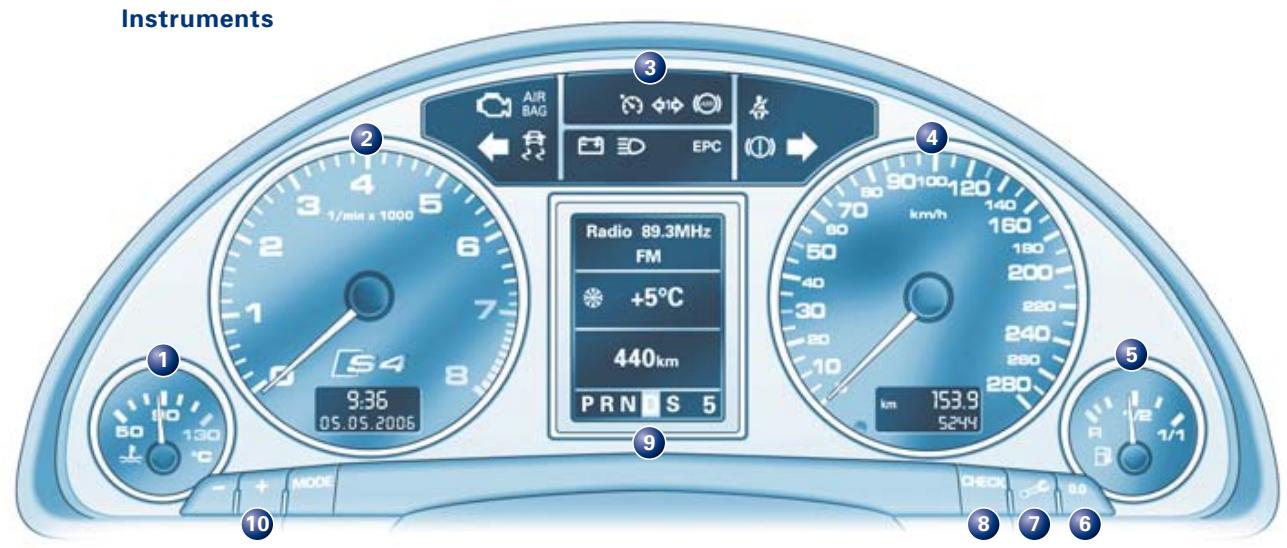
Coolant temperature gauge
Rev counter
Warning and indicator lamps
Speedometer
Fuel gauge
Reset button for trip recorder
Press the button until the display is reset to zero.
7 Button for service indicator
Press the button briefly when the vehicle is stationary and the ignition is switched on. A service reminder appears briefly if a service inspection is due in the near future.
3 Check button for:
- Activating mileage recorder display and clock
Press button with ignition switched off.
- Calling up driver messages again
Press button briefly when warning symbol appears.
Setting speed warning 1
Press button briefly when desired speed is reached.
To cancel: press button for at least 1 second while vehicle is moving.
9 Display for:
Warning symbols and auto-check control
Radio, CD and telephone
Navigation system
Outside temperature
- On-board computer (with two memories)
- Selector lever position
Service indicator
10 Adjuster buttons for:
Instrument lighting
To adjust, press button


E

Digital clock and date
Press the MODE button until the desired display
(e.g. hour) starts to flash. To adjust, press button


Warning and indicator lamps
| Emission control system1) | Turn signals, hazard warning lights | |
| Airbag system1) | Electronic Stability Program (ESP) | |
| Cruise control system | Alternator1) | |
| Trailer turn signals | Main beam headlights | |
| Anti-lock brake system1) | EPC | Engine management1) |
| Seat belt warning lamp | Fault in brake system or handbrake engaged | |
Warning symbols and auto-check control
Any faults which may occur are indicated by red or yellow symbols in the instrument cluster display.
You can also press the CHECK button to display a message that gives you more information. The messages remain in the display for about 5 seconds. The message can be called up once more if you press the adjuster/test button again.
| ① | Fault in brake system | Engine oil pressure too low | |
| Fault in cooling system | Tyre pressure too low |
| 警告灯 WARNING! |
| If one of the red symbols lights up while you are driving, stop the car, switch off the engine and refer to the Owner's Manual. |
| Fuel level low | Washer fluid level low |
| Check engine oil level | Bulb failure |
| Engine oil sensor faulty1) | Battery voltage too high or too low1) |
| Light sensor/rain sensor defective | Loss of tyre pressure |
| Brake pads worn1) | Tyre pressure monitoring system not available |
| Speed warning 1 and 2 | Door(s) or boot lid open |
| Dynamic headlight range control faulty1) |
Note: Depending on your vehicle version some warning/indicator lamps may appear different. For example, the symbol indicating tyre pressure loss may appear as or (L).
1) Should one of these warning symbols or warning lamps light up when driving, please contact a qualified workshop without delay.
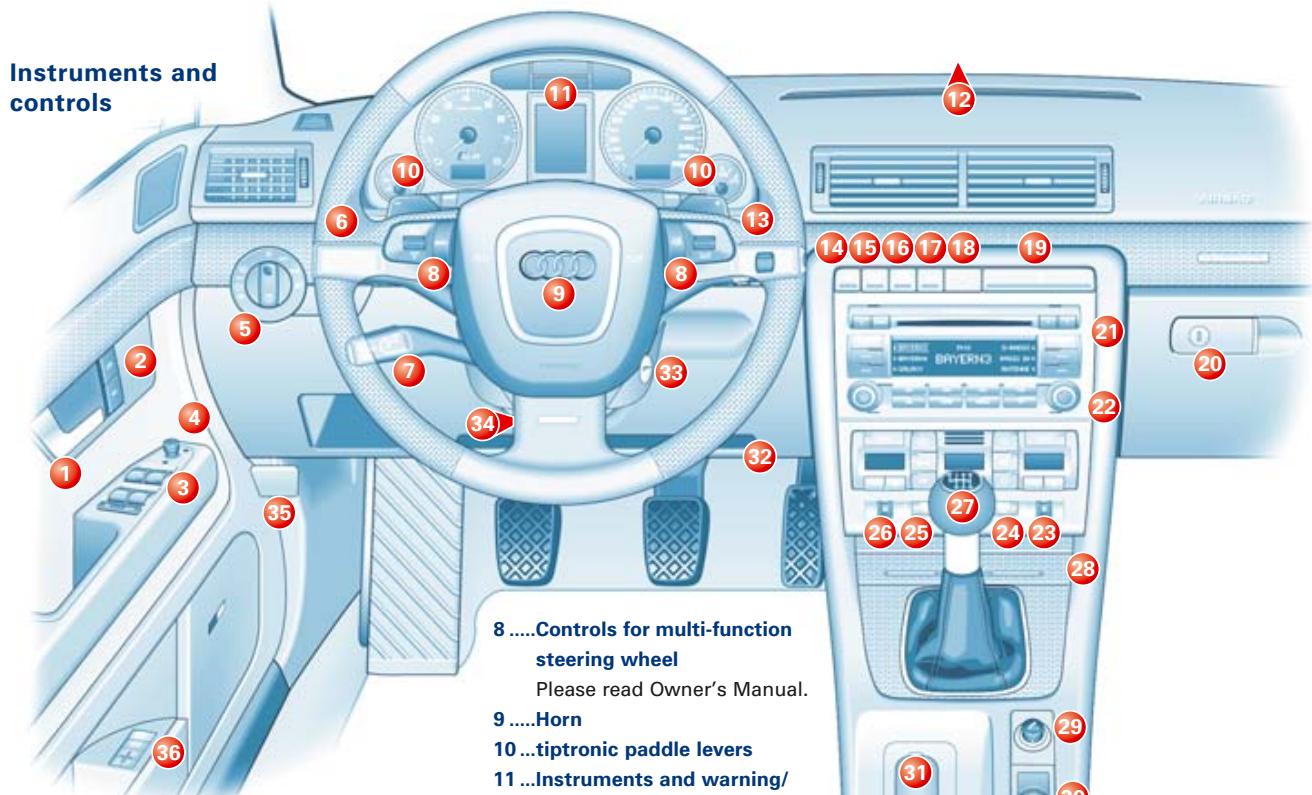

1.....Door handle
2.....Central locking switch
Press the appropriate symbol to unlock or lock the vehicle from the inside:
3.....Electric windows
Press or lift the switch as far as the first stop and hold it until the window has moved to the desired position.
"One-touch" function:
Press/pull the switch briefly to the second stop.
4 ....Electric adjuster for exterior mirrors
Note: At low outside temperatures, the mirrors are heated automatically when the rear window heating is switched on.
5.....Light switch
6 ....Lever for turn signals and main beam headlights
7.....Control lever for cruise control system
Further information for these items is given on the following pages.
19...Cup holder
20...Glove box
8.....Controls for multi-function steering wheel Please read Owner's Manual.
9.....Horn
10...tiptronic paddle levers
11...Instruments and warning/ indicator lamps
12...Switch for sliding/tilting sun roof
13...Control lever for windscreen wipers/washer, on-board computer and menu functions
14...Switch for Electronic Stabilisation Program (ESP)
15...Switch for sun blind (only Saloon)
16...PASSenger AIRBAG OFF display
17...Switch for acoustic parking system
18...Switch for hazard warning lights
21...Navigation System Plus (sound system, navigation, TV/video)
22...Heating and ventilation or switches for air conditioner
23...Thumbwheel for seat heating (front right seat)
24...Switch for rear window heating
25...Switch for windscreen heating
26...Thumbwheel for seat heating (front left seat)
27...Gear lever/selector lever (on vehicles with automatic gearbox)
28...Ashtray
29...Cigarette lighter/socket
30...Storage compartment or switches for navigation system
31...Handbrake
32...Service Wallet compartment
33...Ignition lock
34...Lever for adjustable steering column
35...Bonnet release lever Please read Owner's Manual.
36...Memory buttons for driver's seat Please read Owner's Manual.
[6] Lever for turn signals and main beam headlights
Right turn signals (with ignition off: right parking light on)
Left turn signals (with ignition off: left parking light on)
Main beam headlights
Headlight flasher
![AUDI S4 - [6] Lever for turn signals and main beam headlights - 1](/content/2025/01/130115/images/59d2a58a097d13cb5b3c29e1356e9db5fd52227ff96d296a6f9c5479ba0d18df.jpg)
[7] Control lever
for cruise control system
Please refer to the Owner's Manual
for operating instructions.
[13] Control lever for windscreen wipers/washer, on-board computer
and menu functions
Windscreen:
0 Wipers off
1 Brief wipe
2 Intermittent wipe: Move control A to alter the wiper delay intervals.
3 Slow wiper speed
Fast wiper speed
Automatic wash and wipe: Pull lever towards you and hold.
Rear window (only Avant):
6 Intermittent wipe: Press lever towards dashboard.
Automatic wash and wipe: Press lever as far as it will go towards dashboard and hold.
Controls for on-board computer
Press the top or bottom of rocker switch B repeatedly to display the various computer functions in turn. Press and hold RESET button C to return the current display to zero.
RESET/Selector button
Press the RESET button C repeatedly to select the information supplied by the on-board computer or to select the menu display. Use rocker switch B to highlight a menu function (e.g. tyre pressure). Then activate the function by pressing the RESET button C.
[12] Switch for sliding/tilting sun roof
The ignition must be switched on to open and
close the sunroof.
Comfort setting
Turn the control until it engages at position 1.
To open completely
Turn the control to position 2 and hold it there.
To close
Turn the control until it engages at position 0.
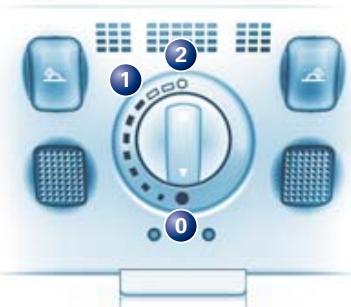
To tilt open
Press the control briefly (in position 0)
to make the roof tilt open all the way.
Pull the control briefly to close the sun roof.
You can also press or pull the control
and hold it (in position 0) to make the
roof move up or down to the desired position.
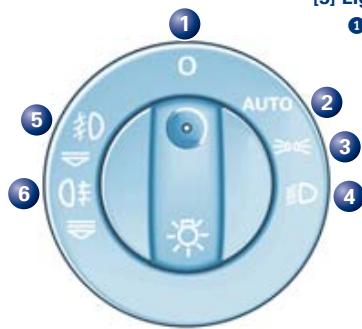
[5] Light switch
0 Off
AUTO
When the light switch is set to AUTO, the dipped beam headlights will be switched on and off automatically according to the outside light conditions (only on vehicles with a light sensor).
Side lights
Dipped beam/main beam headlights
In fog, turn switch to dipped headlights position and then pull out to 1^st stop
(6 front fog lights) or to 2^nd stop (6 front and rear fog lights).
![AUDI S4 - [5] Light switch - 1](/content/2025/01/130115/images/8962f3f79610333fcb494ca07cf37d2de4da97d02a9d3c94b914eb73ea11b9b9.jpg)
[22] Switches for air conditioner
Automatic mode (driver's side/front passenger's side)
Temperature selection (driver's side/front passenger's side)
Blower speed
Standard setting for all seasons: Select a temperature between 18^ and 29^ (60°F and 84°F) and press the AUTO switch.
![AUDI S4 - [22] Switches for air conditioner - 1](/content/2025/01/130115/images/ce1c522d489d9d0d61856ea45e4519c5f8fdadc48a0400cca1442fa2d7863e73.jpg)
[34] Lever for adjustable steering column
Push lever down and adjust position of the steering column as required. Then push the lever back up.
[27] Selector lever for automatic gearbox
Selector lever positions
P Parking lock
N Neutral
S Sport
R Reverse gear
D Drive
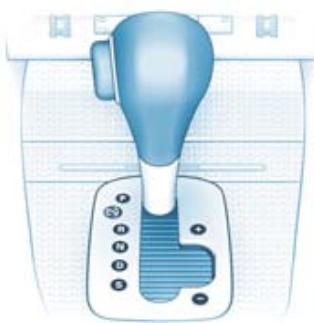
To move the selector lever out of position P or N, or into position P or R, press the interlock button on the selector lever handle and the brake pedal simultaneously.
Note: Use the foot brake to hold the vehicle when stationary with the engine running (in all selector lever positions other than P).
WARNING!
Do not move the selector lever to positions P or R when the vehicle is moving.
Manual gear selection (tiptronic)
The tiptronic program enables you to change gear manually. Move the selector lever out of position D into the tiptronic gate on the right. Press the selector lever forwards briefly to shift up a gear, or push the lever back to shift down a gear.