
STR-UV-01 - Controller Gembird - Free user manual and instructions
Find the device manual for free STR-UV-01 Gembird in PDF.


Pick your language and provide your email: we'll send you a specifically translated version.
| Product Type | Controller |
| Brand | Gembird |
| Model | STR-UV-01 |
| Compatibility | Windows, macOS, Linux, Android, iOS |
| Connection Type | USB 2.0 (wired) / Bluetooth 5.0 (wireless) |
| Dimensions (W x D x H) | 150 x 100 x 60 mm |
| Weight | 200 g |
| Cable Length | 1.8 m |
| Power Supply | USB bus power or 2x AA batteries (not included) |
| Battery Life | Up to 20 hours (wireless) |
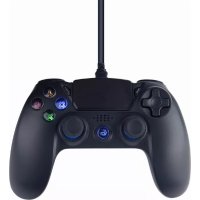
| Main Functions | Joystick, D-pad, 12 action buttons, dual analog triggers, vibration feedback |
| Wireless Range | Up to 10 m |
| Charging Time | 2 hours (via USB) |
| Material | ABS plastic, rubber grips |
| Color | Black / White |
| Operating Temperature | 0°C to 40°C |
| Storage Temperature | -20°C to 60°C |
| Maintenance | Clean with a soft dry cloth; do not use liquid cleaners |
| Safety | Avoid exposure to liquids and extreme temperatures; keep away from children under 3 years |
| Spare Parts | Battery compartment cover, USB cable (available from Gembird support) |
| Warranty | 2 years |
| Certification | CE, FCC, RoHS |
Frequently Asked Questions - STR-UV-01 Gembird
Is the Gembird STR-UV-01 controller compatible with PlayStation or Xbox?
No, it is designed for PC, Mac, Android, and iOS devices. It uses USB and Bluetooth, so it works with most PCs and mobile devices but not directly with consoles.
How do I pair the controller via Bluetooth?
Turn on the controller by pressing the home button. Put it in pairing mode by holding the pairing button (usually the home + X button) until the LED flashes rapidly. Then select 'Gembird STR-UV-01' from your device's Bluetooth settings.
Can I use the controller while charging?
Yes, you can use it via the USB cable while charging. The battery will charge even during gameplay.
What type of batteries does the controller use?
It uses 2 AA batteries (not included) or you can power it via USB. Rechargeable Ni-MH batteries are recommended for wireless use.
Does the controller have vibration feedback?
Yes, it features dual vibration motors for immersive gameplay. You can adjust or disable vibration in the controller settings on your device.
How do I clean the controller?
Use a soft, dry cloth to wipe the surface. For stuck dirt, slightly dampen the cloth with water. Do not use alcohol or abrasive cleaners. Avoid getting moisture into the buttons.
What is the wireless range?
The Bluetooth range is up to 10 meters (33 feet) in open space. Walls and obstacles may reduce the range.
How long does the battery last?
With two AA alkaline batteries, you can expect up to 20 hours of continuous gameplay. Battery life varies depending on usage and vibration intensity.
Are spare parts available for the STR-UV-01?
Yes, you can order replacement USB cables and battery compartment covers from Gembird support. Contact support@gembird.com for details.
What should I do if the controller stops responding?
First, check the batteries or charge the controller. For wired mode, try a different USB port. For Bluetooth, unpair and re-pair. If problems persist, reset by inserting a pin into the reset hole on the back.
User questions about STR-UV-01 Gembird
0 question about this device. Answer the ones you know or ask your own.
Ask a new question about this device
No questions yet. Be the first to ask one.
Download the instructions for your Controller in PDF format for free! Find your manual STR-UV-01 - Gembird and take your electronic device back in hand. On this page are published all the documents necessary for the use of your device. STR-UV-01 by Gembird.
USER MANUAL STR-UV-01 Gembird
Manual assistant
Powered by Anthropic
Waiting for your message
Product information
Brand : Gembird
Model : STR-UV-01
Category : Controller