
SB 16 - Soundbar HARMAN KARDON - Free user manual and instructions
Find the device manual for free SB 16 HARMAN KARDON in PDF.


| Product Type | Soundbar |
| Brand | Harman Kardon |
| Model | SB 16 |
| Dimensions (W x H x D) | Approximately 1000 x 100 x 80 mm |
| Weight | Approximately 3.0 kg |
| Power Consumption | 50 W (typical), standby < 0.5 W |
| Audio Channels | 2.0 |
| Total Output Power | 50 W RMS |
| Frequency Response | 70 Hz - 20 kHz |
| Bluetooth Version | 4.2 |
| Audio Inputs | HDMI ARC, Optical, 3.5mm Aux |
| Supported Audio Formats | Dolby Digital, PCM |
| Remote Control | Included (IR) |
| Wall Mountable | Yes, bracket included |
| Cleaning Instructions | Wipe with a soft, dry cloth; avoid solvents |
| Spare Parts Availability | Contact Harman Kardon support for remote, power adapter |
| Repairability Index | Not rated |
| Safety Certifications | CE, FCC, RoHS |
Frequently Asked Questions - SB 16 HARMAN KARDON
User questions about SB 16 HARMAN KARDON
0 question about this device. Answer the ones you know or ask your own.
Ask a new question about this device
Download the instructions for your Soundbar in PDF format for free! Find your manual SB 16 - HARMAN KARDON and take your electronic device back in hand. On this page are published all the documents necessary for the use of your device. SB 16 by HARMAN KARDON.
USER MANUAL SB 16 HARMAN KARDON
Active speaker soundbar
Owner's Manual

natural_image
Black rectangular electronic device with a flat top, no visible text or symbols on its bodyharman/kardon®
by HARMAN
INTRODUCTION 3
DESCRIPTION AND FEATURES 3
INCLUDED ITEMS 3
SOUNDBAR TOP-PANEL CONTROLS 4
SOUNDBAR REAR-PANEL CONTROLS AND CONNECTIONS 4
SUBWOOFER REAR-PANEL CONTROLS 5
SPEAKER PLACEMENT 6
PLACING THE SOUNDBAR ON A TABLE 6
WALL-MOUNTING THE SOUNDBAR 6
PLACING THE SUBWOOFER 6
CONNECTIONS 7
SOURCE CONNECTIONS 7
POWER CONNECTIONS 8
OPERATION 9
TURNING THE SOUNDBAR ON AND OFF 9
TURNING THE SUBWOOFER ON AND OFF 9
ADJUSTING THE SYSTEM'S VOLUME 9
MUTING THE SYSTEM 9
SOUNDBAR SRC (SOURCE) BUTTON 9
SUBWOOFER VOLUME KNOB 10
SOUNDBAR TRIM SWITCH 10
WIRELESS CODE SWITCHES 10
SUBWOOFER CROSSOVER KNOB 10
SUBWOOFER PHASE SWITCH 10
PROGRAMMING THE SOUNDBAR TO RESPOND TO YOUR TV REMOTE 11
TROUBLESHOOTING 12
SPECIFICATIONS 13
Introduction
Please register your product on our Web site at www.harmankardon.com.
Note: You'll need the product's serial number. At the same time, you can choose to be notified about our new products and/or special promotions.
Thank you for purchasing the harman kardon ^® SB 16 speaker system, with which you're about to begin many years of listening enjoyment. The SB 16 has been custom-designed to provide the excitement and power of the cinema experience in your own living room.
While sophisticated electronics and state-of-the-art speaker components are hard at work within the SB 16, hookup and operation are simple.
To obtain maximum enjoyment from your new soundbar speaker system, we urge you to take a few minutes to read through this manual. This will help ensure that the connections you make are correct. In addition, a few minutes spent learning the functions of the various controls will enable you to take advantage of all the power and refinement the SB 16 is able to deliver.
If you have any questions about this product, its installation or its operation, please contact your retailer or custom installer, or visit our Web site at www.harmankardon.com.
Description and Features
The SB 16 is a complete home theater speaker system that includes:
- A video-shielded stereo soundbar speaker (the SB 16 CTR) with two-way dual-driver left and right speakers and built-in 25-watt x 2 stereo amplifier
- A 10-inch (250mm), 100-watt wireless powered subwoofer (the SB 16 SUB)
• Wall-mount brackets for the soundbar - A 6.5-foot (2m) stereo audio cable for connecting the system directly to your TV's audio output.
The SB 16CTR soundbar contains the system's left and right speakers and stereo amplifiers, and features digital signal processing with virtual 3D surround circuitry that creates a complete surround-sound experience without any extra speakers or wires. You can set the soundbar on a table in front of your TV; also, the system includes hardware that makes it easy to mount the soundbar on the wall along with your flat-panel TV. You can program the soundbar to respond to your TV remote's volume, power and source commands.
The SB 16 SUB subwoofer receives its signal from the SB 16CTR soundbar via wireless technology, so you can place it anywhere in your room without having to run any wires. Its 10-inch (250mm) woofer and built-in 100-watt amplifier deliver a movie's impact and excitement. Other conveniences include a volume control, a phase switch for fine-tuning bass performance to suit your listening environment, and an efficient switching system that senses the presence of an audio signal and automatically switches the subwoofer on.
harman kardon invented the high-fidelity receiver more than 50 years ago. With state-of-the-art features and time-honored circuit designs, the SB 16 system will turn your flat-screen TV into a fun and exciting home theater.
Included Items
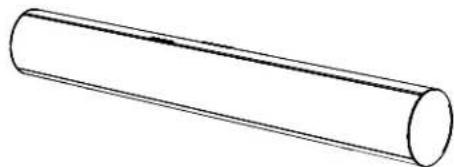
One SB 16 CTR soundbar speaker
natural_image
Simple line drawing of a cylinder (no text or symbols)One SB 16 SUB 10-inch (250mm) 100-watt wireless subwoofer

natural_image
Simple line drawing of a rectangular container with two side supports and no text or symbolsTwo sets of wall-mount brackets for the soundbar – one shallow and one extended (for when the optical digital audio input is being used)
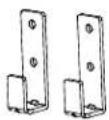

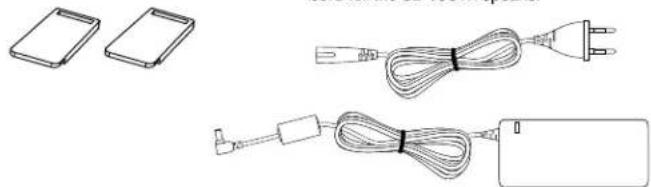
Two rubber feet One 24V DC power supply and one AC power
cord for the SB 16CTR speaker
natural_image
Illustration of various electronic devices including battery pack, charging cable, and power plug (no text or symbols)One 1.5m (5-ft) optical digital audio cable

natural_image
Coiled black cable with two connectors (no text or symbols visible)One 2m (6.5-ft) stereo audio cable

natural_image
Coiled cable with two connectors and a black strap, no text or symbols visibleImportant: If anything is missing, or if any part of your SB 16 system fails to operate properly, contact your dealer immediately.
Soundbar Top-Panel Controls

flowchart
graph LR
    A["Power Button"] --> B["Surround Mode Button"]
    B --> C["Volume Up/Down Buttons"]
    C --> D["Source Selector Button"]
    E["Power Indicator"] --> A
    F["Surround Mode Indicator"] --> B
    G["Source Indicator"] --> D
Power Button: When the soundbar is in the Standby mode (the Power Indicator is amber), press this button to turn the SB 16 system on (the Power Indicator turns blue.) NOTE: When the soundbar is in the Standby mode, it will automatically turn on whenever it detects an audio signal at the Source 1 (analog) inputs.
When the SB 16 system is on:
- Momentarily press the Power button to mute the SB 16 system. (The Power Indicator flashes blue.)
- Hold down the Power button for three seconds to put the soundbar in the Standby mode. (The Power Indicator turns amber.) NOTE: The subwoofer will remain on for approximately 15 minutes after the audio signal ceases and then will automatically go into the Standby mode.
Surround Mode Button: This button turns the SB 16 system's 3D Surround processing On and Off. The Surround Mode Indicator turns blue when 3D Surround is active and turns white when 3D Surround is not active (normal stereo sound). See Soundbar Surround Mode Button, on page 9, for more information.
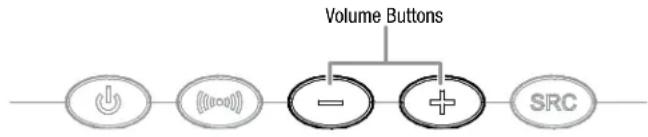
Volume Up/Down Buttons: Press the (−) button to reduce the volume; press the (+) button to increase the volume.
Source Selector Button: This button switches between the sources connected to the Source 1 (analog) and Source 2 (digital) inputs. When Source 1 is active, the Source Indicator turns white; when Source 2 is active, the Source Indicator turns blue.
Soundbar Rear-Panel Controls and Connections
Wireless Code Switch: Selects between four different channels for the wireless subwoofer signal.
IMPORTANT: Be sure to set the subwoofer's Wireless Code switch to the same channel that you set the soundbar's Wireless Code switch. See Wireless Code Switches, on page 10, for more information.
EQ Switch: This switch adjusts the soundbar's bass for either wall or table mounting. If you're mounting the soundbar on a wall with the included wall-mount brackets, set this switch to the Wall position for the most natural-sounding bass performance. If you are placing the soundbar on a table, set the EQ switch to the Table position for the most natural-sounding bass performance.
Trim Switch: This switch adjusts the soundbar's input sensitivity so it will work with TVs that have different audio signal output levels. See Soundbar Trim Switch, on page 10, for more information.
Source 1 Connection (analog): Use the included stereo audio cable to connect the stereo analog outputs of your TV, DVD player or cable/satellite tuner here.
Source 2 Connection (digital): If your TV, DVD player or cable/satellite tuner has a coaxial digital output, you can connect it here.
NOTE: If you connect your TV or another component to the soundbar's Source 1 connection, you can connect a different component to the Source 2 connection.
Power Connection: Connect the included DC power supply here. See Power Connections, on page 8, for more information.
IMPORTANT: Do not connect the power supply's AC cord to an AC outlet until you have made and verified all connections.
Power Switch: Set this switch to the On position (press the switch's white dot) to activate the soundbar. In normal operation, this switch will be left in the On position. See Turning the Soundbar On and Off, on page 9, for more information.

Subwoofer Rear-Panel Controls
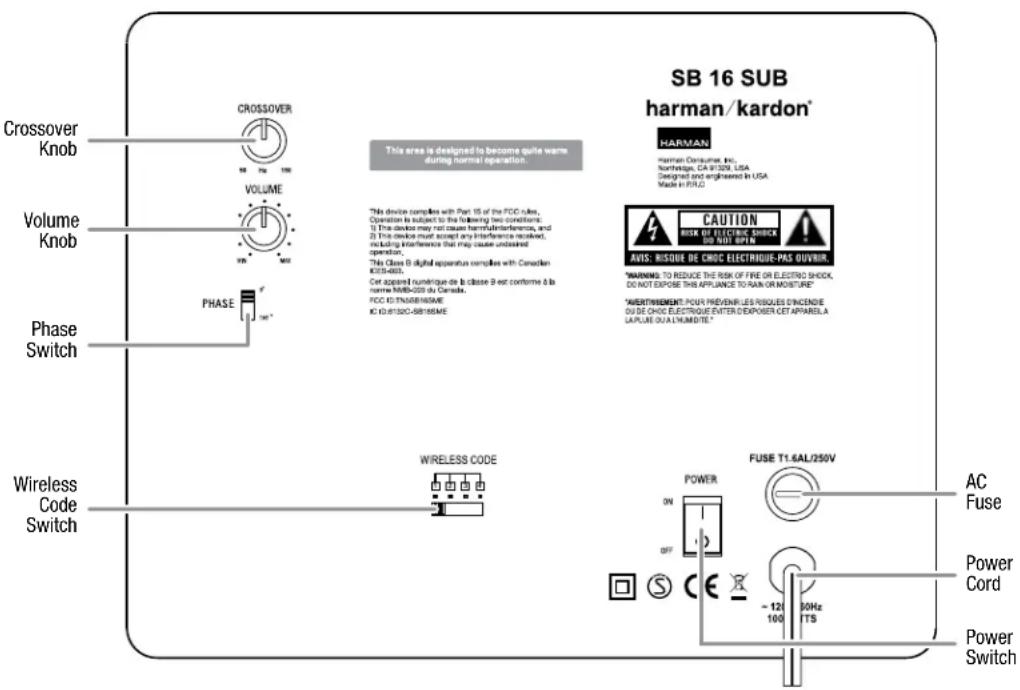
Crossover Knob: This knob adjusts the subwoofer's crossover between 50Hz and 150Hz. The higher you set the Crossover knob, the higher in frequency the subwoofer will operate and the more its bass will "overlap" that of the soundbar. This adjustment helps achieve a smooth transition of bass frequencies between the subwoofer and the soundbar for a variety of different rooms and subwoofer locations. See Subwoofer Crossover Knob, on page 10, for more information.
Volume Knob: Use this control to balance the subwoofer's volume with that of the soundbar. Turn the knob clockwise to increase the subwoofer's volume; turn it counterclockwise to decrease the subwoofer's volume.
Phase Switch: This switch determines whether the subwoofer driver's piston-like action moves in and out in phase with the speakers in the soundbar. If the subwoofer were to play out of phase with the soundbar speakers, the sound waves from the soundbar could cancel out some of the sound waves from the subwoofers, reducing bass performance and sonic impact. This phenomenon depends in part on the placement of the subwoofer and soundbar relative to each other in the room. See Subwoofer Phase Switch, on page 10, for more information.
Wireless Code Switch: Selects between four different channels for the wireless subwoofer signal.
IMPORTANT: Be sure to set the soundbar's Wireless Code switch to the same channel as you set the subwoofer's Wireless Code switch. See Wireless Code Switches, on page 10, for more information.
AC Fuse: The SB 16 SUB is factory-equipped with a T1.6AL/250V AC fuse. If the fuse ever blows:
- Unplug the power cord from the wall.
- Use a screwdriver to remove the blown fuse.
- Replace the fuse with an identical T1.6AL/250V AC fuse.
CAUTION: FOR CONTINUED PROTECTION AGAINST FIRE, REPLACE THE FUSE ONLY WITH THE SAME TYPE AND RATING.
Power Cord: Plug this cord into an active, unswitched AC outlet. See Power Connections, on page 8, for more information.
Power Switch: Set this switch to the On position to activate the subwoofer. In normal operation, this switch will be left in the On position. See Turning the Subwoofer On and Off, on page 9, for more information.
Status Indicator (on top of unit, not shown): Turns blue when the subwoofer's power switch is in the On position; turns amber when the subwoofer is in Standby; turns off when the subwoofer's Power switch is in the Off position.
Speaker Placement
Placing the Soundbar on a Table
If your TV is placed on a table, you can place the soundbar on the table directly in front of the TV stand, centered with the TV screen. Attach the supplied rubber feet to the soundbar as shown in the illustration.

natural_image
Diagram showing a device being processed from a slide to a flat-screen TV (no text or symbols present)As long as the table's surface is flat, the soundbar will rest on the rubber feet.
Wall-Mounting the Soundbar
If your TV is attached to a wall, you can use the included wall-mount brackets to mount the soundbar on the wall directly below the TV screen.
- Determine the location for the soundbar on the wall. Make sure that the top of the soundbar will not block your view of the TV screen when it is mounted on the wall.
- Mark the locations of the soundbar wall-mount bracket holes on the wall. The holes for the left and right brackets are spaced 600mm apart and are designed to accept #8 screws. The top and bottom holes for each bracket are spaced 25mm apart. See the illustration below.

NOTE: To ensure that the soundbar will be level, use a carpenter's level, laser sight or other device to ensure that the two sets of holes are at exactly the same height.
- If you are using the soundbar's optical digital audio input, select the extended wall-mount brackets. Otherwise, select the shallow wall-mount brackets.
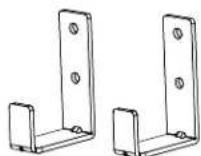
When Optical Digital Input is Used
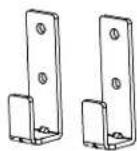
When Optical Digital Input is Not Used
- Attach the two wall-mount brackets to the wall at the locations you marked, using hardware that is appropriate for the wall's construction and materials. Note that the soundbar weighs 3.6kg (8 lb). Be sure to use hardware that can support this weight.

natural_image
Technical line drawing of two mechanical bracket components with screw fasteners (no text or symbols)- After making all of the connections described in the Connections section, on page 7, attach the soundbar to the brackets by sliding the slots in its feet onto the brackets' vertical tabs.
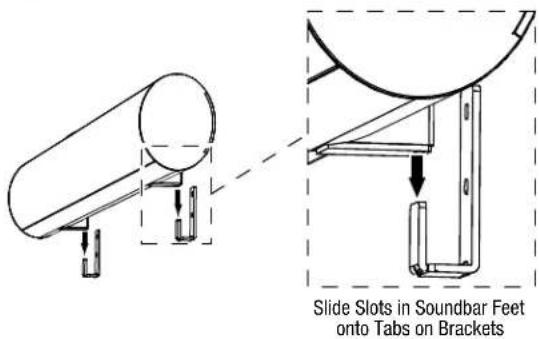
Placing the Subwoofer
Since our ears do not hear directional sound at the low frequencies where the subwoofer operates, it will perform well from just about any location in your room. However, the strongest bass reproduction is likely to be heard when the subwoofer is placed in a corner along the same wall as the soundbar.
IMPORTANT: Make sure that the subwoofer's rear panel is at least 150mm (6") from the wall to allow proper operation of its port tube opening.

You can experiment with subwoofer placement by temporarily placing the subwoofer in the listening position and playing music with strong bass content. Move around to various locations in the room while the system is playing and listen until you find the location where the bass performance is best. Place the subwoofer in that location.
IMPORTANT: The maximum wireless operating distance between the soundbar and subwoofer is approximately 15.3m (50 feet).
Connections
Source Connections
Analog: Use the supplied stereo audio cable to connect the soundbar's Source 1 (analog) input to your TV's stereo audio output. If your TV has two sets of audio output jacks, use the set that has a fixed (not variable) output level. This will let you turn your TV's speakers all the way off while the TV still supplies a constant audio signal to the soundbar.
Digital: If your DVD player, cable tuner or satellite tuner have coaxial or optical digital outputs, you can use the supplied optical digital audio cable and a coaxial digital audio cable (not supplied) to connect them to the soundbar's Optical and Coaxial digital inputs.
NOTE: If your DVD player, cable tuner or satellite tuner does not have a coaxial digital output, you can connect its analog audio output to your TV. The TV will send its audio signal to the soundbar through the analog connection described above.

flowchart
graph TD
    A["TV"] --> B["Audio OUT"]
    A --> C["L"]
    B --> D["Stereo Audio Cable (supplied)"]
    C --> D
    D --> E["SB 16 CNTR harman/kardon MADE IN PRC"]
    E --> F["Wireless CODE 1.2.3.4"]
    E --> G["Table WB 1.2.3"]
    E --> H["EQ Tin"]
    E --> I["Source 1"]
    E --> J["Coaxial"]
    J --> K["Power"]
    K --> L["Optical Digital Audio Cable (supplied)"]
    L --> M["Satellite Tuner"]
    M --> N["OPTICAL DIGITAL OUT"]
    N --> O["DVD Player"]
    O --> P["Coaxial Digital Audio Cable (not supplied)"]
Power Connections
After you have made and verified all of the source connections above:
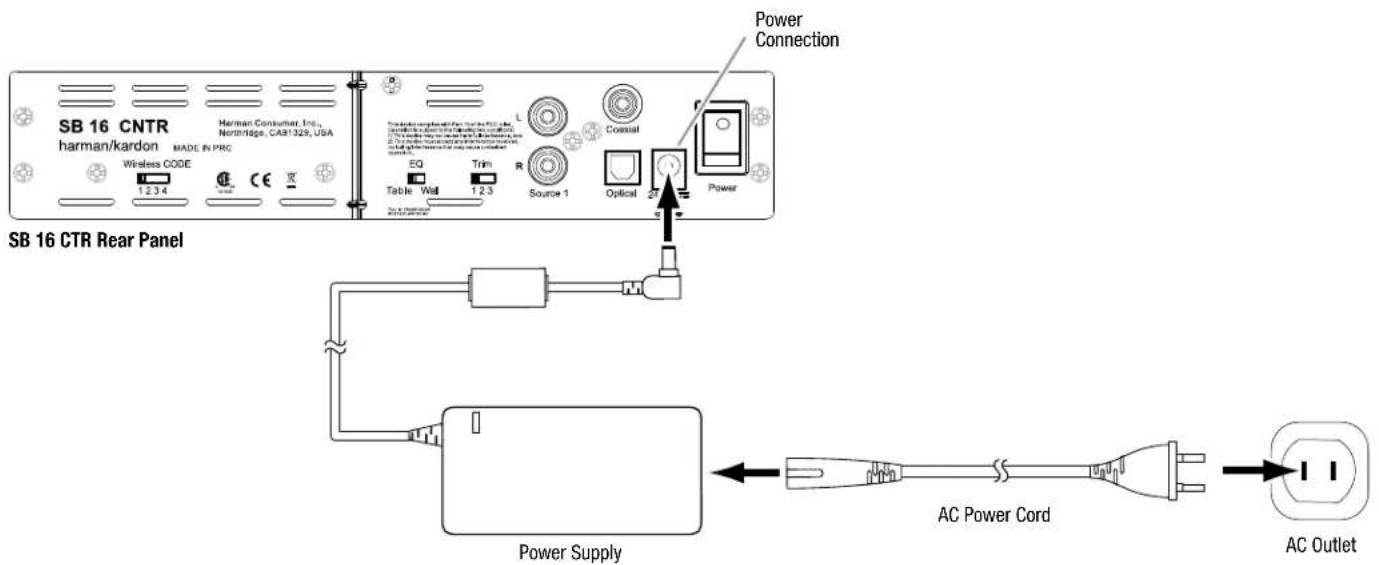
- Connect the DC power supply to the soundbar's power connection. Then plug the supplied AC cord into the DC power supply and into an active, unswitched AC outlet. DO NOT plug this cord into the accessory outlets found on some audio components.
- Plug the subwoofer's power cord into an active, unswitched AC outlet. DO NOT plug this cord into the accessory outlets found on some audio components.
Operation
Set the soundbar's and subwoofer's Power switches in their On positions.

Turning the Soundbar On and Off
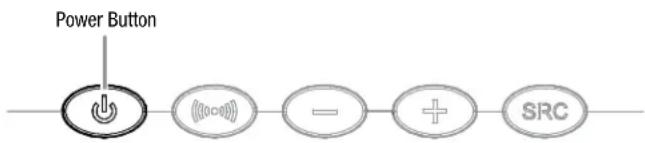
Manually: To turn the soundbar on manually, momentarily press the soundbar's Power button.
Power Button

flowchart
graph LR
    A["Power"] --> B["(000)"]
    B --> C["-"]
    C --> D["+"]
    D --> E["SRC"]
To put the soundbar into Standby manually, hold the Power button for at least three seconds.
NOTE: If you put the soundbar into Standby manually, you can turn it back on only by manually pressing the Power button again.
Auto turn-on: The soundbar has a signal detector that will automatically turn the unit on when it senses an audio signal at any of its inputs. To minimize power consumption, the signal detector is not activated unless the soundbar first senses any kind of IR remote signal. This does not have to be a remote code that has been learned by the soundbar (see Programming the Soundbar to Respond to Your TV Remote, on page 11) – turning your TV on or changing its volume via its remote will be enough.
Once the soundbar's signal detector has been activated, the unit will automatically turn from Standby to On as soon as it detects an input signal at any of its Source input connections.
Auto turn-off: The soundbar will automatically enter the Standby mode if no audio signal is detected at any of its Source input connections for approximately 15 minutes. If you have programmed the soundbar to respond to your TV remote's on and off commands, you can manually put the soundbar into the Standby mode without having to hold its Power button for three seconds. See Programming the Soundbar to Respond to Your TV Remote, on page 11.
If you will be away from home for an extended period of time, or if you will not be using the system for an extended period, set the soundbar's Power switch to Off.
Turning the Subwoofer On and Off
The subwoofer will automatically turn itself on when it receives an audio signal, and it will return to the Standby mode when it has received no audio signal for 15 minutes. The subwoofer's LED will turn blue when the subwoofer is on, and will turn amber when the subwoofer is in Standby.
If you will be away from home for an extended period of time, or if you will not be using the system for an extended period, set the subwoofer's Power switch to the Off position.
Adjusting the System's Volume
Press the soundbar's Volume Up and Down buttons to raise and lower the system's volume one step at a time. Hold down the buttons to raise or lower the volume continuously. NOTE: The lowest setting of the Volume Down button will mute the system.
flowchart
graph LR
    A["Input Button"] --> B["Volume Buttons"]
    C["Input Button"] --> B
    D["Input Button"] --> B
    E["Input Button"] --> B
    F["Input Button"] --> B
    G["Input Button"] --> B
    H["Input Button"] --> B
    I["Input Button"] --> B
    J["Input Button"] --> B
    K["Input Button"] --> B
    L["Input Button"] --> B
    M["Input Button"] --> B
    N["Input Button"] --> B
    O["Input Button"] --> B
    P["Input Button"] --> B
    Q["Input Button"] --> B
    R["Input Button"] --> B
    S["Input Button"] --> B
    T["Input Button"] --> B
    U["Input Button"] --> B
    V["Input Button"] --> B
    W["Input Button"] --> B
    X["Input Button"] --> B
    Y["Input Button"] --> B
    Z["Input Button"] --> B
    AA["Input Button"] --> B
    AB["Input Button"] --> B
    AC["Input Button"] --> B
    AD["Input Button"] --> B
    AE["Input Button"] --> B
    AF["Input Button"] --> B
    AG["Input Button"] --> B
    AH["Input Button"] --> B
    AI["Input Button"] --> B
    AJ["Input Button"] --> B
    AK["Input Button"] --> B
    AL["Input Button"] --> B
    AM["Input Button"] --> B
    AN["Input Button"] --> B
    AO["Input Button"] --> B
    AP["Input Button"] --> B
    AQ["Input Button"] --> B
    AR["Input Button"] --> B
    AS["Input Button"] --> B
    AT["Input Button"] --> B
    AU["Input Button"] --> B
    AV["Input Button"] --> B
    AW["Input Button"] --> B
    AX["Input Button"] --> B
    AY["Volume Buttons"]
    AZ["Volume Buttons"]
    BA["Volume Buttons"]
    BB["Volume Buttons"]
    BC["Volume Buttons"]
    BD["Volume Buttons"]
    BE["Volume Buttons"]
    BF["Volume Buttons"]
    BG["Volume Buttons"]
    BH["Volume Buttons"]
    BI["Volume Buttons"]
    BJ["Volume Buttons"]
    BK["Volume Buttons"]
    BL["Volume Buttons"]
    BM["Volume Buttons"]
    BN["Volume Buttons"]
    BO["Volume Buttons"]
    BP["Volume Buttons"]
    BPB["Volume Buttons"]
    BPC["Volume Buttons"]
    BPD["Volume Buttons"]
    BPE["Volume Buttons"]
    BPF["Volume Buttons"]
    BPG["Volume Buttons"]
    BPH["Volume Buttons"]
    BPI["Volume Buttons"]
    BPJ["Volume Buttons"]
    BPK["Volume Buttons"]
    BPL["Volume Buttons"]
    BPM["Volume Buttons"]
    BPN["Volume Buttons"]
    BPO["Volume Buttons"]
    BP_P["Volume Buttons"]
    BP_Q["Volume Buttons"]
    BP_R["Volume Buttons"]
    BP_S["Volume Buttons"]
    BP_T["Volume Buttons"]
    BP_U["Volume Buttons"]
    BP_V["Volume Buttons"]
    BP_W["Volume Buttons"]
    BP_X["Volume Buttons"]
    BP_Y["Volume Buttons"]
    BP_Z["Volume Buttons"]
    BP_AA["Volume Buttons"]
    BP_AB["Volume Buttons"]
    BP_AC["Volume Buttons"]
    BP_AD["Volume Buttons"]
    BP_AE["Volume Buttons"]
    BP_AF["Volume Buttons"]
    BP_AG["Volume Buttons"]
    BP_AH["Volume Buttons"]
    BP_AI["Volume Buttons"]
    BP_AJ["Volume Buttons"]
    BP_AK["Volume Buttons"]
    BP_AL["Volume Buttons"]
    BP_AM["Volume Buttons"]
    BP_AN["Volume Buttons"]
    BP_AO["Volume Buttons"]
    BP_AP["Volume Buttons"]
    BP_AQ["Volume Buttons"]
    BP_AR["Volume Buttons"]
    BP_AS["Volume Buttons"]
    BP_AT["Volume Buttons"]
    BP_AU["Volume Buttons"]
    BP_AVB["Volume Buttons"]
    BP_AXBB["BMI/BMI"]
If the system will not play loud enough or quiet enough, adjust the Trim Switch (see Soundbar Trim Switch, on page 10).
For the best sound, we recommend turning your TV's built-in speakers off. Consult your TV's owner's manual to find out how to do this. If there is no way to turn your TV's speakers off, you can adjust the TV's volume so that your SB 16 system will always supply most of the sound:
- Using the volume buttons on your TV, turn its volume all the way down.
- Then use the soundbar's Volume Up/Down buttons to set the sound to a comfortable listening level.
This way, your SB 16 system should always be louder than your TV's speakers. NOTE: This may reduce the volume of your TV's output connection, so you may have to set the soundbar's Trim Switch to position 3 to compensate. See Soundbar Trim Switch, on page 10.
Muting the System
Momentarily press the soundbar's Power button to mute the system. (The Power Indicator flashes blue.) Momentarily press the Power button again to un-mute the system. (The Power Indicator turns to a steady blue.)
Soundbar Surround Mode Button
This button switches the sound between normal stereo (the Surround Mode Indicator turns white) and 3D Surround (the Surround Mode Indicator turns blue). The 3D Surround setting will produce a complete surround-sound experience for anyone sitting in front of and several feet away from the soundbar. Although it is particularly effective when watching movies, you can also try the 3D Surround setting for music.

Soundbar SRC (Source) Button
Each press of this button switches the soundbar's audio source between the optical digital connection, the coaxial digital connection and the analog connections.

Subwoofer Volume Knob
Use the subwoofer's Volume knob to balance the bass with the rest of the sound. Play music or movies that you are familiar with and adjust the subwoofer's Volume knob so the bass sounds balanced on both music and films. Listen to several different music recordings and film soundtracks that contain strong bass passages, and find a setting for the Volume knob that doesn't over-emphasize the bass or make it sound weak.
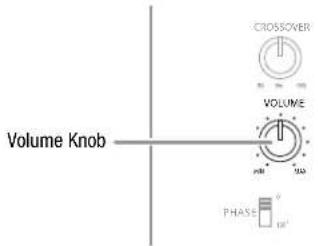
Once you find a setting for the subwoofer's Volume knob that balances the bass with the rest of the sound, you shouldn't have to change it.
Soundbar Trim Switch
This switch adjusts the soundbar's audio input sensitivity so it will work with TVs that have different audio signal output levels. If your TV's audio signal output is low, the soundbar may not play loud enough. In this case, set the Trim switch to position 3 so the soundbar will play louder. If your TV's audio signal output is high, you may hear distortion in the soundbar at normal listening volumes. In this case, set the Trim Switch to position 1 to reduce the distortion and improve the sound.

Wireless Code Switches
In the unlikely event that you encounter interference when operating the system, or if you have more than one SB 16 system in operation, you may change the wireless channel at which the system operates. There are four-position Wireless Code switches on both the soundbar and subwoofer. To change the wireless channel, simply set each of the switches to one of the other three positions. IMPORTANT: The switches on the soundbar and the subwoofer must be set to the same position for the wireless system to work properly.
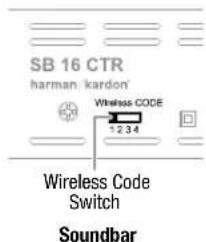
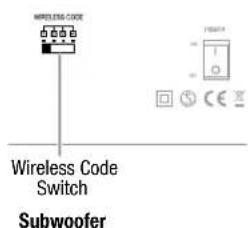
NOTE: The maximum wireless operating distance between the soundbar and subwoofer is approximately 50 feet (15.3m).
Subwoofer Crossover Knob
The subwoofer's Crossover knob adjusts the subwoofer's crossover between 50Hz and 150Hz. The higher you set the Crossover knob, the higher in frequency the subwoofer will operate and the more its bass will "overlap" that of the soundbar. This adjustment helps achieve a smooth transition of bass frequencies between the subwoofer and the soundbar for a variety of different rooms and subwoofer locations.
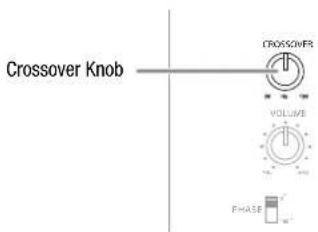
To set the Crossover knob, listen for the smoothness of the bass. If the bass seems too strong at certain frequencies, try a lower Crossover knob setting. If the bass seems too weak at certain frequencies, try a higher Crossover knob setting.
Subwoofer Phase Switch
This switch determines whether the subwoofer's piston-like action moves in and out in phase with the speakers in the soundbar. If the subwoofer were to play out of phase with the soundbar speakers, some of the sound waves produced by the soundbar and subwoofer could be canceled out at some frequencies, reducing bass performance and sonic impact. This phenomenon depends in part on the relative placement of all the speakers in the room.

Although there is no absolutely correct setting for the Phase switch, in most cases it should be left in the 0^ position. When the subwoofer is properly in phase with the soundbar speakers, the sound will be clearer and have more impact. This will make percussive sounds like drums, piano and plucked strings sound more lifelike. The best way to set the Phase switch is to listen to music that you are familiar with and adjust the switch so that drums and other percussive sounds have maximum impact.
Programming the Soundbar to Respond to Your TV Remote
You can program the soundbar so it will respond to your TV remote's power off, mute, volume up, volume down and source commands. This programming lets you control your whole home theater system with a single remote. Before beginning to program the soundbar, have your TV remote in hand. We recommend sitting down in front of the soundbar.
NOTE: Some steps will time out, so read through this entire procedure before you begin.
Have the remote handy. When you start the remote programming after step 4, be ready to aim the TV remote at the front of the soundbar from about 300mm – 900mm (about 12 – 36 inches) away.
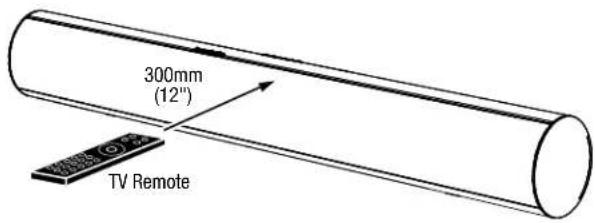
NOTE: If at any time the Surround and Source buttons both stop flashing, and the soundbar returns to the power-on state, the programming operation has failed. In this case, restart at step 2.
To program the power off, surround, volume down, volume up or source command:
-
Ensure that the soundbar is on.
-
Simultaneously press and hold the soundbar's Power and Source buttons until the visible Surround button flashes blue (the Power and Source buttons also flash but are covered by your fingers). If the buttons do not flash after three seconds, release the buttons and try again.
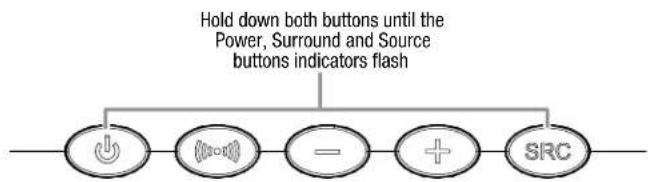
flowchart
graph TD
    A["Hold down both buttons until the Power, Surround and Source buttons indicators flash"] --> B["Power icon"]
    A --> C["Surround icon"]
    A --> D["Source icon"]
    A --> E["+"]
    A --> F["SRC"]
- You now have 20 seconds to momentarily press the soundbar button that you want to program (Power, Surround, Volume Down, Volume Up, Source), or the programming operation will fail and you must restart at step 2. When you are successful, the soundbar Power button light will turn off.
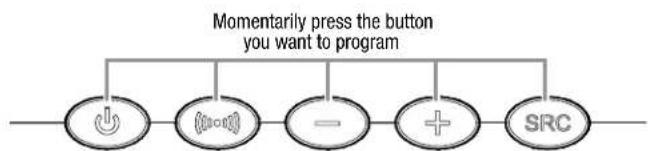
flowchart
graph TD
    A["Button"] --> B["Press Button"]
    B --> C["Button"]
    C --> D["Button"]
    D --> E["Button"]
    E --> F["+"]
    F --> G["SRC"]
- You now have 5 seconds to aim the TV remote at the front of the soundbar and slowly and repeatedly press and release the corresponding button on the remote until the Surround and Source buttons on the soundbar flash and then, after a few seconds, return to constant illumination. This indicates that the programming operation has been successful. Otherwise you must restart at step 2.
To program the Mute command: Repeat steps 1 and 2. At step 3, press and hold the soundbar's Power button until the Surround and Source buttons switch to constant illumination. Then proceed to step 4.
To erase all remote programming: Ensure that the soundbar is on, then simultaneously press and hold the soundbar's Surround Mode and Volume Up buttons until the lights in all the buttons flash.
Troubleshooting
If your SB 16 system isn't performing the way you think it should, check to see if the problem is covered in this section before calling your dealer or contacting a harman kardon representative.
Problem Solution
| If the soundbar does not turn on: | Check that the soundbar power supply's AC cord is plugged into a working AC outlet and that the power supply is plugged into the soundbar.Check that the soundbar's Power switch is in the On position. |
| If the subwoofer does not turn on: | Check that the subwoofer's power cord is plugged into a working AC outlet.Check that the subwoofer's Power switch is in the On position.Check if the subwoofer's AC fuse has blown. See Subwoofer Rear-Panel Controls: AC Fuse, on page 5, for instructions on checking and changing the fuse. |
| If there is no sound coming from both the soundbar and the subwoofer: | Check that the soundbar is on (the Power Indicator is blue).Check that the cable connecting the TV or other source component to the soundbar is properly connected at both ends.Check that the soundbar's Source Selector is set to the correct source (the Source Indicator turns white for Source 1 – analog and turns blue for Source 2 – digital) and that the source is playing an audio signal.Check that the system is not muted (when the system is muted, the soundbar's Power Indicator flashes blue). If the system is muted, momentarily press the Power button to un-mute the system.Check that the soundbar's volume is not turned all the way down (the lowest setting of the Volume Down button will mute the system). |
| If there is no sound coming from just the subwoofer: | Check that the Subwoofer Volume Control is not turned all the way down (fully counterclockwise).Check that the Wireless Code switches on the subwoofer and soundbar are both set to the same setting number.Move the subwoofer closer to the soundbar. The maximum wireless operation distance is 50 feet (15.3m). |
| If the soundbar's sound is distorted: | Set the soundbar's Trim switch to a lower setting.Check the source component to see if the distortion is coming from it, and not from the soundbar. |
| If the system's sound is too quiet, even when the soundbar's volume is turned all the way up: | Set the soundbar's Trim switch to a higher setting.If the TV or source component is connected via a variable output, check its instructions to be sure that the output is not turned down too low. |
| If the bass output is not loud enough: | Turn up the subwoofer's Volume knob.Move the subwoofer into a corner of the room.Move the subwoofer closer to the seating location. |
| If the soundbar won't learn your TV remote's commands: | Carefully follow steps 1 – 4 of Programming the Soundbar to Respond to Your TV Remote, on page 11.Hold the TV remote 12 inches (300mm) in front of the soundbar during the learning procedure.Although the soundbar will learn commands from most TV remotes, there may be some IR codes that it cannot learn. |
| If you press your TV remote's Power button and the soundbar turns off when the TV turns on (or vice versa): | Press the Power button on either the soundbar or the TV (but not both) one time. This will put them back in sync so they will turn on and off together when you press the TV remote's Power button. |
You can find additional troubleshooting information in the FAQs link on the Support page at www.harmankardon.com.
Specifications
SB 16 System
| Frequency response 50Hz – 20kHz |
SB 16 CTR Soundbar
| Midrange transducers Two x 3" (75mm) cones per channel, video-shielded |
| High-frequency transducer One x 3/4" dome per channel, video-shielded |
| Amplifier power 25 watts x 2 |
| Power requirement 24V DC, 2.5A – 2.7A |
| Dimensions (H x W x D) 110mm x 920mm x 89mm (4-5/16" x 36-1/4" x 3-1/2") |
| Weight 3.6kg (8 lb) |
SB 16 Subwoofer
| Woofer 10" (254mm) cone |
| Enclosure type Ported |
| Power requirement 120V AC, 50Hz/60Hz, 100W |
| Dimensions (H x W x D) 480mm x 380mm x 380mm (18-7/8" x 13-3/8" x 13-3/8") |
| Weight 15.4kg (34 lb) |
natural_image
Black rectangular electronic device with reflective surface against white background (no visible text or symbols)HARMAN
HARMAN Consumer, Inc.
8500 Balboa Boulevard, Northridge, CA 91329 USA
516.255.4545 (USA only)
Made in P.R.C.
© 2010 HARMAN International Industries, Incorporated. All rights reserved.
harman kardon is a trademark of HARMAN International Industries, Incorporated, registered in the United States and/or other countries.
Features, specifications and appearance are subject to change without notice.
Part No. 406-000-06269-E
harman/kardon
by HARMAN
www.harmankardon.com


- Introduction
- Description and Features
- Included Items
- Soundbar Rear-Panel Controls and Connections
- Subwoofer Rear-Panel Controls
- CAUTION: FOR CONTINUED PROTECTION AGAINST FIRE, REPLACE THE FUSE ONLY WITH THE SAME TYPE AND RATING.
- Speaker Placement
- Placing the Soundbar on a Table
- Wall-Mounting the Soundbar
- Placing the Subwoofer
- Connections
- Source Connections
- Power Connections
- Operation
- Turning the Soundbar On and Off
- Turning the Subwoofer On and Off
- Adjusting the System's Volume
- Muting the System
- Soundbar Surround Mode Button
- Soundbar SRC (Source) Button
- Subwoofer Volume Knob
- Soundbar Trim Switch
- Wireless Code Switches
- Subwoofer Crossover Knob
- Subwoofer Phase Switch
- Programming the Soundbar to Respond to Your TV Remote
- Troubleshooting
- Specifications
- HARMAN
Brand : HARMAN KARDON
Model : SB 16
Category : Soundbar