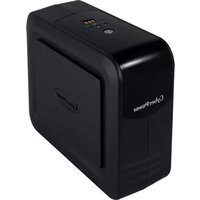
DX600E - Uninterruptible power supply CyberPower - Free user manual and instructions
Find the device manual for free DX600E CyberPower in PDF.


| Product Type | Uninterruptible Power Supply (UPS) |
| Model | DX600E |
| Brand | CyberPower |
| Power Capacity | 600 VA / 360 W |
| Input Voltage | 120 V AC |
| Output Voltage | 120 V AC ± 10% |
| Number of Outlets | 6 (battery backup & surge protection) |
| Battery Type | Sealed lead-acid, maintenance-free |
| Typical Battery Life | 3-5 years |
| Recharge Time | 8 hours (to 90% capacity) |
| Runtime at Full Load | ~5 minutes |
| Runtime at Half Load | ~15 minutes |
| Surge Energy Rating | 1200 joules |
| Dimensions (W x H x D) | 10.2 in x 5.9 in x 7.8 in (259 x 150 x 198 mm) |
| Weight | 12.3 lbs (5.6 kg) |
| USB Port | Yes, for data monitoring |
| LED Indicators | Power on, battery mode, overload, replace battery |
| Audible Alarms | Battery mode, low battery, overload |
| Safety Approvals | UL, cUL |
| Operating Temperature | 32°F to 104°F (0°C to 40°C) |
| Maintenance | Replace battery every 3-5 years; keep free from dust |
| Repairability | User-replaceable battery; other repairs by authorized service |
Frequently Asked Questions - DX600E CyberPower
User questions about DX600E CyberPower
0 question about this device. Answer the ones you know or ask your own.
Ask a new question about this device
Download the instructions for your Uninterruptible power supply in PDF format for free! Find your manual DX600E - CyberPower and take your electronic device back in hand. On this page are published all the documents necessary for the use of your device. DX600E by CyberPower.
USER MANUAL DX600E CyberPower
Reliability. Quality. Value.

natural_image
Line drawing of a device resembling a computer or electronic device with no visible text or symbolsDX400E-DE / DX600E-DE / DX800E-DE User's Manual
IMPORTANT SAFETY INSTRUCTIONS
This manual contains important instructions that should be followed during installation and maintenance of the UPS and batteries. Please read and follow all instructions carefully during installation and operation of the unit. Read this manual thoroughly before attempting to unpack, install, or operate.
CAUTION! The UPS must be connected to a grounded AC power outlet with fuse or circuit breaker protection. DO NOT plug the UPS into an outlet that is not grounded. If you need to de-energize this equipment, turn off and unplug the UPS.
CAUTION! DO NOT USE FOR MEDICAL OR LIFE SUPPORT EQUIPMENT! CyberPower Systems does not sell products for life support or medical applications. DO NOT use in any circumstance that would affect the operation or safety of any life support equipment, with any medical applications, or patient care.
CAUTION! The battery can energize hazardous live parts inside even when the AC input power is disconnected.
CAUTION! To prevent the risk of fire or electric shock, install in a temperature and humidity controlled indoor area, free of conductive contaminants. (Please see specifications for acceptable temperature and humidity range).
CAUTION! To reduce the risk of electric shock, do not remove the cover. There are no user serviceable parts inside.
CAUTION! To avoid electrical shock, turn off the unit and unplug it from the AC power source before installing a computer component.
CAUTION! DO NOT USE WITH OR NEAR AQUARIUMS! To reduce the risk of fire, do not use with or near aquariums. Condensation from the aquarium can come in contact with metal electrical contacts and cause the machine to short out.
CAUTION! DO NOT USE WITH LASER PRINTERS! The power demands of laser printers are too large for a UPS.
INSTALLING YOUR UPS SYSTEM
UNPACKING
The box should contain the following:
(1) UPS Unit x 1; (2) USB Cable x 1; (3) User Manual x 1; (4) Management software Disk x 1
OVERVIEW
The DX400E-DE/DX600E-DE/DX800E-DE features 405 Joules of surge protection, and provides battery backup during power outages. The DX400E-DE/DX600E-DE/DX800E-DE ensures consistent power to your computer system and its included software will automatically save your open files and shutdown your computer system during a utility power loss.
HOW TO DETERMINE THE POWER REQUIREMENTS OF YOUR
EQUIPMENT
- Make sure that the total Volt-Amp (VA) requirements of your computer, monitor, and peripheral equipment does not exceed 400VA/600VA/800VA.
- Ensure that the equipment plugged into the battery power-supplied/surge outlets does not exceed the UPS unit's rated capacity (400VA/240W for DX400E-DE, 600VA/360W for DX600E-DE,
800VA/480W for DX800E-DE). If the rated unit capacities are exceeded, an overload condition may occur and cause the UPS unit to shut down or the circuit breaker to trip.
BASIC OPERATION
DESCRIPTION

① Power On/Off Switch
Press the power switch to turn the UPS ON or OFF.
② LED Indicators
Three LED indicators include Using AC, Using Battery, and Fault. Refer to “Definitions for Illuminated LED Indicators” section for details.
③ Battery Capacity Indicators
The indicators show the battery capacity remains during battery mode. Refer to “Definitions for Illuminated LED Indicators” section for details.
④ AC outlet
The UPS provides 3 outlets for connected equipment to insure temporary uninterrupted operation during a power failure and against surges and spikes.
⑤ USB Port to PC
This port allows connection and communication from the USB port on the computer to the UPS unit. The UPS communicates its status to the PowerPanel® Personal Edition software.
⑥ Input Circuit Breaker
The Circuit Breaker provides optimal overload protection.

Hardware Installation Guide
- Your new UPS may be used immediately upon receipt. However, recharging the battery for at least 8 hours is recommended to ensure that the battery's maximum charge capacity is achieved. Charge loss may occur during shipping and storage. To recharge the battery, simply leave the unit plugged into an AC outlet. The unit will charge in both the on and off position.
- If you will use the software, connect the USB cable to the USB port on the UPS.
- With the UPS unit off and unplugged, connect the computer, monitor, and any externally powered data storage device (Zip drive, Jazz drive, Tape drive, etc. into the battery power supplied outlets. DO NOT plug a laser printer, copier, space heater, vacuum, paper shredder or other large electrical device into the UPS. The power demands of these devices will overload and possibly damage the unit.
- Plug the UPS into a 2 pole, 3 wire grounded receptacle (wall outlet). Make sure the wall branch outlet is protected by a fuse or circuit breaker and does not service equipment with large electrical demands (e.g. air conditioner, refrigerator, copier, etc.) Avoid using extension cords.
- Depress the power switch to turn the unit on. The power on indicator light will illuminate and the unit will "beep".
- If an overload is detected, an audible alarm will sound and the unit will emit one long beep. To correct this, turn the UPS off and unplug at least one piece of equipment from the battery power supplied outlets. Wait 10 seconds. Make sure the circuit breaker is depressed and then turn the UPS on.
- Your UPS is equipped with an auto-charge feature. When the UPS is plugged into an AC outlet, the battery will automatically recharge.
- To maintain optimal battery charge, leave the UPS plugged into an AC outlet at all times.
- To store your UPS for an extended period, cover it and store with the battery fully charged. Recharge the battery every three months to ensure battery life.
CYBERPOWER GREENPOWER UPS™ TECHNOLOGY
CyberPower's Green Commitment
CyberPower is dedicated to the development of green products, and has adopted Green practices throughout its business, including: membership in Climate Savers Computing Initiative (CSCI), accordance with the Restriction on Hazardous Substances (RoHS), Waste Electrical and Electronic Equipment (WEEE) protocols, as well as ISO 14001 and IECQ QC080000. CyberPower pledges to provide the advanced energy solution for the environment and become a leading eco-friendly organization in the UPS industry.

Reduce Energy Cost with GreenPower UPS ^TM Technology
CyberPower's goal is not only to provide eco-friendly products but also to bring the best value for consumers. The advanced energy-saving design improves the operating_efficiency and eliminates waste energy consumption. As a result, consumers will enjoy significant energy cost savings with the adoption of GreenPower UPS™ technology.
DEFINITIONS FOR ILLUMINATED LED INDICATORS
| Icon | Name | Alarm | Condition |
 | Using AC OFF Normal | ||
 | Using Battery | Beep twice every 30 seconds | Utility Failure – The UPS is providing power to battery power-supplied outlets from its battery. |
| Rapid beeping every 1/2 second | Utility Failure – The UPS is providing battery power. Rapid beeping indicates the unit will run out of power shortly. | ||
 | Fault | Constant | Battery Overload – Occurs when connected equipment exceeds the listed capacity of the UPS. Turn the UPS off, Tone unplug at lease one piece of equipment from battery outlets, reset the circuit breaker and turn the unit on. |
 | Battery Capacity OFF | 3 LED: 75~100%2 LED: 50~75%1 LED: 25~50%1 LED Flash: <25% |
TECHNICAL SPECIFICATIONS
| Model DX400E-DE | DX600E-DE | DX800E-DE | |
| Capacity (VA) 400VA | 600VA 800VA | ||
| Capacity (Watts) 240W | 360W 480W | ||
| Input | |||
| Input Voltage Range 192-263Vac | |||
| Frequency Range 47~63Hz (Auto Sensing) | |||
| Output | |||
| On Battery Output Voltage | Simulated Sine Wave at 230Vac +/-7% | ||
| On Battery Output Frequency | 50/60Hz +/-1% | ||
| Transfer Time 4ms Typical | |||
| Overload Protection On | Utility: Circuit Breaker and Internal Current LimitingOn Battery: Internal Current Limiting | ||
| Surge Protection | |||
| Lightning / Surge Protection | Yes | ||
| Physical | |||
| Total # of UPS outlets 3 | Battery Backup & Surge Protected Outlets | ||
| Maximum Dimensions(LxWxH) | 235 x 90 x 190mm | ||
| Weight (kg) | 2.7 | 3.4 | 3.9 |
| Battery | |||
| Sealed Maintenance Free Lead Acid Battery | 12V / 4.5Ah x1 | 12V / 7Ah x1 | 12V / 8.5Ah x1 |
| Typical Recharge Time | 8 hours | ||
| Status Indicators | |||
| Indicators | Using AC, Using Battery, Fault, Battery Capacity | ||
| Audible Alarms | On Battery, Low Battery, Overload | ||
| Environment | |||
| Operating Temperature | 0°C to 40°C | ||
| Relative Humidity | 0 to 90% (Non-condensing) | ||
| Communication | |||
| PowerPanel® Personal Edition Software | Windows Vista/XP/2000/Server 2003, Linux | ||
| Management | |||
| Auto-Charger | Yes | ||
| Auto-Restart | Yes | ||
| USB interface | Yes | ||
TROUBLESHOOTING
| Problem | Possible Cause | Solution |
| Full-time surge protection outlets stop providing power to equipment. Circuit breaker button is projecting from the side of the unit. | Circuit breaker has tripped due to an overload. | Turn the UPS off and unplug at least one piece of equipment. Reset the circuit breaker by depressing the button, and then turn the UPS on. |
| The UPS does not perform expected runtime. | Battery not fully charged. | Recharge the battery by leaving the UPS plugged in. |
| Battery is slightly worn out. | Contact CyberPower Systems about replacement batteries at service@cyberpower-eu.com | |
| The UPS will not turn on. | The on/off switch is designed to prevent damage by rapidly turning it off and on. | Turn the UPS off. Wait 10 seconds and then turn the UPS on. |
| The battery is worn out. | Contact CyberPower Systems about replacement batteries at service@cyberpower-eu.com | |
| Mechanical problem. | Contact CyberPower Systems at service@cyberpower-eu.com | |
| PowerPanel® Personal Edition is inactive. | The USB cable is not connected. | Connect the USB cable to the UPS unit and an open serial port on the back of the computer. You must use the cable that came with the unit. |
| The unit is not providing battery power. | Shutdown your computer and turn the UPS off. Wait 10 seconds and turn the UPS back on. This should reset the unit. |
Additional troubleshooting information can be found at eu.cyberpowersystems.com
For more information, visit eu.cyberpowersystems.com or contact
CyberPower Systems B.V.
Flight Forum 3545 5657DW Eindhoven The Netherlands
Tel: +31 40 2348170, E-MAIL: sales@cyberpower-eu.com
Entire contents copyright ©2009 CyberPower Systems B.V., All rights reserved. Reproduction in whole or in part without permission is prohibited. PowerPanel® and PowerPanel® Plus are trademarks of CyberPower Systems (USA) Inc.
C ∈





- DX400E-DE / DX600E-DE / DX800E-DE User's Manual
- IMPORTANT SAFETY INSTRUCTIONS
- INSTALLING YOUR UPS SYSTEM
- UNPACKING
- OVERVIEW
- HOW TO DETERMINE THE POWER REQUIREMENTS OF YOUR
- EQUIPMENT
- BASIC OPERATION
- DESCRIPTION
- Hardware Installation Guide
- CYBERPOWER GREENPOWER UPS™ TECHNOLOGY
- CyberPower's Green Commitment
- Reduce Energy Cost with GreenPower UPS TM Technology
- DEFINITIONS FOR ILLUMINATED LED INDICATORS
- TROUBLESHOOTING
- CyberPower Systems B.V.
Brand : CyberPower
Model : DX600E
Category : Uninterruptible power supply