
HP-6002ACK - Powerline Adapter Edimax - Free user manual and instructions
Find the device manual for free HP-6002ACK Edimax in PDF.


| Product Type | Powerline Adapter |
| Brand | Edimax |
| Model | HP-6002ACK |
| Standard | HomePlug AV2 |
| Data Transfer Rate | Up to 600 Mbps |
| Network Ports | 1 x Gigabit Ethernet (10/100/1000 Mbps) |
| AC Pass-Through | Yes (built-in power socket) |
| Dimensions (W x H x D) | 90 x 60 x 40 mm |
| Weight | Approx. 150 g |
| Power Supply | AC 100-240V, 50/60 Hz |
| Power Consumption | < 5W (standby), < 10W (active) |
| Security | 128-bit AES encryption |
| Pairing Method | Push button (Secure Pairing) |
| LED Indicators | Power, Powerline link, Ethernet link |
| Operating Temperature | 0°C to 40°C |
| Storage Temperature | -20°C to 70°C |
| Humidity | 10% to 90% non-condensing |
| Maintenance & Cleaning | Wipe with a soft, dry cloth. Do not use liquids or solvents. |
| Safety Warnings | Do not expose to water or moisture. Plug directly into a wall socket. |
| Spare Parts & Repairability | No user-serviceable parts. Contact Edimax support for repairs. |
Frequently Asked Questions - HP-6002ACK Edimax
User questions about HP-6002ACK Edimax
0 question about this device. Answer the ones you know or ask your own.
Ask a new question about this device
Download the instructions for your Powerline Adapter in PDF format for free! Find your manual HP-6002ACK - Edimax and take your electronic device back in hand. On this page are published all the documents necessary for the use of your device. HP-6002ACK by Edimax.
USER MANUAL HP-6002ACK Edimax
No.3, Wu-Chuan 3rd Road, Wu-Gu, New Taipei City 24891, Taiwan
Email: support@edimax.com.tw
Edimax Technology Europe B.V.
Multi-Language Quick Installation Guide(QIG) on the CD
PRODUCT INTRODUCTION
Thanks for purchasing the AV600 PowerLine Adapter with Integrated Power Socket. This adapter enables you to set up a home network quickly and easily via your existing household electrical wiring, without the need for complex conguraon or additional cabling. Please follow the steps in this guide to set up the network.
Package Contents
Before you start using this product, please check if anything is missing from the packaging, and contact your dealer to claim the missing item(s):
HP-6002AC
● Powerline adapter x 1
- Quick installaon guide x 1
- CD with setup wizard, user manual & mul-language QIG x 1
- Ethernet cable x 1
HP-6002ACK
● Powerline adapter x 2
- Quick installaon guide x 1
- CD with setup wizard, user manual & mul-language QIG x 1
- Ethernet cable x 2
About Your Product
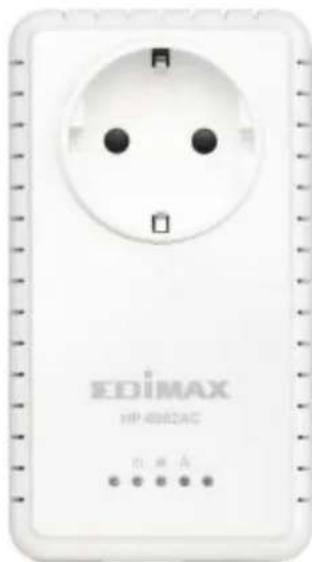
natural_image
White HP 4802AC power outlet with four pins (no visible text or symbols on the socket itself)| LED | Status | Descripon |
| LAN | Green | LAN port connected |
| Blinking | LAN acvity (transferring data) | |
| O | LAN port not connected | |
| PLC | Green | The green indicator turns on and the green indicator blinks slowly when the device is detectcng a powerline link.The green indicator turns on and the yellow indicator blinks quickly to indicate data is being transferred over the powerline link. |
| Red | Powerline link transferred quality is bad. | |
| O | No other PLC device detected | |
| PWR | Green | Powered on |
| O | Powered o |
Note: The device will enter standby mode, and all LEDs will exnguish, aer 60 seconds without any data transfer, including when the Ethernet cable is disconnected.
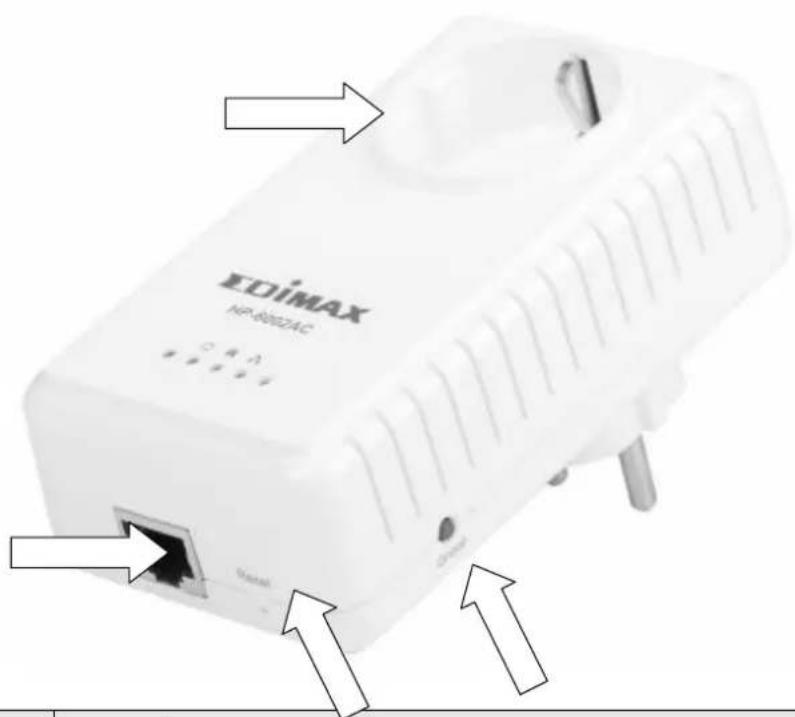
| Interface | Descripon |
| Integrated Power Socket | The integrated electrical socket enables additional terminal devices or mulple socket to be connected to the adapter, just as a normal wall socket would. |
| Ethernet Port | This is a Gigabit Ethernet port for connecng to a computer or other devices with a network port. |
| Group | Creates an encrypted powerline network group automacally (press the buon for less than 3 seconds). |
| Leaves an encrypted powerline network group (press the buon for 8~12 seconds). | |
| Reset | Restores the powerline adapter to factory defaults (press the buon for 8~12 seconds). |
GETTING STARTED
Hardware Installaon
- Always plug the powerline adapter directly into a power socket. Never plug it into a mulple socket or uninterruptible power supply (UPS).
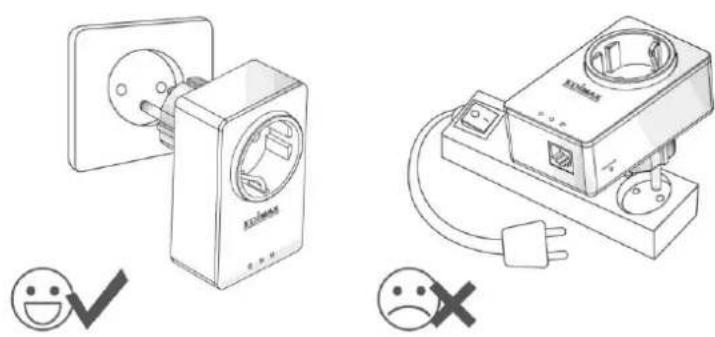
natural_image
Illustration of two electrical wall connectors with icons and symbols (no text or labels)- If you need to use a mulple socket for additional network devices, then connect the mulple socket to the integrated power socket of the adapter, and plug the powerline directly into a power socket, as shown below. The power socket of the adapter features a Iter funcon which is able to improve the data transmission in the network.
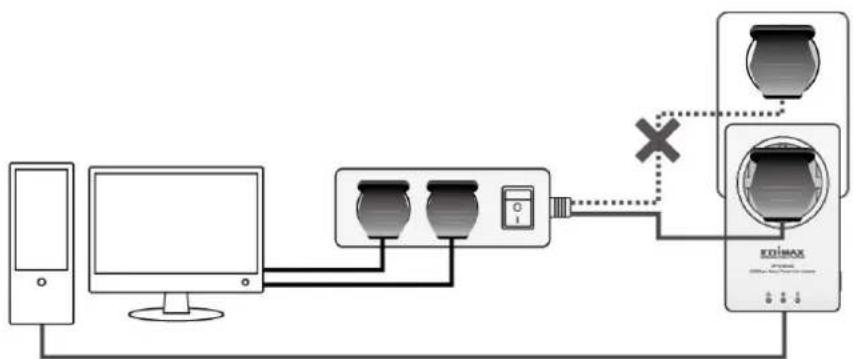
flowchart
graph TD
    A["Computer"] --> B["Monitor"]
    B --> C["Device 1"]
    C --> D["Device 2"]
    D --> E["Device 3"]
    E --> F["Device 4"]
    F --> G["Device 5"]
    G --> H["Device 6"]
    H --> I["Device 7"]
    I --> J["Device 8"]
    J --> K["Device 9"]
    K --> L["Device 10"]
    L --> M["Device 11"]
    M --> N["Device 12"]
    N --> O["Device 13"]
    O --> P["Device 14"]
    P --> Q["Device 15"]
    Q --> R["Device 16"]
    R --> S["Device 17"]
    S --> T["Device 18"]
    T --> U["Device 19"]
    U --> V["Device 20"]
    V --> W["Device 21"]
    W --> X["Device 22"]
    X --> Y["Device 23"]
    Y --> Z["Device 24"]
    Z --> AA["Device 25"]
    AA --> AB["Device 26"]
    AB --> AC["Device 27"]
    AC --> AD["Device 28"]
    AD --> AE["Device 29"]
    AE --> AF["Device 30"]
    AF --> AG["Device 31"]
    AG --> AH["Device 32"]
    AH --> AI["Device 33"]
    AI --> AJ["Device 34"]
    AJ --> AK["Device 35"]
    AK --> AL["Device 36"]
    AL --> AM["Device 37"]
    AM --> AN["Device 38"]
    AN --> AO["Device 39"]
    AO --> AP["Device 40"]
    AP --> AQ["Device 41"]
    AQ --> AR["Device 42"]
    AR --> AS["Device 43"]
    AS --> AT["Device 44"]
    AT --> AU["Device 45"]
    AU --> AV["Device 46"]
    AV --> AW["Device 47"]
    AW --> AX["Device 48"]
    AX --> AY["Device 49"]
- Please note that AV200 (Edimax HP-200x series), AV500 (Edimax HP-500x series) and AV600 (Edimax HP-600x series) powerline adapters are able to communicate directly with one another. AV200, AV500 and AV600 powerline adapters can be used on the same household electric wiring as 14Mbps & 85Mbps powerline adapters (Edimax HP-85XX series) without interfering, but are not able to communicate directly with 14Mbps and 85Mbps powerline adapters.
Creang a Powerline Network
- Connect a powerline adapter to your router via Ethernet cable, and then plug it into a power socket.
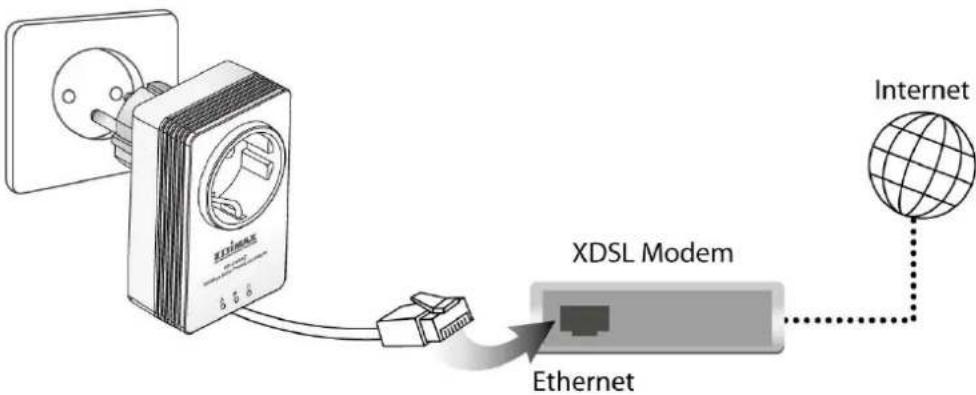
flowchart
graph LR
    A["Power outlet"] --> B["XDSL Modem"]
    B --> C["Ethernet"]
    C --> D["Internet"]
- Connect another powerline adapter to your computer, and then plug it into a power socket.
Note: You can also connect the adapter to a printer, set top box, gaming console, TV or other device with a network port, to add the device into the powerline network.
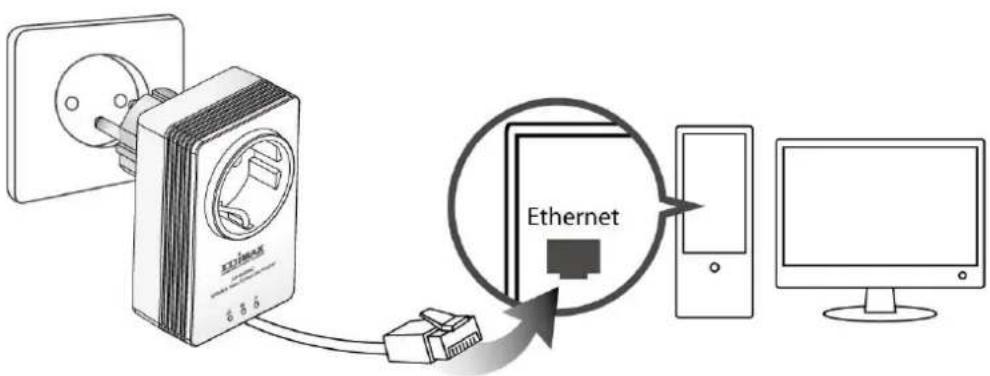
-
Make sure that the PLC and LAN LEDs light up on both PLC adapters.
-
The computer and the router will be connected to the powerline network automacally.
Creang an Encrypted Powerline Network with Two Adapters
Once both adapters have been successfully connected, press the “Group” buon of each adapter for less than 3 seconds within 2 minutes. The adapters will automatically generate a random password to encrypt the powerline network.
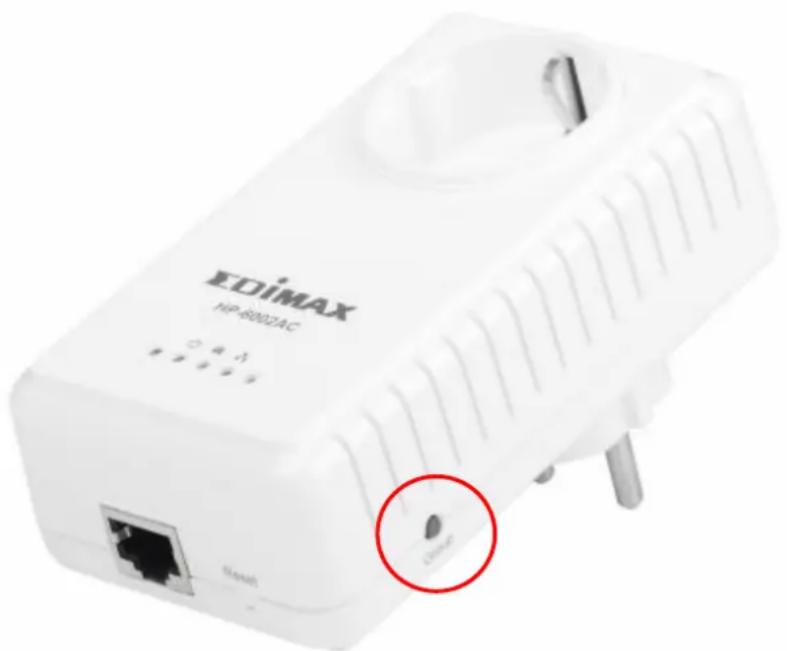
Note:
- To add additional adapters into the encrypted powerline network or to remove an adapter from the powerline network, please refer to the user manual for more details.
- If the powerline adapter in your network does not feature a “Group” or an “Encrypt” buon, you can use the utility soware included in the CD as an alternate. For more details please refer to user manual.
COPYRIGHT
Copyright © Edimax Technology Co., Ltd. all rights reserved. No part of this publicaon may be reproduced, transmied, transcribed, stored in a retrieval system, or translated into any language or computer language, in any form or by any means, electronic, mechanical, magnec, opcal, chemical, manual or otherwise, without the prior written permission from Edimax Technology Co., Ltd.
Edimax Technology Co., Ltd. makes no representaons or warranes, either expressed or implied, with respect to the contents hereof and specifically disclaims any warranes, merchantability, or tness for any parcular purpose. Any soware described in this manual is sold or licensed as is. Should the programs prove defecve following their purchase, the buyer (and not this company, its distributor, or its dealer) assumes the enre cost of all necessary servicing, repair, and any incidental or consequential damages resulting from any defect in the soware. Edimax Technology Co., Ltd. reserves the right to revise this publicaon and to make changes from me to me in the contents hereof without the obligaon to nofy any person of such revision or changes.
The product you have purchased and the setup screen may appear slightly dierent from those shown in this QIG. For more informaon about this product, please refer to the user manual on the CD-ROM. The soware and specicaons are subject to change without noce. Please visit our website www.edimax.com for updates. All brand and product names menoned in this manual are trademarks and/or registered trademarks of their respective holders.
Edimax Technology Co., Ltd.
Add: No. 3, Wu-Chuan 3rd Rd., Wu-Ku Industrial Park, New Taipei City, Taiwan Tel: +886-2-77396888
EU Declaraon of Conformity
English: This equipment is in compliance with the essenal requirements and other relevant provisions of Directive 2004/108/EC, 2009/125/EC.
WEEE Directive & Product Disposal

At the end of its serviceable life, this product should not be treated as household or general waste. It should be handed over to the applicable collecon point for the recycling of electrical and electronic equipment, or returned to the supplier for disposal.
Declaraon of Conformity
We, Edimax Technology Co., Ltd., declare under our sole responsibility, that the equipment described below complies with the requirements of the European EMC directive (2004/108/EC).
Equipment: AV600 Gigabit Powerline Adapter with Integrated Power Socket
Model No.: HP-6002AC
The following European standards for essenal requirements have been followed:
EMC: EN 55022: 2010 CISPR/I/257/CD:2008
EN 61000-3-2: 2006+A2:2009
EN 61000-3-3: 2008
EN 50412-2-1: 2005
IEC 61000-4-2: 2008; IEC 61000-4-3: 2010
IEC 61000-4-4: 2012; IEC 61000-4-5: 2005;
IEC 61000-4-6: 2008; IEC 61000-4-8: 2009; IEC 61000-4-11:
2004
Safety (LVD): EN 60950-1: 2006 +A11: 2009 + A1: 2010 + A12: 2011 IEC 60950-1:2005+A1:2009
Edimax Technology Co., Ltd.
No. 3, Wu Chuan 3 ^rd Road,
Wu-Ku Industrial Park,
New Taipei City, Taiwan
CE
Date of Signature: March, 2014
Signature:

Printed Name: Albert Chang
Title: Director
Edimax Technology Co., Ltd.
ΣDIMAX
NETWORKING PEOPLE TOGETHER
- Multi-Language Quick Installation Guide(QIG) on the CD
- PRODUCT INTRODUCTION
- Package Contents
- HP-6002AC
- HP-6002ACK
- About Your Product
- GETTING STARTED
- Hardware Installaon
- Creang a Powerline Network
- Creang an Encrypted Powerline Network with Two Adapters
- Note:
- COPYRIGHT
- Edimax Technology Co., Ltd.
- EU Declaraon of Conformity
- WEEE Directive & Product Disposal
- Declaraon of Conformity
- ΣDIMAX
Brand : Edimax
Model : HP-6002ACK
Category : Powerline Adapter