
SBX 10 - Subwoofer SCOTT - Free user manual and instructions
Find the device manual for free SBX 10 SCOTT in PDF.


| Product Type | Powered Subwoofer |
| Brand | Scott |
| Model | SBX 10 |
| Driver Size | 10 inches |
| Power Output | 100 W RMS |
| Frequency Response | 30 - 200 Hz |
| Maximum SPL | 110 dB |
| Impedance | 4 ohms |
| Inputs | RCA Line In, LFE Input |
| Outputs | Line Out (pass-through) |
| Crossover Frequency | 40 - 180 Hz (adjustable) |
| Phase Control | 0° / 180° switch |
| Cabinet Type | Bass reflex with front-firing port |
| Enclosure Material | MDF (Medium Density Fiberboard) |
| Finish | Black vinyl |
| Dimensions (WxHxD) | 330 x 380 x 360 mm |
| Weight | 12.5 kg |
| Power Supply | 120 V / 60 Hz |
| Standby Power Consumption | < 0.5 W |
| Included Accessories | Power cable, RCA cable, user manual |
| Safety Features | Overload protection, short circuit protection |
Frequently Asked Questions - SBX 10 SCOTT
User questions about SBX 10 SCOTT
0 question about this device. Answer the ones you know or ask your own.
Ask a new question about this device
Download the instructions for your Subwoofer in PDF format for free! Find your manual SBX 10 - SCOTT and take your electronic device back in hand. On this page are published all the documents necessary for the use of your device. SBX 10 by SCOTT.
USER MANUAL SBX 10 SCOTT
RF 2.4 GHz WIRELESS SUBWOOFER
Instruction Manual
CE
PRECAUTIONS
Follow the instructions below to ensure the product is used safely and correctly.
PLACEMENT
. Do not use the unit in places which are extremely hot, cold, dusty, or humid.
. Place the unit on a flat, even surface.
. Do not restrict the airflow around the unit by placing it in a place with poor ventilation, by covering it with a cloth, or by placing it on a carpet.
. Do not place the unit close to heat sources.
. Use the apparatus only in moderate climates.
. Do not expose the unit to rain or splash with water.
. Do not place objects filled with liquids, such as vases on the unit.
SAFETY
. When connecting and disconnecting the AC power cord, take hold of the plug and not the cord. Pulling the cord may damage it and may be dangerous.
. The mains plug is used as the disconnect device. The plug must be easily accessible.
- When you are not going to use the unit for a long period of time, disconnect the AC power cord from the AC mains outlet.
AC VOLTAGE
. Before use, check that the rated voltage of your unit matches your local voltage.
CONDENSATION
. When there is condensation inside the unit, it may not function normally. Unplug the unit for 1 to 2 hours before turning the power back on, or gradually heat the room up and dry the unit before use.
. Ensure a minimum distance of 5 cm around the unit for sufficient ventilation.
. Do not cover the ventilation openings.
BATTERIES
. Pay attention to the environmental aspects of battery disposal.
 | CAUTIONRISK OF ELECTRIC SHOCKDO NOT OPEN |  | ||||
| The lightning flash with an arrowhead symbol within a triangle is a warning sign alerting the user to the presence of “dangerous voltage” inside the unit. | ATTENTION: To reduce the risk of electric shock, do not remove the cover. There are no user serviceable parts inside the unit. Refer all servicing to qualified personnel. | The exclamation mark within a triangle is a warning sign alerting the user to the presence of important instructions accompanying the product. | ||||
Congratulations on your purchase of this wireless sound system that we hope will fully meet your requirements. It will allow you to improve the bass of your iDXS 10L or iXSW 50 system.
CONTENT
| PRECAUTIONS | 1 | |
| CONTENT | 2 | |
| BOX CONTENT | 2 | |
| LOCATION OF CONTROLS | 2 | |
| POWER SUPPLY | 2 | |
| BASIC OPERATION | 2 | |
| MAINTENANCE | 3 | |
| TROUBLESHOOTING GUIDE | 3 | |
| TECHNICAL SPECIFICATIONS | 3 |
BOX CONTENTS
-
Unit
-
Instruction manual
-
Pin for pairing
LOCATION OF CONTROLS
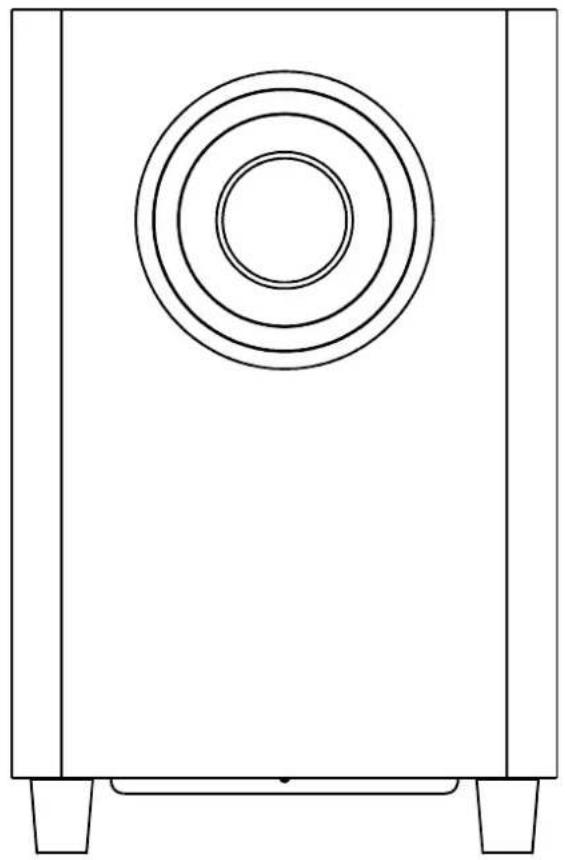
RF 2.4 GHz wireless subwoofer
- Bass reflex tube
- Standby/Power LEDs (2x)
- Speaker
- Bass volume control
- PAIR button
- Crossover frequency switch
- PHASE switch
- POWER ON/OFF switch
- AC cord

POWER SUPPLY
Connect the AC power cord to the mains with AC 100-240V \~ 50/60Hz power source.
BASIC OPERATION
PAIRING
Pairing is to ensure your subwoofer can receive RF transmission correctly from the docking station.
- You have to reset the pairing first: when the docking station is in standby mode, use the pin (supplied) to press and hold the PAIR button of the docking station for more than 10 seconds until the source LEDS at the top of the docking station flash for few seconds.
- Press the PAIR button on the docking station then the PAIR button of the other modules within one minute. All the standby LEDs will blink rapidly until the pairing is successful in about one minute and the source LEDS at the top of the docking station will flash for few seconds. Then the station goes into standby mode.
Refer to the iDXS 10L or iXSW 50 manual for more information about pairing.
Bass volume control
Rotate the bass volume dial to adjust the volume.
Crossover frequency
Slide the switch to select the crossover frequency: 80, 120 or 160 Hz for different bass effect. This setting is depending on the music content.
Phase adjustment
As different rooms have different influences on the bass, the phase switch is used to compensate the room acoustic effect. Place the subwoofer as required, listen to strong bass music and then set the PHASE switch to 0° or 180° . Use the setting which gives a stronger bass effect. This is the best phase setting for your listening room.
MAINTENANCE
Care and maintenance
To clean the casing, unplug the unit and wipe off dust and stains with a soft, damp cloth. Do not use benzene, thinner or similar chemicals to clean the casing.

If at any time in the future you want to dispose of this product, please note that electrical products should not be disposed of with household waste. Find out where your nearest recycling centre is. Consult your local authority or retailer for more details (Waste Electrical and Electronic Equipment Directive).
TROUBLESHOOTING GUIDE
| Problems Recommendations | |
| 1. The subwoofer does not work properly | 1.1 Slide the power ON/OFF switch at ON.1.2 Reset the unit by unplugging the AC power cord for few seconds, then plugging it back in.1.3 The subwoofer alone cannot be paired. If necessary carry out a new pairing. |
TECHNICAL SPECIFICATIONS
| Subwoofer | |
| Power source | AC 100-240V ~ 50/60Hz |
| Speaker | 6.5", 4 Ohm |
| Output power – Speaker | 50 W (r.m.s.) |
| Power consumption | 80 W |
| Standby power consumption | < 1 W |
| Dimensions | 341 (H) x 220 (W) x 220 (D) mm |
| Weight | 6 Kg |
Note: Due to continuing improvements, the technical specifications are subject to change without notice.
Brand : SCOTT
Model : SBX 10
Category : Subwoofer