
Prexiso X2 - Rangefinder Calculated Industries - Free user manual and instructions
Find the device manual for free Prexiso X2 Calculated Industries in PDF.


| Product Type | Laser Rangefinder |
| Brand | Calculated Industries |
| Model | Prexiso X2 |
| Measurement Range | Up to 100 ft (30 m) |
| Accuracy | ±1/8 inch (±3 mm) |
| Measurement Units | Feet, Inches, Meters, Yards |
| Laser Class | Class II, <1 mW (IEC 60825-1) |
| Power Supply | 2 x AAA batteries (1.5V) |
| Battery Life | Approximately 5,000 measurements |
| Auto Power Off | After 90 seconds of inactivity |
| Dimensions (L x W x H) | 4.5 x 2.0 x 1.0 in (114 x 51 x 25 mm) |
| Weight (with batteries) | 4.2 oz (120 g) |
| Display Type | Backlit LCD |
| Measurement Modes | Single distance, Continuous, Area, Volume |
| Add/Subtract Function | Yes |
| Min/Max Tracking | Yes |
| Memory Recall | Last 10 measurements |
| Water Resistance | IP54 (splash proof) |
| Operating Temperature | 32°F to 104°F (0°C to 40°C) |
| Maintenance | Clean lens with soft dry cloth; avoid solvents |
| Safety Precautions | Do not stare into laser beam; avoid eye exposure |
| Spare Parts & Repairability | Batteries user-replaceable; device not user-serviceable; contact support for repairs |
| General Information | Indoor/outdoor use; includes carrying pouch and lanyard |
Frequently Asked Questions - Prexiso X2 Calculated Industries
User questions about Prexiso X2 Calculated Industries
0 question about this device. Answer the ones you know or ask your own.
Ask a new question about this device
Download the instructions for your Rangefinder in PDF format for free! Find your manual Prexiso X2 - Calculated Industries and take your electronic device back in hand. On this page are published all the documents necessary for the use of your device. Prexiso X2 by Calculated Industries.
USER MANUAL Prexiso X2 Calculated Industries
CALCULATED INDUSTRIES®
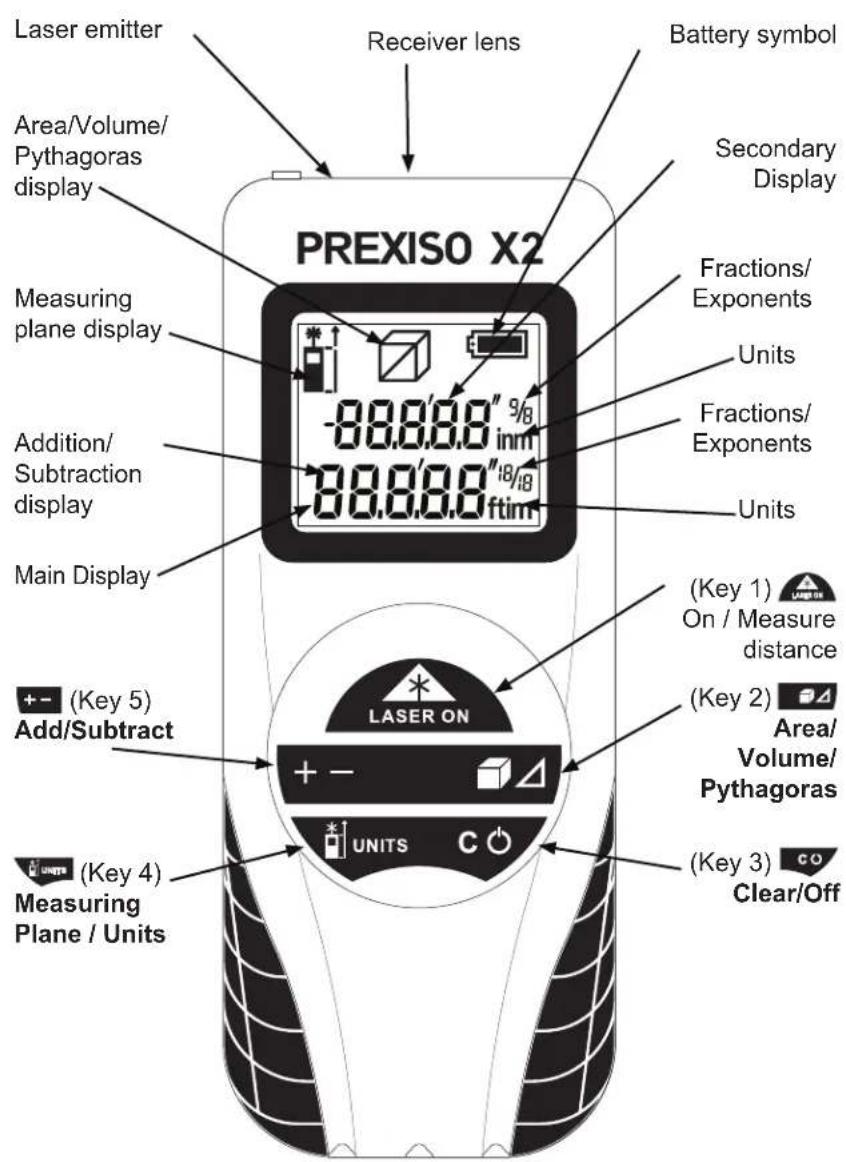
KEYS, DISPLAYS AND FUNCTIONS
Do not aim light at persons or animals. Do not stare into the laser light source. Laser light can damage your eyes.
Read the instructions carefully before using the device.
Safe Practices for Using the Prexiso X2
- Do not use as a pointing device.
• Make sure that the safety settings are not disabled. - Make sure that warning labels and caution labels are not removed.
- Do not open the device with tools (screwdriver, etc.).
• Make sure that the device is not modified. - Avoid using accessories that are not recommended by the manufacturer.
- Do not aim the laser beam at shiny, reflective surfaces.
- Avoid aiming directly at the sun.
Correct usage
The Prexiso X2 is designed for measuring distances, lengths, and heights and for calculating areas and volumes.
INITIAL OPERATION
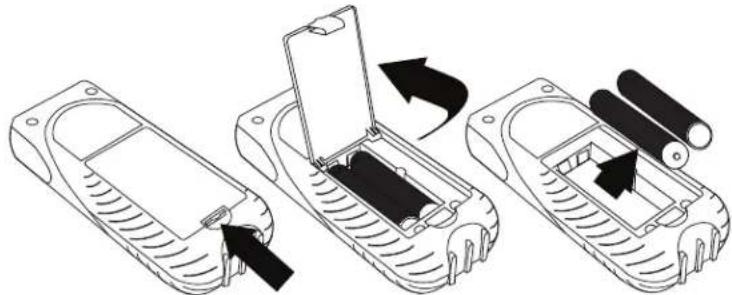
Insert the batteries
• To ensure reliability, use alkaline batteries only.
- Remove battery compartment cover.
- Insert two (2) AAA alkaline batteries, observing the polarity.
- Close the battery compartment cover.
natural_image
Three-step diagram showing a device being inserted into a housing, with arrows indicating the process (no text or symbols present)Changing the batteries
- Change the batteries when the battery symbol is blinking continuously.
HOW TO USE
Measuring conditions
The quality of the measurement depends on the surfaces to which you are measuring. Strongly reflecting targets deflect the laser beam and cause measuring errors. Non-reflecting, dark surfaces increase the measuring time.
Always begin by making a control measurement.
Measurement errors
Measuring errors are possible in case of:
• Colorless fluids (e.g., water)
- Clean, translucent glass
• Styrofoam or similar semi-translucent surfaces
• Strongly reflecting targets that deflect the laser beam
• Measurements aimed at moving objects
For consistently accurate measurements
- Perform control measurements periodically.
- Perform control measurements before and after important measurements.
Switching on/off

- Switch on the device by pressing Clear/Off (Key 1). The device shows the Battery and Measuring Plane symbols until another key is pressed.
- Switch off the device by pressing Clear/Off co (Key 3) for 2 seconds. If no key is pressed for 3 minutes, the device switches off automatically.
Clear key (Key 3)
- Undo the most recent action by pressing Clear/Off (56y 3) briefly.
Adjusting the measuring plane
Rear measuring plane is the standard setting.
- For measurement from front edge, press Measuring Plane/Units
- For measurement from rear edge, press Measuring Plane/Units


MEASURES FROM:

The Front EdgeThe
Adjusting measuring units
Metric system is the standard setting.
- To change the unit, hold Measuring Plane/Units (key 4) for several seconds.
Possible units:
- meters
- feet-inch-fractions
— main display up to 1/16 inch
— secondary display up to 1/8 inch
- inch-fractions
— main display up to 1/16 inch
— secondary display up to 1/8 inch
Measuring LABRITION (Key 1)
- Press and release On/Measure (Key 1) to light the laser.
- Aim active laser at target area.
- Press and release On/Measure (Key 1) again to measure.
The device measures the distance and immediately displays the result in the Main Display.
Continuous measuring
This function enables specific, desired distances to be determined.
- Hold On/Measure (Key 1) for several seconds. Continuous measuring starts, and display shows "trc"
- Press On/Measure (Key 1) briefly. Continuous measuring stops.
The value last measured appears in the Main Display.
FUNCTIONS
Add/Subtract +- (Key 5)
Add:
- Measure the first distance by pressing On/Measure (Key 1).
- Press Add/Subtract +- (key 5) once.
• Measure the second distance.
The device adds the second measurement to the first measurement. Result shows in the
Main Display and the previous value in the Secondary Display.
Subtract:
- Measure the first distance by pressing On/Measure (Key 1).
- Press Add/Subtract +- (key 5) twice.
• Measure the second distance.
The device subtracts the second measurement from the first measurement.
Repeat if required. The device displays the result in the Main Display and the previous value in the Secondary Display.
Area
- Press Area/Volume/Pythagoras
(94) (key 2) once. The Area symbol appears on the display. - Press On/Measure 📂 (Key 1) and measure the first distance (e.g., length).
- Press On/Measure 📂 (Key 1) and measure the second distance (e.g., width).
The Area measured is shown in the Main Display and the last distance measured is in the Secondary Display.
Area or Volume
- Press Area/Volume/Pythagoras (key 2) twice. The Volume symbol appears on the display.
- Press On/Measure 📄 (Key 1) and measure the first distance (e.g., length).
- Press On/Measure 📄 (Key 1) and measure the second distance (e.g., width).
- Press On/Measure 📄 (Key 1) and measure the third distance (e.g., height). The result is shown in the Main Display and the last distance measured is shown in the Secondary Display.
□ AREA

L x W = Area
VOLUME

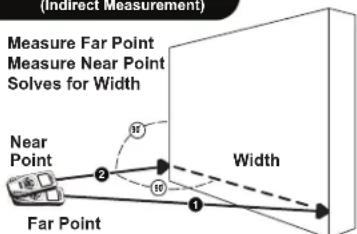
Pythagoras (Indirect)
- Press Area/Volume/Pythagoras (key 2) three times.
The Pythagoras symbol appears on the display. - Press On/Measure 📄 (Key 1) and measure the first distance (diagonal measurement).
- Press On/Measure 📂 (Key 1) and measure the second distance (horizontal measurement).
The result is shown in the Main Display and the last distance
measured is shown in the Secondary Display.
Note: Second measurement must be perpendicular ( 90^ angle) to measured surface.
PYTHAGOREAN (Indirect Measurement)

PYTHAGOREAN (Indirect Measurement)
TROUBLESHOOTING
- If the laser remains lit, or the value in the Main Display keeps changing, flashing, or showing "trc" you are in Continuous Measure mode. Press On/Measure 📂 (Key 1) once to exit this mode.
- If the message Error does not disappear after switching on and off the device repeatedly, contact Calculated Industries.
- If the message InFo appears with a number, follow the instructions in the following table.
No. Cause Remedy
204 Calculation error Measure again.
252 Temperature too high Let the device cool down.
253 Temperature too low Warm the device up.
255 Reception signal too weak, Change target surface (e.g., white paper). measuring time too long
256 Input signal too high Change target surface (e.g., white paper)
257 Measuring error, Shadow the target area. too much background light
258 Measurement outside of the measuring range Target is beyond range. Move closer to target.
260 Laser beam interrupted Repeat the measurement.
SPECIFICATIONS
| Measuring Range | 4" (10 cm) to 100' (30.5 m) |
| Accuracy | +/- 1/8" (3 mm) or better over entire range |
| Smallest unit displayed | 1/16 (1 mm) |
| Laser class | 2 |
| Laser type | 635 nm, < 1 mW |
| Automatic shut-off | After 3 minutes |
| Continuous measuring | Yes |
| Addition/Subtraction | Yes |
| Area | Yes |
| Volume | Yes |
| Pythagoras (Indirect) | Yes |
| Metric and Imperial Units | Yes |
| Dimensions | 4.75 x 2 x 1" (118 x 50 x 26 mm) |
| Battery life | Up to 3,000 measurements |
| Weight | 3.22 ounces (100g) |
| Temperature range: | |
| - Storage | -13°F to +158°F (-25°C to +70°C) |
| - Operation | 32°F to +104°F (0°C to +40°C) |
LIMITED WARRANTY
This product has a 2-year Limited Warranty. For complete details, view warranty information on our website, www.calculated.com/warranty.
HELPFUL USER HINTS
a. To clean your Prexiso PX2 (PX2) use a soft, damp cloth. Do not immerse in, or spray with water. Avoid all liquid or abrasive cleaners.
b. The electronic module in your PX2 was sealed after factory calibration; therefore, no user serviceable parts or adjustments are required.
c. Your PX2 is temperature compensated. However, small variations in accuracy may occur with changes in altitude and humidity. These variations typically can be ignored for estimating purposes.
d. If moved from one temperature environment to another, allow the PX2 time to adjust to the surrounding air temperature before operating.
ELECTROMAGNETIC COMPATIBILITY (EMC)
Warning
Possible disturbance of other devices (e.g. safety equipment, medical equipment) due to electromagnetic radiation.
Observe the safety instructions of the respective devices. Despite the compliance with all requirements of the corresponding directives and norms, a disturbance of other devices is possible.
FCC
This equipment has been certified to comply with the limits for a Class B digital device, pursuant to Part 15 of FCC rules.
FCC Statement
This equipment has been tested and found to comply with the limits for a Class B digital device, pursuant to part 15 of the FCC Rules. These limits are designed to provide reasonable protection against harmful interference in a residential installation. This equipment generates, uses and can radiate radio frequency energy and, if not installed and used in accordance with the instructions, may cause harmful interference to radio communications. However, there is no guarantee that interference will
not occur in a particular installation. If this equipment does cause harmful interference to radio or television reception, which can be determined by turning the equipment off and on, the user is encouraged to try to correct the interference by one or more of the following measures:
- Reorient or relocate the receiving antenna.
- Increase the separation between the equipment and receiver.
- Connect the equipment into an outlet on a circuit different from that to which the receiver is connected.
- Consult the dealer or an experienced radio/ TV technician for help.
WARRANTY, REPAIR AND RETURN INFORMATION
Return Guidelines
- Please read the Warranty in this User's Guide to determine if your CI product remains under warranty before calling or returning any device for evaluation or repairs.
- If your product won't turn on, check the batteries as outlined in the User's Guide.
- If you need more assistance, please go to the website listed below.
- If you believe you need to return your product, please call a Calculated Industries representative between the hours of 8:00am and 4:00pm Pacific Time for additional information and a Return Merchandise Authorization (RMA).
Call Toll Free: 1-800-854-8075
Outside USA: 1-775-885-4900
www.calculated.com/warranty
WARRANTY
Warranty Repair Service – U.S.A.
Calculated Industries ("CI") warrants this product against defects in materials and workmanship for a period of two (2) years from the date of original consumer purchase in the U.S. If a defect exists during the warranty period, CI at its option will either repair (using new or remanufactured parts) or replace (with a new or remanufactured calculator) the product at no charge. THE WARRANTY WILL NOT APPLY TO THE PRODUCT IF IT HAS BEEN DAMAGED BY MISUSE, ALTERATION, ACCIDENT, IMPROPER HANDLING OR OPERATION, OR IF UNAUTHORIZED REPAIRS ARE ATTEMPTED OR MADE. SOME EXAMPLES OF DAMAGES NOT COVERED BY WARRANTY INCLUDE, BUT ARE NOT LIMITED TO, BATTERY LEAKAGE, BENDING, A BLACK "INK SPOT" OR VISIBLE CRACKING OF THE LCD, WHICH ARE PRESUMED TO BE DAMAGES RESULTING FROM MISUSE OR ABUSE.
To obtain warranty service in the U.S., please go to the website.
A repaired or replacement product assumes the remaining warranty of the original product or 90 days, whichever is longer.
Non-Warranty Repair Service – U.S.A.
Non-warranty repair covers service beyond the warranty period, or service requested due to damage resulting from misuse or abuse.
Contact Calculated Industries at the number listed above to obtain current product repair information and charges. Repairs are guaranteed for 90 days.
Repair Service – Outside the U.S.A.
To obtain warranty or non-warranty repair service for goods purchased outside the U.S., contact the dealer through which you initially purchased the product. If you cannot reasonably have the product repaired in your area, you may contact CI to obtain current product repair information and charges, including freight and duties.
Disclaimer
CI MAKES NO WARRANTY OR REPRESENTATION, EITHER EXPRESS OR IMPLIED, WITH RESPECT TO THE PRODUCT'S QUALITY, PERFORMANCE, MERCHANTABILITY, OR FITNESS FOR A PARTICULAR PURPOSE. AS A RESULT, THIS PRODUCT, INCLUDING BUT NOT LIMITED TO, KEYSTROKE PROCEDURES, MATHEMATICAL ACCURACY AND PREPROGRAMMED MATERIAL, IS SOLD "AS IS," AND YOU THE PURCHASER ASSUME THE ENTIRE RISK AS TO ITS QUALITY AND PERFORMANCE. IN NO EVENT WILL CI BE LIABLE FOR DIRECT, INDIRECT, SPECIAL, INCIDENTAL, OR CONSEQUENTIAL DAMAGES RESULTING FROM ANY DEFECT IN THE PRODUCT OR ITS DOCUMENTATION.
The warranty, disclaimer, and remedies set forth above are exclusive and replace all others, oral or written, expressed or implied. No CI dealer, agent, or employee is authorized to make any modification, extension, or addition to this warranty.
Some states do not allow the exclusion or limitation of implied warranties or liability for incidental or consequential damages, so the above limitation or exclusion may not apply to you. This warranty gives you specific rights, and you may also have other rights, which vary from state to state.
KEYS, DISPLAYS AND FUNCTIONS


CALCULATED
INDUSTRIES®
Printed in U.S.A.
1/12

QSG3350E-C


- Safe Practices for Using the Prexiso X2
- Correct usage
- INITIAL OPERATION
- Insert the batteries
- Changing the batteries
- HOW TO USE
- Measuring conditions
- Measurement errors
- For consistently accurate measurements
- Switching on/off
- Clear key (Key 3)
- Adjusting the measuring plane
- Adjusting measuring units
- Possible units:
- Measuring LABRITION (Key 1)
- Continuous measuring
- FUNCTIONS
- Add/Subtract +- (Key 5)
- Add:
- Subtract:
- Area
- Area or Volume
- Pythagoras (Indirect)
- TROUBLESHOOTING
- No. Cause Remedy
- LIMITED WARRANTY
- HELPFUL USER HINTS
- ELECTROMAGNETIC COMPATIBILITY (EMC)
- Warning
- FCC
- FCC Statement
- WARRANTY, REPAIR AND RETURN INFORMATION
- Return Guidelines
- WARRANTY
- Warranty Repair Service – U.S.A.
- Non-Warranty Repair Service – U.S.A.
- Repair Service – Outside the U.S.A.
- Disclaimer
Brand : Calculated Industries
Model : Prexiso X2
Category : Rangefinder