
BT7532 - Flat screen mount B-Tech - Free user manual and instructions
Find the device manual for free BT7532 B-Tech in PDF.


| Product Type | Flat screen wall mount |
| Brand | B-Tech |
| Model | BT7532 |
| Compatible Screen Sizes | 26 to 55 inches |
| VESA Compatibility | Up to 400 x 400 mm |
| Weight Capacity | 30 kg (66 lbs) |
| Material | Steel |
| Product Dimensions (W x H x D) | 500 x 300 x 50 mm |
| Weight | 5 kg |
| Tilt Range | +5° / -15° |
| Swivel Range | ±90° |
| Rotation | ±180° (landscape/portrait) |
| Installation | Wall mount; includes hardware |
| Power Supply | None (manual operation) |
| Maintenance | Wipe with soft dry cloth; check bolts periodically |
| Safety Features | Safety latch to prevent accidental dislodging |
| Spare Parts Availability | Contact B-Tech customer service |
| Repair Possibility | Replacement bolts and brackets available |
| General Information | Designed for flat screens; full motion adjustment |
Frequently Asked Questions - BT7532 B-Tech
User questions about BT7532 B-Tech
0 question about this device. Answer the ones you know or ask your own.
Ask a new question about this device
Download the instructions for your Flat screen mount in PDF format for free! Find your manual BT7532 - B-Tech and take your electronic device back in hand. On this page are published all the documents necessary for the use of your device. BT7532 by B-Tech.
USER MANUAL BT7532 B-Tech
This Pack Contains 1 Mount
PLEASE KEEP THIS FOR FUTURE REFERENCE
mountlogic® range

natural_image
Black metal mechanical component with mounting holes and central circular hole (no text or symbols)REG. DESIGN NO: 4003129
FEATURES
- Designed for screens up to 42" (107cm) / 40kg (88lbs)
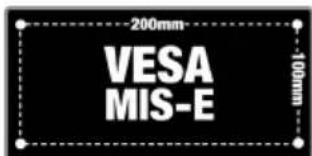
- Fits screens with VESA mounting patterns: 75mm x 75mm and 100mm x 100mm, 200mm x 100mm and 200mm x 200mm
- Low profile design mounts screens only 15mm (0.6") from wall
- Simple 'hook-on' installation with all mounting hardware included


CONTENTS
Installation Safety Notes....2
Parts List....4
Installation Instructions....6
Additional Mounting Options....10
Product Dimensions....11
B-Tech Contact Details....12
TOOLS REQUIRED
13mm (1/2")
Spanner or socket
Drill
10mm (7/16") masonry bit Pencil or 6mm (1/4") wood bit
Level (optional)
Stud finder (optional)


B-TECH AUDIO VIDEO MOUNTS
www.btechavmounts.com
INSTALLATION SAFETY INSTRUCTIONS

CAUTION: This wall mount is intended for use only with the maximum weights indicated. Use with flat screen heavier than the maximum indicated may result in instability causing possible injury.
Do not attempt to install this product until all instructions and warnings have been read and properly understood. Please keep these instructions for future reference.
B-Tech International Limited, its distributors and dealers are not liable or responsible for damage or injury caused by improper installation, improper use or failure to observe these safety instructions. In such cases, all guarantees will expire.
General
B-Tech International Ltd recommends that a professional AV installer or other suitably qualified person install this product. Great care must always be taken during installation as most AV equipment is of a fragile nature, possibly heavy and easily damaged if dropped.
If you do not fully understand the instructions or are not sure how to install this product safely, then please consult a professional for advice and/or to install this product for you. Failure to mount this product correctly may cause serious injury or death both during installation and at any time thereafter.
Do not mount any AV equipment that exceeds the specific weight limit of the product you are installing. This weight limit will be clearly stated on each product and its packaging and will vary from product to product.
Product location
Please pay careful attention to where this product is located. Some walls are not suitable for installation.
If located in a public or frequently populated area ensure that the product is out of the immediate reach of people. If any AV equipment is to be suspended over the likely path or location of people then great care should be taken to secure all parts of the installation from falling.
If you install this product on drywall it must be securely fixed to a wooden stud, concrete block or other permanent structure behind the drywall board. Installing on drywall boards alone will not support the weight of most AV equipment.
When drilling holes in walls it is essential to avoid contact with electrical cables and water or gas pipes contained within. Use of a good quality live wire detector and hidden object locator is therefore recommended. Only drill into structures when you are sure it is safe to do so.
Fixing hardware
It is highly recommended that all wall fixing screws be used where supplied and that the purpose of all other fixing hardware is fully understood. In some cases more AV equipment fixing hardware will be supplied to accommodate different models of equipment and set up configurations.
The installer must be satisfied that any supplied fixing hardware is suitable for each specific installation. If any fixing screws or included hardware are deemed not sufficient for a safe installation then please consult a professional or your local hardware store.
Hazard limitation
When routing cables take advantage of any built in cable management features that the product might provide and ensure that all cables are tidy and secure. Check to see that any moving aspect of the product can do so unhindered by any cabling.
Some products have moving parts and the potential to cause injury through the crushing or trapping of fingers or other body parts.
Particular attention to the nature of moving parts is required especially when assembling installing and adjusting during set up.
Immediately after installations double-check that the work done is safe and secure. Double-check all necessary fixings are present and are of ample tightness.
It is recommended that periodic inspections of the product and its fixing points are made as frequently as possible to ensure that safety is maintained. If in doubt consult a professional AV installer or other suitably qualified person.
CS
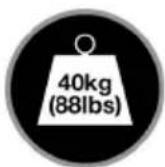
Suitable for loads up to 40kg (88lbs)

FLAT SCREEN INTERFACE KIT
(FOR ATTACHING MOUNT TO BACK
OF FLAT SCREEN)
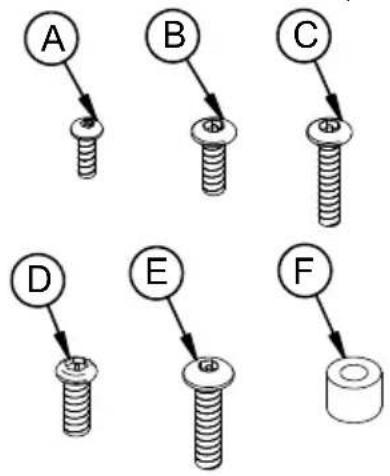

| REF PART NAME QTY | ||
| 1 | WALL PLATE 1 | |
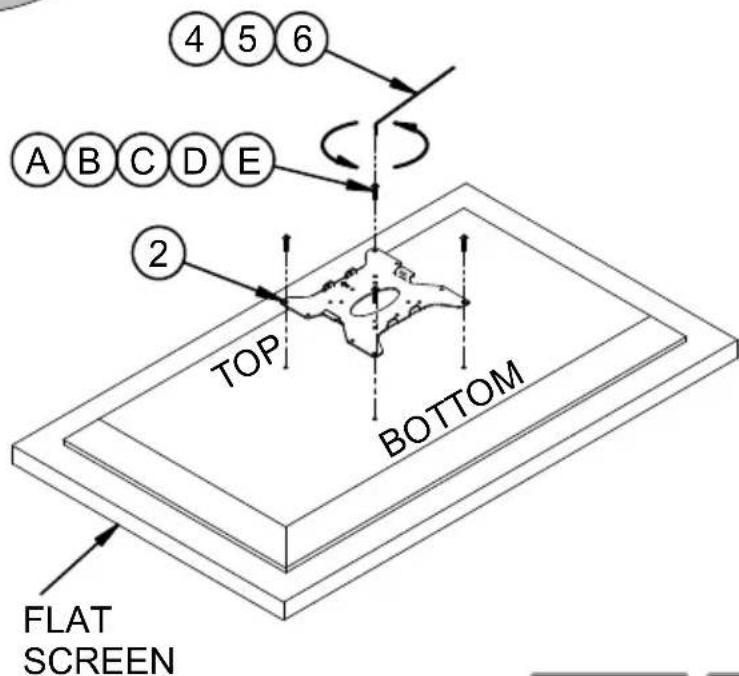
| 2 | INTERFACE PLATE 1 | |
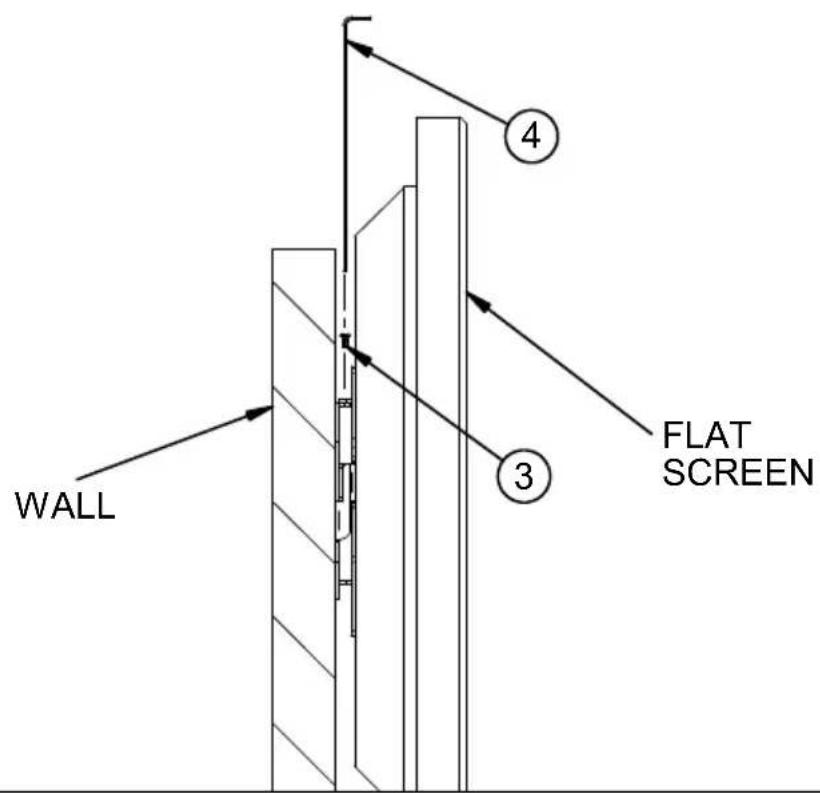
| 3 | M4 X 8mm PIN HEX SECURITY SCREW | 2 |
| 4 | 2.5mm PIN HEX SECURITY KEY (FOR PARTS 3 & A) | 1 |
| 5 | 3mm PIN HEX SECURITY KEY (FOR PARTS B & C) | 1 |
| 6 | 4mm PIN HEX SECURITY KEY (FOR PARTS D & E) | 1 |
INTERFACE KIT
| A | M4 X 12mm PIN HEX SECURITY SCREW | 4 |
| B | M5 X 16mm PIN HEX SECURITY SCREW | 4 |
| C | M5 X 25mm PIN HEX SECURITY SCREW | 4 |
| D | M6 X 16mm PIN HEX SECURITY SCREW | 4 |
| E | M6 X 25mm PIN HEX SECURITY SCREW | 4 |
| F | PLASTIC SPACER ID6.5 OD13 T12 (FOR PARTS C & E) | 4 |
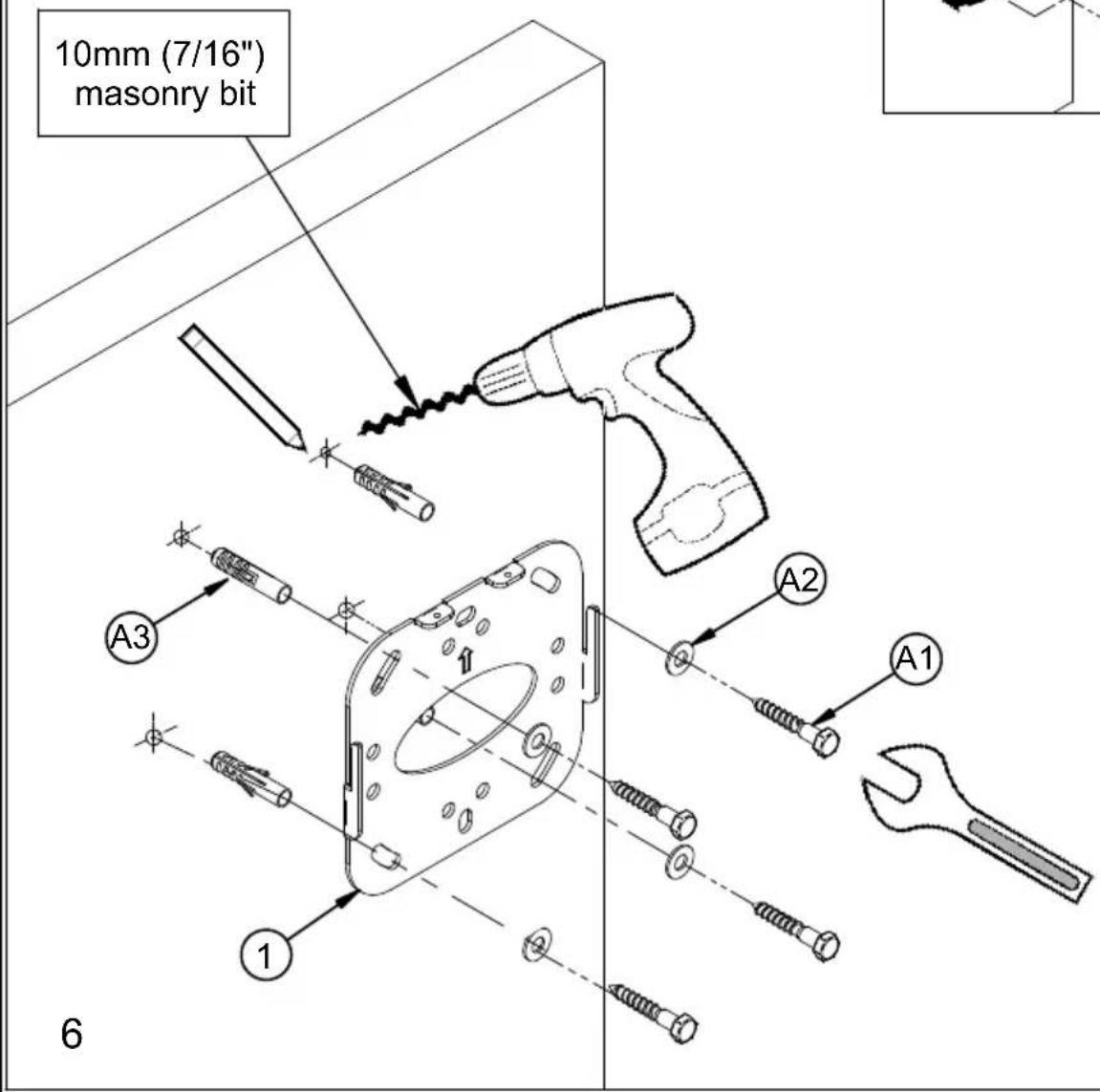
FIXING KIT
| A1 M8 X 50mm COACH SCREW 4 | ||
| A2 | M8 METAL WASHER(FOR PART A1) | 4 |
| A3 | No. 10 WALL PLUG(FOR PART A1) | 4 |
INSTALLATION INSTRUCTIONS
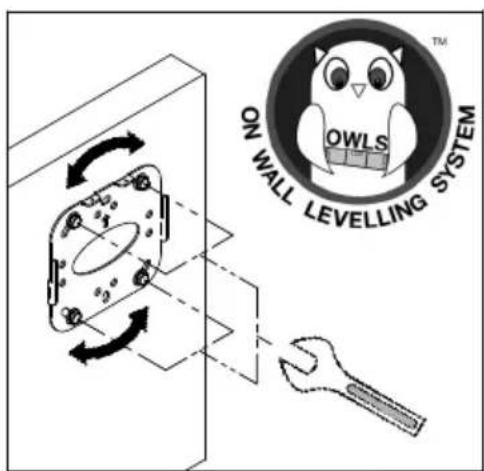
1 Fix wall plate to the wall using one of the following methods.
i. Brick / concrete walls.
ii. Wood / wood stud walls.


2
Attach interface plate to back of screen.
FOR SCREENS WITH
RECESS FIXINGS



3
i. Hook screen onto wall plate.

8
ii. Secure the screen.
OPTIONAL ACCESSORIES
B-Tech AV Component Shelves & Cable Management.

ADDITIONAL MOUNTING OPTIONS


This product is compatible with the System 2 range of professional install products from B-Tech
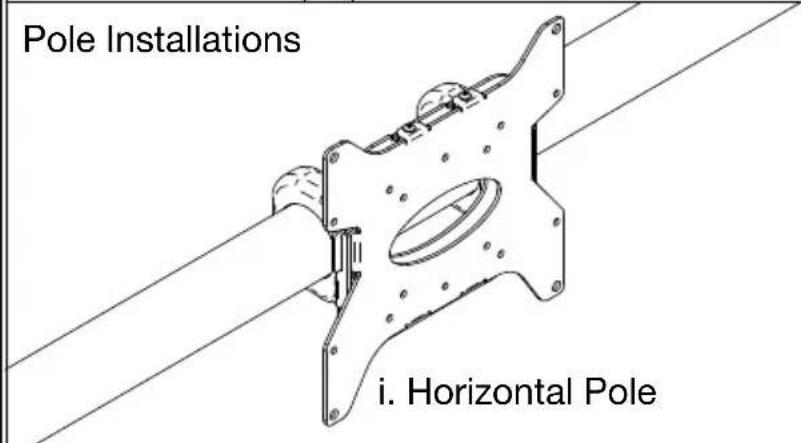

natural_image
Technical line drawing of a mechanical component with labeled 'ii. Vertio' (no other text or symbols)SAMPLE INSTALLATIONS

10

Ceiling Mounting Floor Mounting
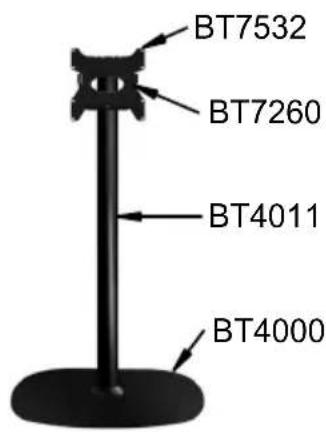
BT7532
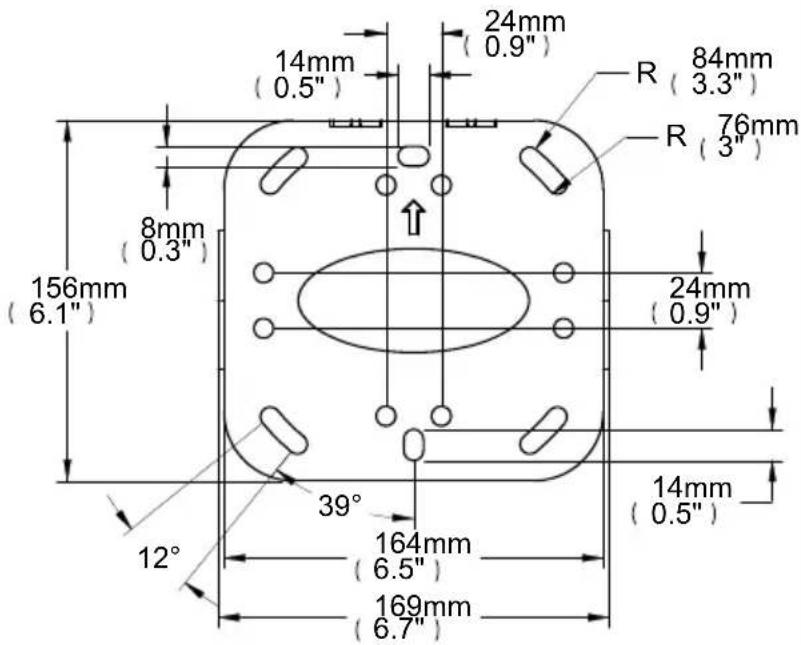
PRODUCT DIMENSIONS

INTERFACE PLATE
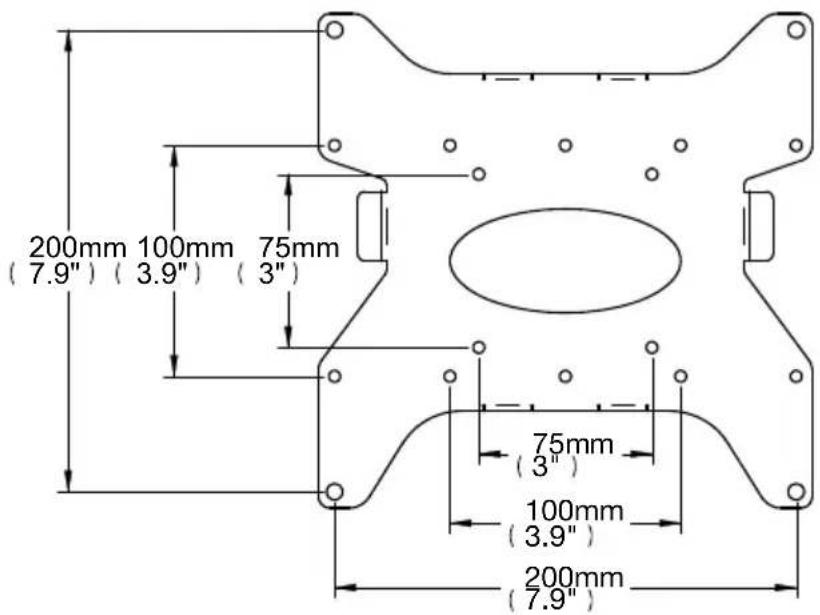

WALL PLATE
THESE INSTRUCTIONS ARE INTENDED AS A GUIDE ONLY AND B-TECH ACCEPTS NO LIABILITY FOR THE ACCURACY OF THE INFORMATION CONTAINED IN THIS DOCUMENT.

BETTER BY DESIGN
www.btechavmounts.com
B-TECH AUDIO VIDEO MOUNTS
HEAD OFFICE
Bennett House, Long March, Daventry, Northants NN11 4NR, UK
Email: info@btechavmounts.co.uk
EUROPE
Brixtonlaan 32, Zaventem 1930,
Brussels, Belgium
Email: info@btechproav.com
NORTH AMERICA
203 Eggert Road,
Buffalo, NY 14215, USA
Email: info@btechavmounts.com
SINGAPORE
Ruby Industrial Complex,
Singapore 347740
Email: info@btechavmounts.com.sg
ASIA PACIFIC
1503 Prosperity Millennia Plaza,
Quarry Bay, Hong Kong
Email: info@btechavmounts.com.hk
©2010 Bennett Technologies Limited. All rights reserved.
B-Tech Audio Video Mounts is a division of Bennett Technologies Limited.
B-Tech. Better By Design, System 2 & Mountlogic are registered trademarks of Bennett Technologies Limited.
All other brands and product names are trademarks of their respective owners.
Photographs are for illustrative purposes only. E&OE.
IP-BT7532-V2-OR2BX-230610-03 MADE IN CHINA


- FEATURES
- CONTENTS
- TOOLS REQUIRED
- INSTALLATION SAFETY INSTRUCTIONS
- General
- Product location
- Fixing hardware
- Hazard limitation
- CS
- INSTALLATION INSTRUCTIONS
- OPTIONAL ACCESSORIES
- ADDITIONAL MOUNTING OPTIONS
- SAMPLE INSTALLATIONS
- BT7532
- PRODUCT DIMENSIONS
- B-TECH AUDIO VIDEO MOUNTS
- EUROPE
- NORTH AMERICA
- SINGAPORE
- ASIA PACIFIC
Brand : B-Tech
Model : BT7532
Category : Flat screen mount