Pick your language and provide your email: we'll send you a specifically translated version.
This manual is not available in your language
Product Type
LED Television
Brand
Energy Sistem
Model
TV2070
Screen Size
32 inches (81 cm)
Resolution
1366 x 768 (HD Ready)
Display Technology
LED
Dimensions (with stand)
730 x 180 x 475 mm
Dimensions (without stand)
730 x 80 x 430 mm
Weight (with stand)
5.2 kg
Weight (without stand)
4.8 kg
Power Consumption (typical)
45 W
Power Consumption (standby)
< 0.5 W
Power Supply
AC 100-240V, 50/60Hz
HDMI Inputs
2 x HDMI
USB Ports
1 x USB 2.0
Composite Input
1 x AV (shared with component)
Headphone Output
1 x 3.5mm
Audio Output
1 x Digital Optical (SPDIF)
Tuner
DVB-T/T2/C, Analog
Remote Control
IR Remote included
Wall Mount VESA
200 x 200 mm
Speakers
2 x 5 W
Energy Class
A+
Cleaning Instructions
Use a soft, dry cloth. Avoid chemicals.
Spare Parts Availability
Contact Energy Sistem support
Frequently Asked Questions - TV2070 ENERGY SISTEM
How do I connect my TV to Wi-Fi?
The TV2070 does not have built-in Wi-Fi. Use a wired Ethernet connection or an external streaming device via HDMI.
What is the screen resolution of the TV2070?
The TV2070 has a 1366x768 HD Ready resolution.
How can I clean the TV screen safely?
Turn off the TV and let it cool. Use a soft, dry microfiber cloth to gently wipe the screen. Do not use liquids or abrasive cleaners.
What cables are included in the box?
The box includes a power cable, remote control with batteries, and a user manual. HDMI cables are not included.
Can I mount this TV on a wall?
Yes, the TV supports VESA 200x200mm wall mounts. Use a compatible bracket and follow the installation instructions.
Why is there no sound from the TV?
Check if the volume is muted or too low. Ensure external speakers are connected correctly. Try a factory reset if the issue persists.
How do I update the TV firmware?
The TV2070 updates via USB if a firmware file is available. Download from the Energy Sistem support site, transfer to a USB drive, and use the Update option in the settings menu.
What is the warranty period for this TV?
The TV2070 comes with a 2-year warranty from the date of purchase. Keep your receipt for service requests.
Can I connect a USB hard drive to record TV?
The TV2070 supports PVR (Personal Video Recorder) via USB. Connect a USB 2.0 drive (FAT32 formatted) and use the record button on the remote.
How do I reset the TV to factory settings?
Go to Settings > System > Factory Reset. Enter the PIN (default 0000) and confirm. The TV will restart with default settings.
User questions about TV2070 ENERGY SISTEM
0 question about this device. Answer the ones you know or ask your own.
Ask a new question about this device
No questions yet. Be the first to ask one.
Download the instructions for your Television in PDF format for free! Find your manual TV2070 -
ENERGY SISTEM and take your electronic device back in hand. On this page are published all the documents necessary for the use of your device. TV2070 by ENERGY SISTEM.
USER MANUAL TV2070 ENERGY SISTEM
User Manual
I. INTRODUCTION
To ensure your safety and the safety of others, please ensure that you read all the safety information before operating this product.
Keep this information in a safe place for future reference.
WARNING: To reduce the risk of fire or electric shock, do not expose this apparatus to rain or moisture.
Safety Considerations.
Position the cables so that they cannot be walked on or pinched by items placed on or against them.
Do not use the device in humid or damp conditions.
▶ Do not allow the device to get wet.
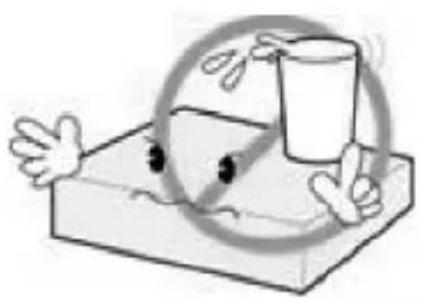
▶ Do not expose the device to dripping or splashing.
Do not place water filled objects such as vases on top of the device.
Do not place naked flame sources, such as candles, on the top of the device.
Ventilation
The slots and openings on the device are for ventilation. Do not cover or block them as it may cause overheating.
NEVER let children push anything into the holes or slots on the case.
Battery Disposal
Please ensure batteries are disposed of safely.
Never dispose of batteries in a fire or with other household waste.
Check with your local authority for disposal regulations.
Cleaning
ALWAYS unplug the product before you clean it.
Do not use liquid or aerosol cleaners.
Clean the device with a soft, damp (not wet) cloth.
ENERGYTV handling and care
Place the product in a well-ventilated area Don't install it in the cold or under direct sunlight
Leave a minimum 10cm gap all around the product
Do not disassemble, repair, or reorganize the product
Don't place cups with water or other liquids on the top of the product
Don't place objects on the top of the product
2. CONTROLS AND CONNECTIONS
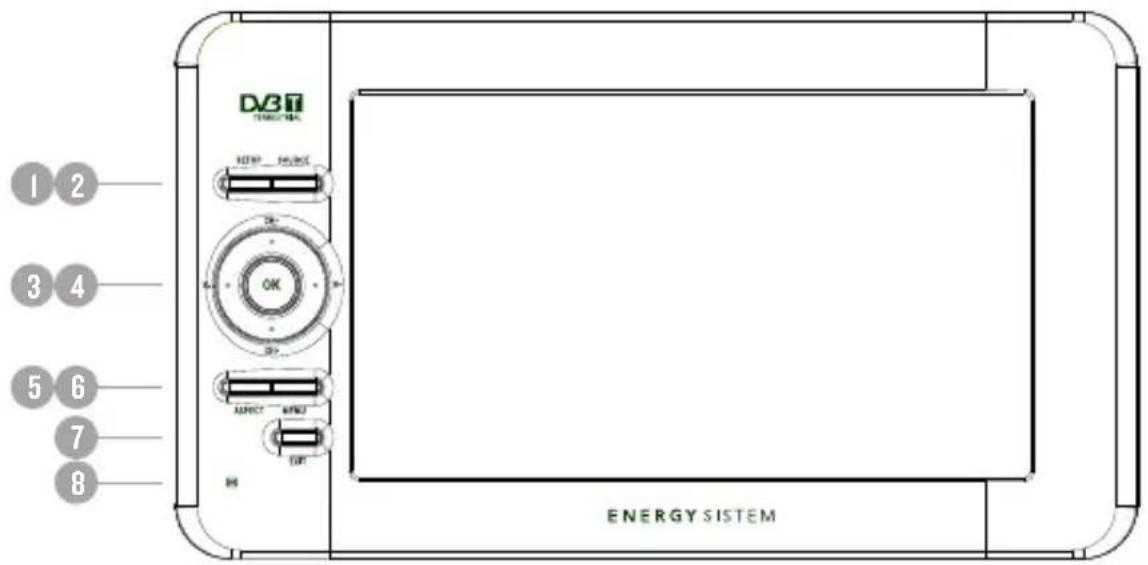
SETUP: Adjust brightness/contrast/color/hue of the screen in playback mode.
SOURCE: Select the input source.
CH+/- V+/-: Navigation buttons. Used to browse the menus and to confirm selection. In playback mode changes channel / adjusts volume.
OK: Confirm a selection within a menu or show the channel list in DVB-T mode.
ASPECT: Switch between 4:3 and 16:9 aspect ratios.
MENU: Access the setup menu.
EXIT: Leave the current menu.
IR Sensor: Receives the signal from the remote control.
Antenna coaxial connector.
3.5 mm (1/8") TRRS A/V input.
II. 3.5 mm (1/8") TRRS A/V output.
3.5 mm (1/8") Stereo earphone output.
Power Switch.
DC Power connection DC (I2 V).
USB connector.
Card reader.
3. REMOTE CONTROL
3.1. BUTTON DESCRIPTION
MUTE: Mute/unmute the sound.
EPG: Electronic Program Guide.
PAUSE: Pause or resume the playback.
FAV: Access your favorite channels.
TV/RADIO: Switch between TV and radio channels.
STOP: Stops the playback or recording.
CH+/- V+/-: Navigation buttons. Used to browse the menus and to confirm selection. In playback mode changes channel / adjusts volume.
OK: Confirms the selection.
MENU: Access the main menu.
SETUP: Adjust the brightness/contrast/color/hue parameter of TFT screen.
II. SCREEN: Switch on/off the screen.
INFO: Display information about the channel being viewed or special function indicated on the menu.
RECORD: Record the program manually and select the record duration if pressed twice.
Number keys: Select channels by number or use
when numerical input is required.
AUDIO: Selects between available audio tracks or sets the sound mode as LR (stereo), LL (left) or RR (right).
TTX: Teletext in DVB-T mode.
EXIT/RECALL: Return to the previous screen or menu.
SUBTITLE: Switch among available subtitles.
SPEAKER: Enables/disables the integrated speakers.
ASPECT: Switch between 4:3 and 16:9 aspect ratios.
Note:
SUBTITLES/TEXT/AUDIO may not be available for all channels.
A/V output is unavailable when working in A/V in mode: it only works in DVB-T mode.
FUNCTION/SCREEN/SPEAKER/ASPECT will act as RED/GREEN/YELLOW/BLUE key depending on context.
3.2. BATTERy
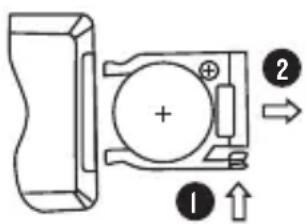
Pull the battery loader out and insert a CR2025 battery.
Make sure to place the battery in the correct direction.
When not using the remote control for a long time remove the battery.
This portable TV uses a smart battery management system with low-battery detection.
If the battery voltage falls below a specific value, the unit will enter low battery mode displaying a flashing low battery icon in the OSD, indicating the user needs to recharge the TV immediately.
If the AC/DC adapter is connected the battery will be charged whatever the power switch is on or off.
When the battery is almost exhausted a blinking empty battery icon will be displayed on the left-up corner. The screen and audio will be disabled but the system is still working. If the user plugs the DC adaptor soon enough the system will resume playback.
5. USER INTERFACE
Note that the first time you use EnergyTV it will automatically show the Setup->Installation screen in order to scan for TV and radio channels. Please refer to Setup->Installation in page 8.
Once the channel scan is finished and all the channels are stored into the database, you can start to watch the digital terrestrial TV channel or listen to the radio broadcast, some typical operations are given in this chapter.
Press
Other manuals ENERGY SISTEM
Discover other manuals and user guides for the brand ENERGY SISTEM
💬 Hi! I'm your manual assistant.I know your ENERGY SISTEM TV2070.
How can I help you? (use, settings, error codes, maintenance, explaining a step from the manual, etc.)💡 Examples :
• How do I use it ?
• Error code E3 ?
• How do I clean it ?