
DTV-43 - Television Fantec - Free user manual and instructions
Find the device manual for free DTV-43 Fantec in PDF.


| Product Type | LED TV |
| Screen Size | 43 inches (diagonal) |
| Resolution | 1920 x 1080 (Full HD) |
| Dimensions (without stand) | 96.5 x 56.0 x 8.0 cm (38.0 x 22.0 x 3.1 in) |
| Weight (without stand) | 7.2 kg (15.9 lbs) |
| Power Consumption (typical) | 70 W |
| Standby Power Consumption | < 0.5 W |
| Energy Class | A+ |
| Inputs | 2x HDMI, 1x USB, 1x AV, 1x VGA, 1x Antenna |
| Audio Output | Built-in speakers (2x 8W) |
| Remote Control | Included (batteries not included) |
| Wall Mount Pattern | VESA 200x200 mm |
| Operating System | Basic (non-smart) |
| Supported Video Formats | MPEG-2, MPEG-4, H.264, AVI, MKV |
| Cleaning Instructions | Wipe screen and body with a soft, dry cloth. Do not use harsh chemicals. |
| Safety Warnings | Do not expose to water or moisture. Do not open the back cover. |
| Spare Parts Availability | Contact Fantec support for replacement parts. |
| Repairability Index | 5.0 / 10 (estimated) |
| Manual Languages | English (PDF, 7 pages) |
| Warranty | 2 years (standard) |
Frequently Asked Questions - DTV-43 Fantec
User questions about DTV-43 Fantec
0 question about this device. Answer the ones you know or ask your own.
Ask a new question about this device
Download the instructions for your Television in PDF format for free! Find your manual DTV-43 - Fantec and take your electronic device back in hand. On this page are published all the documents necessary for the use of your device. DTV-43 by Fantec.
USER MANUAL DTV-43 Fantec
3.5" Portable DVB-T TV
Model: FANTEC DTV-35

natural_image
Black fantasy TV displaying a soccer player on a grass field, with no visible text or symbols on the device itself.User Manual
Table of contents
1 About the Portable TV ......2
2 Introduction....3
2.1 Power On/Off....3
2.2 Channel switch....3
2.3 Volume Control....3
2.4 Program list....3
2.5 Sub-menu 3
2.6 Reset....3
3 System Setup....4
3.1 Manual Scan....4
3.2 Auto Scan....4
3.3 System setting 4
3.4 Display setting....4
3.5 Factory Default ....4
3.6 Version ....4
4 Use of battery....5
5 Accessories ....5
6 Specifications....6
1 About the Portable TV

natural_image
Black Lantec TV displaying a soccer player on a grassy field, no visible text or symbols on the device itself. | Menu Button |
| Power Button / Return Button | |
| ▲ | Channel + |
| ▼ | Channel - |
| ▶ | Vol + |
| ◀ | Vol - |
| OK | Confirm Button |
 | DC Jack |
 | Earphone Jack |
2 Introduction
2.1 Power On/Off
Power On: Press button and hold for 3 seconds, the system will start up. Power Off: Press button and hold for 3 seconds, the system will pop up a dialog box as follow:

Press OK to power off the player.
2.2 Channel switch
Press ▲▼ to channel +/-.
2.3 Volume Control
Press to increase or decrease the volume.
2.4 Program list
Press under TV/Radio playback mode to show the program list and press ▲▼ to select the TV/Radio channel, then press OK to confirm.
2.5 Sub-menu
Press OK under TV/Radio playback mode to enter the sub-menu as follow:
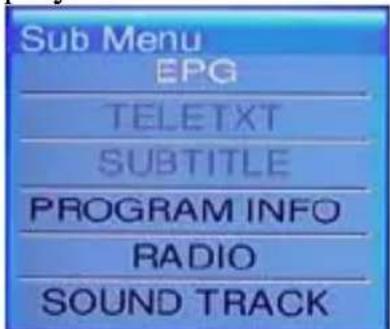
Move the cursor and press OK to enter these functions, and then you can press the Direction Key to select different option, press to return and exit this sub-menu.
2.6 Reset
If the player suspend hanged up, please insert a sharp stick into the reset hole and press lightly, the system will clear all setting and power off.
3 System Setup
Press to enter the system setup menu as follow:

natural_image
Icon set displaying five white icons: hand gesture, globe, gear, server, document, and monitor on dark background (no text or symbols)3.1 Manual Scan
Move the cursor to and press OK to start MANUAL SCAN; you can set the start frequency, end frequency and band width manually.
3.2 Auto Scan
Move the cursor to and press OK to start AUTO SCAN base on the Country setting.
3.3 System setting
Move the cursor to and press OK to enter system setting menu, you can set Area, Time Zone, OSD Language.
3.4 Display setting
Move the cursor to and press OK to enter Display Setting menu, you can set LCD Brightness, Contrast, Hue and Aspect Ratio option.
3.5 Factory Default
Move the cursor to 📄 and press OK to load Factory Default setting.
3.6 Version
Move the cursor to version information. and press OK to show the Hardware and Software
4 Use of battery
Precautions
Please fully charge the battery when you use the unit for the first time. For the first 3 times the charging takes at least 8 hours to extend the life time of the battery. The unit will get warm when the unit is in use, this is normal. Please power off when the unit is not used for a long time. The unit will be automatically powered off when the battery is too low.

Warning
z Charge the battery with the provided AC/DC adapter.
5 Accessories
Accessories
Please check the accessories according to the following list:
AC/DC adapter
User manual
6 Specifications
| Specifications | |
| Digital TV tuner DVB-T module | |
| Antenna | Built-in telescopic antenna to receive the digital terrestrial TV programs |
| Panel | 3.5" TFT-LCD Display with the resolution of 320*240 pixel |
| IO | - Earphone jack- DC-in Jack |
| Buttons | - Reset Hole- Volume key- Navigation key- Menu key- Esc key /power on/off |
| Battery | Lithium-ion rechargeable battery (2400mAh, 3.7V)Watch DTV up to 4 hours (Earphone Mode) |
| Dimensions 117 x 75 x 16.1 mm | |
| Weight | 165g with battery |
| Regulations | CE, RoHS |
| Watch DVB-T programs | Support digital teletext, EPG |
| Language English, German, Spanish, Italian, Dutch, French, Danish, Finnish, Swedish | |
| Channel Scan Auto scan / Manual scan | |


- 3.5" Portable DVB-T TV
- Table of contents
- About the Portable TV
- Introduction
- Power On/Off
- Channel switch
- Volume Control
- Program list
- Sub-menu
- Reset
- System Setup
- Manual Scan
- Auto Scan
- System setting
- Display setting
- Factory Default
- Version
- Use of battery
- Precautions
- Warning
- Accessories
- Accessories
- Specifications
Brand : Fantec
Model : DTV-43
Category : Television