
Forever 400 Pro - Iron POLTI - Free user manual and instructions
Find the device manual for free Forever 400 Pro POLTI in PDF.


| Product Type | Steam Generator Iron |
| Brand | Polti |
| Model | Forever 400 Pro (Vaporella Forever 400 Pro) |
| Power Supply | 220-240 V, 50/60 Hz |
| Power Consumption | 2000 W |
| Water Tank Capacity | 1 L (approx) |
| Steam Pressure Indicator | Yes, indicator light (5) |
| Iron Temperature Control | Adjustable knob (7) with fabric settings |
| Steam Flow Control | Adjustable knob (6) for variable steam output |
| Continuous Steam Jet | Yes, button (12) for continuous steam (PRO model only) |
| Steam Request Button | Yes, on iron handle (10) |
| Iron Heating Indicator | Yes, indicator light (11) |
| Cable Winder | Yes, integrated winder (1) |
| Self-Refilling Tank | Yes, tank can be refilled during use |
| Flex (Steam and Electric) | Combined steam hose and power cord (8) |
| Illuminated On/Off Switch | Yes, button (2) |
| Safety Features | Thermal fuse, pressure safety valve, auto shut-off (by unplugging) |
| Care Instructions | Clean with moist cloth; do not use solvents |
| Material | Plastic body, stainless steel soleplate |
| Color | White |
| Dimensions (approx) | Base: 30 x 20 x 25 cm; Iron: 20 x 10 x 5 cm |
| Weight (approx) | 3.5 kg |
Frequently Asked Questions - Forever 400 Pro POLTI
User questions about Forever 400 Pro POLTI
0 question about this device. Answer the ones you know or ask your own.
Ask a new question about this device
Download the instructions for your Iron in PDF format for free! Find your manual Forever 400 Pro - POLTI and take your electronic device back in hand. On this page are published all the documents necessary for the use of your device. Forever 400 Pro by POLTI.
USER MANUAL Forever 400 Pro POLTI
natural_image
White Uropore electric vacuum cleaner with open lid, no visible text or symbols on bodyVaporella®
FOREVER 400 PRO
natural_image
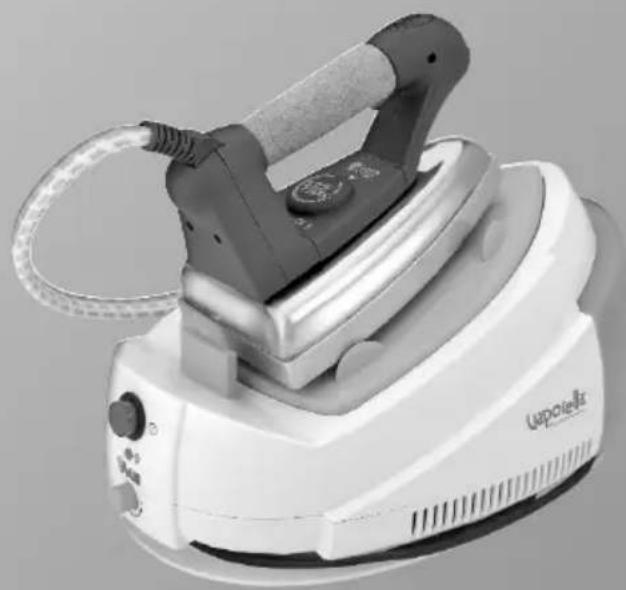
White Lappielle air iron with attached cord, no visible text or symbols on the device itselfVAPORELLA FOREVER 400 - FOREVER 400 PRO


natural_image
Close-up of a mechanical component with a black arrow pointing left, labeled 'Fig. 1' (no other text or symbols)
natural_image
3D mechanical component diagram showing a lever and base assembly (no text or symbols)

natural_image
Close-up of a white appliance component with a curved arrow indicating rotation or movement (no text or symbols visible)

natural_image
Close-up of a white electric machine with a close-up inset showing internal components (no text or symbols visible)VL Forever 400 - 400 PRO M0S08534 1P08


Read these instructions carefully before using the appliance.
KEY
1) Cable winder
2) Illuminated ON/OFF switch
3) Tank
4) Dip tube
5) Steam pressure indicator light
6) Steam flow control knob
7) Iron temperature control knob
8) Flex (Steam and electric)
9) Power supply cable
10) Steam request button
11) "Iron heating" indicator light
12) Continuous steam jet button (Only VL Forever 400 PRO)
Polti S.p.A. reserves the right to change equipment or accessory specification without prior notice.
CE This unit conforms with EC-directives 2004/108/CE (EMC) and 2006/95/CE (low voltage).
PLEASE READ THE FOLLOWING
BEFORE USE
KEEP THESE INSTRUCTIONS
- Read these instructions for use carefully before using the appliance.
- Any use which does not comply with these instructions will invalidate the warranty.
- The wiring system to which the appliance is connected must always comply with the laws in force.
- Before connecting the appliance, make sure that the mains voltage is the same as the voltage indicated on the data label of the appliance and that the power outlet is connected to earth
- Always turn off the appliance at the on/off switch before unplugging it.
- If the appliance is left unused, always disconnect it from the mains. Never leave the appliance unattended with the cable plugged into the mains.
• Always make sure the appliance is un-
plugged before performing maintenance work of any kind
- Do not pull the power supply cable out of the socket, but grasp the plug itself to avoid damage to the socket.
- Do not allow the power supply cable to be twisted, crushed, stretched, or come into contact with sharp or hot surfaces.
- Do not use the appliance if the power cable or other important parts are damaged.
- Do not use electric extension leads that are not authorized by the manufacturer, as they may cause damage or fire.
- If it is necessary to replace the power supply cable, please refer to the nearest Polti authorised service centre, since the use of a special tool is necessary.
- Never touch the appliance with wet hands or feet with the cable plugged into the mains.
- Do not use the appliance when barefoot.
- Do not use the appliance near a bathtub, shower or container full of water
- Never immerse the appliance, the cable or the plugs in water or other liquids.
- Use of the appliance where there is a danger of explosions is prohibited.
- Do not use the product with toxic substances.
- Do not lay the hot appliance on surfaces sensitive to heat.
VAPORELLA FOREVER 400 - FOREVER 400 PRO
- Do not leave the appliance exposed to wind or rain.
- Do not place the appliance near a live element, an electric stove or any other source of heat.
- Do not expose the appliance to extreme temperatures
- Never let children or people who are not familiar with how the appliance works use it.
- Do not press the buttons hard or with a pointed object such as a pen.
- Always rest the appliance on a stable surface.
- In case of accidental fall of the appliance it is necessary to have it checked by an authorized Service Centre as the internal safety features may have been affected.
- If the appliance is dropped and shows signs of damage, do not use it but take it to a technical service centre.
- In order to avoid prejudicing the safety of the appliance, use only original spare parts and accessories approved by the manufacturer.
- Do not wind the power cable around the appliance, especially when the appliance is still hot.
- During refilling water, switch off and disconnect the appliance from the mains.
- It is necessary to keep the unit in horizontal position during operation.
- Do not direct the steam jet on electrical appliances.
- Leave the appliance to cool down before cleaning it.
- Before storing the appliance be sure that it has completely cooled down.
- This appliance is equipped with safety devices which are to be replaced only by a suitably qualified technician.
- Do not direct the steam jet at people, animals or debris. Danger of burns!
- Never place your hands inside the jet of steam.
- Do not put any detergent or chemical substance in the water tank.
• Water, in nature, contains magnesium and mineral salts which aid limescale
Danger of burns!
build-up. To avoid this residue may cause problems to your appliance, use demineralized water only.
- If you iron sitting down, do not put your legs under the ironing board, the steam can cause burns.
- Iron only on heat resistant surfaces and on surfaces that allow the steam to escape, e.g. mesh ironing boards.
- The iron must be used and rested on a stable surface.
- When placing the iron on its stand, make sure that the surface on which the stand is placed is stable.
- This appliance is not intended for use by persons (including children) with reduced physical, sensory or mental capabilities, or lack of experience and knowledge, unless they have been given supervision or instruction concerning use of the appliance by a person responsible for their safety.
• Children should be supervised to ensure that they do not play with the appliance.
- The appliance must not be used if it has fallen, been dropped or when it has visible signs of damage or leaks.
- The electric cable (Y type power cord) must not be replaced by the user. The cord must always be replaced by a qualified technician from one of our authorised service centres.
IMPORTANT
Before leaving our factory all our products are rigorously tested. Therefore, your VA-PORELLA may contain some residual water in its tank.
CORRECT USE OF THE PRODUCT
This appliance is intended for home use as a steam generator as described and in accordance with the instructions provided in this manual.
Please read these instructions carefully and keep them, as you may find them useful in future.
VAPORELLA FOREVER 400 - FOREVER 400 PRO
Polti declines liability for any damage or accident derived from any use of VA-PORELLA which is not in conformity with the instructions contained in this manual.
ATTENTION
Directive 2002/96/EC (Waste Electrical and Electronic Equipment - WEEE): information for users
This product complies with EU Directive 2002/96/EC.

The crossed-out wastebasket symbol on the appliance means that at the end of its useful lifespan, the product must be disposed of separately from ordinary household wastes.
The user is responsible for delivering the appliance to an appropriate collection facility at the end of its useful lifespan.
Appropriate separate collection to permit recycling, treatment and environmentally compatible disposal helps prevent negative impact on the environment and human health and promotes recycling of the materials making up the product. For more information on available collection facilities, contact your local waste collection service or the shop where you bought this appliance.
PREPARATION FOR USE
- Remove the water tank (3) from the appliance (fig.1).
- Remove the dip tube (4) from the tank (fig.2).
- Fill the water tank with water up to the MAX level marked on the water tank.
- Water, in nature, contains magnesium and mineral salts which aid limescale build-up. To avoid this residue may cause problems to your appliance, use demineralized water only.
- Never use distilled water or scented water.
- Connect the cable plug to an earthed power supply of the correct voltage.
- Press the illuminated ON/OFF switch (2); both the steam pressure indicator light (5) and the “iron heating” indicator light (11) go on.
- The noise you hear when you turn the appliance on, and periodically during its use, is due to the water refilling system.
INSTRUCTIONS FOR USE
Before ironing a garment, it is always advisable to check the symbols and instructions on the label provided by the garment manufacturer.
Check which kind of ironing is recommended, referring to the table below:
| Steam ironing allowedFor dry ironing, set the iron temperature on··· | |
| Steam ironing allowedFor dry ironing, set the iron temperature on··· | |
| Check the fabric's resistance to steam ironing, dry ironing allowed with temperature set on · | |
| - do not iron- steam ironing or treatment not allowed |
STEAM IRONING
- Set the iron temperature on "COTTON - LINEN" steam position (fig. 3), by turning the control knob (7).
- Wait for both the steam pressure indicator light (5) and the "iron heating" indicator light (11) to go off (about 3 minutes). Push the steam request button (10) on the iron to release steam from the holes on the sole-plate. Release the button and the steam flow stops.
NOTE: at the first request of steam, a few drops of water mixed with steam may come out of the soleplate until the temperature stabilizes. It is advisable to direct the first jets of steam onto an old cloth until a uniform stable jet of steam is obtained.
- By turning the steam flow control knob (6) you can vary the quantity of steam according to the kind of textiles to be ironed (more or less delicate). You can increase the steam flow by turning the knob in clockwise direction. Turning it in an anticlockwise direction reduces the steam flow (fig.4). We suggest the maximum emission for heavy
textiles like jeans and linen, medium for cotton, minimum for light delicate textiles.
CONTINUOUS STEAM JET BUTTON
(Only VL Forever 400 PRO)
- In order to have a continuous steam jet, move the button (12) forwards. Steam will keep on coming out, even releasing the steam request button. To interrupt the outlet, move the button (12) backwards (fig.5).
DRY IRONING:
- For DRY ironing (without steam), set the iron temperature by turning the control knob (7) on the position required for the fabric, as shown on the same knob. When dry ironing, be careful NOT TO PRESS THE STEAM REQUEST BUTTON (10) on the iron, otherwise water may leak from the soleplate.
NOTE:
- Both (5) and (11) indicator lights go on and off during operation; this is quite normal and means that the electric resistances are operating to maintain the system at a constant temperature.
- If no steam is released from the iron, check that the steam pressure light (5) is off.
FILLING THE TANK
It is necessary to fill up the tank with water before it becomes empty. If no steam comes out when pressing the steam request button, this means that there is no more water in the tank.
To keep on working, simply restore the water level in the self-refilling tank as described in the “Preparation for use” paragraph.
CABLE WINDER
Put away the iron when you have finished ironing. Let the iron cool before putting it away. Wind the cable around the cable winder (1) as shown in (fig.6). Hook the end of the cable with the clip to the rest of the cable so that it will not come off.
CARE OF YOUR VAPORELLA
- Before attempting any maintenance operation, always disconnect the appliance from the mains.
- To clean the body of the appliance, simply use a moist cloth. Do not use solvents or detergents which may harm the body material.


- Vaporella®
- FOREVER 400 PRO
- KEY
- KEEP THESE INSTRUCTIONS
- VAPORELLA FOREVER 400 - FOREVER 400 PRO
- Danger of burns!
- IMPORTANT
- CORRECT USE OF THE PRODUCT
- ATTENTION
- PREPARATION FOR USE
- INSTRUCTIONS FOR USE
- STEAM IRONING
- CONTINUOUS STEAM JET BUTTON
- DRY IRONING:
- NOTE:
- FILLING THE TANK
- CABLE WINDER
- CARE OF YOUR VAPORELLA
Brand : POLTI
Model : Forever 400 Pro
Category : Iron