
E-Control - Thermostat Magnum - Free user manual and instructions
Find the device manual for free E-Control Magnum in PDF.


| Product Type | Programmable Thermostat |
| Dimensions | 120 x 80 x 30 mm |
| Weight | 0.2 kg |
| Power Supply | 2 AA batteries or 24V AC |
| Functions | Heating and cooling control, programmable schedule, temperature display, fan control |
| Maintenance | Clean with dry cloth; avoid moisture |
| Safety | RoHS compliant, low voltage operation |
| Spare Parts | Batteries, mounting screws |
| General Info | For residential heating and cooling systems |
Frequently Asked Questions - E-Control Magnum
User questions about E-Control Magnum
0 question about this device. Answer the ones you know or ask your own.
Ask a new question about this device
Download the instructions for your Thermostat in PDF format for free! Find your manual E-Control - Magnum and take your electronic device back in hand. On this page are published all the documents necessary for the use of your device. E-Control by Magnum.
USER MANUAL E-Control Magnum
User- and installation manual
Dated March 1 st 2004
Important:
Switch off power before connecting or disconnecting wiring to thermostat.
A qualified electrician to current IEE regulations must install all wiring, failure to do so may invalidate the warranty.
Introduction:
The ME-control thermostat is very user friendly and has intelligent software to guide the user throughout the whole menu-structure. The thermostat is capable of switching your underfloor heating system on and off, up to four different times of the day. The ME-control has an automatic Setback period. The setback periods are the events between your comfort periods. This will lower your room temperature as well as your energy costs without reducing the comfort.
In order to program just follow the onscreen information, you will be guided through the different menus and functions automatically.
Nevertheless it is strongly recommended to study the operators manual carefully and keep it for future reference.
The ME-Control has a 3-button structure:
Middle button : Selection button, higher/lower and Scroll through options.
Right button : to confirm choices/settings and to proceed.
Left button : to rectify wrong choices and settings.

* Some menu parts contain more program choices than displayed at first sight. Use middle button to scroll down until “Back to main Screen” is displayed, this is always the last choice in all menus.
Start up menu:
When switching the thermostat on for the first time, you will be asked a series of questions about your heating system.
- Language - you have a choice between English, German & French
- Date - set to present date
- Time - choose between 12 & 24 hr clock, then set to present time
- Heating system - choose "with floor sensor"
- Floor thickness - Enermat (floor adhesive & tiles) or Enercable (<5cm, <10cm or >10cm)
- Standard settings - Factory preset settings, can be changed in later menus.
- Comfort temperature - Factory setting 21.5°C, change now or later in menu.
- Select timer menu - only for new floors. Please allow for drying out period.
- Timer - set for when floor is completely cured.
The menu-structure is provided with 3 main programs:
Start-up menu : to program factory or change settings.
Mode : to change settings temporarily
Menu : to change settings permanent
The auto standard comfort period factory settings:
Monday till Friday : comfort heating during 06.00 till 09.00 and 15.00 till 22.00 hrs.
Saturday and Sunday : comfort heating during 09.00 till 23.00 hrs.
Besides the above-mentioned periods the thermostat works on stand-by and is auto-programmed for lower setback temperatures to save energy consumption.
Explanation of the LED colors and signals :
Yellow : Heating system is operational. No energy consumption.
Red : Active energy consumption. System in heating mode.
Green : Heating system in setback period.
Red flashing fast : Sensor failure.
Heating system non-operational (Please contact Technical Support).
Red flashing slowly : Heating system in sleeper function
will be activated by timer at mentioned date/time.
Explanation main screen textures:
Comfort period : heating system operational
Setback : setback period activated
Heating : power on
Timer activates on : date and time of activation of the heating system
Thermostat off : heating system not operational
Manual control : auto-standard settings off - manual temperature adjustment +/-
Sensor failure : heating system non-operational
At the same time, the appearance of main-screen is the confirmation that all standard settings or pre-programmed settings are fully operational.
Use the auto-program as confirmed in Start menu approx. 14 days after date of activation. In this way the memory of the thermostat is able to store and adapt historical temperature movements.

Important:
Changing standard settings is only possible from main screen, by using Mode (left button) and Menu (right button)
Press the Mode button for temporary changes and the Menu button for permanent changes in standard settings.
Always return to main screen after new settings are programmed.
Press Mode for temporary changes and next options appear in display:
Options
Explanation
-
Temporary temperature : Used only when thermostat is in setback mode and extra heating is required.
-
Thermostat Auto : Thermostat will follow factory settings or 7 days program.
-
Manual Control : The thermostat will heat continuously 24/7 according to the comfort temperature.
-
Thermostat OFF : Thermostat is turned off and will not follow any program, however all presets remain in memory.
-
Timer : Timer menu is used when there will be no heat requirement for a long period of time, for example during holidays.
This is also used when new floors are installed, to allow a drying out time and avoid possible construction damage because of early heating.
- Back to main screen : Return to main screen.
Scroll to option and press confirm to activate one of the above.
Press Menu button for permanent changes and next options appear in display:
Options
Explanation
-
Program/Comfort temperature: Change Comfort temperature.
Change the 7 days program to your preferred times. (To activate
7 Days program – return to main screen, press Mode and scroll to
Thermostat Auto and confirm).
Return to Factory Settings. -
Date/time : Date & time can be accessed and changed
-
Other functions : *See explanation other functions
-
Child lock on/off : To prevent unintentional changing of settings. The easy ON/OFF indicator will tell you whether the child lock is on or off.
-
Back to main screen : Return to main screen
*3. Options for "Other functions":
- Energy consumption : Consumption of energy in % during displayed period. (Please refer to calculation on last page).
- Language : Only change if necessary
- Celsius / Fahrenheit : Select preference
- Reset All : Allows you to reset the thermostat to factory settings and return to start menu.
- Advanced functions : See explanations advanced functions.
- Back to main-screen : Return to main screen.
3.5 Options in "Advanced functions" menu :
Attention !!!
Changes in advanced functions menu may cause negative influence concerning the energy consumption and comfort feelings and even disturb the heating system completely. Only use this menu in consultation with and support from the supplier or official installer involved.
Options
Select and Confirm
-
Heating system : Only to use in case of wrong setting in start menu or for an other (new) application.
-
Sensor temperature : Shows the actual sensor temperature.
-
Calibration : +/- adjustment of sensor- and measured temperature.
-
Adaptive function on/off : Off= de-activation all self programming adjustments.
-
Differential : +/- adjustment reaction time / graduation schedule.
-
Contrast : Adjust contrast of display with right and left button.
-
Back to main-screen : Return to main screen.
Disturbances, failure signals and/or wrong readout of information:
-
Return to Start menu: in main-screen press the Menu button, select other functions and confirm, select Reset All and confirm again.
Select language .....the first question of the Start menu will appear in the display and proceed. -
Switch the current off/on and try again.
-
Switch off the power, remove the thermostat and check if all wiring is connected correctly.
-
If none of the above mentioned correct the problem contact your supplier or installer.
Installation instructions for mounting the ME-Control:

Press the housing of the display slightly together at the sides and use a pencil or something similar, not sharp object, and press it carefully into the square hole on the upside of the thermostat. Both, housing and base-plate, can now be removed
Ensure that the power supply is switched off. Connect the wires to the thermostat as per the instructions.
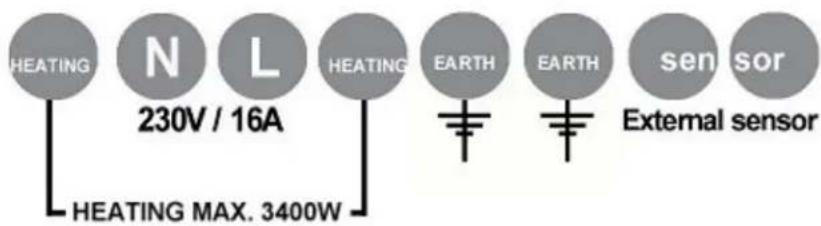
Locate the ME-Control thermostat into the back box (deep single switch back box) and secure in place with two screws.
Replace the base-plate and display housing and push into place.
Technical Details:
Supply voltage : 230V - 50/60 Hz
Output relay : Max. 16 Amps. / 230V
Temperature range : +5/+40°C (Option °F)
Housing : IP20
Built in back box (deep 50mm single switch back box) according to Standard DIN sizes
Delivered incl. built-in sensor and external (floor) sensor
Colour : Polar white (RAL 9010)
Guarantee : 2 years manufacturers guarantee
Approvals : VDE / FI / CE / CCA
Manufacturer : C&F Technics, The Netherlands
More information:
ENERfoil magnum LTD
P.O. Box 2004
Aberfeldy
Perthshire
PH15 2YF
Technical Support: 01887 830638 (Mon-Fri, 9 am -5 pm).
Fax: 01887 830640
Email: technical@enerfoil.com
Energy consumption formula:
The read out of energy consumption is as follows;
30 days x 24 hours x %Last 365 days x Installed power = energy consumption in kWh 100
365 days x 24 hours x %Last 365 days x Installed power = energy consumption in kWh 100
Example:
30 days x 24 hours x 20 (% Last 365 days) x 1.7 (kW installed power) = 244 kWh 100
If the energy consumption screen displays N/A, this means there is no available percentage at present time. Thermostat hasn't reached the period of measuring yet.
- USER- AND INSTALLATION MANUAL
- IMPORTANT
- INTRODUCTION
- THE ME-CONTROL HAS A 3-BUTTON STRUCTURE
- START UP MENU
- THE MENU-STRUCTURE IS PROVIDED WITH 3 MAIN PROGRAMS
- THE AUTO STANDARD COMFORT PERIOD FACTORY SETTINGS
- EXPLANATION OF THE LED COLORS AND SIGNALS
- EXPLANATION MAIN SCREEN TEXTURES
- OPTIONS
- EXPLANATION
- 3. OPTIONS FOR "OTHER FUNCTIONS
- 3.5 OPTIONS IN "ADVANCED FUNCTIONS" MENU
- ATTENTION
- SELECT AND CONFIRM
- DISTURBANCES, FAILURE SIGNALS AND/OR WRONG READOUT OF INFORMATION
- INSTALLATION INSTRUCTIONS FOR MOUNTING THE ME-CONTROL
- TECHNICAL DETAILS
- MORE INFORMATION
- ENERGY CONSUMPTION FORMULA
Brand : Magnum
Model : E-Control
Category : Thermostat