
AN-3DG20B - 3D Glasses SHARP - Free user manual and instructions
Find the device manual for free AN-3DG20B SHARP in PDF.


| Product Type | Active Shutter 3D Glasses |
| Brand | Sharp |
| Model | AN-3DG20B |
| Weight | Approx. 40 g (without battery) |
| Dimensions (WxHxD) | 170 x 45 x 165 mm |
| Power Source | Built-in rechargeable lithium-ion battery |
| Battery Capacity | 100 mAh |
| Charging Time | Approx. 2 hours via USB |
| Operating Time | Approx. 30 hours (continuous use) |
| Compatibility | Sharp Aquos 3D TVs (2013 and later models) |
| 3D Technology | Active Shutter (IR synchronization) |
| Lens Type | LCD shutter lens |
| Refresh Rate | 240 Hz (per eye 120 Hz) |
| Transmission | Infrared (IR) |
| Recommended Viewing Distance | 2 to 5 meters |
| Cleaning | Wipe gently with a soft, dry cloth |
| Storage Temperature | -10°C to 50°C |
| Operating Temperature | 0°C to 40°C |
| Safety | Meets CE and FCC standards |
| Recycling | Dispose according to local regulations for electronic waste |
| Included Accessories | USB charging cable, storage case |
Frequently Asked Questions - AN-3DG20B SHARP
User questions about AN-3DG20B SHARP
0 question about this device. Answer the ones you know or ask your own.
Ask a new question about this device
Download the instructions for your 3D Glasses in PDF format for free! Find your manual AN-3DG20B - SHARP and take your electronic device back in hand. On this page are published all the documents necessary for the use of your device. AN-3DG20B by SHARP.
USER MANUAL AN-3DG20B SHARP
These 3D Glasses (AN-3DG20) are only for use with SHARP AQUOS LCD TVs supporting 3D. For details of how to make adjustments for 3D functions and to fully enjoy 3D viewing, refer to the operation manual of your TV.
Thank you for your purchase of the 3D Glasses for SHARP 3D AQUOS. To ensure safety and many years of trouble-free operation of your product, please read the Important Safety Instructions carefully before using this product.
IMPORTANT SAFETY INSTRUCTIONS
3D Glasses
Prevention of accidental ingestion
- Keep the accessory out of the reach of small children. Small children can accidentally swallow these parts. - If a child accidentally swallows any of these parts, seek immediate medical attention.
Do not disassemble
- Do not disassemble the 3D Glasses except when disposing the batteries. Do not modify the 3D Glasses.
Caution for lithium ion polymer rechargeable battery
- Do not expose the battery to excessive heat, such as direct sunlight or fire, etc.
Handling the 3D Glasses
- Do not drop, exert pressure on, or step on the 3D Glasses. Doing so may damage the glass section, which may result in injury.
- Be careful not to trap your finger in the hinge section of the 3D Glasses. Doing so may result in injury. -Pay special attention when children are using this product.
Using the 3D Glasses
- The 3D Glasses vision should be limited. Security advisory establishes a maximum of 3 hours visualization, and in any case no more than one show length, break included.
- Use the 3D Glasses only for the specified purpose.
- Do not move around while wearing the 3D Glasses. The surrounding area appears dark, which may result in falling or other accidents that may cause injury.
Caring for the 3D Glasses
- Use only the cloth provided with the 3D Glasses to clean the lenses. Remove dust and soil from the cloth. Any dust or other soiling on the cloth may result in scratches on the product. Do not use solvents such as benzene or thinners as doing so may cause the coating to peel off.
- When cleaning the 3D Glasses, take care not to allow water or other fluids to come into contact with the glasses.
• Always store the 3D Glasses in the case provided when not in use. - When storing the 3D Glasses, avoid very humid or hot locations.
Viewing 3D images
- If you experience dizziness, nausea, or other discomfort while viewing 3D images, discontinue use and rest your eyes.
- Do not use the 3D Glasses if they are cracked or broken.
Keep away from heat
- Do not place the 3D glasses in a fire, near heat or in an area with high humidity. This product may cause a fire or injury from ignition or explosion of the built-in lithium ion polymer rechargeable battery.
Caution regarding rechargeable battery
- Use the supplied USB cable to connect to a USB terminal of a 3D compatible SHARP TV when recharging. Recharging using other devices may lead to battery leakage, heat generation or explosion.
Caution regarding the power supply
- Use the supplied USB cable to connect to a USB terminal of a 3D compatible SHARP TV for supplying power. Supplying power using other devices may lead to heat generation or explosion.
CAUTION
- Not all consumers can experience and enjoy 3D TV. Some people suffer from stereo blindness which prevents them from perceiving the intended depth of 3D entertainment. Also, some people who watch 3D programming may experience initial feelings of motion sickness as they adjust to the picture. Others may experience headaches, eye fatigue or continued motion sickness, or some viewers might also experience epileptic seizures or strokes. Like a roller coaster, the experience is not for everyone.
- The 3D Glasses are precision equipment. Handle them with care.
- Improper use of the 3D Glasses or failure to follow these instructions can result in eye strain.
- If you experience dizziness, nausea, or other discomfort while viewing 3D images, immediately discontinue use of the 3D Glasses. Using the binocular disparity 3D system of the TV with incompatible 3D broadcasts or software can make images appear with a cross talk blur or create overlapping images.
- When viewing 3D images continuously, be sure to take a break periodically to prevent eye strain.
- If you are nearsighted or farsighted or have astigmatism or a different level of eyesight between the left and right eyes, you should take the necessary steps, such as wearing eyeglasses, to correct your eyesight before viewing 3D images. The 3D Glasses can be worn over eyeglasses.
- When viewing 3D images, keep the 3D Glasses horizontally level with the TV screen. If you tilt the 3D Glasses with respect to the TV screen, the images viewed by the left and right eyes may appear significantly different or images may appear overlapping.
- View 3D images at the appropriate distance from the TV screen. The recommended distance is three times the effective height of the TV screen.
- Be careful of your surroundings when viewing 3D images. When you view 3D images, objects may appear at a distance closer or farther than the actual TV screen. This may cause you to misjudge the distance to the TV screen and possibly result in injury if you accidentally hit the screen or surrounding objects.
- The 3D glasses are not recommended for people aged less than 6.
- When children are viewing 3D images, be sure a parent or guardian is present. Monitor children viewing 3D images, and if they show signs of discomfort, immediately discontinue use of the 3D Glasses.
- People with a known history of photosensitivity and people with heart problems or poor health should not use the 3D Glasses. This can worsen existing health conditions.
- Do not use the 3D Glasses for other purposes (such as general eyeglasses, sunglasses, or protective goggles).
- Do not use the 3D function or 3D Glasses while walking or moving around. This may result in injuries due to running into objects, tripping, and/or falling.
- When using the 3D Glasses, take care not to accidentally strike the TV screen or other people. Viewing 3D images may cause you to misjudge the distance to the TV screen and accidentally strike the screen, resulting in possible injury.
- It is recommended that you do not view 3D images if you are sleep deprived or if you have been drinking alcohol.
Supplied Accessories
Make sure the following accessories are provided with the 3D Glasses.

3D Glasses
(×1)

Glasses case
(×1)

Nose pad *1 (Large ×1, small ×1)

Cleaning cloth
(×1)

USB cable *2 (×1)
Operation manual (this publication)
Use the 3D Glasses nose pad as needed. The small nose pad is already attached.
The supplied USB cable is a dedicated cable for the 3D Glasses (AN-3DG20). It does not operate when connecting with other USB devices.
NOTE
- The illustrations above are for explanation purposes and may vary slightly from the actual accessories.
Part names

1Infrared receiver
Receives an infrared signal sent from the TV. The 3D Glasses turn off automatically after 10 minutes if no signal is received from the TV.
2 Power-supply terminal
This terminal is for recharging.
3 3D/2D/OFF Switch
This button switches between 2D and 3D modes.
4 LED light
Blinks once every second when the battery power is low.
Attaching the Nose Pad
Attach either of the supplied nose pads as needed (such as when the glasses do not fit properly). The glasses come with a large and small nose pad.

Attaching the nose pad Removing the nose pad

5 Nose pad mount
The dedicated nose pad can be mounted here.
NOTE
- Do not soil or apply stickers or other obstacles to the infrared receiver. Doing so may block signals from the TV and prevent the 3D Glasses from working correctly.
- Interference from other infrared communications equipment may prevent you from viewing 3D images correctly.
Using the 3D Glasses
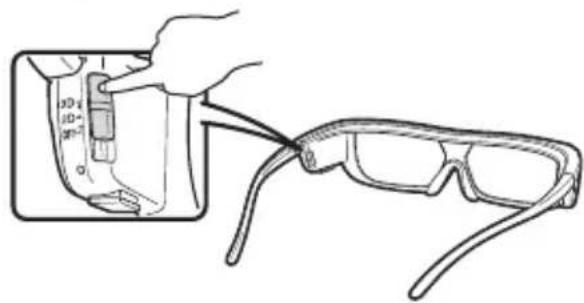
Turning On/Off the Power
Slide the switch to 3D to turn on the power. Slide the switch to OFF to turn off the power.
NOTE
- When the battery power is low, the LED light blinks once every second after the power is turned on.
Switching to 3D and 2D Mode
When viewing 3D images, you can slide the switch between 2D and 3D modes. This is useful when several people are viewing 3D images on the same TV with some people wanting to watch in 3D and some people wanting to watch in 2D.
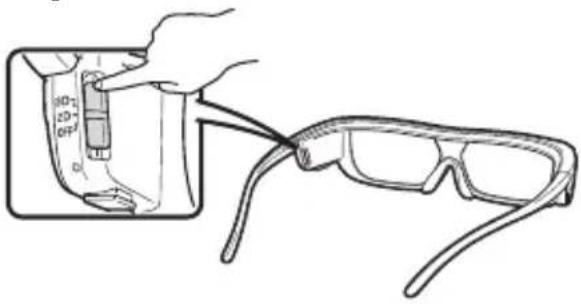
■Viewing 2D images
When you slide the switch to 2D while viewing 3D images, the 3D images switch to 2D images.
■Viewing 3D images
When you slide the switch to 3D while viewing 2D images, the 2D images switch to 3D images.
Usage Range of the 3D Glasses
The 3D Glasses can be used by receiving an infrared signal sent from the TV.
The 3D Glasses turn off automatically after 10 minutes if no signal is received from the TV.
Operating range
From directly in front of the 3D infrared emitter on the TV: approx. 5 m (within approx. 30° horizontally and 20° vertically)
Recharging the 3D glasses battery
When the battery power is low, the LED light blinks one time per second. If the 3D glasses battery runs out, you can recharge the 3D glasses battery by connecting the supplied USB cable to the TV and the power-supply terminal on the 3D glasses.
1 Turn off the TV, and then slide the switch on the 3D glasses to OFF.
2 Connect the cable shown below before turning on the TV.
- The LED light blinks once per two seconds, and then starts recharging.
- When the LED light goes off, the recharge is complete. It takes 90 minutes to complete the recharge.
- Insert the USB cable again if the LED light blinks on and off once every 0.5 seconds. If it still doesn't respond, inquire with a retail dealer or SHARP customer service.
3 After the recharge has completed, turn off the TV, and then remove the USB cable from the 3D glasses.
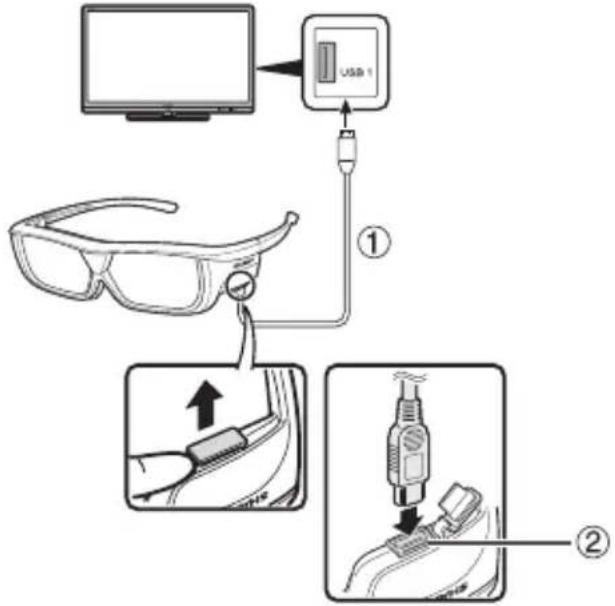
①USB cable (supplied accessory)
②Power-supply terminal
CAUTION
- Do not recharge while wearing the 3D glasses.
NOTE
- Be sure to turn on the TV when you recharge the 3D glasses battery. If the TV is turned off, you may not recharge it.
- When you recharge the 3D glasses battery, only connect the USB cable (supplied accessory) to a USB terminal on the TV.
- The battery will not recharge during usage with the USB cable connected.
- Recharge the battery within the operating temperature (10°C–40°C/50°F–104°F). The battery may not be able to recharge outside of the operating temperature.
Using the 3D glasses with an external power supply
You can use the 3D glasses with an external power supply when you slide the switch on the 3D glasses to 3D or 2D after steps 1 and 2 in Recharging the 3D glasses battery (recharging will not complete).
NOTE
- Do not move around while wearing the 3D glasses. You may result in getting your feet caught in USB cable, the TV falling or other accidents that may cause injury.
- When you supply power to the 3D glasses, only connect the USB cable (supplied accessory) to a USB terminal on the TV.
- When you use the USB cable connecting the 3D glasses, careful not to get your feet caught in the USB cable. It may result in falling or other accidents that may cause injury.
Disposal of the 3D glasses (Excluding Australia)
Remove the 3D glasses battery, and then follow these steps to take the 3D glasses apart.
1 Pull out the nose pad with your fingers.

2 Remove the five screws with a Phillips screwdriver (commercially available).
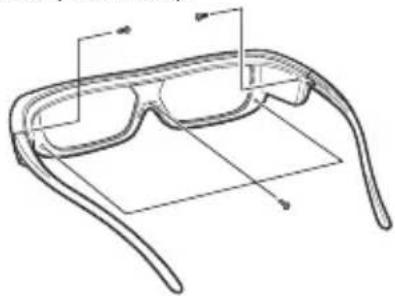
3 Pull the front casing outward with your fingers while pulling the base of the right temple arm inward with your fingers (A→B)
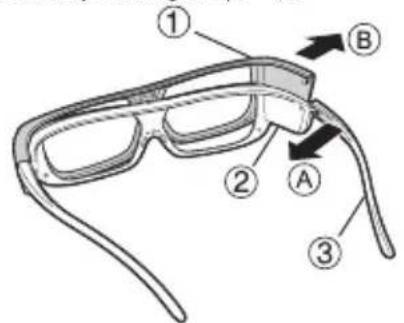

①Front casing
②Base
③Right temple arm
4 Cut off the three cables of the rechargeable battery unit one by one with a pair of scissors.
- There is the rechargeable battery unit inside ② on the right temple arm shown below.
• Insulate the tip of the removed rechargeable battery cable with material such as scotch tape.

①Right temple arm
②Rechargeable battery unit
③Rear casing

5 Pull out the entire rechargeable battery unit and remove it from the rear casing.

NOTE
- Used batteries should be disposed in accordance with local laws and regulations.
NOTE
• These 3D Glasses are only for use with SHARP LCD TVs supporting 3D.
■3D Glasses lenses
- Do not apply pressure to the lenses of the 3D Glasses. Also, do not drop or bend the 3D Glasses.
- Do not scratch the surface of the lenses of the 3D Glasses with a pointed instrument or other object. Doing so may damage the 3D Glasses and reduce the quality of the 3D image.
- Use only the cloth provided with the 3D Glasses to clean the lenses.
■3D Glasses infrared receiver
- Do not allow the infrared receiver to become dirty, and do not attach stickers to or otherwise cover the infrared receiver. Doing so may prevent the receiver from operating normally.
- If the 3D Glasses are affected by other infrared data communication equipment, the 3D images may not be displayed correctly.
■Caution during viewing
- Do not use devices that emit strong electromagnetic waves (such as cellular phones or wireless transceivers) near the 3D Glasses. Doing so may cause the 3D Glasses to malfunction.
- The 3D Glasses cannot operate fully at extreme high or low temperatures. Please use them within the specified usage temperature range.
- If the 3D Glasses are used in a room with fluorescent lighting (50/60 Hz), the light within the room may appear to flicker. In this case, either darken or turn off the fluorescent lights when using the 3D Glasses.
- Wear the 3D Glasses correctly. 3D images will not be correctly visible if the 3D Glasses are worn upside down or back-to-front.
- Other displays (such as computer screens, digital clocks, and calculators) may appear dark and difficult to view while wearing the 3D Glasses. Do not wear the 3D Glasses when watching anything other than 3D images.
- If you lie on your side while watching the TV with 3D Glasses, the picture may look dark or may not be visible.
- Be sure to stay within the viewing angle and optimum TV viewing distance when watching 3D images. Otherwise, you may not be able to enjoy the full 3D effect.
- The 3D Glasses may not work properly if there is any other 3D product or electronic devices turned on near the glasses or TV. If this occurs, turn off the other 3D product or electronic devices or keep the devices as far away as possible from the 3D Glasses.
- Stop using this product in any of the following situations:
- When images consistently appear doubled while you are wearing the 3D Glasses -When you have difficultly perceiving the 3D effect
- If the 3D Glasses are faulty or damaged, stop using them immediately. Continued use of the 3D Glasses may cause eye fatigue, headaches and illness.
- If you have any abnormal skin reaction, stop using the 3D Glasses. In very rare instances, such reactions may be due to an allergic reaction to the coating or materials used.
- If your nose or temples become red or you experience any pain or itchiness, stop using the 3D Glasses. Pressure caused by long periods of use may lead to such reactions and may result in skin irritation.
Troubleshooting
| Problem Possible Solution | |
Images displayed in 3D mode appear doubled while you are wearing the 3D Glasses.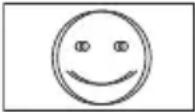 | Is the power of the 3D Glasses turned on?Slide the switch to 3Dto turn on the 3D Glasses. |
Images displayed in 3D mode appear 2D while you are wearing the 3D Glasses. | Are the 3D Glasses set to 2D mode?Slide the switch to 3Dwhile viewing 2D images and the 2D images switch to 3D images. |
Specifications
| Product 3D Glasses | |
| Model number AN-3DG20 | |
| Lens type Liquid crystal shutter | |
| Power supply DC5V (supplied by a USB terminal of a SHARP TV) | |
| Battery Lithium ion polymer rechargeable battery (DC3.7V 70mAh) | |
| Battery life*1 | Approx. 30 hours of continuous use |
| Charging time 90 minutes | |
| Dimension (W x H x D) 175.5 × 43.0 × 173.0 mm/6 | 15/16 × 123/32 × 613/16 inch |
| Weight Approx. 40.0 g/0.1 lbs. (including the lithium ion polymer rechargeable battery) | |
| Operating temperature 10°C to 40°C/50°F to 104°F (The 3D Glasses cannot operate fully at extreme high or low temperatures. Please use them within the specified usage temperature range.) | |
Battery life: A rechargeable battery becomes depleted from repetitive usage, and the battery life gradually becomes shorter (the battery life varies with your usage environment). The above is the value at the factory default state and quality is not guaranteed by the value.

These symbols displayed on the product and the individual carton package of the product are symbols about the environment in Japan, the U.S., Canada, China and the EU.


For Japan only
For China only
For China only


For the EU only
For the U.S. and Canada only*2
The RBRC™ Battery Recycling Seal on the Lithium-ion (Li-ion) batteries/battery packs indicates SHARP is voluntarily participating in an industry program to collect and recycle these batteries/battery packs at the end of their useful life, when taken out of service in the United States or Canada. The RBRC™ program provides a convenient alternative to placing Li-ion batteries into the trash or municipal waste stream, which is illegal in some areas. Please call 1-800-822-8837 for information on Li-ion battery recycling in your area. SHARP's involvement in this program is part our commitment to preserving our environment and conserving our natural resources.
(RBRC™ is a trademark of the Rechargeable Battery Recycling Corporation.)
NOTE
- Please contact your local authority for the correct method of disposal of this product and/or packing.
For location of the nearest Sharp Authorized Service, or to obtain product literature, accessories, supplies, or customer assistance, please call 1-800-BE-SHARP.
LIMITED WARRANTY
For USA customers only
CONSUMER LIMITED WARRANTY
SHARP ELECTRONICS CORPORATION warrants to the first consumer purchaser that this Sharp brand product (the "Product"), when shipped in its original container, will be free from defective workmanship and materials, and agrees that it will, at its option, either repair the defect or replace the defective Product or part thereof with a new or remanufactured equivalent at no charge to the purchaser for parts or labor for the period(s) set forth below.
This warranty does not apply to any appearance items of the Product or if the serial number or model number affixed to the Product has been removed, defaced, changed, altered or tampered with. This warranty does not cover installation or signal reception problems. This limited warranty will not apply if the Product has been or is being used in a commercial setting or application; this warranty is meant solely for the non-commercial, household use of the Product by consumers in their home or residence. If you intend to or already use this Product for commercial purposes or in a commercial setting, there are warranties available to cover your use of this Product, the terms of which may vary. Please contact 1-888-GO-SHARP for further information.
In order to enforce your rights under this limited warranty, you should follow the steps set forth below. You must be able to provide proof of purchase to the servicer, which proof must include the date of purchase.
To the extent permitted by applicable state law, the warranties set forth are in lieu of, and exclusive of, all other warranties, express or implied. Specifically ALL OTHER WARRANTIES OTHER THAN THOSE SET FORTH ABOVE ARE EXCLUDED, ALL EXPRESS AND IMPLIED WARRANTIES INCLUDING THE WARRANTIES OF MERCHANTABILITY, FITNESS FOR USE, AND FITNESS FOR A PARTICULAR PURPOSE ARE SPECIFICALLY EXCLUDED. IF, UNDER APPLICABLE STATE LAW, IMPLIED WARRANTIES MAY NOT VALIDLY BE DISCLAIMED OR EXCLUDED, THE DURATION OF SUCH IMPLIED WARRANTIES IS LIMITED TO THE PERIOD(S) FROM THE DATE OF PURCHASE SET FORTH BELOW. THIS WARRANTY GIVES YOU SPECIFIC LEGAL RIGHTS. YOU MAY ALSO HAVE OTHER RIGHTS WHICH VARY FROM STATE TO STATE.
The warranties given herein shall be the sole and exclusive warranties granted by Sharp and shall be the sole and exclusive remedy available to the purchaser and only for the time periods set forth herein. No other representations or promises made by anyone are permitted. Correction of defects, in the manner and for the period of time described herein, shall constitute complete fulfillment of all liabilities and responsibilities of Sharp to the purchaser with respect to the Product, and shall constitute full satisfaction of all claims, whether based on contract, negligence, strict liability or otherwise. Sharp does not warrant nor shall Sharp be liable, or in any way responsible, for Products which have been subject to abuse (including, but not limited to, improper voltage), accident, misuse, negligence, lack of reasonable care, alteration, modification, tampering, misuse, improper operation or maintenance or any damages or defects in the Product which were caused by repairs or attempted repairs performed by anyone other than a Sharp authorized servicer. Nor shall Sharp be liable or in any way responsible for any incidental or consequential economic or property damage. Some states do not allow limits on warranties or on remedies for breach in certain transactions; in such states, the limits herein may not apply.
THIS LIMITED WARRANTY IS VALID ONLY IN THE FIFTY (50) UNITED STATES, THE DISTRICT OF COLUMBIA. AND PUERTO RICO.
Model Specific Section
YYour Product Model Number & Description: AN-3DG20 3D Glasses
(Be sure to have this information and Proof of Purchase available when you need service for your Product.)
Warranty Period for this Product:
Additional Exclusions:
What to do to Obtain Service:
One (1) year parts and labor from date of purchase.
User replaceable batteries are not covered by this Limited Warranty.
Warranty service is available from a Sharp Authorized Service Center located in the United States.
To receive repair handling instructions, please contact Sharp toll free at 1-800-BE-SHARP (1-800-237-4277).
If it is necessary to ship the Product for servicing, please ensure it is shipped prepaid, insured and packaged securely. Sharp shall not be responsible for lost, stolen or misdirected mail or for damage to the product incurred during shipping. Please have proof of purchase available when requesting warranty service.
TO OBTAIN PRODUCT INFORMATION OR PURCHASE ACCESSORIES, CALL 1-800-BE-SHARP OR VISIT www.SharpUSA.com
SHARP®
SHARP ELECTRONICS CORPORATION
Sharp Plaza, Mahwah, New Jersey 07495-1163
SHARP CORPORATION
SHARP®
LIMITED WARRANTY
Consumer Electronics Products
Congratulations on your purchase!
Sharp Electronics of Canada Ltd. ("Sharp") warrants to the first purchaser for this Sharp brand product ("Product"), when shipped in its original container and sold or distributed in Canada by Sharp or by an authorized Sharp dealer, that the Product will during the applicable warranty period, be free from defects in material and workmanship, and will within the applicable warranty period, either repair the defective Product or provide the first purchaser a replacement of the defective Product.
Conditions: This limited warranty shall not apply to:
(a) Any defects caused or repairs required as a result of abusive operation, negligence, accident, improper installation or inappropriate use as outlined in the owner's manual or other applicable Product documentation.
(b) Any defects caused or repairs required as a result of any Product that has been tampered with, modified, adjusted or repaired by any person other than Sharp, a Sharp authorized service centre or a Sharp authorized servicing dealer.
(c) Any defects caused or repairs required as a result of the use of the Product with items not specified or approved by Sharp, including but not limited to, head cleaning tapes and chemical cleaning agents.
(d) Any replacement of accessories, glassware, consumable or peripheral items required through normal use of the Product, including but not limited to, earphones, remote controls, AC adapters, batteries, temperature probe, trays, filters, belts, ribbons, cables and paper.
(e) Any cosmetic damage to the Product surface or exterior that has been defaced or caused by normal wear and tear.
(f) Any defects caused or repairs required as a result of damage caused by any external or environmental conditions, including but not limited to, transmission line/power line voltage or liquid spillage or acts of God.
(g) Warranty claims for Products returned with illegible or without appropriate model, serial number and CSA/cUL markings.
(h) Any Products used for rental or commercial purposes.
(i) Any installation, setup and/or programming charges.
How to get service: Warranty service may be obtained upon delivery of the Product, together with proof of purchase (including date of purchase) and a copy of this limited warranty statement, to an authorized Sharp service centre or an authorized Sharp servicing dealer. In home warranty service may be provided, at Sharp's discretion, on any Sharp Television with the screen size of 40" or larger and on any Sharp Over-The-Range Microwave Oven or Home Use Microwave Drawer. No other person (including any Sharp dealer or service centre) is authorized to extend, enlarge or transfer this warranty on behalf of Sharp. The purchaser will be responsible for any and all removal, reinstallation, transportation and insurance costs incurred.
The express warranties in this limited warranty are, except for consumer purchasers domiciled in Quebec, in lieu of and, except to the extent prohibited by applicable law, Sharp disclaims all other warranties and conditions, express or implied, whether arising by law, statute, by course of dealing or usage of trade, including, without limitation, implied warranties or conditions of merchantability and/or quality, fitness for a particular use or purpose, and/or non-infringement. Limitations (not applicable to consumer purchasers domiciled in Quebec to the extent prohibited under Quebec law): (a) Sharp shall not be liable for any incidental, special, consequential, economic, exemplary or indirect damages of any kind or nature (including lost profits or damages for loss of time or loss of use or loss of data) arising from or in any connection with the use or performance of a Product or a failure of a Product, even if Sharp is aware of or has been advised of the possibility of such damages; (b) the remedies described in this limited warranty constitute complete fulfillment of all obligations and responsibilities of Sharp to the purchaser with respect to the Product and shall constitute full satisfaction of all claims, whether based on contract, negligence, strict liability or otherwise. Some provinces may not allow the exclusion or limitation of certain damages, or limits on the duration or voiding of implied warranties or conditions; in such provinces, the exclusions and limits herein may not apply. This limited warranty is, except for consumer purchasers domiciled in Quebec, governed by the laws of the Province in Canada in which the purchaser has purchased the Product. For consumer purchasers domiciled in Quebec this limited warranty is governed by the laws of Quebec.
WARRANTY PERIODS (calculated from the date of original purchase): Parts & Labour (exceptions noted)
| Audio Product | 1 year |
| Blu-Ray Product | 1 year |
| Projector | 1 year (lamp 90 days) |
| LCD TV | 1 year |
| Microwave Oven | 1 year (magnetron component-4 additional years) |
| Air Punifier | 1 year |
| Portable Air Conditioner | 1 year |
| Plasmacluster Ion Generator | 1 year |
| 3D Glasses | 1 year |
| Wireless LAN Adapter | 1 year |
To obtain the name and address of the nearest Authorized Sharp Service Centre or Dealer, or for more information on this Limited Warranty, Sharp Extended Warranty Offers, Sharp Canada Products or Accessory Sales, please contact Sharp:
• By writing to Sharp Electronics Of Canada Ltd, at 335 Britannia Road East Mississauga, Ontario L4Z 1W9
• Calling: at 905-568-7140
• Visiting our Web site: www.sharp.ca

SHARP

SHARP
FOR LOCATION ENQUIRIES WITHIN
AUSTRALIA
SHARP APPROVED SERVICE CENTRE
(LOCAL CALL COST APPLY WITHIN AUSTRALIA)
SHARP CORPORATION OF AUSTRALIA PTY LTD
SHARP
FOR LOCATION ENQUIRIES WITHIN
NEW ZEALAND
SHARP APPROVED SERVICE CENTRE
Consumer Electronic Products
Congratulations on Your Purchase!
This Sharp product is warranted against faults in materials and manufacture for a period of twelve (12) months from the date of original purchase.
If service is required during the warranty period, please contact your nearest Sharp Approved Service Centre. These repairs would be carried out at no charge to the owner, subject to the conditions specified herein.
The owner is responsible for any transportation and insurance costs if the product has to be returned for repair.
This warranty does not extend to accessories or defects or injuries caused by or resulting from causes not attributable to faulty parts or the manufacture of the product, including but not limited to, defect or injury caused by or resulting from misuse, abuse, neglect, accidental damage, improper voltage, liquid spillage, vermin infestation, software, or any alterations made to the product which are not authorised by Sharp.
Please retain your sales documentation, as this should be produced to validate a warranty claim.
This warranty is in addition to and in no way limits, varies or excludes any express and implied rights and remedies under any relevant legislation in the country of sale.
IMPORTANT DO NOT RETURN THIS DOCUMENT TO SHARP
For your reference, please enter the particulars of your purchase below and retain, with your purchase documentation.
Model No. ____
Serial No. ____
Date of Purchase ____
Retailer
Purchase SHARP CORPORATION OF AUSTRALIA PTY. LIMITED SHARP CORPORATION OF NEW ZEALAND LIMITED 59 Hugo Johnston Drive Penrose, Auckland 1 Huntingwood Drive Huntingwood NSW2148 SPForm030 (JUNE 2004)
IMPORTANT NOTICE: This warranty applies only to products sold in Australia & New Zealand
- IMPORTANT SAFETY INSTRUCTIONS
- 3D GLASSES
- PREVENTION OF ACCIDENTAL INGESTION
- DO NOT DISASSEMBLE
- CAUTION FOR LITHIUM ION POLYMER RECHARGEABLE BATTERY
- HANDLING THE 3D GLASSES
- USING THE 3D GLASSES
- CARING FOR THE 3D GLASSES
- VIEWING 3D IMAGES
- KEEP AWAY FROM HEAT
- CAUTION REGARDING RECHARGEABLE BATTERY
- CAUTION REGARDING THE POWER SUPPLY
- CAUTION
- SUPPLIED ACCESSORIES
- NOTE
- PART NAMES
- 1INFRARED RECEIVER
- 2 POWER-SUPPLY TERMINAL
- 3 3D/2D/OFF SWITCH
- 4 LED LIGHT
- ATTACHING THE NOSE PAD
- 5 NOSE PAD MOUNT
- TURNING ON/OFF THE POWER
- SWITCHING TO 3D AND 2D MODE
- VIEWING 2D IMAGES
- USAGE RANGE OF THE 3D GLASSES
- OPERATING RANGE
- RECHARGING THE 3D GLASSES BATTERY
- USING THE 3D GLASSES WITH AN EXTERNAL POWER SUPPLY
- DISPOSAL OF THE 3D GLASSES (EXCLUDING AUSTRALIA)
- 3D GLASSES LENSES
- 3D GLASSES INFRARED RECEIVER
- CAUTION DURING VIEWING
- TROUBLESHOOTING
- LIMITED WARRANTY
- CONSUMER LIMITED WARRANTY
- MODEL SPECIFIC SECTION
- WARRANTY PERIOD FOR THIS PRODUCT
- ADDITIONAL EXCLUSIONS
- WHAT TO DO TO OBTAIN SERVICE
- SHARP®
- CONSUMER ELECTRONICS PRODUCTS
- CONGRATULATIONS ON YOUR PURCHASE
- SHARP
- AUSTRALIA
- NEW ZEALAND
- CONSUMER ELECTRONIC PRODUCTS
- IMPORTANT DO NOT RETURN THIS DOCUMENT TO SHARP
Brand : SHARP
Model : AN-3DG20B
Category : 3D Glasses