
Plus 1U - Audio module Klavis - Free user manual and instructions
Find the device manual for free Plus 1U Klavis in PDF.


| Type | Audio Module (Eurorack) |
| Brand | Klavis |
| Model | Plus 1U |
| Format | Eurorack 1U |
| Width | 4 HP |
| Height | 1U (approx. 30 mm) |
| Depth | 25 mm |
| Weight | 50 g |
| Power Supply | +/-12V DC, 50 mA (+12V), 20 mA (-12V) |
| Connectors | Eurorack power header, 3.5mm audio jacks |
| Main Functions | Signal routing, attenuation, muting |
| Material | PCB, aluminum front panel |
| Maintenance | Clean with dry cloth, avoid moisture |
| Safety | Disconnect power before installation, avoid short circuits |
| Repairability | Repairable by qualified technician; spare parts available on request |
| General Information | Designed for standard Eurorack cases |
Frequently Asked Questions - Plus 1U Klavis
User questions about Plus 1U Klavis
0 question about this device. Answer the ones you know or ask your own.
Ask a new question about this device
Download the instructions for your Audio module in PDF format for free! Find your manual Plus 1U - Klavis and take your electronic device back in hand. On this page are published all the documents necessary for the use of your device. Plus 1U by Klavis.
USER MANUAL Plus 1U Klavis
The Tweakers is a slim companion module that allows fine tuning your modulations. Two channels offer control over gain and offset. A three-position switch allows muting the channel and inverting the modulation polarity without impacting the offset. Normalizing of the inputs avoids using a multiple when a signal is dispatched to two targets. Normalizing of the outputs offers an extra mixer, summing the two channels. The Tweakers is a perfect companion for modules whose modulation inputs lack such amenities. Activating predefined settings at the flick of a switch is paramount for live situations. Being able to prepare two sets of carefully adjusted settings for a given signal is even more useful. It may come handy as an audio mixer too.

Features
- Two independent channels also useable jointly as a mixer or splitter
- In each channel:
o Input and output jack
- Gain pot with up to 2.1 amplification
○ Bipolar offset pot
- 3-position switch:
- Inverted polarity
- Channel off
-
Normal polarity
-
Offset setting is independent of the polarity switch
- Normalized input A can distribute the signal in both channels
- Normalized outputs can mix the two channels on out B
- Compact module
Installation and security
Purpose
This module is meant for installation in a Eurorack-compliant chassis.
It adheres to Doepfer Eurorack mechanical and electrical specifications.
Do not attempt using this module in other mechanical or electrical contexts.
Installation
Before the installation, disconnect the mains power supply from your modular system.
Some power supplies are not safely isolated; there is a risk of injury!
See in the specifications if this module requires 5V from the supply rails. If 5V is needed and your rack is not providing 5V, do not attempt connection!
Check that the current consumption requirements of this module, when added to your installed set of modules do not exceed the available current from your supply. This is done by adding up the current draw of all modules (mA) separately for each of 5V, 12V and -12V rails. If any of these 3 sums exceeds the available current of your supply for that voltage, do not connect the module to your system; you need a stronger power supply.
The provided supply flat cable can only be inserted in the appropriate orientation at the back of the module, so there is no risk of error on that end. However, you should pay attention to the orientation of the cable in the socket of the supply PCB inside your chassis. Cheap sockets without shrouding may allow you to plug in the connector the wrong way!
The red stripe on the cable should match a stripe printed on the supply board. The stripe also indicates the -12V side. In case there is no stripe, a -12V marking is a safe indication of the orientation.
Double check that the connectors are fully inserted and correctly oriented before switching on the power supply. In case of an anomaly, switch off the power supply immediately and check everything again.
Quick overview
The Tweakers is all you need to pre-process up to two modulation signals.
There are two identical channels that can be used independently.
Normalization of the inputs and outputs offer duplicating and mixing options.
Channel features
![graph TD A["in"] --> B["+"] B --> C["gain"] C --> D["offset"] D --> E["+"] E --> F["inv"] F --> G["Sum"] G --> H["•"] H --> I["out"] G --> J["• normal"] G --> K["• off"] G --> L["• inverted"]](/content/2026/06/1250334/images/21c450b078baee90a8abe7163b90c2dfdab204e6be799152974947a055714c01.jpg)
Each channel presents one input, one output, a 3-state switch and two potentiometers.
- The input jack accepts modulation or audio signals of any amplitude.
- The Gain pot allows reducing the amplitude down to zero or amplify weak signals.
-
The Offset pot brings an adjustable voltage that is added to the incoming signal.
-
It generates an increasingly negative voltage when turned counter-clockwise,
- an increasingly positive voltage when turned clockwise,
- and zero volts (no offset) when set halfway
• The 3-position switch allows:
- switching off the channel entirely when set to the middle
- enabling the channel with the incoming signal non-inverted when set to the right
- enabling the channel with the incoming signal being inverted when set to the left
- The output jack brings the resulting signal according to the switch and pots settings
Usage examples
The main use is in front of a module lacking gain and offset settings at its modulation inputs.
By adding a fixed voltage, the Offset pot can change a unipolar signal into bipolar and vice-versa.
Another use of Offset is to create predefined transpose settings ready to be switched on or added from the two channels.
Offset can be used to deliberate clip an audio wave to change its harmonic content (e.g. a triangle or saw into a half-trapezoid). Using the offset of the second channel can recenter the signal around zero after being clipped in the first channel.
Using the two channels with their outputs mixed on board, a slow modulation signal can dynamically change such waveshaping. The gain and offset pots allow a perfect control of the process.
The tweakers is also useful as a simple audio mixer.
Normalizing
Internal connections that are active when no jacks are inserted allow additional features. Such connections are called normalization and can be seen as internal patching.
Input normalization
![graph TD A["in A"] --> B["Section A"] C["in B"] --> D["Section B"] B --> E["out A"] D --> F["out B"]](/content/2026/06/1250334/images/8430f2ffce948ad2a90f4a5d559f070f9871e791d0175b569d8395bac5e2ab74.jpg)
When there is no jack in input B, the signal brought to input A is distributed to both inputs.
This is useful to send a single modulation source to two targets without requiring a multiple or other signal duplicating accessory.
Output normalization = mixer
![graph TD A["Section A"] -->|in A| B["Section B"] C["in B"] --> D["Section B"] B -->|out B = Mix| E style A fill:#fff,stroke:#000 style C fill:#fff,stroke:#000 style D fill:#fff,stroke:#000](/content/2026/06/1250334/images/73de884dc78c9764502fce4fdb8b80706abb35dd9aac5e793f92e6099c1f4a01.jpg)
When there is no jack at output A, output B becomes a mix of signal A and B.
This is useful when two modulation signals should act on the same destination. It avoids requiring an additional mixer.
Making use of in and out normalization jointly
![graph TD A["Section A"] -->|in A out A| B["Section B"] B -->|in B out B| A C["out B = Mix"] --> B](/content/2026/06/1250334/images/9173a11669653c994d66782b444c25639ea8156c51cb3a23be2db681191424e7.jpg)
At first glance this setup might seem pointless.
Actually, it is a very useful setup for live performance: it allows preparing a first adjustment of gain and offset for a modulation and a activate a variation of the whole at the flick of switch B.
The neat trick is that it is not necessary to switch off A before activating B; as a matter of fact:
- If the gain should go higher, switch b is set to + and Gain B adds some signal to the one set in A.
- If the gain should be reduced, switch B is activated to negative and Gain B will reduce the signal set in A; going further will even invert the polarity of the signal.
- Offset B pot can freely increase, reduce or counteract the offset defined in A
Specifications
Mechanical
| Dimensions | mm | inches | Eurorack compliance |
| Height | 128.40 | 5.06 | 3HE |
| Width | 15.00 | 0.59 | 3HP |
| Depth behind panel | 33.00 | 1.30 |
Supply
The supply socket is protected against reverse insertion.
| Supply rail | Current draw |
| +12V | 24mA |
| -12V | 24mA |
| +5V | 0 mA |
Input/output
All inputs and outputs can withstand signals between -12V and +12V without harm.
| Jack | Effective voltage range received or generated |
| Input | +/- 12V, gain: zero to x2.1 |
| Output | ~ +/-10V |
Signals
| Parameter | Values |
| Frequency range | DC to beyond audio |
Packing list
The box contains:
- Tweakers module
• 2x M3 black mounting screws + washers
• Eurorack-compliant 10/16-pin supply cable
Klavis products, including PCB and metalwork, are designed and manufactured in Europe.
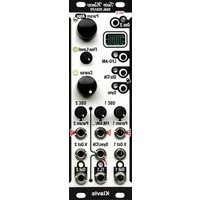

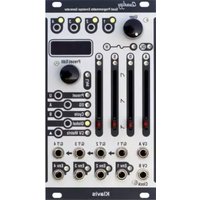
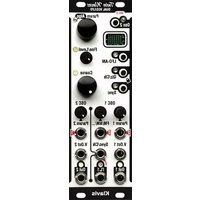

Brand : Klavis
Model : Plus 1U
Category : Audio module