
Volt SC10 - Data Storage Rocstor - Free user manual and instructions
Find the device manual for free Volt SC10 Rocstor in PDF.


| Product Type | Data Storage Charging and Sync Cabinet |
| Model | Volt SC10 |
| Capacity | 10 tablets |
| Dimensions (with packaging) | 525 x 470 x 560 mm (20.67 x 18.50 x 22.05 inches) |
| Net Weight / Gross Weight | 33 lbs (15 kg) / 39.6 lbs (18 kg) |
| Power Rating | Input: AC 100-120 Vac, 50/60Hz, 3A or AC 220-240 Vac, 50/60Hz, 2A; Output: USB 5V, 2.4A per slot |
| LED Indicators | Green: Charged; Red: Charging; Green/Red Flash: Sync in progress |
| Sync Function | USB sync via B-type connector to PC/Notebook; sync enable/disable switch |
| Charging Standard | Supports Apple iPad 2.4A charge; conforms to USB BC 1.2 |
| Fan | DC12V, 0.11A, 6x6mm |
| Locking Mechanism | Door lock with two keys; locking kit for desktop/peripherals |
| Stacking Capability | Yes, with stacking screws (M6x40, 4 pcs); multiple cabinets can be stacked |
| Wall Mounting | Optional; wall-mount kit included (screws, anchors, holding plate); applies to wood or concrete walls |
| Package Contents | Door keys (2), power cable, sync cable, user manual, locking kit, stacking screws, lock seat |
| Safety Features | Indoor use only; keep ventilation holes clear; do not place TV/monitor on top; adult operation only |
| Warranty | 3 years for cart/station/locker & trays; 2 years for electrical components (see manual for details) |
| Compliance | Listed I.T.E. under E341990 |
| Manufacturer | Rocstorage, Inc., 12979 Arroyo Street, 2nd Floor, San Fernando, CA 91340, USA |
Frequently Asked Questions - Volt SC10 Rocstor
User questions about Volt SC10 Rocstor
0 question about this device. Answer the ones you know or ask your own.
Ask a new question about this device
Download the instructions for your Data Storage in PDF format for free! Find your manual Volt SC10 - Rocstor and take your electronic device back in hand. On this page are published all the documents necessary for the use of your device. Volt SC10 by Rocstor.
USER MANUAL Volt SC10 Rocstor
natural_image
Exterior view of a black RoCstor server unit with red frame and black ventilation grille (no text or symbols visible)General Use
- The product is designed to allow you to easily store, secure, charge and sync up to 10 tablet devices per unit.
- Product Specification P.02
- Package Contents P.03
- Set-up P.04
- Desktop and Peripherals locking P:05
- Door lock and user guide P.06
- Attaching bracket buckle and wall-mounting (Option) feature — P.06
- Safety P.07
1. Product Specification
Volt® SC10


Product SPEC
| Model Name | Volt® SC10 | N.W. / G.W. | 33 lbs / 39.6 lbs15 |
| Capacity | 10 tablet | LED indicator 10 | |
| Slot | 6: H52 x W242 x D280 mmH2.07 x W9.53 x D11.02 inch8: H37 x W242 x D280 mmH1.45 x W9.53 x D11.02 inch10: H28 x W242 x D280 mmH1.10 x W9.53 x D 11.02 inch | Power Rating | Input : AC 220-240 Vac, 50/60Hz, 2AAC 100-120 Vac, 50/60Hz, 3AOutput : USB 5V, 2.4A |
| Dim. with Packing | 525 x 470 x560 mm20.67 x 18.50 x 22.05 inch | Fan | DC12V / 0.11A / 6 x 6mm |
gs / 18 kgs -
2. Package Contents
■ Package Contents
Door Key x 2 units
Power Cable x 1 pcs
Sync Cable x 1 pcs
User Manual x 1 pcs
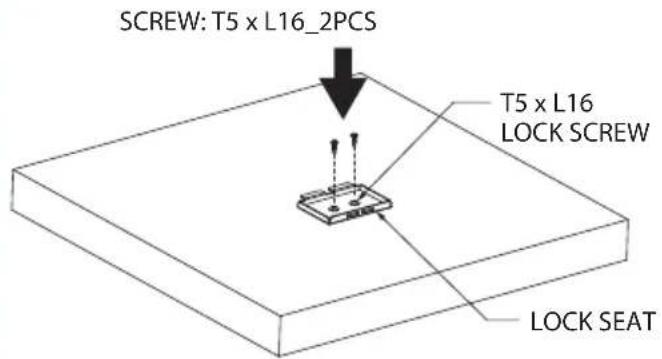
Locking kit: T5 x 16_2pcs
Stacking screw: M6 x 40_4pcs
Lock seat x 1 pcs

natural_image
Collection of electronic components and connectors including screws, pins, a connector, and cables (no text or symbols visible)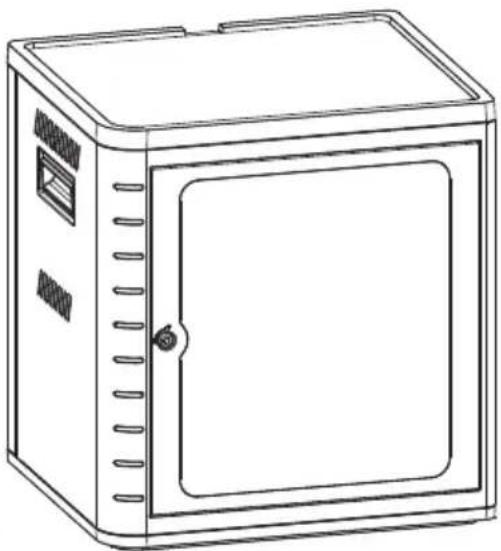
natural_image
Line drawing of a rectangular industrial cabinet with ventilation slots and a door (no text or symbols)Option & Accessory

Wall_Mounting

Wallmount Screw x 4 pcs

Stainless Screw x 4 pcs

Dilation Tube x 4 pcs

Wood Screw
x 4 pcs

Washer x 4 pcs

natural_image
Line drawing of a four-wheel cart with wheels (no text or symbols)Wheel Stand
natural_image
Technical diagram of a mechanical assembly with rollers and a cart, showing no text or symbols
Screw: M6 x L40_4 pcs
3. Set-up

Set-up:
- Place the unit on a flat surface.
- Make sure the power switch is on "OFF" position.
- Connect the power cord into the power supply slot, and on to the wall outlet.
- Plug USB cable into USB port and manage cable through the clip.
- Insert tablet into each slot.
- Plug dock connector into each tablet.
- Switch on the power switch behind the unit.
LED indicator :
Color Green = Charged.
Color Red = Charging in progress
Color Green/Red Flash = Sync in process

Sync disabled: switch up

Sync enable : switch down
Note:
-
Support Apple Ipad 2.4A charge.
-
Conform USB BC 1.2 standard.
Sync set-up
-
Take the supplied USB cable USB connector (B type) is connected to cabinet backside USB port. The other side connector is connected to PC / Notebook for data synchronization.
-
Check Sync button switch to enable state.

Volt® SC10 other feature

flowchart
graph LR
    A["Service"] -->|B: Charge board software update (Volt® SC10 only)| B["Service only"]
    A -->|C: Ethernet feature for charge status monitoring (Volt® SC10 only)| B
    B --> C["Laptop"]
4. Desktop and peripherals locking

natural_image
Technical line drawing of a mechanical assembly with a downward arrow indicating a component (no text or symbols present)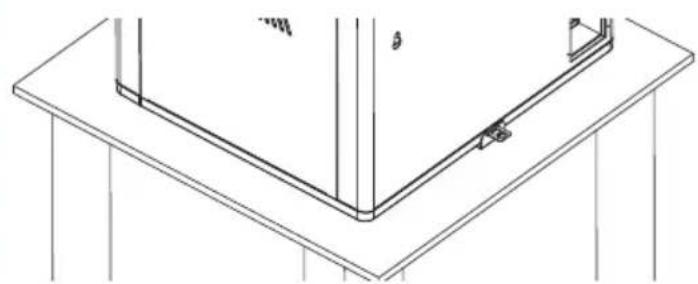
natural_image
Technical line drawing of a structural frame with supports and a vertical support (no text or symbols)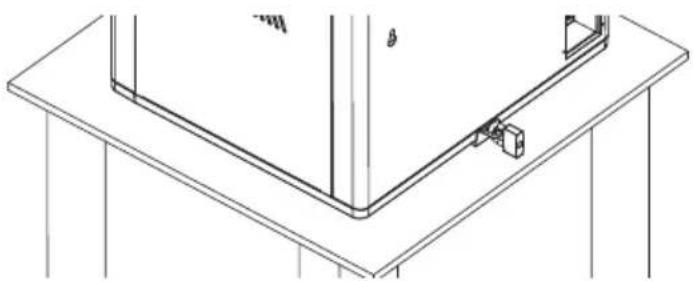
natural_image
Technical line drawing of a structural support frame with mounting base and support fixtures (no text or symbols)Stacking (option Feature)
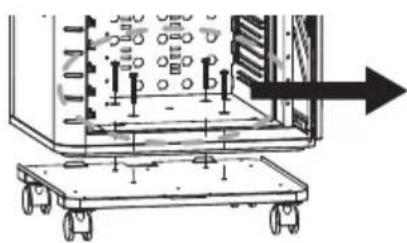
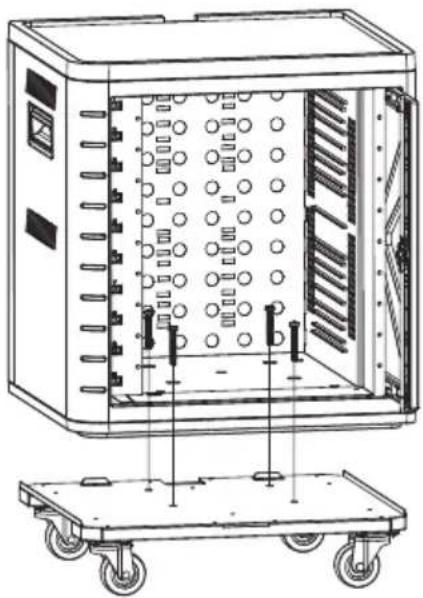
Cabinet and Stand Assembly
- Pull out the trays inside cabinet and put cabinet on the stand.
- Use 4 screws to fix cabinet on the stand.
natural_image
Technical line drawing of an industrial control cabinet with wheels and internal components (no text or symbols)Cabinets Stacking
- Remove the rubber pad on top of cabinet 1.
- Put cabinet 2 on top of cabinet 1. (Please pull out inner trays first)
- Use 4 screws to fixe cabinet 1 and 2

5. Door lock and user guide

natural_image
Line drawing of a simple rectangular cabinet with lid and side panels (no text or symbols)

Press & turn: To open the door properly gently push the key then turn to the right.
6. Attaching bracket buckle and wall-mounting (Option) feature
- Bracket buckle is attached on the rear top and bottom of the product, the bracket buckle can be attached on the surface using table mount kit.
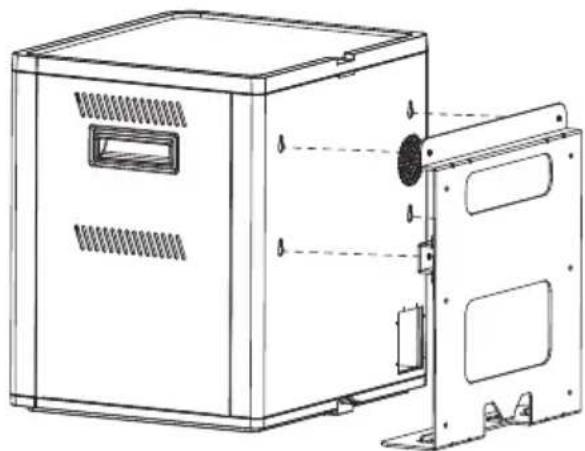
- Attaching the wall-mount bracket: Preparation: Screw (T., Half round, Stainless, T4 x L30mm), Anchor nut (1/4 x L27mm, EM35114-70, PVC).
- Wall-mounting kit only applies on wood structure wall and concrete wall.
- Make sure there is enough space on the wall with the product door open. Drill the hole and drive the anchor nuts into the wall. Place the holding plate on the wall, and then tighten with M5 stainless screws. Position product over the wall bracket and then slide it downward to set it in place.

natural_image
Technical line drawing of an electrical enclosure with ventilation grilles and a door, showing internal components (no text or symbols)
natural_image
Technical line drawing of a mechanical bracket with mounting holes and internal cavity (no text or symbols)
natural_image
Technical line drawing of a mechanical device casing with mounting holes and ventilation slots (no text or symbols)SCREW: T4X30_6PCS

One Wall_mount kit can only support one cabinet.
7. Safety
WARNING :
This product must only be used for its intended purpose in accordance with these operating instructions. Failure to observe the following notices can result in fire, injury, death by electric shock or equipment damage.

ELECTRIC SHOCK
Operate Carefully
· Always turn OFF the power to the product before plugging IN or OUT.
- Do not unplug the power cord from the outlet when your hands are wet.
- Do not use cables that are damaged.
- Do not unplug by pulling on the cable.
- Do not plug the cable into an extension cable.
- Keep the door closed and locked when in use.

natural_image
Warning symbol: black exclamation mark inside a triangle (no text or numbers)- This product is designed to be used indoors only.
- This product is not designed to be operated by a child or student.
- Only Adult operation and supervision should move this product.
- Do not allow anyone to set, stand, or climb on the product.
- Move the product with caution.
- Keep the product away from water.
- Keep the ventilation holes unblock for air circulation.
- Do not place TV or monitor on top of the product.
- Do not use the product to store liquids or cleaning supplies.
- Keep the door closed and locked when in use.
- Disconnect the power cable from the wall before relocate the main unit.

LISTED
I.T.E.
E341990

XXXXXX株式會社


2019年1月1日


Rocstor
12979 Arroyo Street, 2nd Floor
San Fernando, CA 91340
Tel: 1.818-727-7000
www.rocstor.com

natural_image
Exterior view of a red and black rack-mounted server unit with ventilation grilles (no visible text or symbols)ROCSTOR LIMITED WARRANTY - USA
This Limited Warranty is provided by Rocstorage, Inc. (hereinafter: Rocstor) for Volt Charging units.
General Terms
EXCEPT AS EXPRESSLY SET FORTH IN THIS LIMITED WARRANTY, ROCSTOR MAKES NO OTHER WARRANTIES OR CONDITIONS, EXPRESS OR IMPLIED, INCLUDING ANY IMPLIED WARRANTIES OF MERCHANTABILITY AND FITNESS FOR A PARTICULAR PURPOSE. ROCSTOR EXPRESSLY DISCLAIMS ALL WARRANTIES AND CONDITIONS NOT STATED IN THIS LIMITED WARRANTY. ANY IMPLIED WARRANTIES THAT MAY BE IMPOSED BY LAW ARE LIMITED IN DURATION TO THE LIMITED WARRANTY PERIOD. SOME STATES OR COUNTRIES DO NOT ALLOW A LIMITATION ON HOW LONG AN IMPLIED WARRANTY LASTS OR THE EXCLUSION OR LIMITATION OF INCIDENTAL OR CONSEQUENTIAL DAMAGES FOR CONSUMER PRODUCTS. IN SUCH STATES OR COUNTRIES, SOME EXCLUSIONS OR LIMITATIONS OF THIS LIMITED WARRANTY MAY NOT APPLY TO YOU.
This Limited Warranty applies to the Rocstor Volt Charging hardware products sold by or leased from Rocstorage, Inc., its worldwide subsidiaries, affiliates, authorized resellers, or country distributors (collectively referred to in this Limited Warranty as "Rocstor") with this Limited Warranty. This Limited Warranty is applicable in all countries and may be enforced in any country where Rocstor or its authorized service providers offer warranty service subject to the terms and conditions set forth in this Limited Warranty. However, warranty service availability and response times may vary from country to country and may also be subject to registration requirements in the country of purchase.
Rocstor warrants that the Rocstor hardware product and all the internal components of the product that you have purchased or leased from Rocstor are free from defects in materials or workmanship under normal use during the Limited Warranty Period. The Limited Warranty Period starts on the date of purchase or lease from Rocstor. Your dated sales or delivery receipt, showing the date of purchase or lease of the product, is your proof of the purchase or lease date. You may be required to provide proof of purchase or lease as a condition of receiving warranty service. You are entitled to warranty service according to the terms and conditions of this document if a repair to your Rocstor branded hardware is required within the Limited Warranty Period. This Limited Warranty extends only to the original purchaser or lessee of this Rocstor branded product and is not transferable to anyone who obtains ownership of the Rocstor branded product from the original purchaser or lessee.
Rocstor products are manufactured using new materials or new and used materials equivalent to new in performance and reliability. Spare parts may be new or equivalent to new. Spare parts are warranted to be free from defects in material or workmanship for thirty (30) days or for the remainder of the Limited Warranty Period of the Rocstor hardware product in which they are installed, whichever is longer.
Rocstor's Obligation under the Limited Warranty
During the Limited Warranty Period, Rocstor will repair or replace the defective component parts or the hardware product. All component parts or hardware products removed under this Limited Warranty become the property of Rocstor. The replacement part or product takes on either the Limited Warranty status of the removed part or product or the thirty (30) day limited warranty of the spare part. In the unlikely event that your Rocstor product has a recurring failure, Rocstor, at its discretion, may elect to provide you with a replacement unit of Rocstor's choosing that is at least equivalent to your Rocstor branded product in hardware performance. Rocstor reserves the right to elect, at its sole discretion, to give you a refund of your purchase price or lease payments (less interest) instead of a replacement. This is your exclusive remedy for defective products. The original Limited Warranty is not extended when the product, or a part of the product, is repaired or replaced during the Limited Warranty period. Rocstor shall not be responsible or liable for backing up any data that is on a drive being returned for service
YOU SHOULD MAKE PERIODIC BACKUP COPIES OF THE DATA STORED ON YOUR DEVICE HARD DRIVE STORAGE OR OTHER STORAGE DEVICES AS A PRECAUTION AGAINST POSSIBLE FAILURES, ALTERATION, OR LOSS OF THE DATA. BEFORE RETURNING ANY UNIT FOR SERVICE, BE SURE TO BACK UP DATA AND REMOVE ANY CONFIDENTIAL, PROPRIETARY, OR PERSONAL INFORMATION. ROCSTOR IS NOT RESPONSIBLE FOR DAMAGE TO OR LOSS OF ANY PROGRAMS, DATA, OR REMOVABLE STORAGE MEDIA. ROCSTOR IS NOT RESPONSIBLE FOR THE RESTORATION OR REINSTALLATION OF ANY PROGRAMS OR DATA OTHER THAN SOFTWARE INSTALLED BY ROCSTOR WHEN THE PRODUCT WAS MANUFACTURED.
Rocstor does not warrant that the operation of this product will be uninterrupted or error-free. Rocstor is not responsible for damage that occurs as a result of your failure to follow the instructions that came with the Rocstor branded product.
This Limited Warranty does not apply to expendable parts. This Limited Warranty does not extend to any product from which the serial number has been removed or that has been damaged or rendered defective (a) as a result of accident, misuse, abuse, or other external causes; (b) by operation outside the usage parameters stated in the user documentation that shipped with the product and/or posted on the Rocstor website; (c) by the use of parts not manufactured or sold by Rocstor; (d) as a result of normal wear; or (e) by modification or service by anyone other than (i) Rocstor, (ii) a Rocstor authorized service provider, or (iii) your own installation of end-user replaceable Rocstor or Rocstor approved parts if available for your product in the servicing country.
These terms and conditions constitute the complete and exclusive limited warranty agreement between Rocstor and you regarding the Rocstor branded product you have purchased or leased. These terms and conditions supersede any prior agreements or representations including representations made in Rocstor sales literature or advice given to you by Rocstor or an agent or employee of Rocstor-that may have been made in connection with your purchase or lease of the Rocstor branded product. No change to the conditions of this Limited Warranty is valid unless it is made in writing and signed by an authorized representative of Rocstor.
Buyer's Obligation under the Warranty
The person requesting coverage under this warranty shall prove that he or she is the original purchaser and declares that the product has not been sold, leased, bartered or otherwise changed possession.
The buyer must notify Rocstor and show proof of notification, through any reasonable means of communication. See Full Street address email address and toll free phone numbers below or updated contact information are available on Rocstor.com website. The notification shall identify any defect, malfunction, or nonconformity promptly upon discovery. Rocstor will acknowledge receipt of the communication and issue a Return Merchandise Authorization (RMA) code. The buyer is obligated to securely and safely package(s) the product, preferably in the original packing materials, WITH THE RMA number, and deliver it together with a copy of the original purchase receipt and a description of the problem to the Rocstor home office. Buyer is responsible for the product until it is received by Rocstor. It is recommended that the product be insured during transportation by the sender. You must prepay any shipping charges, taxes, or duties associated with transportation of the product. In addition, you are responsible for insuring any product shipped or returned for service. You assume risk of loss during shipping.
Limitation of damages (Liability)
IF YOUR ROCSTOR BRANDED HARDWARE PRODUCT FAILS TO WORK AS WARRANTED ABOVE, THE ORIGINAL PURCHASER'S SOLE AND EXCLUSIVE REMEDY SHALL BE REPAIR OR REPLACEMENT. ROCSTOR'S MAXIMUM LIABILITY UNDER THIS LIMITED WARRANTY IS EXPRESSLY LIMITED TO THE LESSER OF THE PRICE YOU HAVE PAID FOR THE PRODUCT OR THE COST OF REPAIR OR REPLACEMENT OF ANY ROCSTOR HARDWARE COMPONENTS THAT
MALFUNCTION IN CONDITIONS OF NORMAL USE. ROCSTOR IS NOT LIABLE FOR ANY DAMAGE TO ANY OTHER PRODUCT CONNECTED TO A ROCSTOR PRODUCT.
Limitation on Consequential Damages
ROCSTOR IS NOT LIABLE FOR ANY DAMAGES CAUSED BY THE PRODUCT OR THE FAILURE OF THE PRODUCT TO PERFORM, INCLUDING ANY LOST PROFITS OR SAVINGS OR SPECIAL, INCIDENTAL OR CONSEQUENTIAL DAMAGES. ROCSTOR IS NOT LIABLE FOR ANY CLAIM MADE BY A THIRD PARTY OR MADE BY YOU FOR A THIRD PARTY. THIS LIMITATION OF LIABILITY ALSO APPLIES WHETHER DAMAGES ARE SOUGHT OR A CLAIM IS MADE UNDER THIS LIMITED WARRANTY OR AS A TORT CLAIM (INCLUDING NEGLIGENCE AND STRICT PRODUCT LIABILITY), A CONTRACT CLAIM OR ANY OTHER CLAIM. THIS LIMITATION OF LIABILITY CANNOT BE WAIVED OR AMENDED BY ANY PERSON. THIS LIMITATION OF LIABILITY WILL BE EFFECTIVE EVEN IF YOU HAVE ADVISED ROCSTOR OR AN AUTHORIZED REPRESENTATIVE OF ROCSTOR OF THE POSSIBILITY OF ANY SUCH DAMAGES.
THIS LIMITED WARRANTY GIVES YOU SPECIFIC LEGAL RIGHTS. YOU MAY ALSO HAVE OTHER RIGHTS THAT MAY VARY FROM STATE TO STATE OR FROM COUNTRY TO COUNTRY. YOU ARE ADVISED TO CONSULT APPLICABLE STATE OR COUNTRY LAWS FOR A FULL DETERMINATION OF YOUR RIGHTS.
Disclaimer
We accept no liability for any loss of data, damages and the inability of Rocstor products to work with any third party equipment. Nor can Rocstor accept any liability or responsibility for software or third party hardware products.
Limited Warranty Period
The limited warranty period for Rocstor Volt Charging units are stated below. This Limited Warranty extends only to the original purchaser or lessee of this Rocstor branded product and is not transferable to anyone who obtains ownership of the Rocstor branded product from the original purchaser or lessee.
Model Cart/Station/Locker & Trays Electrical Components
| SC10 | 3 Years | 2 Years |
| SC8 | 5 Years | 5 Years |
| CW12 | 5 Years | 5 Years |
| C14 | 3 Years | 2 Years |
| C24 | 5 Years | 5 Years |
| C32 | 5 Years | 5 Years |
| C42 | 5 Years | 5 Years |
| SC32 | 5 Years | 5 Years |
| SCL32 | 5 Years | 5 Years |
| L51 | 5 Years | 5 Years |
Types of Limited Warranty Service
Your Rocstor Limited Warranty consists of repair or replacement of defective parts, including hard drives identified by Rocstor Support Organization as “pre-failure.”
YOU SHOULD MAKE PERIODIC BACKUP COPIES OF THE DATA STORED ON YOUR HARD DRIVE OR OTHER STORAGE DEVICES AS A PRECAUTION AGAINST POSSIBLE FAILURES, ALTERATION OR LOSS OF THE DATA. BEFORE RETURNING ANY UNIT FOR SERVICE, BE SURE TO BACK UP DATA AND REMOVE ANY CONFIDENTIAL, PROPRIETARY OR PERSONAL INFORMATION. ROCSTORAGE IS NOT RESPONSIBLE FOR DAMAGE TO OR LOSS OF ANY PROGRAMS, DATA OR REMOVABLE STORAGE MEDIA. ROCSTORAGE IS NOT RESPONSIBLE FOR THE RESTORATION OR REINSTALLATION OF ANY PROGRAMS OR DATA OTHER THAN SOFTWARE INSTALLED BY ROCSTORAGE WHEN THE PRODUCT WAS MANUFACTURED.
Rocstorage shall not be responsible or liable for backing up any data that is on a drive being returned for service. Expect that all data on the drive will be destroyed and not retrievable when returned for warranty service.
Carry-in Limited Warranty Service Available Monday - Friday Under the terms of carry-in service, you may be required to deliver your Rocstor product to the Rocstor Service Center or an authorized service location for warranty repair. You must prepay any shipping charges, taxes or duties associated with transportation of the product. In addition, you are responsible for insuring any product shipped or returned for service. You assume risk of loss during shipping.
Rocstor Replaceable Parts Program
Where available, the Rocstor Replaceable Parts program ships approved replacement parts directly to you to fulfill your warranty. This will save considerable repair time. After you call the Rocstor Technical Support Center at 818.727.7000 a replaceable part can be sent directly to you. Once the part arrives, call the Rocstor Technical Support Center. A technician will assist you over the phone to ensure that the installation is quick and easy.
Service Upgrades
Rocstor offers extra coverage for your product. For information on service upgrades, visit www.rocstor.com. Service upgrades purchased in one country are not transferable to another country.
Options and Software
The Limited Warranty terms and conditions for Rocstor options are as indicated in the Limited Warranty applicable to Rocstor options. ROCSTOR DOES NOT WARRANTY SOFTWARE PRODUCTS, INCLUDING ANY SOFTWARE PRODUCTS OR THE OPERATING SYSTEM PREINSTALLED BY ROCSTOR. Rocstor's only obligations with respect to software distributed by Rocstor under the Rocstor brand name are set forth in the applicable end-user license or program license agreement. Non-Rocstor hardware and software products are provided "AS IS" and without any Warranty. However, non-Rocstor manufacturers, suppliers or publishers may provide their own warranties directly to you.
The data stored in Rocstor and Rocsecure storage product lines are not guaranteed by Rocstor (or the hard disk manufacturer.) We are not responsible for any loss of data. Always back up data regularly
TECHNICAL SUPPORT
Software Technical Support
Software technical support is defined as assistance with questions and issues about the software that was either preinstalled by Rocstor on the Rocstor branded product or that was included with the Rocstor branded product at the time of your purchase or lease of the product. Technical support for software is available for the first ninety (90) days from date of product purchase or lease. Your dated sales or delivery receipt, showing the date of purchase or lease of the product, is your proof of the purchase or lease date. You may be required to provide proof of purchase or lease as a condition of receiving software technical support. After the first ninety (90) days, technical support for software that was either preinstalled by Rocstor on the Rocstor branded product or included with the Rocstor branded product at the time of your purchase or lease of the product is available for a fee.
WARNING: The individual user should take care to determine prior to use whether this device is suitable, adequate or safe for the use intended. Since individual applications are subject to great variation, the manufacturer
“Rocstor” makes no representation or warranty as to the suitability or fitness of these devices for any specific application.
Technical Support
All Rocstor hard drives are backed by free telephone technical support for two (3) years from the date of purchase. Please register your product with Rocstor. To register, fill in the Limited Warranty Registration form in the Support tab at www.rocstor.com.
Free telephone technical support is available weekdays from 9 AM until 6 PM Pacific Standard Time. Customers in the United States and Canada can call toll-free: (818) 727-7000; all others must call (818) 727-7000.
When calling for support, please have the product's serial number (printed on the label on the bottom of the drive) and system hardware information available.
Trademarks Acknowledgements
© 2019, Rocstorage, Inc; acknowledges the following trademarks for company names or products mentioned within the Rocstor site, portal pages and articles/text/manuals:
Rocstor, Rocsecure and Rocpower are registered trademarks of Rocstorage, Inc. Amphibious, Rocport, Rocbit, Rocsafe, Enteroc, Volt, PrivacyView, Rocbolt are the trademarks of Rocstorage, Inc. "store your future", "secure your future" and "power your future" are the slogan marks of Rocstorage, Inc.
Apple, the Apple logo, Mac, Power Macintosh, FireWire, and Mac Pro, Leopard, Snow Leopard ... are trademarks of Apple Computer, Inc. in the United States and other countries.
Microsoft, MS-DOS, Windows CE, Windows NT, Windows 98, Soft Windows, Vista, Windows 7, 8, 10 are registered trademarks of Microsoft Corporation in the United States and other countries.
Intel, Itanium, Pentium, Celeron, and Xeon MMX are registered U.S. trademarks of Intel Corporation or its subsidiaries in the United States and other countries.
This product is (may also be) integrated with SATA hard drives from the following manufactures: Seagate, Samsung, Western Digital, Hitachi, Toshiba, Fujitsu ...
All other names are trademarks of their respective companies.
Rocstor wishes to acknowledge the use of tables, charts, graphs and texts from the Wikipedia website.
© 2000 - 2019
Rocstor is a California Company; U.S.A.
Contact Information
Corporate Headquarters
12979 Arroyo Street, 2nd Floor
San Fernando, California 91340
U.S.A. Office: +1 (818) 727-7000
Email: info@Rocstor.com
Technical Support / RMA
Tel: (818) 727-7000 (USA and Canada)
Tel: +1 (818) 727-7000 (Domestic and
Hours: 9:00 am - 5:00 pm PST
Mon - Fri (excluding holidays)
Email: support@Rocstor.com
Sales Info
Hours: 9:00 am - 5:00 pm PST
Mon - Fri (excluding holidays)
Email: sales@Rocstor.com
Corporate, Government and Academic Customers
Our Corporate Sales Team's goal is to help our U.S.A. and Canadian customers find a storage solution that best serves their needs. We will help you determine your best purchasing options. For more information please contact the appropriate department below or call us at +1 (888) 877-7716
General sales information: sales@Rocstor.com
Corporate sales information: corporate_sales@Rocstor.com
Educational sales information: academic_sales@Rocstor.com
Federal, State & Local government sales information: government_sales@Rocstor.com
© 2019 Rocstorage, Inc. This Manual is protected by United States copyright law and may not be reproduced, distributed, transmitted, displayed, published or broadcast without the prior written permission of Rocstorage, Inc. You may not alter or remove any trademark, copyright or other notice from copies of this Manual.
- General Use
- Product Specification
- Package Contents
- ■ Package Contents
- Option & Accessory
- Set-up
- Set-up:
- LED indicator :
- Sync set-up
- Volt® SC10 other feature
- Desktop and peripherals locking
- Stacking (option Feature)
- Cabinet and Stand Assembly
- Cabinets Stacking
- Door lock and user guide
- Attaching bracket buckle and wall-mounting (Option) feature
- Safety
- WARNING :
- Rocstor
- ROCSTOR LIMITED WARRANTY - USA
- General Terms
- Rocstor's Obligation under the Limited Warranty
- Buyer's Obligation under the Warranty
- Limitation of damages (Liability)
- Limitation on Consequential Damages
- Disclaimer
- Limited Warranty Period
- Types of Limited Warranty Service
- Rocstor Replaceable Parts Program
- Service Upgrades
- Options and Software
- TECHNICAL SUPPORT
- Software Technical Support
- Trademarks Acknowledgements
- Contact Information
- Corporate Headquarters
- Technical Support / RMA
- Sales Info
- Corporate, Government and Academic Customers
Brand : Rocstor
Model : Volt SC10
Category : Data Storage