
LM-6307U - Point of Sale Terminal Posiflex - Free user manual and instructions
Find the device manual for free LM-6307U Posiflex in PDF.


| Product Type | Point of Sale Terminal |
| Brand | Posiflex |
| Model | LM-6307U |
| Display Size | 15 inches |
| Display Type | TFT LCD with touchscreen |
| Resolution | 1024 x 768 pixels |
| Touch Technology | Resistive |
| Processor | Intel Celeron or equivalent |
| Memory (RAM) | 4 GB DDR3 |
| Storage | 64 GB SSD |
| Operating System | Windows Embedded or Linux |
| Connectivity | Ethernet, 4x USB 2.0, 2x serial RS-232 |
| Power Supply | DC 12V, 5A |
| Dimensions (W x H x D) | 400 x 300 x 200 mm |
| Weight | 5 kg |
| Operating Temperature | 0°C to 40°C |
| Mounting Options | VESA 75 x 75 mm |
| Audio | Built-in speaker |
| Certifications | FCC, CE, RoHS |
Frequently Asked Questions - LM-6307U Posiflex
User questions about LM-6307U Posiflex
0 question about this device. Answer the ones you know or ask your own.
Ask a new question about this device
Download the instructions for your Point of Sale Terminal in PDF format for free! Find your manual LM-6307U - Posiflex and take your electronic device back in hand. On this page are published all the documents necessary for the use of your device. LM-6307U by Posiflex.
USER MANUAL LM-6307U Posiflex
natural_image
Five black electronic devices with stand stands, shown from different angles (no visible text or symbols)This equipment has been tested and found to comply with the limits for a Class A digital device, pursuant to part 15 of the FCC Rules. These limits are designed to provide reasonable protection against harmful interference when the equipment is operated in a commercial environment. This equipment generates, uses, and can radiate radio frequency energy and, if not installed and used in accordance with the instruction manual, may cause harmful interference to radio communications. Operation of this equipment in a residential area is likely to cause harmful interference in which case the user will be required to correct the interference at his own expense.
This device complies with part 15 of the FCC Rules. Operation is subject to the following two conditions: (1) This device may not cause harmful interference, and (2) this device must accept any interference received, including interference that may cause undesired operation.
CE CLASS A WARNING
This equipment is compliant with Class A of CISPR 32. In a residential environment this equipment may cause radio interference.
AVERTISSEMENT CE CLASSE A
Warranty will terminate automatically when the machine is opened by any person other than the authorized technicians. The user should consult his/her dealer for the problem happening. Warranty voids if the user does not follow the instructions in application of this merchandise. The manufacturer is by no means responsible for any damage or hazard caused by improper application.
LIMITES DE GARANTIE
This equipment is not suitable for use in locations where children are likely to be present.
CONSIGNES DE SÉCURITÉ
√ This device is particularly designed for use with a Posiflex system. In such application, it can utilize power support from the Posiflex system.
BRIEF INTRODUCTION
THE PRODUCT
The LM-6x07 7" USB LCD monitor product series are typical of small-sized LCD peripheral. The LM-6x07 can be irreplaceable for a conventional LM (not required for AP modification). The LM-6207 is a stand alone pole customer display designed for discrete POS applications, The LM-6307 is a back cover mount customer display option designed for KS series POS terminals. The LM-6407 is a pole mount type for Gen.5 base stand. The LM-6507/6607 is a back cover mount monitor each for HS and XT series.
FEATURES
- Light weight and high luminance 7" LCD monitor for industrial and commercial use
• Supports display resolution up to 800 x 480 pixels - Tilt and swivel adjustable construction
- Spill proof and easy maintenance structure allowing easy cleaning
- Stand alone Pole Display (LM-6207), back cover mount (LM-6307), pole mount (LM-6407) for POS application, back cover mount (LM-6507) and (LM-6607) each for HS and XT series
- Powered by USB interface
INSTALLATION GUIDES
PACKAGE CONTENTS
Following are items you may find when you carefully unpack the carton that delivers LM6207/6307/6407/6507/6607 series customer display. If there is any discrepancy or problem, contact your dealer immediately.
Be sure to save the packing materials in case the printer needs to be shipped at some point in the future.
1) The 7" LCD monitor with base or fixed bracket
2) USB cable A-type signal cable
3) A Posiflex CD included with USB driver
PHYSICAL INSTALLATION
LM-6207/6307/6407/6507/6607 model:
Find a flat surface to site the base of the LM 6207/6307/6407/6507/6607 display. For application operation, find in the bottom of the base the connectors as in the drawing below:

USB Interface Connection
To enable connection, install USB interface driver firstly from Posiflex CD with USB driver. Click the file: DisplayLink_7.2M0 for further installation then restart. For driver upgrade, please go to http://www.posiflex.com.tw for detailed information of the USB driver installation if required. For immediate PnP function, connect the attached USB 2.0 type A signal cable to the USB port in the host system.
LM-6207 Front View:
The LM-6207 is a stand alone pole customer display as illustrated below.

natural_image
Black electronic device with a vertical stand and top panel (no visible text or symbols)LM-6307 Installation:
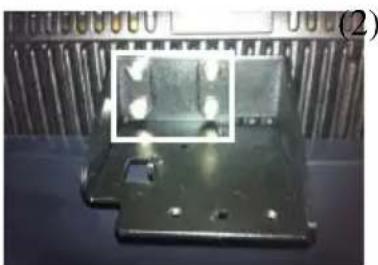
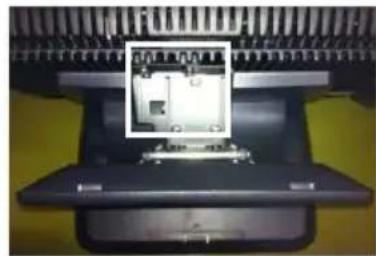
The LM-6307 can be attached to the POS upper rear base. Fasten the 4 screws on the upper rear base of KS series machine as illustrated in No1. picture. Then also fasten the 2 screws on the arrowed holes of LM-6307 as illustrated in No.2 picture. Finally attach this base wall mount upgrade 2^nd customer display to attached to the upper rear base as illustrated on No.3.
(1)
natural_image
Metallic metal component with a highlighted inset showing light reflections (no text or symbols visible)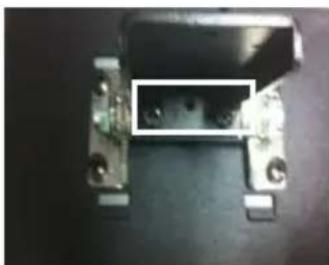
natural_image
Close-up of a mechanical component with metallic parts and mounting holes (no visible text or symbols)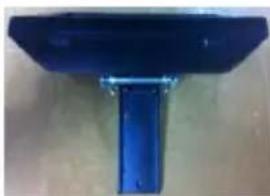
natural_image
Blue metal bracket with bolted base, no visible text or symbols(3)
natural_image
Close-up of a mechanical component with a highlighted internal structure (no visible text or symbols)LM-6407 Installation:
The LM-6407 can be attached to the POS rear corner of bottom plate of Posiflex Gen 5 ^th base. Please aim the 2 holes to the arrowed screw which shows in the below No1. picture. Then use the 2 attached Bing head screws to fix the metal base plate of the LM to the bottom of Gen 5th series base as circled in the No 2. picture. The complete installation is illustrated in No3. picture.
(1)

flowchart
graph LR
    A["Initial component with red circles"] --> B["Step 1: Inserted features"]
    B --> C["Step 2: Clicking with yellow tool"]
    C --> D["Step 3: Cut to final part"]
LM-6507 Installation:
The LM-6507 is a back mount cover monitor for HS series as illustrated below:
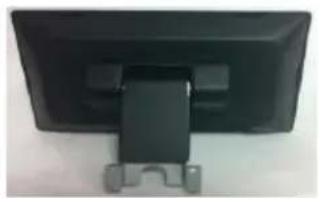
natural_image
Back view of a black computer monitor with a black strap and gray connectors (no visible text or symbols)LM-6607 Installation:
The LM-6607 is a back mount cover customer display for XT series as illustrated below:
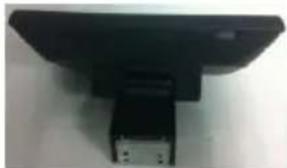
natural_image
Close-up of a black electronic device with a metallic bracket and mounting base (no visible text or symbols)APPLICATION GUIDES
SPECIFICATION
MECHANICAL
Total Height 480 mm (LM-6207) 460 mm (LM-6407)
Total Width 220 mm (LM-6207)
188 mm (LM-6407)
Total Depth 110 mm (LM-6207)
130 mm (LM-6407)
Display Window Width 188mm(LM-6207/
6307/6407/6507/6607)
Display Window Height
124mm(LM-6207/
6307/6407/6507/6607)
Case color Black (LM-6207
/6307/6407/6507/6607)
ELECTRICAL
Powered from USB interface: 5V, DC 1A
ENVIRONMENTAL
Operating temperature 0^ to +50^
Storage temperature -10^ to +60^
Operating humidity 20% to 85%, non-condensing
Storage humidity 5% to 90%, non-condensing
WARNING: If the user opens the pole display housing to make any modification, all the product warranty will be voided.
NOTE: Please refer to Posiflex Product Information DVD or visit our web http://www/posiflex.com.tw for further information needed.


- CE CLASS A WARNING
- AVERTISSEMENT CE CLASSE A
- LIMITES DE GARANTIE
- CONSIGNES DE SÉCURITÉ
- BRIEF INTRODUCTION
- THE PRODUCT
- FEATURES
- INSTALLATION GUIDES
- PACKAGE CONTENTS
- PHYSICAL INSTALLATION
- LM-6207/6307/6407/6507/6607 model:
- USB Interface Connection
- LM-6207 Front View:
- LM-6307 Installation:
- LM-6407 Installation:
- LM-6507 Installation:
- LM-6607 Installation:
- APPLICATION GUIDES
- SPECIFICATION
- MECHANICAL
- ELECTRICAL
- ENVIRONMENTAL
Brand : Posiflex
Model : LM-6307U
Category : Point of Sale Terminal