
KAGXYLTPRJA - Telephone Kogan - Free user manual and instructions
Find the device manual for free KAGXYLTPRJA Kogan in PDF.


| Product Type | Star Light Projector |
| Brand | Kogan |
| Model | KAGXYLTPRJA |
| Material | ABS |
| Power Input | DC 5V/2A |
| Maximum Power | 10W |
| Projection Method | Film disc projection |
| Projection Source | LED light bead |
| Projection Distance | 0.5m – 3m (1.64 – 9.84 ft) |
| Projection Area | 7m² – 16m² (75.3 ft² – 172.2 ft²) at 2m – 3m distance |
| Focus Adjustment | Rotary knob, adjustable within projection range |
| Rotation Speed | Slow (default) or fast; can be stopped |
| Timer Settings | 1 hour, 2 hours, or 4 hours auto shut-off (default 4h) |
| Auto Shut-Off | After 40 minutes, enters slow flashing mode; shuts off after set timer |
| Included Film Discs | 13 light films (replaceable) |
| Disc Replacement | Pinch tray handle, pull out slot, insert disc with 'UP' upward |
| Operating Temperature | -20°C to 50°C (-4°F to 122°F) |
| Storage Temperature | -20°C to 60°C (-4°F to 140°F) |
| Operating Environment | Dark indoor environment |
| Safety Warnings | Do not disassemble; use only with DC 5V/2A adapter; cease use if damaged |
| Included Accessories | Galaxy projector, USB-C cord, 13 film discs, user guide |
| Power Adapter | Not included (requires DC 5V/2A adapter) |
Frequently Asked Questions - KAGXYLTPRJA Kogan
User questions about KAGXYLTPRJA Kogan
0 question about this device. Answer the ones you know or ask your own.
Ask a new question about this device
Download the instructions for your Telephone in PDF format for free! Find your manual KAGXYLTPRJA - Kogan and take your electronic device back in hand. On this page are published all the documents necessary for the use of your device. KAGXYLTPRJA by Kogan.
USER MANUAL KAGXYLTPRJA Kogan
GALAXY & PLANETARIUM STAR LIGHT PROJECTOR
WITH 13 LIGHT FILMS
KAGXYLTPRJA
SAFETY & WARNINGS
- Read all instructions carefully and retain this user guide for future reference.
- Inspect the projector to ensure it is in good working condition before use.
- Do not disassemble the projector or attempt to repair it yourself. If the projector is damaged, cease use immediately and contact help.Kogan.com for support.
- Use this projector in a dark indoor environment.
- This projector requires a DC 5V/2A power adapter (not provided).
COMPONENTS
- Galaxy Projector
- USB-C cord
• Light Films Discs (x13) - User Guide
OVERVIEW

OPERATION
Before Use
- Insert the film with the 'UP' engraving facing upward into the film tray (refer to the following section for instructions on replacing the film disc).
- Connect one end of the provided USB-C cord to the USB-C port on the projector and the other end to a DC 5V/2A power adapter (not provided). The projector will automatically project the image.
- By default, the projector operates at a slow rotating speed and will shut off automatically after 4 hours.
• After 40 minutes of operation, the projector enters the slow flashing projection mode.
Power On/Off
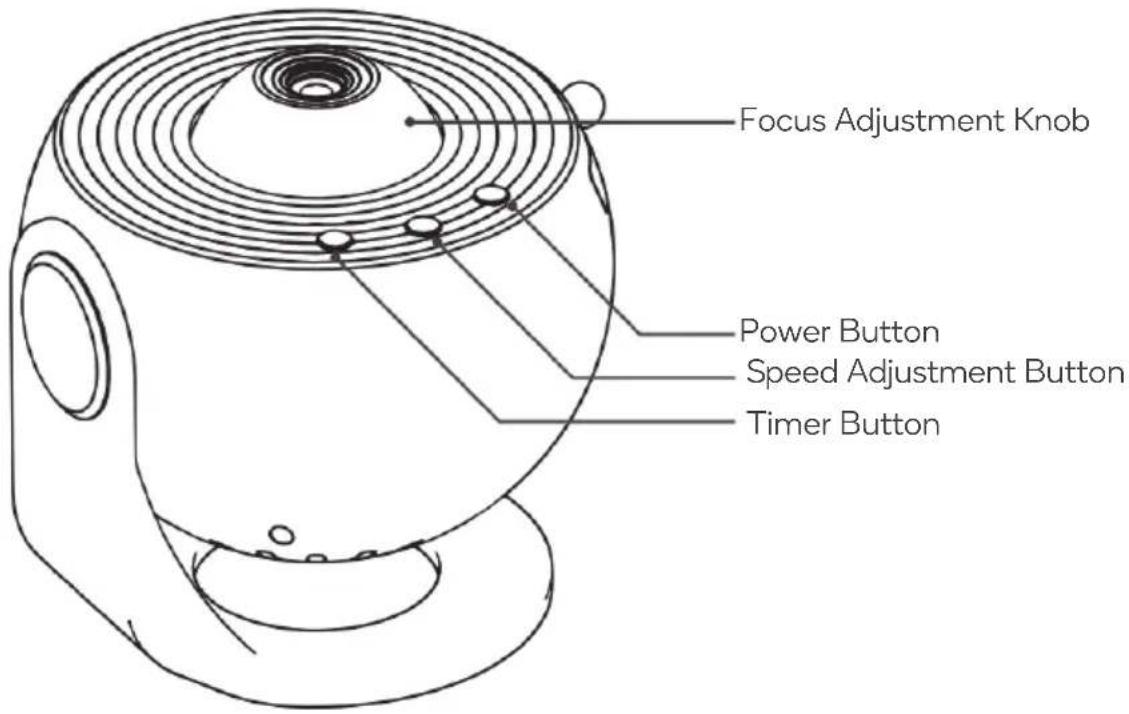
Press the Power button to turn the projector on/off. The projector powers on automatically when plugged in.
Rotation Speed
Press the Speed Adjustment button to change the rotation speed. The speed is set to slow by default.
| Rotation Speed Indicator | |
| Slow ‘S-’ indicator illuminates. | |
| Fast ‘S+’ indicator illuminates | |
| Stop No indicator. |
Timer Setting
- The projector powers off after 4 hours, and timer indicator is off by default.
- Press the Timer button to set a 1-hour timer; the '1H' indicator will illuminate.
- Press again to set a 2-hour timer; the '2H' indicator will illuminate.
- Press once more to cancel the timer setting and revert to the 4-hour auto shut-off.
Change the Film Discs
This projector comes with 13 film discs. To change the film disc:
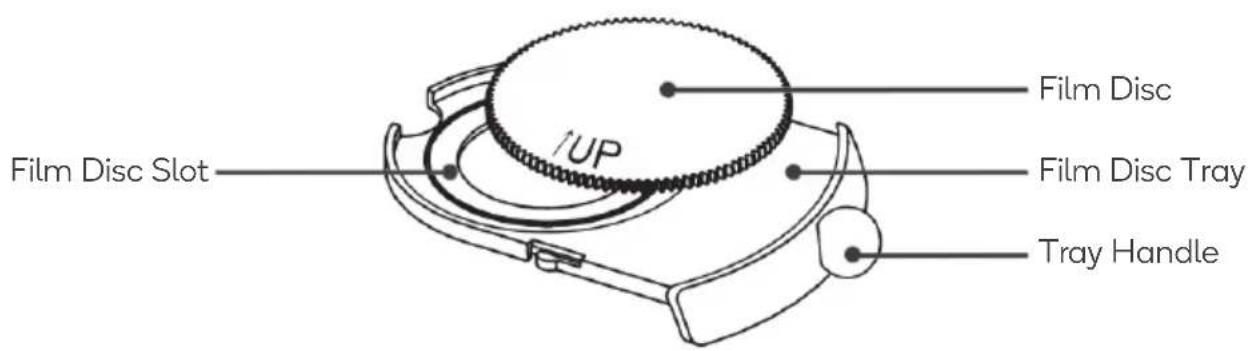
- Pinch the tray handle and pull out the film disc slot
- Place a film disc with the engraved '↑UP' side facing upwards into the film slot.
- Reset the tray back into the projector.

123


Note:
Replace the film disc while the projector is powered off.
Adjust the Focus
- This projector supports projection focus adjustment within a range of 0.5m-3m (1.64-9.84ft).
- To adjust the projection focus, refer to the current projection clarity and rotate the focus adjustment knob forward or backward to achieve a clearer projection effect.

SPECIFICATIONS
Material ABS.
Power Input
DC 5V/2A..
Maximum Power 10W.
Projection Method Film disc projection.
The projection area is 7m216m2/75.3ft2172.2ft2 at a 2m3m/6.56ft9.84ft projecting distance, and so on.
Projection Source LED light bead.
Projection Distance
0.5m-3m/1.64-9.84ft.
Operating Temperature -20°C\~50°C/-4°F\~122°F.
Storage Temperature -20°C\~60°C/-4°F\~140°F.
Operating Environment
Use in a dark indoor environment.
Need more information?
We hope that this user guide has given you the assistance needed for a simple set-up.
For the most up-to-date guide for your projector, as well as any additional assistance you may require, head online to help.kogan.com
kogan.com
Brand : Kogan
Model : KAGXYLTPRJA
Category : Telephone