
VB-MTCL-00 - Tripod Proaim - Free user manual and instructions
Find the device manual for free VB-MTCL-00 Proaim in PDF.


| Product Type | Mitchell Vibration Isolator for Camera Gimbals |
| Brand | Proaim |
| Model | VB-MTCL-00 |
| Compatible Gimbals | Large remote pan-tilt heads, DJI Ronin, MōVI |
| Wire Cable Thickness | 5/16 inch |
| Mounting Options | Over slung and under slung |
| Lightweight Setup Weight Range | 15–30 kg (33–66 lb) with single spring configuration |
| Main Function | Removes vibration from camera gimbals for smooth tracking on vehicles |
| Leveling | Compensates for uneven roads or rough terrain |
| Construction | Wire cable isolator with Mitchell plate, middle base plate, isolator base plate |
| Warranty | 1 year from date of purchase |
| Care and Cleaning | Wipe with dry cloth; avoid harsh chemicals |
| Safety | Ensure bolts are tightened securely; use with appropriate payload |
| Spare Parts Availability | Contact Proaim for replacement parts; nominal cost after warranty |
| Included Items | Proaim Mitchell Vibration Isolator for Camera Gimbals (plate assembly) |
| Optional Accessories | Ronin plate, L-plate for isolator arm (not included) |
Frequently Asked Questions - VB-MTCL-00 Proaim
User questions about VB-MTCL-00 Proaim
0 question about this device. Answer the ones you know or ask your own.
Ask a new question about this device
Download the instructions for your Tripod in PDF format for free! Find your manual VB-MTCL-00 - Proaim and take your electronic device back in hand. On this page are published all the documents necessary for the use of your device. VB-MTCL-00 by Proaim.
USER MANUAL VB-MTCL-00 Proaim
natural_image
Mechanical assembly with black housing and coiled springs, no visible text or symbolsMitchell Vibration Isolator for Gimbals (VB-MTCL-00)
Instruction Manual
PROAIM
CINEMA SERIES
At Proaim, our goal is to ensure 100% Customer Satisfaction in all that we do.
We back our sales with a 1 year warranty from the date of purchase and work hard to resolve any problems in the unlikely event one should arise.
With our commitment to continuous improvement and your Feedback, building on our reputation of providing affordable, quality products is PRIORITY #1.
Table of Contents
Subject Page
Foreword 3
Introduction 4
Assembling 5-8
Warranty 9
■ Welcome To Proaim!
Dear Client,
On behalf of all the people that work so hard to provide you with the most up-to-date, flexible and cost-efficient production gear, we would like to welcome you into the Proaim family.
By purchasing your Proaim Mitchell Vibration Isolator Plate for Camera Gimbals, you have just joined a host of designers, engineers, machinists, assembly, customer service and office staff that take great pride in all that they do. Our mantra of continuous improvement has been the guiding principle of how we conduct our business since day one.
Once you have the opportunity to experience your new Mitchell Vibration Isolator for Camera Gimbals, we hope you will agree that we craft quality products at a competitive price. Products designed to meet and exceed the standards of today's real production world.
Standards set by our valued clients and standards we strive to maintain.
With Best Wishes,
Proaim Team
Introduction
Proaim Mitchell Anti-Vibration Wire Isolator is designed to handle large Remote Pan Tilt heads and Gimbal Systems like the DJI Ronin or MōVI. This unique Vibration Isolator helps remove vibration from camera gimbals and delivers smooth tracking movement mounted on any vehicle. This system is capable of levelling down outcome of vehicle moving on uneven road or rough terrains. The thickness of the wire cable is 5/16".
What's In The Box
Please inspect the contents of your shipped package to ensure you have received all that is pictured and listed below.
• Proaim Mitchell Vibration Isolator for Camera Gimbals
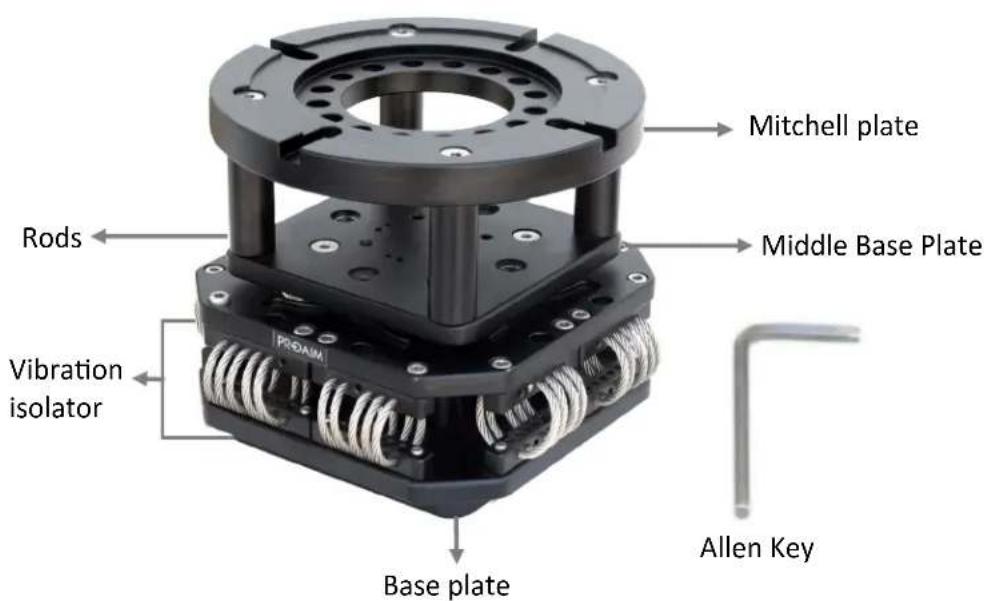
Assembling
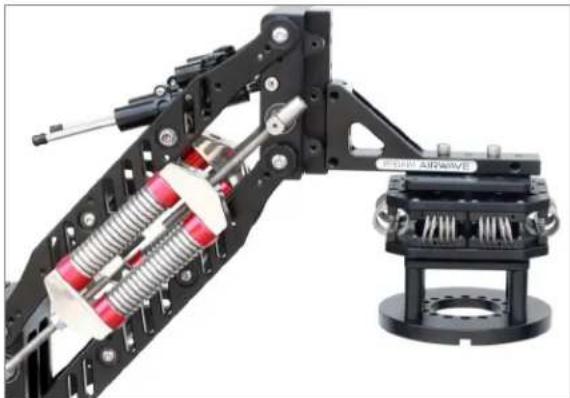
- Attach Mitchell Vibration Isolator with the plate of your setup and tighten to secure it properly.
natural_image
Mechanical assembly diagram showing a robotic arm with spring and connecting components, mounted on a flanged base (no text or symbols visible)NOTE: The isolator plate can be fixed both Over Slung and Under Slung, as per your requirement.

natural_image
Mechanical assembly with spring-loaded components and a mounted bracket (no visible text or symbols)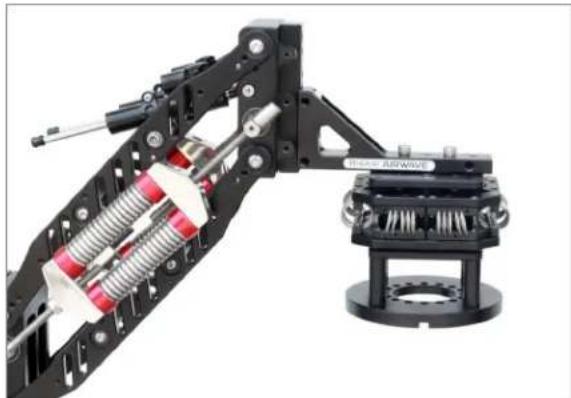
natural_image
Mechanical assembly diagram showing a robotic arm with springs and a mounted airwave component (no text or symbols visible)- Then loosen the bolts of Mitchell plate and insert the Castle Ring into it. Connect any Gimbal Mount with Castle Ring as shown in the image.

natural_image
Close-up of a hand using a tool to adjust or install a mechanical component (no visible text or symbols)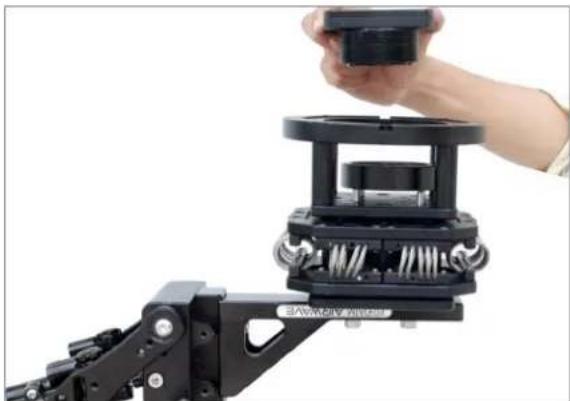
natural_image
Close-up of a hand holding a small black mechanical component mounted on a robotic arm (no visible text or symbols)Assembling with Isolator Base Plate
NOTE: You can attach only Vibration Isolator Plate by removing the Mitchell Plate.
- Loosen bolts on Mitchell Plate with the help of allen key and remove the plate. Your equipment will look as shown in image.

natural_image
Close-up of a hand using a tool to adjust or install a mechanical component, with red circles highlighting specific parts (no text or symbols visible)
natural_image
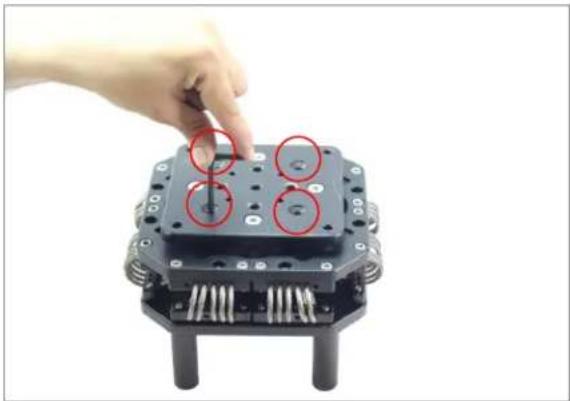
Close-up of a black mechanical component with multiple cylindrical ports and metallic connectors (no visible text or symbols)- Turn the Isolator upside-down & loosen the bolts to remove Isolator with Base Plate.
natural_image
Hand pointing at a black mechanical component with four circular features, no visible text or symbols
natural_image
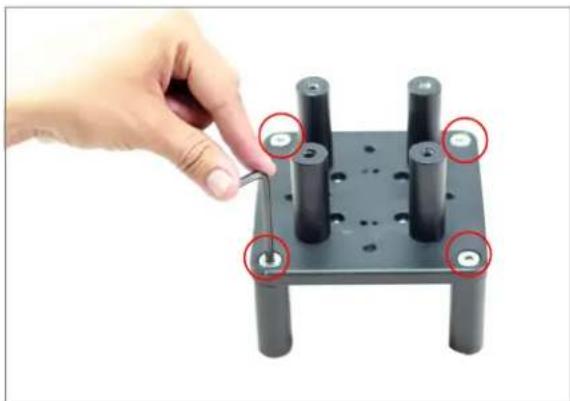
Hand holding a black mechanical device with multiple cylindrical pins, next to a metallic U-shaped base (no visible text or symbols)- Now loosen 4 corner bolts of Middle Base Plate and remove the Rods as shown in image.
natural_image
Hand using a tool to adjust or install a mechanical component with four cylindrical pins (no text or symbols visible)
natural_image
Hand holding a tray of cylindrical batteries with one battery partially visible below (no text or symbols)- Then attach Middle Base Plate with Ronin Plate (Not Included). Insert the bolts and tighten them with the help of allen key.

natural_image
Hand holding a black square mechanical component with multiple holes, alongside a black mechanical clamp device (no text or symbols visible)
natural_image
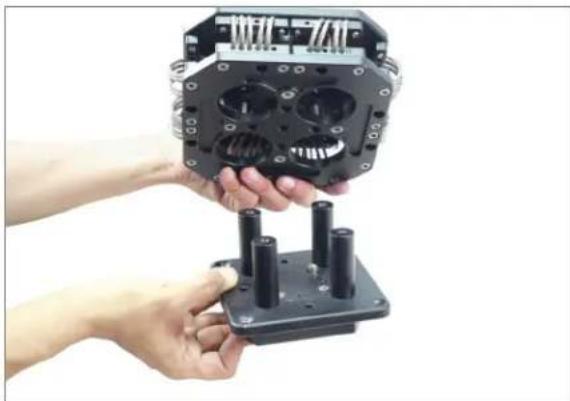
Hand holding a small mechanical component mounted on a black base plate (no text or symbols visible)- Now attach this Middle Base Plate with Isolator Plate and tighten the bolts accurately with allen key, as shown in image.
natural_image
Close-up of hands holding a black mechanical device with multiple cylindrical pins (no visible text or symbols)
natural_image
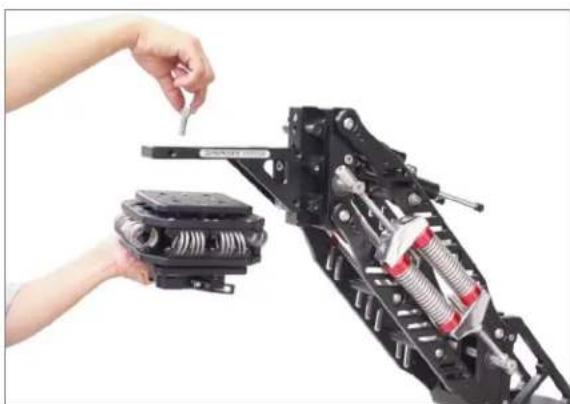
Hand interacting with a black mechanical device with multiple pins and a central hub (no text or symbols visible)- Finally, you can mount the Base Plate with L-plate of your Isolator Arm (Not Included) and mount your Gimbal.
natural_image
Close-up of a hand using a tool to adjust or install a mechanical component, no visible text or symbols
natural_image
Close-up of a hand operating a mechanical assembly with a camera frame and mounted device (no visible text or symbols)Assembling with Single Spring Set
NOTE: Vibration Isolator can also be customized with Single Spring configuration for using with lightweight setups from 15-30kg / 33-66lb.
- Loosen the bolts from top and bottom of Vibration Isolator.

natural_image
Close-up of a hand placing a yellow plastic clip onto a black mechanical component (no text or symbols visible)
natural_image
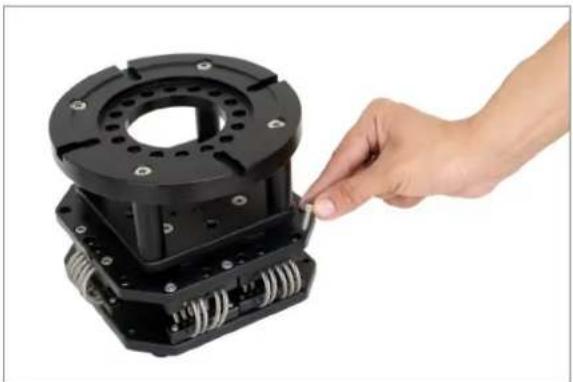
Close-up of a robotic device with a yellow tool inserted, showing internal components and no visible text or symbols.- Then remove the bolts and one wire set from Vibration Isolator plate.
natural_image
Hand inserting a small component into a black mechanical housing (no text or symbols visible)
natural_image
Hand interacting with a black mechanical component, possibly a pump or motor housing (no visible text or symbols)- Now adjust the other wire set in center of the Vibration Isolator and tighten all the allen bolts to secure spring set appropriately.

natural_image
Hand interacting with a black mechanical component, possibly a robotic or mechanical assembly (no visible text or symbols)
natural_image
Hand placing a yellow tool into a black mechanical assembly (no text or symbols visible)YOUR PROAIM MITCHELL VIBRATION ISOLATOR FOR GIMBALS ALL DRESSED UP AND READY TO GO!

natural_image
Mechanical assembly of a robotic arm mounted on a tripod, with a video camera and camera module visible (no text or symbols)(SHOWN WITH OPTIONAL ACCESSORIES)
WARRANTY
We offer a one year warranty for our products from the date of purchase.
We will repair or replace your product, free of charge, in the event of a defect in materials or craftsmanship obtained during normal use or handling based on the user manual. Please note that we will not cover any shipping costs for returning the product to us. If any VAT or import duties are applied to the return, we will also charge these costs to the customer.
The warranty does not include, by the way of example, damage caused by products that we do not supply or from mishandling in transit, accident, misuse, neglect, lack of care of the product, or service by anyone other than our company.
We are not liable for incidental or consequential damages resulting from the use of the unit or occurring due to any breach of this warranty.
Replacement parts of the product will be provided at nominal cost (covering the cost price of the replacement parts only) to the customers after the Warranty Period has expired. We will cover
the complete cost of sending replacement parts within the warranty period. After that, Nominal cost of the product & Actual shipping cost will be charged.
Do not send the unit to us without first getting a response and getting the approval to send back the item.
In case of any kind of dissatisfaction, we urge you to Contact us immediately and we shall do our Best to help you out. For any other assistance you can reach us via email.
For any other assistance you can reach us via email.

- Mitchell Vibration Isolator for Gimbals (VB-MTCL-00)
- Table of Contents
- Subject Page
- ■ Welcome To Proaim!
- Introduction
- What's In The Box
- Assembling
- Assembling with Isolator Base Plate
- Assembling with Single Spring Set
- YOUR PROAIM MITCHELL VIBRATION ISOLATOR FOR GIMBALS ALL DRESSED UP AND READY TO GO!
- WARRANTY
Brand : Proaim
Model : VB-MTCL-00
Category : Tripod