
TAA75077 - Earphones PHILIPS - Free user manual and instructions
Find the device manual for free TAA75077 PHILIPS in PDF.


| Type | True Wireless Stereo (TWS) Earphones |
| Model | TAA75077 |
| Brand | Philips |
| Driver Size | 13 mm (estimated) |
| Frequency Range | 20 Hz - 20 kHz |
| Impedance | 16 ohms (estimated) |
| Sensitivity | 107 dB (estimated) |
| Bluetooth Version | 5.2 (estimated) |
| Wireless Range | Up to 10 meters |
| Battery Life (Earbuds) | Up to 7 hours (estimated) |
| Battery Life with Charging Case | Up to 25 hours (estimated) |
| Charging Time (Earbuds) | About 2 hours |
| Charging Connector | USB-C (estimated) |
| Water Resistance | IPX4 (sweat and splash resistant, estimated) |
| Weight (each earbud) | 5 g (estimated) |
| Weight (charging case) | 40 g (estimated) |
| Dimensions (charging case) | 45 x 45 x 28 mm (estimated) |
| Controls | Touch or button (estimated) |
| Active Noise Cancellation | No (standard model, estimated) |
| Compatibility | iOS and Android devices with Bluetooth |
| What's in the Box | Earbuds, charging case, USB-C cable, ear tips, quick start guide |
| Care and Cleaning | Wipe with dry cloth; do not use liquids or abrasives |
| Safety | Do not expose to extreme temperatures; keep away from children |
| Spare Parts and Repairability | Ear tips available; contact Philips support for battery replacement |
Frequently Asked Questions - TAA75077 PHILIPS
User questions about TAA75077 PHILIPS
0 question about this device. Answer the ones you know or ask your own.
Ask a new question about this device
Download the instructions for your Earphones in PDF format for free! Find your manual TAA75077 - PHILIPS and take your electronic device back in hand. On this page are published all the documents necessary for the use of your device. TAA75077 by PHILIPS.
USER MANUAL TAA75077 PHILIPS
natural_image
Black Philips wireless earbuds and charging case with red trim, shown from front and side (no text or symbols on devices)User manual
Register your product and get support at
www.philips.com/support
Contents
1 Important safety instructions 2
Hearing safety 2
General information 2
2 Your True wireless earpieces 4
What's in the box 4
Other devices 4
Overview of your True wireless
earpieces 5
3 Get started 6
Charge the battery 6
How to wear 7
App download 7
Pair for the first time 7
Pair with another Bluetooth device 8
4 Use your earpieces 9
Connect to your Bluetooth device 9
Control ANC (Active Noise
Cancellation) 9
Power on/off 10
Manage your calls and music 10
Voice Assistant 10
Earpieces LED indicator status 10
Charging box LED indicator status 11
5 Reset the earpieces 12
6 Technical data 12
7 Notice 13
Declaration of conformity 13
Disposal of your old product and battery 13
Remove the integrated battery 13
Compliance with EMF 14
Environmental information 14
Notice of compliance 14
8 Trademarks 16
9 Frequently asked questions 17
1 Important safety instructions
Hearing safety


Danger
- To avoid hearing damage, limit the time you use headphones at high volume and set the volume to a safe level. The louder the volume, the shorter the safe listening time is.
Be sure to observe the following guidelines when using your headphones.
- Listen at reasonable volumes for reasonable periods of time.
- Be careful not to adjust the volume continuously upwards as your hearing adapts.
- Do not turn up the volume so high that you can't hear what's around you.
- You should use caution or temporarily discontinue use in potentially hazardous situations.
- Excessive sound pressure from earpieces and headphones can cause hearing loss.
- Using headphones with both ears covered while driving is not recommended and may be illegal in some areas.
- For your safety, avoid distractions from music or phone calls while in traffic or other potentially dangerous environments.
General information
To avoid damage or malfunction:

Caution
- Do not expose headphones to excessive heat.
• Do not drop your headphones.
• Headphones shall not be exposed to dripping or splashing. (Refer to the IP rating of specific product) - Do not allow your headphones to be submerged in water.
- Do not charge your headphones when the connector or socket is wet.
- Do not use any cleaning agents containing alcohol, ammonia, benzene, or abrasives.
- Use a clean, damp cloth to clean your headphones - especially the sound conduits and the microphone holes - regularly and avoid buildup of substances such as sweat or earwax.
- If any sweat or water droplets are left in the sound conduits, air holes or microphone holes, the sound level will temporarily drop or cut out entirely. This is not a malfunction. Use a soft, damp cloth to dry the headphones thoroughly. Alternatively, remove the earbud tips, turn the sound conduits downward and gently tap the headphones about five times on a dry cloth or similar to remove any water collected inside.
- Be sure the headphones are completely dry before charging and using. Avoid using disposable alcohol pads or other substances for cleaning.
- The integrated battery shall not be exposed to excessive heat such as sunshine, fire or the like.
- Danger of explosion if battery is incorrectly replaced. Replace only with the same or equivalent type.
- To achieve the specific IP rating, the charging slot cover must be closed.
- Disposal of a battery into fire or a hot oven, or mechanically crushing or cutting a battery, can result in an explosion.
• Leaving a battery in an extremely high temperature surrounding environment can result in an explosion or the leakage of flammable liquid or gas. - A battery subjected to extremely low air pressure may result in an explosion or the leakage of flammable liquid or gas.
- Replacement of a battery with an incorrect type risks severely damaging the headphones and the battery (for example, in the case of some lithium battery types).
- If the headset is not used for a long time, the rechargeable battery will begin to lose its charge. To avoid this loss, please fully charge the battery at least once every three months.
- To avoid risk of fire, the equipment is supplied only by external power source which output shall comply with PS1 (with output capacity less than 15W).
Operating and storage temperatures and humidity
- Store in a place where the temperature is between -20°C (-4°F) and 50°C (122 °F) with up to 90% relative humidity.
- Operate in a place where the temperature is between 0°C (32°F) and 45°C (113°F) with up to 90% relative humidity.
- Battery life may be shorter in high or low temperature conditions.
2 Your True wireless earpieces
Congratulations on your purchase, and welcome to Philips! To fully benefit from the support that Philips offers, register your product at www.philips.com/support. With these Philips True wireless earpieces you can:
- Enjoy convenient wireless handsfree calls
- Enjoy and control music wirelessly
- Switch between calls and music
What's in the box

natural_image
Line drawing of a wireless earbuds with two charging case (no text or symbols)Philips True wireless earpieces Philips TAA7507

Stablizers x 6 + Eartips x 6

Lanyard
natural_image
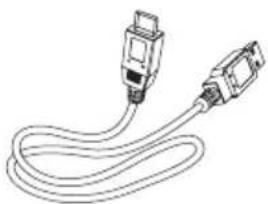
Line drawing of a USB cable with two connectors (no text or symbols)USB-C charging cable (for charging only)

Quick start guide
Warranty

Safety leaflet
Other devices
A mobile phone or device (e.g. notebook, tablet, Bluetooth adapters, MP3 players etc) which supports Bluetooth and is compatible with the earpieces.
Overview of your True wireless earpieces

① LED indicator (earpieces)
② Multi-function touch (MFT)
③ Bluetooth pair button
④ LED indicator (BT pairing and factory reset)
⑤ LED indicator (battery state or charging state)
⑥ USB-C charging slot
3 Get started
Charge the battery

Note
- Before you use your headphones, place them in the charging box and charge the battery for 2 hours for optimum battery capacity and lifetime.
- Use only the original USB-C charging cable to avoid any damage.
- Finish your call before charging. Connecting the earpieces to charge will power them off.
Charging Box
Plug one end of the USB-C cable into the charging box and the other end into the power source.

natural_image
Diagram of a battery cell with an internal plug and battery symbol (no text or labels)
Tip
- The charging box serves as a portable backup battery for charging the earpieces. When the charging box is fully charged, it will fully recharge the earpieces 3 times.
Earpieces
Place the earpieces in the charging box.
- The earpieces start charging and the blue LED light goes on
- When the earpieces are fully charged, the blue light will go off

natural_image
Line drawing of a hand inserting a small electronic device into a multi-wire earbuds (no text or symbols)
Tip
- Normally, a full charge takes 2 hours (for the earpieces or charging box) by USB cable.
How to wear
Select suitable ear tips for optimum fit
A tight, secure fit will provide the best sound quality and noise-cancellation.
1 Test which ear tips and stabilizers provides you with the best sound and wearing comfort.
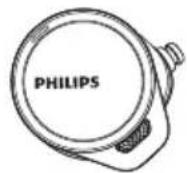
2 3 sizes of silicone ear tips and stabilizers are provided: large, medium, small.

natural_image
Six hand-drawn abstract oval shapes arranged in two rows (no text or symbols)LMS
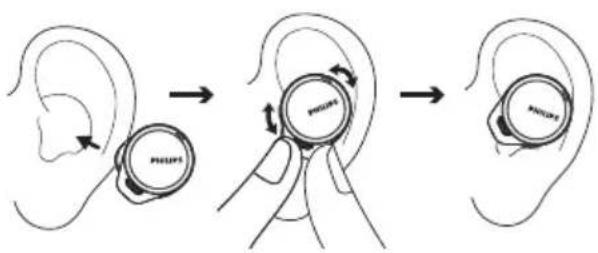
Insert the earpieces
1 Check left or right orientation of the earpieces.
2 Insert the earpieces into the ears and twist slightly until a secure fit is achieved.
App download
Scan the QR code/press 'Download' button or search 'Philips Headphones' in Apple App Store or Google Play to download the app.

natural_image
Blue square icon with white headphones and the word 'PHILIPS' below it (no additional text or symbols)
The Philips Headphones App put you in charge of the music you've listening to. You can customize the sound so your music and calling experience always best suits your needs.
Pair the earpieces with your Bluetooth device for the first time
1 Make sure that the earpieces are fully charged and powered off.
2 Open the cover of the charging box, the earpieces will be in pairing mode and ready to connect.
→ The LEDs on both earpieces flash white and blue alternately
The earpieces are now in pairing mode and are ready to pair with a Bluetooth device (e.g. a mobile phone)
3 Turn on the Bluetooth function of your Bluetooth device.
4 Pair the earpieces with your Bluetooth device, refer to the user manual of your Bluetooth device.

Note
• After powering on, if the earpieces cannot find any previously connected Bluetooth device, it will automatically switch to pairing mode.
The following example shows you how to pair the earpieces with your Bluetooth device.
1 Turn on the Bluetooth function of your Bluetooth device, select Philips TAA7507.
2 Enter the earpieces' password "0000" (4 zeros) if prompted. For those devices featuring Bluetooth 3.0 or higher, there is no need to enter a password.

Philips TAA7507
Single earpiece (Mono mode)
Take either right or left earpiece out from charging box for Mono use. The earpiece will power on automatically. You will hear a voice from the earpieces saying "Power on".

Note
• Take the second earpiece from the charging box and they will pair with each other automatically.
Pair the earpieces with another Bluetooth device
If you want to pair another Bluetooth device with the earpieces, just put them into pairing mode, (press button on box for 3 seconds with both earpieces inside and the cover open), then discover the second device as per normal pairing.


Note
- The earpieces store 4 devices in the memory. If you try to pair more than 4 devices, the earliest paired device is replaced by the new one.
Multi-point connection
Pairing
- Pairing the headphones to 2 devices, e.g. mobile phone and notebook.
Switch between device
- At anytime, you can only listen to music from 1 device. Another device will be for phone call.
- Pause the audio from 1 device and then start play audio from the another device.

Note
- When streaming audio from Device 1, receiving a call from Device 2 will automatically pause Device 1 playback. And the call will be routed automatically to headphones.
• Ending the call will automatically resume playback from device 1.
4 Use your earpieces
Connect the earpieces to your Bluetooth device
1 Turn on the Bluetooth function of your Bluetooth device.
2 Open the charging box cover.
→ The blue LED flashes.
→ The earpieces will search the last connected Bluetooth device and reconnect to it automatically. If the last connected one is not available, the earpieces will search and reconnect to the second last connected device.

Tip
- If you turn on the Bluetooth function of your Bluetooth device after turning on the earpieces, you have to go to the Bluetooth menu of the device and connect the earpieces to the device manually.

Note
- If the earpieces fail to connect to any Bluetooth device within 3 minutes, it will turn off automatically to save the battery life.
- In some Bluetooth devices, connection may not be automatic. In this case, you have to go to the Bluetooth menu of your device and connect the earpieces to the Bluetooth device manually.
- If no signal (music/call) is received for 60 mins even with Bluetooth connection, the earpieces will turn off automatically to save the battery life.
Control ANC (Active Noise Cancelation)
Enable ANC
Different ANC modes can be toggled via double tapping on the right earpiece.
- ANC function is automatically activated when earpiece is placed in the ear
- Touch the MFT twice, it will change to awareness mode
- Touch the MFT twice again, it will turn the ANC function off

flowchart
graph TD
    A["ANC Off"] --> B["Awareness mode"]
    B --> C["ANC ON"]
    C --> A

Tip
- Removing the earpieces will automatically activate sleep mode. When you put the earpieces back they will return to active mode.
| Task | MFT Operation | |
| ANC ON Right earpiece | Double tap | |
| mode | Right earpiece | Double tapAwarene |
| ANC OFF Right earpiece | Double tap | |
| Quick awareness | Right earpiece | Continue touching after beep |
Power on/off
| Task | MFT Operation |
| Turn the earpieces on | Take earpieces out of the charging box to power on |
| Turn the earpieces off | Put earpieces back into the charging box to power off |
Manage your calls and music
Music control
| Task MFT Operation | ||
| Play or pause music | Right earpiece | Tap and hold 1 second |
| Next track Right earpiece | Triple tap | |
| Adjust volume +/- | Via mobile phone control | |
Call control
| Task | MFT | Operation |
| Pick up/ Switch caller during a call | Right earpiece | Double tap |
| Hang up call/ Reject call | Right earpiece | Tap and hold 1 second |
Voice Assistant
| OperationTask But | ||
| Trigger Voice (Siri/Google) Assistant | Left earpiece | Tap and hold 2 seconds |
| Stop Voice Assistant | Left earpiece | Single tap |
Earpieces LED indicator status
| Earpieces status | Indicator |
| The earpieces are connected to a Bluetooth device | White LED blinks every 5 seconds |
| The earpieces are ready for pairing | The LED flashes blue and white alternately |
| The earpieces are on but not connected to a Bluetooth device | White LED blinks every second (auto turn off after 3 minutes) |
| Low battery level (earpieces) | Blue LED blinks 2x every 5 seconds |
| Battery is fully charged (charging box) | Refer to case LED |
Charging box LED indicator status
When charging Indicator
| Battery low | Amber LED lights up |
| Relative adequate battery | White LED lights up |
In use and cover is open Indicator
| Battery low | Amber slowlyblinks for 4 cycles |
| Relativelyadequate battery | Off |
5 Reset the earpieces
If you encounter any pairing or connection issue, you can follow the following procedure to reset your earpieces to factory default settings.
1 On your Bluetooth device, go to the Bluetooth menu and remove Philips TAA7507 from the device list.
2 Turn off the Bluetooth function of your Bluetooth device.
3 Return earpieces to charging box and open the lid.
4 Press button on box twice.
5 Follow steps in "Use your earpieces-connect the earpieces to your Bluetooth device."
6 Pair the earpieces with your Bluetooth device, select Philips TAA7507.
If there is no response from the earpieces, you can follow the below step to reset the hardware of your earpieces.
- Tap and hold multi-function touch for 10 seconds.
6 Technical data
• Music play time (ANC on) : 7 + 21 hours
• Music play time (ANC off) : 8 + 24 hours
• Standby time: 200 hours
• Charging time: 2 hours
• Lithium-ion battery 55 mAh on each earpiece, Lithium-ion battery 500 mAh on charging box
- Bluetooth version: 5.2
• Compatible Bluetooth profiles:
• HFP (Hands-Free Profile)
• A2DP (Advanced Audio Distribution Profile)
• AVRCP (Audio Video Remote Control Profile)
• Supported audio codecs: LDAC, AAC, SBC
• Frequency range: 2.402-2.480 GHz
• Transmitter power: < 10 dBm
• Operation frequency: 110-205kHz
• Max. H-field strength: 11.3 dBuA/m (62.8 dBuV/m)
• Operating range: Up to 10 meters (33 feet)
- Auto power off
• USB-C port for charging
- Wireless charging
• Low battery warning: available

Note
- Specifications are subject to change without notice.
7 Notice
Declaration of conformity
Hereby, MMD Hong Kong Holding Limited declares that this product is in compliance with the essential requirements and other relevant provisions of Directive 2014/53/EU. You can find the Declaration of Conformity on www.p4c.philips.com.
Disposal of your old product and battery

Your product is designed and manufactured with high quality materials and components which can be recycled and reused.

This symbol on a product means that the product is covered by European Directive 2012/19/EU.

This symbol means that the product contains a built-in rechargeable battery covered by European Directive 2013/56/EU which cannot be disposed of with normal household waste. We strongly advise you to take your product to an official collection point or a Philips service centre to have a professional remove the rechargeable battery. Inform yourself about the local separate collection system for electrical and electronic products and rechargeable batteries. Follow local rules and never dispose of the product and rechargeable batteries with normal household waste. Correct disposal of old products and rechargeable batteries helps prevent negative consequences for the environment and human health.
Remove the integrated battery
If there is no collection/recycling system for electronic products in your country, you can protect the environment by removing and recycling the battery before disposing of the earpieces.
• Make sure the earpieces are disconnected from the charging box before removing the battery.

natural_image
Exploded view diagram of a mechanical assembly showing internal components (no text or labels)• Make sure the charging box is disconnected from the USB charging cable before removing the battery.

natural_image
Exploded view diagram of a refrigerator internal components (no text or labels)Compliance with EMF
This product complies with all applicable standards and regulations regarding exposure to electromagnetic fields.
Environmental information
All unnecessary packaging has been omitted. We have tried to make the packaging easy to separate into three materials: cardboard (box), polystyrene foam (buffer) and polyethylene (bags, protective foam sheet.)
Your system consists of materials which can be recycled and reused if disassembled by a specialized company. Please observe the local regulations regarding the disposal of packaging materials, exhausted batteries and old equipment.
Notice of compliance
The device complies with the FCC rules, Part 15. Operation is subject to the following two conditions:
- This device may not cause harmful interference, and
- This device must accept any interference received, including interference that may cause undesired operation.
FCC rules
This equipment has been tested and found to comply with the limits for a Class B digital device, pursuant to part 15 of the FCC Rules. These limits are designed to provide reasonable protection against harmful interference in a residential installation. This equipment generates, uses and can radiate radio frequency energy and,
if not installed and used in accordance with the instruction manual, may cause harmful interference to radio communications.
However, there is no guarantee that interference will not occur in a particular installation. If this equipment does cause harmful interference to radio or television reception, which can be determined by turning the equipment off and on, the user is encouraged to try to correct the interference by one or more of the following measures:
- Reorient or relocate the receiving antenna
- Increase the separation between equipment and receiver
- Connect the equipment into an outlet on a circuit different from that to which the receiver is connected
- Consult the dealer or an experienced radio/TV technician for help
FCC Radiation Exposure Statement:
This equipment complies with FCC radiation exposure limits set forth for an uncontrolled environment.
This transmitter must not be co-located or operated in conjunction with any other antenna or transmitter.
Caution: The user is cautioned that changes or modifications not expressly approved by the party responsible for compliance could void the user's authority to operate the equipment.
Canada:
This device contains licence-exempt transmitter(s)/receiver(s) that comply with Innovation, Science and Economic Development Canada's license-exempt RSS(s). Operation is subject to the following two conditions: (1) This device may not cause interference. (2) This device must accept any interference, including interference that may cause undesired operation of the device.
IC Radiation Exposure Statement:
This equipment complies with Canada radiation exposure limits set forth for uncontrolled environments. This transmitter must not be co-located or operated in conjunction with any other antenna or transmitter.
8 Trademarks
Bluetooth
The Bluetooth® word mark and logos are registered trademarks owned by Bluetooth SIG, Inc. and any use of such marks by MMD Hong Kong Holding Limited is under license. Other trademarks and trade names are those of their respective owners.
Siri
Siri is a trademark of Apple Inc., registered in the U.S. and other countries.
Google and Google Play are trademarks of Google LLC.
9 Frequently asked questions
My Bluetooth earpieces do not turn on.
The battery level is low. Charge the earpieces.
I cannot pair my Bluetooth earpieces with my Bluetooth device.
The Bluetooth is disabled. Enable the Bluetooth feature on your Bluetooth device and turn on the Bluetooth device before you turn on the earpieces.
Pairing does not work.
- Put both earpieces into charging box.
- Make sure you have disabled the Bluetooth function of any previously connected Bluetooth devices.
- On your Bluetooth device, delete "Philips TAA7507" from the Bluetooth list.
- Pair your earpieces (see 'Pair the earpieces with your Bluetooth device for the first time' on page 7).
The Bluetooth device cannot find the earpieces.
- The earpieces may be connected to a previously paired device. Turn off the connected device or move it out of range.
- Pairing may have been reset or the earpieces have been previously paired with another device. Pair the earpieces with the Bluetooth device again as described in the user manual. (see 'Pair the earpieces with your Bluetooth device for the first time' on page 7).
My Bluetooth earpieces are connected to a Bluetooth stereo-enabled mobile phone, but music only plays on the mobile phone speaker.
Refer to the user manual of your mobile phone. Select to listen to music through the earpieces.
The audio quality is poor and a crackling noise can be heard.
- The Bluetooth device is out of range. Reduce the distance between your earpieces and Bluetooth device, or remove obstacles between them.
- Charge your earpieces.
The audio quality is poor when streaming from a mobile phone is very slow or streaming does not work at all.
Make sure your mobile phone not only supports (mono) HFP but also supports A2DP and is BT4.0x (or higher) compatible (see 'Technical data' on page 12).
Clean your headphones regularly.
- Use a clean, damp cloth to clean your headphones - especially the sound conduits and the microphone holes - regularly and avoid buildup of substances such as sweat or earwax.
- If any sweat or water droplets are left in the sound conduits, air holes or microphone holes, the sound level will temporarily drop or cut out entirely. This is not a malfunction. Use a soft, damp cloth to dry the headphones thoroughly. Alternatively, remove the earbud tips, turn the sound conduits downward and gently tap the headphones about five times on a dry cloth or similar to remove any water collected inside.
- Be sure the headphones are completely dry before charging and using. Avoid using disposable alcohol pads or other substances for cleaning.
Charge your headphones regularly.
If the headset is not used for a long time, the rechargeable battery will begin to lose its charge. To avoid this loss, please fully charge the battery at least once every three months.

2022 © MMD Hong Kong Holding Limited. All rights reserved. Specifications are subject to change without notice. Philips and the Philips Shield Emblem are registered trademarks of Koninklijke Philips N.V. and are used under license. This product has been manufactured by and is sold under the responsibility of MMD Hong Kong Holding Limited or one of its affiliates, and MMD Hong Kong Holding Limited is the warrantor in relation to this product. All other company and product names may be trademarks of its respective companies with which they are associated.

- User manual
- Contents
- Important safety instructions 2
- Your True wireless earpieces 4
- Get started 6
- Use your earpieces 9
- Reset the earpieces 12
- Technical data 12
- Notice 13
- Trademarks 16
- Frequently asked questions 17
- Important safety instructions
- Hearing safety
- Danger
- General information
- Caution
- Your True wireless earpieces
- What's in the box
- Other devices
- Overview of your True wireless earpieces
- Get started
- Charge the battery
- Note
- Charging Box
- Tip
- Earpieces
- How to wear
- Select suitable ear tips for optimum fit
- Insert the earpieces
- App download
- Pair the earpieces with your Bluetooth device for the first time
- Single earpiece (Mono mode)
- Pair the earpieces with another Bluetooth device
- Multi-point connection
- Pairing
- Use your earpieces
- Connect the earpieces to your Bluetooth device
- Control ANC (Active Noise Cancelation)
- Enable ANC
- Charging box LED indicator status
- Reset the earpieces
- Technical data
- Notice
- Declaration of conformity
- Disposal of your old product and battery
- Remove the integrated battery
- Compliance with EMF
- Environmental information
- Notice of compliance
- FCC rules
- FCC Radiation Exposure Statement:
- Canada:
- IC Radiation Exposure Statement:
- Trademarks
- Bluetooth
- Siri
- Frequently asked questions
- Pairing does not work.
- The Bluetooth device cannot find the earpieces.
- Clean your headphones regularly.
- Charge your headphones regularly.
Brand : PHILIPS
Model : TAA75077
Category : Earphones