
PBT91 - FM Radio Pyle - Free user manual and instructions
Find the device manual for free PBT91 Pyle in PDF.


| Brand | Pyle |
| Model | PBT91 |
| Product Type | FM Radio |
| Dimensions (Approx.) | 5.5 x 3.0 x 1.2 inches |
| Weight (Approx.) | 0.4 lbs |
| Power Supply | 2 x AA batteries (not included) or DC 5V via USB |
| Frequency Range | 88 - 108 MHz |
| Tuning Method | Manual analog knob |
| Speaker | Built-in mono speaker |
| Headphone Jack | 3.5mm stereo output |
| Antenna | Built-in telescopic rod |
| Indicator | Power LED |
| Maintenance | Clean with soft dry cloth; avoid liquids |
| Safety | Keep away from water and heat; do not disassemble |
| Battery Life | Approximately 20 hours with alkaline batteries |
| Spare Parts | Batteries are user-replaceable |
| Warranty | 1 year limited |
Frequently Asked Questions - PBT91 Pyle
User questions about PBT91 Pyle
0 question about this device. Answer the ones you know or ask your own.
Ask a new question about this device
Download the instructions for your FM Radio in PDF format for free! Find your manual PBT91 - Pyle and take your electronic device back in hand. On this page are published all the documents necessary for the use of your device. PBT91 by Pyle.
USER MANUAL PBT91 Pyle
Car Music Transmitter with Built-in BT for Wireless Music Streaming
USER MANUAL
BRIEF INTRODUCTION
This device streams music and calls directly from your Wireless BT device to your car FM stereo system. The detachable designed microphone provides you with an amazing hands-free function, and it is also with a Micro SD Memory Card/USB Disk slot that lets you enjoy favorite MP3 and WMA tunes by your car's stereo system. Please read the User Manual carefully before using. Hope this device makes your driving more interesting and safer.
COMPATIBILITY
This device can be paired as a hands free kit with any compatible Wireless BT 2.1 or higher enabled devices.
Note:
The main body of the product can be used independently, but with the detachable microphone, you can enjoy clearer sound quality in talking while driving.
PRECAUTIONS
Please read all safety instruction warnings carefully before using this product. Improper use of this product may result in damage to this or attached products. To ensure the products work well, please never use this in the following conditions:
- Moist or underwater conditions.
- Conditions near heater or high-temperature service.
- Conditions with direct and strong sunshine,
- Conditions with apt falling
- Never dismantle the product without due permission, otherwise it may nullify the warranty clause.
PRODUCT OVERVIEW
Fig. 1

natural_image
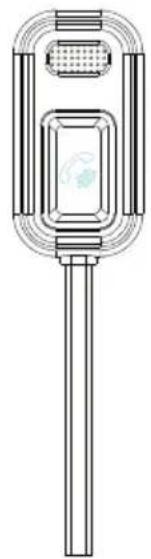
Technical line drawing of a mechanical component with a central shaft and circular housing (no text or symbols)Detachable microphone with 3.5mm plug.

natural_image
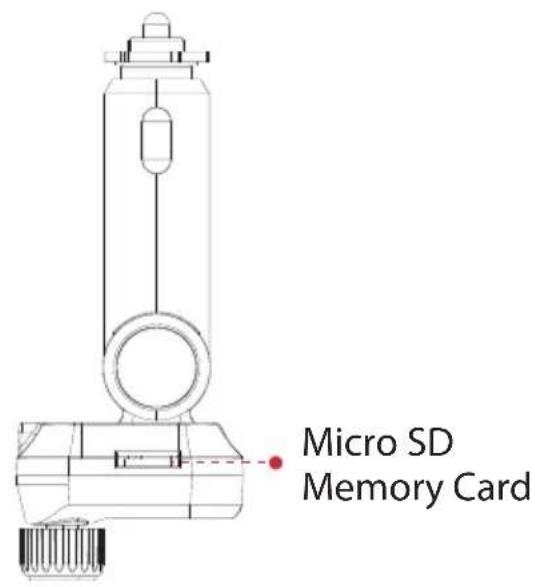
Technical line drawing of a mechanical device with no visible text or symbolsDetachable Microphone connecting port
OPERATION INSTRUCTIONS
Setup the FM Transmitter Connection:
- Plug the unit into your vehicle's cigarette lighter or power port.
- Tune your radio to an unused FM frequency, then match the same frequency of this unit.

(Follow Fig.2 as follow to adjust the frequency of units)
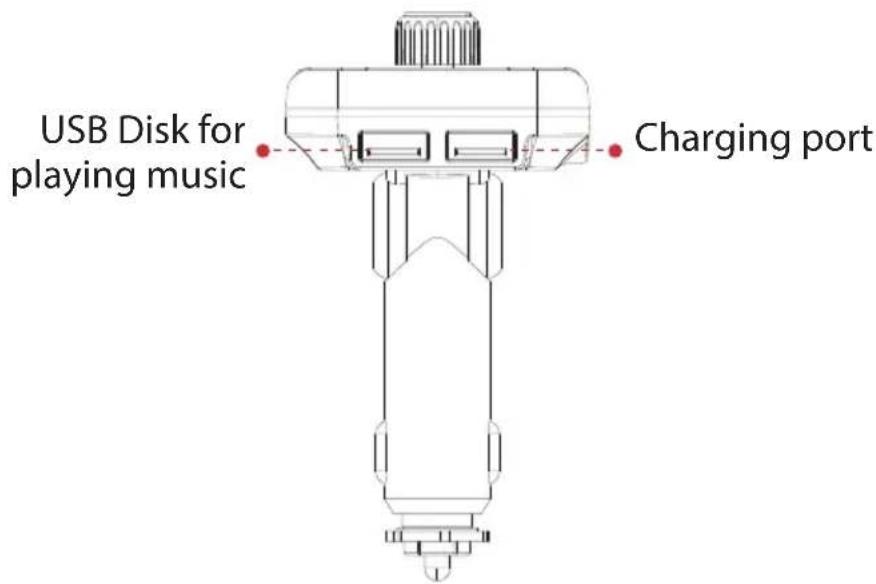
- Insert Micro SD Memory Card or USB disk which containing MP3/WMA files into the card/USB slot. It will play and transmit the file automatically.
Fig. 3
Micro SD Memory Card Play/Pause Volume-Volume+

natural_image
Four technical line drawings of a robotic arm with adjustment knobs and a scroll wheel (no text or symbols)(Follow the Fig. 3 as below to control your music easily.)
Note:
Press ∧ or ∨ to select a song; Rotate the knob to adjust the volume.

-
Detachable Microphone: After the device was powered on and paired by Wireless BT, plug the provided detachable microphone into the main unit's 3.5mm port, and fix the microphone on the car dash board by provided 3M tape, then you can enjoy clearer sound quality in talking while driving. The main unit can also be used independently without the detachable microphone.
-
During Music playing mode, press "b" button can activate the high quality sound.
USING WIRELESS BT STREAMING FUNCTION
-
Using Wireless BT for the first time, you need to pair your mobile phone with this unit. Activate your mobile phone's Wireless BT function, then search new device. When the mobile phone detects this unit (named as "PyleUSA PBT97"), normally the connection will be built-up automatically and doesn't request a password, but if there is a need (special design of some cell phones), please use the pass word "0000".
-
In the music playing mode, when there is an incoming call, this unit will automatically switch to telephone mode. When you pause the music after 10s, the music source will automatically switch to USB disk or Micro SD Memory Card.
WIRELESS BT CALLING
- Press 📋 to answer the incoming call, press and hold 📋 for 3 seconds to reject the incoming call.
- Press 📋 to hang off a call.
- Press twice to dial the last number automatically, press again to cancel the current dialing.
- During a call, press and hold 📋 for 3 seconds to switch to private conversation.
Note: The button 📋 on the main unit and on the detachable microphone has same function in talking aspect.
PBT97
4 Way Stereo Car Music Streaming
Portable Car Music Transmitter with Built-in BT for Wireless Music Streaming
Features:
- Portable Car Music Transmitter
• 4 Way Stereo Music Streaming - Wireless Phone Call & Audio Streaming Transmitter
• Automatic Hands-Free Mode
• Built-in FM Transmitter
• Hassle-free Design & Simple Plug-in Operation
• 4 Way Stereo Music Streaming
• LCD Backlight Display Screen
• Incorporated Voice Microphone Cable - Detect and Display the Voltage of the Car Battery When Powered On
• Full 206 Channels Optional From 87.5-108 MHz
• Support Micro SD Card & Read USB Disk - Quick Siri/Google Assistant Activation
- User-friendly Switch to Private Call
- Hook and Loop Fastener
- Micro SD Memory Card Slot
Wireless BT Streaming:
• Built-in BT for Wireless Music Streaming
• Built-in Microphone for Hands-Free Calling
- Compatible with All of Your Favorite Wireless BT Devices (iPhone, Androids, Smartphones, iPad, Tablets, etc.)
- Wireless BT Version: 5.0
- Wireless Range: Up to 30'+ ft.
What's In The Box:
- Wireless BT device
- User Guide
- Detachable microphone
- Hook and loop fastener
Technical Specs:
• Frequency Range: 87.5-108.0MHz
• Digital Media File Compatibility: MP3 WMA
• Maximum USB/SD Memory Card Support Size: 64GB
• Total output: 5V/3.4A, 2.4A, and 1A&USB reading
• FM Transmitter Size: 2.32" x 1.73" x 4.33" - inches
- Microphone Size: 1.5 × 0.79'' × 0.35'' – inches
• Length of Cable: 23.62" - inches

Questions? Issues?
We are here to help!
Phone: (1) 718-535-1800
Email: support@pyleusa.com

WARNING:
This product can expose you to a chemical or group of chemicals, which may include "Cadmium (Cd)" which is known in the state of California to cause cancer, birth defects, or other reproductive harm. For more info, go to https://www.p65warnings.ca.gov/.
PYLE
PyleUSA.com

natural_image
Illustration of a laptop with a red checkmark icon on screen (no text or symbols)VISIT US ONLINE:
Have a question?
Need service or repair?
Want to leave a comment?
PyleUSA.com/ContactUs

- BRIEF INTRODUCTION
- COMPATIBILITY
- Note:
- PRECAUTIONS
- PRODUCT OVERVIEW
- OPERATION INSTRUCTIONS
- Setup the FM Transmitter Connection:
- USING WIRELESS BT STREAMING FUNCTION
- WIRELESS BT CALLING
- PBT97
- Way Stereo Car Music Streaming
- Features:
- Wireless BT Streaming:
- What's In The Box:
- Technical Specs:
- PYLE
- PyleUSA.com
Brand : Pyle
Model : PBT91
Category : FM Radio