
EM2PTAD14BS - Loudspeaker Element - Free user manual and instructions
Find the device manual for free EM2PTAD14BS Element in PDF.


| Product Type | Portable Monitor |
| Screen Size | 14" diagonally |
| Panel Type | IPS |
| Touchscreen | 10-point touch (compatible devices) |
| Native Resolution | 1920 x 1080 |
| Refresh Rate | 60 Hz |
| Response Time | 3 ms (with overdrive) |
| Brightness | 250 cd/m² |
| Contrast Ratio | 100:1 |
| Aspect Ratio | 16:9 |
| Display Colors | 16.7 million |
| Speakers | Stereo, 1W x 2 |
| Viewing Angle | 178°(H) x 178°(V) |
| Power Input | 5V/3A (15W) |
| Inputs | USB-C (power) x1, USB-C (display) x1, Mini HDMI x1 |
| Included Accessories | USB-C to USB-C cable, Mini HDMI to HDMI cable, USB power adapter, USB to USB-C power cable |
| Stand | Integrated folio case/stand |
| On-Screen Display | Yes (brightness, contrast, color, etc.) |
| Compatibility | Windows, Mac, USB-C phones/tablets, iOS, game consoles |
| Warranty | 1 year limited |
| Cleaning | Clean with dry cloth |
Frequently Asked Questions - EM2PTAD14BS Element
User questions about EM2PTAD14BS Element
0 question about this device. Answer the ones you know or ask your own.
Ask a new question about this device
Download the instructions for your Loudspeaker in PDF format for free! Find your manual EM2PTAD14BS - Element and take your electronic device back in hand. On this page are published all the documents necessary for the use of your device. EM2PTAD14BS by Element.
USER MANUAL EM2PTAD14BS Element
14" PORTABLE MONITOR
EM2PTAD14BS
natural_image
Illustration of a laptop displaying a virtual office scene with people working at desks (no text or symbols visible)USER
MANUAL

element®
LET'S REGISTER YOUR PRODUCT

It's super easy, just head on over to elementelectronics.com/register
BENEFITS OF REGISTERING YOUR PRODUCT:

Support
Get assistance quickly by pre-registering your product.

News & Offers
Take advantage of the latest news and special offers from Element.

Updates
Stay current with important product updates and notifications.
WE'RE HERE TO HELP
Find resources and get help for product setup, connecting devices, technical issues, downloading manuals and more!
We're available 24 hours a day, 7 days a week

elementelectronics.com

1.888.842.3577

customerservice@elementelectronics.com
TABLE OF CONTENTS
What's in the box 4
Getting started 4
How to use the folio case....5
Common connectivity options 6
Device compatibility ....7
On-screen display (OSD) 8
Troubleshooting 9
Specifications 10
FCC statement & disclosures....11
Warranty 12
Safety instructions 14
FOR SUPPORT, VISIT
ELEMENTELECTRONICS.COM/SUPPORT

WHAT'S IN THE BOX

14" Portable Monitor

USB-C to USB-C cable
Mini HDMI to HDMI cable

USB power adapter

USB to USB-C power cable
GETTING STARTED
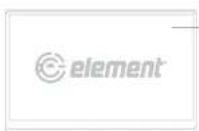

Screen - Monitor display.
Folio case /stand – Protects your device and acts as an integrated stand.
Stereo speaker – For sound.
Adjust volume via the OSD.
4 LED indicator light – Lights red when the monitor is in standby mode. Lights green when the monitor is ready to receive signal.
button – Quick press to increase screen brightness, or when within the OSD move your selection choice up or increase a value.
Button - Quick press to decrease screen brightness, or when within the OSD, move your selection choice down or decrease a value.
7 Power/on-screen display (OSD) button - Press to power the monitor on or press and hold for 3 seconds to power off. When the monitor is on, press to activate the OSD. Within the OSD, press to confirm your selection.
Mini HDMI input – Accepts HDMI video signal.
USB-C video input – Accepts video signal from compatible USB-C devices.
10 USB-C power input – Accepts power via the included USB power supply or other compatible power supply capable of outputting at least 15W.
HOW TO USE THE FOLIO CASE
The folio case provides protection and can be used to support the monitor as a stand. Its integrated design is built-in to the monitor and should not be removed.
Step 1:

natural_image
Diagram showing two 3D rectangular panels transforming into a laptop with an arrow indicating transformation (no text or symbols)Align the folio case with the opening at the top and the screen facing forward.
Step 2:

With the folio case open, stand the screen up and place it in a groove of the cover.
Step 3:
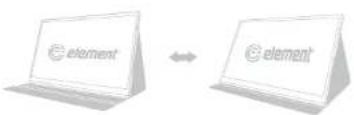
Adjust the screen to your desired angle by placing in either of the grooves.

USER MANUAL4
FOR SUPPORT, VISIT
ELEMENTELECTRONICS.COM/SUPPORT

COMMON CONNECTIVITY OPTIONS
Connect to USB-C Devices

flowchart
graph LR
    A["element"] -->|USB-C to USB-C Cable| B[" "]
- For compatible USB-C devices with DP Alt Mode.
- Power adapter (included) may be required to power the monitor if source device does not have adequate power supply.
- Touchscreen functionality is supported by compatible USB-C (DP Alt Mode) Windows devices only.
Connect to HDMI Devices

- Power adapter (included) must be used to power the monitor.
- Touchscreen functionality is not supported for this connection type.
Connect to iOS Devices

flowchart
graph LR
    A["element"] --> B["USB Cable to USB Cable"]
    B --> C["USB Power Adapter"]
    A --> D["Mini HDMI to HDMI Cable"]
    D --> E["Lightning to HDMI Adapter (not included)"]
    E --> F["Smartphone"]
Illustrations are for example purposes only. Compatible devices and functionality may vary. Please visit elementelectronics.com for more details on compatibility.

USER MANUAL6
DEVICE COMPATIBILITY
| Device | Connection Type | USB Power Supply Required? | Touchscreen Function |
| Windows devices with USB-C (DP Alt Mode) | USB-C to USB-C cable | No* Yes | |
| Mac computer with USB-C (DP Alt Mode) | USB-C to USB-C cable | No* | Yes - Limited functionality, with 1-point touch recognition. |
| USB-C phone or tablet | USB-C to USB-C cable | No* No | |
| iOS device | HDMI via Lightning to HDMI adapter (not included) | Yes No | |
| Game console HDM | Yes No |
*Power supply may be required to power the monitor if the source device does not have adequate power supply.
FOR SUPPORT, VISIT
ELEMENTELECTRONICS.COM/SUPPORT

ON SCREEN DISPLAY (OSD)
| Luminance Setup | Brightness Adjusts | the brightness of the display |
| Contrast Adjusts | the contrast of the display | |
| Black Level Adjusts | the brightness of the darkest parts of the display | |
| Picture Mode Adjusts | the picture settings for different uses | |
| HDR Toggles HDR | on/off for greater color contrast | |
| Color Setup | Color Temp Adjusts | the color temperature mode |
| Red | Adjusts the brightness of each colorGreen | |
| Blue | ||
| Blue Light Filter | Adjusts the level of blue light emitted by the display | |
| OSD Setup | Language | Changes the language used in the OSD |
| H. Position | Adjusts the horizontal position of the OSD | |
| V. Position Adjusts | the vertical position of the OSD | |
| Timeout | Adjusts the time before the OSD deactivates | |
| Transparency | Adjusts the transparency level of the OSD | |
| Image Setup | Image Ratio | Adjusts the proportion of display width to height |
| Overdrive Toggles | overdrive on/off to accelerate response time | |
| Adaptive Sync | Toggles variable refresh rate technology on/off | |
| Other Settings | Input Signal | Changes the input source |
| Volume | Adjusts the volume output of the speakers | |
| Mute | Toggles the mute function of the speakers on/off | |
| Reset | Resets the monitor to factory settings |

USER MANUAL8
TROUBLESHOOTING
| Problem | Possible Reason Solution | |
| The start-up screen is flashing on and off | Insufficient power supply | Use the included power supply or ensure your power source is outputting at least 15W |
| The touchscreen isn't working | Incompatible host device | Ensure your host device can receive touch data via USB-C. Note that touch data cannot be transferred over a HDMI connection |
| No screen image | If the LED indicator is not on | Turn on the monitor with the power button |
| If the LED indicator is green | The monitor isn't recognizing the signal, so try reconnecting the cable and ensuring the host device is outputting an image | |
| The screen flashes, blurs or appears distorted | The host device is outputting an incompatible signal | Ensure your host device is set to 920 x 1080 resolution and 60 Hz refresh rate, or other compatible resolution |
| Poor connection Reconnect the cable | ||
| The speakers aren't working | Mute function is on Change the mute setting in the OSD | |
| The monitor is not selected as the audio device | On your host device, make sure the monitor is selected as the audio output device | |
FOR SUPPORT, VISIT
ELEMENTELECTRONICS.COM/SUPPORT

SPECIFICATIONS
| Screen Size 14" diagonally | |
| Panel Type IPS | |
| Touchscreen 10-point touch for compatible devices | |
| Native Resolution 1920 x 1080 | |
| Refresh Rate 60 Hz | |
| Response Time 3 ms (with overdrive function on) | |
| Brightness 250 cd/m2 | |
| Contrast Ratio 100:1 | |
| Aspect Ratio 16:9 | |
| Display Colors 16.7 million | |
| Speakers | Stereo, 1W x 2 |
| Viewing Angle | 178°(H) x 178°(V) |
| Power Input | 5V/3A (15W) |
| Inputs | USB-C (for power) x 1, USB-C (for display) x 1, Mini HDMI x 1 |
*Specifications are subject to change without notice.

USER MANUAL10

FCC statement
- This device complies with Part 15 of the FCC Rules. Operation is subject to the following two conditions:
(1) This device may not cause harmful interference, and
(2) This device must accept any interference received, including interference that may cause undesired operation.
- Changes or modifications not expressly approved by the party responsible for compliance could void the user's authority to operate the equipment.
NOTE: This equipment has been tested and found to comply with the limits for a Class B digital device, pursuant to Part 15 of the FCC Rules. These limits are designed to provide reasonable protection against harmful interference in a residential installation.
This equipment generates uses and can radiate radio frequency energy and, if not installed and used in accordance with the instructions, may cause harmful interference to radio communications. However, there is no guarantee that interference will not occur in a particular installation. If this equipment does cause harmful interference to radio or television reception, which can be determined by turning the equipment off and on, the user is encouraged to try to correct the interference by one or more of the following measures:
- Reorient or relocate the receiving antenna.
- Increase the separation between the equipment and receiver.
- Connect the equipment into an outlet on a circuit different from that to which the receiver is connected.
- Consult the dealer or an experienced radio/TV technician for help.
FCC radiation exposure statement
This equipment complies with FCC/IC radiation exposure limits set forth for an uncontrolled environment. This equipment should be installed and operated with minimum distance 20cm between the radiator & your body.
HDMI®
The terms HDMI, HDMI High-Definition Multimedia Interface, HDMI Trade dress and the HDMI Logos are trademarks or registered trademarks of HDMI Licensing Administrator, Inc.
Microsoft and Windows are trademarks of the Microsoft group of companies.
FOR SUPPORT, VISIT
ELEMENTELECTRONICS.COM/SUPPORT

ELEMENT LIMITED WARRANTY TO ORIGINAL CUSTOMER
LCD MONITOR - All Models (the "Product")
This Product (including any accessories included in the original packaging) as supplied and distributed in new condition, is warranted by Element TV Company, LP ("Element") to the original purchaser of the Product (the "Original Customer" or "you") against defects in material and workmanship ("Warranty") as follows:
- WARRANTY SERVICE (Parts, Labor and/or Replacement): For a period of one (1) year from the date of the Original Customer purchase ("the Warranty Period"), if this Product or any of its parts are determined by Element or an Element authorized customer service provider to be defective in material or workmanship, Element will, at its sole discretion and option: (i) supply, at no charge to the Original Customer, new or rebuilt replacement parts in exchange for defective parts, (ii) repair the Product and pay the labor charges of such Element authorized service provider for same, at no charge to the Original Customer, (iii) replace the Product with a new or refurbished product of similar or better quality, at no charge to the Original Customer, or (iv) refund the original purchase price of the Product (excluding tax) to the Original Customer. After the Warranty Period, the Original Customer must pay for all parts, labor and replacement costs associated with the Product, regardless of any defects in the Product.
A. SHIPPING COSTS: Notwithstanding the foregoing, the Original Customer is responsible for any shipping or transportation charges incurred to ship or otherwise deliver the Product or part(s) to Element or an Element authorized service provider for diagnosis, repair or replacement. The Original Customer shall not return the Product to Element without Element's prior written consent. Element recommends that the Original Customer insure the Product for its full replacement cost when shipping.
B. TIMING AND PROCEDURE: Before Warranty service can commence, the Original Customer must contact Element for problem determination and service procedures. Proof of purchase in the form of a bill of sale or receipted invoice, evidencing that the Product is within the applicable Warranty Period set forth above, MUST be presented to an Element authorized customer service provider in order to obtain the requested service. Please call the Toll-Free Customer Service Line at (888) 842-3577 to obtain Warranty Service and Troubleshooting information. Please have your model and serial number available, along with your date of purchase of the Product. You can also visit us online at: www.elementetelectronics.com.
2. EXCLUSIONS AND LIMITATIONS TO WARRANTY SERVICE
This Warranty covers manufacturing defects in materials and workmanship encountered in the normal, non-commercial use of the Product, and does not cover (a) damage or failure caused by or attributable to Product abuse or misuse, failure to follow instructions, safety information, and warnings accompanying the Product; (b) improper installation or maintenance, alteration, accident, or excess voltage or current; (c) improper or incorrectly performed repairs by non-authorized service facilities; (d) onsite customer instruction or adjustments; (e) transportation, shipping, delivery, insurance, installation or set-up costs; (f) costs of product removal, transportation or reinstallation costs;
(g) ordinary wear and tear, cosmetic damage or damage due to acts of nature, including but not limited to water, floods, wind, tornado, earthquake or fire, or due to damage caused by automobile accidents or extraordinary impact events, such as dropping or crushing;
(h) commercial use of the Product; or (i) modification of the Product or to any part of the Product. In addition, this Warranty does not cover images "burnt" into the screen.
This Warranty applies to the Original Customer only and does not cover Products sold AS IS or WITH ALL FAULTS, or consumables (e.g., fuses, batteries, bulbs etc.). The Warranty is invalid if the factory-applied serial number has been altered or removed from the Product. This Warranty is valid only in the United States and Canada, and only applies to products purchased and serviced in the United States and Canada. All replaced parts and Products, and Products on which a refund is made, become the property of Element. The addition of equipment or features to the Product that are not manufactured or recommended by Element could affect the intended function of the Product, and therefore may void the Warranty. The Warranty is contingent upon the proper use, maintenance and care of the Product. The Warranty may be void if the Product has been used in a manner contradictory to or in violation of the terms of the user's manual, warnings or instructions accompanying the Product.
This Warranty is made in lieu of and supersedes all other warranties or conditions of merchantability or fitness for a particular purpose or general use, whether express, implied, collateral, statutory, or provided by common law, the Uniform Commercial Code or otherwise. Element further disclaims all warranties after the end of the Warranty Period defined above. No other express warranty or guaranty given by any other person, firm or entity with respect to the Product shall be binding on Element. Repair, replacement, or refund of the original purchase price, at Element's sole discretion, are the exclusive remedies of the customer. Element shall not be liable for any incidental or consequential damages caused by the use, misuse or inability to use the Product. These include but are not limited to any damages in the form of lost profits, loss of use, legal fees, economic loss, personal injuries, or any other damages caused by circumstances beyond the control of Element. Notwithstanding the foregoing, the customer's recovery shall not exceed the purchase price of the Product. This Warranty shall not extend to anyone other than the original customer who purchased the Product, and is not transferrable. No person is authorized to alter, extend or waive the Warranty of Element.
Some states do not allow the exclusion or limitation of incidental or consequential damages, or allow limitations on warranties, so the above limitations or exclusions may not apply to you. This Warranty gives you specific rights, and you may have other rights, which vary from state to state. The exclusions and limitations to the Warranty apply to the maximum extent permitted by law and unless restricted or prohibited by law. Where any term of this Warranty is prohibited by applicable law, it shall be null and void, but the remainder of this Warranty shall remain in effect.
PLEASE DIRECT ALL CORRESPONDENCE TO:
Element TV Company, LP Customer Service
customerservice@elementelectronics.com
(888) 842-3577
www.elementetelectronics.com
PLEASE CONTACT CUSTOMER SERVICE TO CONFIRM ADDRESSES AND PROCEDURES FOR WARRANTY SERVICE.

USER MANUAL12
FOR SUPPORT, VISIT
ELEMENTELECTRONICS.COM/SUPPORT
13

Safety instructions
-
Read these instructions.
-
Keep these instructions.
-
Heed all warnings.
-
Follow all instructions.
-
Do not use this apparatus near water.
-
Clean only with dry cloth.
-
Do not block any ventilation openings. Install in accordance with the manufacturer's instructions.
-
Do not install near any heat sources such as radiators, heat registers, stoves, or other apparatus (including amplifiers) that produce heat.
-
Do not defeat the safety purpose of the polarized or grounding-type plug. A polarized plug has two blades with one wider than the other. A grounding type plug has two blades and a third grounding prong. The wide blade or the third prong are provided for your safety. If the provided plug does not fit into your outlet, consult an electrician for replacement of the obsolete outlet.
-
Protect the power cord from being walked on or pinched particularly at plugs, convenience receptacles, and the point where it exits from the apparatus.
-
Only use attachments/accessories specified by the manufacturer.
-
Use only with the cart, stand, tripod, bracket, or table specified by the manufacturer, or sold with the apparatus. When a cart is used, use caution when moving the cart/apparatus combination to avoid injury from tip-over.

-
Unplug this apparatus during lightning storms or when unused for long periods of time.
-
Refer all servicing to qualified service personnel. Servicing is required when the apparatus has been damaged in any way, such as power-supply cord or plug damaged, liquid has been spilled or objects have fallen into the apparatus, the apparatus has been exposed to rain or moisture, does not operate normally, or has been dropped.
WARNING: To reduce the risk of fire or electric shock, do not expose this apparatus to rain or moisture.
WARNING: To reduce the risk of electric shock, do not remove cover (or back) as there are no user-serviceable parts inside. Refer servicing to qualified personnel.

This lightning flash with arrowhead symbol within an equilateral triangle is intended to alert the user to the presence of non-insulated "dangerous voltage" within the product's enclosure that may be of sufficient magnitude to constitute a risk of electric shock.
The exclamation point within an equilateral triangle is intended to alert the user to the presence of import ant operating and maintenance instructions in the literature accompanying the appliance.
☐ This equipment is a Class II or double insulated electrical appliance. It has been designed in such a way that it does not require a safety connection to electrical earth.
This product contains electrical or electronic materials. The presence of these materials may, if not disposed of properly, have potential adverse effects on the environment and human health. Presence of this label on the product means it should be disposed of as unsorted waste and must be collected separately. As a consumer, are responsible for ensuring that this product is disposed of properly.
Element offers environmentally responsible options to recycle your unwanted consumer electronics device. More information can be found by visiting:
www.elementetelectronics.com/sustainability

USER MANUAL14
FOR SUPPORT, VISIT
ELEMENTELECTRONICS.COM/SUPPORT
15


element®
Bring it home. ^™
Element, the Element Logo, and Bring it home are trademarks of Element Brand Holding, LLC. ©2022, Element Brand Holding, LLC, All Rights Reserved.
- 14" PORTABLE MONITOR
- USER
- MANUAL
- LET'S REGISTER YOUR PRODUCT
- BENEFITS OF REGISTERING YOUR PRODUCT:
- WE'RE HERE TO HELP
- We're available 24 hours a day, 7 days a week
- TABLE OF CONTENTS
- WHAT'S IN THE BOX
- GETTING STARTED
- HOW TO USE THE FOLIO CASE
- COMMON CONNECTIVITY OPTIONS
- DEVICE COMPATIBILITY
- FCC statement
- FCC radiation exposure statement
- HDMI®
- ELEMENT LIMITED WARRANTY TO ORIGINAL CUSTOMER
- LCD MONITOR - All Models (the "Product")
- EXCLUSIONS AND LIMITATIONS TO WARRANTY SERVICE
- PLEASE DIRECT ALL CORRESPONDENCE TO:
- Safety instructions
- element®
Brand : Element
Model : EM2PTAD14BS
Category : Loudspeaker